Blog Customer ServiceComplaint Management: A Guide for SaaS Teams
Complaint Management: A Guide for SaaS Teams
Complaints are your clearest product signal, not just fires to put out. Here's a practical complaint management process, best practices, and how to pick the right software.



Every complaint you actually hear about is a gift. The scary ones are the complaints you never hear, because most unhappy customers don't file a ticket. They just leave.
Complaint management is how you catch those signals before they turn into churn, fix what's broken, and keep customers who would otherwise walk away quietly.
In this guide, I'll break down what complaint management actually is, why it matters, a 6-step process you can copy, and how to pick software that turns complaints into better products. 👇
Key takeaways:
- Complaint management is the process of capturing, resolving, and learning from customer complaints across every channel you have.
- The biggest risk isn't the complaints you receive. It's the silent majority who leave without saying a word.
- A solid process runs in 6 steps: capture, acknowledge, investigate, resolve, close the loop, and analyze trends.
- Handled well, a complaint can make a customer more loyal than if nothing had gone wrong at all. This is called the service recovery paradox.
- The best complaint software does two jobs at once: it helps you resolve issues fast, and it routes recurring problems into product decisions so the same complaint stops coming back.
- Featurebase✨ combines an omnichannel support inbox with feedback boards and a changelog, so you can resolve complaints and turn them into product fixes in one place.
What is complaint management?
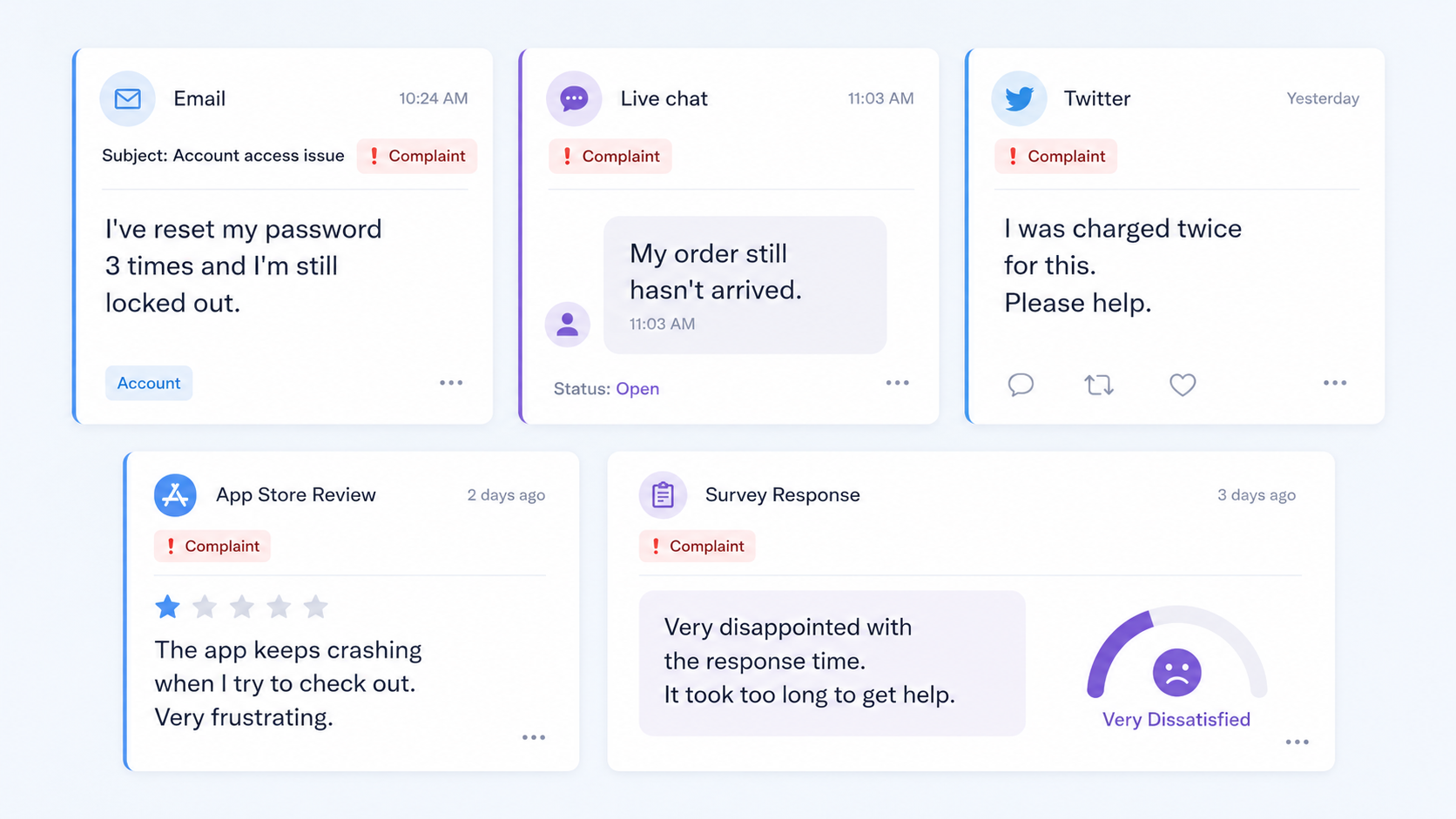
Complaint management is the systematic way an organization receives, records, investigates, resolves, and learns from customer complaints. It covers the full journey of a complaint, from the moment a customer voices it to the moment you've fixed the underlying cause.
A complaint is any expression of dissatisfaction where the customer expects a response or resolution. That's the official ISO 9000 definition, and it's a useful one, because it's broad. A complaint can arrive by email, live chat, a public tweet, an app store review, or a survey response.
It helps to separate a complaint from a routine support request. A support request is a question ("how do I reset my password?"). A complaint carries dissatisfaction ("I've reset my password 3 times and I'm still locked out, this is ridiculous"). The first needs an answer. The second needs an answer plus a bit of care, and often a look at why it happened in the first place.
Good complaint management treats every complaint as data. One angry message is a customer service moment. The same complaint 40 times is a product problem you can now prioritize.
Why complaint management matters
The obvious reason is retention. Unhappy customers leave, and modern customers leave fast. According to the 2025 CX Trends report, 63% of consumers say they'll switch to a competitor after just one bad experience, a number that keeps climbing year over year.
But the less obvious reason is that most unhappy customers never complain at all. They don't tell you what went wrong. They just stop paying. So the handful of people who do complain are actually doing you a favor, because they're showing you the friction that dozens of silent customers hit too.
Here's the upside that catches people off guard. Resolving a complaint well doesn't just save the relationship, it can strengthen it. There's a well-documented effect called the service recovery paradox, where customers whose problems are handled quickly and personally end up more loyal than customers who never had a problem in the first place.
So complaint management isn't damage control. Done right, it's one of the cheapest growth levers you have: it plugs churn, surfaces product issues early, and turns frustrated users into advocates.
Common types of customer complaints
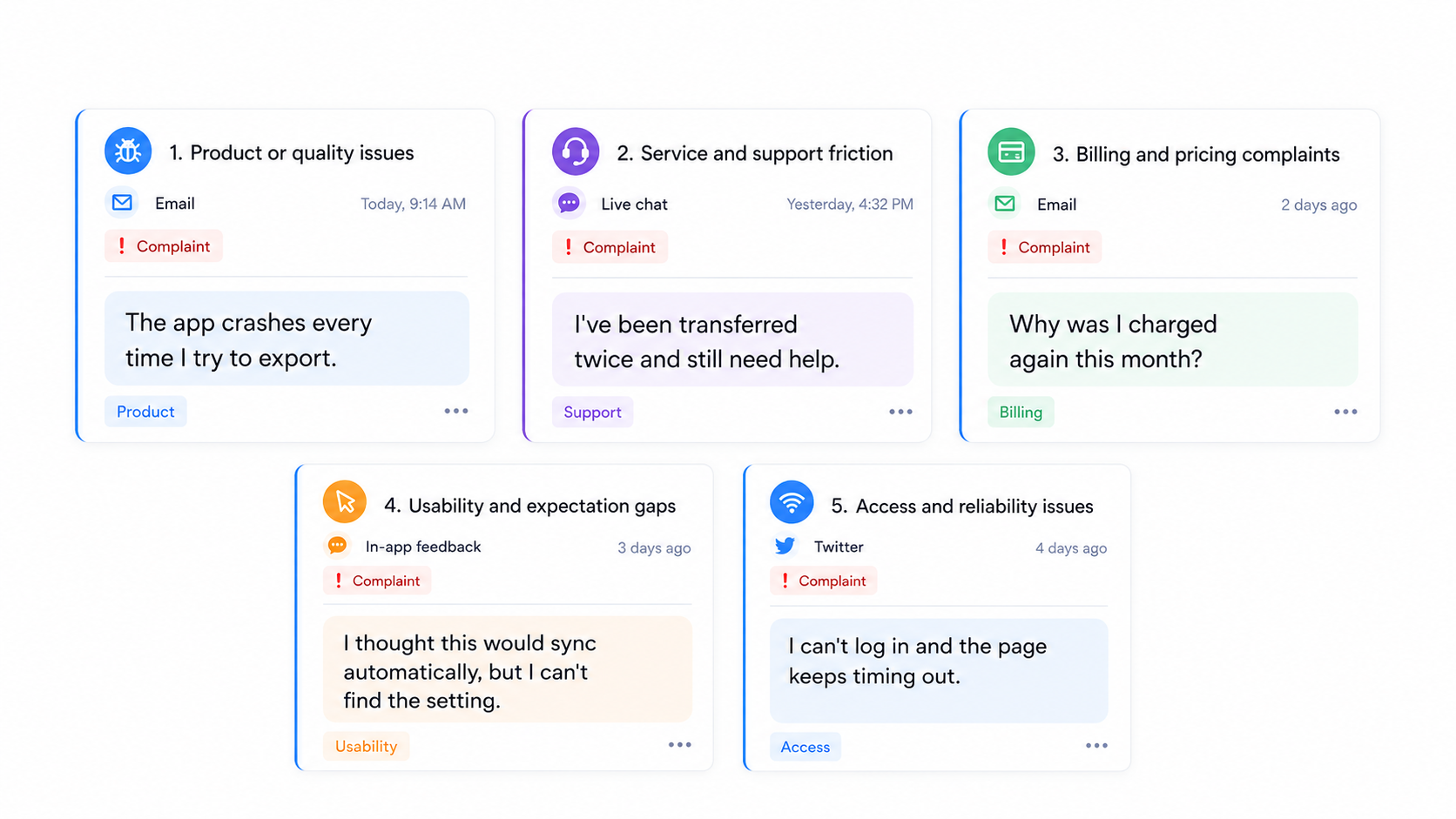
Not every complaint is the same, and sorting them helps you respond the right way. Most fall into a handful of buckets:
- Product or quality issues: Something is broken, buggy, or doesn't work the way it was sold. These are the most valuable complaints because they point straight at a fix.
- Service and support friction: Long wait times, being passed between agents, or having to repeat the same information. The individual issue is small, but in volume it signals a broken process.
- Billing and pricing complaints: Surprise charges, confusing invoices, or a fee that feels unfair. These erode trust quickly, even when everything is technically correct.
- Usability and expectation gaps: The product works, but not the way the customer expected. Often this is a sign your onboarding, docs, or marketing set the wrong expectation.
- Access and reliability issues: Downtime, slow load times, or features that aren't available when the customer needs them. These spike fast and hit many users at once.
The point of categorizing isn't bureaucracy. It's so that when 30 complaints land in a week, you can see at a glance whether you have a billing problem, a bug, or an expectation problem, and route each one to the team that can actually fix it.
The complaint management process
A good complaint process makes sure nothing slips through the cracks and every complaint gets handled the same way. Here's a 6-step version you can adapt to your own team.
1. Capture the complaint
You can't manage a complaint you never received. Make it easy for customers to complain to you directly, across every channel they already use: email, live chat, in-app widgets, social media, and app store reviews.
The goal is to pull complaints into one place instead of leaving them scattered across five inboxes. If a customer has to dig to find a way to reach you, they'll skip you and post on social media instead.
2. Acknowledge and log it
Respond fast, even if it's just to say "we've got this and we're on it." A quick acknowledgment defuses a surprising amount of frustration and buys you time to investigate properly.
Then log the complaint in a central system with the details that matter: who, what, which channel, and which product area. Consistent logging is what makes step 6 possible later.
3. Investigate the root cause
Dig past the symptom. A customer says "the export is broken," but the real issue might be a timeout that only triggers on large accounts. Gather the context you need: account data, logs, past conversations, and anything the customer sent.
The question to keep asking is "why did this happen?" not just "how do I make this person happy right now?" Fixing the symptom closes one ticket. Fixing the cause closes the next 50.
4. Resolve and respond
Give the customer a real fix, whether that's a refund, a correction, a workaround, or a bug fix on the way. Then explain clearly what you found and what you did about it.
Set expectations you can actually meet. "We'll have this fixed by Friday" that turns into three weeks is worse than an honest "this one's tricky, here's our plan."
5. Close the loop
Closing the loop means going back to the customer once the issue is genuinely resolved, especially if the fix took time or shipped later. It's the step teams skip most, and it's the one customers remember.
If a complaint turned into a feature or a fix you shipped, tell the person who reported it. Nothing rebuilds goodwill faster than "hey, you flagged this a month ago, we just fixed it."
6. Analyze trends and fix the source
Individual complaints get resolved in steps 1 through 5. Patterns get resolved here. Aggregate your complaints by type, product area, and channel, and look for what's repeating.
When the same complaint shows up again and again, that's no longer a support issue. It's a prioritization decision for your product team. This is where complaint management stops being reactive and starts making your product measurably better.
Complaint management best practices
A few habits separate teams that just survive complaints from teams that grow because of them:
- Make complaining easy: Put your contact options where customers already are. The easier it is to reach you, the less likely they are to vent publicly instead.
- Acknowledge immediately, resolve promptly: Speed matters more than perfection in the first response. An automatic "we received this" plus a clear timeline goes a long way.
- Centralize everything: Route every complaint into one system so nothing gets lost between channels and you can actually spot trends.
- Never blame the customer: If someone is confused or frustrated, a process or a piece of copy failed them. Treat it as a system to fix, not a person to correct.
- Document as you go: Detailed records make investigations faster next time and give you the trend data you need to prioritize fixes.
- Feed complaints back to product: The teams that win treat complaint data as a roadmap input, not just a support metric. Recurring complaints should influence what you build next.
None of this requires a huge team. It requires a consistent process and a place to see everything at once.
How to choose complaint management software
Once you're handling more than a handful of complaints a week, spreadsheets and scattered inboxes stop working. The right software should make the 6-step process above almost automatic.
Here's what to look for:
- Omnichannel intake: It should pull complaints from email, live chat, social, and in-app widgets into one shared inbox, so nothing lives in a silo.
- Automation and routing: Look for auto-assignment, workflows, and AI that can handle or triage complaints so your team spends time on the ones that need a human.
- Centralized tracking: Every complaint should become a searchable, taggable record with a clear owner and status. That is what customer service case management software is built for.
- Trend analysis: The tool should let you group and filter complaints by type or product area, so patterns are obvious instead of buried.
- A path to product: This is the one most tools miss. The best software doesn't just close tickets, it lets you connect recurring complaints to feedback boards and a roadmap so the underlying issue actually gets fixed.
That last point is the difference between software that manages complaints and software that reduces them over time. If your tool can't turn a repeated complaint into a prioritized fix, you'll keep resolving the same issue forever.
Manage complaints and turn them into better products with Featurebase
If you want one tool that both resolves complaints and turns them into product improvements, that's exactly why we built Featurebase.

Featurebase is a modern AI customer support platform for product-led SaaS. It combines AI-powered support, help center, and feedback management into a single platform for startups that want all their customer-facing tools in one place. Featurebase is loved by thousands of support teams from companies like Lovable, Raycast, and n8n. 💫
Top features:
- Omnichannel inbox – Manage live chat, email, and Slack conversations from one AI-powered view
- Fibi AI Agent - Resolve customer issues on autopilot & run custom actions like trial extensions and refunds
- Help center with AI search – Provide instant, multilingual self-serve answers
- Workflows & automations – Auto-assign tickets, route conversations, collect customer data, and more
- AI Copilot – Help your agents answer customers faster with AI Copilot that uses your internal knowledge
- Multi-brand support – Manage multiple Help Centers and Live chats from a single workspace
- Automatic AI translations – Automatically translate all messages and help articles to your customers native language
- Service Level Agreements – Track SLAs to make sure your team responds to customers on time, every time
- Mobile app – Respond to customers, receive notifications, and unblock users on the go
- Feedback & roadmap tools – Collect feature requests and close the loop with updates
- Product updates – Publish release notes with a changelog page, in-app widget, and emails
- Integrations – Connects with Slack, Linear, Jira, HubSpot, and more
Pricing: Free plan available with unlimited conversations. Paid plans start at $29/seat/month with $0.49 per AI resolution.
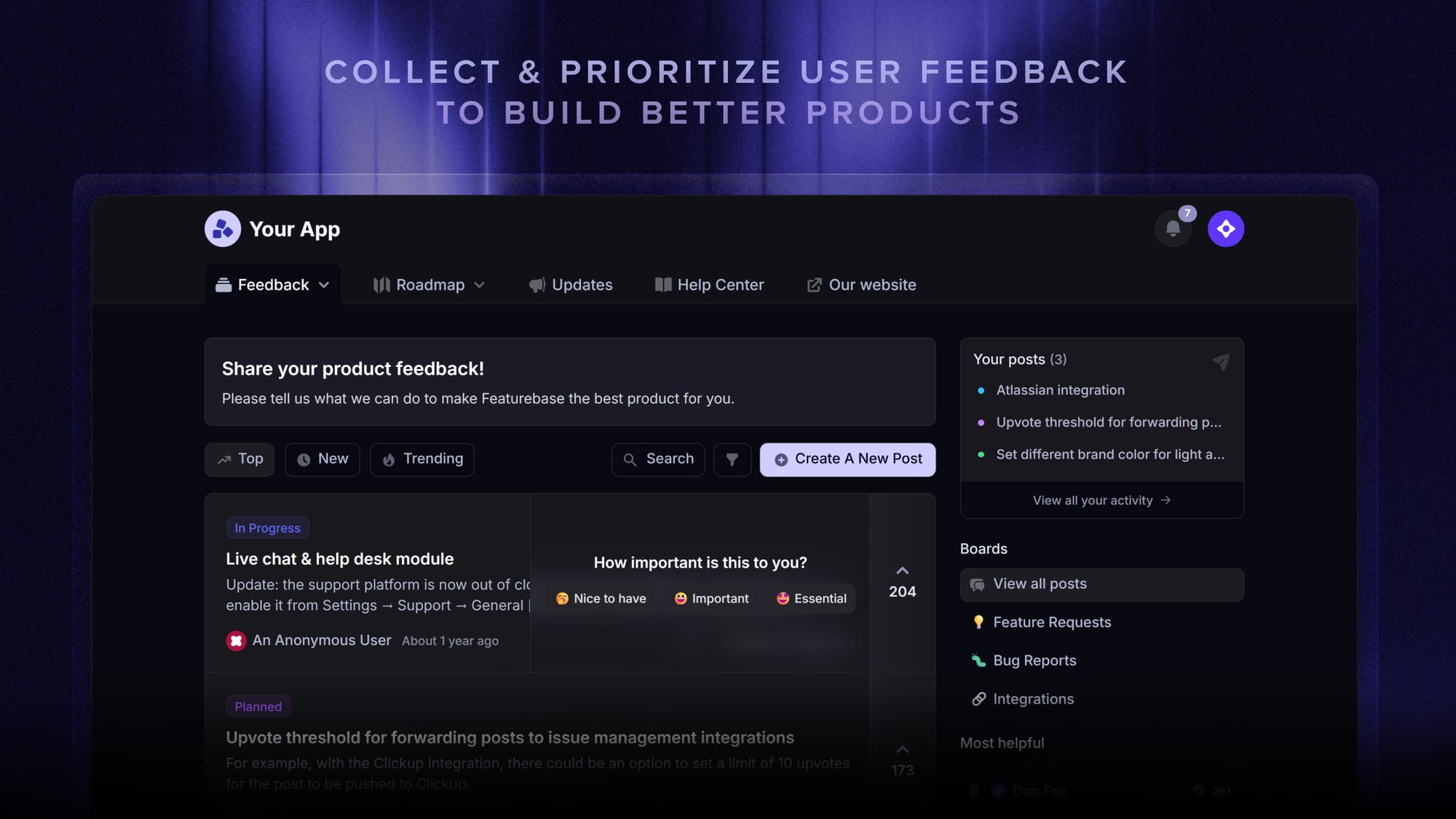
Featurebase covers all the basic support features that legacy platforms do, but with a much more modern approach. It comes with AI automations, a mobile app, and multiple channels (email, live chat, Slack, etc.).
Conclusion
Complaints aren't a threat to manage away. They're the clearest, cheapest signal you'll ever get about what's wrong with your product and your experience. Catch them, resolve them well, and feed the patterns back into what you build, and complaints become one of your best engines for growth.
Featurebase is a modern AI-powered support platform that helps you handle complaints across live chat, email, and Slack from one inbox, resolve them faster with AI, and turn recurring issues into product fixes with built-in feedback boards and a changelog.
It comes with a Free plan and unlimited conversations, and onboarding takes minutes, so there's no downside to trying it. 👇
✨ Automate your support with the fastest AI-enhanced Inbox today →

FAQs
What are the most common types of customer complaints?
Most customer complaints fall into a few categories: product or quality issues, service and support friction, billing and pricing problems, usability or expectation gaps, and access or reliability issues. Sorting complaints this way helps you route each one to the team that can fix it and spot which category is spiking. The most valuable ones are usually product and quality complaints, since they point straight at something you can improve.
What's the difference between a complaint and a support request?
A support request is a neutral question, like how to use a feature or reset a password. A complaint carries dissatisfaction and expects both a fix and a bit of care, like a customer who's frustrated that a feature failed repeatedly. The practical difference is that complaints deserve a root-cause look, not just an answer, because they often reveal a deeper problem affecting other customers too.
What is complaint management software?
Complaint management software is a tool that helps you capture, track, resolve, and analyze customer complaints in one place. Good software pulls complaints in from every channel, assigns owners, automates routing, and surfaces trends so you can see which issues are recurring. The best options also connect complaints to your product roadmap so you can fix the underlying cause, not just close tickets.
How should you respond to an angry customer?
Start by acknowledging the problem and letting them know you're on it, which defuses a lot of the initial frustration. Then investigate what actually went wrong, give them a real fix, and explain clearly what you did. Finally, follow up once it's resolved. Speed and honesty matter more than a perfect script, so avoid promising timelines you can't hit.
How do you turn complaints into product improvements?
The trick is to treat complaints as data, not just tickets. Tag and aggregate them by product area so you can see what's repeating, then prioritize the most common or highest-impact issues on your roadmap. With Featurebase, you can link recurring complaints to feedback boards, prioritize them by customer revenue, and automatically notify everyone who reported an issue once you've shipped the fix, which closes the loop without manual chasing.
What complaint management metrics should you track?
The core metrics are resolution time, complaint volume by type and channel, repeat complaint rate, and customer satisfaction after resolution. Resolution time and satisfaction tell you how well you're handling complaints, while volume by type and repeat rate tell you whether you're actually fixing the underlying causes. If your repeat rate stays high, you're resolving symptoms instead of root causes.