Blog Product ManagementProduct Roadmap Examples: 8 Formats for SaaS Teams (+ When to Use Each)
Product Roadmap Examples: 8 Formats for SaaS Teams (+ When to Use Each)
Here you'll find the best examples of SaaS product roadmaps and get a step-by-step guide on creating your own. We'll go over the product roadmaps of some of the most popular SaaS companies like Clickup and Mixpanel. Let's get into it!

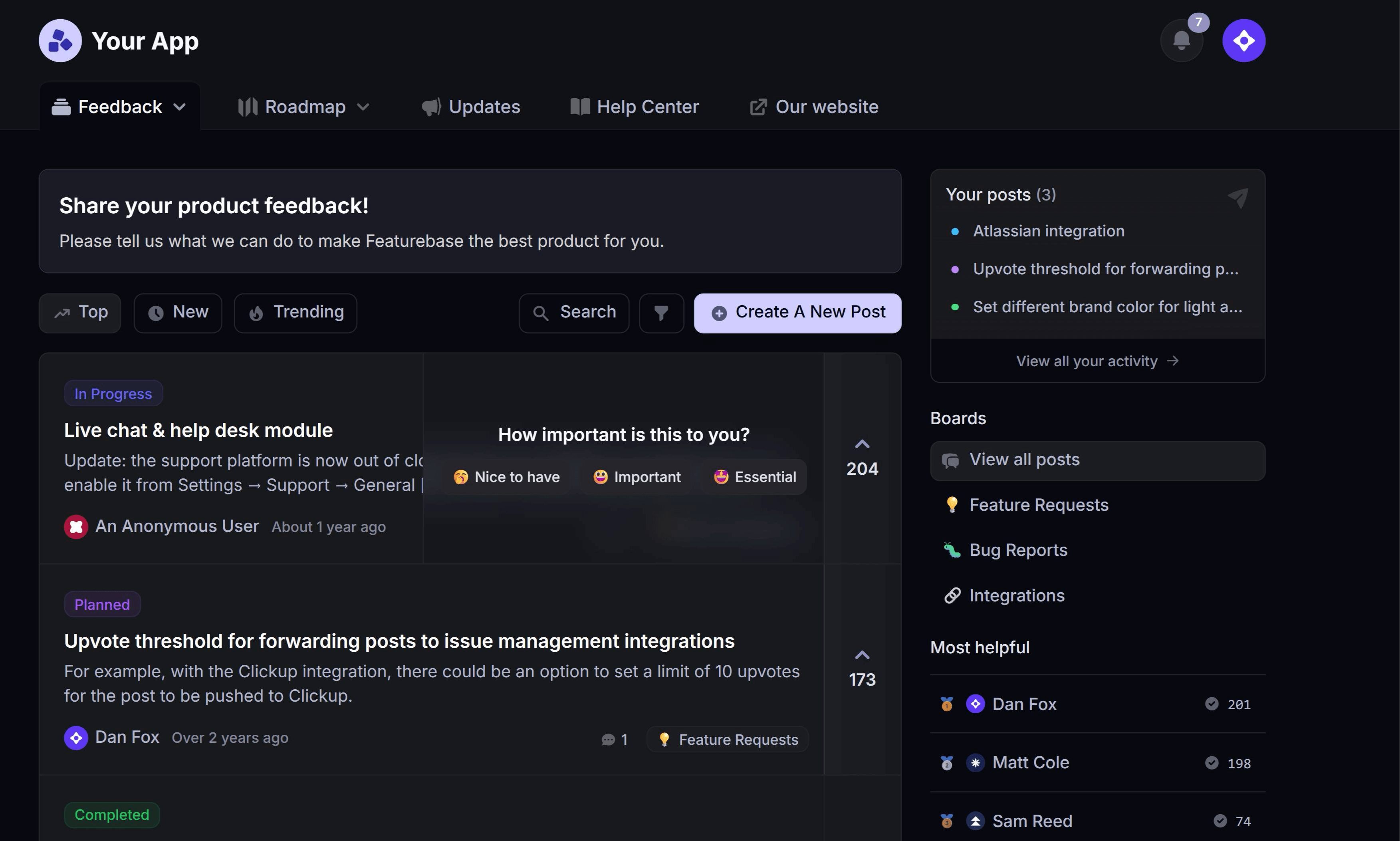

✨ Create your internal & public roadmap with Featurebase for free →
Product roadmaps come in different formats, and the right one depends on your team and goals. Some SaaS companies use public roadmaps to collect feedback and keep customers informed, while others use internal roadmaps to align teams on priorities and progress.
In this guide, we’ll break down 8 product roadmap examples from SaaS companies and explain what makes each one work. And if you want a step-by-step walkthrough, here’s how to create a product roadmap.
Before we get into the examples, here’s a quick look at each roadmap type.
| Roadmap format | Best for | Main audience | Why teams use it | Example in this guide |
|---|---|---|---|---|
| Public roadmap | Transparency and collecting feedback | Customers | Shows what’s planned and gives users a voice in prioritization | Checkly |
| Dynamic roadmap | Iterative product development | Customers and active users | Works well when roadmap priorities evolve often | Buffer |
| Status-based roadmap | Clear progress tracking | Customers and internal teams | Makes it easy to show what’s planned, in progress, and completed | ClickUp |
| Kanban roadmap | Flexible planning | SaaS startups and PM teams | Helps teams organize work visually without rigid timelines | SocialBee |
| Delivery-focused roadmap | Visibility into the product process | Customers and stakeholders | Shows more detailed stages from idea to testing | Linkish |
| Minimalist roadmap | Lightweight external communication | Customers | Keeps users informed without making strict delivery promises | Front |
| Internal roadmap | Cross-functional alignment | Product, design, and engineering | Keeps internal teams aligned on priorities, context, and progress | Mixpanel |
| Hybrid roadmap | Combining external transparency with internal planning | Customers and internal teams | Lets teams share high-level plans publicly while managing details internally | Loom |
What is a product roadmap?
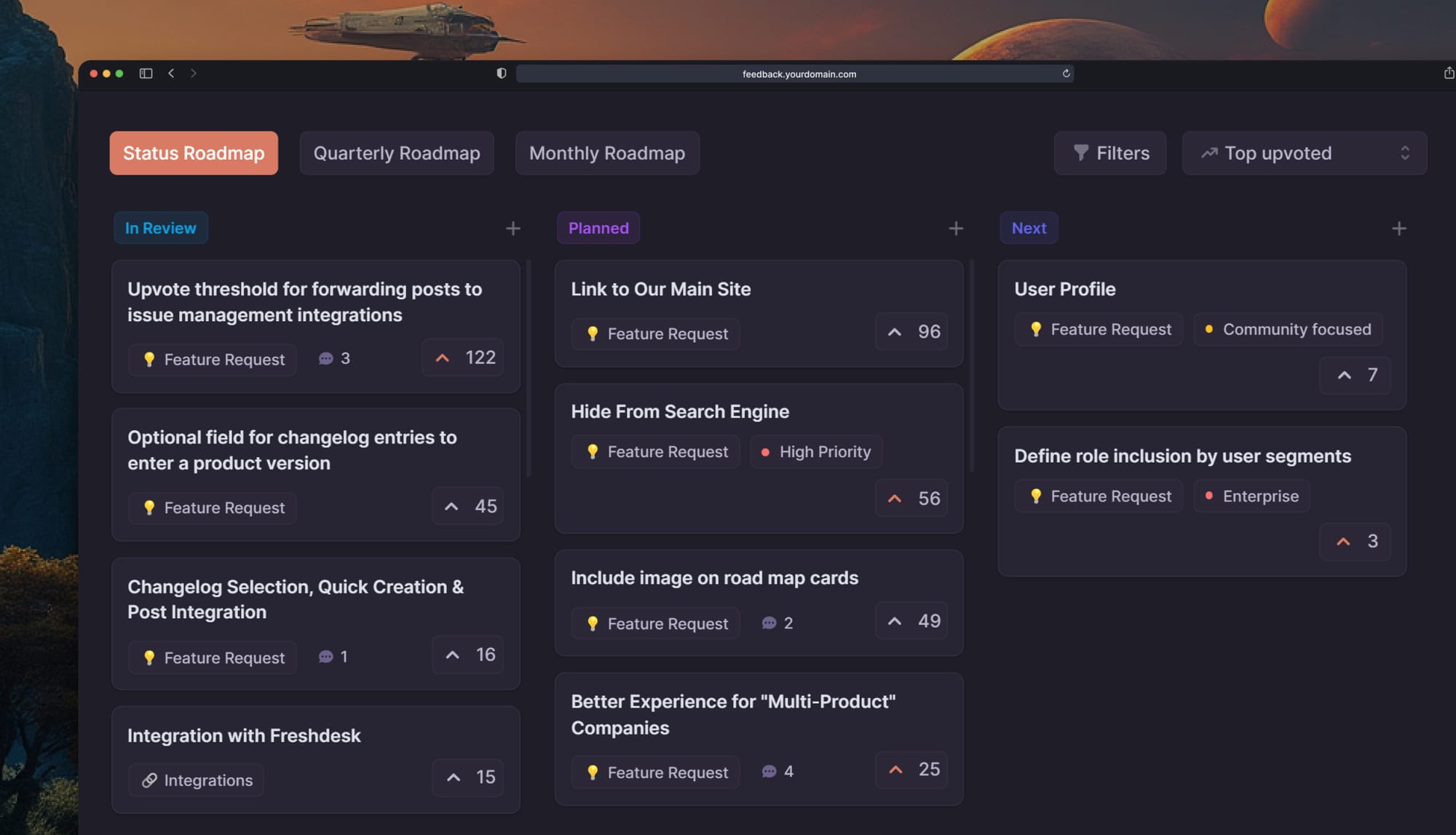
A product roadmap is a visual plan that outlines the vision, direction, and progress of a product over time. It shows what features and improvements are planned, when they will be delivered, and how they align with the overall product strategy and goals.
It can take all kinds of forms, but typically, it's in Kanban view. Product roadmaps can also include key features, votes and comments, and any other vital information to guide the development process.
For example, take Structured’s product roadmap:
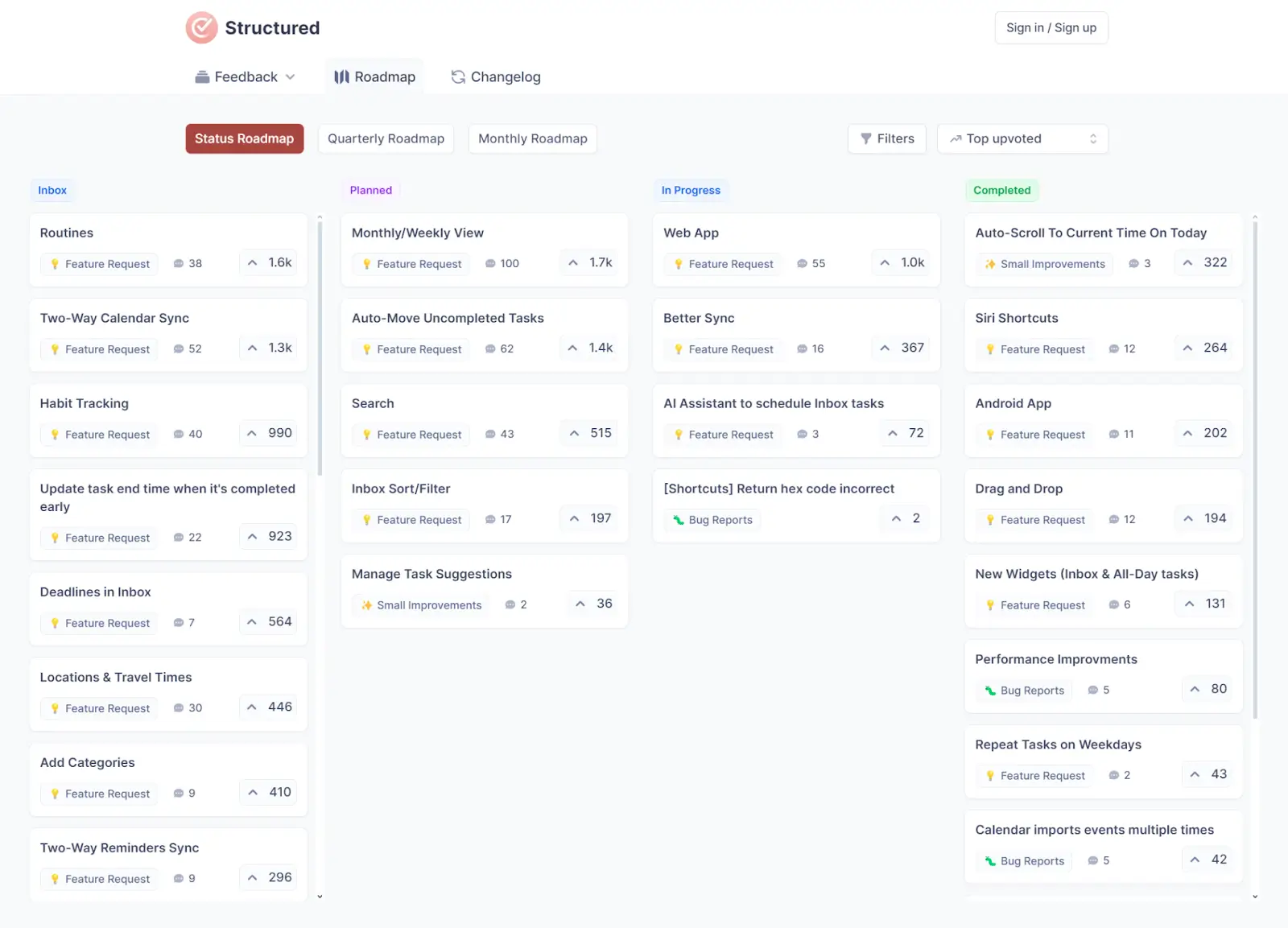
Each card represents a feature or a bug requested by users (or added by the team). The roadmap is public, and users have voted and commented on suggestions to help product managers prioritize. Each card is organized into a column to show its current status—“Planned,” “In Progress,” or “Completed.”
It’s a simple way to keep users informed while also guiding the product development process.
What are the different product roadmap formats?
Product roadmaps come in different formats depending on your goals, audience, and planning style. Some are built to keep customers informed, while others are designed to help internal teams stay aligned. The best format is the one that gives the right people enough context without making the roadmap harder to maintain.
Here are some of the most common product roadmap formats SaaS teams use today:
1. Public roadmaps
Public roadmaps are designed to keep customers informed about what your team is considering, building, or has already launched. They often include feature requests, voting, and comments, which makes them a useful format for collecting feedback and showing transparency.
Public roadmaps work best for SaaS teams that want to build trust with users and create a clear feedback loop between customers and product decisions.
2. Dynamic roadmaps
Dynamic roadmaps are updated often to reflect changing priorities and ongoing product work. Instead of staying fixed for long periods, they evolve as the team learns, ships, and reprioritizes.
This format works well for fast-moving SaaS teams that release updates frequently and want their roadmap to stay current without feeling too rigid.
3. Status-based roadmaps
Status-based roadmaps organize work into simple stages like Planned, In Progress, and Completed. They are one of the easiest roadmap formats to understand and are useful for both customers and internal stakeholders.
This format is best for teams that want a straightforward way to communicate progress without adding too much complexity.
4. Kanban roadmaps
Kanban roadmaps display work in columns that move from one stage to the next. They are visual, flexible, and easy to update, which makes them a popular choice for startups and agile SaaS teams.
Kanban roadmaps are especially useful when priorities change often and the team needs a lightweight way to organize work without locking into strict timelines.
5. Delivery-focused roadmaps
Delivery-focused roadmaps give users more visibility into how work moves through the product process. Instead of only showing broad stages, they may include steps like Voting, Planning, Upcoming, Developing, and Testing.
This format works well for teams that want to show more of the journey from idea to release and give stakeholders a better understanding of how decisions move through the roadmap.
6. Minimalist roadmaps
Minimalist roadmaps keep things simple. They focus on communicating direction without too many categories, dates, or process details. This makes them easier to maintain and easier for customers to scan quickly.
They are a good fit for teams that want to stay transparent without overcommitting or turning their roadmap into a detailed delivery plan.
7. Internal roadmaps
Internal roadmaps are built for product, engineering, design, marketing, and leadership teams. They usually include more detail than public roadmaps, such as context, priorities, ownership, and supporting information.
This format is best when the main goal is internal alignment rather than external communication.
8. Hybrid roadmaps
Hybrid roadmaps combine public and internal roadmapping. A team might share a high-level customer-facing roadmap externally while managing priorities, timelines, and ownership in a separate internal roadmap.
This is often the most practical setup for growing SaaS teams because different audiences usually need different levels of detail.
Benefits of using a product roadmap
There are tons of things we could talk about here, but we’ll stick with the highlights:
- Better data: A public roadmap is a great source of high-quality data. The kinds of users who seek out roadmaps (generally) tend to be the ones who are most passionate about the product. They have insights, and a roadmap (especially when paired with voting, comments, feature requests, etc.) allows them to share those insights.
- Better user transparency: Users like to be in the loop—that’s why they found the roadmap in the first place. A product roadmap is a place where they can see what’s in the works, what’s up next, and how their feedback influences the product.
- Better team alignment: Whether your product roadmap is public or private, it can help you align your team. When everyone has a clear idea of where the product should be 3, 6, 9, and 12 months down the line, they have a better idea of what they need to focus on daily.
✨ Create internal & public roadmaps with Featurebase for free →
8 Product Roadmap Examples for SaaS Teams and When to Use Each
1. Checkly: Public roadmap example
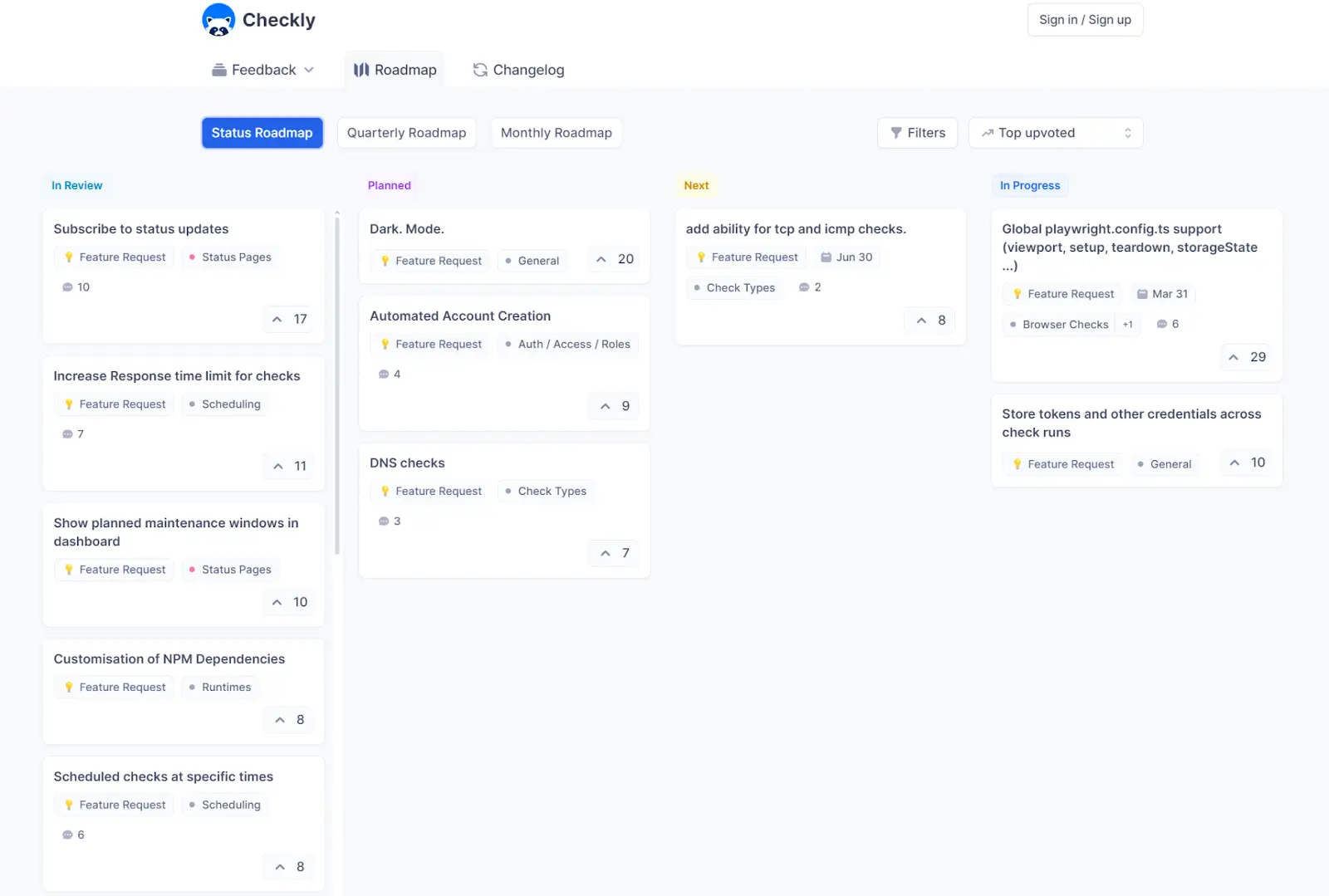
Checkly is a powerful synthetic monitoring tool for developers and DevOps teams. Their public roadmap was built with Featurebase and is used alongside their public feedback portal and changelog.
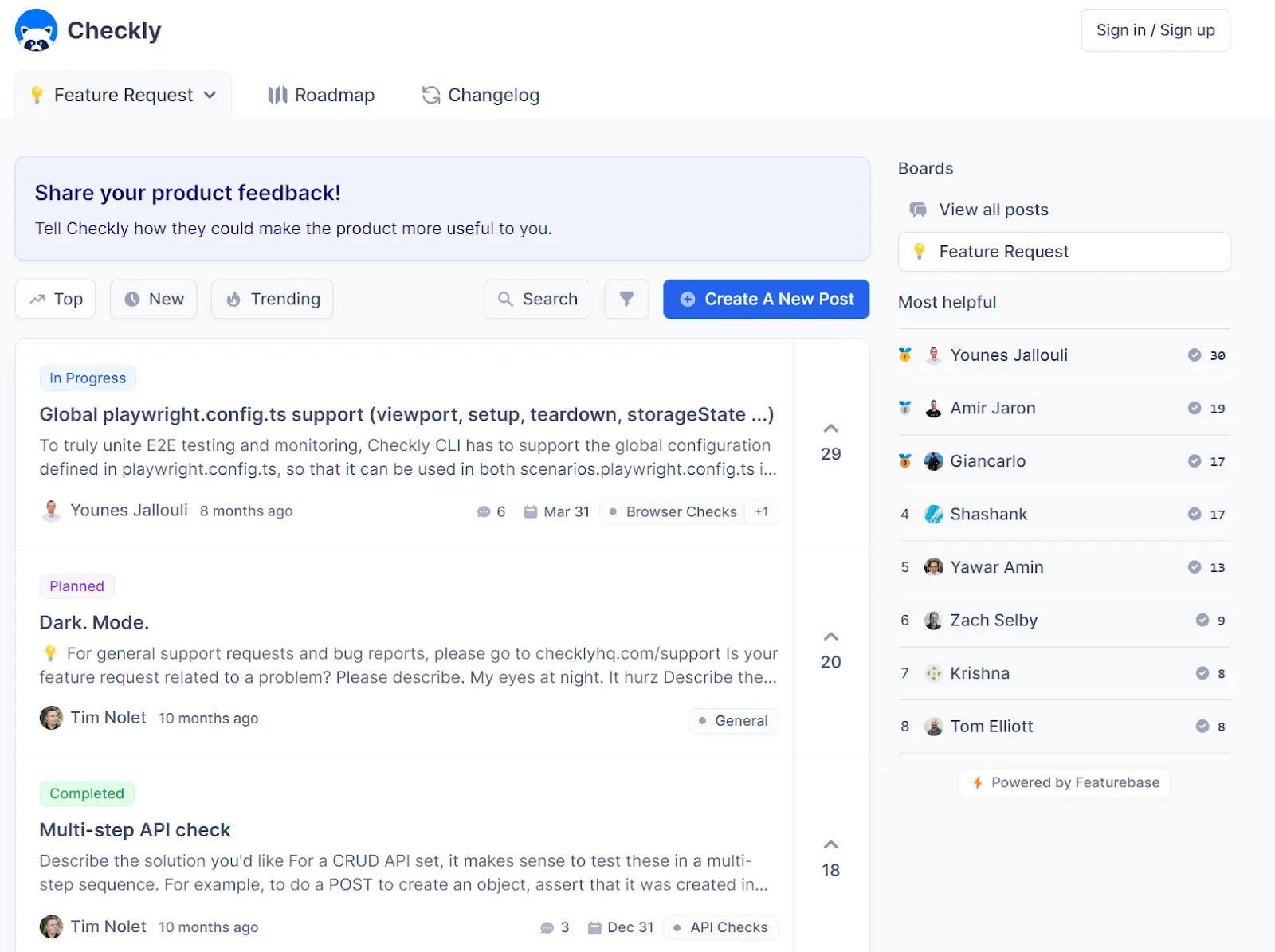
Their process starts with feedback. Users can submit their ideas for Checkly’s product roadmap as posts to the public feedback portal using the “Feature Request” tag. These posts collect votes and comments that help the team prioritize and understand the value of each feature idea.
Once Checkly decides to proceed with a suggestion, it is added to the public roadmap. The team sets the status based on where the suggestion is in the development process. Users who suggested the feature automatically receive email updates about the status changes.
Key takeaways
- Make user feedback easy: Make user feedback simple, accessible, and transparent. Featurebase helps with this by letting your users automatically transition from your app to your feedback portal without creating an account or signing in.
- Use voting for priorities: Look for a tool like Featurebase that supports voting. This will help your team with surface-level prioritization that considers the wants and needs of your users.
- Connect with customer data: Dive deeper into user data when prioritizing features. Use tools like Featurebase to enrich customers’ feedback with additional info like MRR, industry, and more to prioritize better.
- Automate updates & notifications: Don’t leave updates and notifications up to chance. Use tools like Featurebase to automatically notify users of product updates as you complete your roadmap.
Best for: SaaS teams that want to collect feedback and keep customers informed
Use it when: You want users to submit ideas, vote on features, and follow progress publicly
Watch out for: Letting public demand override broader product strategy
✨ Create internal & public roadmaps with Featurebase for free →
2. Buffer: Dynamic roadmap example
Buffer is a social media management tool that’s constantly pushing new features.
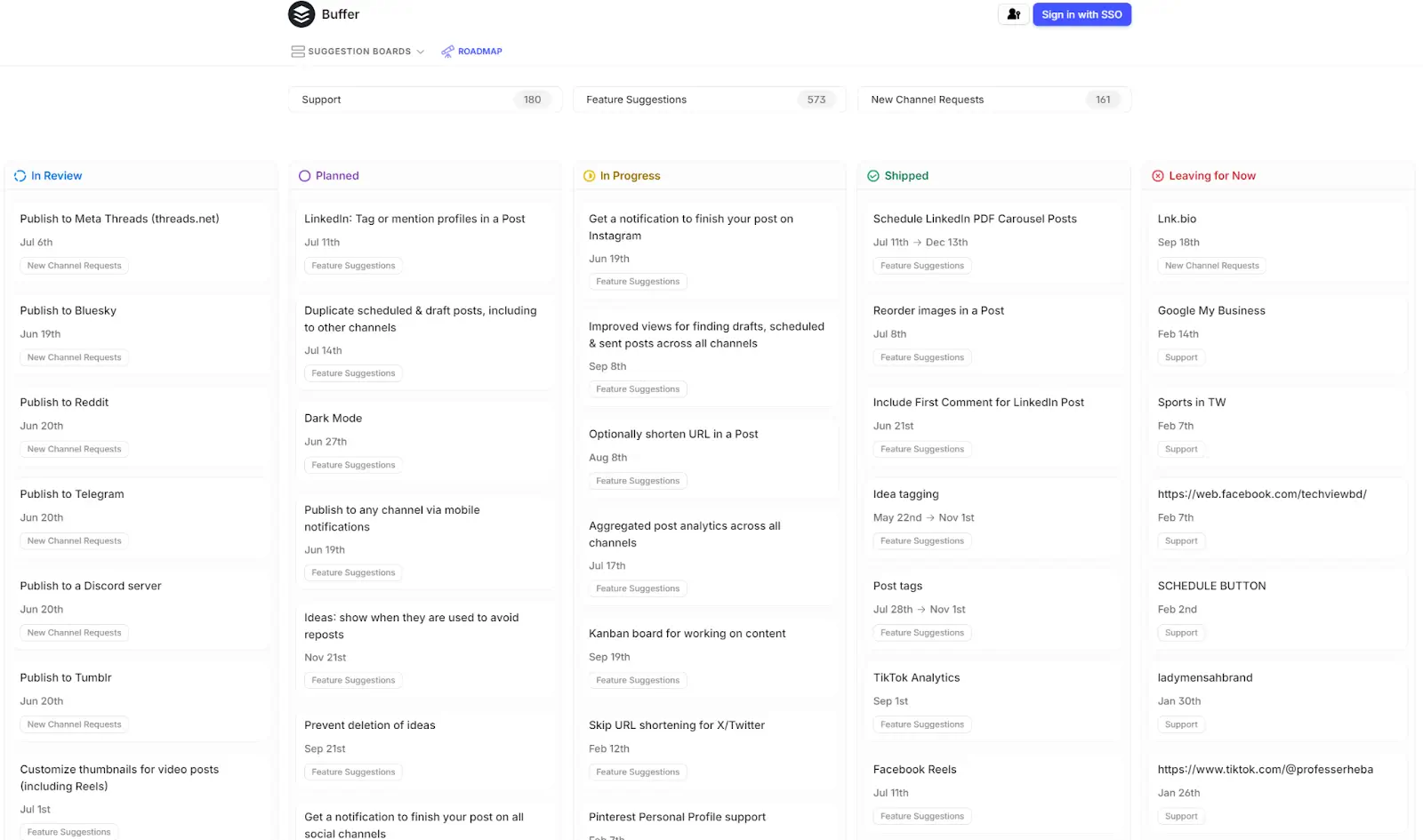
Their public feedback portal and roadmap were built with featureOS. Users log in using their Buffer credentials and can vote on existing features or submit new ideas. Everything is searchable (with both keywords and tags), and users can follow features to receive release notes.
Key takeaways
- Maintain a dynamic roadmap: Buffer’s roadmap is always being tweaked and updated, and you should strive for the same. Keep your users informed and engaged by regularly adding new features and improvements to your roadmap.
- Reflect your iterative development: If you’re only building out part of a feature at a time, make sure your roadmap reflects that. Give users details on what specific updates they can expect.
Best for: Teams shipping frequent updates and iterating quickly
Use it when: Your roadmap changes often and you want a flexible way to reflect ongoing work
Watch out for: Updating too often without enough structure or context
3. ClickUp: Status-based roadmap example
ClickUp is a cloud-based platform that provides a complete set of project management and collaboration tools. It lets teams handle tasks, documents, goals, and chats in one place, making work more efficient using one app instead of many.
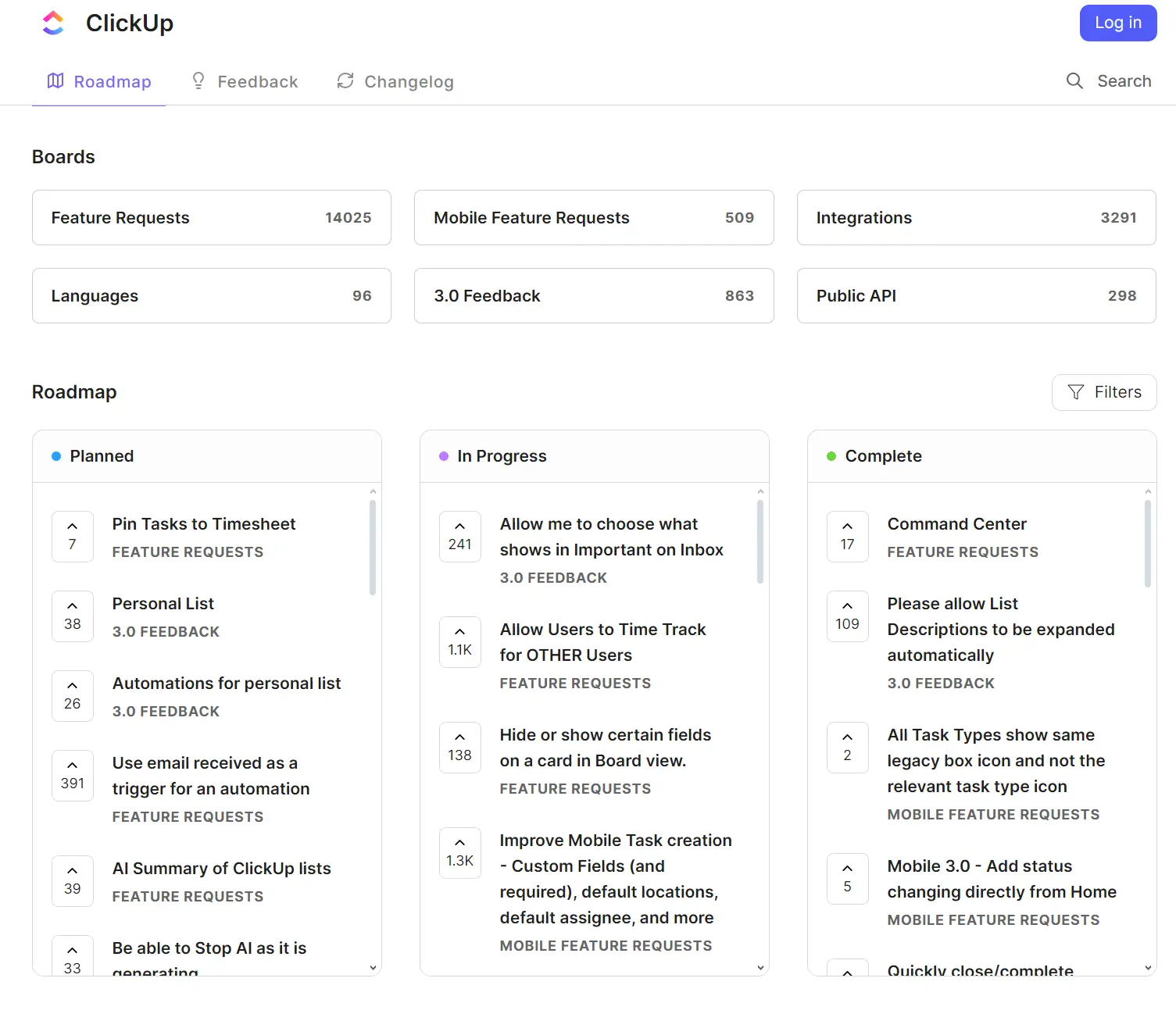
ClickUp's public roadmap uses the standard “Planned, In Progress, Completed” structure. It also supports feature requests and voting, so anyone searching the roadmap can see what’s in the pipeline, add suggestions, and vote on existing ones.
Key takeaways
- Use tags: ClickUp uses tags to help users (and admins) organize their feedback and feature requests into categories. This helps keep things from getting too overwhelming—even with almost 20k+ requests in total.
- Summarize your roadmap: ClickUp has a separate “roadmap” (really more of a changelog) that categorizes everything they’ve launched in the past quarter. It’s a great way for users to get up to speed without scrolling all the way through the “Completed” tab.
Best for: Teams that want a simple, easy-to-understand roadmap
Use it when: You want to clearly show what is planned, in progress, and completed
Watch out for: Keeping statuses too high-level without enough detail on what is actually changing
4. SocialBee: Kanban roadmap example
SocialBee is an AI-powered tool that simplifies social media management.
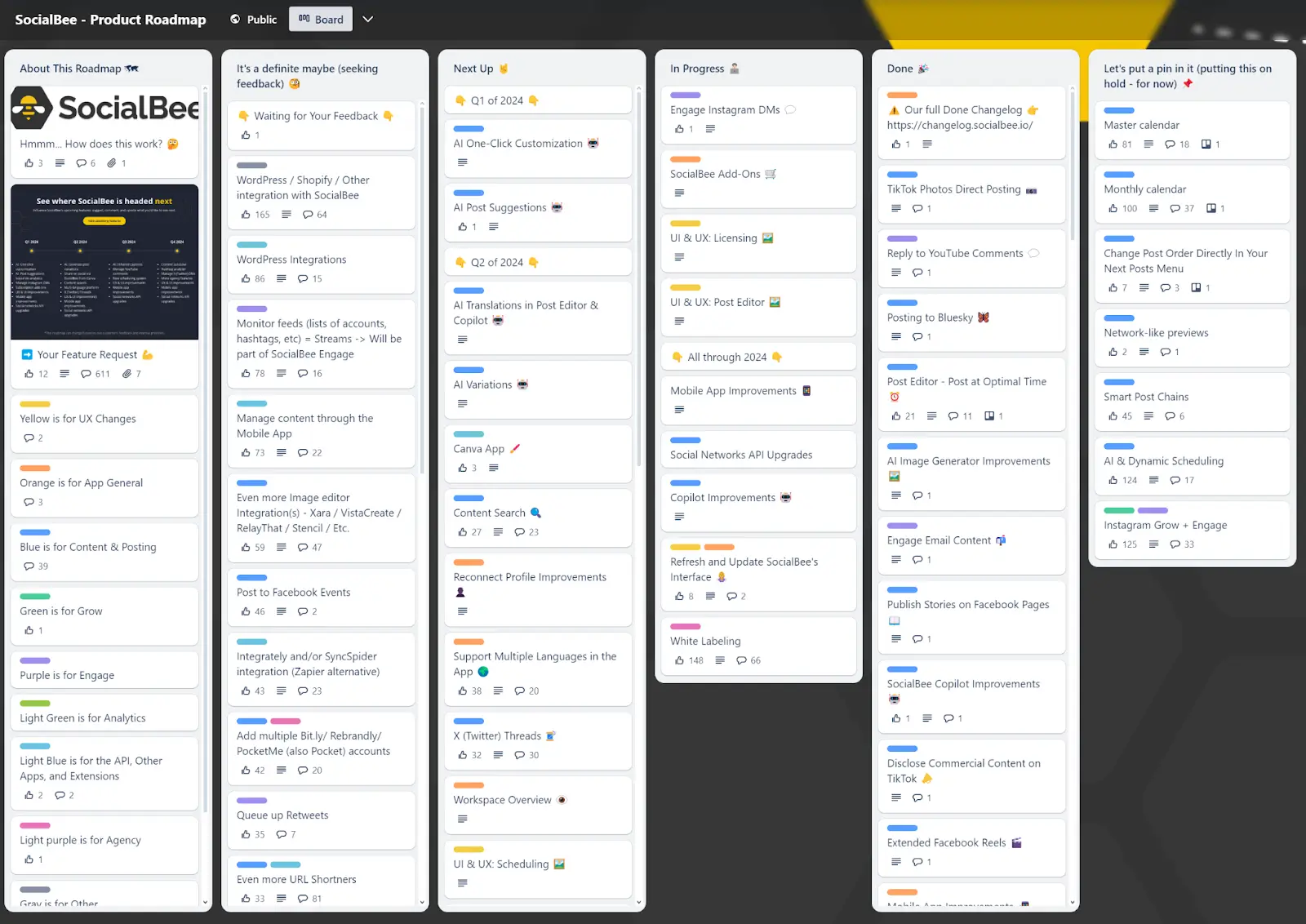
Their roadmap is a (relatively) simple Trello board with columns for “Maybe”, “Next Up”, “In Progress”, “Done”, and “On Hold”. Users can vote and comment on suggestions in the “Maybe” column to increase their chances of moving to “Next Up”.
The entire roadmap is also color-coded by product area, with a key located on the left-hand side. This gives users a quick way to identify the features that are relevant to them.
Key takeaways
- Create a roadmap key: Make it easy for your users to understand your roadmap by giving them tools to understand different product areas. Color coding, definitions, and other visual aids can make a complex roadmap more digestible.
- Use your roadmap to create marketing assets: Every quarter, SocialBee creates a polished graphic to showcase their roadmap on social media. This increases visibility and creates excitement around upcoming features.
- Get active in the comments: SocialBee always has someone from their team monitoring the comments and responding to questions or feedback. This shows users that their opinions are valued and helps build a sense of community.
Best for: SaaS startups and agile teams that want a visual, flexible roadmap
Use it when: Your priorities shift often and you want to organize work without rigid timelines
Watch out for: Letting the board get cluttered as more ideas and requests come in
5. Linkish: Delivery-focused roadmap example
Linkish makes saving, organizing, and managing web links easy. It offers features for bookmarking, shortening links, and embedding, plus folders and tags for organization.
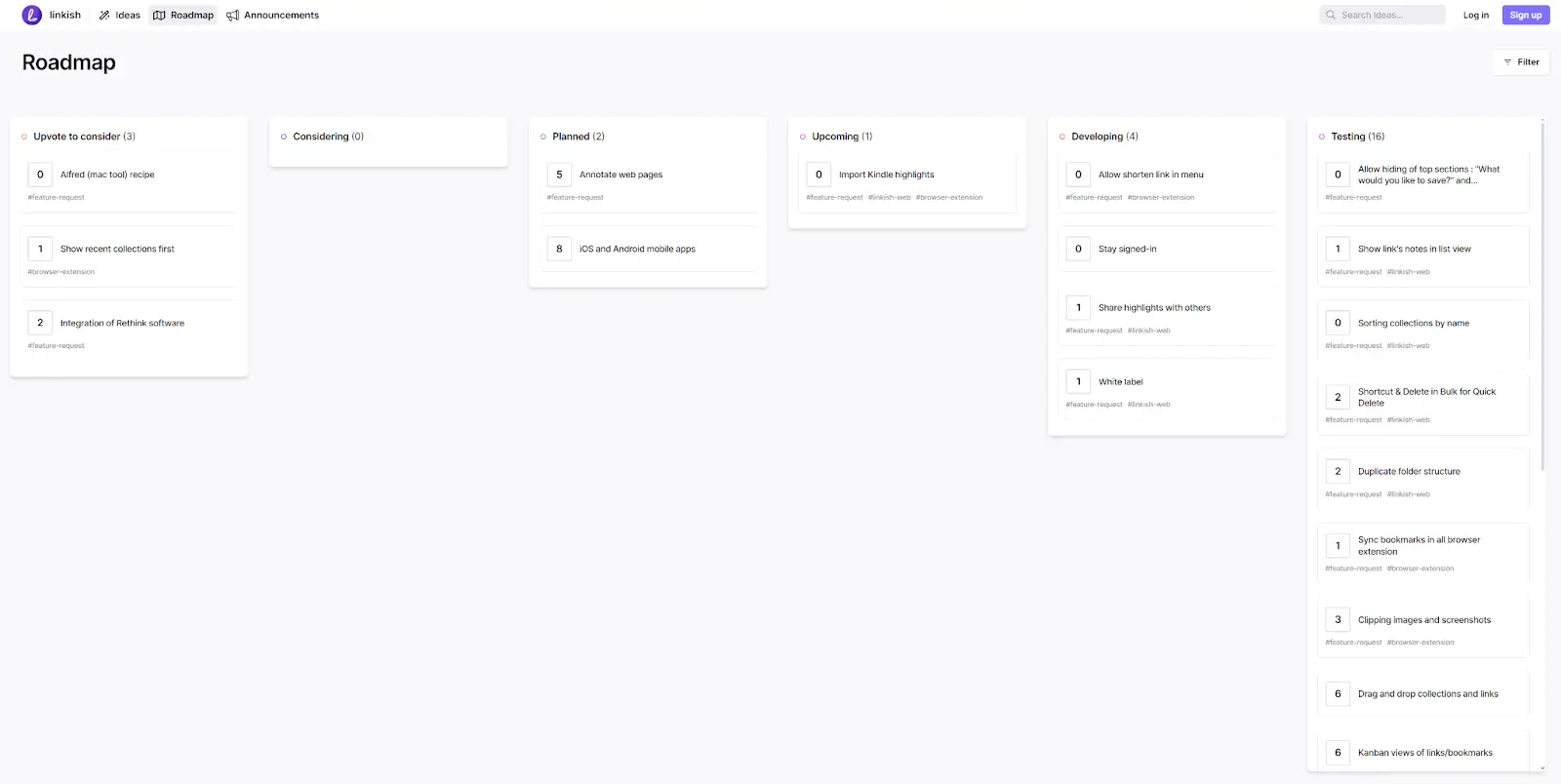
Linkish’s roadmap approach is simple, and focuses on the customer. They have a simple board with clearly written feature cards, comments, voting, and hashtags for easy searching. They’ve also customized their roadmap’s statuses quite a bit, with columns for:
- Voting
- Consideration
- Planning
- Upcoming
- Developing
- Testing
This delivery focused roadmap gives users even more visibility into the process.
Key takeaways
- Customize your roadmap: You don’t need to stick to the standard roadmap format. If you want to make it more relevant and useful for your team or customers, feel free to add your own columns, statuses, or categories.
- Get input from users: Linkish’s approach of including voting and comments on their roadmap allows them to gather valuable feedback from their customers. They also respond to comments to let users know their feedback is being taken onboard.
Best for: Teams that want to show users how ideas move through the product process
Use it when: You want more transparency than a simple planned/in progress/completed roadmap offers
Watch out for: Adding so many stages that the roadmap becomes hard to scan
6. Front: Minimalist roadmap example
Front provides a shared space for emails, apps, and teamwork. It helps teams manage shared inboxes and boost customer service by uniting communication and business tools.
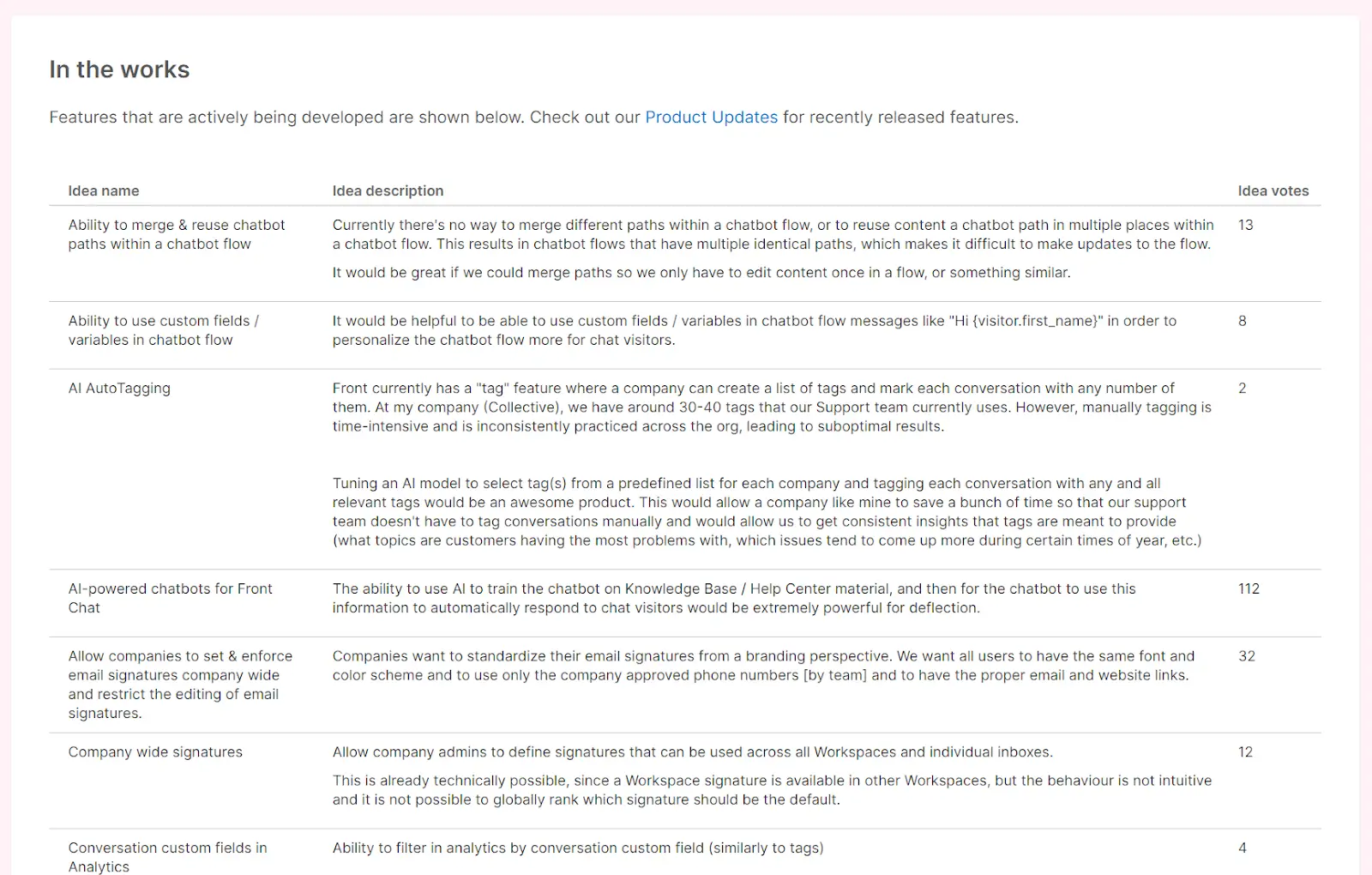
Front uses customers’ votes and feedback to decide what features and bugs to work on next. After discussing the plan internally, they move the feature to their public roadmap. It’s a simple one—there are no categories or expected delivery dates, just an announcement that the feature is “in the works.”
According to Front, you want to give users visibility into what you’re working on without making any strict promises about delivery. This allows for flexibility in timelines and avoids disappointing customers if things don't go according to plan and company objectives go in another direction.
Key takeaways
- Keep it simple: Roadmaps don’t need to be complicated—at their most minimalist, they’re essentially just lists of planned features and updates. Users tend to appreciate more transparency, but it isn’t necessary for every company.
- Use tagging and analytics: Front organizes customer feedback with tags and tracks trends and requests volumes with analytics. This makes roadmap planning more informed and systematic.
- Use shared inboxes for feedback: The Front team uses a shared inbox so everyone can see what’s coming in, making prioritizing and tracking feedback easier. This also allows for collaboration and discussion on potential features.
Best for: Teams that want to communicate direction without overcommitting
Use it when: You want to keep customers informed while staying flexible on timing and scope
Watch out for: Being so minimal that users are left wanting more context
7. Mixpanel: Internal roadmap example
Mixpanel is a powerful data analytics platform that helps businesses track and analyze user behavior.
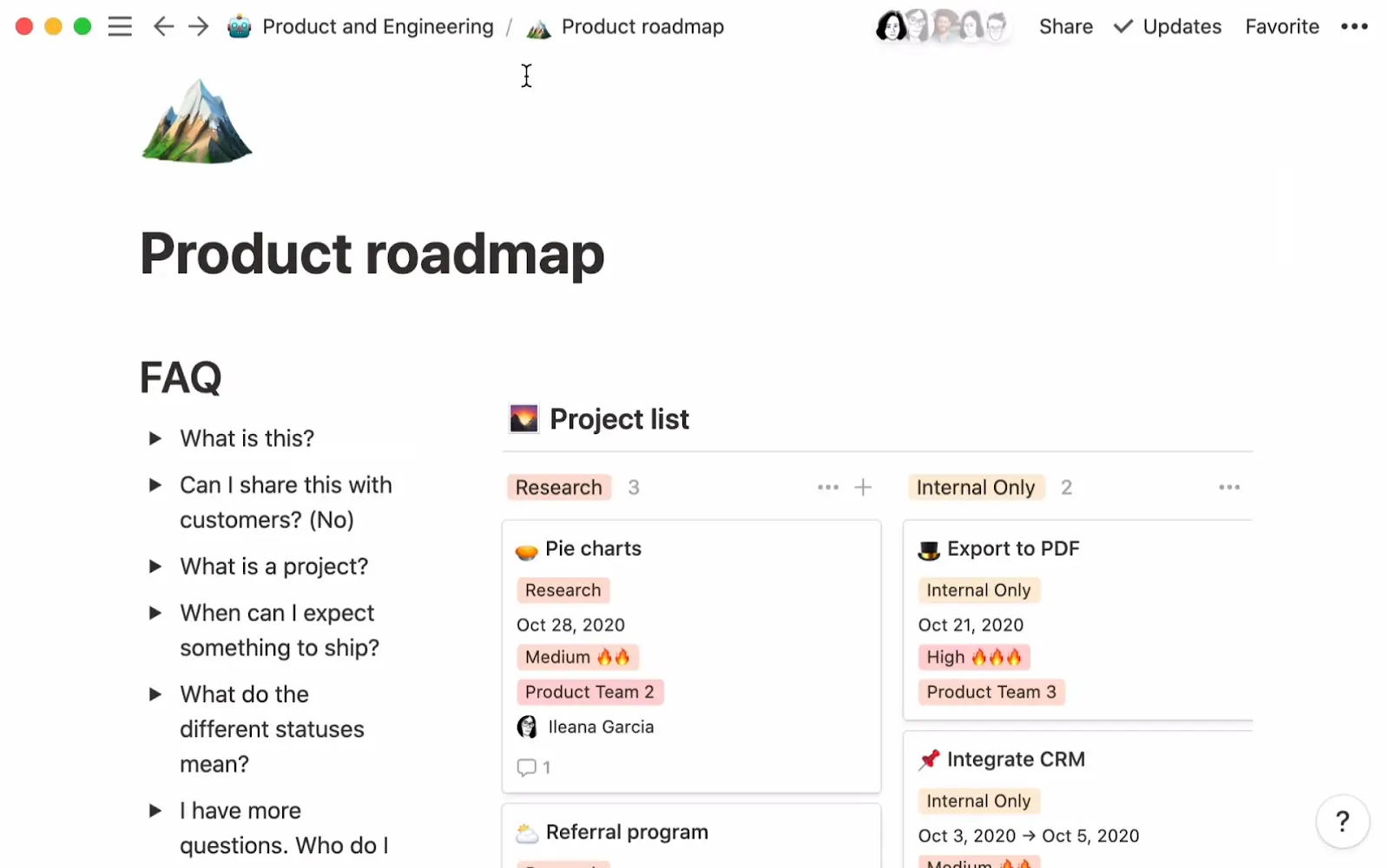
While they don’t have a public roadmap, their engineering, design, and product teams share a private product roadmap built with Notion. It’s designed to give everyone at-a-glance insights into their development efforts: why, and how far along it is.
They’ve prioritized tons of documentation for things like FAQs, background context, and prioritization so that everyone can make progress without constantly checking in and getting approval.
Key takeaways
- Over-document processes: Okay, maybe not to the point of insanity, but having everything documented means fewer meetings and more time for actual work. Notion is an excellent tool for organizing and sharing this documentation.
- Create cross-functional roadmaps: Products are cross-functional, meaning you need to give all functions visibility into what’s being shipped and when. Just make sure you still have spaces where teams can focus on their specific tasks.
Best for: Product, engineering, and design teams that need internal alignment
Use it when: Your main goal is to share context, priorities, and progress across teams
Watch out for: Overloading the roadmap with too much documentation or too many details
8. Loom: Hybrid roadmap example
Loom is a video messaging tool for recording and sharing videos, offering a more personal touch than texts. Businesses use it to boost teamwork with video updates and feedback that don’t need real-time responses.
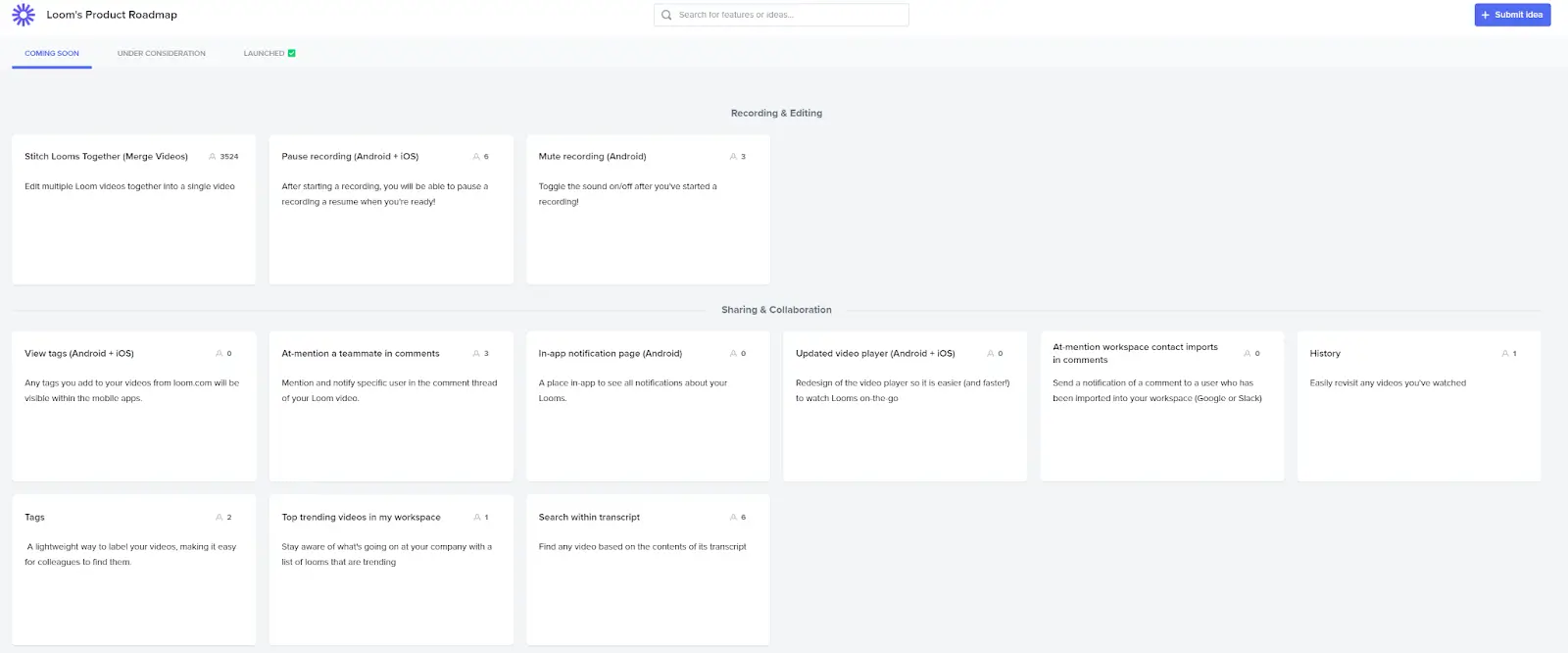
Loom’s roadmap is key to its product-led growth plan. They use three categories to keep things simple—”Coming Soon”, “Under Consideration”, and “Launched”. Their board is also divided horizontally into categories based on product area.
In addition to this public roadmap, Loom uses Google Sheets to organize the internal side of roadmapping—prioritizing features, setting timelines, and assigning owners. They also use their own product to share high-level roadmap updates without calling meetings.
Key takeaways
- Internal tools don’t need to be polished: Everyone wants their internal tools to look nice—but a basic tool that does the job is better than a beautiful tool that doesn’t. External tools like public roadmaps need to balance both.
- Leverage product-led growth: Aim for product-led growth, making the product key in gaining and keeping users. Make sure it’s easy to use, valuable from the start, and makes users want to spread the word.
- Engage stakeholders regularly: Keep in touch with all stakeholders, like team members, investors, and users. Frequent updates and chances for feedback keep everyone involved and committed to the product’s success.
Best for: Growing SaaS teams that need both internal planning and public visibility
Use it when: You want to share high-level plans publicly while managing details internally
Watch out for: Letting the public and internal versions drift out of sync
How to create a product roadmap
Building a product roadmap is pretty straightforward and you don't need any special knowledge or skills.
Here’s a quick overview of the process:
- Choose a roadmapping tool: Unless you intend to build a custom roadmap, you’ll need a tool. Look for a tool that offers all the features you need (and want)—including voting, comments, automation, etc. At Featurebase, we offer all these features and more, making it easy to create and share your roadmap with others.
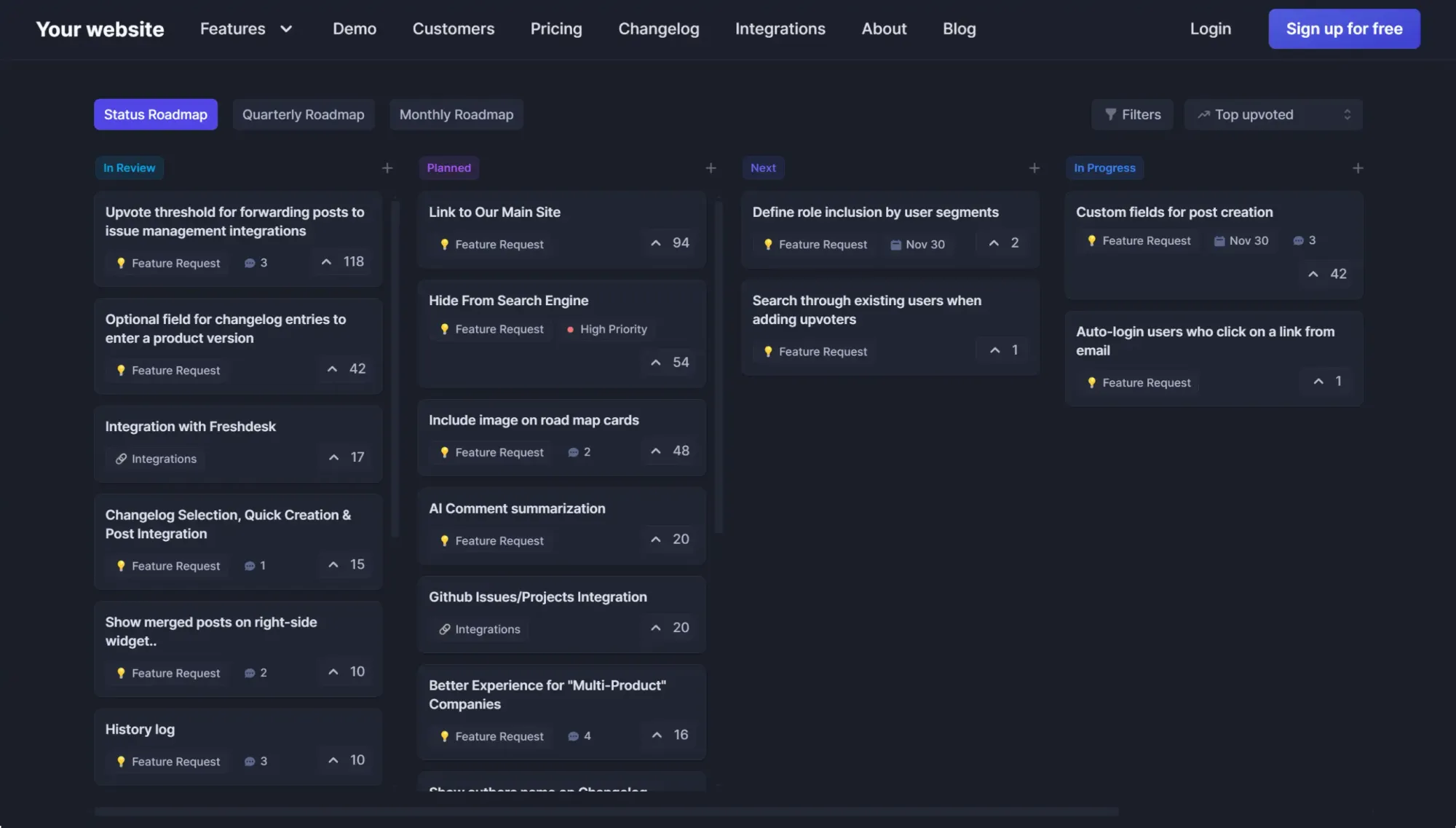
- Set your product strategy: Decide on your product's main goals and the actions it will take to get there. Understand your market, customer needs, and company’s aims. Your release plan will guide the creation of your roadmap, showing what you’ll deliver and when.
- Capture the “Why:” Tell your team and stakeholders why you’re developing your product and what problems it will solve. This unites everyone with a common aim and ensures your roadmap aligns with your product strategy and goals.
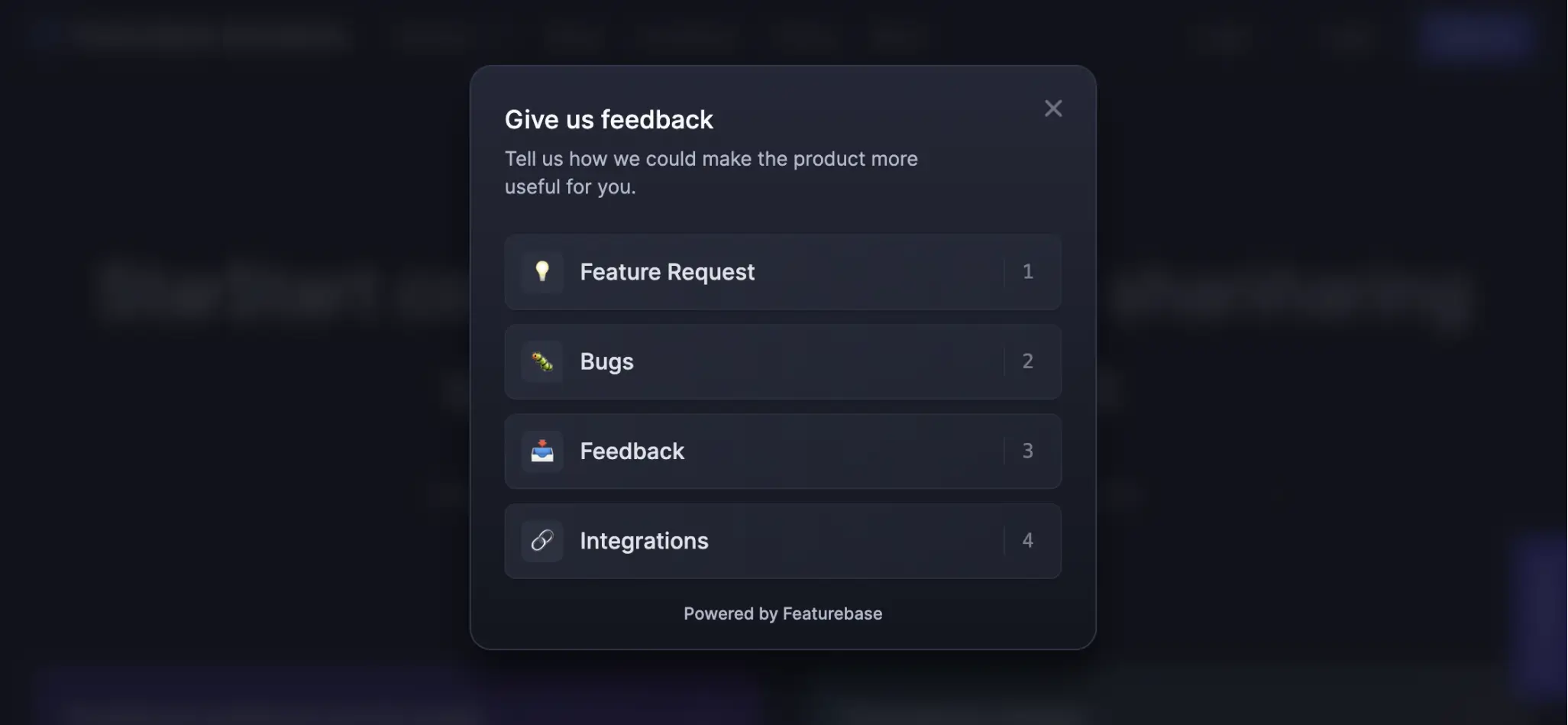
- Collect multiple viewpoints: Collect feedback from customers, your team, and stakeholders. This will make your roadmap well-rounded and inclusive. Tools like Featurebase make it easy to collect feedback by letting you set up an intuitive feedback portal. Be sure to use different methods like surveys, polls, and in-app feedback forms to get even more responses.
PS. you can make multiple roadmaps for different needs and target audiences. You can create visually appealing, informative roadmaps to keep customers interested and informed. And on the other hand, company roadmaps can contain your strategic goals and details relevant to the entire organization, but not your customers.
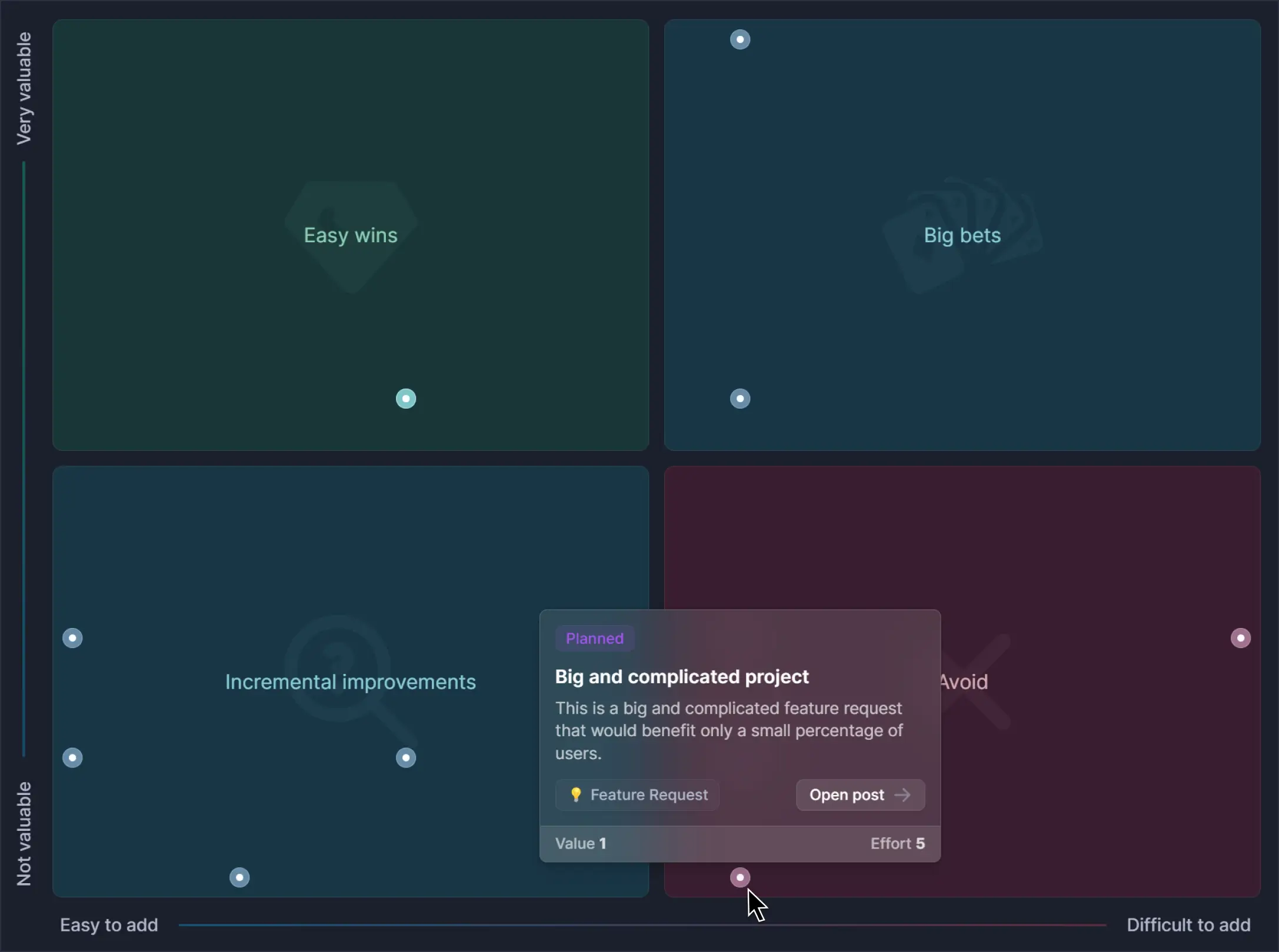
- Use a prioritization framework: Decide how you’ll prioritize features and fixes. Roadmap votes are a great start. But, with tools like Featurebase, you can prioritize features with prioritize features popular with value/effort frameworks and even link customers’ revenue to their feedback.
- Communicate clearly and often: Make sure everyone knows about the roadmap and its updates. Featurebase makes this easy with automatic updates for every user who interacts with a given suggestion.
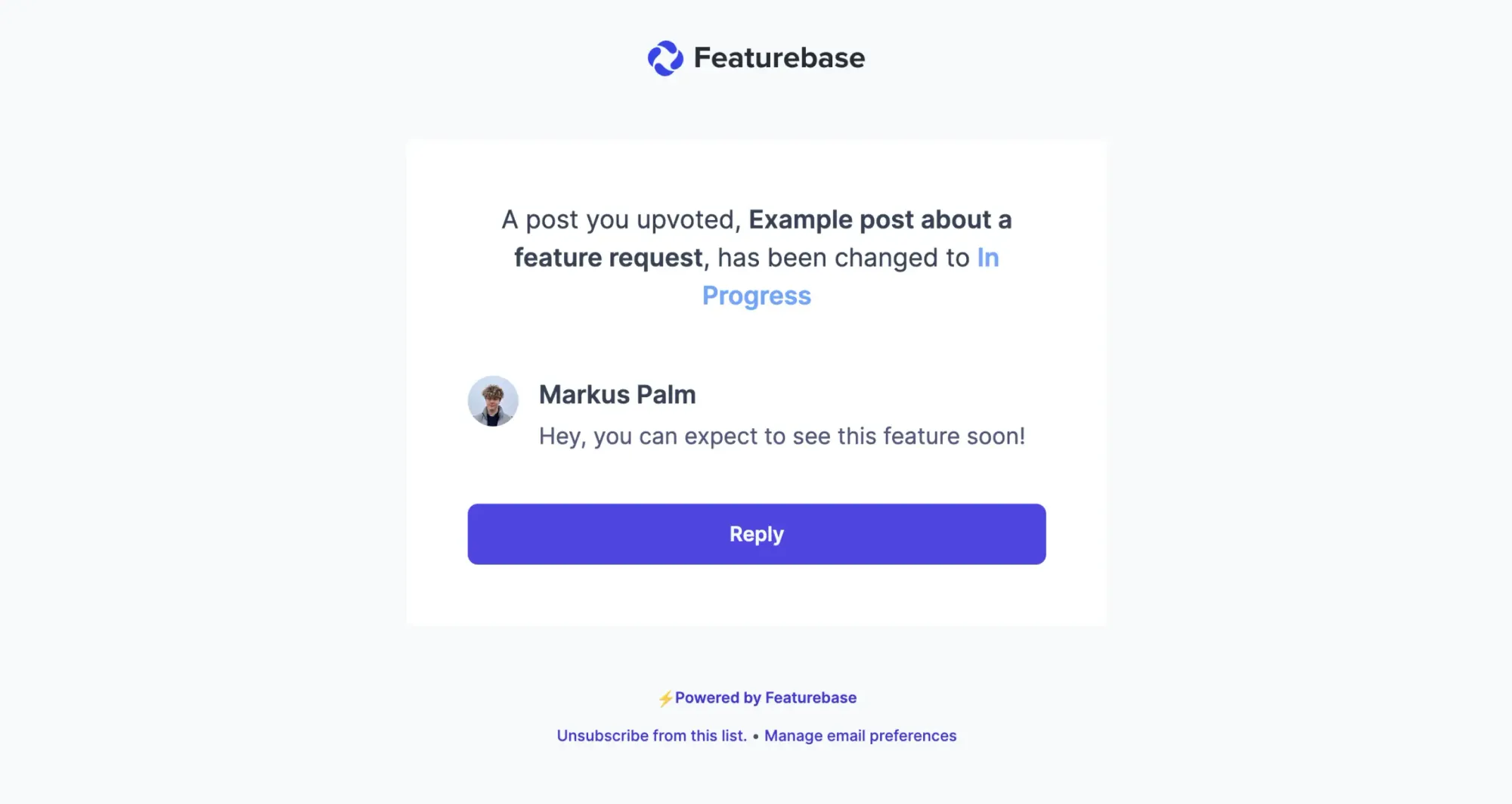
- Be transparent and realistic: Be clear, and don’t promise too much. Your roadmap should be bold but doable, showing a true picture of what your team can achieve in the set time.
Conclusion
There’s no single best product roadmap format for every SaaS team. The right one depends on who the roadmap is for, how much detail you want to share, and how flexible your planning process needs to be.
Featurebase is a modern and powerful product management tool that makes roadmapping easy. You can build internal and public roadmaps, collect feedback, prioritize ideas, and close the feedback loop with users all in one place.
Pricing starts with a Free plan, and paid plans start at $29/seat/month billed yearly. Featurebase also offers a 10-day free trial, and the pricing page says no credit card is required to get started.👇
✨ Create internal & public roadmaps with Featurebase for free →
FAQ
What is a product roadmap?
A product roadmap is a visual plan that shows the direction of a product over time. It helps teams communicate what they are building, why it matters, and what is coming next. Product roadmaps can be used internally to align teams or externally to keep customers informed.
What are the different product roadmap formats?
Some of the most common product roadmap formats include public roadmaps, dynamic roadmaps, status-based roadmaps, Kanban roadmaps, delivery-focused roadmaps, minimalist roadmaps, internal roadmaps, and hybrid roadmaps. The right format depends on your audience, goals, and planning style.
What is the best product roadmap format for SaaS teams?
There is no single best format for every SaaS team. Public roadmaps work well for transparency and feedback, internal roadmaps help with team alignment, and hybrid roadmaps are often the best fit for growing companies that need both.
What is the difference between a public roadmap and an internal roadmap?
A public roadmap is customer-facing and is used to communicate what is planned, in progress, or launched. An internal roadmap is built for product, engineering, marketing, and leadership teams, and usually includes more detail such as priorities, ownership, and context.
Should a product roadmap include exact dates?
Not always. Some roadmap formats are built around timelines, but many SaaS teams prefer more flexible formats that avoid rigid dates. This is especially useful when priorities change often or when teams want to stay transparent without making promises they may not be able to keep.
What should a product roadmap include?
A product roadmap usually includes planned features or initiatives, their current status, and enough context for the intended audience to understand what the team is working on. Depending on the format, it may also include priorities, goals, timelines, customer feedback, comments, or votes.
How do you create a product roadmap?
Start by choosing a roadmapping tool, setting your product strategy, and collecting feedback from customers and internal stakeholders. From there, prioritize initiatives, communicate updates clearly, and keep the roadmap realistic and easy to maintain.
Can you use more than one product roadmap?
Yes. Many SaaS companies use multiple roadmaps for different audiences. For example, they may use a public roadmap to communicate with customers and a separate internal roadmap to manage priorities, ownership, and execution.
More reading: