Blog Customer ServiceBest SaaS Knowledge Base Examples for Your Business in 2026
Best SaaS Knowledge Base Examples for Your Business in 2026
Building a knowledge base from scratch is not easy. Here are some excellent knowledge base examples to get you inspired.



✨ Build a knowledge base for free with Featurebase today →
Creating a knowledge base is a long-term investment in the future of your business and customer experience. It's one of the easiest way for customers to get support and it doesn't put burden on your team. Sounds like a win-win situation, but only if you set up your knowledge base properly.
It should be easy to search through, properly structured, with just the right amount of images, a way for users to vote if the article was useful. In short, there are a lot of moving parts. And if it's your first time creating a knowledge base, you can easily do more harm than good.
To save you from creating a set of pages no one will read, we prepared some excellent knowledge base examples to get you inspired.
But first, let's cover the basics. 👇
Why are knowledge bases so important in the first place?
A knowledge base gives customers answers at the exact moment they need them - no waiting for support, no digging through old emails, no ticket for something that could be solved in two minutes. That is also what most people now expect. Salesforce found that 61% of customers would rather use self-service to resolve simple issues than contact a live agent, and Harvard Business Review reported that 81% of people try to solve a problem themselves before reaching out to a representative.
A good knowledge base pays off on both sides:
- For customers: They can learn the product, fix simple issues, and get unstuck on their own - the option most people prefer over contacting support.
- For your team: It removes repetitive questions, so support can stop answering the same thing ten times a week and focus on issues that actually need a human.
- For new users: The right article explains a feature or shows the next step, helping people reach value faster instead of giving up.
But the key phrase is a good knowledge base. A messy, outdated, hard-to-search one creates more confusion than clarity. The best examples are not just collections of help articles - they are structured support systems built around real customer questions.
What makes a great knowledge base?
Before you look at examples, it helps to know what you are actually looking for. The best knowledge bases tend to share the same handful of qualities, no matter the company or industry:
- Obvious, fast search: Most people do not browse, they search. A prominent search bar that understands intent (and ideally suggests popular articles as users type) is the single biggest factor in whether someone finds an answer or gives up.
- A clear, logical structure: Content is grouped the way users think about their problems, not the way your product team organizes features. New users can find setup content, while existing users can jump straight to the specific topic they are stuck on.
- The right content types: A great knowledge base mixes formats - FAQs, step-by-step how-tos, troubleshooting guides, and short video tutorials - so people can learn in whatever way suits them.
- AI-powered answers: Modern help centers summarize an answer right in the search bar instead of making users read through several articles. If you want to dig deeper, see our guide to building an AI knowledge base.
- A feedback loop: A simple "was this helpful?" vote on each article tells you which content works and which needs a rewrite, so the knowledge base improves over time instead of going stale.
- Regular upkeep: The best knowledge bases are reviewed and updated as the product changes. Outdated screenshots and dead links erode trust faster than having no article at all.
Keep these qualities in mind as you go through the examples below - each one does at least one of them exceptionally well.
The best knowledge base examples you can copy and learn from in 2026
The examples below make it easy for end-users to troubleshoot, find answers on their own and continue using the product. Here is a quick look at all seven before we dig into each one:
| Company | What it is | What they do well | Key lesson |
|---|---|---|---|
| Senja | Testimonial collection SaaS | Clean category structure, question-style article titles | Build around real customer questions and keep it simple |
| Checkly | Developer monitoring platform | Job-based docs (detect, communicate, resolve) plus an AI assistant | Structure around what users are trying to do |
| Raycast | Productivity launcher | Symptom-based troubleshooting and support handoff prep | Group help by real user symptoms, not internal categories |
| Profound | Answer engine optimization platform | Deep categories, onboarding course, popular articles | Split by user intent when you have many use cases |
| Yext | Enterprise digital presence platform | Learning-path and product-based navigation | Segment by learning style, product area, and technical depth |
| Later | Social media scheduling tool | Task-based organization and channel-specific guidance | Organize around the actions users take most often |
| Wispr Flow | Voice dictation app | Onboarding basics, accuracy docs, known-issues area | Build around the moments where users lose confidence |
1. Senja's knowledge base
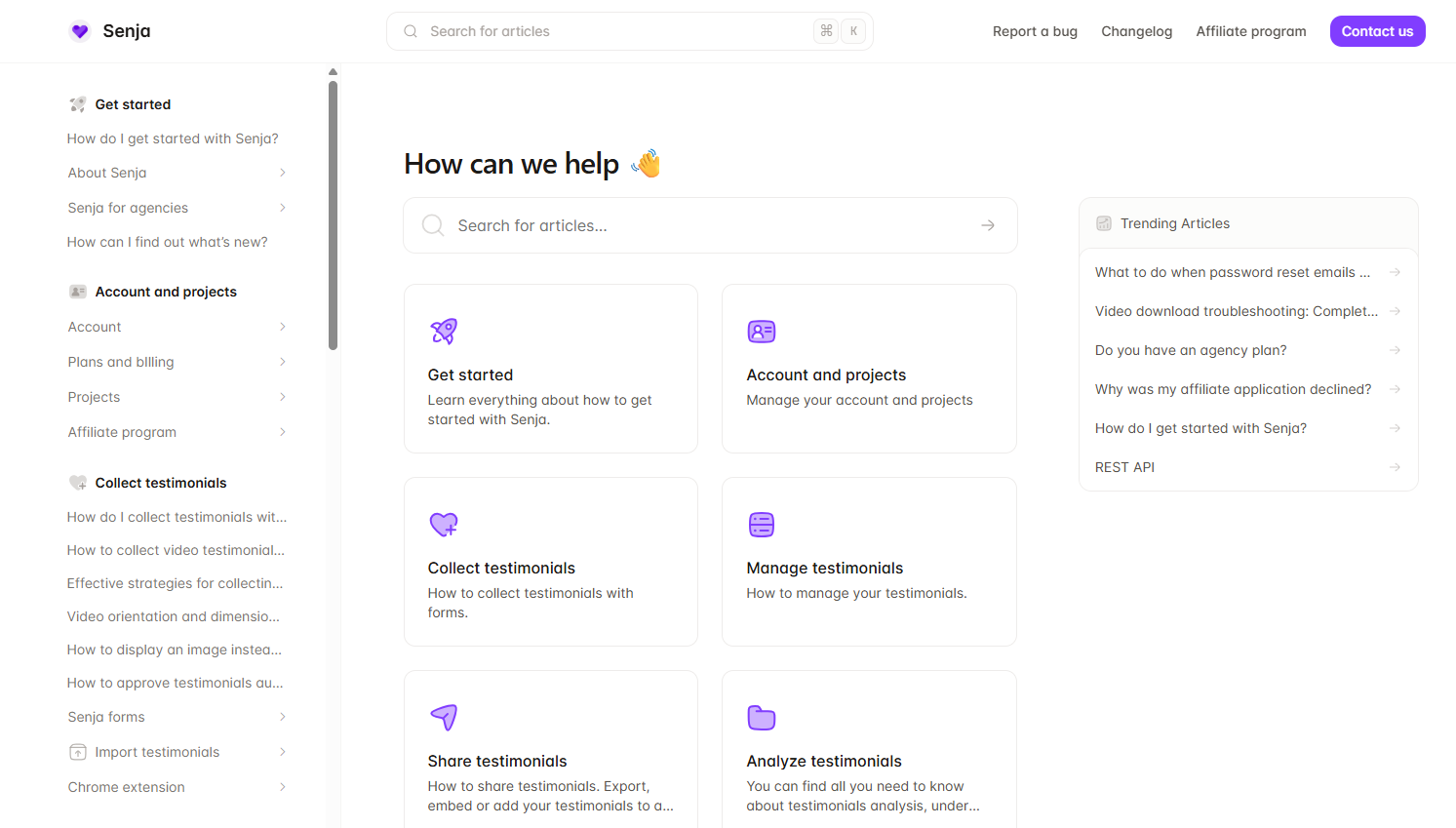
Senja's knowledge base shows how a smaller SaaS company can make support feel simple and human. The home page leads with a clear search bar, then sorts content into practical categories like getting started, collecting testimonials, automation, and troubleshooting.
- Simple structure: New users start with setup articles, while existing users jump straight to specific topics like widgets, integrations, or imports - no guessing where to go.
- Search-friendly titles: Many articles are phrased as direct questions ("Why isn't my widget showing up?"), mirroring how people actually search when they are stuck.
- Product education, not just fixes: Articles also show users how to get more value from Senja, not only how to solve problems.
What you can learn from Senja: build around real customer questions, make search obvious, and keep the structure clean. A smaller, well-organized knowledge base beats a huge, messy one.
2. Checkly's knowledge base
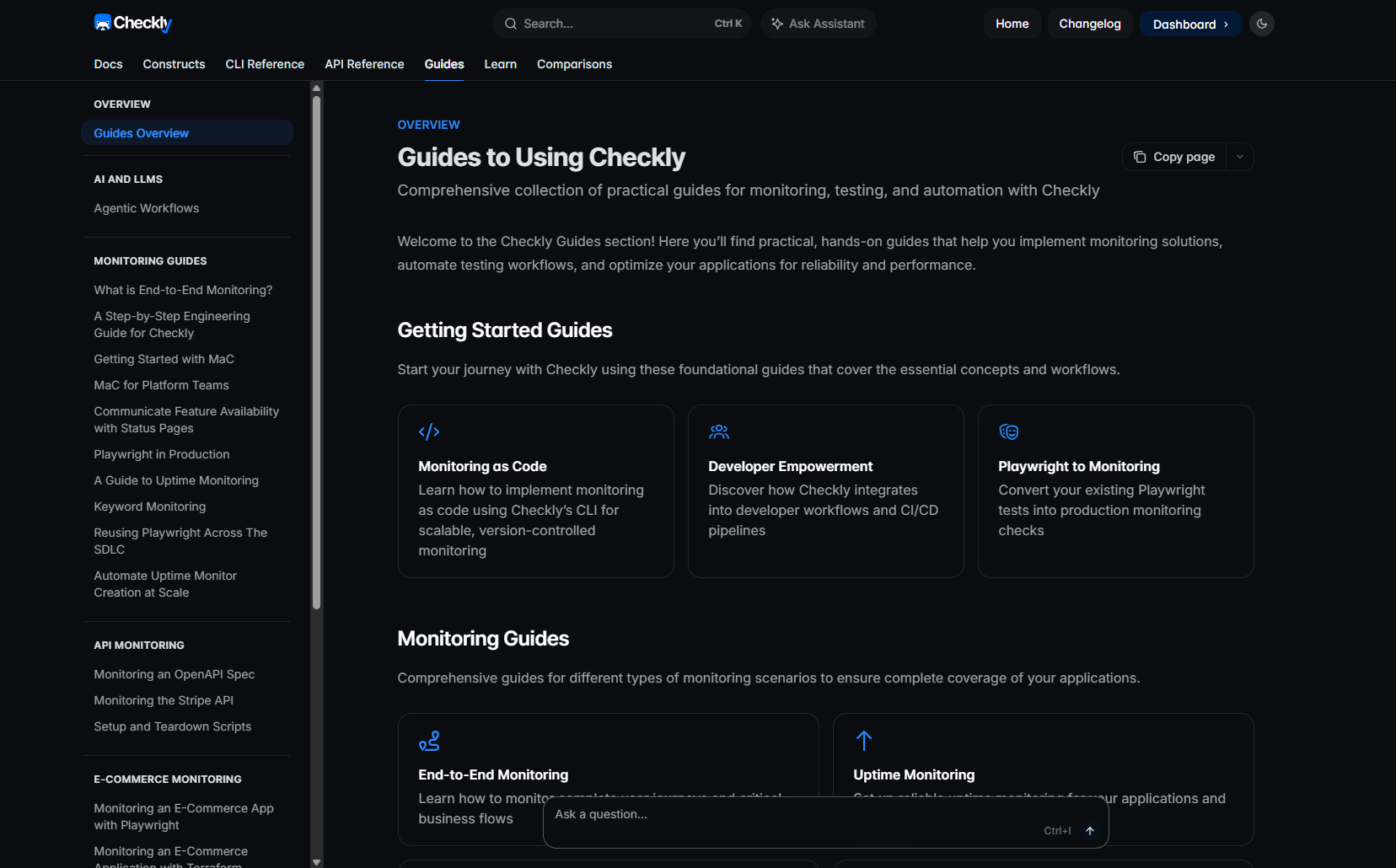
Checkly's docs are built for a technical product and audience, treating documentation as part of the product rather than a support afterthought. Users get a search bar, an Ask Assistant option, and clear paths into docs, CLI and API references, guides, and comparisons.
- Developer-first structure: Product docs are separated from developer tooling, so a newcomer and a developer each have a clear path in.
- Job-based grouping: The main docs are organized around three jobs - detect, communicate, and resolve - instead of a long feature list.
- Docs plus learning and feedback: Guides, quickstarts, and real-world examples sit alongside reference material, with "was this helpful?" and "suggest an edit" options on every page.
What you can learn from Checkly: structure your knowledge base around what users are trying to do, and pair strong search with learning resources and feedback options.
3. Raycast's knowledge base
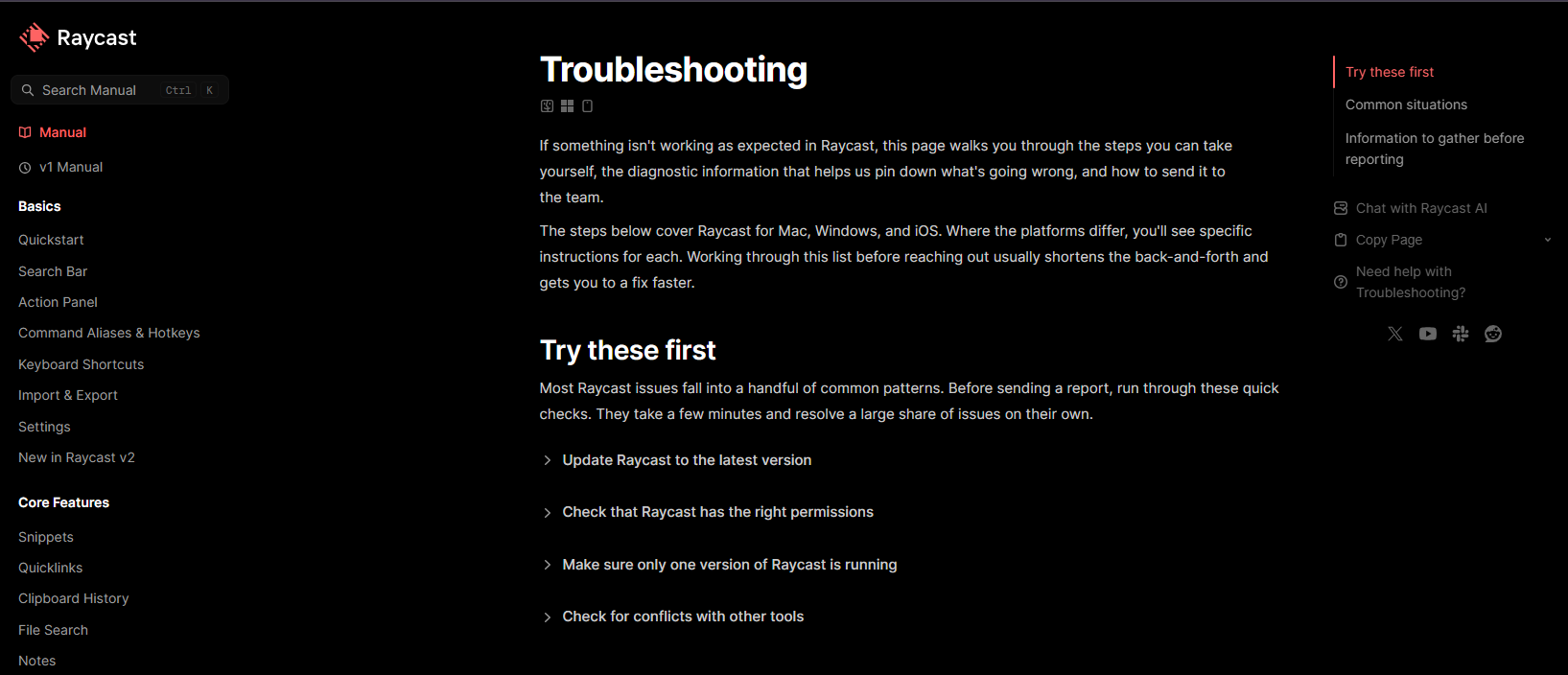
Raycast's troubleshooting page is built for users who are already frustrated, giving them one place to diagnose common issues before contacting support.
- Easiest fixes first: It opens with simple checks - update the app, check permissions, look for conflicts with other tools - that head off the most common tickets.
- Symptom-based grouping: Issues are grouped by what the user is experiencing (app won't open, shortcuts not working, high memory usage), so problems are easy to scan, with platform-specific notes for Mac, Windows, and iOS.
- Support handoff prep: It tells users exactly what to gather before reporting an issue - version, OS, steps to reproduce, logs, a screen recording - which improves the eventual support conversation.
What you can learn from Raycast: build troubleshooting pages around real symptoms, start with the easiest fixes, and tell users what to send if they still need help.
4. Profound's knowledge base
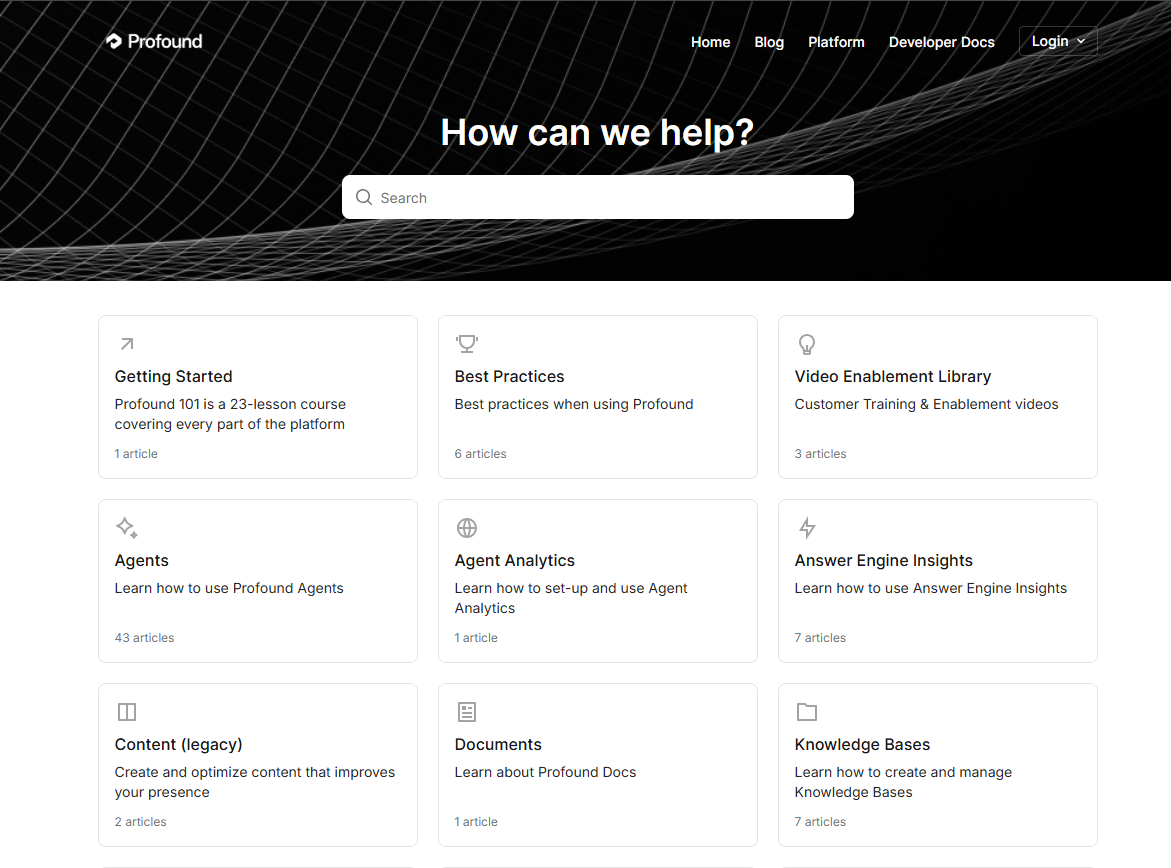
Profound's knowledge base is built for a product with several different user paths. A clear search prompt leads into sections like getting started, best practices, agents, analytics, knowledge bases, and agency use cases.
- Clear category depth: Many product areas are split into specific jobs rather than dumped into one long list, so users can find the right section before they click.
- Strong onboarding: A "Profound 101" course, a getting-started section, a user guide, and a glossary help users learn both the tool and the terminology around answer engine optimization.
- Multiple learning formats: Beyond articles, it points to training videos, developer docs, and a university, plus a "popular articles" shortcut for new users.
What you can learn from Profound: when your product has several use cases, split your knowledge base by user intent and surface popular articles so people find their next step faster.
5. Yext's help center
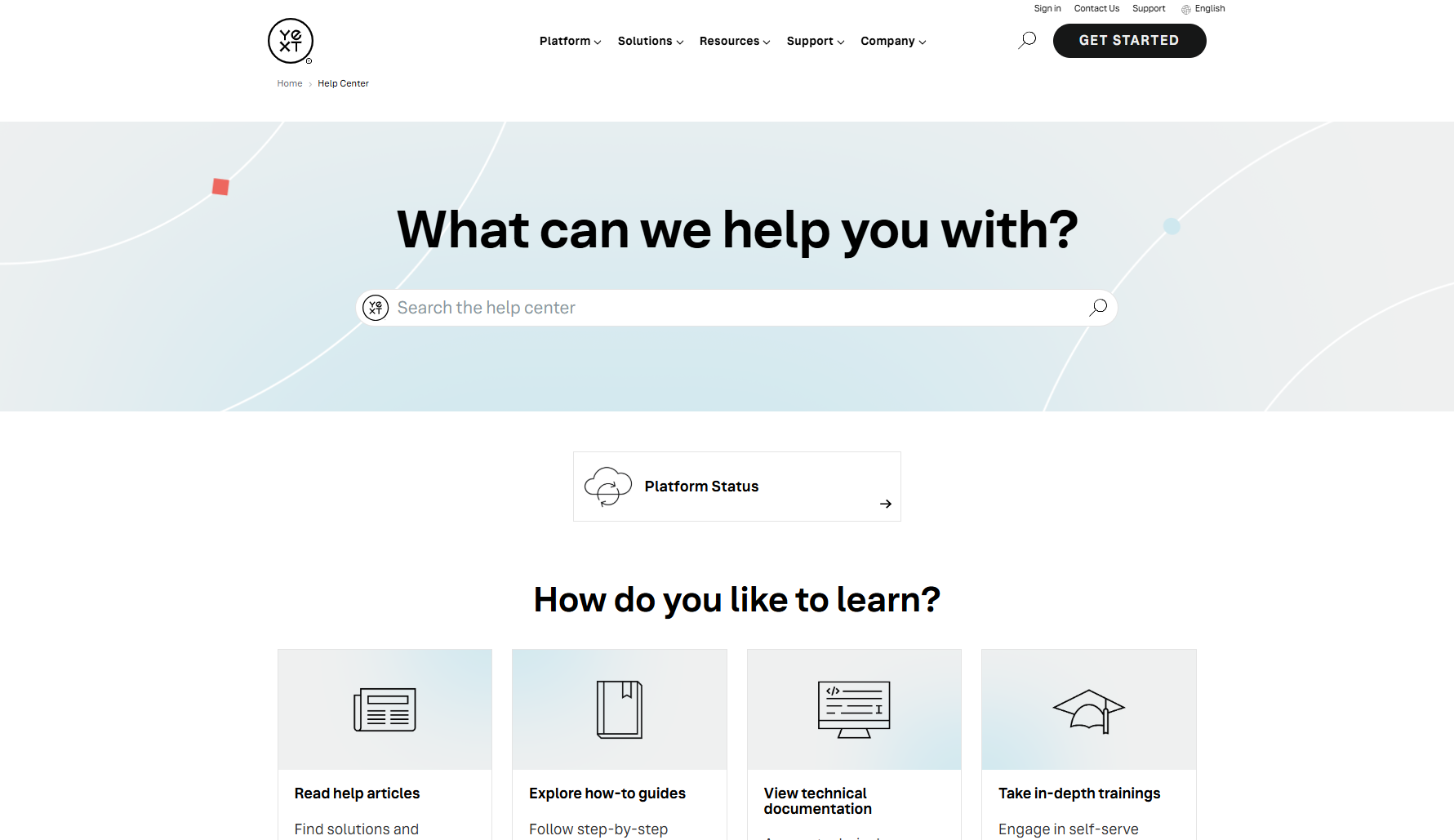
Yext's help center is built for an enterprise product with many user types. It opens with "What can we help you with?" and offers several routes based on how people prefer to learn.
- Learning-path segmentation: Users choose between help articles, how-to guides, technical documentation, and in-depth trainings.
- Product-based navigation: Articles can be browsed by product (Knowledge Graph, Listings, Pages, Search, Reviews, Analytics), so customers start from the part of the platform they already work in.
- Support and docs kept separate: Help articles stay distinct from API documentation, so a marketer and a developer each get a clean path, alongside a status link, FAQs, and multilingual options.
What you can learn from Yext: with many features and user types, do not force everyone through one path - split by learning style, product area, and technical depth.
6. Later's help center
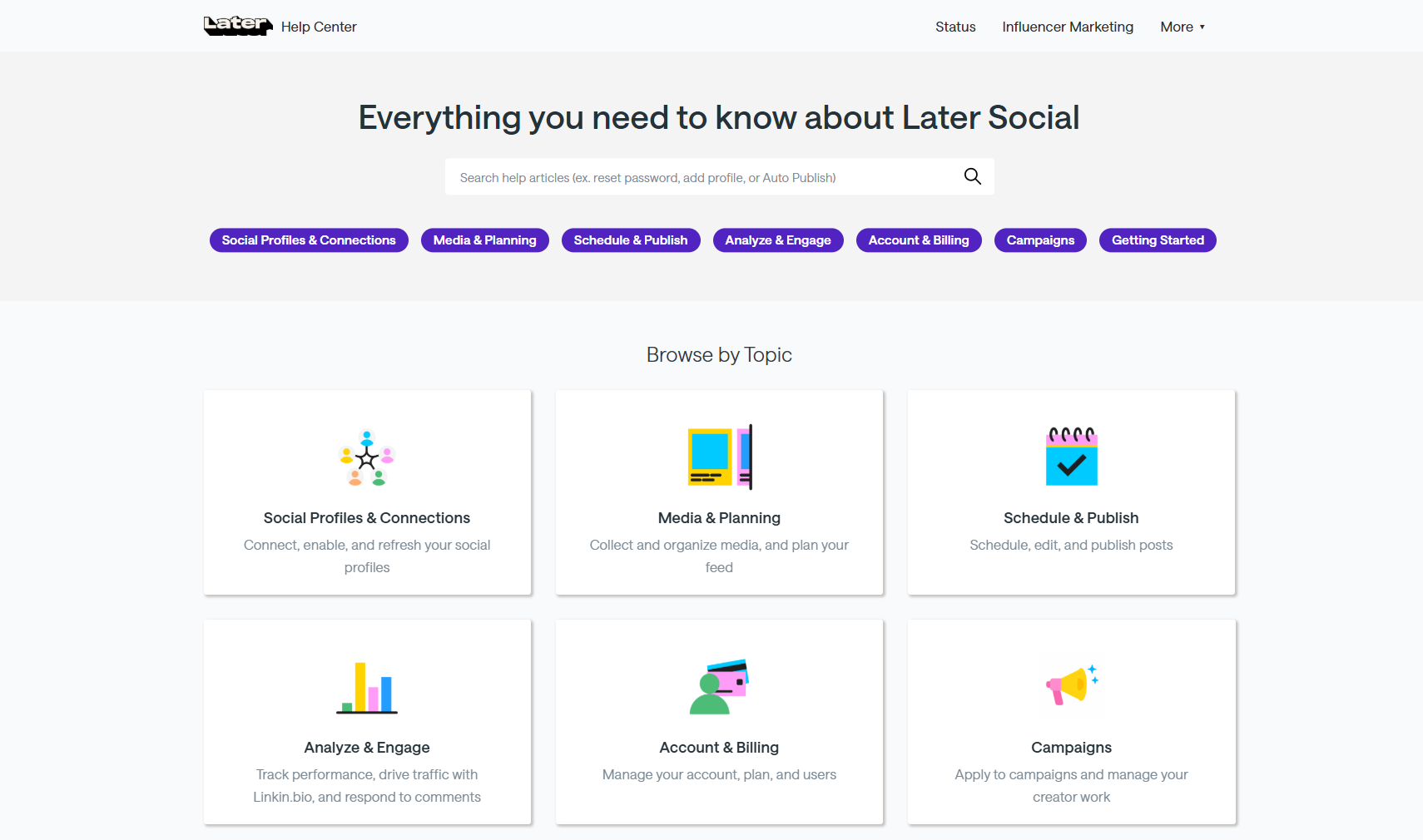
Later's help center is organized around the tasks users actually perform - scheduling, publishing, analytics, and Link in Bio - so people move quickly from setup to posting and troubleshooting.
- Task-based organization: Categories map to jobs (schedule and publish, analyze and engage, account and billing) rather than an internal product menu.
- Popular articles up front: The homepage surfaces urgent, repeat questions like failed posts, best times to post, and connecting or transferring profiles.
- Channel-specific guidance: Separate instructions for Instagram, TikTok, LinkedIn, and more reflect each network's own publishing rules and limits, backed by a status page so users can spot outages.
What you can learn from Later: organize around the actions users take most, put common problems on the homepage, and make product status easy to check before someone opens a ticket.
7. Wispr Flow's help center
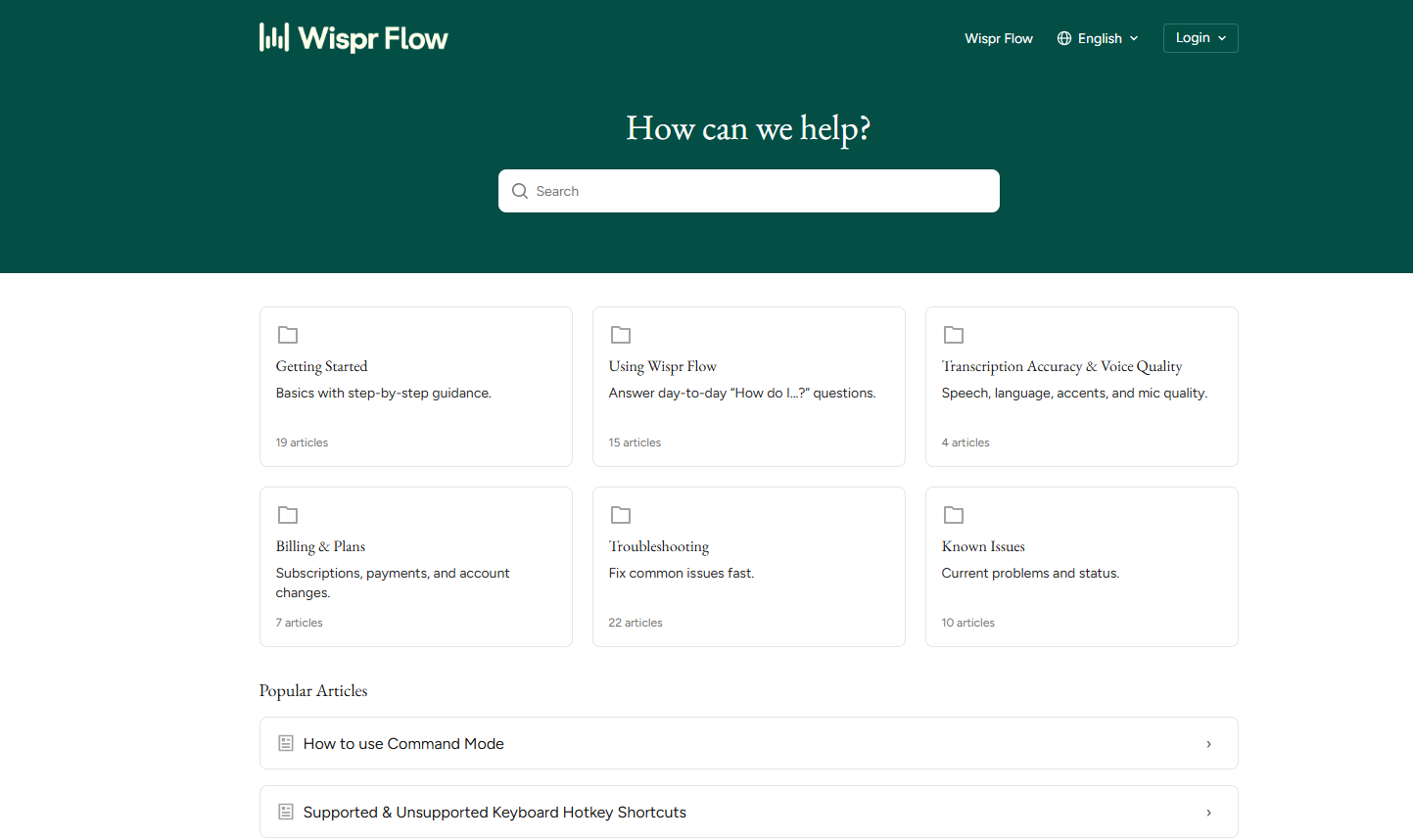
Wispr Flow's help center is built for a product that changes how people work day-to-day, so the docs focus on helping users build confidence fast and fix issues without waiting on support.
- Clear onboarding: A dedicated Getting started basics section walks through permissions, shortcuts, and settings - the make-or-break first experience for a voice product.
- Accuracy-focused docs: A separate section covers transcription accuracy and voice quality (speech, language, accents, microphone), since accuracy is the first thing users judge.
- Troubleshooting and known issues: A troubleshooting section plus a separate known-issues area help users tell whether something is broken on their side or already known by the team.
What you can learn from Wispr Flow: build around the moments where users lose confidence - setup, shortcuts, accuracy, and known bugs - so they can solve problems fast and keep using the product.
Create a knowledge base in Featurebase
Several companies featured in this list are Featurebase customers, but the examples above are here because they show what great self-service support looks like - not because every help center follows the same setup.
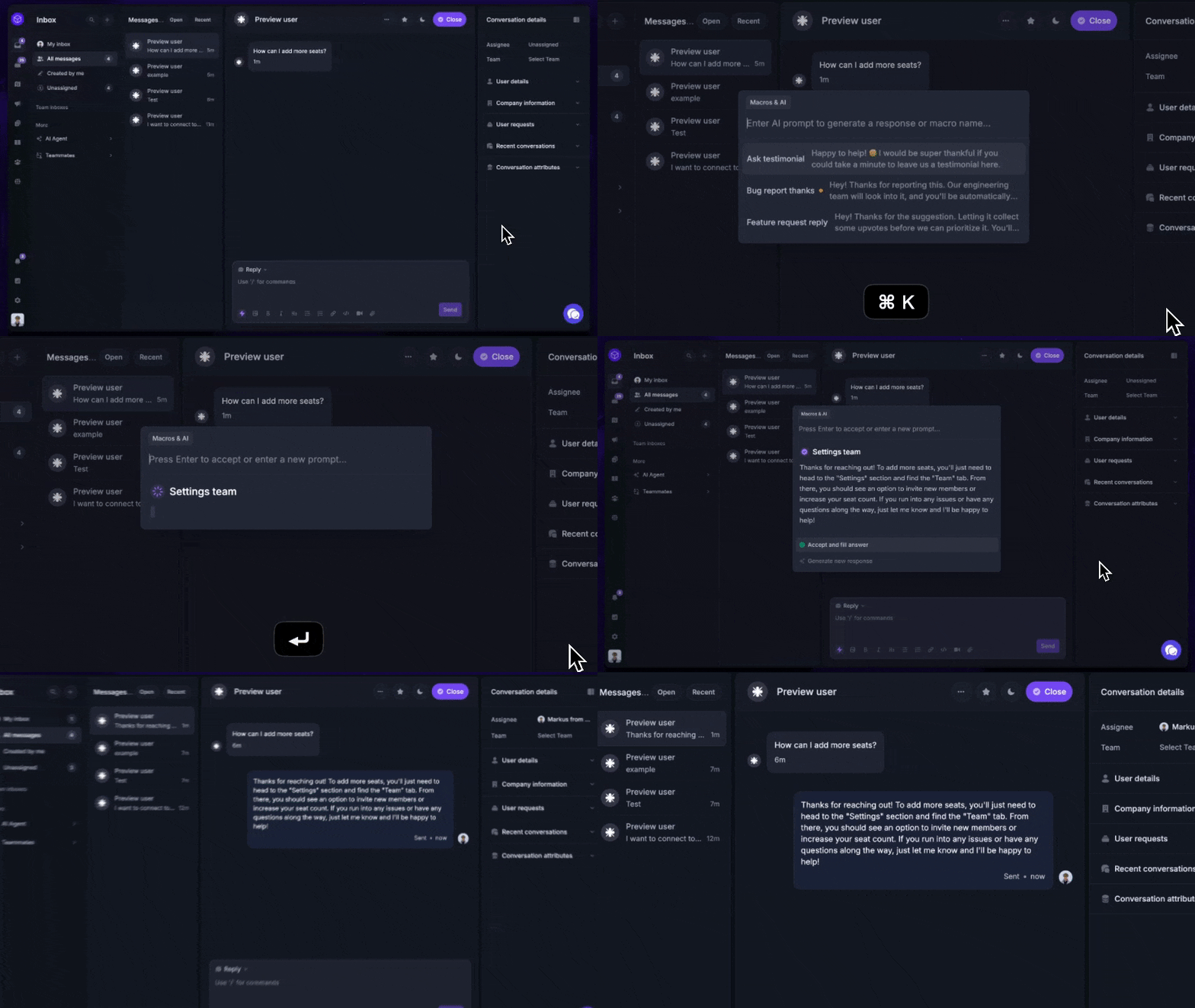
That said, if you want to build a similar experience, Featurebase gives you the tools to do it without turning documentation into a separate project. You can create a branded Help Center, add AI-powered search answers, collect feedback on articles, translate docs, and serve help content directly inside your product.
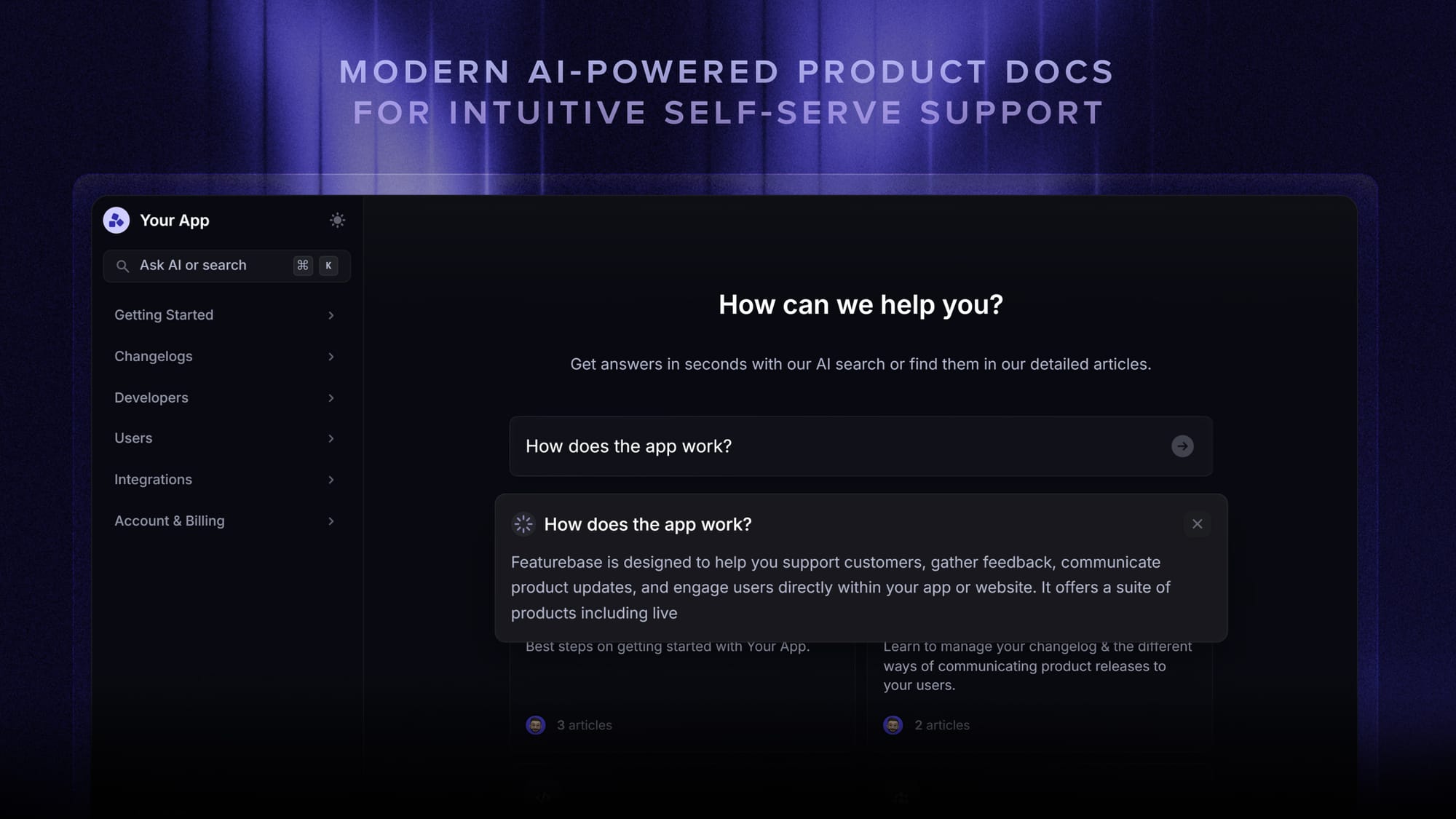
And because Featurebase also includes live chat, feedback collection, roadmaps, changelogs, and surveys, your knowledge base stays connected to the rest of your customer experience instead of living in a silo.
Top features:
- Public & internal help center – Create a branded knowledge base with your domain and design for easy self-service support
- Embeddable in-app widget – Serve help articles directly within your app, reaching users where they need assistance most
- AI-powered search answers – Summarize answers for users right in the search bar in seconds
- Automatic AI translations – Automatically translate and show your Help Center in your users' native languages
- Multi-brand support – Manage multiple Help Centers and Live chats from a single workspace
- AI-powered support platform – Manage chat, email, and Slack support conversations from one AI-powered view
- Feedback & roadmap tools – Collect feature requests and close the loop with updates
- Product updates – Publish release notes with a changelog page, in-app widget, and emails
- Integrations – Connects with Slack, Linear, Jira, HubSpot, and more
You can start with the free plan and create a public help center without a credit card. Paid plans start at $29/seat/month for unlimited articles, as of June 2026.
Conclusion
The best knowledge bases are not just collections of help articles. They are searchable, easy to navigate, and built around the real questions users ask when they are trying to learn your product or solve a problem. The examples above show how much smoother support becomes when your knowledge base is structured around user intent instead of internal product categories.
Featurebase helps you build that kind of knowledge base without turning documentation into a separate project. You can create a beautiful Help Center with AI-powered search answers, custom branding, in-app widgets, article feedback, translations, and multi-brand support. And because Featurebase also includes live chat, feedback collection, roadmaps, surveys, and changelogs, your support content stays connected to the rest of your customer experience.
You can start with Featurebase’s Free plan and create a public help center without needing a credit card. Onboarding is quick, and if you already have docs somewhere else, migrating them over is simple. 👇
✨ Create a beautiful AI-powered Help Center with Featurebase for free →
FAQs
What makes a good knowledge base?
A good knowledge base is easy to search, logically structured, and built around the questions customers actually ask. It mixes content types - FAQs, how-tos, troubleshooting guides, and short videos - and is kept up to date as the product changes. The goal is that most people find an answer on their own without opening a ticket.
What is the difference between an internal and external knowledge base?
An external knowledge base is customer-facing and covers product documentation, FAQs, and troubleshooting that anyone can read. An internal knowledge base is for employees and holds things like processes, onboarding guides, and policies behind a login. Many teams run both, using the same tool with different access controls.
What should a knowledge base include?
At a minimum, a knowledge base should include getting-started guides, FAQs, troubleshooting articles, and step-by-step how-tos for your most common tasks. Many teams also add video tutorials, release notes, and a clear way to contact support when self-service is not enough. Start with the topics that generate the most repetitive tickets, then expand from there.
How do I create a knowledge base?
Start by gathering your most common support questions from tickets, chats, and your support team, then turn each one into a clear, jargon-free article. Choose a knowledge base software that makes content easy to organize, search, and update, group articles into intuitive categories, and add a search bar up front. After launch, review article feedback regularly so the content keeps improving.
What is the best knowledge base software?
The best knowledge base software depends on your needs, but the strongest modern options combine an easy editor, fast AI-powered search, customization, and analytics in one place. Featurebase is a popular pick for SaaS teams because it pairs a branded help center with AI search answers, automatic translations, and built-in feedback and product updates, and it has a free plan to start with. If budget is the main concern, our roundup of free knowledge base software is a good starting point.
What's the difference between a knowledge base and a wiki?
A knowledge base is a structured, curated library of support content with controlled editing and a clear hierarchy, designed mainly to help readers find answers. A wiki is more open and collaborative, letting many people add and edit pages with looser structure. Knowledge bases work best for official customer-facing documentation, while wikis suit fast, internal team collaboration.