Blog Customer ServiceChatbot Use Cases: 18 Real Examples by Department
Chatbot Use Cases: 18 Real Examples by Department
A practical map of 18 real chatbot use cases by business function and industry - plus how to pick the one worth starting with.



For years, "chatbot" meant a clunky widget that asked what you needed, then failed to understand the answer.
That has changed. Modern chatbots resolve real issues across support, sales, HR, and entire industries, and Gartner predicts that by 2027 chatbots will become the primary customer service channel for roughly a quarter of organizations.
In this guide, I'll walk through 18 real chatbot use cases by function and by industry, so you can spot the ones worth running in your own business. 👇
Key takeaways:
- Chatbots are no longer a single "deflect FAQs" tool - they're used across customer support, sales, marketing, HR, IT, and most customer-facing industries.
- There are 3 main types of chatbots: rule-based, AI-powered, and hybrid. The right one depends on the job you're automating.
- The highest-impact place to start is usually customer support, where bots handle repetitive, high-volume questions around the clock.
- Chatbots work best as a first line that escalates complex or emotional cases to a human, not as a full replacement for your team.
- The best first use case is a high-volume, repetitive, low-risk task you can measure - not the most ambitious one.
- Featurebase✨ bundles an AI support agent, omnichannel inbox, help center, and feedback tools so you can run your support chatbot use cases in one place.
What is a chatbot?
A chatbot is software that holds a conversation with a person through text or voice, answering questions and completing tasks without a human agent.
Early chatbots followed rigid scripts. Today's versions use natural language processing (NLP) and machine learning to understand what someone actually means, pull answers from your help content, and even take actions like booking a meeting or processing a return.
The result is a tool that businesses now lean on heavily. Customers get instant answers at any hour, and teams hand off the repetitive questions that used to eat their day.
The 3 main types of chatbots
Before the use cases, it helps to know what kind of bot does what. Most chatbots fall into 3 categories:
- Rule-based chatbots: These follow a fixed script of buttons and decision trees. The customer picks from set options, and the bot guides them down a predefined path. They're cheap, predictable, and great for simple, repetitive flows like booking or order tracking.
- AI-powered chatbots: These use NLP and large language models to understand free-text questions and generate natural answers. They handle messy, varied queries and learn from past conversations, which makes them the standard for modern customer support.
- Hybrid chatbots: These combine both - a scripted flow for structured tasks plus AI for open-ended questions. Most real-world deployments end up here, because few businesses fit neatly into one mode.
The use cases below work across all 3 types. The trick is matching the bot type to the job, which I'll come back to at the end.

Put your chatbot to work across support
Use Fibi AI Agent to answer FAQs, qualify leads, collect feedback, and hand complex conversations to your team when needed.
Chatbot use cases by business function
Almost every team that talks to customers (or to other employees) has a repetitive, high-volume task a chatbot can take off their plate. Here are the most common ones.
Customer support
This is the use case nearly every business starts with, and for good reason. A support chatbot answers common questions instantly, around the clock, and frees your agents for the cases that actually need a human.
A few concrete jobs it handles well:
- Answering FAQs: Pull instant answers from your help center for questions like "how do I reset my password?" or "what's your refund policy?"
- Order and shipping status: Let customers check where their order is without emailing your team or waiting on hold.
- Ticket creation and routing: Collect the details of an issue, open a ticket, and send it to the right team with full context attached.
- Escalation to a human: Recognize when a question is too complex or a customer is upset, then hand off to a live agent with the conversation history intact.
The momentum here is hard to ignore. Gartner predicts that by 2029, agentic AI will autonomously resolve 80% of common customer service issues without human intervention, leading to a 30% reduction in operational costs.
This is exactly where a tool like Featurebase fits. Its Fibi AI Agent resolves common customer questions on autopilot using your help articles and past conversations, and when a query needs a person, it hands the conversation to a teammate with full context, so the customer never has to repeat themselves.
Sales and lead generation
Lead generation chatbots are surprisingly good salespeople. They engage visitors the moment interest is high, qualify them, and pass warm leads to your team.
Typical sales use cases include qualifying leads by asking a few targeted questions before routing them to a rep, booking demos straight into a sales calendar, and recommending the right product based on what a visitor says they need. Because a bot engages anonymous website visitors instantly, it captures interest that a form would let slip away.
It's also a natural place to capture customer input. With Featurebase, requests raised in live chat can be turned into tracked feature requests automatically, so a sales or product team sees what prospects are asking for and customers get updated when it ships.
Marketing
Marketing chatbots turn passive page views into conversations. Instead of a static form, a bot can ask a visitor what they're interested in and respond in real time.
Common marketing jobs include running interactive quizzes and product finders, growing email lists through conversation rather than pop-ups, promoting offers and announcements inside the chat window, and segmenting visitors by their answers so follow-up is relevant. The conversational format tends to convert better than forms because it feels like help, not a demand.
Human resources (HR)
Chatbots aren't only customer-facing. Internally, HR bots answer the repetitive questions that flood HR inboxes and free the team for real people work.
They handle policy and benefits questions ("how many vacation days do I have left?"), guide new hires through onboarding checklists, take in document requests like employment letters, and run employee surveys with higher response rates than static forms. The payoff is faster answers for employees and far less admin for HR.
IT and internal helpdesk
Roughly half of IT helpdesk tickets are simple, repeatable requests, which makes them ideal chatbot territory. A service desk chatbot can walk an employee through a password reset, surface the right setup or troubleshooting guide, log a ticket with full context when it can't resolve something, and broadcast outage or maintenance alerts to everyone at once.
That deflects the routine tickets so your IT team can focus on the genuinely tricky problems.
Chatbot use cases by industry
Beyond function, the value of a chatbot shifts depending on the industry. Here are 5 where bots have clearly earned their place.
Ecommerce and retail
Ecommerce is one of the strongest fits, because shoppers have predictable, repetitive questions and abandoned carts cost real money. Retail bots recommend products based on browsing behavior, answer sizing and availability questions, track orders and process returns, and recover abandoned carts with a timely nudge or discount. The result is more completed purchases and fewer support tickets.
Healthcare
Healthcare providers face high call volumes for fairly routine tasks. Chatbots help patients book and reschedule appointments, send medication and appointment reminders, answer general health and coverage questions, and run basic symptom triage that points patients toward the right level of care. That cuts hold times and frees staff for clinical work - with the caveat that anything medical needs a clear path to a human.
Banking and financial services
Banking customers want fast, secure answers about their money. Insurance chatbots do the same job for quotes, policies, and claims. Finance bots handle balance and transaction queries, send low-balance and bill-due alerts, flag suspicious activity, and guide customers through tasks like scheduling a payment. Sensitive actions sit behind identity verification, and anxious customers get routed to a person quickly.
Travel and hospitality
Travel is full of time-sensitive, repetitive questions, which suits chatbots well. They help travelers search and book trips, handle changes and cancellations, send flight or booking updates, and offer personalized recommendations based on past trips. Being available 24/7 across time zones matters a lot here.
Education
Schools and edtech companies use chatbots to support students and cut admin load. Common jobs include guiding prospective students through enrollment, answering questions about courses and deadlines, delivering personalized study materials, and sending announcements tailored to a student's program. It scales the kind of one-to-one attention institutions can rarely staff for.
What chatbots shouldn't do (and when to hand off to a human)
A chatbot is a tool, not a replacement for your team, and pretending otherwise is the fastest way to frustrate customers.
The biggest mistake is trapping people in a bot with no way to reach a human. Complex, ambiguous, or emotionally charged situations - a billing dispute, a frustrated customer, a high-stakes decision - need human judgment and empathy. The best setups treat the bot as a first line that resolves the routine and escalates everything else, carrying the full conversation history so the customer never starts over.
Get the handoff right and the bot makes your team look good. Get it wrong and it becomes the thing customers complain about.
How to choose your first chatbot use case
With this many options, the temptation is to automate everything at once. Don't. The teams that succeed start with a single, well-chosen use case and expand from there.
Look for a task that ticks these boxes:
- High volume: It happens often enough that automating it frees real time. A question your team answers 50 times a day beats one they see twice a month.
- Repetitive: The answer is consistent and lives in your help content or a database, so a bot can handle it reliably.
- Low risk: A wrong answer won't cause real harm. Start with order tracking, not financial advice.
- Measurable: You can track whether it's working - deflection rate, resolution time, or CSAT - so you can prove value and improve.
Most businesses find their best starting point is customer support FAQs. It's high-volume, repetitive, low-risk, and easy to measure, which is why it's the most common first deployment.
Where Featurebase fits
If customer support is your starting point - and for most teams it is - the practical question is which tool runs it. That's where Featurebase comes in.
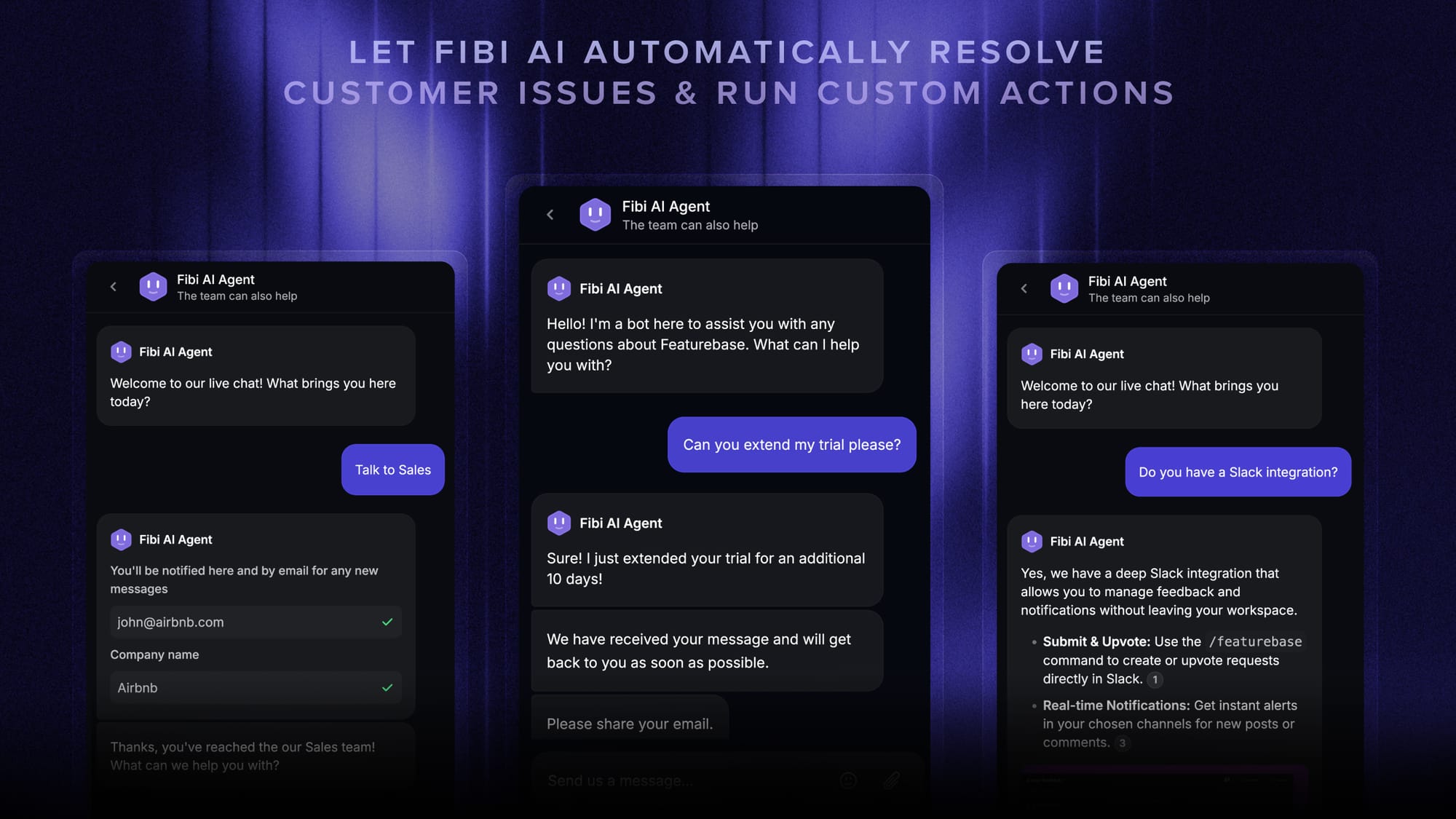
Its Fibi AI Agent handles the support use cases above: it resolves common questions on autopilot using your help articles and past conversations, and escalates anything complex to a teammate with the full conversation attached. Live chat, email, and Slack all land in one inbox, so a bot answer and a human follow-up live in the same thread.
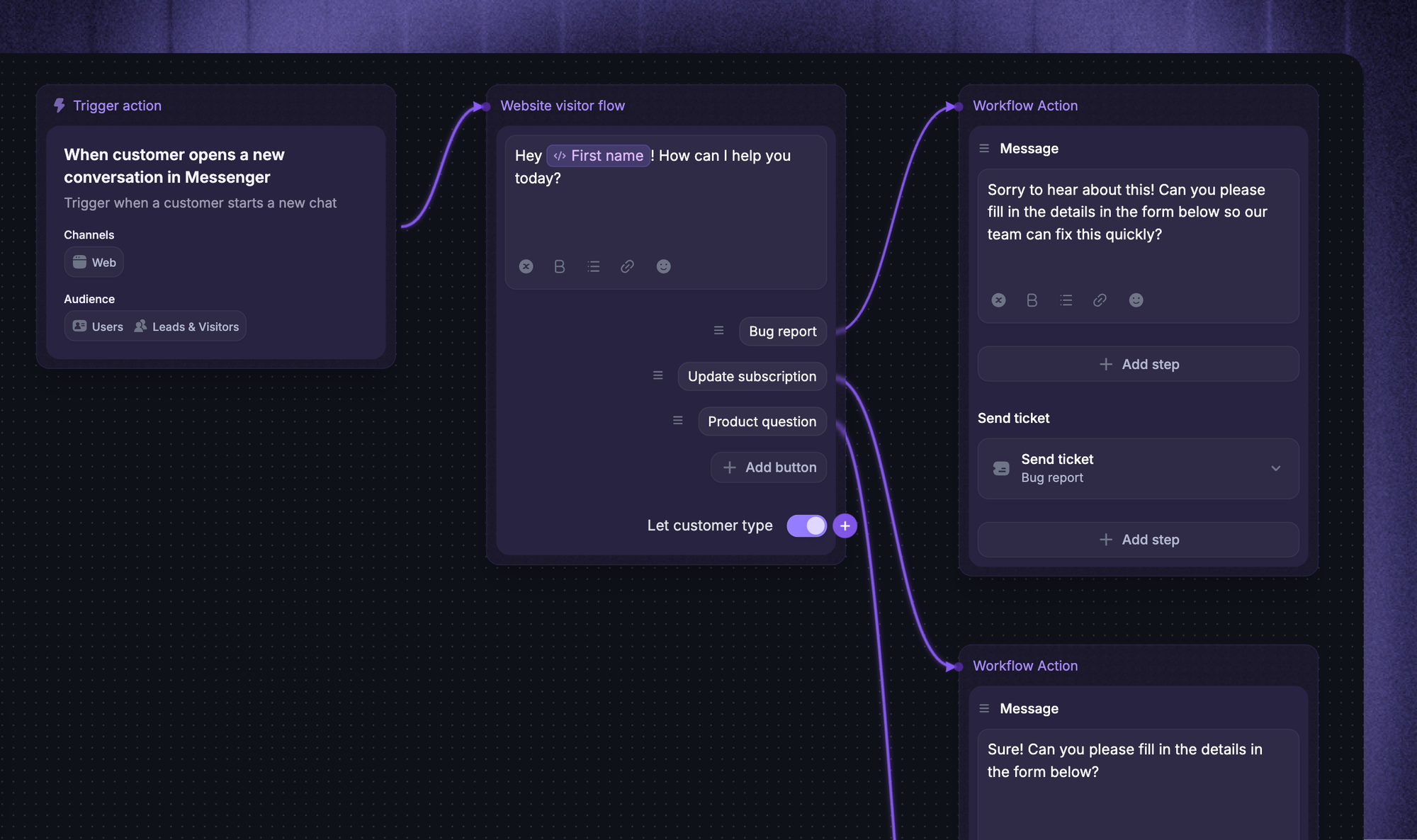
What makes it a good fit for the "start small, then expand" approach is that the chatbot sits next to your help center, feedback boards, and roadmap rather than in a separate tool. A question answered in chat can become a tracked feature request, and a fix you ship can close the loop with the customer who asked. There's a free plan with unlimited conversations, and AI resolutions are billed at $0.29 each, so the cost scales with outcomes rather than seats.
Conclusion
Chatbots have grown from a single FAQ widget into a tool that quietly runs work across support, sales, marketing, HR, and entire industries. The businesses that win with them don't chase every use case - they pick one high-volume, low-risk job, measure it, and build from there.
Featurebase is a modern AI customer support platform that lets you automate your most common support use cases with the Fibi AI Agent, manage every conversation from one omnichannel inbox, and deflect tickets with an AI-powered help center - all connected to your feedback and roadmap.
It comes with a Free plan, and the onboarding is quick with no credit card required, so there's no downside to trying it. 👇
✨ Automate your support with the fastest AI-enhanced Inbox today →
FAQs
What is the most common chatbot use case?
Customer support is the most common chatbot use case by a wide margin. Most businesses start by automating FAQ answers and ticket deflection, because those questions are high-volume, repetitive, and easy for a bot to handle. From there, teams usually expand into sales, marketing, or internal use cases.
What's the difference between a chatbot and an AI virtual assistant?
A chatbot is typically scoped to a specific context, like answering support questions on your website or app. A virtual assistant (think Siri or Alexa) is broader and more autonomous, handling a wide range of personal tasks across apps and devices. In practice the line is blurring, as modern AI chatbots take more autonomous actions than older bots ever could.
Will chatbots replace human support agents?
No. Chatbots are best at handling high volumes of repetitive questions and instant, 24/7 answers, but they aren't a substitute for human judgment. Complex, sensitive, or emotional situations still need a person, so the strongest setups use a bot as a first line that escalates those cases to your team.
How do you measure whether a chatbot use case is working?
Track a few core metrics: deflection or containment rate (how many conversations the bot resolves on its own), resolution time, escalation rate, and customer satisfaction (CSAT). If containment and CSAT are rising while resolution time falls, the use case is working. If escalations climb, the bot is likely giving wrong or unhelpful answers and needs tuning.
Which industries get the most value from chatbots?
Industries with high volumes of repetitive, predictable questions benefit most - ecommerce, banking and finance, healthcare, and travel lead the way. In each, customers ask the same things constantly (order status, balances, appointments, bookings), which is exactly what a chatbot handles well at scale.
Are AI chatbots expensive to set up?
Costs range widely, from free tools to enterprise contracts, so you don't need a big budget to start. Many modern platforms offer free plans and usage-based pricing instead of large upfront fees. Featurebase, for example, has a free plan with unlimited conversations and paid plans from $29/seat/month, with AI resolutions billed at $0.29 each - so you only pay when the bot actually resolves something.