Blog Customer ServiceFAQ chatbots: a practical guide to automating common customer questions
FAQ chatbots: a practical guide to automating common customer questions
An FAQ chatbot can answer up to 80% of repetitive customer questions instantly. Here's what an FAQ chatbot really is in 2026, the 4 types, what to look for, and how to build one this week.



Most "FAQ pages" are where customer questions go to die. People scroll, search, give up, and email your team anyway. Meanwhile, your support inbox fills with the same 30 questions on repeat.
An FAQ chatbot fixes that, but only if you pick the right kind. Old rule-based bots are part of the problem they were meant to solve. Modern FAQ chatbots, powered by AI and connected to your knowledge base, are a different category. They understand questions, deliver accurate answers, and hand off cleanly to a human agent when they should.
In this guide, I'll break down what an FAQ chatbot really is in 2026, the four types you'll come across, how to choose between an FAQ chatbot, an AI agent, and AI-powered help center search, plus the five steps to ship one this week. 👇
Key takeaways
- An FAQ chatbot is an automated assistant that answers your customers' frequently asked questions, usually pulling from a predefined knowledge base, a list of pre-written answers, or both.
- There are four main types of FAQ chatbot: rule-based, keyword-matching, NLP-based, and RAG-powered AI agents. In 2026, only the last two are worth your time.
- A good FAQ chatbot can deflect up to 80% of repetitive queries, freeing your support team for more complex requests that actually need a human.
- The best FAQ chatbots understand natural language, hand off cleanly to a human, work across messaging platforms, and answer in your customer's native language.
- ✨ Featurebase combines an AI-powered FAQ chatbot, an AI Help Center, and a unified inbox into one platform.

Resolve 70% of customer requests with AI
Automatically resolve customer issues & cut down support loads for your team
What is an FAQ chatbot?
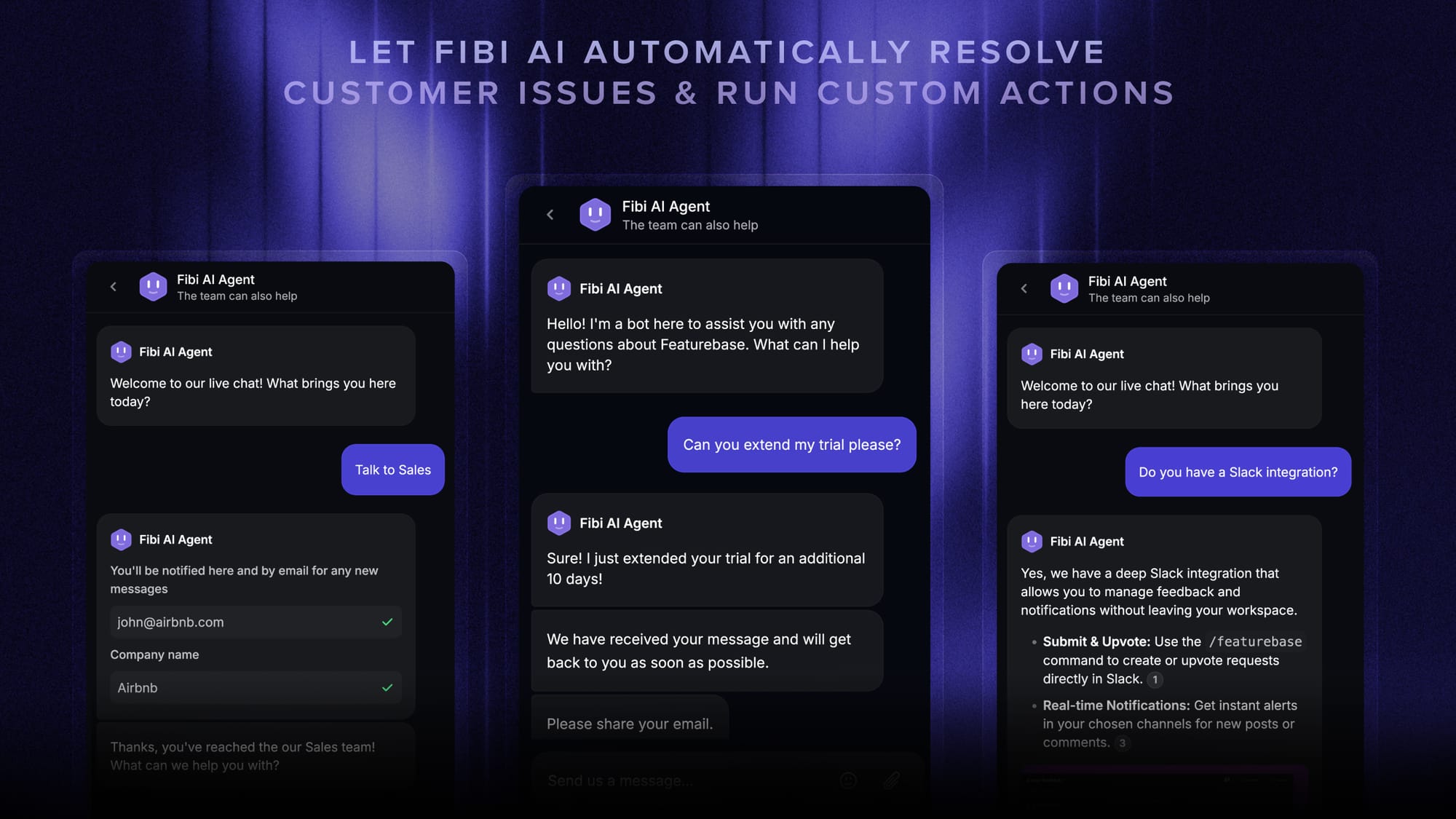
An FAQ chatbot is a virtual assistant that automatically answers your customers' frequently asked questions, using either a predefined knowledge base, pre-scripted answers, or AI that pulls from your existing help center and product docs. Instead of forcing visitors to scroll through static FAQ pages, the bot listens to a real question and returns the relevant answer in seconds.
Most FAQ bots live on your website or inside your app, but they also work over email, WhatsApp, Slack, Facebook Messenger, and pretty much any other messaging apps and communication channels where your customers talk to you. The point is the same everywhere: provide instant answers to the questions your support team gets every single day, without making someone wait or scroll.
Modern FAQ chatbots are also a lot smarter than their predecessors. They use natural language processing (NLP), machine learning, and (more recently) retrieval augmented generation (RAG) to understand user intent, hold dynamic conversations, and give context-aware responses that don't read like a robot. Better still, the best ones generate AI-powered responses on the fly instead of just retrieving canned text.
How an FAQ chatbot is different from a static FAQ page
A static FAQ page is a long list of questions. An FAQ chatbot is a conversation. That's the headline difference, but the practical gap is bigger than it sounds.
With an FAQ page, your customer has to know what to look for, then scroll, then read three other questions before they find theirs. With an FAQ chatbot, they just ask. The bot interprets the customer questions, finds the best match in its knowledge base, and returns a focused answer. If they need a follow-up, the bot keeps the conversation history and adjusts.
That's also why FAQ chatbots tend to outperform FAQ pages on engagement metrics: customers actually use them.
The 4 types of FAQ chatbots (and which one you actually need)
Not every FAQ chatbot works the same way. The category spans everything from rigid rule-based systems to truly advanced bots that use generative AI to understand user needs in real time. The differences matter because they shape how flexible your bot is, how many questions it can handle, and how often it ends up making customers angry instead of helping them.
1. Rule-based / decision-tree chatbots
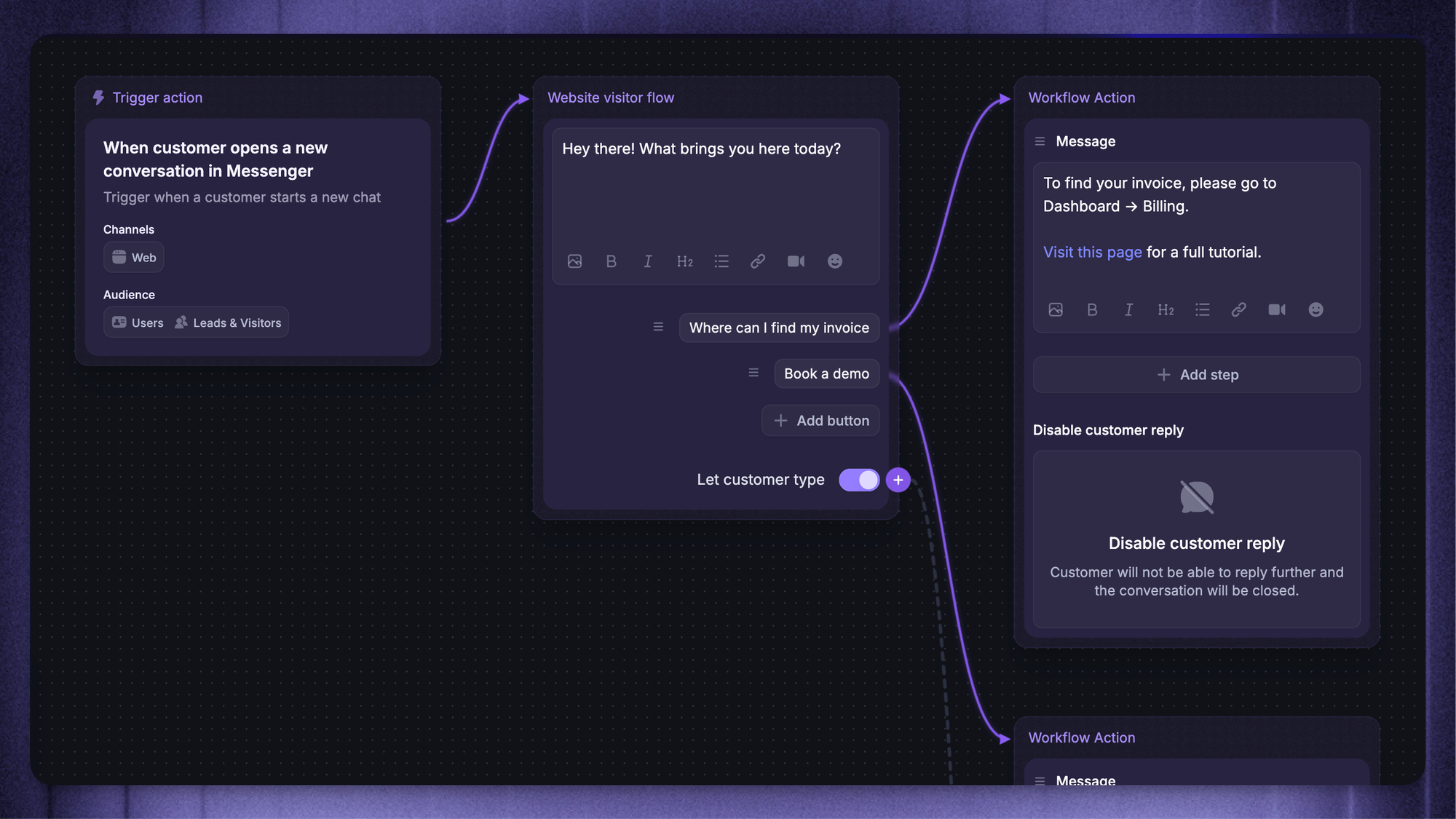
A rule-based chatbot follows a strict decision tree. The user picks from a menu of options ("Track an order", "Update my address", "Talk to a human"), and the bot routes them to a pre-written answer. There's no understanding involved, and there's no flexibility either.
These were the original FAQ bots, and they still show up everywhere. They're fast to set up, easy to maintain, and reliable for very narrow use cases like "what are your opening hours?". But the moment a user types a question that doesn't match a button, the experience falls apart. Skip rule-based chatbots unless your FAQ database is tiny and your customers are unusually patient.
2. Keyword-matching chatbots
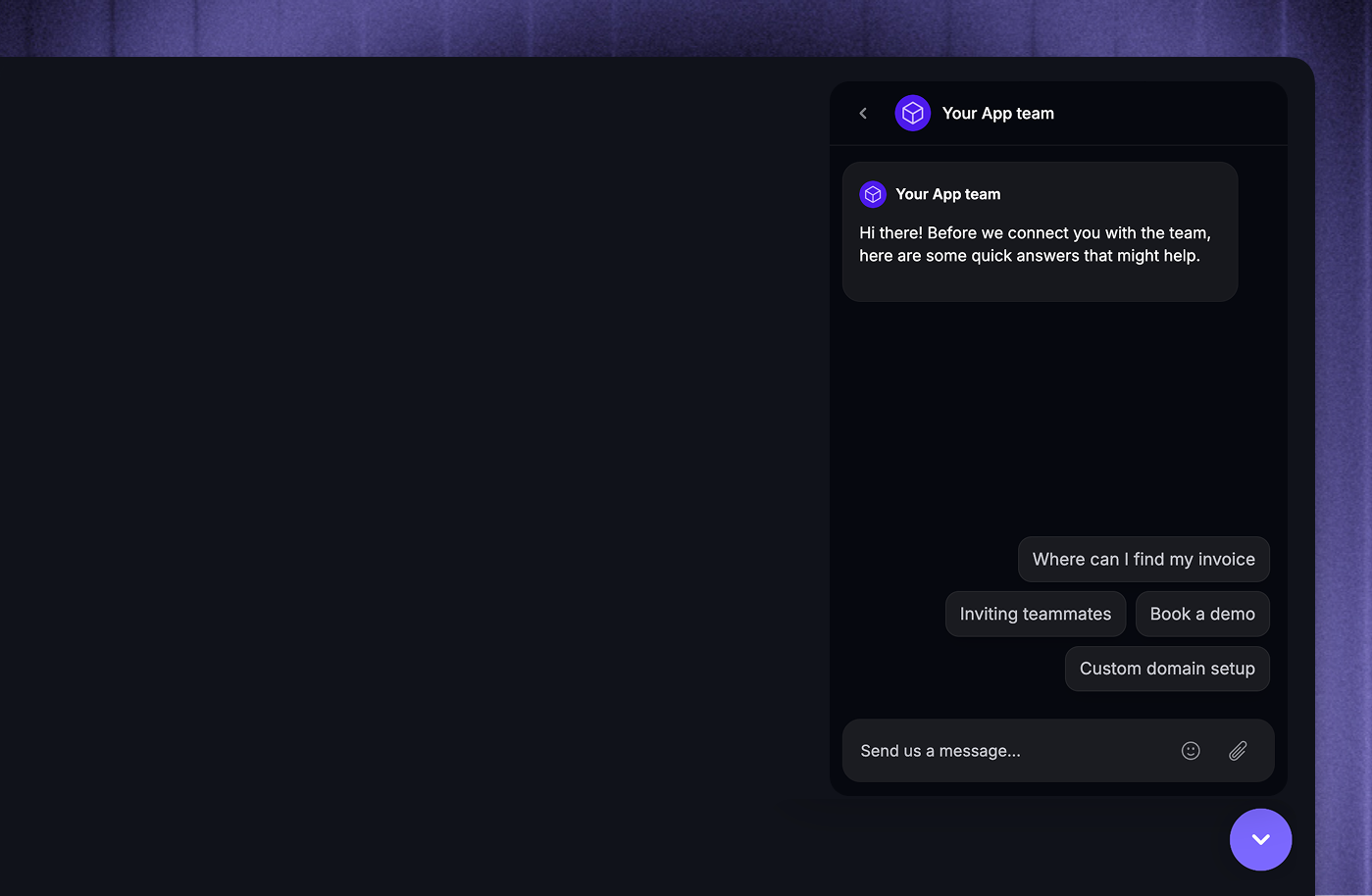
Keyword chatbots scan the user's message for specific keywords ("refund", "shipping", "password"), then return the answer linked to that keyword. They're slightly more flexible than rule-based systems because users can type instead of clicking through menus.
The problem: they don't understand context. If a customer types "I want to return this and get my money back", the bot might catch "return" and miss "refund", or vice versa. Two semantically identical questions can produce wildly different answers. For anything beyond the most basic user queries, keyword bots produce more frustration than they prevent.
3. NLP / conversational AI chatbots
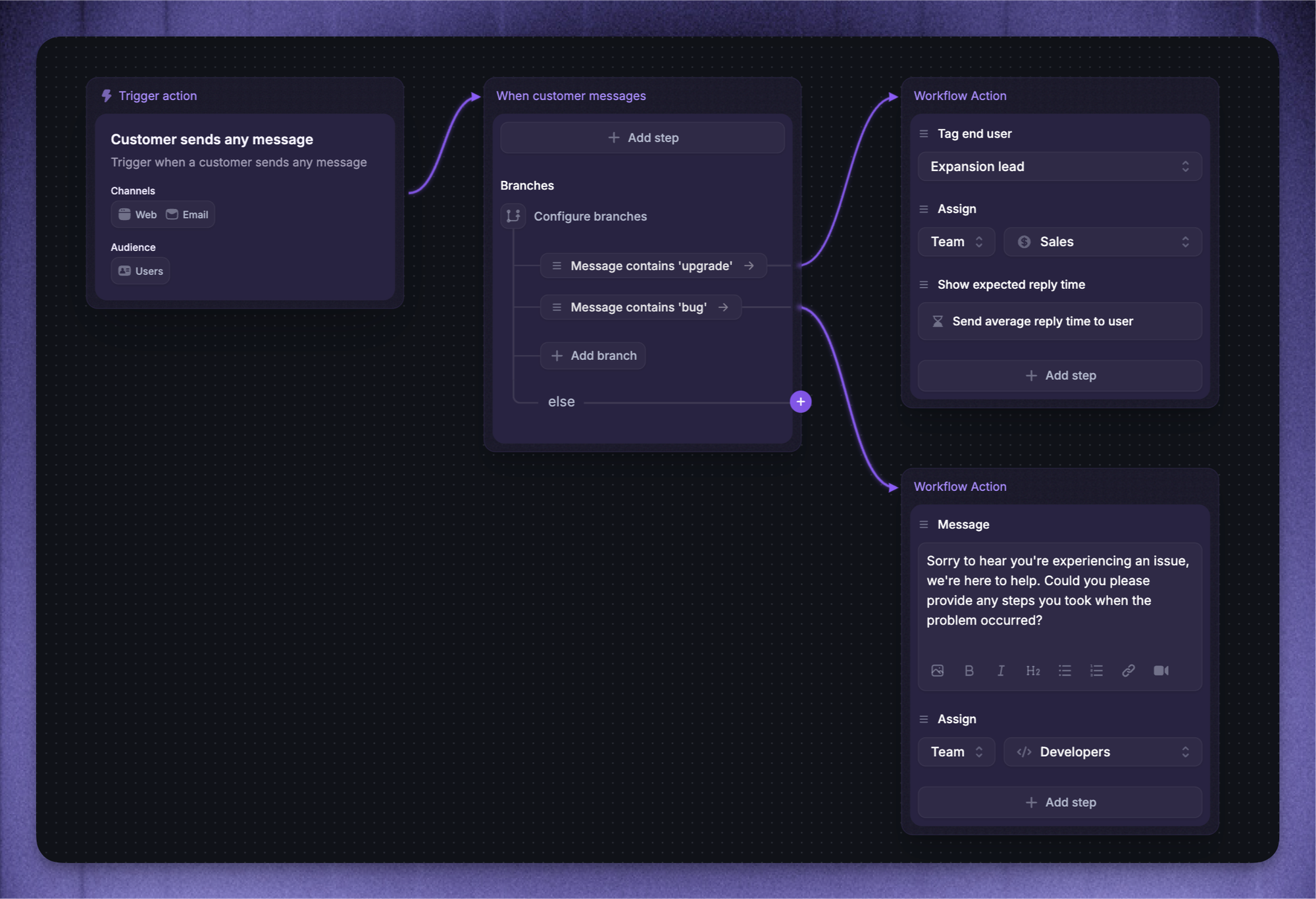
NLP chatbots use natural language processing and machine learning to interpret user intent, not just specific keywords. They can handle complex conversations, ask clarifying questions, and understand variations in phrasing. "How long does shipping take?" and "When will my order arrive?" map to the same answer because the bot understands meaning, not just words.
This is where modern AI chatbots start to feel useful. NLP-based FAQ chatbots can handle a much wider range of user queries, learn from conversation history and past interactions, and deliver more accurate responses over time.
4. RAG-powered AI agents (the modern default)
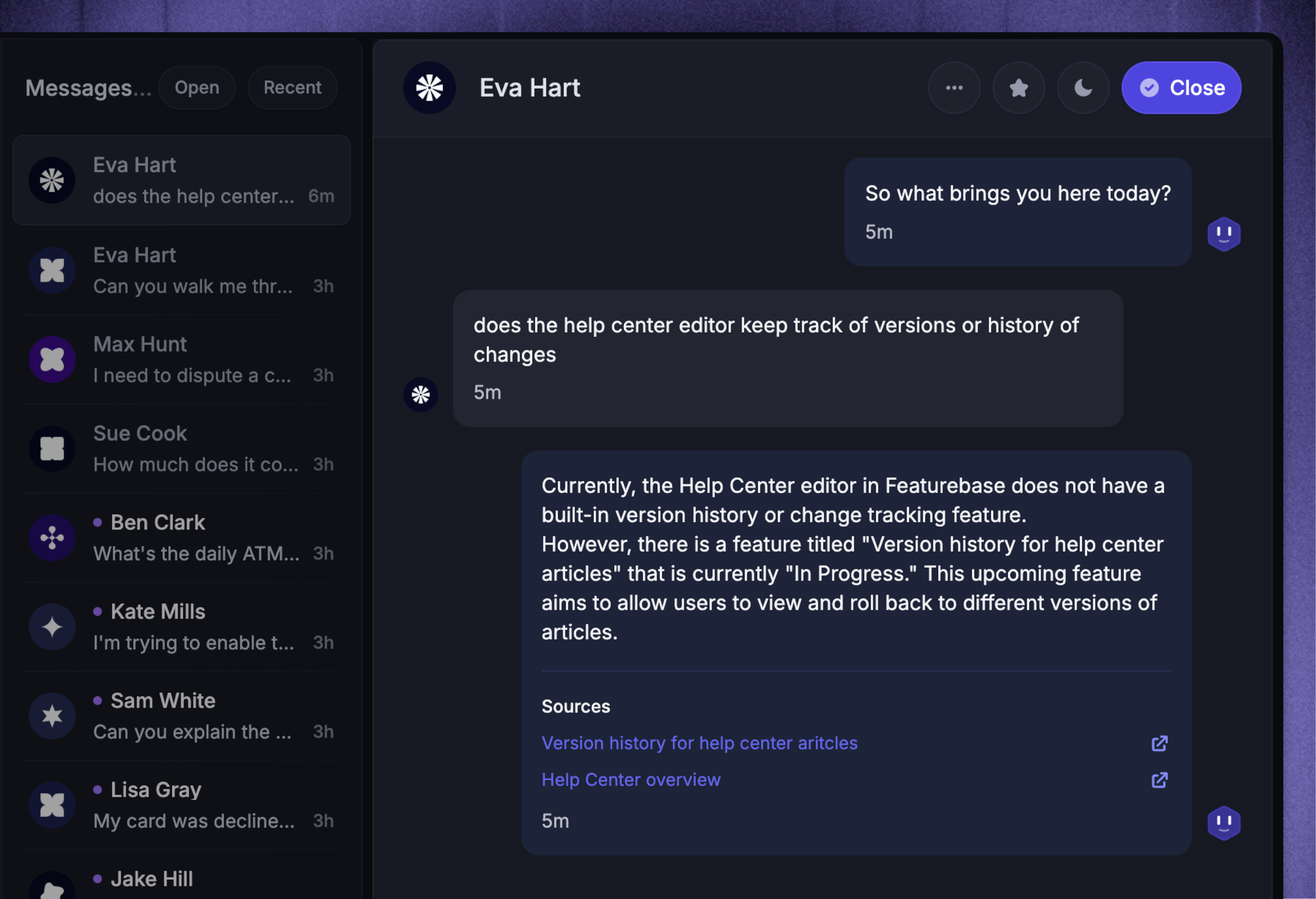
Retrieval augmented generation (RAG) is the most important shift in FAQ chatbots since natural language processing. A RAG-powered AI agent combines a large language model with a vector search over your knowledge base.
The result: it can answer complex questions with natural, dynamic conversations, but the answers stay grounded in your real product docs instead of being hallucinated.
That last part is what separates a useful AI agent from a liability. A pure generative AI can confidently invent product features that don't exist. A RAG-powered FAQ chatbot can only answer based on the content you've given it, which is exactly what you want when an AI assistant is speaking on behalf of your brand.
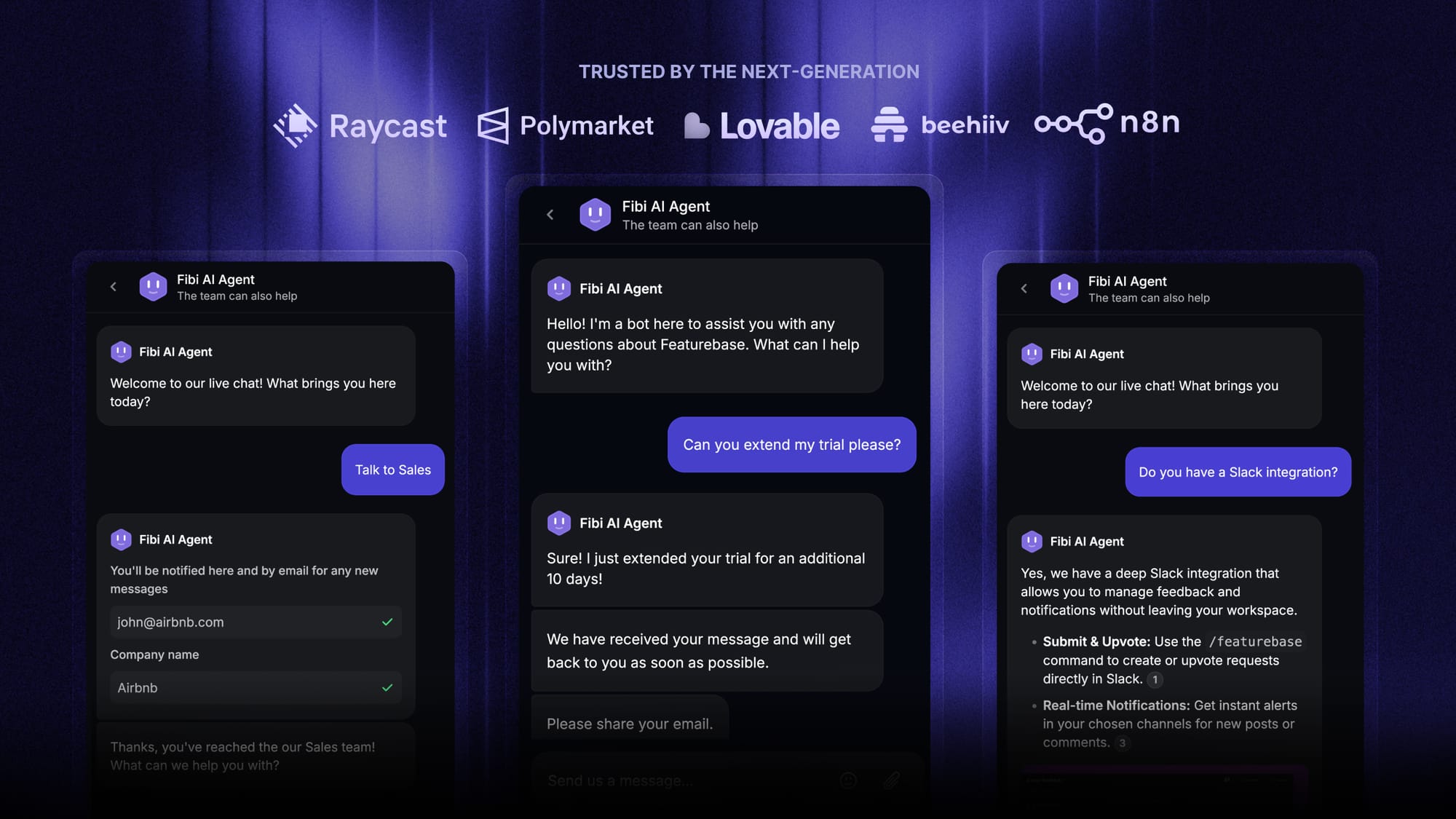
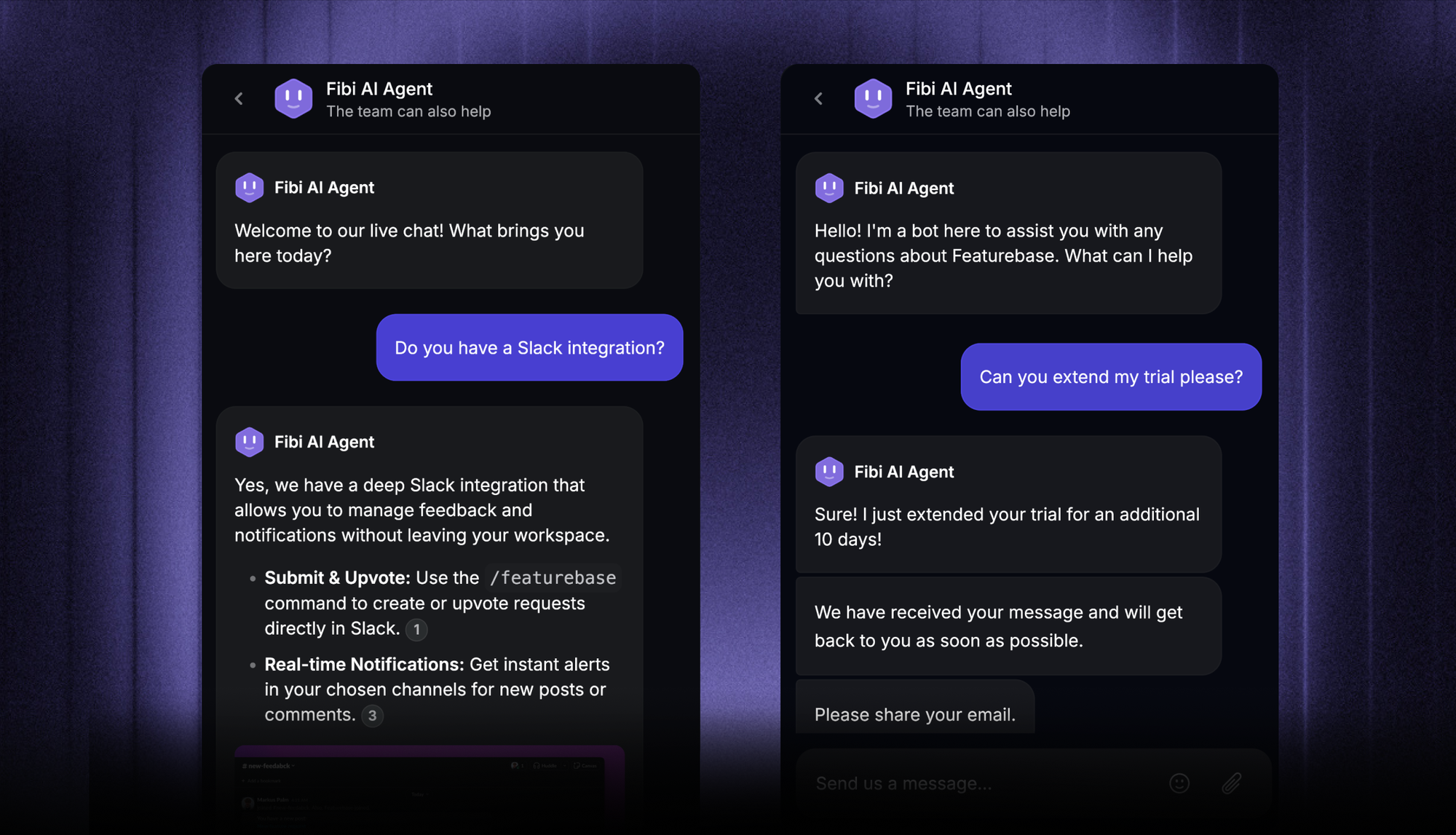
Featurebase's Fibi AI Agent is one example. Fibi pulls from your help center articles, custom answers, and even external websites to deliver accurate, context-aware responses to customer questions, and runs custom actions like extending a trial or issuing a refund when needed.
Why use an FAQ chatbot? Benefits at a glance
The case for FAQ chatbots is well established, but the size of the benefit usually surprises people. A few of the most consistent benefits of FAQ chatbots:
- They cut your team's repetitive workload.
Around 80% of customer support tickets come from just 20% of FAQs. Push that long tail into an FAQ chatbot and your customer service team gets to focus on more complex requests that actually need human judgment, like billing disputes, churn risks, or escalations. - They deliver instant answers, 24/7.
Customers don't care that your team is asleep. According to HubSpot, 82% of consumers rate immediate response time as important or very important. An FAQ chatbot answers user questions in seconds, every day, including weekends and holidays. - They drive customer satisfaction up.
Faster resolutions mean happier customers, and higher user satisfaction. Salesforce found that 89% of consumers are more likely to make another purchase after a positive customer service experience. Quick and accurate responses to common queries are exactly that experience. - They keep answers consistent.
A chatbot doesn't have off days. Whether it's question number one or question number five thousand, the FAQ chatbot delivers consistent answers, with the same accuracy, regardless of who's asking. No more "well, that's not what the last agent told me" tickets. - They cut support costs.
IBM has reported AI chatbots can reduce support costs by up to 30%. Some businesses see calls drop by 20% to 80% after deploying an FAQ chatbot. That's serious headroom for a growing team that doesn't want to hire reactively. - They turn support into a data source.
Every conversation your FAQ bot handles generates valuable insights. You learn which customer inquiries come up most often, where your docs fall short, and what topics confuse customers. Those engagement metrics and pieces of user feedback feed product, marketing, and content decisions over time. Your sales team can also use the same customer interactions to spot upsell signals and follow up with personalized messages.
FAQ chatbot vs AI agent vs help center search: what's the difference?
These three categories overlap so much that you'll see vendors use the terms interchangeably. They shouldn't. Here's the practical breakdown.
| Tool | What it does | Best for | Limit |
|---|---|---|---|
| FAQ chatbot | Answers your most common customer questions from a predefined knowledge base | Deflecting repetitive support volume on a website or in-app messenger | Doesn't take actions, just answers |
| AI agent | Answers complex questions and runs custom actions (refunds, trial extensions, account updates) | Replacing tier-1 support, not just deflecting tickets | Needs setup time + an action layer |
| Help center search (AI-powered) | Surfaces help articles directly to users searching your docs | Self-serve support before a customer ever opens a chat | Doesn't have a conversation, just returns articles |
The clean way to think about it: AI-powered help center search is your first line of defense for self-serve, the FAQ chatbot is your second line for conversational answers, and the AI agent is your third for more complex queries that need actions, not just answers.
Most modern support platforms let you run all three from the same knowledge source, so the customer gets the right experience whether they search, chat, or escalate. For a deeper look at how AI is reshaping this stack, see our guide on AI help desk software.
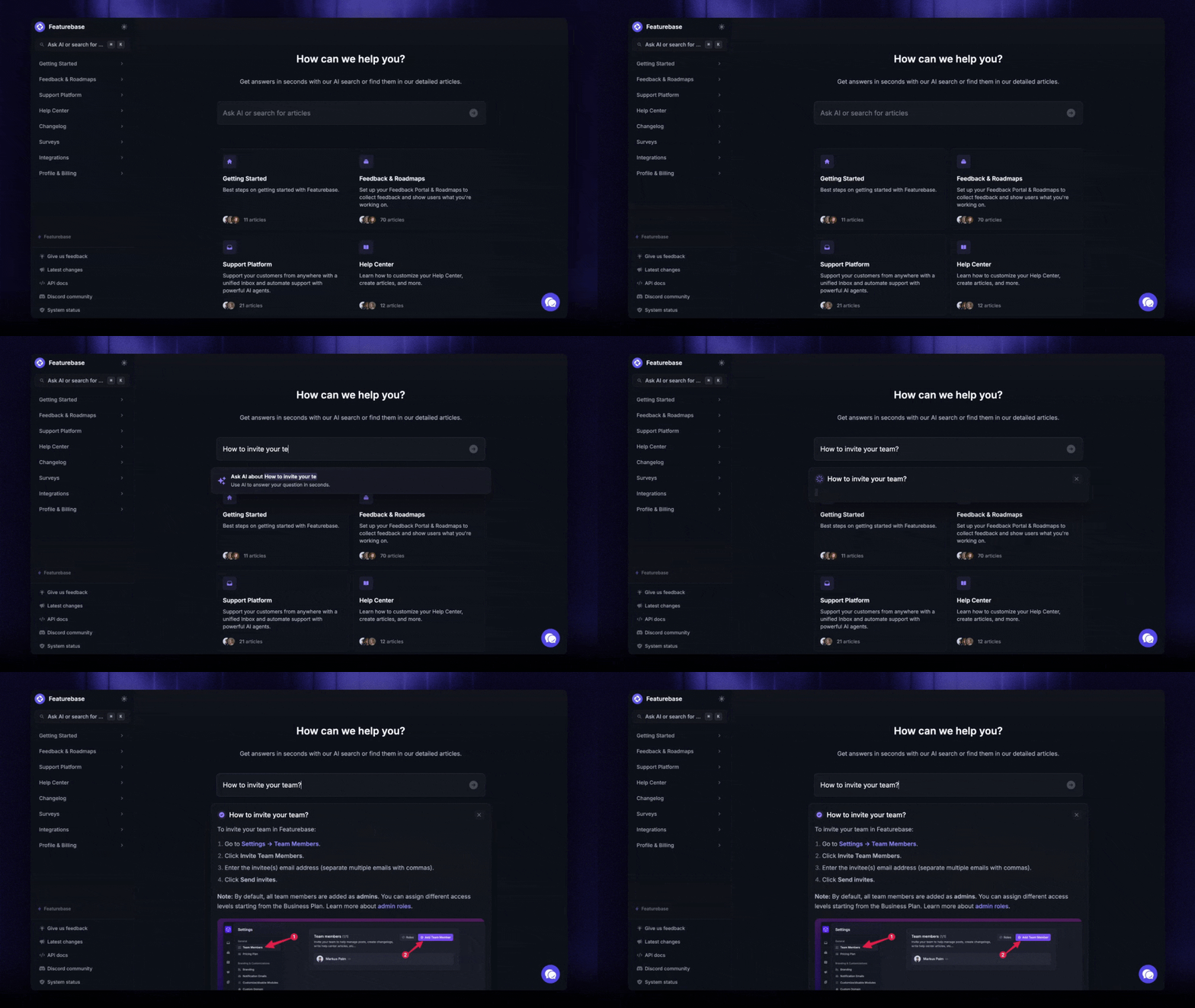
Featurebase, for example, runs Fibi (FAQ chatbot and AI agent) and the AI-powered Help Center off the same set of articles, so updating an answer once updates it everywhere.
What to look for in a good FAQ chatbot
Picking a chatbot platform isn't about who has the most features. It's about which features actually move the needle on resolution rate and customer satisfaction. Here's what matters in 2026.
Connects to your real knowledge base
A great FAQ chatbot doesn't need you to rewrite all your content from scratch. It connects to your existing knowledge base, help center, product docs, and even external websites, then uses RAG to pull accurate answers on demand. The fewer places you have to maintain the same FAQ data, the better. (We've written more about pairing chatbots with an AI knowledge base if you want to go deeper on this.)
Featurebase trains Fibi on your help center articles by default, but you can also add custom training content, point to external websites, or just type in custom FAQs directly. The bot uses all of it naturally, so you can fill in answers for questions that haven't made it into your help center yet.
Understands natural language
If your chatbot only answers questions phrased exactly the way you wrote them, it's not really an FAQ chatbot, it's a search bar with extra steps. Modern FAQ bots use natural language processing to interpret intent, so "what's your return policy?" and "can I send this back?" both map to the same answer.
Hands off cleanly to a human
Even the best AI FAQ chatbot will run into questions it can't resolve. Complex queries, edge cases, emotional complaints, or anything that needs context the bot doesn't have. A good FAQ chatbot recognizes those moments and routes the conversation to a human agent with the full conversation history attached, so the customer doesn't have to repeat themselves.
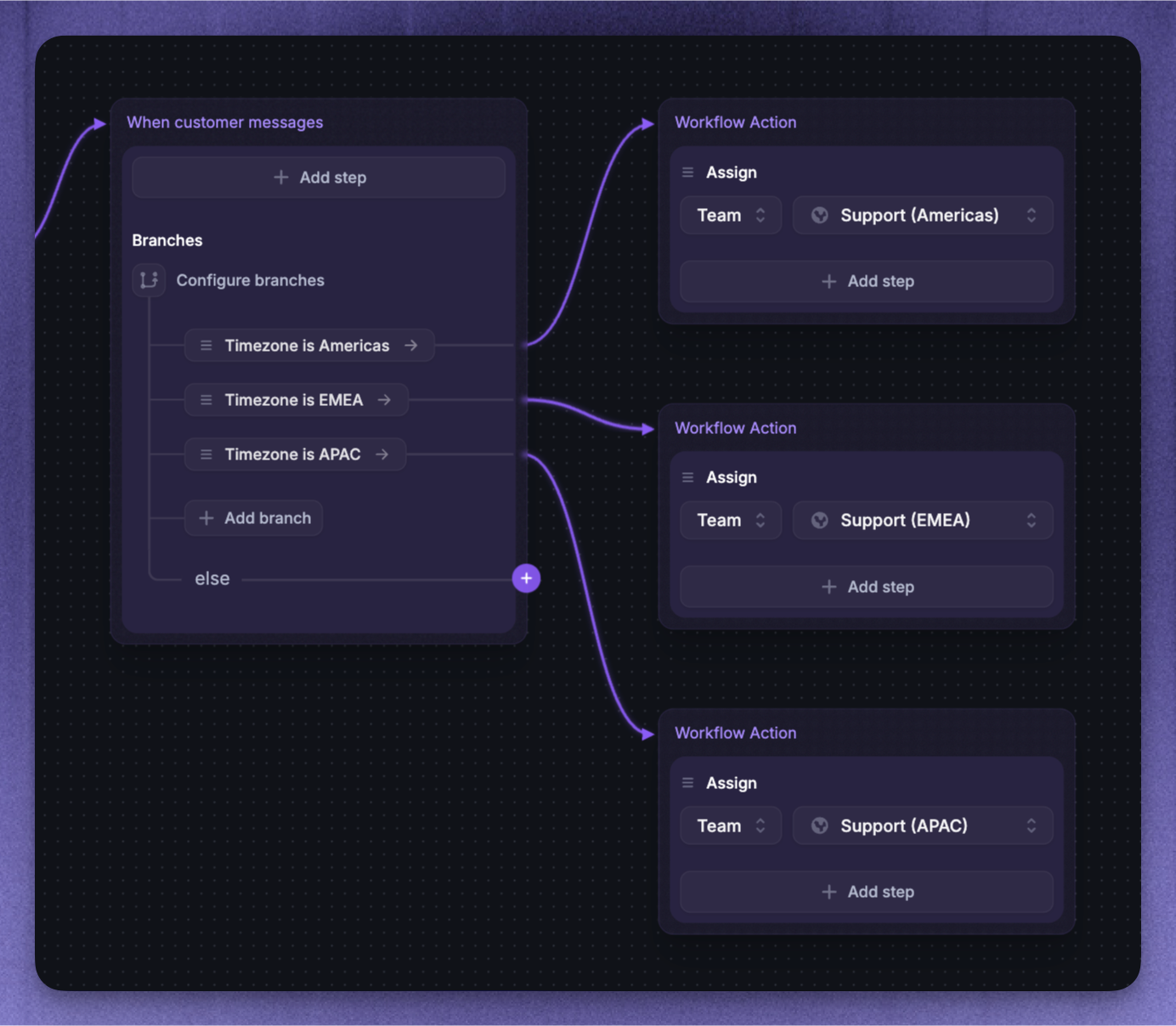
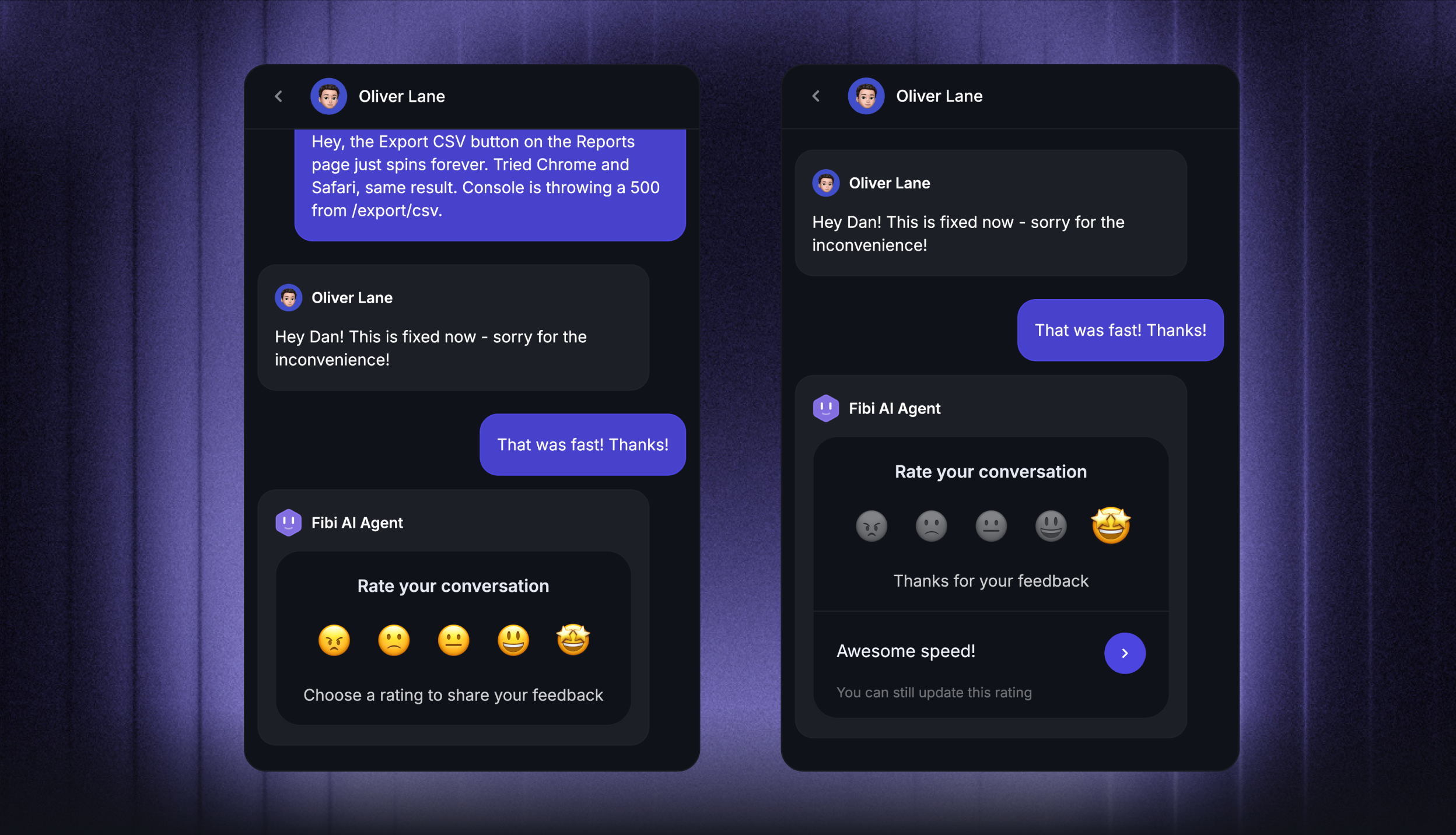
In Featurebase, Workflows let you set up routing logic in a drag-and-drop builder: if Fibi can't resolve the issue, send it to a specific team, tag it, set priority, and attach the relevant customer data.
Works across channels
Customers don't just message you on your website. They use email, WhatsApp, Facebook Messenger, Slack, and in-app messengers. Your FAQ chatbot should give consistent answers across every channel they show up on. Multi-channel deployment is non-negotiable in 2026, and your bot's AI-powered responses should look identical whether the conversation lives in a website widget or one of the messaging apps your customers prefer.
Speaks your customer's language
If you have customers in more than one country, your FAQ chatbot needs to answer in their native language. Manually translating every FAQ across ten languages is a maintenance nightmare. The right platform handles this automatically.
Tracks the right metrics
A pretty chatbot interface tells you nothing. What matters is resolution rate, escalation rate, time-to-resolution, and customer satisfaction. The platform should let you review conversations regularly so you can spot the questions your FAQ chatbot is missing, and update your knowledge base accordingly.
How to build an FAQ chatbot in 5 steps
Building your own FAQ chatbot used to take months and a small army of developers. Today, you can ship one in an afternoon if you make the right calls early. Here's the practical path.
Step 1: Map your top 20 to 50 customer questions
Don't try to cover every possible question on day one. Pull your support inbox, live chat logs, and FAQ page analytics, then rank the questions by volume. The top 50 will usually cover 80% of incoming customer inquiries.
Start with those. You'll get fast wins and a clear sense of where the bot needs more training before you expand the scope.
Step 2: Pick a chatbot platform
Skip rule-based and pure keyword chatbots unless you have an unusual reason to use one. For everything else, look at NLP or RAG-powered chatbot platforms that handle natural language, support multi-channel deployment, and integrate with your knowledge base. We recommend Featurebase, but you can check out other top options from this blog.
A few things to check during the initial setup evaluation: ease of use (look for no-code builders), integration channels (your website, in-app messenger, automated text message, email, WhatsApp, etc.), human handover behavior, and the ability to use both your help center and custom sources for training. Bonus points for AI-powered responses with adjustable tone and retrieval accuracy controls.
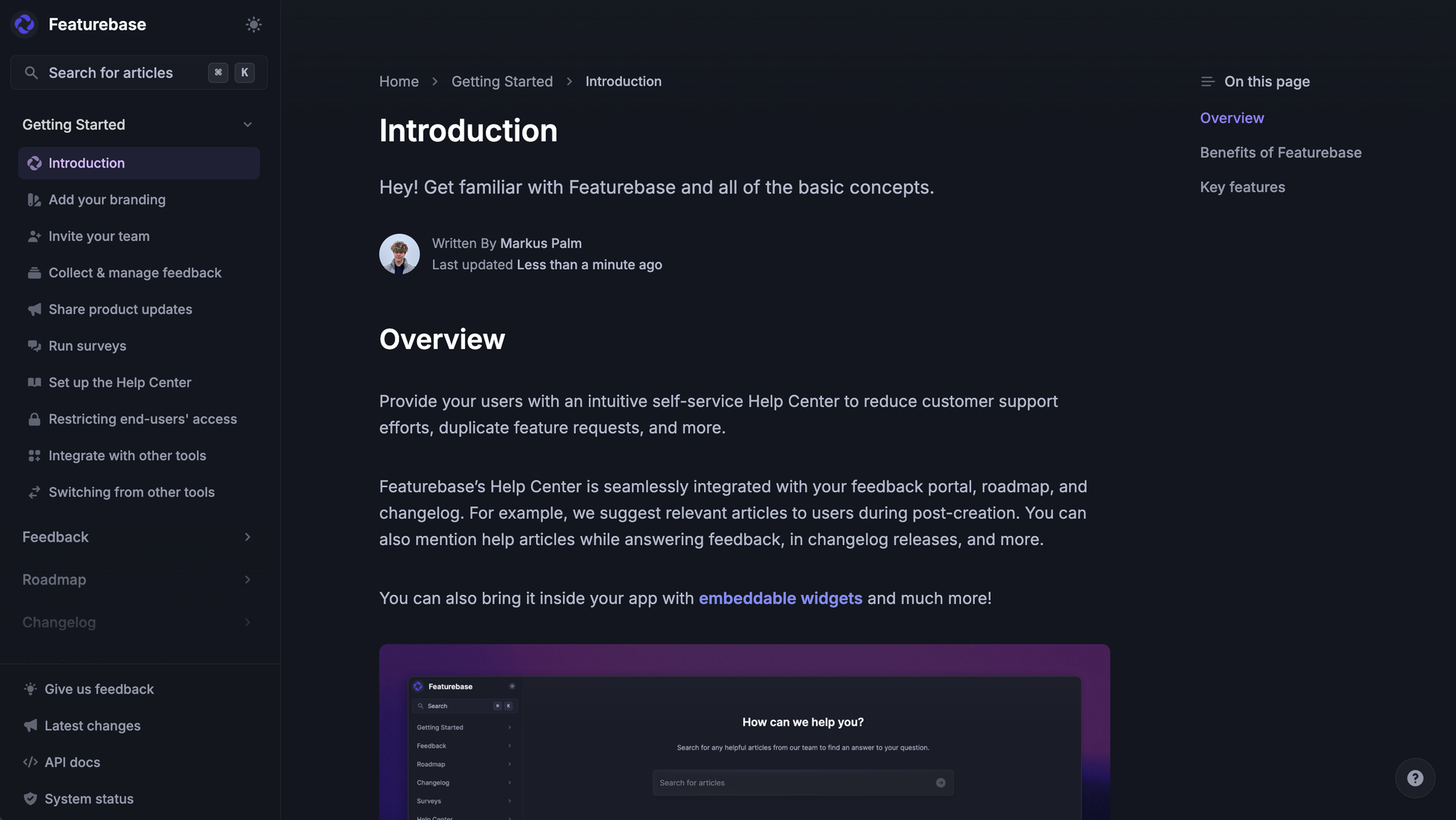
Step 3: Connect a knowledge source
This is where most FAQ chatbot projects succeed or fail. A bot is only as good as the FAQ data behind it.
If you already have a help center, connect it directly. If not, this is a good moment to build one, because you'll want to maintain answers in one place anyway.
With Featurebase, this is straightforward: write your articles in the Help Center, and Fibi automatically uses them to answer common queries. You can also supplement with typed FAQs or external websites if your docs aren't fully ready yet.
Step 4: Set up a clean human handoff
The fastest way to ruin an FAQ chatbot is to trap customers in it. Build a clear escape route. If the bot misses a question twice, or if the customer asks for a human, route the conversation to a real human agent with full context attached.
In Featurebase, you can build this in Workflows: Fibi answers first, and if confidence drops below a threshold or the user asks to talk to a person, the conversation routes to the right team in your unified inbox.
Step 5: Launch, measure, and iterate
Once your FAQ chatbot is live, watch the conversation history weekly. Review conversations and look for: customer questions Fibi escalated to humans that should have been answered automatically, answers the bot gave that customers disliked, and patterns that suggest new FAQs to add.
Update your knowledge base based on what you find. The best FAQ chatbots get noticeably better over the first 60 to 90 days, mostly because their training data gets better. A good FAQ chatbot is a living system, not a deploy-and-forget project.
4 real-world FAQ chatbot examples
FAQ chatbots show up in every industry, but the use case varies widely depending on what your customers ask about. A few practical examples. 👇
SaaS: self-serve "how do I..." questions
Most SaaS support tickets are "how do I configure X" or "where do I find Y". An FAQ chatbot trained on your help center can resolve almost all of them without involving a human, and it can do it inside your product via an embedded messenger so users never leave their workflow.
Teams using Featurebase's Fibi paired with the in-app live chat see Fibi resolve over 70% of "how do I" questions before they reach a human agent, which also smooths out the onboarding process for new users.
Real complex issues (a corrupted account, a tricky billing edge case) still go to a human, where they belong. For more concrete examples across industries, see our roundup of chatbot examples.
Ecommerce: order status, returns, sizing
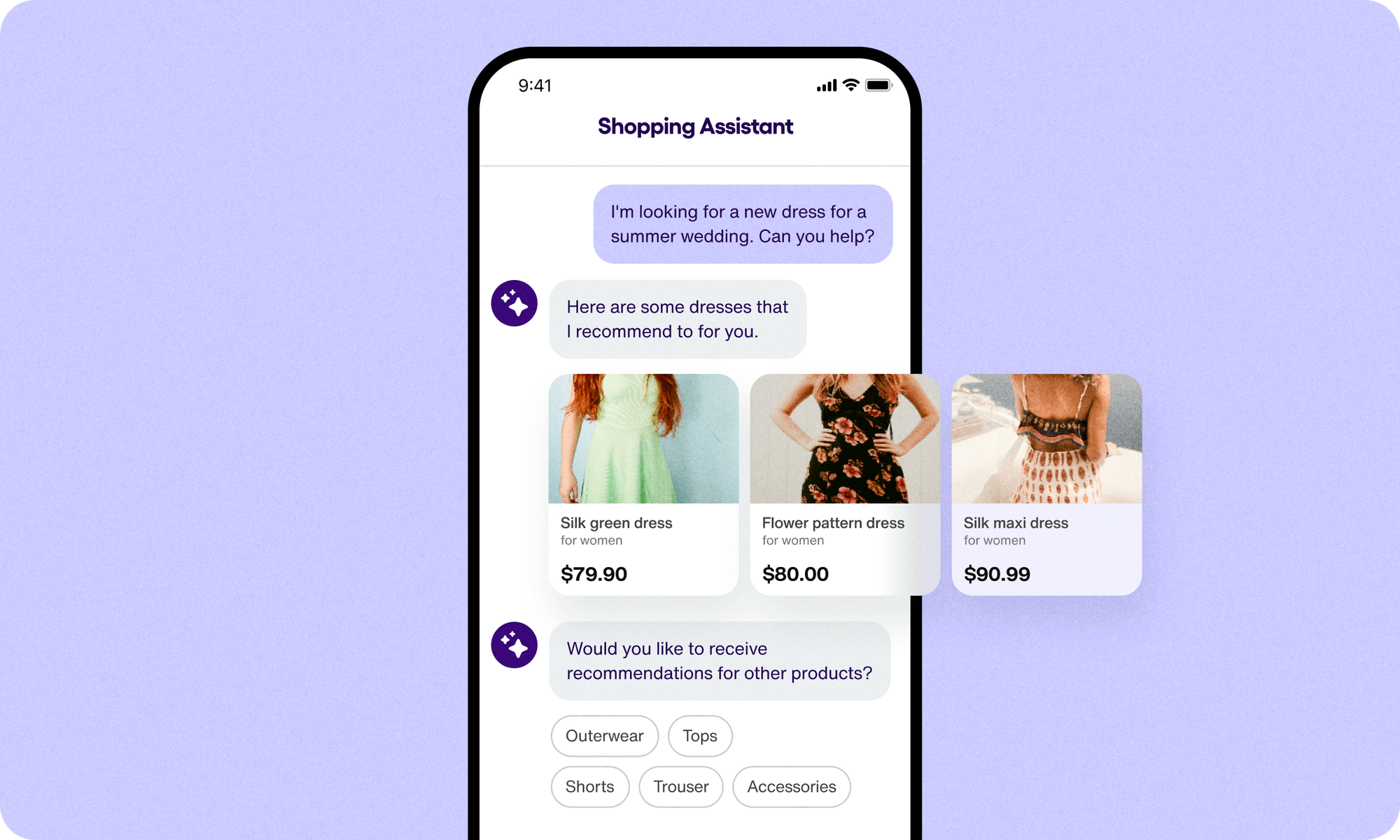
Ecommerce FAQ chatbots focus on order tracking, return windows, sizing questions, and product details.
The right bot also pulls in real-time customer data, so when a customer asks "where's my order?", the answer is specific to their order, not a generic shipping policy.
Banking & fintech: account, OTP, KYC
In banking, FAQ chatbots handle questions about OTP validity, account opening, KYC documents, transaction history, and card services. Accuracy matters more here than in any other vertical, because a wrong answer can mean a compliance issue.
RAG-powered FAQ chatbots are particularly well-suited for finance because answers are tied to documented policies rather than generated freestyle.
Internal IT and HR: employee policy questions
Not every FAQ chatbot is customer-facing. Internal teams use FAQ bots for IT support ("how do I reset my VPN?"), HR ("how much PTO do I have left?"), and onboarding ("where do I find our brand guidelines?").
These cut a huge amount of repetitive load off internal helpdesks, especially in distributed teams.
Common FAQ chatbot mistakes to avoid
Most FAQ chatbots underperform for the same handful of reasons. Watch out for these.
- Trapping users in the bot.
If a customer wants to talk to a human, your FAQ chatbot should hand off immediately. Forcing them through five more menus just to escalate is the fastest way to lose trust. - Writing answers like a legal document.
Your FAQ data should sound like a helpful colleague, not a policy doc. Short, direct, action-oriented. If the answer to "how do I reset my password?" is four paragraphs, rewrite it. - Skipping the knowledge base refresh.
Your product changes. Your pricing changes. Your policies change. An FAQ chatbot working from last year's content is creating support tickets, not deflecting them. Set a recurring review. - Treating the chatbot as set-and-forget.
The conversation history of your FAQ chatbot is a goldmine of user feedback, missed answers, and new edge cases. Review conversations monthly at minimum. The best FAQ chatbots improve continuously, and that improvement comes from human attention. - Measuring page views instead of resolution rate.
What matters is whether the bot is actually resolving customer inquiries, not how many people opened a chat window. Track resolution rate, escalation rate, time-to-resolution, and CSAT. - Forgetting to guide users into the bot.
If customers don't know your FAQ chatbot exists, none of the above matters. Surface it where support conversations naturally start: your help center, your contact page, your in-app messenger.
✨ Featurebase: an AI-powered FAQ chatbot built for product-led SaaS
If you're shopping for an FAQ chatbot that's modern, easy to set up, and built to grow with your support team, Featurebase is worth a look. 👋
Featurebase ✨
Featurebase is a modern AI customer support platform for product-led SaaS, with an FAQ chatbot at its core. Fibi, our built-in AI agent, answers your customers' frequently asked questions instantly using your help center articles, custom training content, and even external websites. When a question is too complex, Fibi hands off cleanly to a human agent with the full conversation history intact. Featurebase is loved by thousands of support teams from companies like Lovable, Raycast, and n8n. 💫
Top features:
- Fibi AI Agent - Resolve customer issues on autopilot & run custom actions like trial extensions and refunds
- Omnichannel inbox – Manage live chat, email, and Slack conversations from one AI-powered view
- Help center with AI search – Provide instant, multilingual self-serve answers
- Workflows & automations – Auto-assign tickets, route conversations, collect customer data, and more
- AI Copilot – Help your agents answer customers faster with AI Copilot that uses your internal knowledge
- Multi-brand support – Manage multiple Help Centers and Live chats from a single workspace
- Automatic AI translations – Automatically translate all messages and help articles to your customers native language
- Service Level Agreements – Track SLAs to make sure your team responds to customers on time, every time
- Mobile app – Respond to customers, receive notifications, and unblock users on the go
- Integrations – Connects with Slack, Linear, Jira, HubSpot, and more
Pricing: Free plan available with unlimited conversations. Paid plans start at $29/seat/month with $0.29 per AI resolution.
Featurebase covers all the basic support features that legacy platforms do, but with a much more modern approach. It comes with AI automations, a mobile app, and multiple channels (email, live chat, Slack, etc.).
Resolve 70% of customer requests with AI
Automatically resolve customer issues & cut down support loads for your team
Conclusion
In 2026, an FAQ chatbot is the difference between a support team that drowns in repetitive questions and a support team that gets to focus on the work that actually moves the business forward. The technology has matured, the initial setup is no longer a nightmare, and there's no good reason to keep losing hours every week to the same 30 customer inquiries.
Featurebase is a modern AI customer support platform with an FAQ chatbot, AI agent, AI-powered help center, and unified inbox all in one place. Instead of stitching together 5 different tools, you get one platform that handles everything from your customers' first FAQ to a full support escalation.
It comes with a Free plan, unlimited conversations, and onboarding takes minutes, so there's no downside to trying it. 👇
✨ Automate your support with the fastest AI-enhanced Inbox today →