Blog Customer ServiceHR Help Desk Guide: Features, Workflows, and Tips for HR Teams in 2026
HR Help Desk Guide: Features, Workflows, and Tips for HR Teams in 2026
An HR help desk is not just another piece of software. Done well, it gives HR teams a clearer way to manage requests, improve self-service, and reduce manual work. This guide covers the features, workflows, and tools that matter most.



When the HR team handles support through scattered inboxes, chat messages, and spreadsheets, things break down fast. Requests get buried, repetitive questions pile up, and HR spends too much time on admin work.
An HR help desk can fix that by giving teams a more structured way to manage support. But the tool itself is not the solution. What matters is how well it fits your workflows, service model, and employee needs.
Key takeaways:
- An HR help desk will not fix broken HR processes. If your underlying HR workflows are messy, new desk software will just make that mess easier to track.
- Self-service should handle simple employee inquiries, not sensitive or high-context issues. A knowledge base is great for policy questions, onboarding steps, and routine HR help, but it should not replace human judgment.
- Automation is useful for repetitive work, but too much of it can make employee support feel cold and confusing. The goal is to remove admin work, not make HR service harder to trust.
- The best HR help desk software is not the one with the most features. It is the one that fits your team’s size, support volume, privacy needs, and overall HR service delivery model.
- If your HR team is still answering the same questions manually every week, start with a better knowledge base and a few simple workflows before investing in a more complex system. Tools like Featurebase✨ are often a good fit for that first step.
- Faster responses matter, but consistency matters more. A quick answer is not helpful if it is incomplete, unclear, or wrong.
- A good HR help desk solution should reduce HR workload, improve the employee experience, and create more room for strategic work - not just give the team another tool to manage.
What is an HR help desk?
An HR help desk is a centralized system or a form of internal customer service for handling employee inquiries and internal HR requests. It gives the HR team a single place to manage support, rather than juggling email threads, chat messages, and scattered documents.
At a basic level, the job of an HR help desk is simple: make HR services easier to access, track, and scale. Employees know where to go for help, and HR has a clearer way to handle requests consistently.
Most HR help desk software includes ticketing, self-service, automation, and reporting. But the real value is not the features. It is giving HR a cleaner process for answering questions, reducing noise, and supporting employees without creating more manual work.
Why HR teams need a help desk
Most HR teams do not start with a formal support system. They start with email, chat, and whatever process seems good enough at the time.
That usually works for a while. But as the company grows, support gets harder to manage. More employees means more questions, more follow-ups, and more room for things to slip through the cracks.
That creates three problems fast:
- Employees wait too long for answers.
- The HR team gets stuck doing the same repetitive work.
- HR managers have no clear way to track what is coming in, what is getting delayed, or where the real pressure is.
A good HR help desk addresses that by providing the team with structure. It makes HR service delivery more consistent, reduces manual work, and creates more room for higher-value work. That matters because HR should not spend its time buried in admin when it could be improving the employee experience and supporting the business more strategically.
How the HR help desk process works
A good HR help desk process should be easy to follow for both employees and the HR team. The goal is not to add more process. It is to make HR requests easier to submit, route, and resolve.
| Step | What happens | Why it matters |
|---|---|---|
| 1. Request comes in | An employee submits a question through email, chat, a form, or a help portal. | This gives employees a clear way to ask for HR help instead of relying on scattered messages. |
| 2. Request gets categorized | The system tags the request by topic, urgency, or owner. | This helps the HR team route work faster and keep similar employee inquiries organized. |
| 3. Simple issues get resolved | Routine questions are answered with saved replies, self-service content, or automation. | This reduces repetitive work and helps teams deliver faster support. |
| 4. Complex cases get escalated | Sensitive or high-context issues are passed to the right person. | Not every request should be automated. Some HR questions need privacy, judgment, and expertise. |
| 5. Progress gets tracked | HR can see status, ownership, and follow-up needs in one place. | This improves visibility, supports timely responses, and reduces dropped requests. |
| 6. Team reviews patterns | Managers look at volume, bottlenecks, and common request types. | This helps improve HR workflows, reduce HR workload, and strengthen HR service delivery over time. |
In practice, most HR help desk software follows this same flow. The difference is how well it supports self-service, automation, privacy, and reporting. The best systems make the process feel simple for employees while providing HR with a clearer structure behind the scenes.
Core features to look for in HR help desk software
Not every platform is built the same way. But most strong HR help desk software tools include a few core features.
Centralized request management
A good help desk should pull all requests into one place. That gives the HR team visibility, reduces confusion, and makes it easier to manage work across people and processes.
Ticket management
This is the backbone of the system. Ticket management helps HR assign work, set priorities, track status, and follow every request from intake to resolution.
Knowledge bases and self-service
Employees should not need to wait on HR for every question. Strong knowledge bases help them find answers on their own, especially for policy, onboarding, and benefits questions.
This improves employee support while reducing the volume of simple tickets.
Automation
Automation helps HR reduce repetitive admin work. It can assign incoming tickets, trigger reminders, change statuses, and send updates without manual effort.
Some tools also include smart automation, which can tag requests, recommend next steps, or route work based on patterns.
Support across multiple channels
Employees ask for help in different ways. Some use forms, others email, and some prefer chat. Good desk software supports multiple channels while keeping everything inside one system.
Reporting and key metrics
A strong system helps teams measure what matters. Useful key metrics include response time, backlog volume, resolution time, repeat issue rate, and employee satisfaction scores.
These insights help HR managers improve HR operations, manage HR workload, and support better team performance.
Permissions and audit trails
Some requests involve sensitive personal information. That means privacy and accountability matter. Features like role-based access and audit trails help protect employee data and create a clear history of actions.
Common HR workflows to automate
One of the biggest benefits of an HR help desk is the ability to improve HR workflows without adding more work for the team.
Automation is not about removing people from the process. It is about reducing manual steps in processes that are already predictable.
Here are a few workflows that benefit most from automation.
- Time-off and leave requests: These are common, easy to structure, and often require approvals. A clear workflow helps employees submit the right details and helps managers respond faster.
- Payroll support: Payroll questions often need to reach the right person quickly, especially when employees need help accessing pay records or using a paystub creator. Automating the routing process cuts delays and improves accuracy.
- Onboarding for new hires: New hires usually ask the same early questions about tools, policies, benefits, and training. A better workflow helps them get fast answers and creates a smoother first impression.
- Benefits administration: Questions about enrollment, deadlines, and plan options are common. A structured process helps HR answer them consistently and makes employee benefits easier to manage.
- Policy and documentation requests: When employees need policy clarification or documents, self-service content and clear routing rules can save time for both sides.
These kinds of HR processes help the HR team move from reactive support to a more scalable service model.
How an HR help desk improves employee satisfaction
The main benefit of a help desk is not just operational. It also shapes how employees experience the company.
When support is slow, confusing, or inconsistent, employees feel it. A delayed answer about pay or leave can create frustration fast. So can getting different answers from different people.
A better HR help desk improves employee experience by making support more reliable. Employees know where to go, how to ask for help, and what to expect next.
That matters because improving employee satisfaction often starts with removing small points of friction. Faster responses, clearer ownership, and more consistent communication all contribute to better day-to-day support.
Over time, that can lead to higher employee satisfaction, stronger trust in HR, and better team performance across the organization.
Tips for HR teams setting up a help desk
You do not need a huge rollout to improve HR service delivery. In most cases, it is better to start small and build from there.
Here are a few practical tips.
Start with high-volume request types
Begin with the questions your team gets most often. That may include payroll, leave, benefits, onboarding, and policy questions.
Keep workflows simple
The first version of your process should be easy to follow. Do not overbuild early. A clear workflow that people actually use is better than a complex one that creates more confusion.
Build self-service content early
If your team answers the same question every week, write it down. Self-service content helps employees find answers quickly and reduces avoidable work.
Define ownership clearly
Every request type should have an owner. That makes the process easier to track and helps avoid delays.
Review trends regularly
Support needs change as the business changes. Review your data monthly to spot patterns, improve routing, and refine documentation.
Protect time for strategic work
A good system should not just help HR close tickets. It should also help the team create more room for higher-value work, including culture, retention, planning, and other strategic initiatives.
Key metrics to track
A strong HR help desk process creates visibility. But that only matters if you use the data.
Some of the most useful key metrics to follow include:
- First response time
- Average resolution time
- Open ticket volume
- Backlog by category
- Self-service usage
- Employee satisfaction score
- Repeat question rate
- Escalation rate
These numbers help HR professionals understand where time goes, which issues create the most pressure, and what changes lead to better results.
They also help HR leaders connect support quality to business outcomes. If response times improve and repeated questions drop, that usually means your systems, documentation, and workflows are getting stronger.
HR help desk vs. HR service desk
You will often see HR help desk, HR helpdesk, and HR service used in similar ways.
In practice, the difference is usually about scope.
An HR help desk is the support function that manages employee-facing requests and questions.
An HR service desk may refer to a broader service model that includes workflows, approvals, shared services, and structured HR service delivery across multiple teams.
For most companies, the important point is that both models aim to improve support, reduce manual work, and make HR operations easier to manage.
Top HR help desk tools to consider
If you are comparing software, it helps to look at a few different types of tools. Some platforms are better for self-service and internal documentation, while others focus more on ticket routing, workflow automation, or enterprise-wide service delivery.
Below are a few popular HR help desk tools to consider.
1. Featurebase✨

Featurebase (that's us!👋) is a modern AI-powered help center and support platform for product-led SaaS. It combines a self-service help center, omnichannel support inbox, feedback collection, surveys, changelogs, and AI agents into a single platform for teams that want all their customer-facing tools in one place. Featurebase says it’s used by thousands of teams from companies like Lovable, Raycast, and n8n.
For this use case, the strongest fit is self-service. If your goal is to reduce repetitive HR questions and make internal documentation easier to access, Featurebase can help you build a clean, modern help center that employees can actually use. It also gives teams room to expand into support workflows, feedback collection, and internal communication without stitching together several different tools.
Key features
- Help center – Create a modern self-service knowledge base with AI search and multilingual support
- Support platform – Manage conversations across live chat, email, and Slack from one inbox
- Workflows & automations – Automate repetitive tasks, routing, and follow-up actions
- Surveys – Run CSAT, NPS, and other surveys in the same platform
- Product updates – Publish updates through a changelog page, emails, and in-app notifications
- Integrations – Connect with tools like Slack, Jira, and Linear
Best for: HR teams that want a self-service-first support experience with a strong internal knowledge base, plus room to grow into broader support workflows.
Pricing: Featurebase has a Free plan, offers a 10-day free trial, and its paid plans start at $29/seat/month billed yearly for Growth, then $59 for Professional and $99 for Enterprise, plus $0.29 per AI resolution on paid plans.
2. monday service
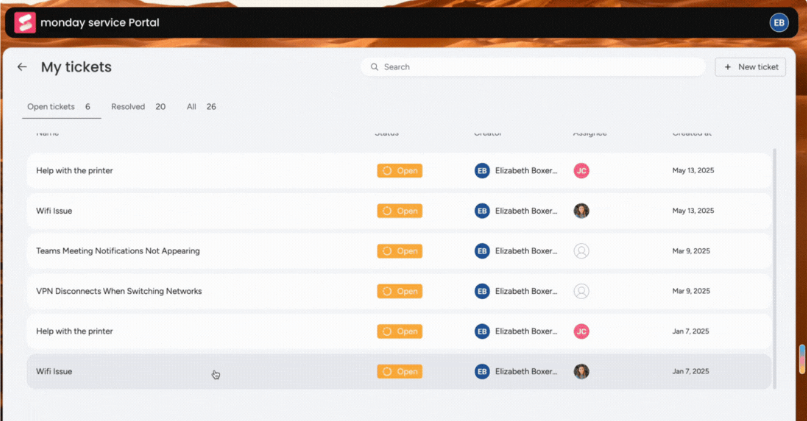
monday service is a flexible platform for teams that want strong automation, customizable workflows, and visibility into support operations. It can work well for HR teams that want to centralize requests and create structured workflows without relying heavily on technical teams.
It is especially useful for teams that want to connect HR support with broader cross-functional workflows.
Key features
- Customizable request workflows
- Automation for routing and status updates
- Dashboards for tracking support operations
- Flexible forms and service boards
- Cross-team workflow support
Best for: HR teams that want flexible workflow automation and customizable request management.
Pricing: monday service says it offers a free trial with no credit card required, and paid plans start at $26 per user/month for unlimited tickets and workflows.
3. Zendesk

Zendesk is one of the best-known support platforms on the market. It is a strong option for teams that want mature ticketing, omnichannel support, workflow automation, and reporting in one place.
For HR teams, Zendesk can work well when support volume is high and requests come in from different channels.
Key features
- Omnichannel ticket management
- Workflow automation and routing
- Self-service knowledge base
- Reporting and analytics
- Strong integration ecosystem
Best for: Teams that need advanced support workflows, routing, and scalability.
Pricing: Zendesk’s pricing starts at $19/month, and its official pricing page also lists add-ons like Copilot at $50 per agent/month billed annually, Quality Assurance at $35, and Workforce Management at $25.
4. Freshservice
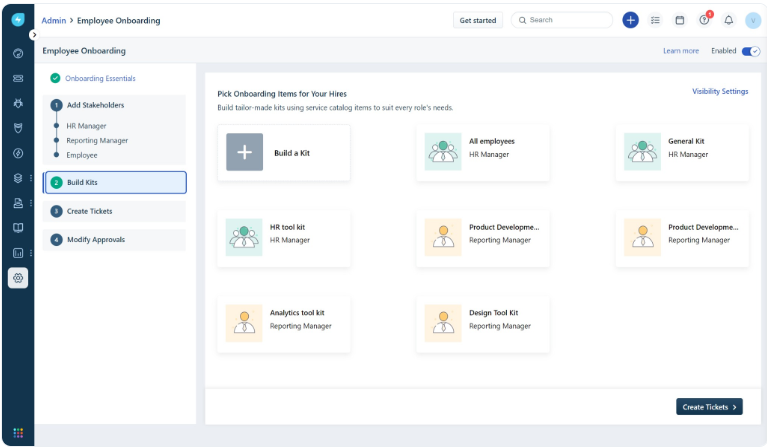
Freshservice is a service management platform that works well for internal support teams. It is often a good fit for HR teams that want automation, structured workflows, and a modern employee support experience.
It can be especially useful for organizations that want HR, IT, and other internal service teams to work in a similar way.
Key features
- Internal service request management
- Workflow automation
- Knowledge base and self-service portal
- AI-assisted support capabilities
- Analytics and reporting
Best for: HR teams that want structured internal service delivery with automation.
Pricing: Freshservice says pricing starts at $19 USD/month, and it also offers a free plan plus an Enterprise option.
5. Jira Service Management
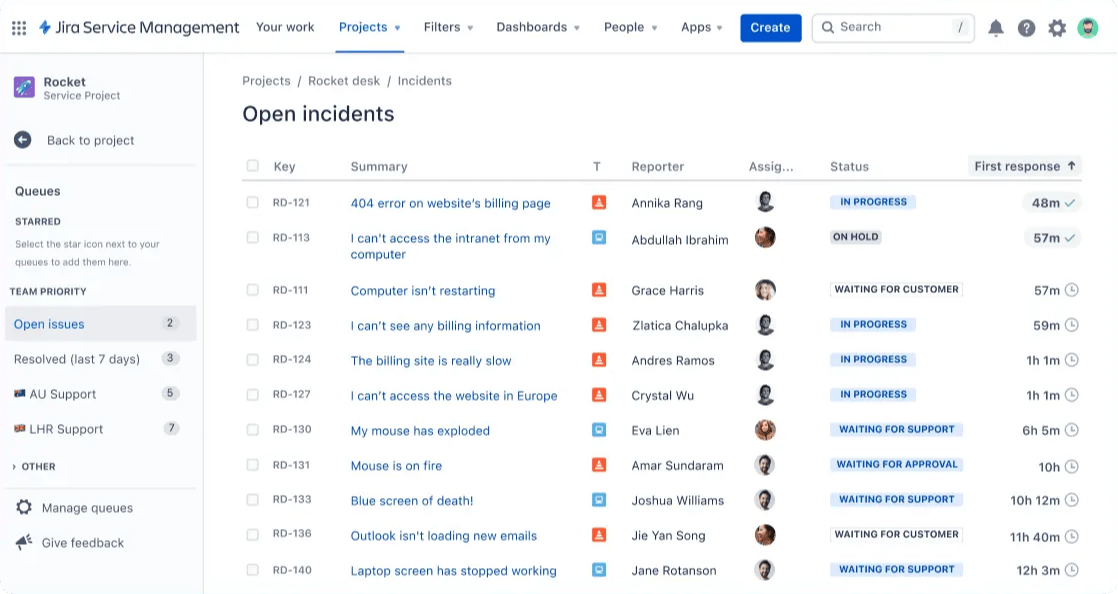
Jira Service Management is a strong option for companies that already use Atlassian products. It is especially useful when HR support overlaps with IT, access management, onboarding, or other internal workflows.
It may be less intuitive for non-technical teams, but it offers solid structure and flexibility.
Key features
- Request management workflows
- Automation for repetitive tasks
- Knowledge base integrations
- Permission controls for sensitive cases
- Strong fit with existing Atlassian tools
Best for: Companies already using Atlassian tools and teams that want HR and IT workflows to work closely together.
Pricing: Jira Service Management has a Free plan for 3 agents, with paid plans starting at $20 per agent/month for Standard and $51.42 per agent/month for Premium.
6. ServiceNow
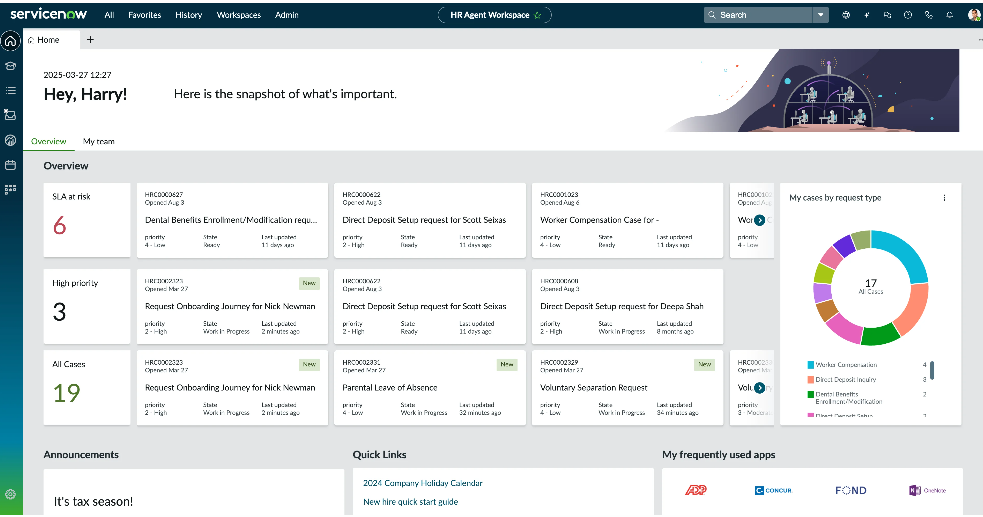
ServiceNow is a more enterprise-focused option built for larger organizations with complex workflows and broader service delivery needs. It is often used when HR support is part of a larger shared-services model across multiple departments.
It is powerful, but it usually makes the most sense for larger teams with more operational complexity.
Key features
- Enterprise case management
- Workflow automation across departments
- Employee self-service portals
- Advanced permissions and governance
- Broad service delivery capabilities
Best for: Larger organizations with complex HR service delivery and governance needs.
Pricing: ServiceNow does not publish standard HR Service Delivery pricing on its public pricing page and instead directs buyers to request a quote based on their needs and implementation scope.
Final thoughts
A strong HR help desk helps teams organize work, improve response times, and create a better experience for employees without adding more manual effort. It gives the HR team one place to manage requests, improve HR processes, and scale support in a way that feels clear and reliable.
That matters because effective HR support is not just about closing tickets. It is about helping people get the right answers at the right time, while giving HR more room to focus on the work that drives the business forward.
Featurebase is a modern and powerful platform for building better support experiences. You can create a beautiful knowledge base for common HR questions, make important information easy to access, and give employees fast self-service answers. It also comes with feedback collection, surveys, roadmaps, and changelogs to help teams improve communication across the organization. Your internal documentation becomes easier to use, easier to maintain, and more helpful for the people who need it.💫
It has affordable pricing and a Free plan, so there is very little friction in trying it. Setup is quick, and you can launch a polished help center without a long implementation process. 👇
✨ Create a beautiful Help Center with Featurebase for free →