Blog Customer ServiceMultilingual Customer Support: How to Support Customers in Any Language
Multilingual Customer Support: How to Support Customers in Any Language
Learn what multilingual customer support is and how to support customers in any language with help centers, translation tools, and support teams.



助けてください. Necesito ayuda. أحتاج إلى مساعدة.
That means “I need help” in Japanese, Spanish, and Arabic. For global customers, that simple request should feel easy to make in the language they know best.
That friction grows as your customer base expands into new markets. Language barriers slow down customer inquiries, create misunderstandings, and make even a helpful support team feel less accessible.
Multilingual customer support fixes that by giving customers a clearer way to get help in their preferred language. In this guide, we’ll cover what it means, why it matters, and how teams can use multilingual support agents, translation tools, and a multilingual knowledge base to support customers in any language. 👇
✨ Stop losing customers because of language barriers →
Key takeaways:
- Multilingual customer support helps businesses provide support in multiple languages across help centers, support tickets, email, chat, and phone calls.
- Customers are more likely to feel understood when they can get help in their preferred language or native language.
- A strong multilingual support system can improve customer satisfaction, reduce language barriers, and create better customer experiences for a diverse customer base.
- Companies can offer multilingual support through a mix of multilingual support agents, translation tools, translation services, and self-service options.
- A multilingual knowledge base gives customers instant access to answers in their own language and helps reduce repeated customer inquiries.
- The best multilingual customer support setups combine translation technology with human expertise, especially for complex customer queries and cultural nuances.
- A tool like Featurebase✨ can help teams turn their help center into a multilingual self-service layer, so customers can find answers in their preferred language before creating a support ticket.
What is multilingual customer support?
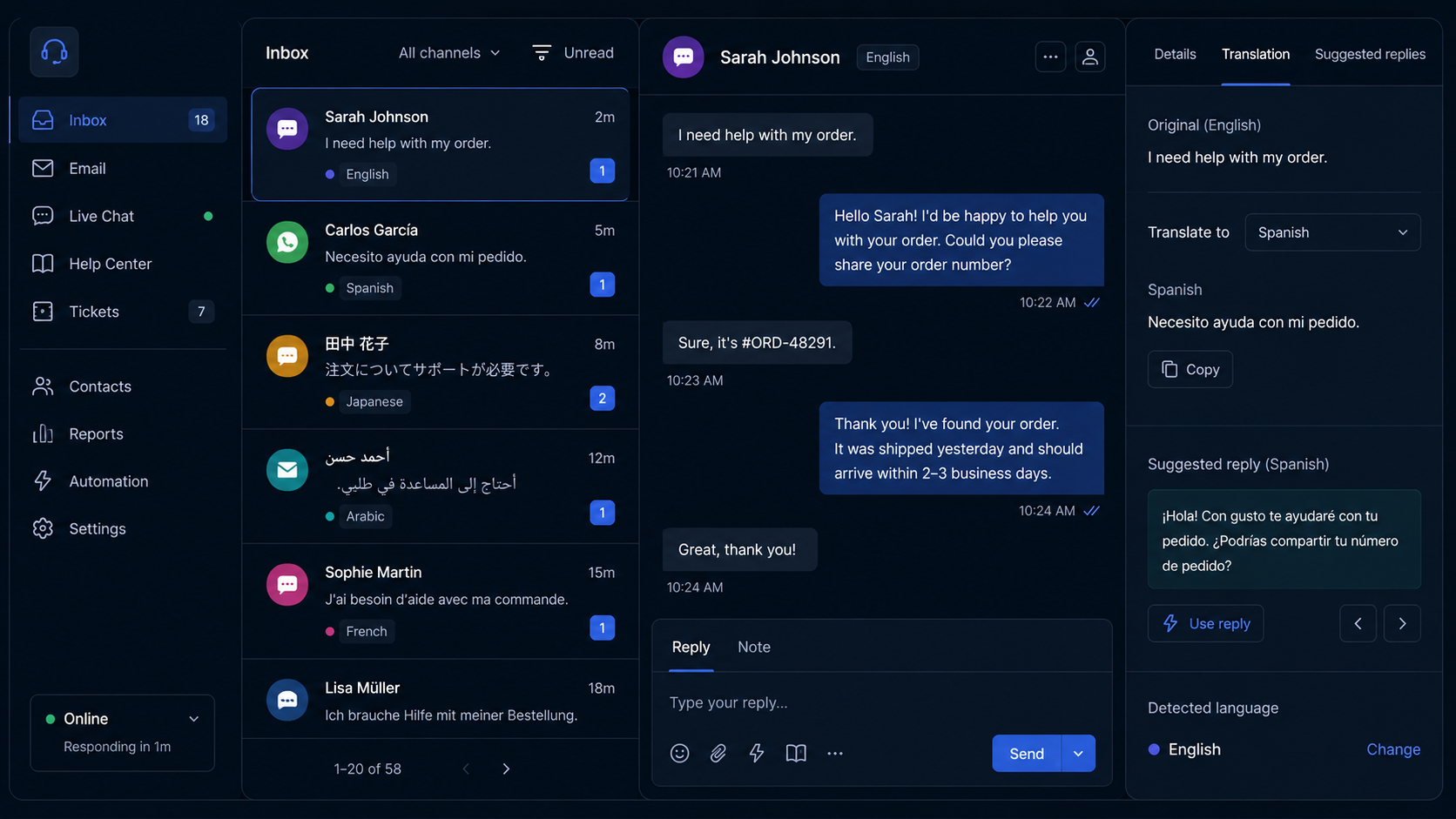
Multilingual customer support refers to helping customers in multiple languages across channels such as email, live chat, help centers, support tickets, and phone calls.
The goal is simple: customers should be able to get help in their preferred language, or at least in a language they are comfortable using.
That does not mean hiring a full multilingual support team on day one. Many companies start by translating their help center, using translation tools for simple customer inquiries, and routing complex customer queries to native speakers or multilingual agents.
When done well, multilingual support makes customers feel understood instead of making them work around language barriers.
Why multilingual customer support matters
Multilingual customer support matters because language affects almost every part of the customer experience.
When customers cannot get help in their native language, even simple issues can become frustrating. They may misunderstand instructions, miss important details, or need several follow-up messages to explain what they mean.
That creates more work for the support team and a worse experience for the customer.
For example, imagine a customer trying to explain a billing issue, a technical bug, or a setup problem in a language they do not use every day. The support agent may be helpful, but the conversation still takes longer because both sides are working around language barriers.
Now imagine the same customer getting help in their preferred language. The issue is clearer. The tone feels more natural. The answer is easier to follow. The customer feels respected instead of frustrated.
This matters commercially too. A CSA Research survey of almost 9,000 consumers across 29 countries found that 76% prefer to buy products with information in their own language, while 40% will never buy from websites in other languages.
That leads to a few key benefits.👌
✨ The easiest way to support customers worldwide →
Higher customer satisfaction
Customers are more likely to feel understood when they can communicate in their own language.
This matters most during stressful moments. If someone is locked out of an account, confused about a payment, or waiting for an urgent answer, effective communication can make the difference between a satisfied customer and a risk of churn.
Providing multilingual customer support helps customers get answers faster and with less confusion. Over time, that can lead to higher customer satisfaction across different customer segments.
Better customer loyalty
People remember how a company treats them when they need help.
If customers feel like your support team understands their language, region, and cultural context, they are more likely to trust your brand. That trust can turn into customer loyalty, repeat business, and a more loyal customer base.
This is especially important for international clients and international customers who may have plenty of local alternatives. If your product feels easier to use and easier to get support for, you have a stronger reason to stay in their workflow.
Improved customer retention
Poor support creates churn. Poor support in the wrong language creates even more churn.
When customers cannot solve problems quickly, they lose confidence in the product. A multilingual support system helps reduce that risk by making support more accessible to a diverse clientele.
Better support not only fixes issues. It helps customers keep using the product successfully.
Expanded market reach
If you want to sell into new markets, support has to scale with the business.
A company may be able to launch a website, pricing page, or product campaign in various languages. But if customer support is only available in one language, the experience breaks as soon as customers need help.
Multilingual customer support gives global businesses the foundation to serve more regions without creating a poor customer experience after the sale.
Fewer misunderstandings
Support is not just about speed. It is also about accuracy.
Language barriers can cause customers to describe an issue incorrectly or agents to misunderstand the context. This is especially risky for technical support, billing questions, security issues, or complex customer queries.
When customers and support agents can communicate in the same language, it becomes easier to diagnose the issue, explain the solution, and avoid unnecessary back-and-forth.

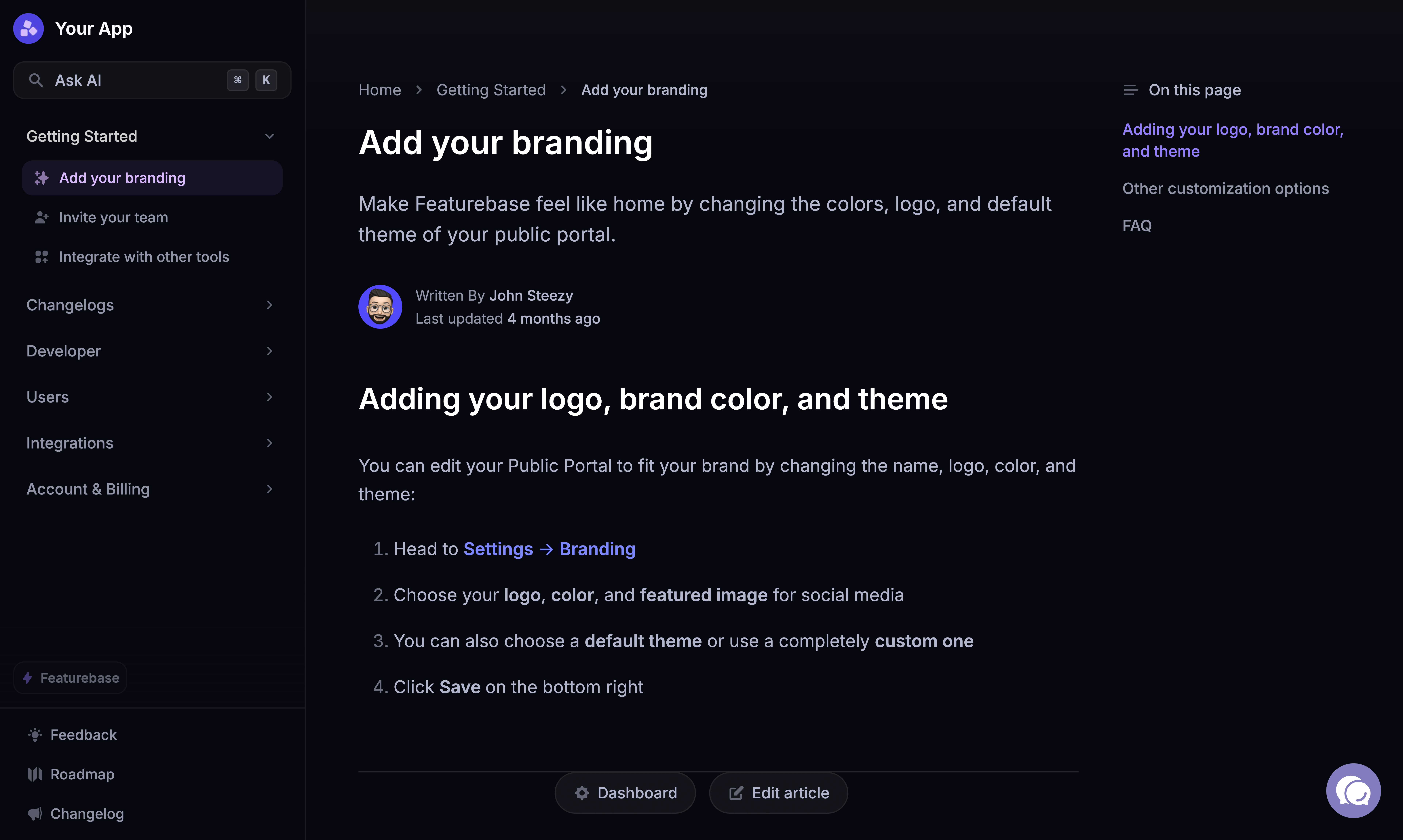
Create an AI-powered multilingual help center
Support customers in every language with an AI-powered help center built for global teams.
What does multilingual support handle?
Multilingual support can handle almost any customer support need across different languages.
It is not only for large enterprise teams or multilingual call center operations. Even smaller teams can offer support in multiple languages by combining a multilingual help center, translation tools, customer service software, and human expertise.
Here are a few common examples.
| Support need | How multilingual support helps |
|---|---|
| Product questions | Customers can learn how features work in their preferred language. |
| Billing issues | Support agents can explain payment, invoices, and subscription questions more clearly. |
| Technical problems | Complex customer queries are easier to understand when customers can describe them in their own language. |
| Onboarding | New customers can learn the product faster with native language support. |
| Self-service | A multilingual knowledge base gives customers instant access to answers without contacting support. |
| Phone calls | A multilingual call center or native language agents can help with urgent issues. |
| Support tickets | Ticket routing can send customer inquiries to the right multilingual agents or translation workflow. |
| Customer feedback | Teams can collect feedback from international customers in their own language. |
The process usually starts with customer data.
A company looks at where its customers are located, which languages appear in support tickets, which regions are growing, and which customer segments need the most help. Then it decides where multilingual support will have the biggest impact.
For some teams, that might mean translating the help center first. For others, it might mean hiring native speakers for high-value markets. For global businesses, it might mean building a full multilingual support team across time zones.
The right setup depends on your customer base, support volume, product complexity, and target audience.
Multilingual customer support vs. multilingual customer service
Multilingual customer support and multilingual customer service are closely related, but they are not the same.
Multilingual customer service covers the full customer experience across languages, including sales, onboarding, customer success, support, renewals, and feedback.
Multilingual customer support is narrower. It focuses on helping customers solve problems, answer questions, and get unstuck in their preferred language.
In simple terms, customer service is the whole relationship. Customer support is the help customers get when they need an answer.
Signs you need multilingual customer support
Many companies wait too long to offer multilingual support.
At first, support in one language may feel manageable. A few international customers can use translation tools on their own. Some support agents may speak more than one language. A few help center articles may be manually translated when needed.
But as the company grows, those workarounds start to break.
Here are a few signs you need a more structured multilingual support system.
Customers are contacting you in multiple languages
If customer inquiries are already coming in various languages, customers are telling you what they need.
This does not mean you need to support every language immediately. But it does mean your support team should start tracking which languages appear most often, which customer segments use them, and how those tickets perform compared to your main support language.
Your support team relies on manual translation
Manual translation can work for a small number of tickets. But it becomes messy fast.
Agents copy messages into translation tools, paste responses back into the support inbox, and hope the translation is accurate. This slows down the support process and creates room for mistakes.
A better setup uses customer service software, translation technology, or a multilingual support system to make the workflow more consistent.
International customers wait longer for answers
If your global customer base spans multiple time zones, some customers may wait much longer than others.
This often happens when only one internal support team handles all customer support from one region. A multilingual support team, outsourced support, or better self-service options can help reduce the gap.
Your help center only supports one language
A help center should reduce support tickets. But if it only supports one language, many customers cannot use it properly.
A multilingual help center gives customers instant access to answers in their preferred language. That can reduce repeated questions and make global customer support more cost-effective.
Customer satisfaction varies by region
If customer satisfaction is lower in certain regions, language may be one reason.
Customer data can help you spot the pattern. Look at CSAT, response time, resolution time, ticket volume, and customer feedback by language or region. If customers in one market consistently report more confusion, slower support, or less helpful answers, multilingual support may be part of the fix.
Agents struggle with cultural nuances
Language is not only about grammar. It also includes tone, cultural context, expectations, and communication style.
A message that feels direct and helpful in one language may feel cold or confusing in another. Multilingual agents and native speakers can help support teams understand these cultural nuances and deliver support in a way that feels natural.
✨Help customers find answers in their preferred language, instantly. →
How to provide multilingual customer support
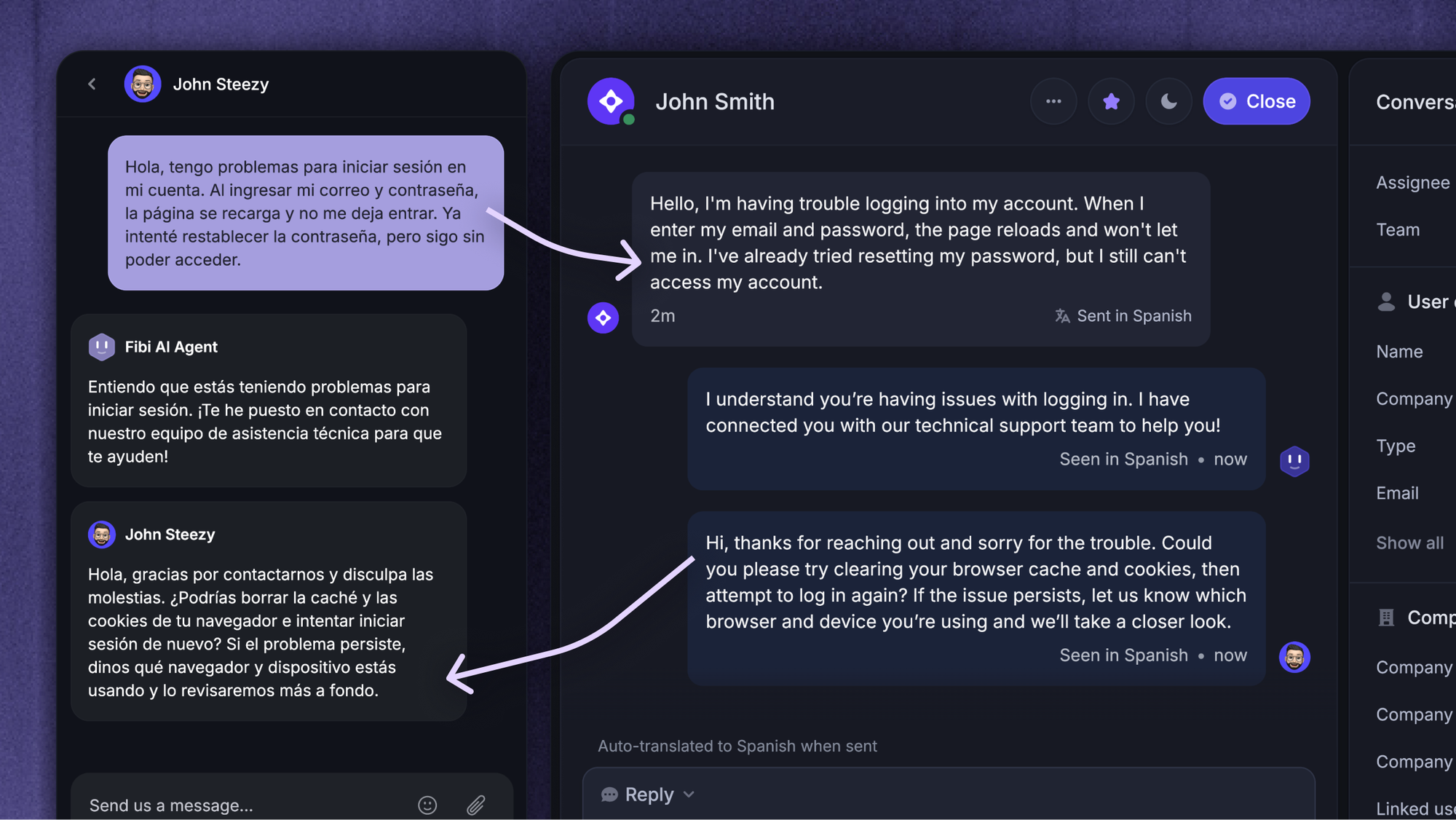
There is no single way to provide multilingual customer support.
Some companies build an internal support team with native language agents. Some use outsourced multilingual support agents. Some rely heavily on translation services and a multilingual knowledge base. Others use a hybrid approach with human agents, translation tools, and self-service options.
The best approach depends on your product, support volume, and customer base.
Here is a practical way to start.
1. Use customer data to choose your languages
Do not guess which languages to support first.
Start with customer data. Look at where your customers are located, which languages they use, which regions generate the most support tickets, and which markets have the highest growth potential.
Useful data points include:
- Ticket volume by country or region
- Browser or account language settings
- Customer feedback by language
- Revenue by market
- Customer satisfaction by region
- Churn by customer segment
- Search terms used in your help center
- Sales activity in new markets
This helps you decide which languages matter most.
For example, if 25% of your customer base is in Spanish-speaking markets, Spanish support may have a bigger impact than adding five low-volume languages at once.
The goal is not to support every language immediately. The goal is to offer support where it will improve customer satisfaction, retention, and global reach the most.
2. Let customers choose their preferred language
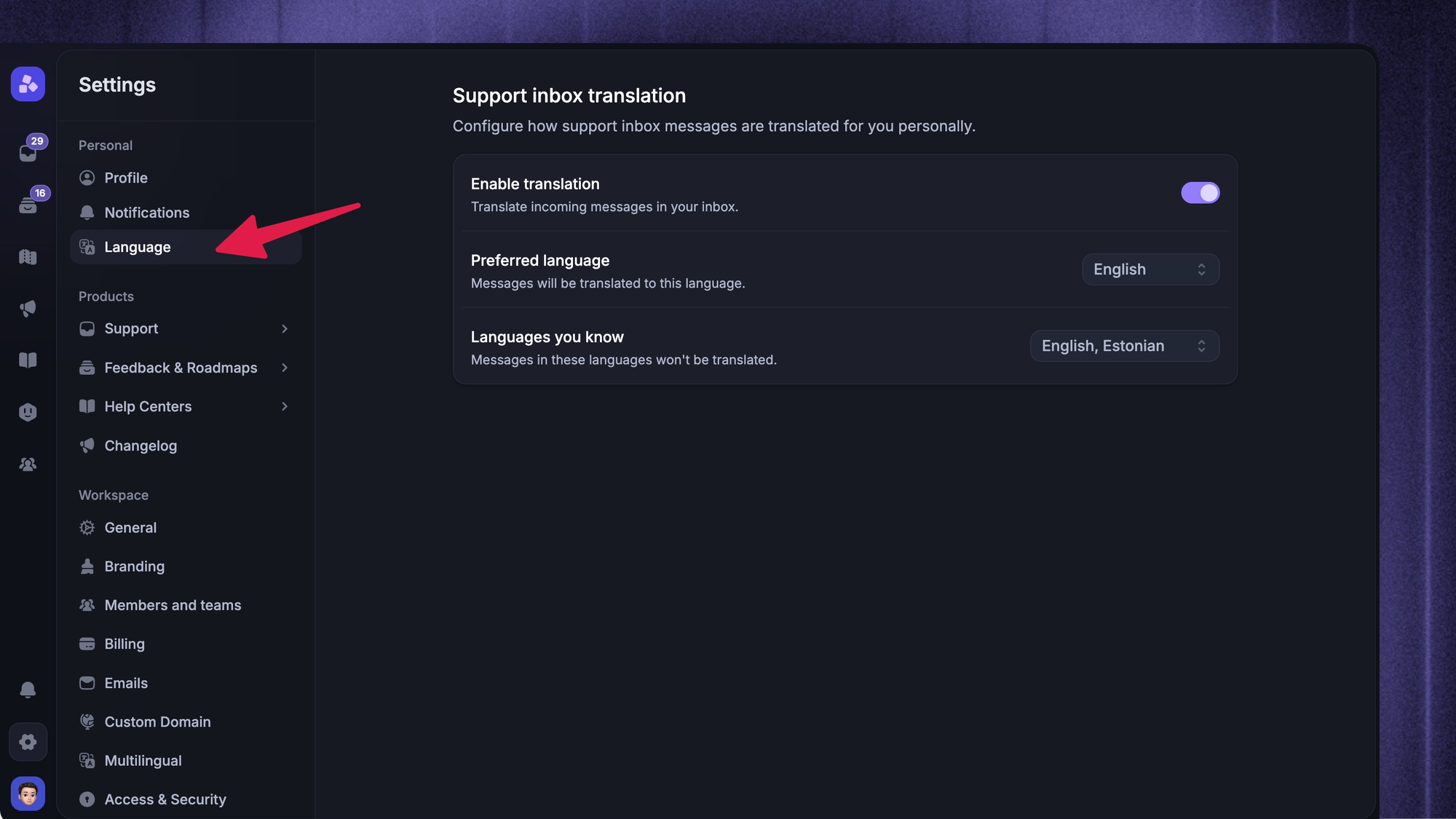
Customers should not have to guess how to get help in their own language.
Make it easy for them to choose their preferred language in your help center, support form, chatbot, or account settings. If possible, automatically detect the customer’s language based on browser settings, location, or previous interactions.
Residential proxies can help teams verify that localized experiences display correctly in each target market.
This helps your support team route customer inquiries correctly and gives customers a smoother experience from the start.
For example:
- Help center articles can open in the customer’s preferred language
- Support forms can include a language field
- Chatbots can greet customers in their language
- Support tickets can be routed to multilingual support agents
- Email replies can use the customer’s language consistently
The fewer steps customers need to take, the better.
3. Build a multilingual knowledge base
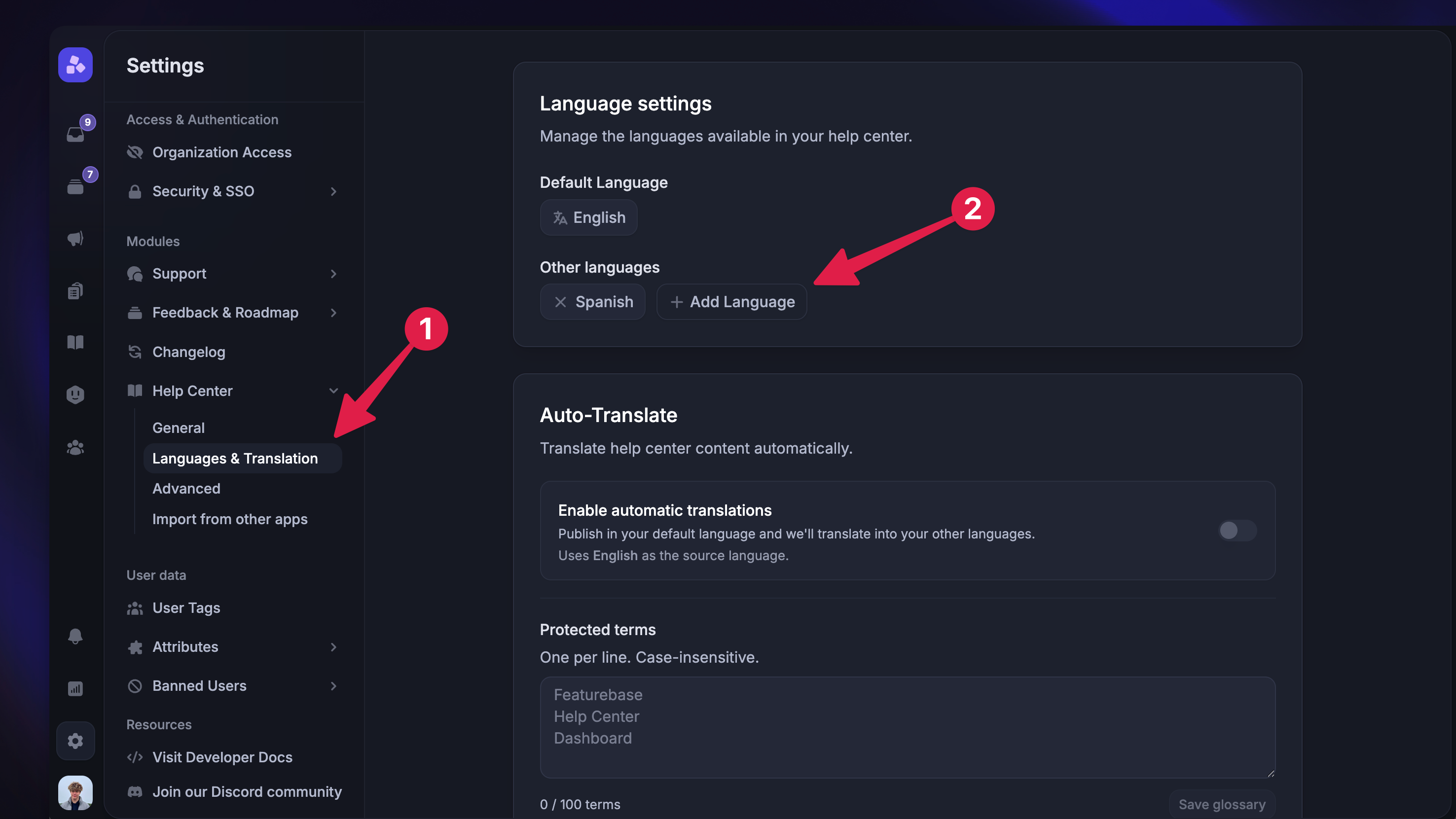
A multilingual knowledge base is one of the most cost effective ways to offer multilingual support.
Instead of asking customers to contact your support team for every question, you give them instant access to answers in their own language. That makes support faster for customers and reduces ticket volume for your team.
A good multilingual help center can include:
- Getting started guides
- Account setup instructions
- Billing articles
- Troubleshooting guides
- Product FAQs
- Feature documentation
- Policy pages
- Best practice guides
This is where Featurebase Help Center fits naturally.
Featurebase helps teams create a clean, searchable, AI-powered help center with translations, private articles, authentication, custom domains, and more. That makes it easier to provide support across multiple languages without forcing every customer inquiry into the support inbox.
A multilingual knowledge base also creates a better experience for international customers. They can search for answers in their native language, browse help content at any time, and solve common issues without waiting for a human agent.
That does not replace your support team. It gives them more room to focus on complex customer queries that actually need human expertise.
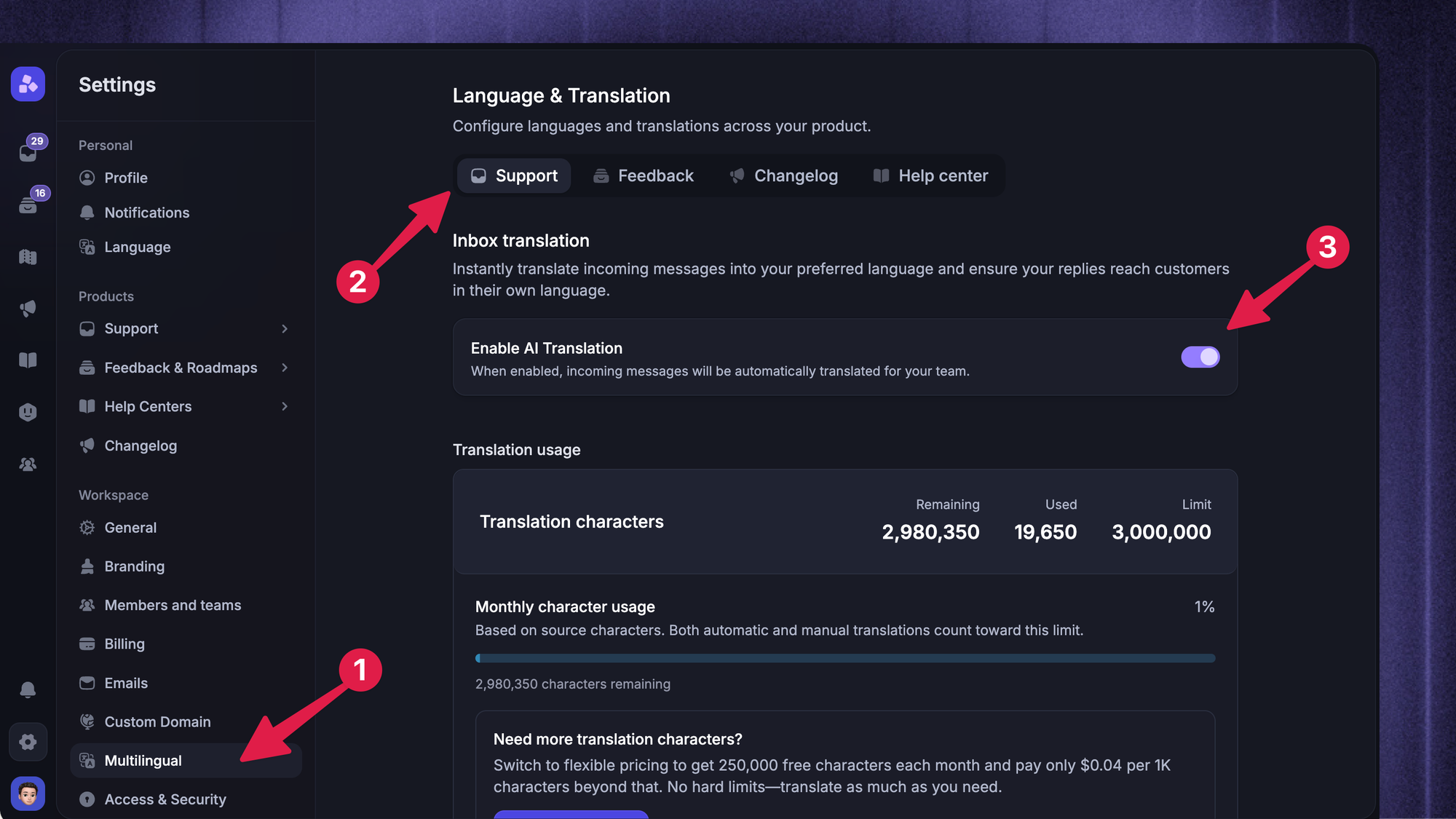
4. Use translation tools carefully
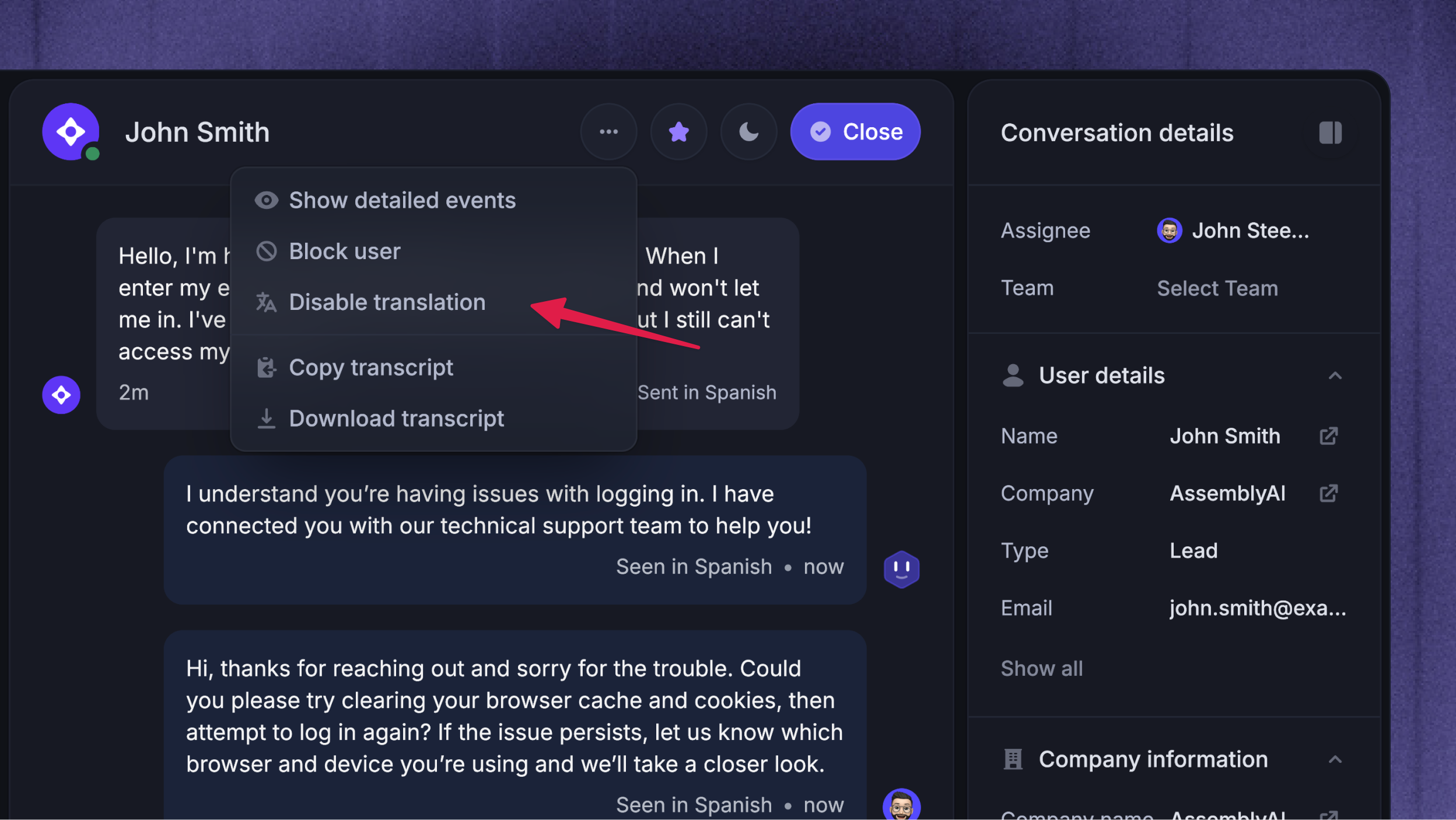
Modern translation technology, including neural machine translation, can help support teams understand incoming messages, draft replies, and translate help center content into various languages.
Translation tools can also help with downloadable support content. For example, teams can translate PDFs into another language to localize product manuals, onboarding guides, policy documents, and troubleshooting resources.
This can be especially useful when:
- Ticket volume is growing quickly
- You do not have native speakers for every language
- Customers need fast answers
- Support teams are working across time zones
- You want to make self-service options available in different languages
But translation tools are not perfect.
They can miss cultural context, misunderstand product terms, or translate technical language incorrectly. That is why translation technology works best when it is combined with human expertise.
For example, you might use machine translation for simple customer inquiries like password resets or basic product questions. But for legal, billing, security, or complex technical issues, it is safer to involve native speakers or multilingual agents.
A strong multilingual support system should make translation easier without removing human judgment.
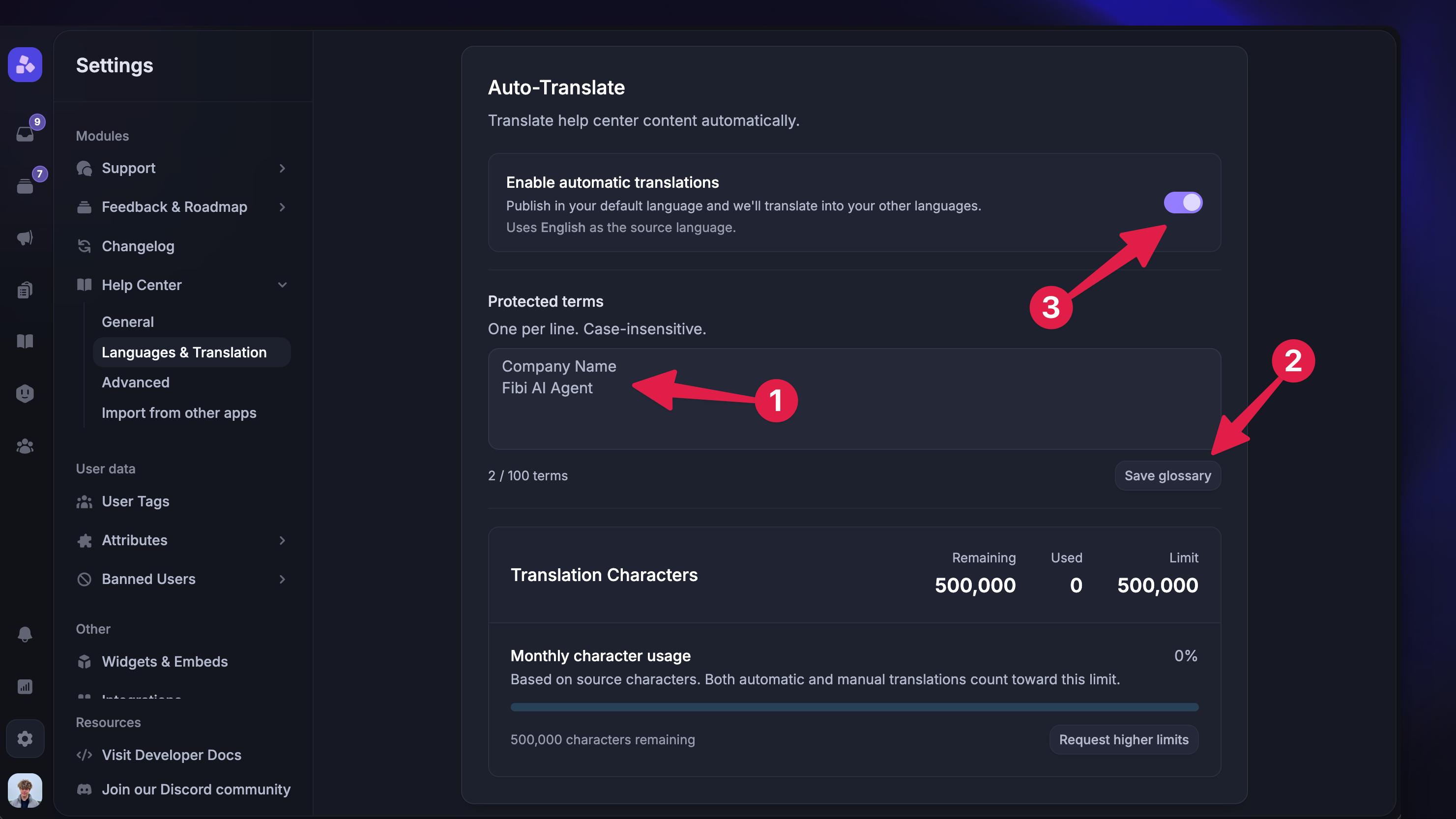
5. Create a glossary for product terms
Every company has product names, feature labels, technical terms, and internal phrases that should be translated consistently.
Without a glossary, support content can become messy across languages. One article may translate a feature name one way, while another uses a different phrase. That creates confusion for customers and support agents.
A simple glossary can include:
- Product names
- Feature names
- Common error messages
- Billing terms
- Technical phrases
- Words that should not be translated
- Preferred tone and style rules
This helps translation services, native speakers, and internal support teams stay aligned. And it's not just a support problem. Product teams hit the same thing when they translate their app's interface; if a button says one thing in the app and another in your docs, it looks sloppy.
It also improves the quality of your multilingual knowledge base. Customers get clearer answers, support agents use consistent language, and the overall customer experience feels more polished.
6. Hire multilingual support agents where it matters
Translation tools are useful, but some conversations still need human agents who understand the customer’s language and cultural context.
This is especially true for high-value markets, complex customer queries, phone support, and sensitive customer interactions.
Native language agents can help with:
- Enterprise customer support
- Sales-assisted onboarding
- Technical troubleshooting
- Billing disputes
- Escalations
- Phone calls
- Region-specific questions
- Cultural nuances
You do not need native speakers for every language immediately. Start with the languages that have the highest ticket volume, revenue impact, or customer satisfaction gap.
For example, if your French-speaking customers generate a large number of support tickets and have lower satisfaction scores, hiring French-speaking support agents may improve both resolution quality and customer loyalty.
The point is to use human expertise where it matters most.
7. Route support tickets by language
Once you offer support in multiple languages, routing becomes important.
A multilingual support system should help you send each customer inquiry to the right person, queue, or workflow. Otherwise, tickets still end up in the wrong place and agents waste time moving them around manually.
Ticket routing can be based on:
- Customer’s preferred language
- Detected language
- Country or region
- Time zone
- Customer segment
- Product area
- Support plan
- Ticket priority
For example, Spanish support tickets can go to Spanish-speaking agents. French enterprise tickets can go to a senior multilingual support agent. Lower-priority questions in less common languages can go through a translation workflow.
Good routing helps teams deliver support faster and more consistently.
It also makes the support team more efficient because agents can focus on conversations they are best equipped to handle.
8. Offer support across time zones
Language is only one part of global customer support. Time zones matter too.
If customers can get help in their native language but only during your company’s local business hours, the experience may still feel slow.
There are a few ways to improve coverage:
- Hire multilingual support agents in different regions
- Use outsourced support for after-hours coverage
- Build a multilingual knowledge base for 24/7 self-service
- Use automated replies to set expectations
- Prioritize urgent support tickets across regions
- Offer phone support only for specific plans or markets
Not every company needs 24/7 human coverage. But every global customer should have a clear path to help.
A strong multilingual help center is often the first step because it gives customers instant access to answers even when your internal support team is offline.
9. Train agents on cultural context
Effective communication is not just about speaking the same language.
Support agents also need to understand cultural nuances, tone, expectations, and local context. This matters because customer interactions can feel very different across markets.
For example, some customers expect direct answers. Others expect more context and reassurance. Some languages use more formal phrasing in business communication. Others feel more casual.
Training should cover:
- Tone and formality
- Local expectations
- Sensitive phrases to avoid
- Regional product usage patterns
- Escalation expectations
- Cultural context around complaints or refunds
This helps multilingual agents deliver support that feels natural, not translated.
It also helps your brand feel more consistent across different languages.
10. Measure support performance by language
You cannot improve multilingual customer support if you do not measure it.
Start tracking support performance by language, region, or customer segment. This helps you understand where customers are getting good support and where the experience needs work.
Useful metrics include:
- Customer satisfaction by language
- First response time by language
- Resolution time by language
- Ticket volume by language
- Help center searches by language
- Self-service success rate
- Escalation rate
- Customer feedback by region
- Retention by customer segment
These metrics help you make better decisions.
For example, if customers using one language have longer resolution times, you may need better routing, translated help center articles, or more native language agents. If one market has high help center searches but low article usefulness, your multilingual knowledge base may need better content.
The best multilingual support teams keep improving based on real customer data.
Customer Support Without Language Barriers
Give every customer a native-language support experience with AI-powered self-service.
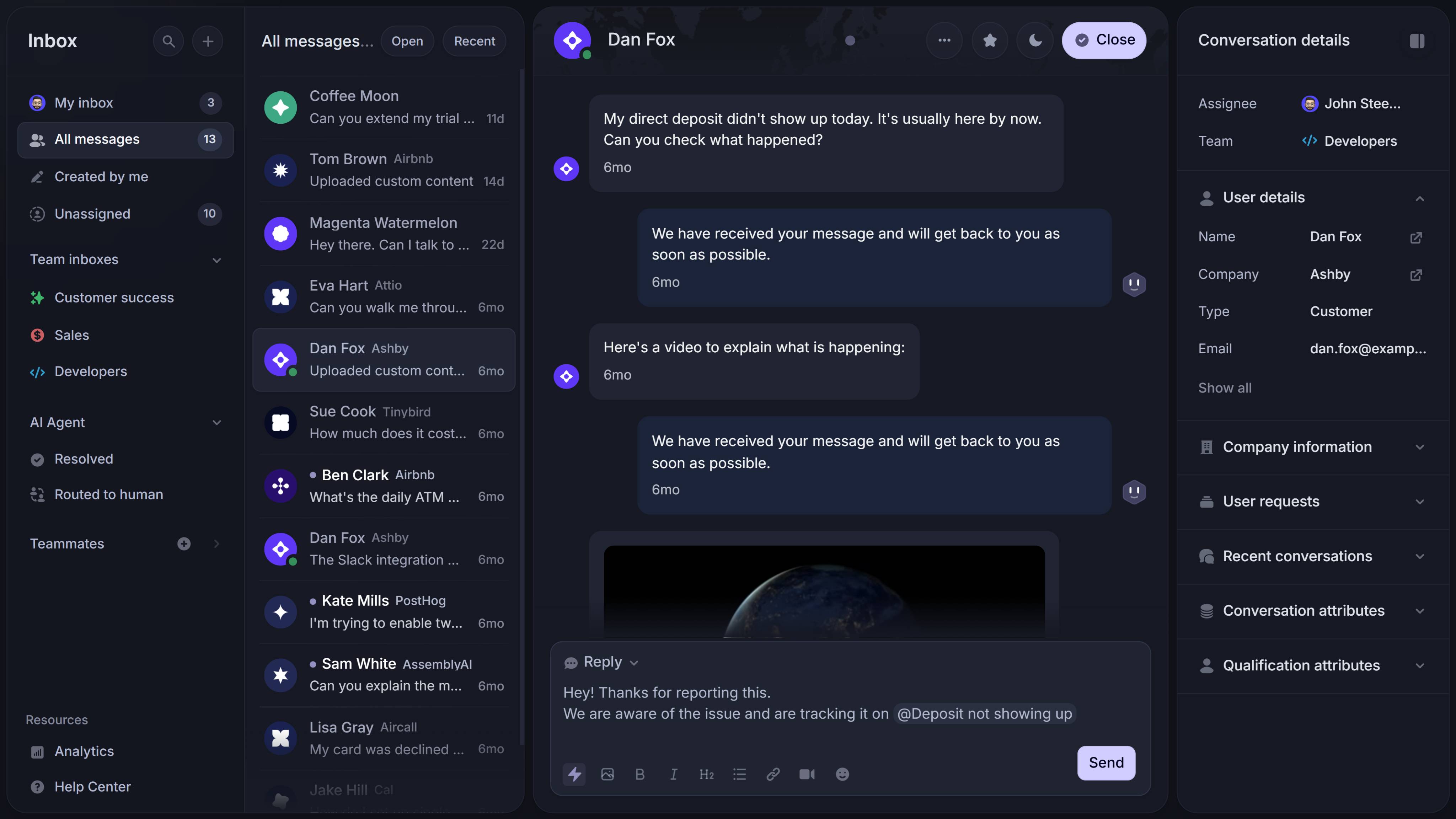
Key features to look for in multilingual customer support software
The right customer service software can make multilingual support much easier to manage.
Without the right support tools, teams often rely on manual translation, scattered workflows, and inconsistent routing. That can work for a while, but it does not scale well as your global customer base grows.
Here are the features that matter most.
Multilingual help center
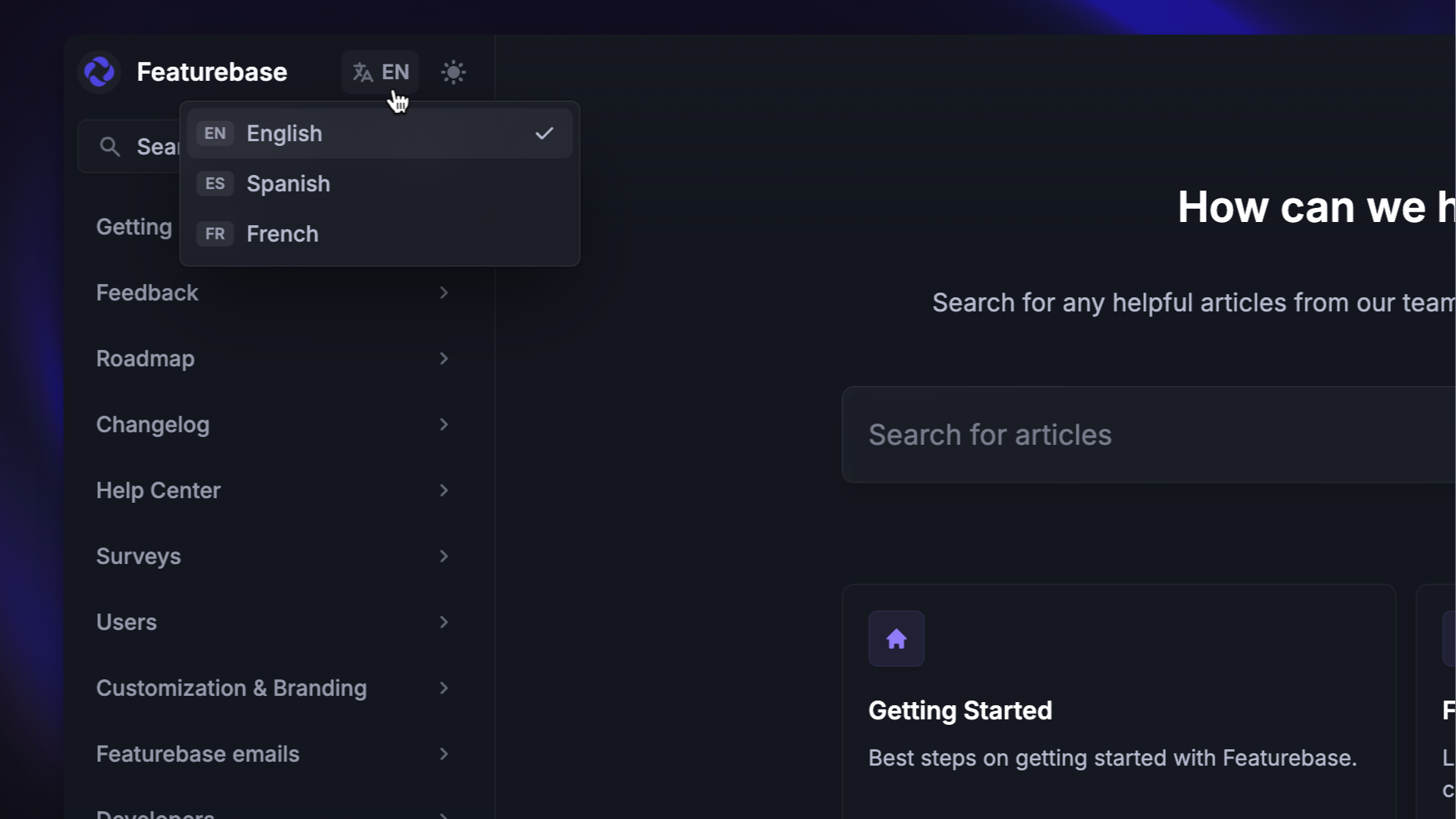
A multilingual help center gives customers a place to find answers in their preferred language.
This is one of the most important parts of a multilingual support strategy because it helps customers solve common issues on their own.
Look for help center software that supports:
- Multiple languages
- Search across translated content
- Easy article management
- Private or restricted articles
- Custom domains
- AI-powered self-service
- Fast publishing workflows
Featurebase Help Center is built for this kind of setup. Teams can create a searchable help center, add translations, organize articles, and give customers a better self-service experience across different languages.
Ticketing and routing
If your support team handles tickets in multiple languages, routing matters.
Good support tools should help route conversations based on the customer’s language, region, plan, or issue type. This reduces manual triage and helps customer inquiries reach the right agent faster.
For growing teams, routing can make the difference between a messy support inbox and a structured multilingual support system.
Translation support
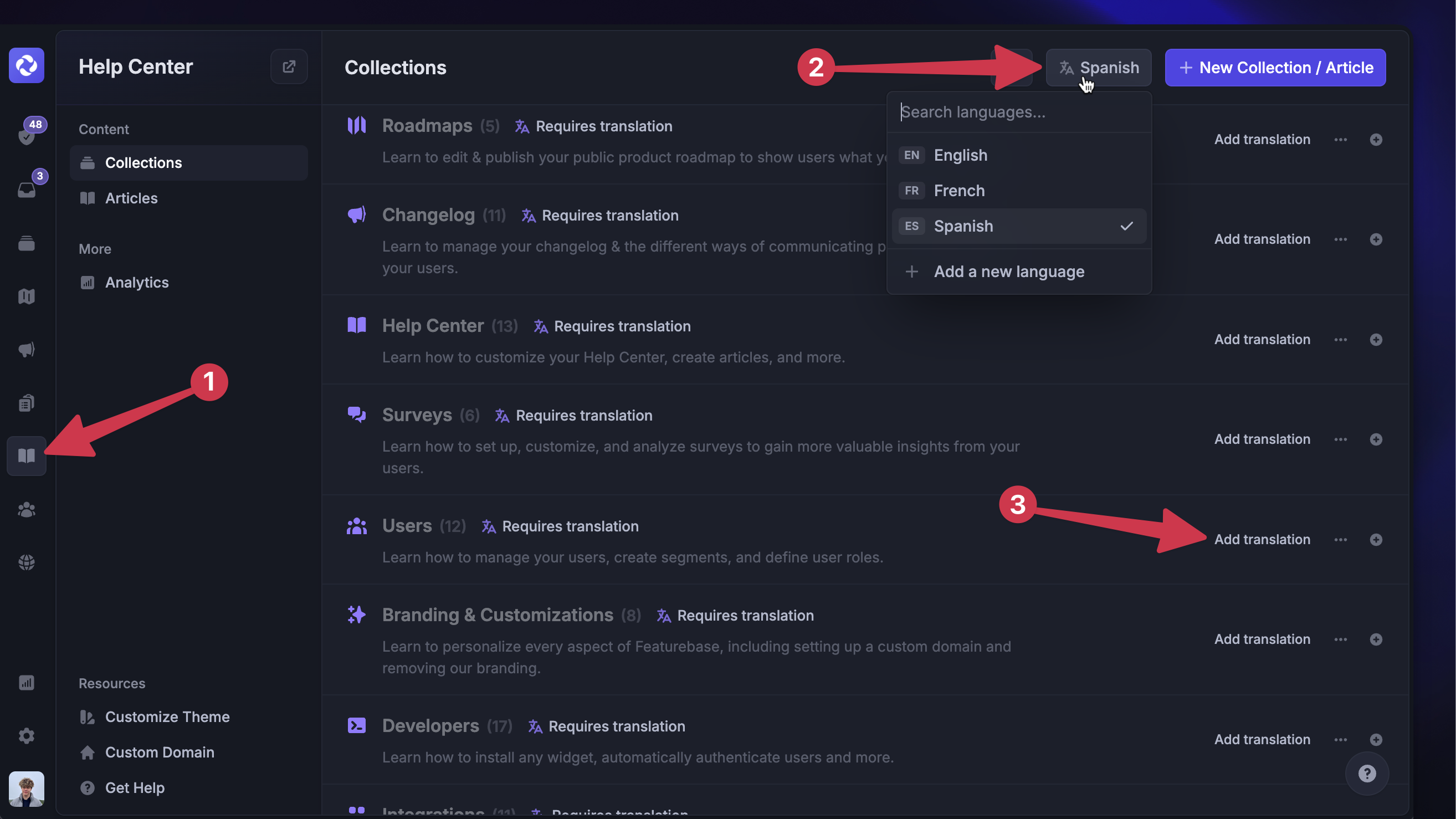
Translation tools help support teams communicate with customers across various languages.
Some companies use built-in translation features inside their customer service software. Others connect external translation services or neural machine translation tools.
Either way, the goal is to make translation easier, faster, and more consistent.
The best setup should still leave room for human review, especially for sensitive or complex conversations.
AI-powered self-service
AI can help customers find answers faster, especially when paired with a strong knowledge base.
For example, an AI-powered help center can help customers search support content, discover relevant articles, and get answers without creating a support ticket.
This is useful for multilingual customer support because customers may not always know the exact article title or product term in another language. AI-powered search and self-service can make the help center easier to use.
The goal is not to replace human agents. It is to reduce repetitive questions so the support team can focus on conversations that need human expertise.
How Featurebase helps with multilingual support
A strong multilingual support strategy is not only about answering more tickets. It is also about helping customers find answers before they need to contact your support team.
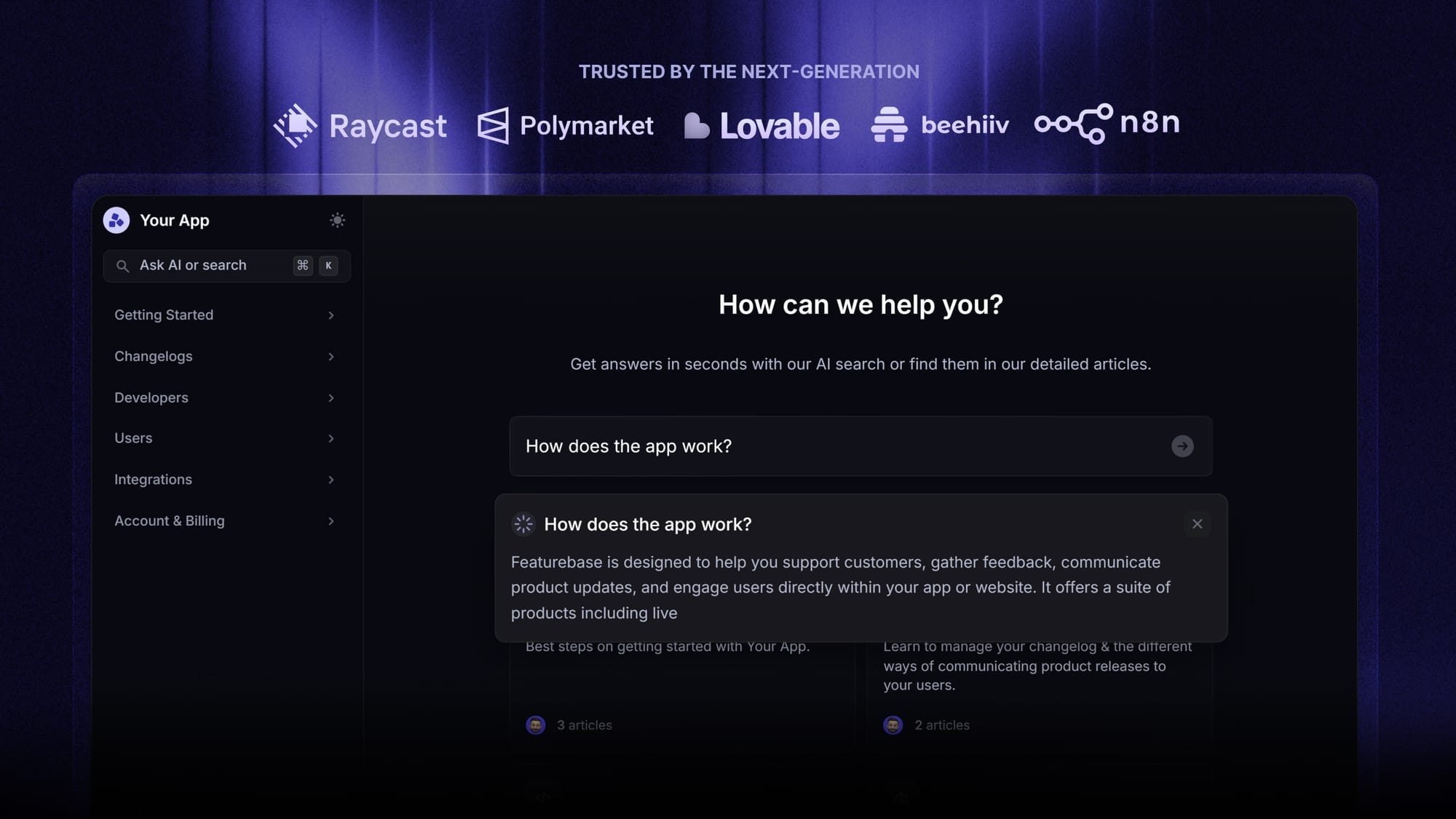
That is where a multilingual help center helps.
Featurebase Help Center gives SaaS teams a beautiful, searchable place to publish product docs, FAQs, and support content. With automatic AI translations, teams can show help articles in each customer’s native language and create a better self-service experience across multiple languages.
That helps teams:
- give customers instant access to answers in their preferred language
- reduce repeated customer inquiries
- support international customers across time zones
- manage multilingual help content as the company grows
- serve a diverse customer base without hiring agents for every language immediately
Featurebase also supports public and internal help centers, custom domains, private content, AI-powered search answers, an embeddable in-app widget, multi-brand support, and integrations with tools like Slack, Linear, Jira, and HubSpot.
For many teams, this is the easiest place to start: translate the most important help center articles first, then expand into more languages as your customer base grows. Over time, your multilingual knowledge base becomes a core part of your support system.
Conclusion
Multilingual customer support helps customers get answers in the language they know best. You do not need to support every language from day one, but you do need a clear way to reduce language barriers as your customer base grows.
Featurebase is a modern AI-powered help center with a support inbox and product updates. It helps SaaS teams create beautiful product docs, provide AI-powered support, and automatically translate help articles into customers’ native languages. It also comes with feedback collection, surveys, roadmaps, and changelogs to help you manage more of your customer-facing communication in one place.💫
You can create a public help center with a fully Free plan, and paid plans start at $29/seat/month for unlimited articles. Plus, if you already use another knowledge base tool, migration is straightforward too. 👇
✨ Stop losing customers because of language barriers →