Guru Pricing 2026: Is It Worth It?
The latest information on Guru pricing plans: how much they cost, what features you get, and whether it makes sense for businesses like yours.


On this page
Psst... Looking for a modern & powerful alternative to Guru? Check out Featurebase
Guru is an AI-powered knowledge-sharing platform that lets businesses share data internally with their team or externally with their customers.
There are a lot of tools in this space, with prices going from a few dollars to a few thousand dollars a month. If you wanted to use Guru for knowledge management, you're probably interested in how much it costs.
Today, we explain and demystify Guru pricing so you can find out if it makes sense for your business. 👇
Key takeaways
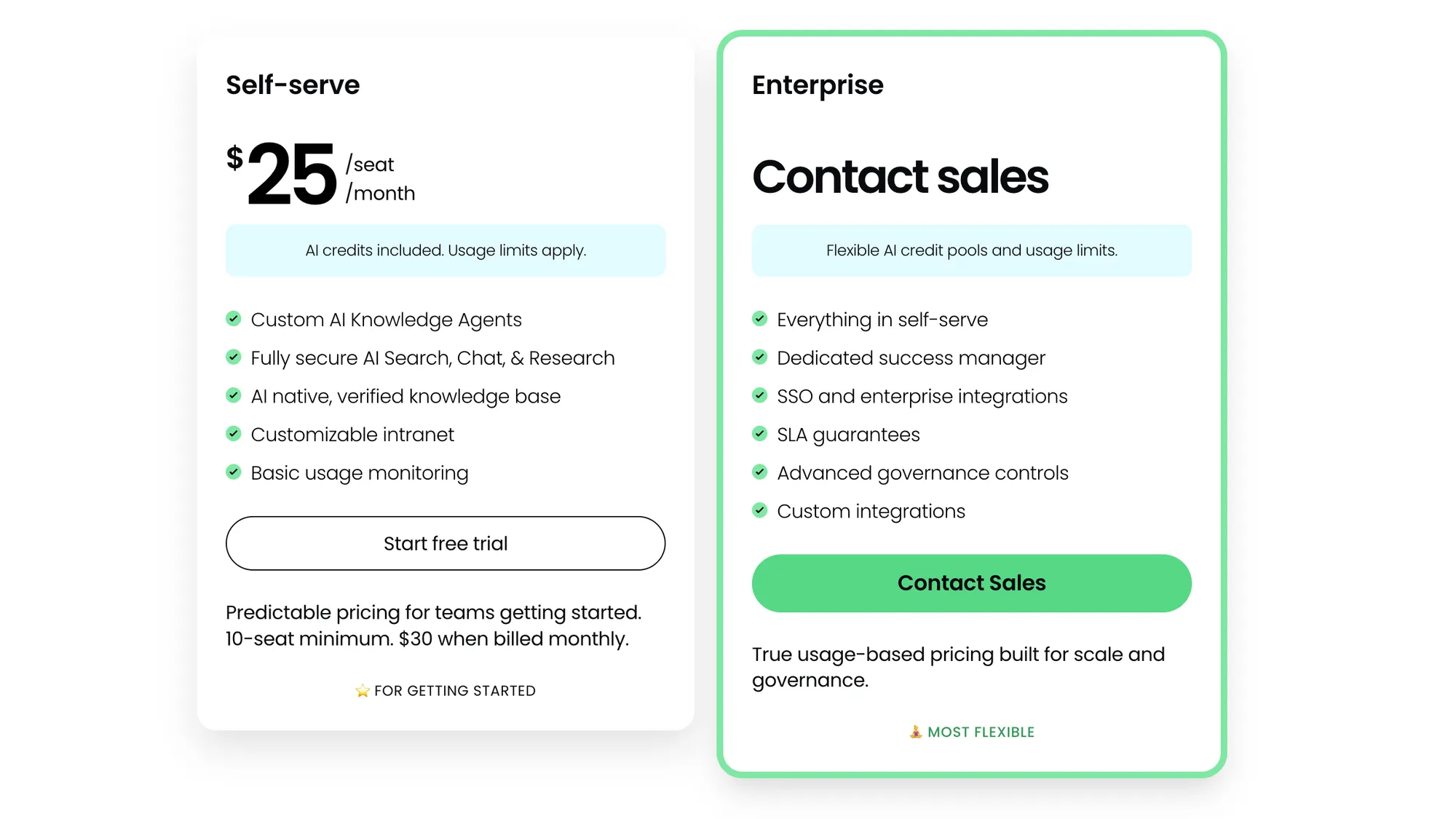
- Guru has 2 plans: Self-serve ($25/seat/month) and Enterprise (sales call required)
- Self-serve requires a 10-seat minimum, so the real starting price is $250/month (annual) or $300/month (monthly)
- You can try it with a 30-day free trial
- It’s only for internal knowledge base, not customer-facing docs: everyone who has to access your content needs a paid seat
- Enterprise switches to usage-based pricing, but pricing isn’t transparent, and it’s mainly aimed at SSO, security, governance, and integrations for larger teams
- There are many more modern alternatives, including Featurebase, which provides modern AI-powered support for fast-growing teams
Guru pricing 2026
Guru has only 2 plans: Self-serve and Enterprise
Only the first one has transparent pricing. To get info on the Enterprise tier, you need to book a call with their sales team.
There is also a 30-day free trial to try the tool out. Here are the plans and what they include. 💸
Self-serve plan ($25/seat/mo)
Self-serve starts at $25/seat/month when paying annually (or $30 if you pay monthly), but Guru's pricing page is pretty vague and leaves out some key details.
Here's what we know: while the price is $25 per user per month, you can't just purchase two seats if you need to test the tool out. The minimum number of users you can get is 10. So in practice, the least you'll pay for Guru is $250 monthly.
The second issue is with who those users are. Based on everything on the pricing page, it seems like Guru is more geared towards internal communication and sharing company knowledge rather than creating an external-facing knowledge base for customers.
In other words, if your product has 100 customers, you'll need 100 Guru seats, as there is no public knowledge base available.
For public & internal help center, you can check out Featurebase →
Features include:
- Custom AI knowledge agents
- Fully secure AI Search, chat, & research with data encryption
- AI native, verified knowledge base software
- Customizable intranet with role-based access controls
- Basic usage monitoring
You get the basics to share knowledge and verified information, maintain compliance and operational consistency, protect sensitive information... All of which seem like excellent features for internal communication. For communicating with customers, they're convenient but unnecessary.
If you want to enable Guru to answer questions and provide accurate search results to customers, it's a bit of overkill.
Enterprise plan (contact sales)
The Enterprise plan unlocks usage-based pricing, but you don't get to find out what that means. You don't pay per seat, but for the actual usage in your team, which is a good deal for internal knowledge management.
Some team members may use Guru daily, while others use it rarely or not at all, and you only pay for what you use.
You get all the features from the Self-serve plan, plus:
- Dedicated success manager
- Single Sign On (SSO) and enterprise integrations
- SLA guarantees
- Advanced security and governance controls
- Custom integrations
Once again, all the features relevant for internal use cases. You can get seamless integrations with your existing tools or use the API access to make sure Guru connects to your internal knowledge or support workflows. Once again, not built for customer-facing knowledge sharing but rather for internal use cases.
Why Guru isn't meant for public knowledge sharing
In all of the paid plans, a (hefty) subscription fee only helps your team members access critical information and get instant answers with the help of AI interactions.
For any kind of team that wants a self-service knowledge base, Guru is going to be very expensive.
At $25 per seat (and every user has to log in), Guru is objectively more expensive than most knowledge base tools in today's market.
While Guru integrates with powerful tools and comes with advanced analytics and security features, the final bill will be too high for a knowledge management platform for customers.
So, is Guru worth it?
Guru is a comprehensive knowledge-sharing tool for internal use. Since only teammates with paid seats can access the knowledge, you can't use it for a public Help Center at the same time, which means you need a separate tool with yet another subscription.
Featurebase (👋 that's us) is a modern Guru alternative with an AI-powered help center suitable for both public and internal knowledge sharing. You get all the same features, plus segmented access, in-app widget, and much more. It's loved by thousands of companies like Lovable, Polymarket, and Raycast.
What's best is that end-users don't need a seat, so you can use it for a public knowledge base at the same time! It comes with a Free plan, and the paid plans start at just $29/seat/mo. The onboarding takes seconds, so there's no downside to trying it out! 👇
Create a beautiful AI-powered Help Center with Featurebase for free