Blog ComparisonsConfluence Pricing 2026: Plans, Costs, and Real-World Examples
Confluence Pricing 2026: Plans, Costs, and Real-World Examples
Where teams and knowledge meet like rivers, costs can flood fast, see Confluence’s real 2026 pricing and smarter alternatives like Featurebase.


✨ Psst... Looking for a modern & powerful alternative to Confluence? Check out Featurebase →
Ever wonder how much Confluence's pricing really costs as your team grows?
A free plan, low per-user rates, and multiple cloud plans make it seem affordable. But as your team size increases, add-ons, automation, and advanced admin controls can quickly drive up costs. Many teams underestimate what they’ll actually pay, sometimes by thousands of dollars per year.
I’ve broken down Confluence pricing for 2026 between Cloud and Confluence Data Center, including free, standard, premium, and enterprise tiers, hidden costs, real-world examples, and whether it is really worth the spend. 👇
Key takeaways
- Confluence pricing plans (Free, Standard, Premium, Enterprise) are priced per user/month and are mostly billed annually.
- Features like automation, advanced analytics, and enhanced security are only available in the paid Standard and Premium plans.
- Marketplace apps for diagrams, reporting, or workflow tools are not included in base pricing.
- Real-world costs often start at $1,000–$5,000/year, depending on user tiers, add-ons, and team size.
- A free plan exists, but many features are locked behind paid tiers. Annual billing requires upfront commitment.
- There are simpler, more affordable alternatives, like Featurebase, which provides a centralized knowledge hub, an AI-powered inbox, and tools for growing teams without complex per-user scaling.
What is Confluence?
Confluence (/ˈkɒnflʊən(t)s/) literally means the junction of two rivers, especially rivers of roughly equal width. In the same way, Atlassian's Confluence brings together teams, knowledge, and tools in one shared space. It’s a central hub where teams organize Confluence pages, meeting notes, and project plans, storing internal documentation for small teams and growing teams alike.
But that doesn’t all flow easily downstream for Atlassian. Collaborating with external partners can be tricky; costs can scale quickly with per-user pricing, and features such as advanced permissions, audit logs, or unlimited automation often require premium plan upgrades.
Teams already using Atlassian tools can integrate Jira Service Management or Jira Software to unlock advanced Jira integrations, but setup and administration can take time and effort, especially for larger team workspaces.
Confluence Cloud vs. Confluence Data Center
Before discussing Confluence pricing tiers, it’s important to understand Confluence Cloud and Confluence Data Center, because your choice here can drastically affect costs.
Confluence Cloud is the “easy button” (Atlassian-hosted, quick setup, automatic updates) with per-user pricing that scales as your team grows, while Confluence Data Center is the self-managed option for enterprises that want maximum control and compliance - but you’ll pay for the license plus infrastructure and ongoing maintenance.
Here’s a breakdown of 2026 pricing for both options:
Confluence Cloud Pricing
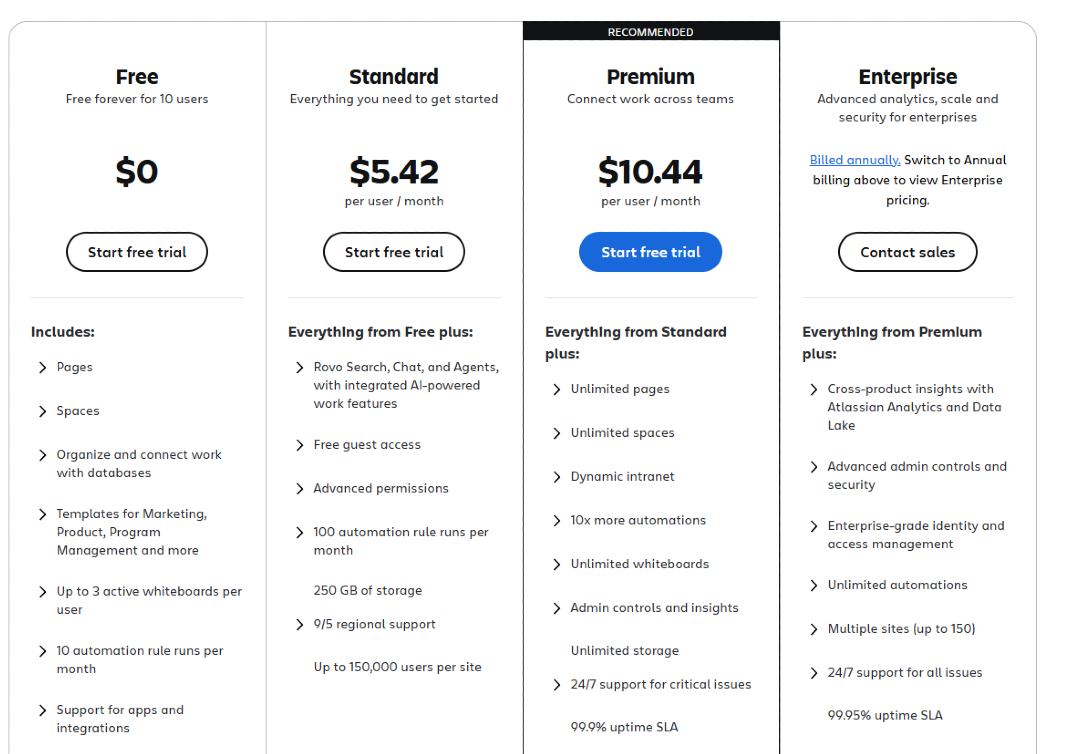
Confluence Cloud is Atlassian’s hosted platform. It’s easier to set up, includes automatic updates, and scales with your user count, but Cloud's pricing is per user, so it does increase quickly for larger teams.
| Plan | Users / Tier | Annual Price | Key Features | Best For |
|---|---|---|---|---|
| Free | Up to 10 users | $0 | • Pages & spaces • Basic templates (Marketing, Product, Program Management) • Up to 3 active whiteboards per user • 10 automation rule runs • 2 GB storage • Community support |
Small teams starting out |
| Standard | 1–10 users | $680 | • Everything in Free • Rovo AI (search, chat, agents) • Guest access • Advanced permissions • 100 automation rule runs • 250 GB storage • 9/5 support • Scalable up to 150,000 users |
Growing teams needing more structure |
| Premium | 1–10 users | $1,300 | • Everything in Standard • Unlimited pages & spaces • Dynamic intranet • Unlimited whiteboards • 10x more automation • Admin controls & insights • Unlimited storage • 24/7 support • 99.9% SLA |
Teams needing advanced collaboration |
| Enterprise | 801+ users | Custom | • Everything in Premium • Atlassian Analytics & Data Lake • Advanced admin controls & identity • Unlimited automations • Multiple sites (up to 150) • 24/7 support • 99.95% SLA |
Large organizations or regulated industries |
Confluence pricing tiers explained
Here’s a detailed look at what each tier offers and how Cloud plans work in practice.
Free Plan (It's free)
The Free plan is designed for small teams just getting started. It allows up to 10 users and includes:
- Core Confluence pages and spaces
- Templates for projects, marketing, and onboarding
- Up to 3 active whiteboards per user
- 10 automation rule runs per month
- Support from the community
- 2 GB file storage
The Free plan is great for testing Confluence Cloud, but many features like advanced permissions, audit logs, or automation require paid tiers.
Best for: companies starting out with centralized knowledge management.
Standard Plan ($5.42 per user/month)
The Standard plan is the cheapest paid plan that unlocks essential tools for growing teams. For small teams (1–10 users), it’s priced at $680/year, billed annually, or roughly $5.42 per user/month. Key features include:
Everything from Free, plus:
- Rovo AI search, chat, and agents
- Free guest access
- Advanced permissions
- 100 automation rule runs per month
- 250 GB file storage
- 9/5 regional support
- Supports up to 150,000 users per site in Confluence Cloud
Best for: growing teams that want more structure, control, and workflow automation without jumping straight to Premium.
Premium Plan (10.44 per user/month)
The Premium plan is designed for teams that need advanced collaboration, automation, and admin controls. For small teams (1–10 users), it’s priced at $1,300/year, billed annually, or roughly $10.44 per user/month. Key features include:
Everything from Standard, plus:
- Unlimited pages and spaces
- Dynamic intranet for internal knowledge sharing
- 10x more automation runs (1,000 per user/month)
- Unlimited whiteboards
- Admin controls and insights
- Unlimited storage
- 24/7 support for critical issues
- 99.9% uptime SLA
Best for: teams needing advanced collaboration, centralized oversight, and more powerful automation and admin controls than Standard.
Enterprise Plan (Custom pricing)
The Enterprise plan is tailored for large organizations with complex compliance, strict regulatory requirements, or global teams. Pricing is custom, depending on team size, multiple sites, and advanced features like data residency or identity management.
Everything from Premium, plus:
- Cross-product insights with Atlassian Analytics and Data Lake
- Advanced admin controls and enterprise-grade identity
- Unlimited automations
- Multiple sites (up to 150)
- 24/7 support for all issues
- 99.95% uptime SLA
Best for: global organizations or regulated industries needing centralized admin control, advanced analytics, and enterprise-grade compliance across Confluence Cloud and Confluence Data Center.
Confluence Data Center Pricing
Confluence Data Center is self-managed and aimed at enterprises with strict regulatory or compliance needs. While it offers more control, costs rise sharply with team size, plus infrastructure, maintenance, and add-ons are extra.
| User Count | Annual License Cost | Key Features | Best For |
|---|---|---|---|
| 500 users | ~$27,000 | • Self-managed deployment • All Premium features • Multiple sites • Automation • Compliance & security features • Full admin controls |
Enterprises needing on-premise hosting & strict regulatory compliance |
| 1,000 users | ~$54,000 | • Self-managed deployment • All Premium features • Multiple sites • Automation • Compliance & security features • Full admin controls • Scaled for 1,000 users |
Large enterprises scaling up |
| 2,000+ users | Custom | • Full Data Center functionality • Advanced analytics • Enterprise-grade security • High availability |
Global organizations or strict regulatory environments |
Notes:
- Per-user costs increase quickly as team size grows.
- Confluence's Data Center pricing includes infrastructure, maintenance, backups, and upgrades in addition to license fees.
- Many automation, analytics, and workflow add-ons are extra.
Hidden costs and limitations
Confluence's pricing plans might look straightforward on paper, but several hidden costs and limitations can quickly increase your expected spend. Here’s what to watch out for:
- Per-user pricing scales quickly.
Cloud plans charge per user/month, and costs rise sharply as your team grows. Even the Standard plan can reach $1,000–$5,000/year once you factor in all users. Costs increase with premium plan upgrades and large team sizes. - Annual billing only.
Most plans require an upfront annual payment, limiting flexibility if you’re testing or scaling your team. - Add-ons and marketplace apps aren’t included.
Features like advanced automation, analytics, workflow tools, reporting apps, diagrams, or compliance add-ons are sold separately. Premium or Enterprise plans often need these to unlock full functionality. - Enterprise and Data Center costs can balloon.
Confluence Data Center adds infrastructure, maintenance, backups, and upgrades on top of license fees. Enterprise Cloud plans may require custom pricing for multiple sites, advanced admin controls, enterprise-grade identity, and advanced analytics. - Feature limitations on lower tiers.
Free and Standard plans limit key functionality, such as advanced admin controls, centralized knowledge hub features, and template libraries. Teams needing deeper integration with Atlassian tools (like Jira Service Management) may need higher tiers to access all capabilities.

Get the best modern Confluence alternative
Give customers and teammates the answers they need - fast, with AI summaries.
Real-world pricing examples
Even if the base plan seems affordable, real teams often spend significantly more when factoring in users, storage, automation, and add-ons. Here’s an example of estimated annual costs for Confluence's pricing in 2026:
| Team Size | Plan | Base Annual Cost | Add-Ons & Extra Features | Estimated Total Cost | Notes |
|---|---|---|---|---|---|
| 10 users | Standard | $680 | • Extra automation • Additional storage (~$200) |
~$880 | Small team needing structure & basic automation |
| 50 users | Standard | $3,400 | • Rovo AI • Additional storage (~$1,200) |
~$4,600 | Growing team with collaboration needs |
| 100 users | Premium | $13,000 | • Unlimited pages • Extra automation (~$2,000) |
~$15,000 | Teams needing advanced collaboration & oversight |
| 500 users | Premium | $65,000 | • Advanced admin controls • Integrations (~$10,000) |
~$75,000 | Mid-to-large teams with multiple projects & analytics |
| 1,000 users | Enterprise | Custom | • Enterprise analytics • Multiple sites • Compliance features (~$50,000+) |
~$50,000+ | Large organizations requiring full enterprise functionality |
Note: These are rough estimates based on published pricing for Confluence Cloud in 2026 and typical add-ons. Costs for Confluence Data Center will be higher due to infrastructure, maintenance, and license scaling.
What if Confluence is too expensive for me?
If Confluence’s Cloud or Data Center plans feel pricey, you’re not out of options. Plenty of knowledge management and team collaboration platforms offer similar functionality without the steep per-user scaling or annual lock-ins. Some of the best alternatives include:
- ✨ Featurebase – A modern all-in-one support and knowledge platform with AI-powered inbox, automation, and centralized knowledge management. Ideal for fast-growing teams looking for efficiency without complex per-user pricing.
- Notion – Flexible workspace for docs, wikis, and project tracking. Great for small to medium teams, with intuitive templates and strong collaboration features.
- Slite – Lightweight knowledge hub that’s easy to set up and scale. Perfect for teams that want simplicity and shared documentation without extra overhead.
- Guru – Knowledge management focused on team workflows and verification. Integrates across tools for consistent internal knowledge sharing.
These alternatives can give you similar collaboration and documentation features, often at a more predictable cost than Confluence’s tiered per-user pricing.
Give your Confluence setup a boost with Featurebase ✨
Confluence can handle internal documentation and team knowledge, but costs can escalate quickly with per-user fees, automation limits, add-ons, and advanced admin controls. These are the key factors to watch.
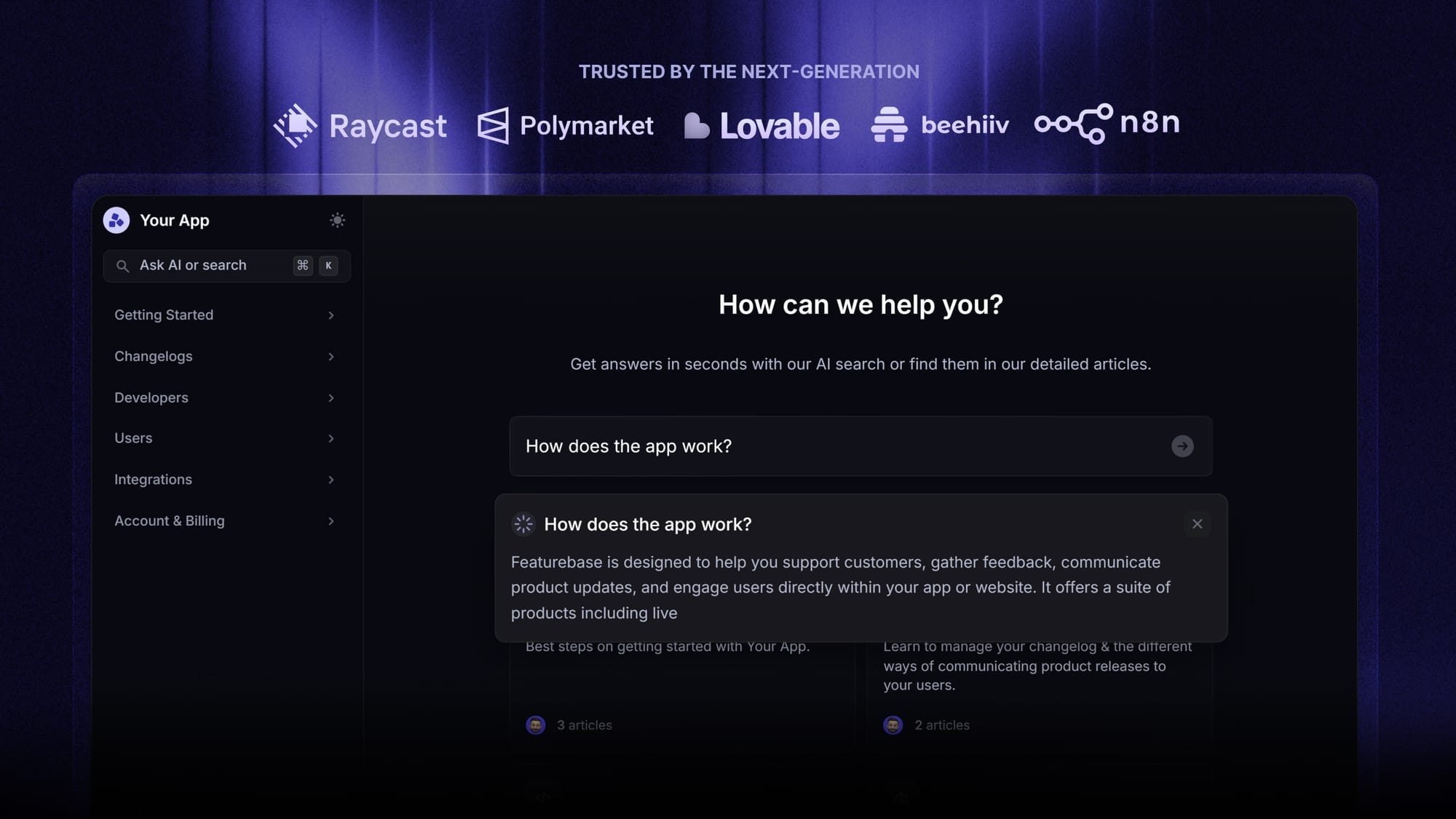
Featurebase is a modern & powerful Confluence alternative that lets you create beautiful product documentation in minutes for your customers and team. It integrates with Jira, so you're not missing out on ecosystem advantages. It’s loved by thousands of product, marketing, and support teams from companies like Lovabale, Polymarket, and Instantly.
The best part? Featurebase offers a Free plan, with paid plans starting at just $29/seat/mo. Onboarding is quick, requires no credit card, and you can immediately start improving documentation discoverability and user experience. 👇
✨ Create a beautiful AI-powered Help Center with Featurebase for free →
FAQs about Confluence's pricing
How much does Confluence cost per user for small vs growing teams?
Confluence cloud plans are billed per user/month with annual billing. Small teams can start with the free plan, while growing teams often choose the standard plan or premium plan, which unlock advanced admin controls, unlimited pages, and automation. Costs scale with your team size.
Which Confluence plan should I choose for advanced features?
Teams that need advanced permissions, audit logs, unlimited automation, or advanced analytics typically choose the premium plan. Enterprises with enterprise-grade identity, multiple sites, and complex admin requirements choose the enterprise plan with custom pricing.
Are Atlassian marketplace apps or integrations included in Confluence pricing?
No. Marketplace apps and integrations like Jira Service Management or Jira Software are sold separately. Teams may also need extra file storage or centralized knowledge hub features, depending on usage.
What key factors affect Confluence pricing on Atlassian Cloud?
Key factors include team size, number of user tiers, required advanced admin controls, automation, file storage, and whether you need multiple sites or enterprise-grade identity. These considerations affect the costs of the standard, premium, and enterprise plans.
Is the standard plan sufficient for small teams using Atlassian Cloud?
Yes. The standard plan on Atlassian Cloud provides essential features like advanced permissions, automation, and 250 GB file storage, making it a solid choice for small teams that need structure without jumping to premium.