Blog ComparisonsHelpCrunch Pricing (2026): Plans, Features, and Best Alternatives
HelpCrunch Pricing (2026): Plans, Features, and Best Alternatives
HelpCrunch pricing (2026) guide to help you understand true costs, choose the right support plan, and get the most value from your live chat, help desk, AI agents, and email automation tools.


✨ Looking for a more powerful & affordable alternative to HelpCrunch? Check out Featurebase →
Thinking about using HelpCrunch for customer support, live chat, and email marketing automation, but not sure what the real cost looks like as your team and customer data grow? You’re not alone.
On the surface, HelpCrunch offers competitive pricing and a modern, user-friendly interface. It positions itself as an all-in-one platform that combines live chat support, help desk software, knowledge base tools, and email marketing tools in a single dashboard. That sounds great for small businesses and medium-sized businesses that want to manage customer inquiries across multiple channels.
But once you dig into HelpCrunch pricing plans, the details matter. From support agents, contact volume, automation rules, AI assistant access, customizable chat widgets, and email campaigns can all affect your total cost.
In this guide, we’ll break down HelpCrunch pricing, features by tier, hidden cost drivers, scaling scenarios, and whether it’s the right customer service software for your support needs.
Key takeaways
Here’s what you should know before choosing a HelpCrunch plan:
- Subscription-based pricing model: HelpCrunch pricing is based on a subscription model, where costs depend on the number of support agents, AI usage, email marketing automation, and automated campaigns.
- Core functionalities are included in all plans: Live chat, help desk software, and knowledge base access are available across tiers, while advanced features scale with higher plans.
- AI tools impact cost: Access to AI agents and the AI editor is included in Pro and Unlimited plans, and usage limits or paid extensions can increase monthly expenses.
- Automation and email campaigns increase with growth: Automated onboarding, marketing campaigns, and email marketing tools scale costs as your customer data grows.
- Billing and savings: Annual billing saves 20%, helping teams manage costs while scaling.
- Customization and branding: Higher-tier plans include options for full customization, multiple languages, and branding removal, which can also affect pricing.
- Scalable for team size: Plans are designed to grow with your team and customer volume, so businesses can start small and expand without disruption.
- There are many more modern & powerful alternatives, like Featurebase, which provides modern AI-powered support for fast-growing teams
What is HelpCrunch?
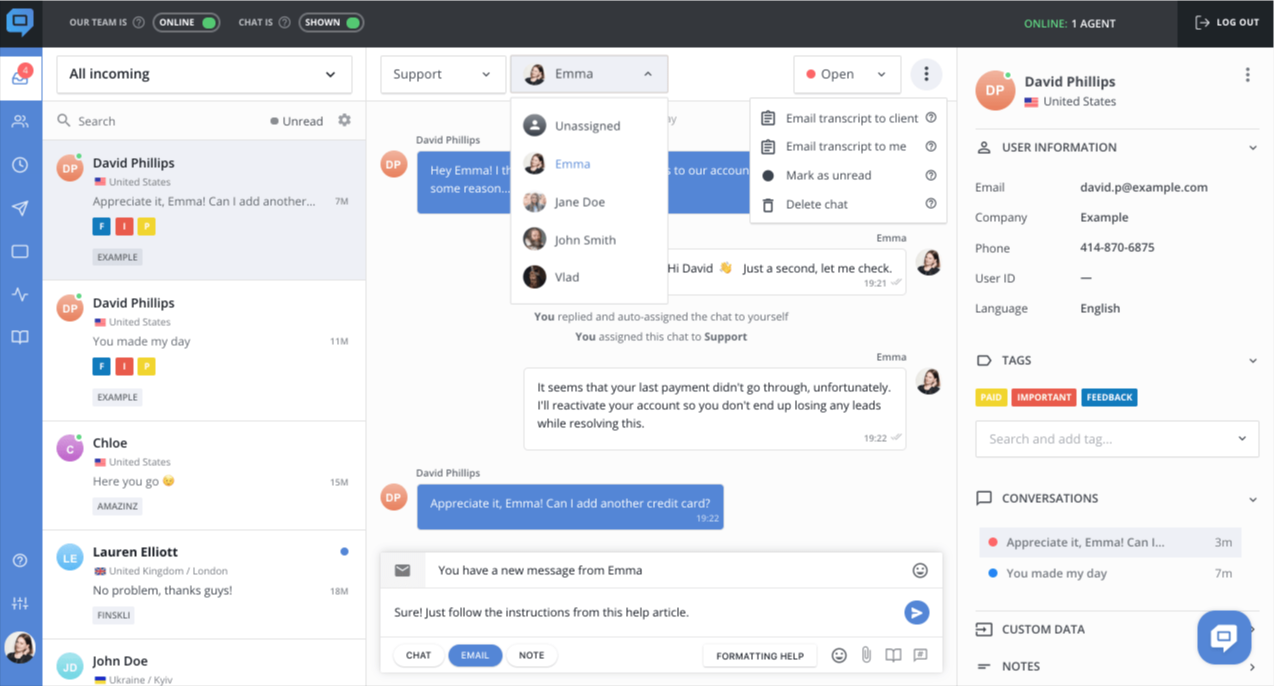
HelpCrunch is a customer service platform that lets teams manage live chat, help desk tickets, knowledge base, and AI-driven support from a single dashboard. It’s typically used to handle customer inquiries, run automated campaigns, and manage onboarding or marketing messages across multiple channels. Most teams adopt it as part of their customer support stack rather than as a standalone tool.
From a pricing standpoint, HelpCrunch uses a subscription model where costs are determined by the number of support agents, AI conversations, AI data sources, and email usage. Core functionality like live chat, help desk, and basic email automation is available on lower plans, while AI assistant tools, automated campaigns, and higher volumes are tied to higher tiers and paid extensions.
In practice, the more customer interactions, AI-driven conversations, and automated emails you send, the more your HelpCrunch subscription can grow. Extensions for AI conversations and AI data sources can significantly impact your monthly cost, so forecasting usage is key.
HelpCrunch Pricing breakdown 2026
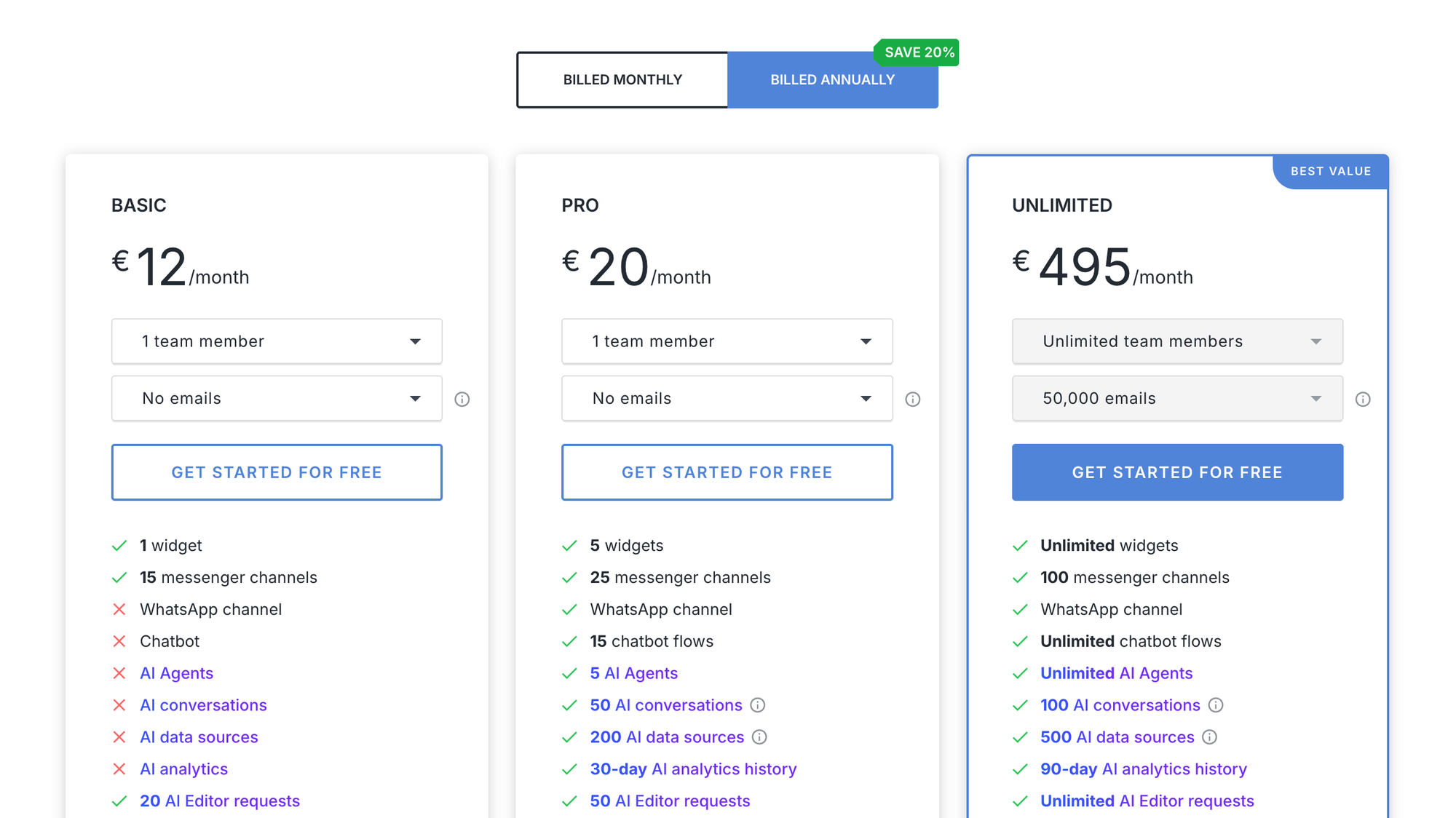
As your team grows or your AI agents, automated campaigns, onboarding or marketing campaigns, and email marketing automation increase, HelpCrunch pricing scales to match your usage.
Each plan is designed to accommodate more team members, higher email volumes, and advanced customer support tools. Upgrading tiers ensures you can efficiently manage customer inquiries, respond to customer queries, and maintain high customer satisfaction.
With advanced features like AI editor, support features, and multilingual knowledge bases, HelpCrunch enables your support team to handle larger volumes of customer support while maintaining a user-friendly interface. The scalability of the pricing tiers lets businesses start small and expand as needed, ensuring access to all your business needs without sudden disruption. Use the table above to compare plans before exploring the detailed tier breakdown.
| Plan | Starting Price | Team Size | Emails/Month | Key Features |
|---|---|---|---|---|
| Basic | $15/month | 1–5 | 0–20,000 | - 1 chat widget - 15 messenger channels - 3 auto messages - 3 popups - Basic automation - Medium priority support - Monolingual knowledge base - Full customization - HelpCrunch branding |
| Pro | $25/month | 1–5 | 0–50,000 | - 5 customizable chat widgets - 25 messenger channels - WhatsApp support - 15 chatbot flows - 5 AI agents - 50 AI conversations - 200 AI data sources - 30-day AI analytics - AI editor - Multilingual knowledge base - Advanced automation - Branding removal - High priority support |
| Unlimited | $620/month | Unlimited | Unlimited | - Unlimited widgets, messenger channels, chatbots - Unlimited AI agents & AI editor requests - Auto messages & popups - 100 AI conversations - 500 AI data sources - 90-day AI analytics - Multilingual knowledge bases - Entire knowledge base access - Advanced automation - Branding removal - Highest priority support |
Basic plan ($15–$105/month)
Ideal for small businesses or startups just getting started with customer support tools and live chat.
- Widgets & Channels: 1 chat widget, 15 messenger channels
- Automation & AI: 3 auto messages, 3 popups, basic automation
- Support & Knowledge Base: Medium priority support, monolingual knowledge base
- Customization & Branding: Full customization; HelpCrunch branding appears on chat widget
- Team & Emails: 1–5 team members, 0–20,000 emails/month
Best for: Teams on a budget needing essential customer communication, live chat support, and support features without AI capabilities.
Pro plan ($25–$205/month)
Designed for growing teams seeking AI agents, chatbots, and advanced automation rules.
- Widgets & channels: 5 customizable chat widgets, 25 messenger channels, WhatsApp support
- AI & automation: 15 chatbot flows, 5 AI agents, 50 AI conversations, 200 AI data sources, 30-day AI analytics, AI editor
- Support & knowledge base: High priority support, multiple languages, multilingual knowledge base
- Customization & branding: Advanced customization options and automation, branding removal included
- Team & emails: 1–5 team members, 0–50,000 emails/month
Best for: Teams that want to manage customer inquiries efficiently, improve customer satisfaction, and leverage email marketing automation or onboarding/marketing campaigns.
Unlimited plan ($620/month)
Perfect for medium- to large-sized businesses that need unlimited team members and all the features in one platform.
- Widgets & Channels: Unlimited widgets, messenger channels, chatbots
- AI & Automation: Unlimited AI agents, AI editor requests, auto messages, popups; 100 AI conversations, 500 AI data sources, 90-day AI analytics
- Support & Knowledge Base: Highest priority support, multilingual knowledge bases, entire knowledge base access
- Customization & Branding: Advanced automation, branding removal
- Team & Emails: Unlimited team members and emails
Best for: Large teams or enterprises requiring all-in-one platform capabilities, customer service software, help desk, and full customer engagement across multiple channels.

Get the best modern HelpCrunch alternative
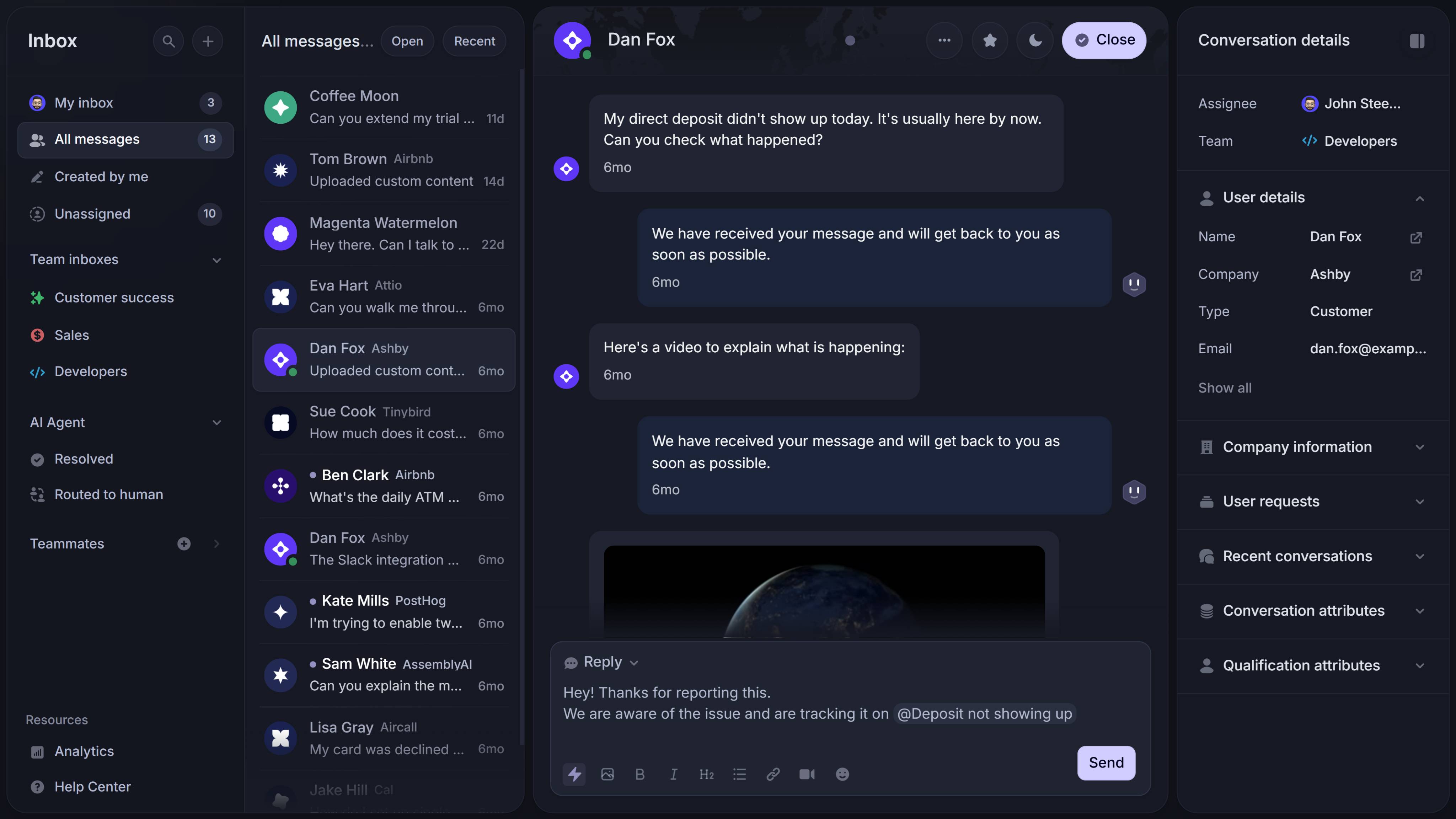
Support your customers from anywhere with an AI-powered omnichannel inbox
Core features that scale pricing over time
HelpCrunch pricing grows with the features your team uses most. Chat widgets, customizable chat widgets, knowledge base access, AI agents, and email marketing automation all influence your monthly cost.
Smart chat widget targeting, self-serve knowledge bases, and advanced options like AI assistant search or AI editor support help your support team manage customer inquiries efficiently. Meanwhile, email campaigns and automated onboarding or marketing campaigns scale with customer data, ensuring your subscription adjusts as usage grows.
Chat widget and customizable chat widgets
The chat widget is central to HelpCrunch. You can deploy customizable widgets and control:
- Design and layout
- HelpCrunch branding visibility
- Auto messages triggers
- Multiple follow-up messages
- Targeting by user behavior
- Lead generation prompts
- Conversion rates optimization
Smart chat widget targeting improves customer engagement and customer experience when aligned with user actions.
Knowledge base capabilities
HelpCrunch includes a knowledge base across all pricing plans. This reduces routine tasks and improves customer satisfaction by letting users self-serve answers.
Higher tiers expand:
- Entire knowledge base structure
- Custom domains
- Monolingual knowledge base → multiple languages
- AI assistant search
- AI editor content help
- Customization options
A strong knowledge base reduces inbound customer inquiries and improves support team efficiency.
Email marketing automation and campaign costs
HelpCrunch doubles as an email marketing tools platform with:
- Email campaigns
- Email follow ups
- Email automation
- Automated campaigns
- Marketing campaigns
- Lead generation funnels
Because these features rely on stored customer data, costs rise with contact growth. This is similar to Intercom pricing, where Intercom pricing starts at a base but increases with usage and automation depth.
What if HelpCrunch isn’t the perfect fit for me?
Don’t worry, you’re not the only one. Many teams look for simpler, more affordable, or more specialized alternatives. Some of the best options include:
- ✨ Featurebase – Best modern HelpCrunch alternative with AI, chat, email, automations & help center
- Intercom – Best for growing teams that want AI-powered messaging, support, and product updates
- Help Scout – Best for teams that want a clean, email-first help desk with docs & chat
- Zendesk – Best for large teams needing enterprise ticketing and analytics
- Crisp – Best for startups & SMBs that want modern live chat with automation
- LiveAgent – Best for teams needing robust help desk software with ticketing & chat
- Zoho Desk – Best for budget-conscious teams wanting full omnichannel support
- Front – Best for teams that collaborate heavily via shared inboxes
- GitBook – Best for internal documentation, changelogs, and lightweight support
- Canny – Best for product teams collecting feedback and managing roadmaps
Is HelpCrunch worth it?
HelpCrunch is a solid all-in-one customer support platform, but costs can quickly scale as your team, AI usage, and email campaigns grow. Understanding pricing tiers, feature limits, and automation impact is key to avoiding surprises and managing your support efficiently.
Featurebase is a modern support platform that combines AI support tools, feedback collection, and product communication in one place. You can manage support tickets, live chat, knowledge bases, AI-assisted workflows, and also collect and act on customer feedback with feature voting, surveys, and changelogs. It's loved by thousands of companies like Lovable, n8n, and Raycast.
It comes with a Free Plan and quick onboarding that doesn’t require a credit card, so teams of any size can try it risk-free. Whether you’re a small business or a growing team, Featurebase scales with your support needs and product feedback workflows. 👇
✨ Automate your support with the fastest AI-enhanced Inbox today →

Frequently asked questions
1. How does HelpCrunch’s subscription-based pricing model work?
HelpCrunch uses a subscription-based pricing model where costs depend on support agents, email marketing tools, AI agents, and automated campaigns. Base features like live chat support and knowledge base access are included in all tiers.
2. What drives the total cost of HelpCrunch?
Your total cost grows with AI assistant usage, email campaigns, automation rules, advanced support features, multiple languages, and customization options. Teams running onboarding or marketing campaigns may see higher costs as customer data increases.
3. Can I remove HelpCrunch branding or customize my chat widget?
Yes, higher tiers allow full customization and branding removal on chat widgets. You can also set up multiple follow-up messages and target users effectively based on user actions.
4. Are AI agents and the AI editor included in all plans?
No, AI agents and the AI editor are only available in Pro and higher plans. Usage is capped per month, so teams with high-volume customer queries should forecast AI needs carefully.
5. How can I manage costs while scaling my support team?
Start small with core functionalities like help desk, live chat, and knowledge base. As your team grows or you add multiple brands, automated campaigns, and email marketing automation, consider upgrading plans or billing annually to save 20%.