Blog Customer ServiceHow Do Chatbots Qualify Leads? A Complete Guide
How Do Chatbots Qualify Leads? A Complete Guide
A practical guide to how AI chatbots qualify leads in real time, from BANT questions and lead scoring to branch-based routing. With Workflow examples and best practices.



Sales reps spend less than 30% of their day actually selling - the rest gets eaten by admin, meetings, and chasing leads that were never going to buy.
Chatbots fix the qualification side of that math, asking the right questions in seconds instead of hours and routing the answers somewhere your team will actually see them.
This guide walks through exactly how it works, step by step. 👇
Short overview
The short version of how AI chatbots qualify leads:
- A visitor lands on your site. The chatbot starts a conversation, either on intent signals like a pricing-page visit, or the moment they reply.
- It asks 3-5 targeted questions based on a framework like BANT (Budget, Authority, Need, Timeline) plus the ICP attributes that matter for your business.
- It scores the answers in real time against rules you set, and decides whether the lead is hot, warm, or cold.
- It routes qualified leads to the right place. Hot leads get a calendar link or a Slack ping to a rep. Cold leads go into a nurture flow.
- It captures lead data in your CRM so nothing falls through the cracks between the chat and follow-up.
✨ Featurebase is a modern support suite, enabling SaaS teams to run this AI workflow inside their live chat, so the chatbot can qualify leads, run custom actions like extending trials, and hand off to a human when needed.

Resolve 70% of customer requests with AI
Automatically resolve customer issues & cut down support loads for your team
What does it actually mean to qualify a lead?
Lead qualification is figuring out which of the people who've shown interest in your product are actually worth talking to. The lead qualification process separates the tire-kickers from the people with a real problem, real budget, and a real timeline to buy.
Before we get into the chatbot mechanics, two definitions worth pinning down.
The BANT framework (and why most teams still use it)
Most sales teams use a framework to qualify leads consistently. The classic is BANT:
- Budget - the lead has the money to buy
- Authority - the lead can make the buying decision, or strongly influence it
- Need - your product solves a real problem they have
- Timeline - they want to buy soon enough to matter
BANT has been around since the 1960s and is still the default for a reason. It covers the four signals that most reliably predict whether a lead will convert.
Plenty of teams layer extra criteria on top, like company size, job title, or current tech stack, and that's fine. The point of lead qualification criteria is consistency: every lead is scored against the same questions, so the bar doesn't move based on which rep is on duty.
Visitors, leads, and customers - know the difference
These three words get tossed around interchangeably, but they aren't the same thing:
- A visitor is anonymous. They're browsing your site but haven't started a conversation or logged in.
- A lead is a visitor who's engaged with you, usually by starting a chat or replying to outbound outreach. Once they share contact details like an email or phone number, you can follow up.
- A customer has signed up or logged into your product. Their profile carries all past interactions and conversations forward.
The job of a lead qualification chatbot is to move people from the first bucket to the second, and to flag the ones most likely to make it to the third.
How do chatbots qualify leads? (the 6-step flow)
Once you know what you're qualifying for, the chatbot does the work in 6 stages. They run in order, and each one feeds the next.
1. The chatbot starts the conversation
Timing matters more than people think. Speed-to-lead is one of the most studied numbers in sales, and the math is brutal: the odds of qualifying a lead are 21× higher when you respond within 5 minutes vs. 30 minutes, according to the MIT Lead Response Management Study. 82% of customers now expect immediate resolution in their service interactions, and that expectation bleeds into sales conversations too.
A well-configured lead generation chatbot fires on signals - time on page, a return visit, hovering near a CTA - not just on every page load. The first message is short and offers something useful, not a sales pitch. It also runs 24/7, which closes the gap that opens up outside of business hours.
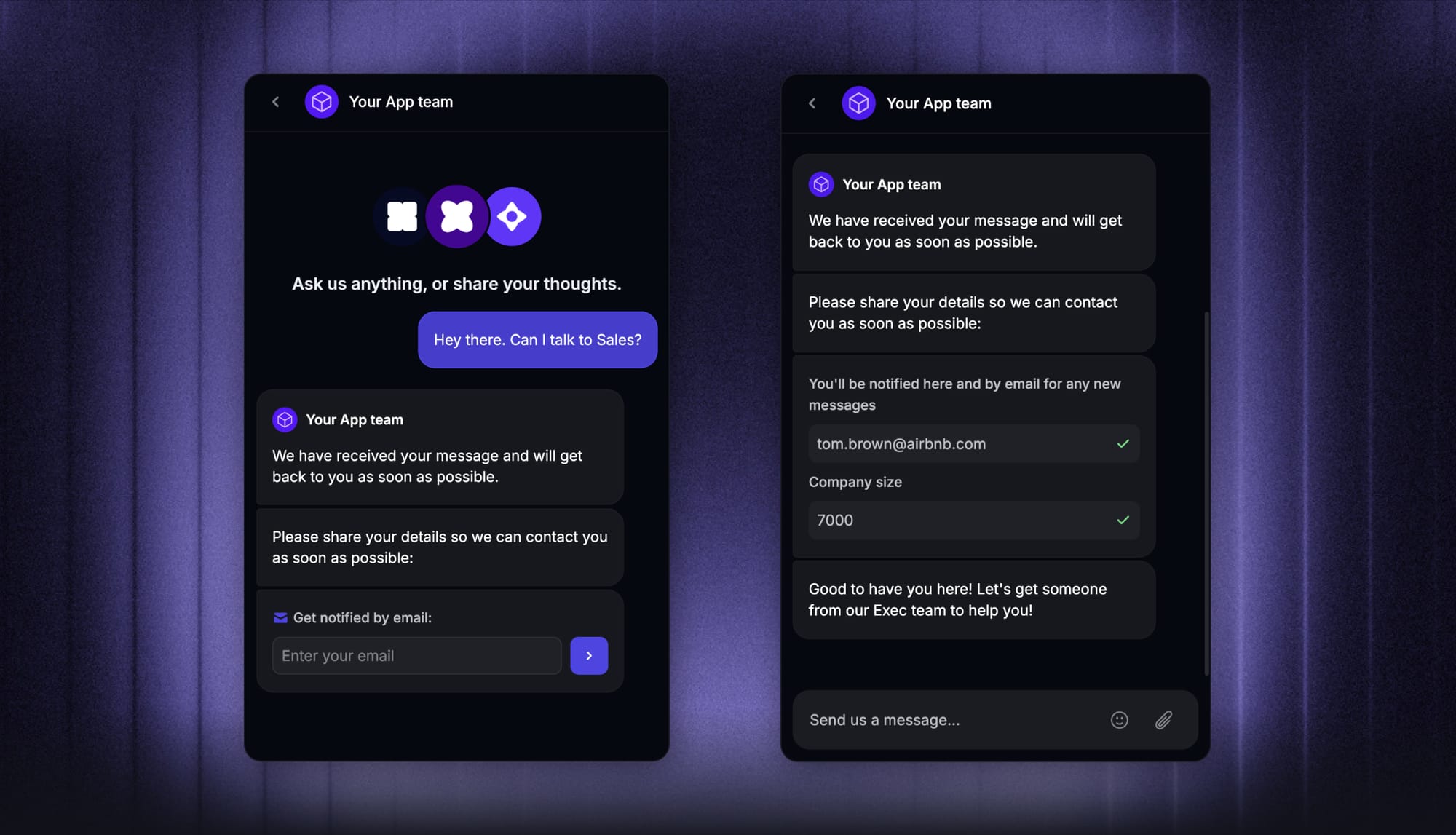
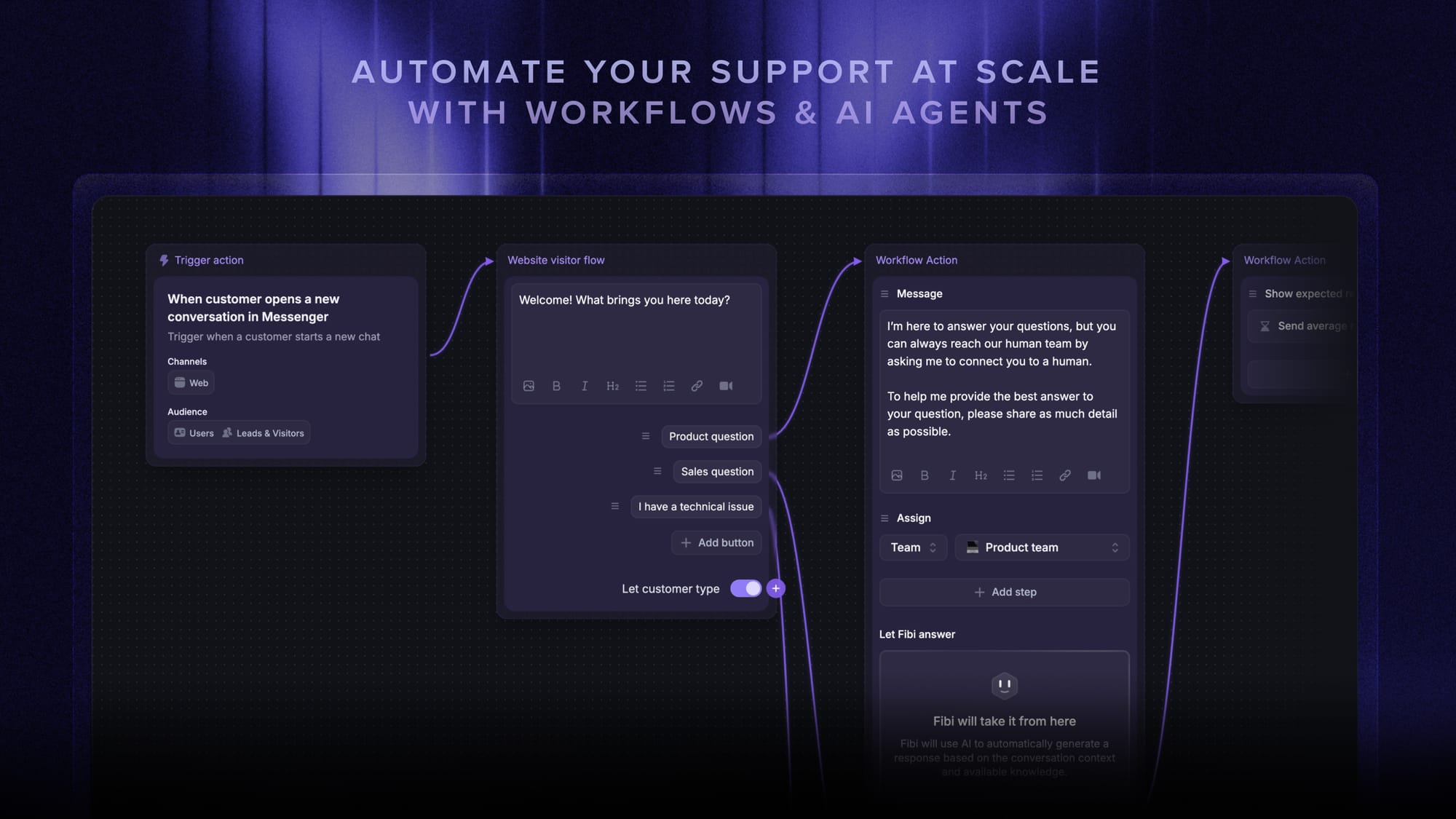
In Featurebase, you can run a lead qualification workflow from the moment a visitor lands on your website to start qualifying them.
2. It asks targeted qualifying questions
Once the conversation starts, the bot shifts into qualification mode. Good chatbots keep this to 3-5 questions max, fewer if your ICP is narrow.
The flow is usually logic-based: the next question depends on the last answer. If someone says they're a solo founder, the bot doesn't ask about team size. If they say they're "just looking," the bot offers a resource and exits cleanly instead of grilling them.
Multiple-choice answers work better than free text for sensitive questions like budget range. A range ($0-1k, $1k-5k, $5k+) is much easier to answer than "what's your budget?" and gives you cleaner lead data on the back end.
3. It analyses the answers in real time
This is where AI chatbots pull ahead of rule-based bots. Natural language processing (NLP) lets the bot understand free-text replies, not just keyword matches.
"Maybe next quarter if things go well" doesn't fit a "buy within 30 days = yes / no" rule. An AI chatbot reads the intent (interested but not urgent) and adapts, asking a follow-up like "what would need to be true for you to move sooner?" instead of dead-ending the flow.
The bot is also pulling in signals beyond the conversation itself: user behavior (pages visited, return frequency), firmographic data (company size, industry from IP enrichment), and CRM data (lead status, past interactions). Similar data enrichment capabilities are commonly used by AI lead generation platforms such as Artisan to help sales teams prioritize high-potential prospects.
4. It scores and segments the lead
Lead scoring is where the chatbot decides what kind of lead this is. Each answer carries a point value based on rules you set in advance.
A simple example for a B2B SaaS:
- Director-level job title: +20
- Company size of 50+: +15
- Buying within 30 days: +25
- Budget over $1,000/month: +20
- No budget defined: -10
If the lead clears your threshold (say, 50 points), they get tagged SQL and routed to a rep as a high potential lead. Below that, they're an MQL and go into nurture. Below an even lower bar, the bot politely wraps up the conversation with a link to a resource and moves on.
Most modern chatbots refine these rules over time. As more conversations close (or don't), the scoring model gets sharper and the qualified prospects rise to the top faster.
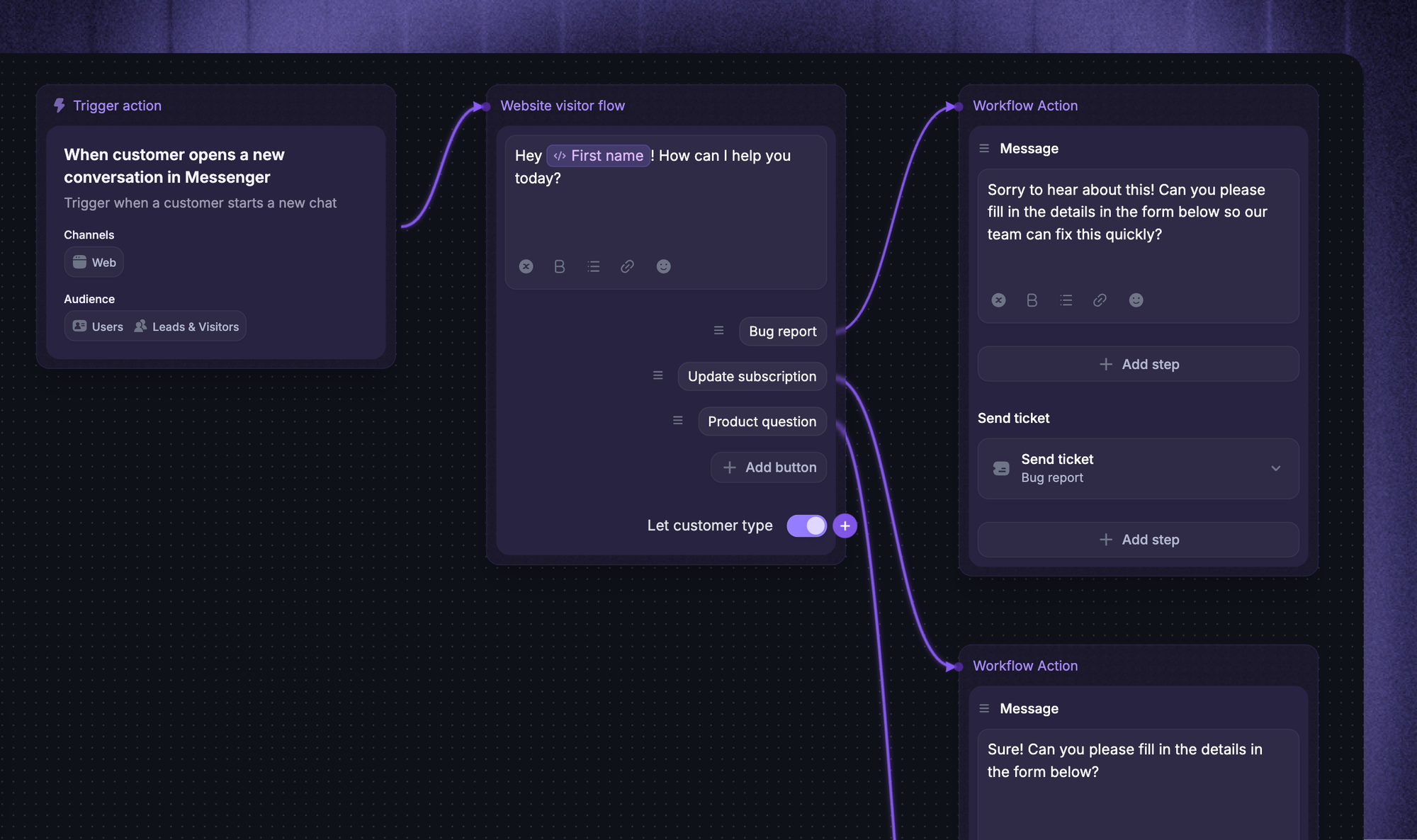
5. It routes qualified leads to the right place
A scored lead is only useful if it lands somewhere a human can act on it. The chatbot's job at this stage is to make the handoff invisible.
For high quality leads, that usually means one of three things:
- A calendar link to book a demo on the spot, with the rep matched to their territory or product line
- A Slack ping to the assigned rep with the full conversation pasted in
- A push to your CRM with the lead's record pre-populated, scored, and tagged for follow-up
For cold leads, the chatbot adds them to an email nurture sequence or a retargeting audience. For the lowest-intent website visitors, it ends the conversation gracefully and offers something educational.
The point is that no qualified lead waits in a queue. By the time the rep sees them, the chat history, the score, and the routing rationale are already in the CRM. That's why CRM integration isn't optional, it's the whole point.
6. It follows up if the lead drops off
Most chatbot flows lose potential leads in the middle. Someone closes the tab before finishing, gets distracted, or leaves their email but never answers the timeline question.
A good qualification bot recovers some of those. If the visitor came back later (same cookie or same email), the bot picks up where the conversation left off instead of starting from scratch. If they left an email but didn't finish, the bot can fire off a short follow-up message: "Hey, you were checking out our pricing earlier - want me to send over a quick comparison?"
This is the part most "set it and forget it" deployments skip, and it's where a lot of pipeline leaks out.
What questions should a lead qualification chatbot ask?
Map the targeted questions back to BANT plus 1-2 ICP attributes. Here are 8 that cover most B2B SaaS use cases:
- Intent: "Are you evaluating options, or just doing early research?"
- Company size: "Roughly how many people are on your team?"
- Job title: "What's your role at the company?"
- Budget: "Do you have a budget allocated for this, or are you still scoping?"
- Authority: "Are you researching for yourself or on behalf of a team?"
- Need: "What's the main thing you're trying to solve?"
- Timeline: "When are you hoping to have a solution in place?"
- Current tool: "Are you using anything for this today?"
Keep them conversational. "Do you have a budget?" reads colder than "Is budget something you've already scoped, or are you still figuring that out?" - same data, much better drop-off rate.
If you can pull a data point automatically (company size from a domain lookup, role from LinkedIn enrichment), skip the question. Every question you cut is a 5-10% bump in completion rate, which is how chatbots qualify leads faster than long static forms.
How to set up a lead qualification chatbot
The technology is the easy part. The setup is where most marketing teams get stuck. Here's the order that works.
1. Define your ideal customer profile
Before you write a single chatbot question, sit down with sales and write out what a qualified lead looks like. A few questions that help:
- What pain points does our product solve?
- What size company are they at?
- What role do they hold?
- What's their realistic budget?
- What's their typical timeline?
- Are there industries or segments we explicitly don't sell to?
Rank these by impact on conversion. Budget and authority usually outrank company size and timeline, but it depends on your product. The point is to be specific. "Anyone interested in support software" is not an ICP.
2. Decide what lead data to collect
Once you have the ICP, pick the 4-8 attributes the bot should capture. Don't try to capture everything in one conversation. Anything you can enrich automatically afterward (industry from IP, company size from a domain lookup, LinkedIn URL from email) belongs in enrichment, not in the chat flow.
Connecting your chat workflow to a multi-source company dataset enables real-time enrichment of millions of B2B records with granular firmographics, ensuring high data reliability without lengthening the conversation.
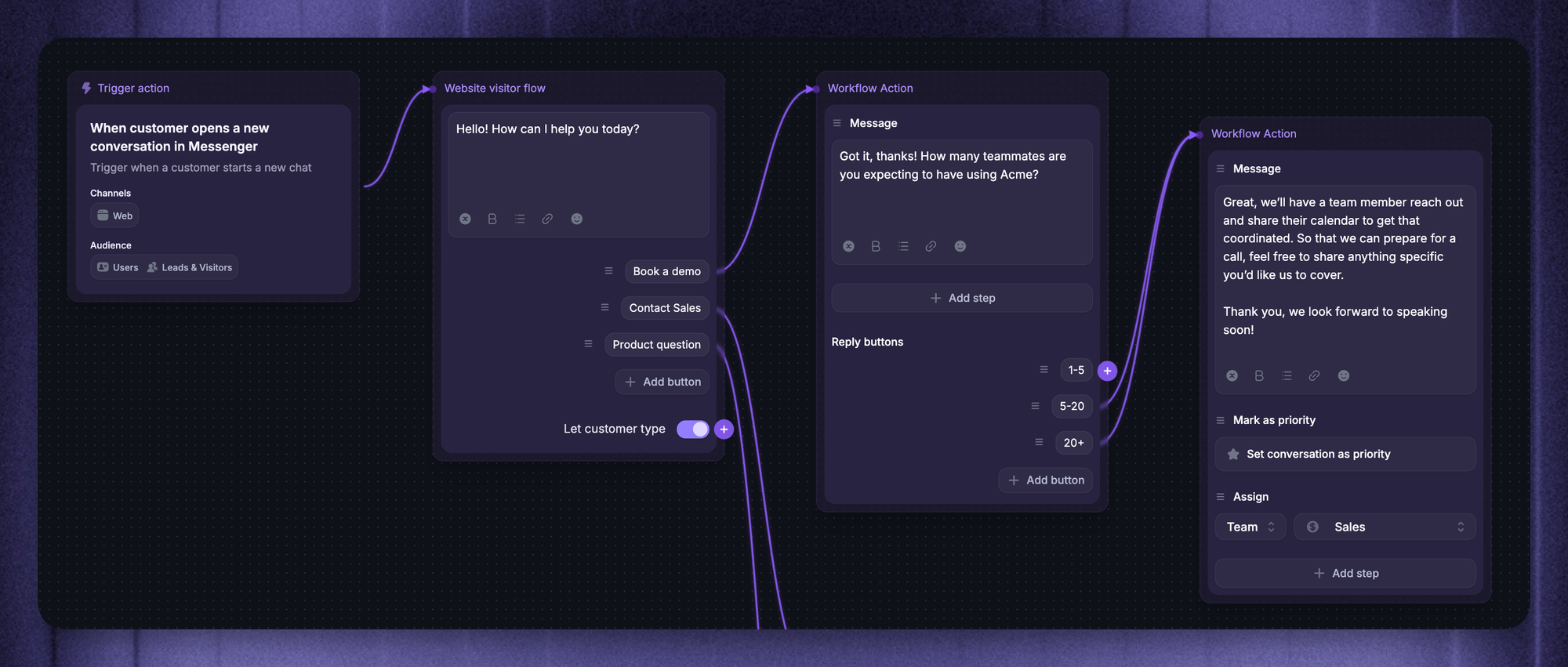
3. Design the conversation flow
Open with something useful, not a question. "Looking for help picking a plan? I can ask a few quick questions to point you in the right direction" beats "What's your name?" every time.
Branch the flow on key answers. Multiple-choice for sensitive data (budget, revenue, headcount). Free text for open-ended ones (the main problem they're solving). Always include an escape hatch like "Talk to a human" or "I'm just browsing" so people don't feel trapped.
4. Connect it to your CRM and tools
A chatbot that doesn't push lead data into your CRM is a glorified contact form. The minimum connections to wire up:
- CRM - new lead records get created with score, source, and the full conversation log
- Calendar - hot leads can book a demo without leaving the chat
- Slack or email - your team gets pinged when a high-score lead comes through
- Marketing automation - lower-score leads get dropped into the right nurture sequence
If the chatbot platform doesn't integrate with your stack out of the box, you'll be living in Zapier. Factor that in when you pick a tool.
5. Test, score, and refine
The first version of your chatbot will be wrong. That's fine. Look at the chat logs after the first 50-100 conversations and check:
- Where do people drop off? (Usually the question right before drop-off needs work.)
- Which questions get the most "I don't know" answers? (Either the question is bad or the audience isn't who you think.)
- Are your "qualified" leads actually converting at the rate you predicted? (If not, your lead criteria need tightening.)
Treat the chatbot like any other piece of product. Ship, measure, iterate.
Common mistakes to avoid when setting up a qualification chatbot
A few patterns that show up in nearly every chatbot post-mortem:
- Asking too many questions. Past 5, drop-off climbs fast. Cut anything you can enrich automatically.
- Not verifying captured emails. Bots, typos, and people dropping in disposable addresses like "test@test.com" all skew your data. Connecting your chatbot to an email verifier catches invalid and disposable addresses before they enter your CRM, so only real, deliverable leads make it through to your nurture or routing flows.
- No human escape hatch. Some leads need human interaction, not a bot. If your chatbot doesn't have a "talk to someone" button, you lose them.
- Treating every lead the same. A free-tier user asking about an upgrade isn't a new lead, they're an existing user. Your bot needs to know the difference and react accordingly.
- No follow-up on drop-offs. Half the value of a chatbot is recovering conversations that didn't finish. If you don't have a flow for that, you're leaving pipeline on the table.
- Scoring rules nobody updates. The first scoring model is always wrong. Review the rules monthly for the first quarter, then quarterly after that, using chatbot performance and key metrics like completion rate and conversion to demo.
How Featurebase qualifies leads for SaaS teams
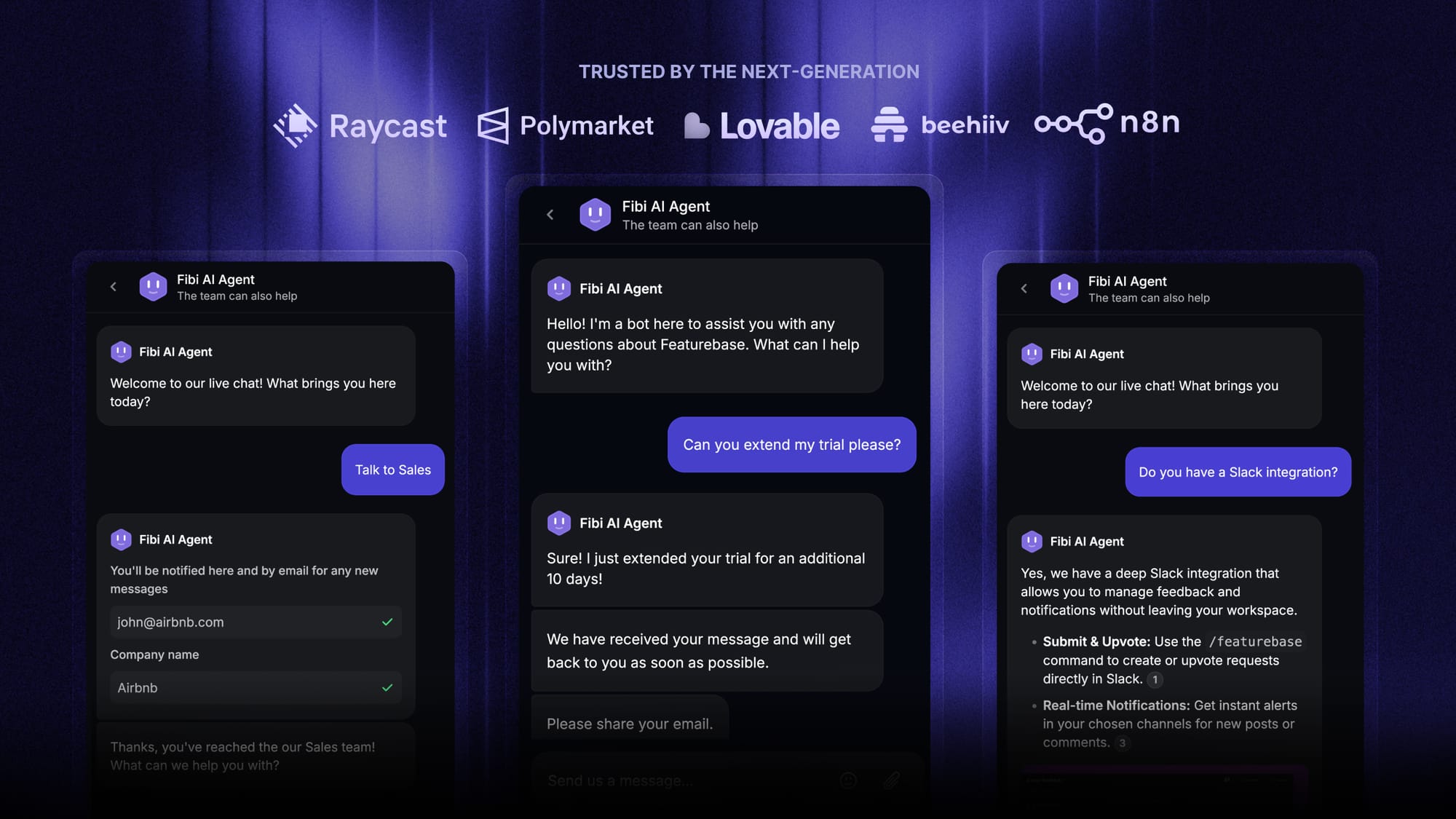
Featurebase is a modern AI customer support platform for product-led SaaS. It combines AI-powered support, help center, and feedback management into a single platform for startups that want all their customer-facing tools in one place. Featurebase is loved by thousands of support teams from companies like Lovable, Raycast, and n8n. 💫
Top features:
- Workflows – Automatically qualify new leads, capture their contact details, and route them to the right team with no-code Workflow templates
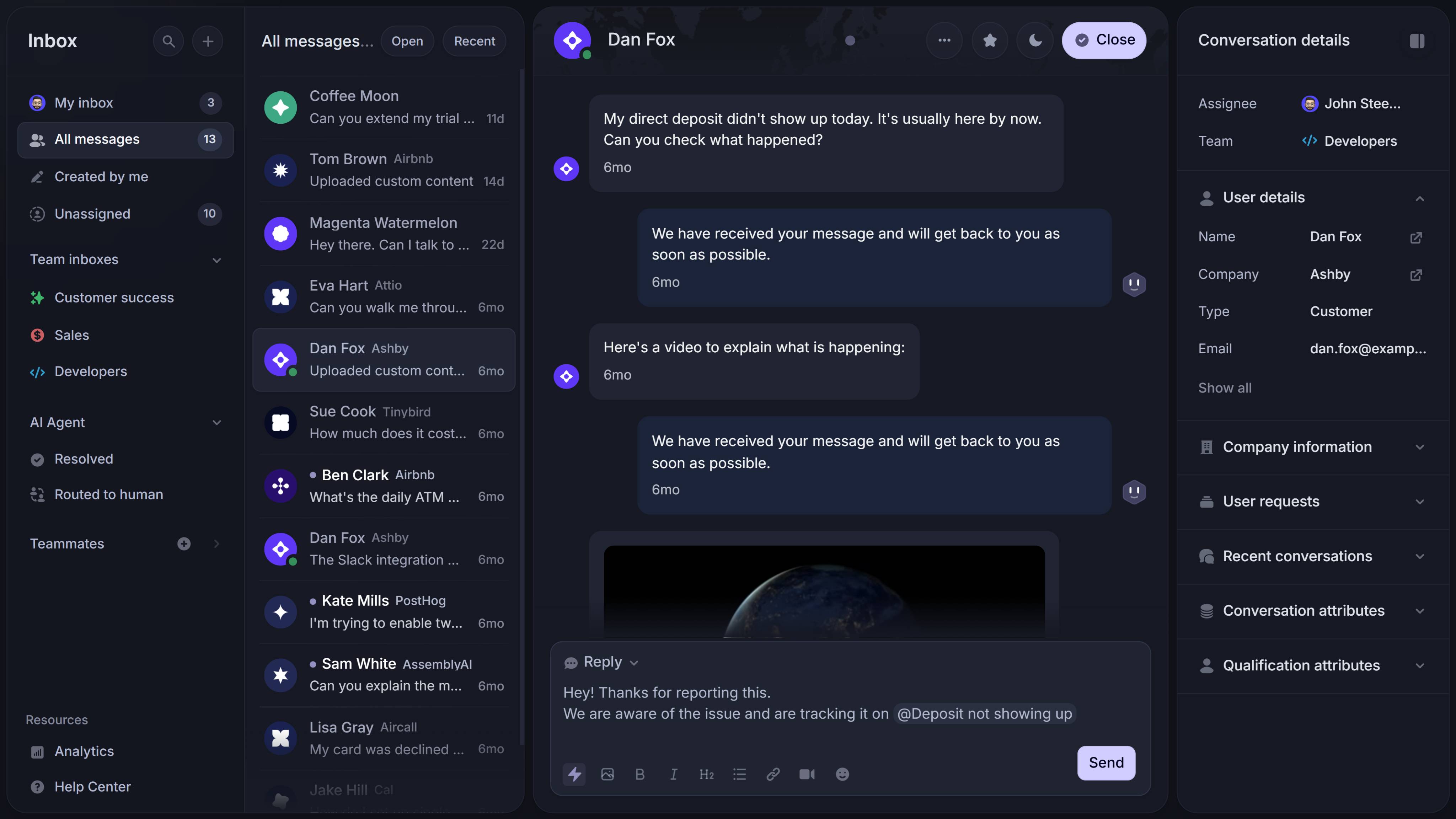
- Omnichannel inbox – Manage live chat, email, and Slack conversations from one AI-powered view
- Fibi AI Agent - Resolve customer issues on autopilot & run custom actions like trial extensions and refunds
- Help center with AI search – Provide instant, multilingual self-serve answers
- AI Copilot – Help your agents answer customers faster with AI Copilot that uses your internal knowledge
- Multi-brand support – Manage multiple Help Centers and Live chats from a single workspace
- Automatic AI translations – Automatically translate all messages and help articles to your customers native language
- Service Level Agreements – Track SLAs to make sure your team responds to customers on time, every time
- Integrations – Connects with Slack, Linear, Jira, HubSpot, and more
Pricing: Free plan available with unlimited conversations. Paid plans start at $29/seat/month with $0.29 per AI resolution.
Featurebase covers all the basic support features that legacy platforms do, but with a much more modern, omnichannel approach. The Messenger turns every new conversation into a lead in your workspace, Fibi can handle the qualifying questions and even run custom actions (extend a trial, offer a discount, fetch account data), and Workflows let you script the whole qualification process without code.
Get the fastest AI-powered Support Inbox
Support your customers from anywhere with an AI-powered omnichannel inbox
Conclusion
Chatbots qualify leads by doing what a sales rep would do in the first 60 seconds of a discovery call, just faster, around the clock, and against a consistent set of rules. Done right, they turn anonymous website visitors into scored leads with full context, and they hand the most promising prospects to a human while the conversation is still warm.
Featurebase is a modern AI-powered support platform that helps SaaS teams qualify leads, resolve customer questions, and run custom workflows from inside one Messenger. With Fibi AI Agent, lead qualification Workflows, and a full omnichannel Inbox, you can capture and qualify every visitor without lifting a finger.
It comes with a Free plan and onboarding takes minutes, so there's no downside to trying it. 👇
✨ Automate your support with the fastest AI-enhanced Inbox today →

FAQ
Can a chatbot really qualify B2B leads as well as a human SDR?
For the top of the funnel, yes. A chatbot can run BANT-style qualification 24/7, in seconds, against consistent rules. What it can't do is build rapport, handle nuanced objections, or push back when a prospect is being evasive. The right play is to use the bot as a first filter and let SDRs spend their time on the warm leads it surfaces - meaningful interactions over volume.
What's the minimum number of questions a qualification chatbot should ask?
3 to 5. Fewer and you don't have enough data to score. More and drop-off climbs fast. Past 5 questions, completion rates drop noticeably in most benchmarks. Pick the 2-3 questions that most reliably predict fit, add anything your CRM can't enrich on its own, and stop.
What framework should the chatbot use?
BANT (Budget, Authority, Need, Timeline) is the most widely used and a fine default. CHAMP, MEDDIC, and GPCT exist if you've outgrown it, and they're more granular, but the basic logic is the same. The framework matters less than picking one and applying it consistently across every lead.
Should the chatbot ever just hand the conversation to a human?
Yes, and as cleanly as possible. If a lead asks for a human, scores above a certain threshold, or shows signs of frustration in the conversation (sentiment analysis catches this in most modern bots), the handoff should happen automatically with the full chat history attached.
How long does it take to set up a lead qualification chatbot?
A basic version, with a workflow template and a couple of CRM integrations, takes about a day. A version tuned to your ICP with proper scoring rules, branching logic, and follow-up flows takes 2-3 weeks of iteration on real conversations. Don't expect to ship v1 and walk away.