Knowledge Management Process: The Full Guide for 2026
Find out what the knowledge management process is, why it's important and how your SaaS business can get ready today.


On this page
Knowledge in the context of software is different than knowledge in general. SaaS knowledge implies the knowledge of the product, what it does (and doesn't do), where to find critical features, and how to solve customers' problems. Naturally, this category is very important for SaaS and just about any product or service that cares about their customers' experience.
Investing time and money in knowledge management means a lighter workload for your customer service team, happier customers, and more revenue.
Today, we show you how to do it right, each step of the way. 👇
✨ Create a knowledge management system built on AI for self-service. Try Featurebase today for free →
What is knowledge management?
Knowledge management is the process of capturing, organizing, sharing, and improving company knowledge, so people can find the right information when they need it.
That knowledge can come from many places: help articles, internal docs, product notes, customer conversations, onboarding materials, FAQs, meeting notes, Slack threads, and support tickets.
The issue is rarely that a company has no knowledge.
The issue is that the knowledge is scattered.
One answer lives in a Google Doc. Another sits in someone's head. A third is buried in a support ticket from six months ago. Over time, teams answer the same questions repeatedly, new hires take longer to ramp up, customers wait longer for help, and important context gets lost.
A good knowledge management process fixes that.
It gives your team a clear way to:
- Capture useful information before it disappears
- Turn scattered knowledge into clear documentation people can trust
- Organize content so employees and customers can actually find it
- Keep articles accurate as your product, policies, or processes change
- Share knowledge across teams, including support, product, sales, marketing, and customer success
- Use customer feedback to improve both your documentation and your product
For a SaaS company, knowledge management usually covers two main areas.
The first is internal knowledge. This includes the information your team needs to do their jobs, such as product specs, support playbooks, sales notes, onboarding docs, and company policies.
The second is customer-facing knowledge. This includes help center articles, FAQs, product guides, release notes, and other resources that help customers solve problems without waiting for a support reply.
Both are important for your business.
When internal knowledge is organized, your team works faster and makes fewer mistakes. When customer-facing knowledge is organized, users get answers faster, and your support team spends less time repeating the same explanations.
The best knowledge management systems connect both sides. They help teams learn from customer questions, spot missing documentation, improve help articles, and feed useful insights back into product decisions.
In short, knowledge management turns everyday company information into a shared system that helps teams work better and customers get better answers.
Why is knowledge management so important for SaaS businesses?
SaaS companies run on product knowledge. When that knowledge is hard to find, every team slows down.
Support agents need accurate answers. Sales teams need clear product context. Customer success needs onboarding materials. Product teams need feedback from real users. Customers need help without opening a ticket every time they get stuck.
When knowledge management is weak, the same problems show up everywhere:
- Support gets overloaded because customers keep asking questions that should already have clear help articles
- New hires take longer to ramp up because they need to ask teammates for basic information
- Product feedback gets lost because customer insights sit in support conversations instead of reaching the product team
- Customers get inconsistent answers because different team members explain the same thing in different ways
- Documentation becomes outdated because nobody owns the process of reviewing and improving it
For SaaS businesses, this gets worse as the product grows.
Every new feature adds more information to explain. Every new customer segment creates new questions. Every new teammate needs context. Without a clear system, knowledge starts spreading across tickets, docs, chats, calls, and personal notes.
That creates a hidden drag on the company.
The support team spends more time repeating answers. Product teams miss recurring complaints. Customers lose patience. Internal teams make decisions with incomplete context.
Good knowledge management helps SaaS companies avoid that by creating one reliable source of truth.
It helps teams:
- Answer customer questions faster
- Reduce repeated support tickets
- Keep onboarding consistent
- Turn product feedback into useful insights
- Make help content easier to find
- Keep internal knowledge from disappearing when people leave
It also improves the customer experience directly.
A customer who finds the right answer in your help center can keep using the product without waiting for a reply. A customer who sees clear release notes understands what changed. A customer who gets the same answer from your docs, chatbot, and support team feels like your company knows what it is doing.
That trust matters in SaaS because customers do not judge your product only by its features. They judge it by how easy it is to use, understand, and get help with.
Strong knowledge management makes your product easier to adopt, easier to support, and easier to improve.
What knowledge management is not
Knowledge management is not a place where company information goes to sit untouched. It is also not the same as having a help center, a Notion space, or a folder full of internal docs.
Those things can be part of the system, but they do not create knowledge management on their own.
A SaaS team can have hundreds of help articles and still have a knowledge problem. The articles might be outdated. The same answer might exist in five places. Support agents might still rely on Slack because they do not trust the docs. Product feedback might stay buried in tickets instead of reaching the people who can act on it.
That is usually where knowledge management breaks down. The issue is not a lack of information. The issue is that nobody owns it, updates it, or turns it into something reusable.
Knowledge management is not only a support task. Support teams are often closest to the problem because they hear customer questions every day. But product, sales, customer success, marketing, and engineering all create and use knowledge too.
It is also not a one-time cleanup project. SaaS products change too often for that. Features move, pricing changes, onboarding steps evolve, and customer questions shift. A doc that was accurate six months ago can easily confuse users today.
A strong knowledge management process helps teams decide:
- What needs to be documented
- What needs to be updated
- What should be removed
- Who owns each area
- How customers and employees find the right answer
In short, knowledge management is not documentation for the sake of documentation. It is the discipline of keeping useful company knowledge accurate, searchable, and connected to the way your team actually works.
Types of knowledge you need to manage
SaaS teams do not manage one type of knowledge. They manage product answers, customer questions, internal context, team processes, and feedback at the same time.
That is why knowledge management gets messy so quickly. The information does not come from one place, and it does not serve one audience.
Some knowledge helps customers use the product. Some helps employees do their jobs. Some helps product teams decide what to build next. A good knowledge management process gives each type a clear home.
The main types include:
- Customer-facing knowledge: This is the information customers use to solve problems on their own. It includes help center articles, FAQs, setup guides, troubleshooting docs, product tutorials, and onboarding resources. This content needs to be clear, searchable, and updated whenever the product changes.
- Internal knowledge: This is the information your team needs to work consistently. It can include support playbooks, sales notes, company policies, onboarding docs, escalation rules, refund guidelines, and internal product explanations. The goal is to stop employees from relying on memory, private messages, or the same few people for answers.
- Product knowledge: This covers how your product works, what changed, what is coming next, and where the limits are. It includes feature specs, release notes, technical details, roadmap context, known issues, and integration information. For SaaS companies, this knowledge changes often, so ownership matters.
- Customer knowledge: This is what your users tell you through support tickets, feedback forms, feature requests, surveys, reviews, sales calls, and churn conversations. It helps teams understand what customers want, where they get stuck, and which problems keep coming back.
- Tribal knowledge: This is the risky one. It is the knowledge that lives in someone's head, in a Slack thread, or in a call recording nobody will watch again. It might be a workaround, a customer insight, a technical explanation, or a decision from months ago. If it is useful and repeatable, it should be captured before it disappears.
- Operational knowledge: This covers repeatable company processes, such as how to launch a feature, handle a customer escalation, publish a changelog, update a help article, or prepare a sales handoff. It keeps teams from reinventing the same process every time.
The point is not to document every small detail your company knows.
The point is to identify the knowledge people actually use, the knowledge customers keep asking for, and the knowledge that creates problems when it is missing.
For SaaS teams, the best place to start is usually customer-facing knowledge and customer knowledge. These two areas show you where users are confused, what support keeps repeating, and which answers need to be easier to find.
The 8 steps to create a knowledge management process
A good knowledge management process starts with one question: how should knowledge move through your company?
For SaaS teams, the answer usually touches support, product, customer success, sales, and marketing. Customer questions become help articles. Product updates become release notes. Internal decisions become docs. Feedback becomes product insight.
The process below gives you a practical way to capture that knowledge, clean it up, publish it, and keep it useful over time.
1. Define what knowledge management needs to fix
Start with the problem, not the tool.
Most SaaS teams do not wake up one day and decide they need a knowledge management process because documentation sounds nice. They need one because something is breaking.
Maybe support agents keep answering the same questions. Maybe customers cannot find setup instructions. Maybe new hires need weeks of hand-holding. Maybe product feedback gets lost in tickets and Slack threads.
Write those problems down first.
For example:
- Support problem: agents spend too much time answering repeat questions.
- Customer problem: users cannot find clear answers in the help center.
- Product problem: recurring feature requests do not reach the roadmap discussion.
- Internal problem: teams rely on a few people for basic product knowledge.
- Onboarding problem: new hires learn by interrupting teammates.
This step matters because it stops your process from becoming a documentation cleanup project with no clear purpose. You are not trying to document everything. You are trying to fix the knowledge gaps that slow down the business.
2. Audit the knowledge you already have
Before creating new content, look at what already exists.
SaaS companies usually have more knowledge than they think. It is just spread across too many places: support tickets, help center articles, sales calls, changelog notes, onboarding docs, product specs, Slack threads, meeting notes, and customer feedback boards.
The goal here is not to judge every document line by line. The goal is to understand what you have, what is still useful, and what creates confusion.
A simple audit can group content into four buckets:
| Bucket | What it means |
|---|---|
| Keep | Accurate, useful, and still relevant |
| Update | Useful, but outdated or incomplete |
| Merge | Duplicates another article or doc |
| Remove | Wrong, outdated, or no longer needed |
Pay special attention to repeated questions. If customers keep asking about billing, permissions, integrations, onboarding, or feature limits, those topics should be easy to find and easy to trust.
A good audit also shows where your company's knowledge actually lives. That is often the uncomfortable part.
If your best answers are buried in private Slack threads, your team does not have a knowledge system. It has scattered notes.
3. Decide who owns each knowledge area
Knowledge gets messy when everyone can contribute but nobody owns the final answer.
That does not mean every article needs a full approval chain. It means each area needs someone responsible for accuracy.
For example, product owns the feature behavior. Support owns common customer questions. Customer success owns onboarding guidance. Sales owns pricing and buyer objections. Marketing owns positioning and messaging. Engineering owns technical limits and API details.
The ownership model can be simple:
- Owner: responsible for accuracy.
- Contributor: adds context, examples, or customer questions.
- Reviewer: checks sensitive or technical details before publishing.
- User: relies on the knowledge to do their job or solve a problem.
This is especially important for SaaS teams because the product changes all the time. A help article about permissions can become wrong after one release. A pricing FAQ can become risky after a packaging change. A product note can confuse sales if nobody updates it after launch.
Clear ownership keeps knowledge from becoming everyone's side task and nobody's responsibility.
4. Turn scattered information into reusable content
This is where raw information becomes actual knowledge.
A support ticket is not a help article. A Slack answer is not onboarding documentation. A product manager's comment is not a release note. Each one may contain useful information, but it needs to be shaped before the rest of the company or your customers can use it.
The best way to do this is to create content from real use cases.
Start with the questions people already ask:
- What does this feature do?
- How do I set it up?
- Why am I seeing this error?
- What changed in the latest release?
- Can I connect this with another tool?
- What should I do when this process fails?
Then turn those answers into formats people can reuse:
- Help articles for customer questions.
- Internal notes for team-only context.
- Product FAQs for launches and updates.
- Support macros for common replies.
- Onboarding guides for new customers or employees.
- Changelog posts for product updates.
The test is simple: would someone be able to use this answer without asking the same follow-up question again?
If the answer is no, the content needs more context, clearer steps, or better examples.
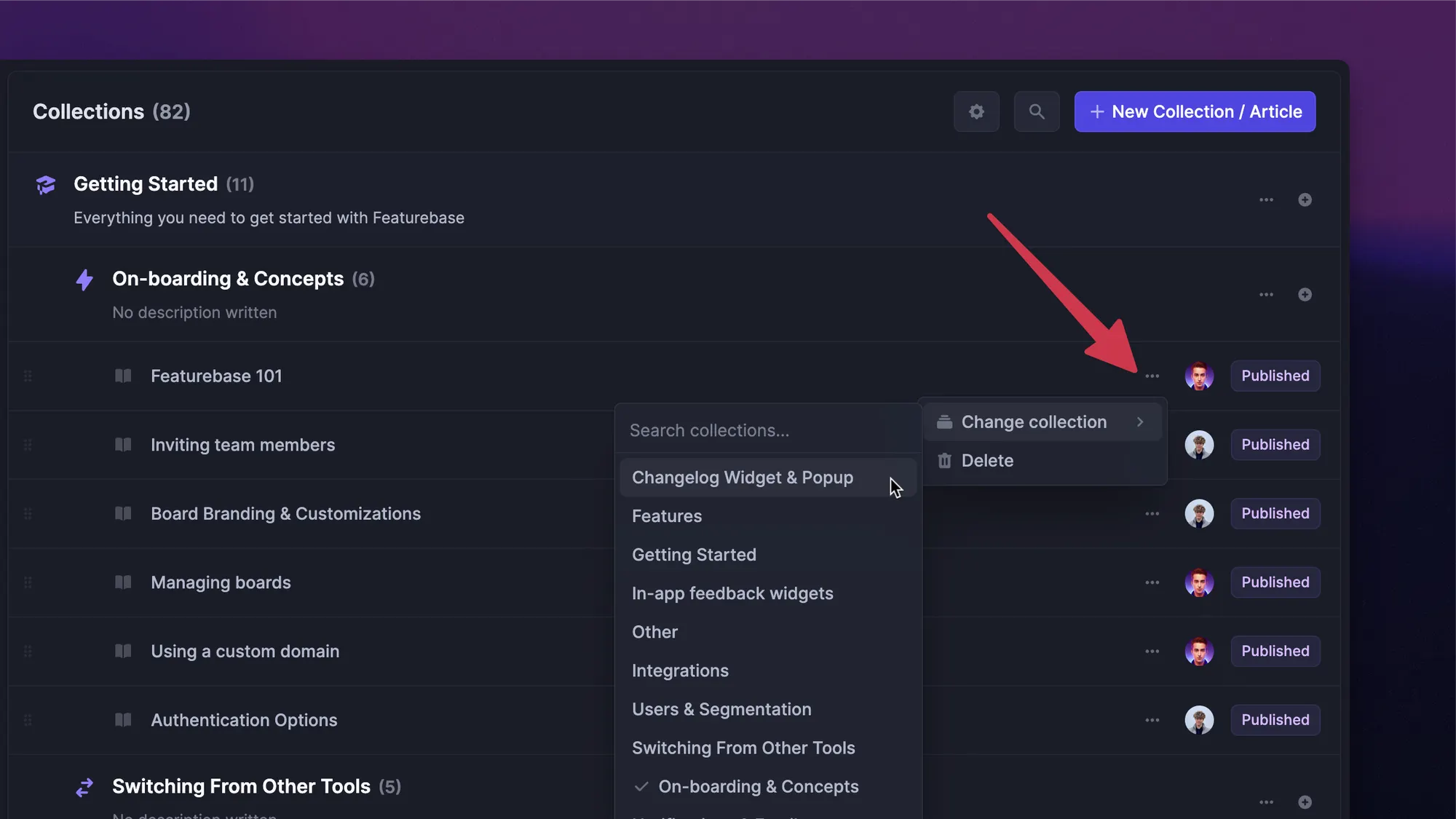
5. Organize knowledge around how people search
A knowledge system should match the way people look for answers.
That sounds obvious, but many teams organize docs around internal team structures instead. Product has one folder. Support has another. Sales has another. The customer does not care which team created the answer. Neither does a new hire who just needs to know how something works.
Organize knowledge around topics, tasks, and intent.
For a SaaS product, that might mean categories like:
- Getting started
- Account settings
- Billing
- Integrations
- User permissions
- Troubleshooting
- Product updates
- Best practices
- Internal product notes
- Sales enablement
- Customer feedback
Names matter here. Use the words your customers and employees actually use. If customers search for "invite teammates," do not bury the answer under "user provisioning." If support agents search for "refund policy," do not hide it inside "commercial operations."
A good organization makes the search more useful. It also makes gaps easier to spot.
If your help center has 40 articles about advanced settings and two articles about onboarding, that tells you something.
6. Create standards so every article feels familiar
People should not have to relearn your documentation style every time they open a new article.
Content standards make knowledge easier to read, easier to write, and easier to review. They also help teams avoid the classic documentation mess: one article is a step-by-step guide, another is a long product essay, and a third is a pasted support reply with no structure.
You do not need a 20-page style guide. Start with practical rules.
For customer-facing articles, define:
- The article title format.
- When to use screenshots or videos.
- How to write setup steps.
- How to explain errors.
- Where to add related articles.
- How to show product limitations.
For internal docs, define:
- Who the doc is for.
- When it was last updated.
- Who owns it.
- What decision or process it explains.
- What to do when something changes.
A useful standard removes guesswork. Writers know what to include. Reviewers know what to check. Readers know where to find the answer.
That consistency becomes more important as the company grows and more people contribute.
7. Build knowledge sharing into the places teams already use
Publishing an article is not enough. People need to know it exists, and they need to find it at the moment they need it.
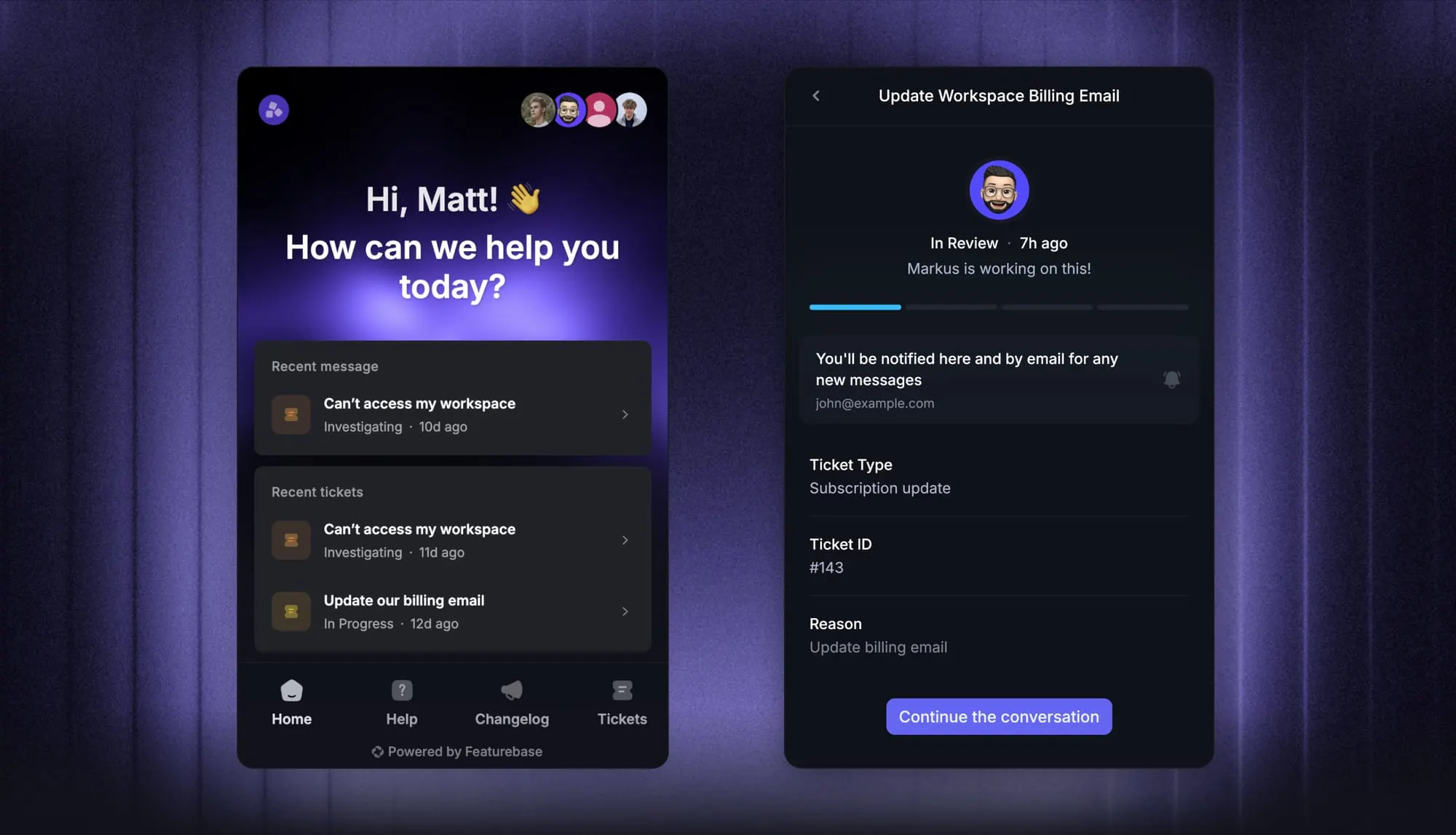
For customer-facing knowledge, that might mean adding help articles to your support widget, chatbot, in-app messages, onboarding flows, and product pages. For internal knowledge, it might mean connecting docs to support conversations, feedback tools, product planning, or team channels.
The goal is to reduce the gap between the question and the answer.
Here is what that can look like in practice:
- A customer searches the help center before opening a ticket.
- A support agent sees a relevant article while replying to a customer.
- A product manager reviews recurring feedback before planning a feature.
- A customer success manager sends a guide during onboarding.
- A sales rep finds the latest pricing or integration answer before a call.
This is where knowledge management becomes more than storage. The right answer shows up where work is already happening.
For SaaS teams, this is especially useful because so much knowledge starts with customers. A repeated support question can become a help article. A confusing setup step can become an onboarding guide. A common complaint can become product feedback.
8. Review, improve, and remove knowledge regularly
Knowledge management only works if the content stays alive.
Set a review cycle for important content. High-impact articles need more attention than low-traffic pages. Anything related to pricing, billing, security, integrations, onboarding, or product limits should be checked more often.
You can also use customer behavior to decide what needs work.
Look for signals like:
- Articles with high views but low helpfulness.
- Search terms with no good results.
- Support tickets that repeat after an article already exists.
- Docs that agents avoid using.
- Product updates that did not lead to new or updated content.
- Feedback themes that are missing from internal notes.
The best knowledge systems also remove content. Old articles create risk. Duplicate docs confuse people. Outdated product notes make teams second-guess the source of truth.
A simple review habit works well:
| Review question | Why it matters |
|---|---|
| Is this still accurate? | Product and policy changes can make old content wrong |
| Is this still useful? | Some docs stop serving a clear purpose |
| Is this easy to find? | Good content fails if search and structure are poor |
| Is there a better version elsewhere? | Duplicate answers create confusion |
| Should this become customer-facing? | Internal answers often reveal missing help content |
The process does not end when knowledge is published. Publishing is just the point where the content starts being tested by real users, real employees, and real customer questions.
Build a better knowledge management system with Featurebase
Knowledge management is not just about creating more docs. It is about turning scattered product knowledge, customer questions, internal context, and feedback into a reliable system your team and customers can actually use.
Featurebase is a modern & powerful help center tool that helps SaaS teams create beautiful product docs, manage internal and customer-facing knowledge, and provide AI-powered self-service support. You can build public or internal help centers, serve articles inside your app, answer questions with AI search, translate content automatically, collect feedback, publish changelogs, and connect support conversations to your documentation.
It comes with affordable pricing and a Free plan for creating your help center. Paid plans start at just $29/seat/mo, onboarding is quick, and you can get started without a credit card, so there’s no downside to trying it. 👇
Create a beautiful AI-powered Help Center with Featurebase for free