Pylon Pricing 2026: Is It Worth It?
Pylon looks modern and powerful - but once you factor in seat minimums, annual billing, and pricey AI add-ons, costs can skyrocket fast. In this guide, we’ll break down its real 2026 pricing, hidden fees, and whether it’s worth the spend.


On this page
Psst... Looking for a more powerful & affordable alternative to Pylon? Check out Featurebase
Thinking about using Pylon to manage customer support but not sure what it'll actually cost? You're not alone.
On the surface, Pylon looks like a modern, all-in-one helpdesk built for fast-moving SaaS teams, and in July 2026 it relaunched as an "agentic support platform" built around AI agents. But once you dig into its pricing, things get a lot more complicated. Minimum seat requirements, annual billing, and add-ons like AI and Account Intelligence can push the total far beyond the advertised rates.
The price can very easily start from $5,000/year at a minimum.
In this guide, I'll break down Pylon's 2026 pricing clearly, what each plan includes, how the add-ons work, where the hidden costs appear, and whether it's actually worth paying for. 👇
Key takeaways:
- Pylon's core plans (Starter, Professional, Enterprise) are priced per seat per month. Starter and Professional now offer monthly or annual billing, while Enterprise is annual-only.
- All plans come with minimum seat requirements, 3 for Starter/Professional and 7 for Enterprise.
- Add-ons like Account Intelligence ($10/account/mo) and AI tools (AI Assistants from $50/seat/mo, AI Agents from $100/mo) are not included in base pricing.
- The real cost for most teams starts around $5,000-$10,000/year, depending on seats and add-ons.
- No free trial or free plan, so you commit to a paid contract before you can properly test it.
- There are many more affordable alternatives, including Featurebase, which provides modern AI-powered support for fast-growing teams.
What is Pylon?
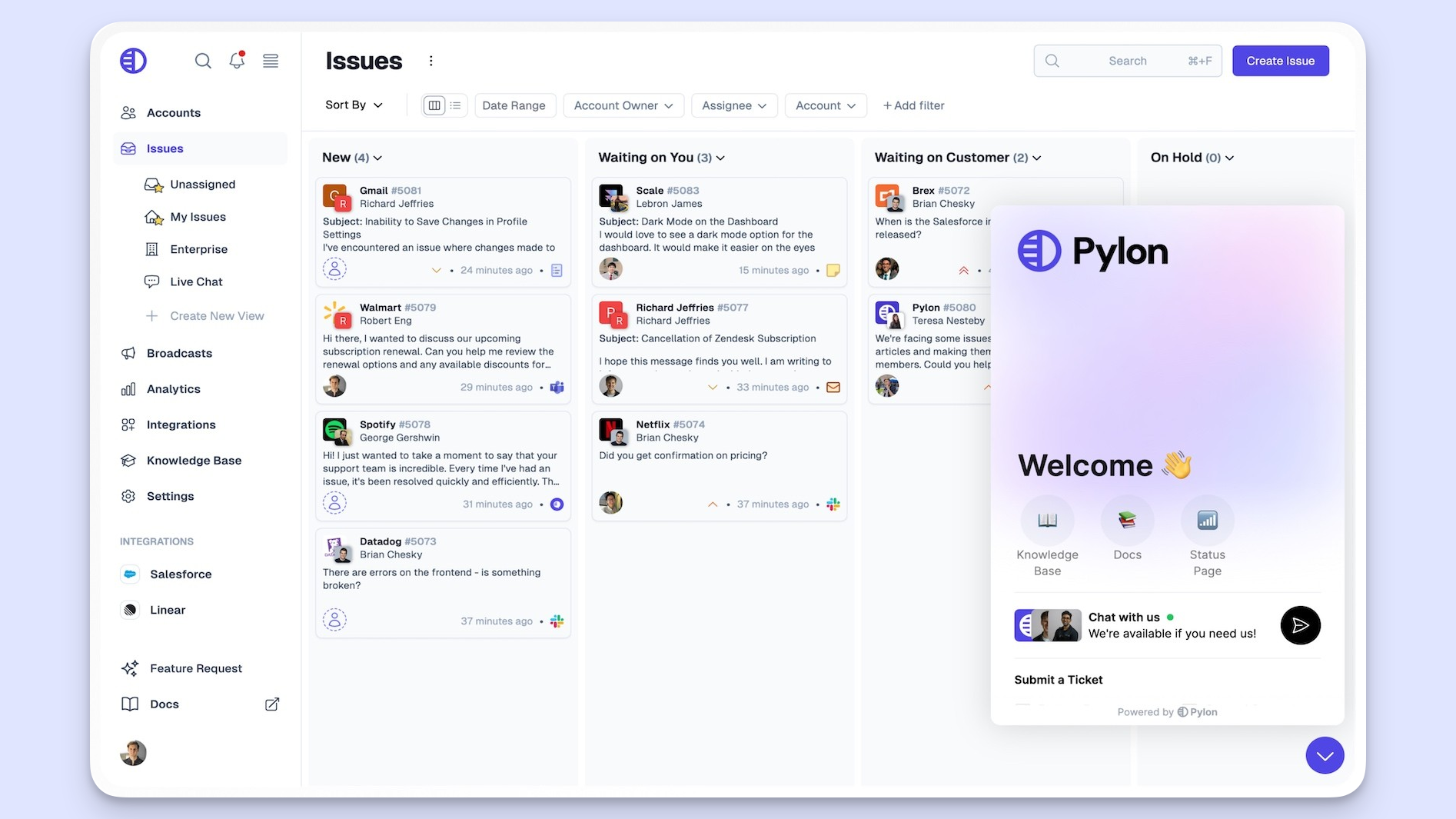
Pylon is a modern customer support platform built for SaaS and enterprise teams that want deep integrations and automations out of the box. It combines a shared inbox, chat widget, ticket forms, and a full knowledge base, all designed to connect seamlessly with tools like Slack, Jira, Linear, Salesforce, and HubSpot.
Unlike older helpdesk tools like Zendesk, Pylon focuses on collaboration and connectivity. Your support, product, and engineering teams can manage customer requests directly from channels like Slack or Discord, with automations and routing that keep everything running smoothly.
In July 2026, Pylon relaunched itself as an "agentic support platform." Instead of agents working every ticket by hand, support teams now direct AI agents that investigate issues, gather account context, draft replies, and update connected systems. Pylon groups that context into three layers it calls Support Intelligence, Account Intelligence, and Product Intelligence, and it lets teams package repeatable processes as reusable Skills.
It's a genuinely modern take on the support desk. What it doesn't do is close the loop after the conversation ends. Turning support tickets into product feedback, public roadmaps, and changelogs is a different job, and one Pylon leaves to other tools. 🤔.
Pylon pricing 2026
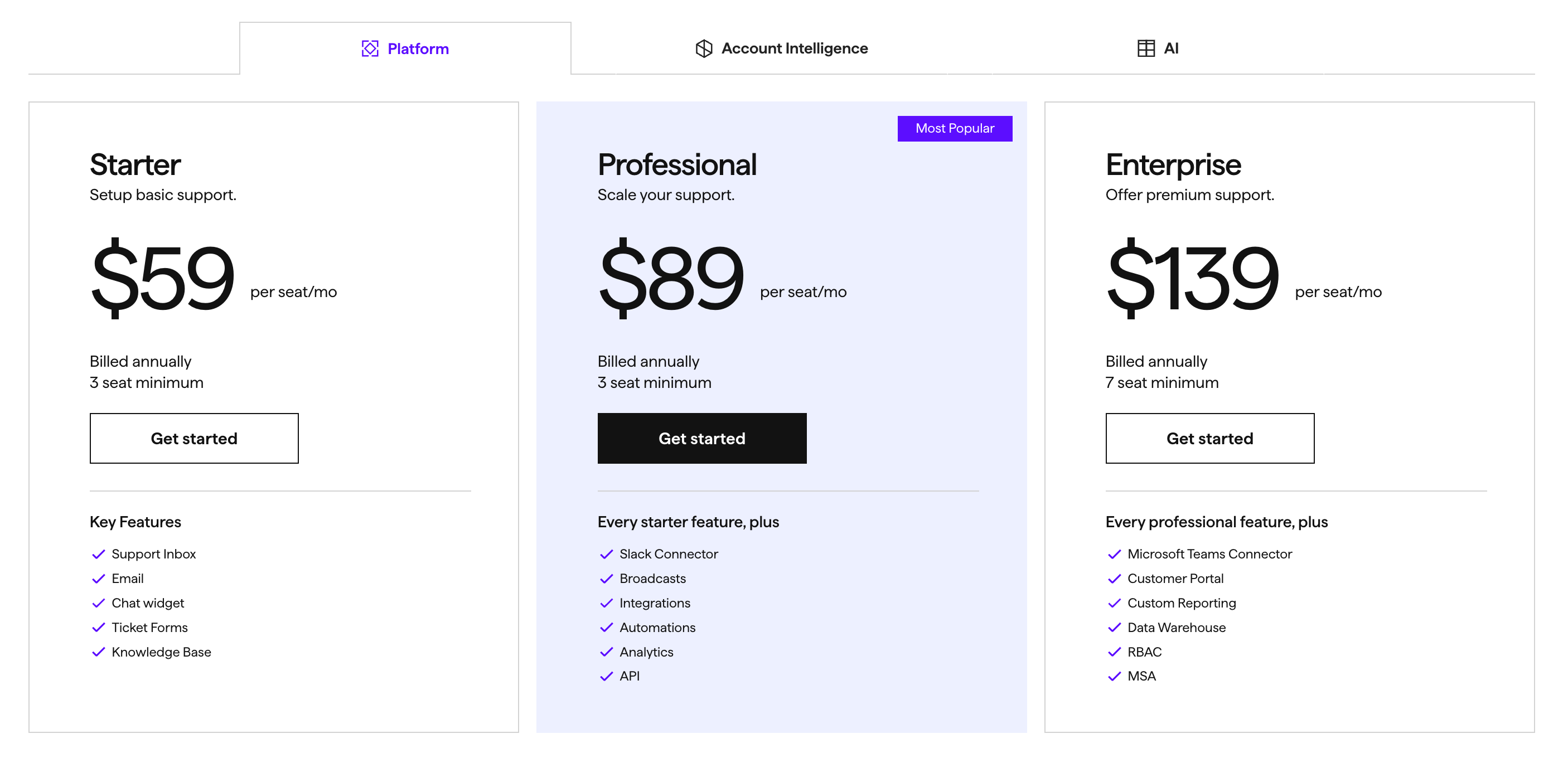
Pylon pricing consists of 3 core plans, all priced per seat per month with minimum seat requirements. As of July 2026, Starter and Professional can be billed monthly or annually, and annual billing gives you the lowest per-seat rate. Enterprise is annual-only.
That means you can't just test Pylon with 1 or 2 agents. You'll need to commit to at least 3 seats (or 7 for Enterprise), and to get the advertised rates you'll pay for the full year upfront.
On top of that, two key modules, Account Intelligence and AI, are sold separately. Let's get into it. 👇
Starter ($59/seat/mo)
Pylon's Starter plan is the entry point for small support teams or early-stage SaaS companies that need the core features to manage support across multiple channels without heavy automation.
You get the essentials for building a solid customer experience platform:
- Support inbox for handling customer interactions and internal notes in one place
- Chat widget and ticket forms for capturing leads or requests directly from your app or website
- Knowledge base for organizing articles, templates, and FAQs, a strong start to good knowledge management
- Basic workflow automation including triggers, macros, SLAs, and CSAT surveys
- Reporting dashboards to track agent performance and customer satisfaction
- Integrations with third-party apps like Linear, Jira, HubSpot, and Salesforce to synchronize data
It's a solid foundation if you just want to centralize communication and reduce repetitive tasks. Billed monthly, Starter runs $70/seat/mo. But since Pylon enforces a 3-seat minimum, the real starting cost on annual billing is at least $2,124 per year, even before adding AI features or Account Intelligence.
Professional ($89/seat/mo)
The Professional plan adds everything most scaling teams actually need, automation, analytics, and collaboration across multiple systems. It's where Pylon starts to feel more like a true multi-channel ticketing and customer experience platform.
It includes everything in Starter, plus:
- Slack Connect & Slack Community integrations for seamless collaboration across multiple teams
- Broadcasts & automations for proactive customer communication and workflow automation
- API access and custom dashboards for exporting data and building tailored reports
- Viewer-only seats for stakeholders who need visibility but don't manage support directly
- Deeper integrations with Salesforce, PagerDuty, OpsGenie, and calendar tools to synchronize data and manage leads
- Dedicated onboarding and priority support for faster setup and better value for money
This plan hits the sweet spot for most SaaS teams, but it's not cheap. Billed monthly, it's $118/seat/mo. On annual billing, the 3-seat minimum brings the base cost to $3,204 per year, and once you add AI Assistants ($50/seat/mo), the real price starts around $5,004/year.
Enterprise ($139/seat/mo)
The Enterprise plan is built for larger organizations handling complex workflows and multiple teams. It's designed for those that need deep analytics, security, and compliance while keeping the customer experience consistent across all channels.
It includes everything in Professional, plus:
- Microsoft Teams Connector and Customer Portal for multi-channel ticketing and mobile support
- Data Warehouse integrations (Snowflake, BigQuery) to export data for advanced reporting
- Custom reporting and RBAC for granular access control across the core platform
- HIPAA/BAA compliance, security reviews, and Master Service Agreements (MSAs)
- Customer health and performance tracking through Account Intelligence integrations
- Dedicated Customer Success Manager to help optimize complex workflows and synchronize data between tools
It's a powerful setup for enterprise-grade support teams managing large volumes of customer data and interactions, but also the most expensive. Enterprise is annual-only, and with the 7-seat minimum you're looking at $11,676 per year before AI pricing or account add-ons.
Switch from Pylon to save +$1k/mo and get the fastest AI-powered support platform
Add-on Suites
Here's where Pylon's pricing gets tricky. While the Platform plans cover the basics (like inbox, chat, and knowledge base), two of Pylon's most valuable modules, Account Intelligence and AI, are sold separately.
For most teams, they're must-haves that significantly increase the total cost. Let's break them down. 👇
Account Intelligence ($10/account/mo)
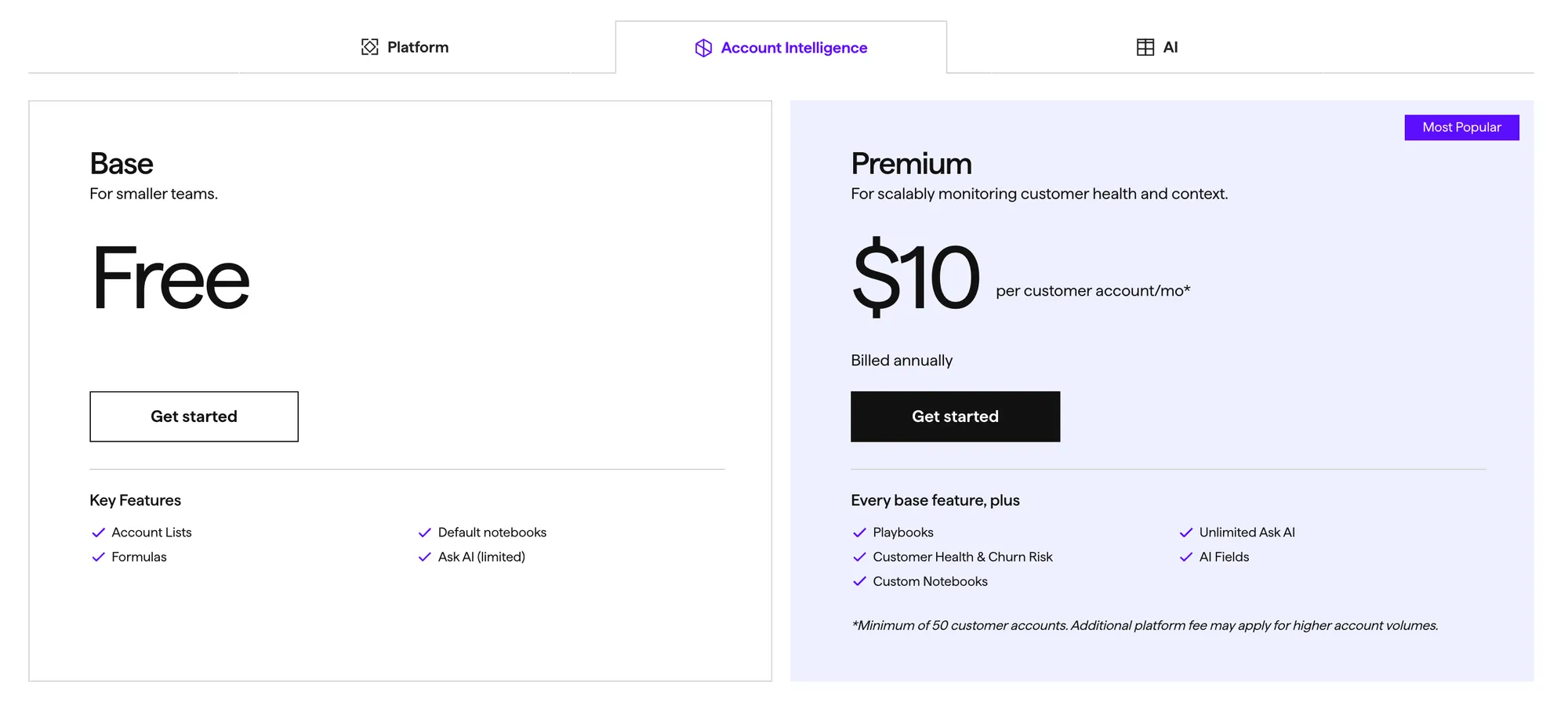
Pylon's Account Intelligence suite is designed for B2B support teams that want deeper insight into customer accounts, think health tracking, churn risk, and account-specific notes.
It comes in two tiers:
- Base: Free
- Premium: $10/customer account/month on annual billing ($12/account/month monthly)
Key features:
- Account lists, smart views, and activity logs
- CRM syncing (Salesforce, HubSpot, Pipedrive)
- AI Notebooks for summaries, insights, and reporting
- Account health and churn risk modeling (Premium only)
- AI formulas and automation playbooks
- Integration with your main Platform workspace
Important caveats:
- You must already have Platform seats. Account Intelligence can't be used on its own.
- The free Base tier is heavily limited (low AI usage, capped formulas and projects).
- Premium is billed per customer account, so the cost scales quickly with how many accounts you track.
AI suite (from $50/seat/mo)
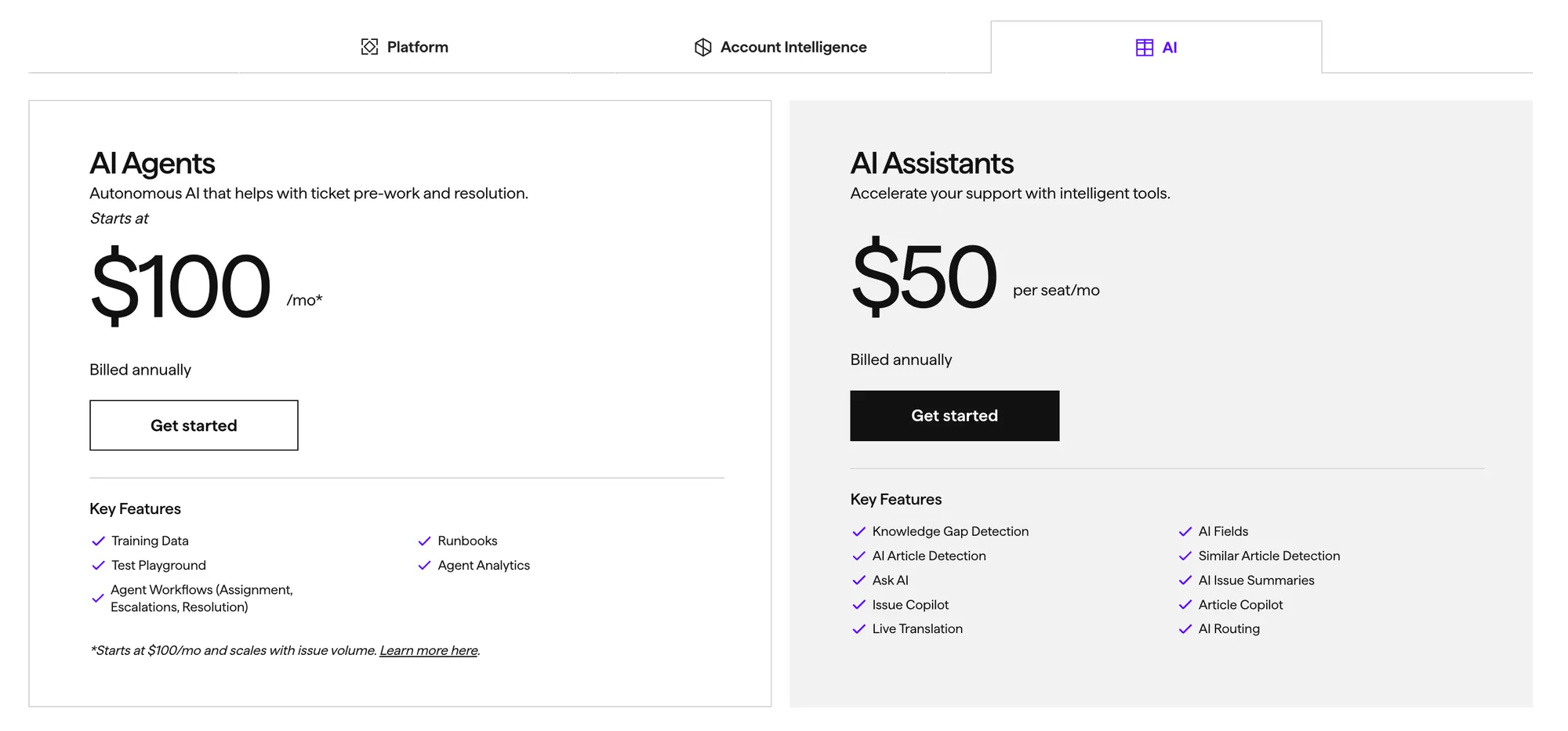
Pylon's AI suite takes automation further. There are two separate AI products here, each priced differently depending on usage and seat count.
AI Agents (from $100/mo)
Autonomous AI agents that resolve or pre-process tickets automatically. They can summarize, route, classify, and even resolve issues using custom workflows.
Key features:
- Build and deploy AI agents for ticket triage and resolution
- Runbook-style automation and sandbox testing
- Agent analytics and performance dashboards
- Developer APIs for extending functionality
Pricing starts at $100/mo and scales with your issue volume, so heavy-volume teams will pay considerably more.
AI Assistants ($50/seat/mo)
These are human-assist copilots that help agents work faster, similar to Intercom's Fin Copilot.
Key features:
- Suggested replies, summaries, translations, and routing
- Knowledge base enhancement and gap detection
- Workflow acceleration and "Ask AI" queries
- Seat-based pricing (scales with agent count)
Pylon pricing table
| Plan / Suite | Price (per seat/mo) | Minimum Seats / Accounts | Key Features | Best For | Starting Cost (annual) |
|---|---|---|---|---|---|
| Starter (Platform) | $59 ($70 monthly) | 3 seats | Inbox, Email, Chat Widget, Ticket Forms, Knowledge Base | Small teams getting started with structured support | $177/mo |
| Professional (Platform) | $89 ($118 monthly) | 3 seats | Everything in Starter + Slack Connect, Broadcasts, Integrations, Automations, Analytics, API | Growing SaaS teams wanting automation and data visibility | $267/mo |
| Enterprise (Platform) | $139 (annual only) | 7 seats | Everything in Professional + Microsoft Teams Connector, Customer Portal, Custom Reporting, Data Warehouse, RBAC, MSA | Enterprises needing full compliance, reporting, and control | $973/mo |
| Account Intelligence (Add-on) | $10/account/mo (Premium) | Platform seats required | CRM Sync, Account Health, AI Notebooks, Risk Modeling, Formulas & Playbooks | B2B SaaS teams tracking account health & prioritization | Scales per account |
| AI Assistants (Add-on) | $50 | Platform seats required | AI Copilot for agents, summaries, translations, routing, KB improvements | Teams augmenting human agents with AI | $150/mo (3 seats) |
| AI Agents (Add-on) | From $100/mo | 1+ | Autonomous ticket resolution, routing, and analytics | Teams automating high-volume support workflows | $100+/mo (usage-based) |
Hidden costs & limitations
Pylon's pricing might look clean on paper, but once you dig in, you'll find several hidden costs that can easily double your expected spend. Here's what to watch out for:
- Seat minimums increase the base cost.
Starter and Professional plans require 3 seats minimum, while Enterprise requires 7. That means your entry price starts at $2,124/year even before any add-ons. - Monthly billing costs more.
Starter and Professional can now be billed monthly ($70 and $118/seat respectively), but you'll pay more per seat than on annual billing ($59 and $89). Annual billing is cheaper per seat but locks you in for the year, and Enterprise is annual-only. - AI and Account Intelligence aren't included.
The base Platform only covers inbox, chat, and help center. To unlock the full Pylon experience, you'll need to buy:- Account Intelligence Premium ($10/account/month)
- AI Assistants ($50/seat/month)
- AI Agents (from $100/month, scaling with volume)
- No free trial or plan.
You can't try premium features with a free trial without committing. Everything, including AI or integrations, is locked behind paid tiers.
Switch from Pylon to get transparent pricing & save +$1k/mo
Real-world pricing examples
The advertised per-seat rates rarely reflect what teams actually pay. Once you apply seat minimums and the add-ons most teams need, here's what a typical monthly bill looks like:
Small team (Starter, annual): 3 seats × $59 = $177/mo, or $2,124/year.
Scaling team (Professional + AI Assistants, annual): 5 seats × ($89 + $50) = $695/mo, or $8,340/year.
Enterprise (annual only): 7 seats × $139 = $973/mo, or $11,676/year before any add-ons.
In short: while Pylon's pricing initially seems quite affordable, starting at $59/seat, most real-world setups start at a minimum of $800/mo once you include AI, account insights, and the minimum seat commitment.
What if Pylon is too expensive for me?
If you like Pylon's modern approach but not its price tag, you've got options. Plenty of support platforms offer similar functionality without the annual lock-ins or pricey add-ons. Here are the best ones:
- ✨ Featurebase - Best modern support tool for fast-growing startups with an AI inbox, automations, customer feedback collection, and a built-in help center. Most comparable to Pylon, and it closes the loop from support to roadmap to changelog.
- Intercom - Best for conversational support with advanced AI agents, chatbots, and proactive engagement. Great for scaling SaaS teams, but expect higher costs as you grow.
- Zendesk - Best for enterprise teams that need deep analytics, advanced routing, and robust compliance. Still one of the most feature-rich (and complex) options.
- Plain - Best for developer-first teams that want a clean, API-driven support tool. Simple, fast, and integrates neatly into existing workflows.
- Help Scout - Best for small teams that prefer an easy, email-style helpdesk with shared inboxes, chat, and lightweight docs.
You can read more about the best Pylon alternatives from our blog.
So, is Pylon worth it?
Pylon is a powerful, modern support platform that ticks nearly every box, from an omnichannel inbox and deep integrations to advanced analytics and enterprise-level compliance. Its new agentic direction is genuinely interesting. But when you factor in minimum seat requirements, annual billing for the best rates, and separate add-ons for AI and Account Intelligence, the real cost often lands 2-3x higher than expected.
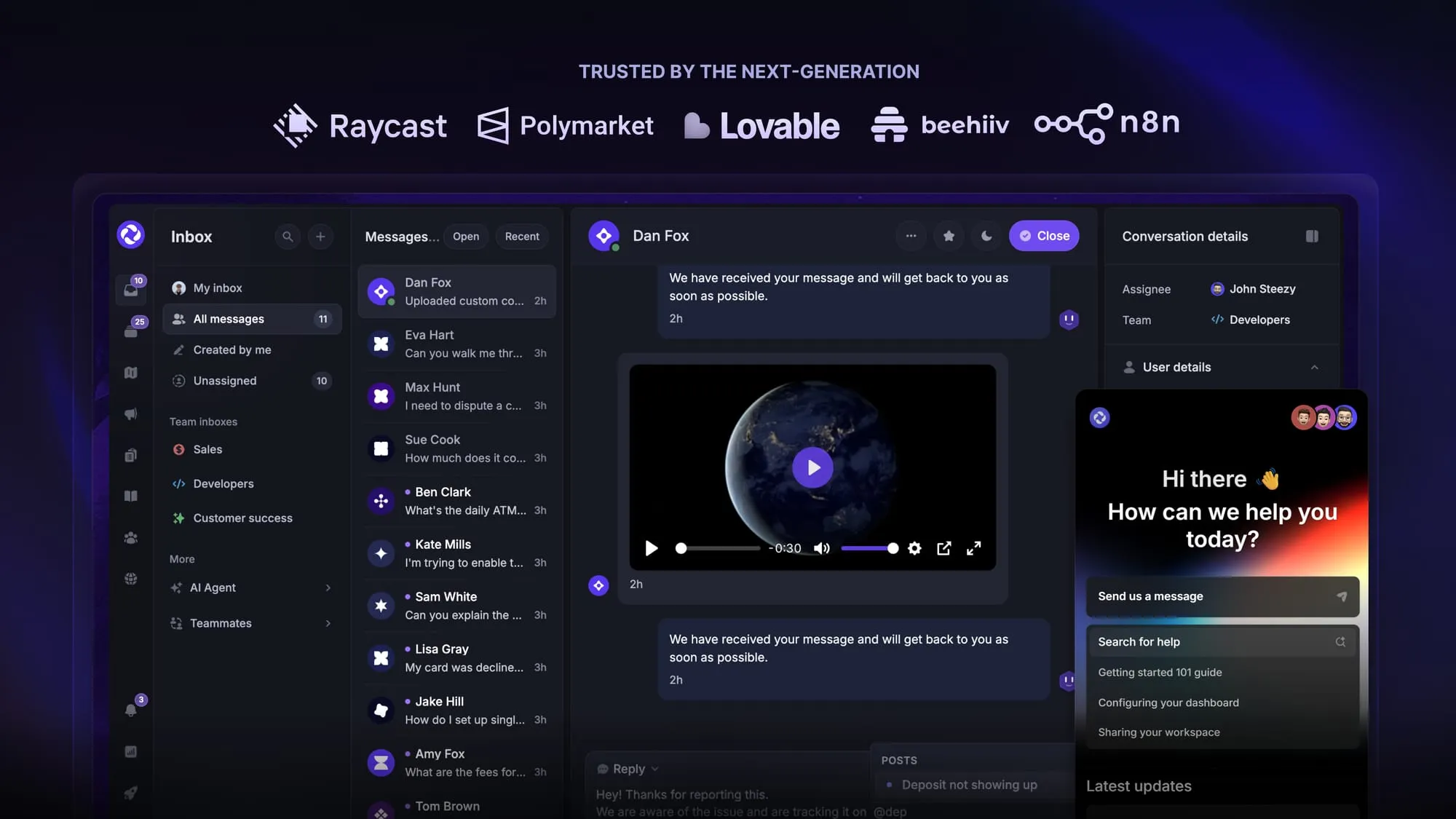
Featurebase is a modern Pylon alternative that runs your whole customer loop in one place: an AI-powered support inbox with the Fibi AI Agent, plus feedback boards, roadmaps, product updates, and an AI help center. Pylon's agentic desk stops at the support conversation, while Featurebase turns that conversation into feedback, a roadmap, a changelog, and better help-center answers, all in a much more affordable package. It's loved by thousands of companies like Lovable, Polymarket, and Raycast.
What's best is that it comes with a Free plan, and the onboarding is super simple, so there's no downside to trying it out! 👇
Automate your support with the fastest AI-enhanced Inbox today
FAQs
Pylon has three core plans priced per seat per month: Starter at $59, Professional at $89, and Enterprise at $139 (all on annual billing). Because Starter and Professional require a 3-seat minimum and Enterprise requires 7, the real starting cost is at least $2,124/year, and most teams land between $5,000 and $10,000/year once AI and Account Intelligence add-ons are included.
Yes. As of 2026, Starter and Professional can be billed monthly at $70 and $118 per seat respectively, though that's more per seat than annual billing ($59 and $89). Enterprise remains annual-only, so there's no month-to-month option at the top tier.
No, Pylon doesn't currently offer a free plan or a free trial, so you commit to a paid contract before you can properly test features like automations, AI, or Account Intelligence. If you want to try a modern support platform for free first, Featurebase has a free plan with unlimited conversations.
Not exactly. Pylon focuses on customer support and collaboration, not full customer relationship management. It does integrate deeply with CRMs like Salesforce, HubSpot, Attio, and Pipedrive, acting as the support layer that syncs data between your ticketing system and sales pipeline.
In July 2026, Pylon relaunched as an "agentic support platform" where support teams direct AI agents rather than working every ticket by hand. The agents investigate issues, pull account context, draft replies, and update connected systems, drawing on what Pylon calls Support, Account, and Product Intelligence, plus reusable Skills that capture your team's processes.
Pylon doesn't publicly list any discounts or startup programs. If you're purchasing at scale you may be able to negotiate through sales, but there's nothing automatic like some competitors' startup or nonprofit deals.


