Intercom Pricing 2026: Is It Worth It?
Intercom (now Fin) mixes per-seat plans with $0.99-per-outcome AI pricing, so the real bill is hard to predict. Here's a clear 2026 breakdown of every plan, add-on, and real cost so you know exactly what you'll pay.


On this page
Psst... Looking for modern & affordable alternative to Intercom? Check out Featurebase
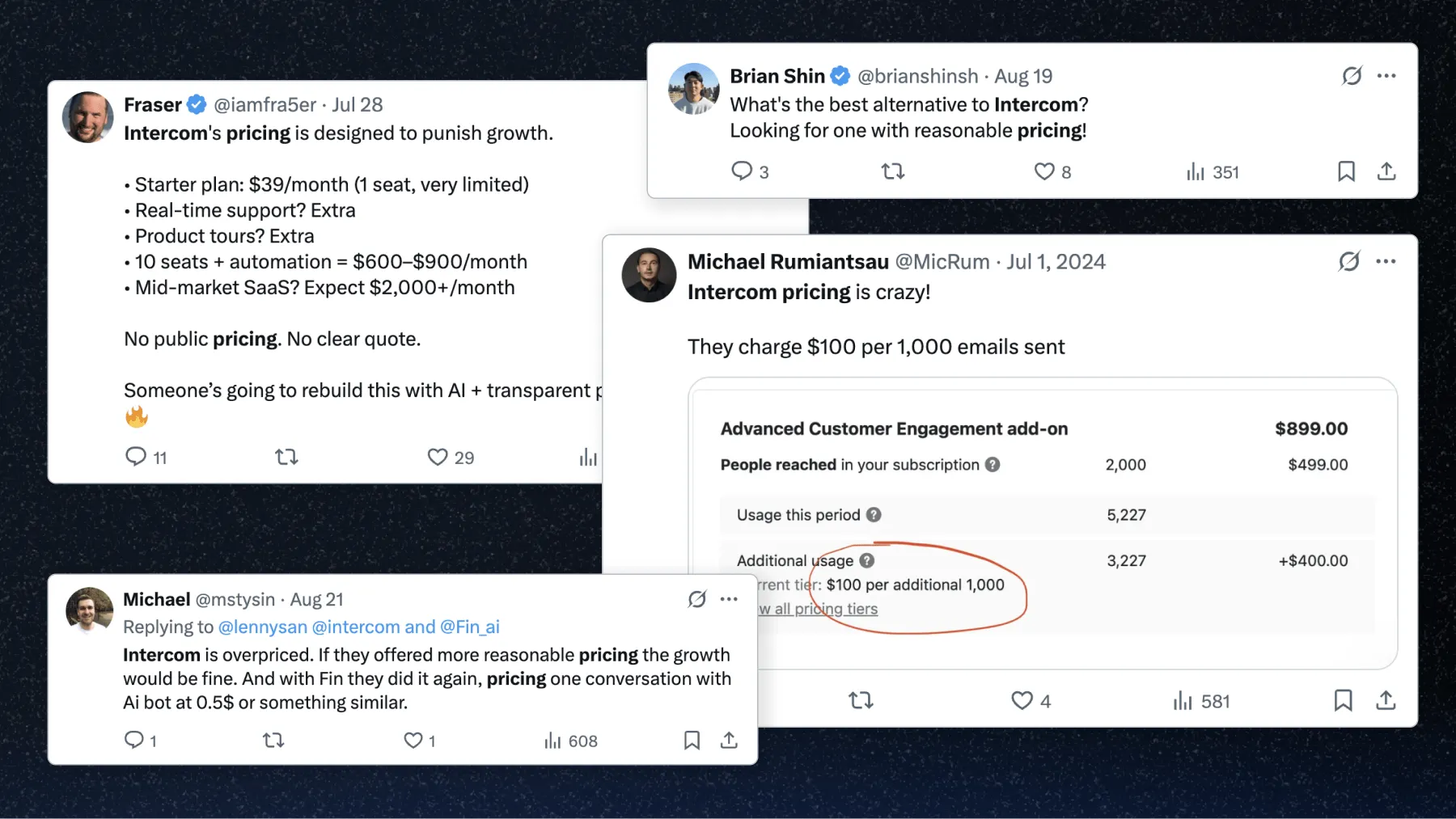
Considering Intercom for customer support and engagement, but confused about what it will actually cost you? You're not alone.
Intercom is one of the most powerful tools in its category, but its pricing is notoriously high and complex - mixing seats, add-ons, usage-based fees, and channel costs. It has also just rebranded to Fin and agreed to be acquired by Salesforce, which makes its pricing worth a fresh look.
In this guide, we'll break down Intercom's pricing, explain its add-ons and channel fees, cover what the Fin rebrand changes, and help you decide if it's really worth your buck in 2026. Let's dive in. 👇
What is Intercom?
Intercom is a customer service platform that combines live chat, help desk, help center, and marketing automation into one tool. It helps businesses support, engage, and convert users across multiple channels - like website chat, email, SMS, and WhatsApp.
It's best known for its modern messenger widget, AI agent Fin, proactive support campaigns, and automations. In 2026 the company rebranded around that AI agent and now positions itself as "Fin", but the helpdesk and its per-seat plans still carry the Intercom name. With power comes price - and Intercom's pricing is where many companies hit roadblocks.
What the Fin rebrand and Salesforce acquisition mean for pricing
Two big changes landed in 2026, and both matter if you're evaluating Intercom today.
First, Intercom rebranded to Fin, named after its AI agent. The helpdesk plans are still sold as "Fin and Intercom", but the whole platform is now marketed AI-first, with every plan leading on the AI agent rather than the seat price.
Second, Salesforce agreed to acquire Fin for roughly $3.6 billion in a deal announced in June 2026 (as of July 2026, the acquisition is signed but not yet closed). Salesforce says Fin already resolves around 76% of incoming support requests autonomously across its customer base.
For now, the practical takeaway is simple: the pricing structure below is unchanged, but two things are worth watching. Fin is increasingly sold as a standalone AI agent that runs on any helpdesk (including Salesforce), and post-acquisition roadmaps and pricing could shift once the deal closes. If you're signing a long contract, factor that uncertainty in.
Intercom pricing 2026
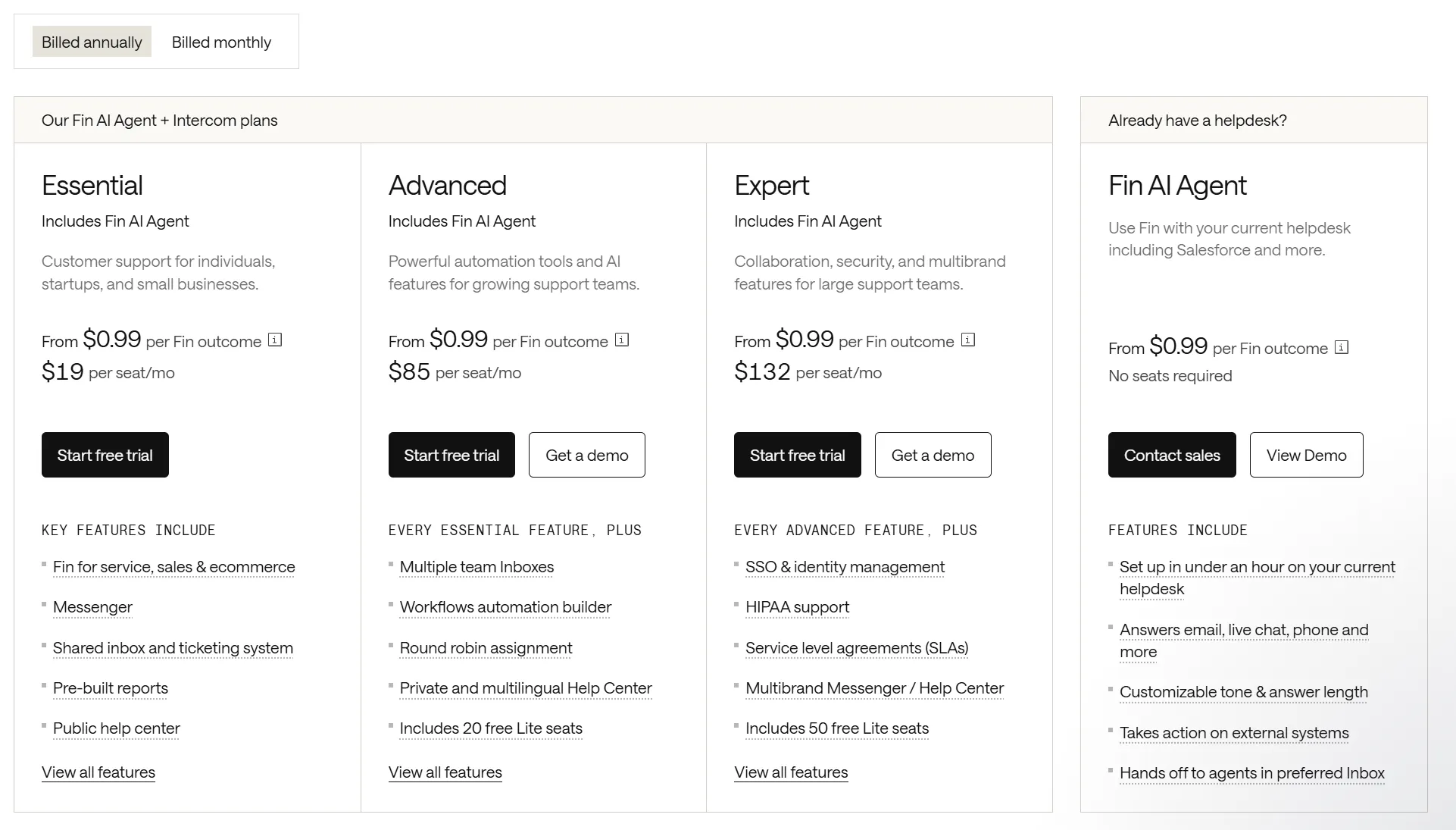
Intercom offers three core seat-based pricing plans. On top of these, you'll pay for add-ons, plus usage fees for AI features and customer support channels.
| Plan | Monthly (per seat) | Annual (per seat) | Best for | Fin AI Agent |
|---|---|---|---|---|
| Essential | $29 | $19 | Individuals, startups, small teams | Access included (usage from $0.99/outcome) |
| Advanced | $99 | $85 | Growing teams needing automation | Access included (usage from $0.99/outcome) |
| Expert | $139 | $132 | Large or multi-brand support teams | Access included (usage from $0.99/outcome) |
Each plan has two seat rates - one for monthly billing and a cheaper one for annual billing. Annual billing saves about 34% on Essential, 14% on Advanced, and 5% on Expert. Here's how the three plans compare at a glance:
Essential is listed at $19/seat/month billed annually or $29/seat/month billed monthly. Every plan includes access to Fin AI Agent, with usage billed separately per outcome (more on that below).
Essential plan ($29/seat/mo)
The entry-level plan aimed at startups and smaller teams:
- Shared inbox & basic ticketing
- Messenger with branded chat
- Email customer support
- Basic help center
- Pre-built reports
- HubSpot, Pipedrive, WhatsApp, and GitHub integrations
It's affordable to start, but you'll quickly face additional costs and usage charges as your needs grow.
Advanced plan ($99/seat/mo)
Best for growing support teams that need automation:
- Everything in Essential
- 20 free lite seats (can access dashboard but not take actions)
- Multiple team inboxes & round robin assignment
- Conversation topics
- Ticket portal & side conversations
- Workflows automations builder
- Private & multilingual help center
- Instagram, Facebook, Slack, Salesforce, and Zendesk integrations
This plan introduces the most helpful features, including workflows, multiple team inboxes, and Lite Seats, so teammates who just need to view data don't require a paid seat.
Expert plan ($139/seat/mo)
The Expert plan is the most expensive plan and built for larger support teams needing advanced collaboration and security:
- Everything in Advanced
- 50 free lite seats
- Multibrand support for messenger
- Multiple help centers
- AI replies in inbox
- Real-time reporting
- Custom admin roles
- Advanced security (SSO, 2FA, HIPAA)
This plan is mostly targeted at large customer support teams with multiple products or brands that they want to manage from one place.
Intercom add-ons pricing
Add-ons are where Intercom pricing gets tricky. Each add-on can significantly raise your monthly bill, depending on usage. 💸
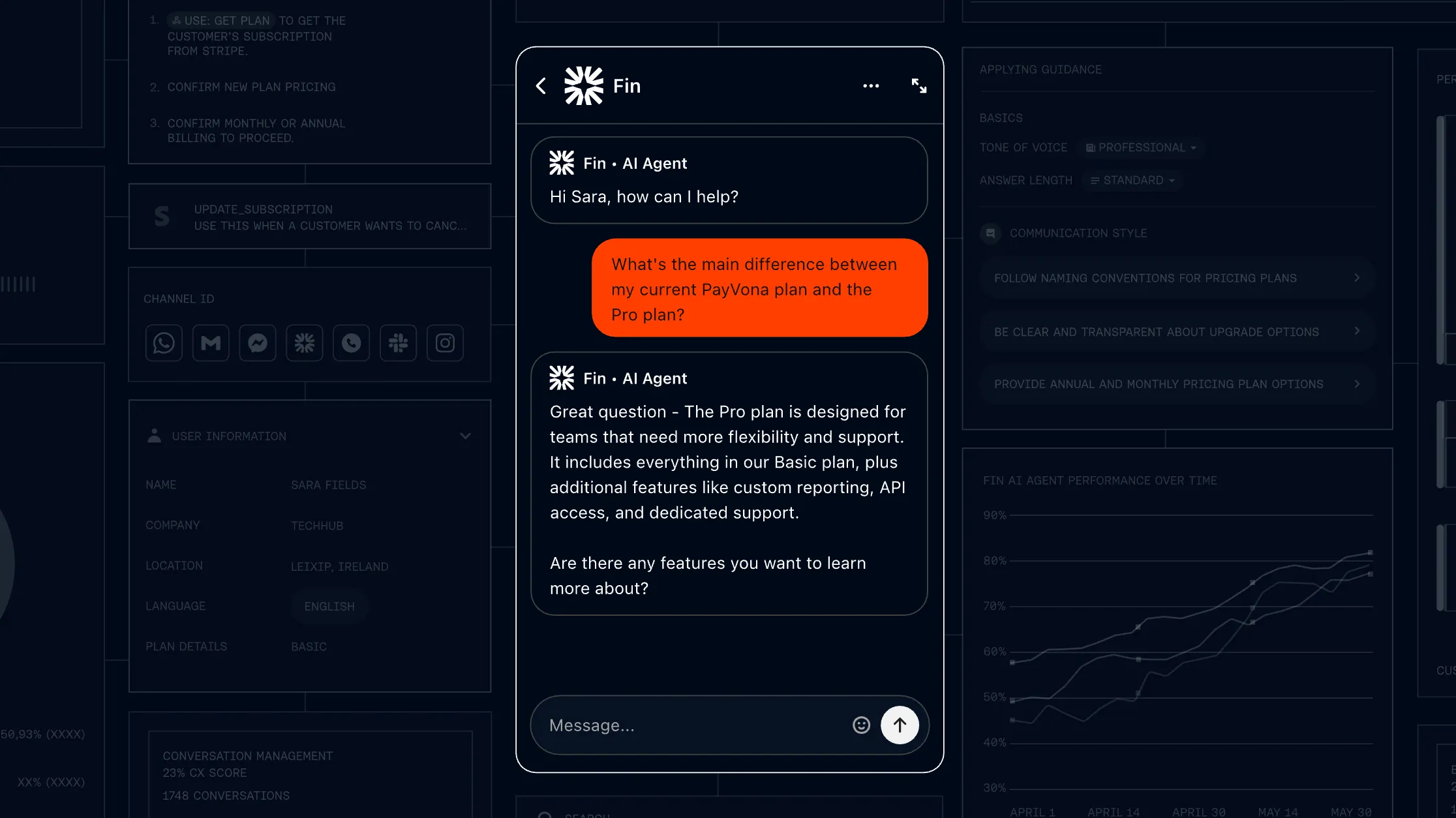
Fin AI Agent (from $0.99/outcome)
Fin AI Agent is Intercom's customer-facing AI agent that resolves support questions automatically. Crucially, it's priced on outcomes, not on seats and not on every resolution - you only pay when Fin actually delivers value.
Fin bills several outcome types, which is why its pricing differs from a flat per-resolution fee. Self-serve routing costs $0.99, alongside the following outcomes:
- Resolution: Fin answers the question and the customer confirms or exits without asking for more help ($0.99).
- Procedure handoff: Fin executes a configured workflow that ends in a handoff to a human ($0.99).
- Disqualification: Fin determines a prospect doesn't match your criteria and routes them accordingly ($0.99).
- Qualification: Fin matches a prospect to your qualification criteria and routes them ($9.99).
You're charged for one outcome per conversation even if Fin takes multiple actions. Standalone Fin with an existing helpdesk has a 50-outcome monthly minimum. Inside Intercom, Fin usage is pay-as-you-go on top of at least one paid Full seat. Conversations simply passed to your team without an outcome aren't billed.
One detail the acquisition makes more relevant: Fin can run as a standalone AI agent on top of your existing helpdesk (including Salesforce, HubSpot, Freshworks, and Zoho) from $0.99 per outcome, with no Intercom seats required and a 50-outcome monthly minimum. So you can buy the AI layer without buying the full Intercom platform.
Real customer-reported resolution rates from Intercom's own case studies run 42-50% (Linktree: 42%, Robin: 50%).
For the full breakdown of Fin's outcome model, minimum commitments, what counts as a billable outcome, and real cost examples at different conversation volumes, see our dedicated Fin AI pricing guide.
Fin AI Copilot ($35/seat/mo)
The AI Copilot helps your human agents by suggesting replies and surfacing context in the inbox. It can streamline customer support and shorten response times, but it also adds a significant cost for each customer support seat. For example, if you have 10 agents on monthly billing, that's an extra $350 every month. Annual billing brings the per-seat cost down to around $29/month, saving roughly 17%.
All Full-seat teammates also get 10 Copilot conversations per month included at no cost, so the add-on only matters once a teammate is regularly hitting the cap.
Pro ($99/mo)
Pro is a newer add-on focused on AI visibility and quality control across your conversations. The base $99 covers analysis of 1,000 conversations per month and unlocks a set of reporting and monitoring tools:
- CX Score - Automatically score conversation quality across your inbox.
- AI Topics & Trends - Surface what customers are contacting you about and how it's shifting.
- AI Recommendations - Get suggested improvements based on conversation analysis.
- Monitors & Custom Scorecards - Track quality signals and build your own evaluation criteria.
It's useful for larger teams that want to measure and improve AI and agent performance, but the per-conversation analysis cap means costs rise with volume.
Proactive support ($99/mo)
Proactive support unlocks multiple customer engagement tools, letting you reach users before they reach you:
- Product tours - Walk new users through your app step by step to speed up onboarding.
- In-app messages - Trigger helpful popups right inside your product to guide or upsell users.
- Surveys & checklists - Collect quick feedback or keep users on track with interactive checklists.
- Mobile carousels & push notifications - Engage customers on mobile with timely nudges or updates.
- A/B testing for campaigns - Experiment with different messages to see which drives the best results.
It's great for user onboarding, customer interactions, nudging adoption, and reducing churn. However, while the base $99 includes 500 sends, any SaaS with thousands of users will quickly rack up usage charges. For example, a 3,000-user product tour could add around $145 extra that month.
Channels pricing
Intercom charges separately for outreach channels, and each messaging channel comes with its own pricing quirks. Here's a breakdown:
How email campaign pricing works
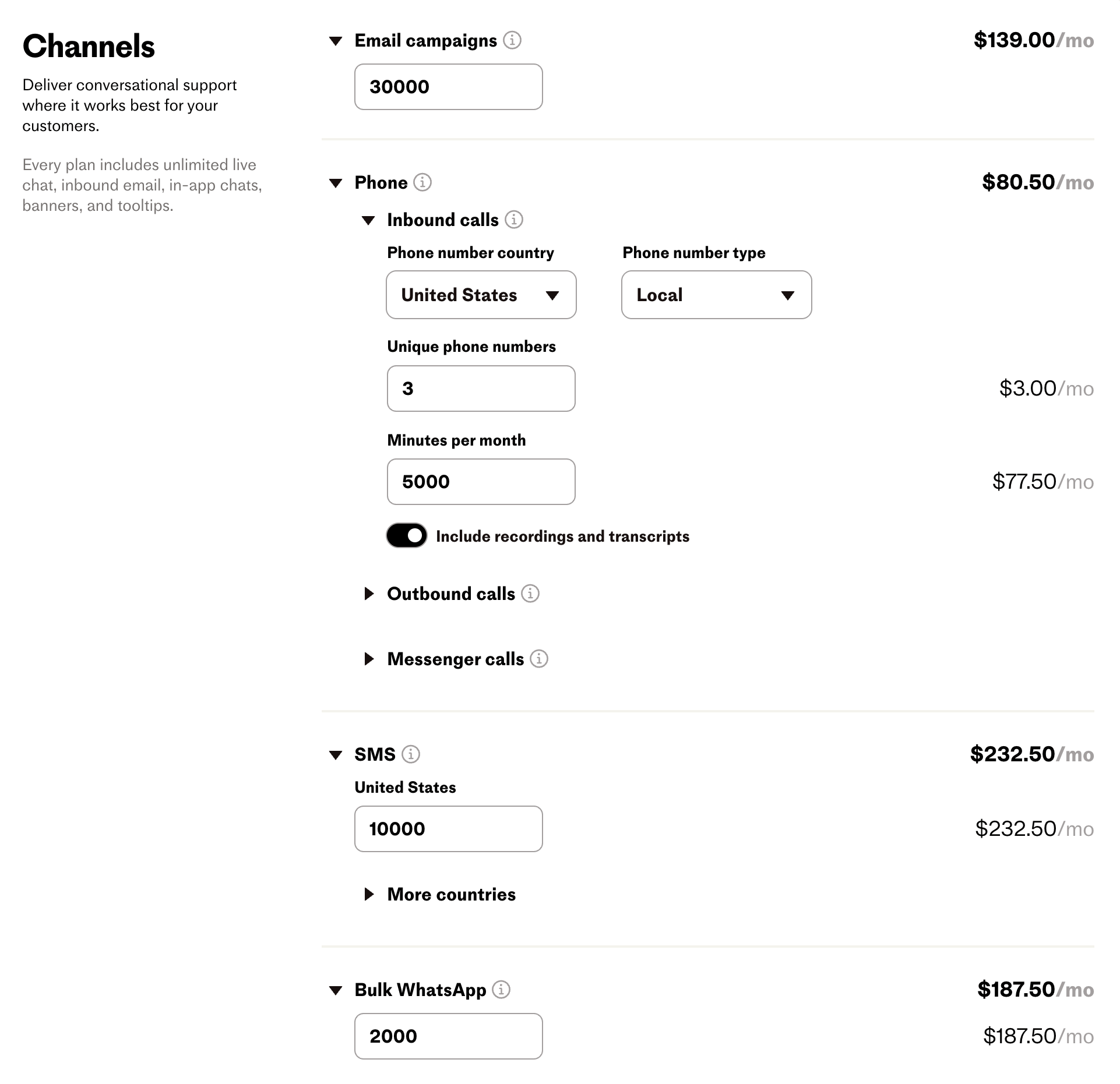
Email campaigns are billed per send, ranging from $0.00025 to $0.045 per email, depending on your monthly volume. For SaaS teams sending thousands of onboarding or retention emails, this can add up quickly. While cheaper than SMS or WhatsApp, the costs scale with your user base.
How SMS pricing works
SMS is billed per segment sent or received, with tiered rates ranging from $0.01 to $0.09 depending on region and volume. A long message can contain multiple segments. For example, 10,000 US SMS segments cost $232.50 across the published tiers.
How WhatsApp pricing works
Bulk WhatsApp messages sent through Outbound or Series cost $0.07-$0.10 each, depending on volume. Inbound WhatsApp conversations, including replies from the Inbox, are free. Campaign costs scale with the number of billable messages sent.
How phone pricing works
Phone usage billing depends on multiple factors, including country, local vs toll-free number, and whether the call is inbound or outbound. For example, taking 5000 minutes of inbound calls per month for 3 US phone numbers costs about $80/mo. Outbound calls are more expensive, costing approximately $127/mo for the same number of minutes.
All of these channels are usage-based, meaning your bill can scale sharply as your SaaS grows and engages more customers. You can calculate the precise cost from Intercom's pricing calculator.
Real-world Intercom cost examples
To make the math concrete, here's what the bill looks like at three common team sizes. Numbers assume a 45% Fin resolution rate (the midpoint of Intercom's published Linktree and Robin case-study figures).
| Team size | Seats | Plan | Fin outcomes/mo | Monthly billing | Annual billing |
|---|---|---|---|---|---|
| Small | 5 | Essential | 200 | ~$343 | ~$293 |
| Mid-size | 15 | Advanced | 2,000 | ~$3,465 | ~$3,255 |
| Enterprise | 30 | Expert | 9,000 | ~$13,080 | ~$12,870 |
Two things stand out. First, the per-seat savings from annual billing are real but modest compared to the Fin outcome cost (~$50-$200/mo for the team sizes above). Second, the Fin component grows linearly with conversation volume, so at high scale most of your invoice is Fin, not seats.
Who is Intercom for?
Intercom is marketed as a fit for businesses of all sizes, but the reality looks a bit different when you factor in additional costs and usage charges. Here's how it breaks down:
- Early-stage startups - New Early Stage customers get 93% off in year one. The $33/month package includes 2 Advanced seats, 2 Copilot seats, 20 Lite seats, Pro, and Proactive Support Plus, plus 300 Fin outcomes and 15 Fin qualifications per month. Extra usage is billed separately.
- Small businesses - Can start on the Essential or Advanced plan for under $100/seat, but will likely need to add proactive support, extra messaging, or Copilot. Once those are included, even small teams can see monthly bills climb into the hundreds.
- Mid-market companies - These teams benefit most from automation, multiple inboxes, integrations, and proactive campaigns. Intercom scales well for this segment, but higher-tier plans often cost in the $1,000-$5,000/month range, depending on seat count and usage.
- Enterprise teams - The Expert plan with advanced security, multiple help centers, and real-time reporting is designed for enterprises. Intercom offers enterprise-grade compliance (SOC 2, HIPAA, GDPR), but it comes with enterprise pricing. Expect bills in the tens of thousands once seats, AI, and channel usage are factored in.
In short, Intercom works for all segments, but its true cost is usage-based and can quickly spiral beyond the advertised seat price.
What if Intercom is too expensive for me?
Don't worry - you're not the only one. Many teams look for simpler and more affordable alternatives.
If you're specifically looking to swap Fin AI rather than the full Intercom platform, see our dedicated Fin AI alternatives post. For broader Intercom alternatives that replace the helpdesk, inbox, and AI agent together, here are the best options:
- ✨ Featurebase - Best modern support tool with AI, chat, email, automations, & help center
- Tidio - Best for small businesses & ecommerce with live chat + AI chatbots
- Help Scout - Best for teams that want a clean, email-first help desk with docs & chat
- Zendesk - Best for large teams needing enterprise ticketing and analytics
- Crisp - Best for startups & SMBs that want modern live chat with automation
- Olark - Best for simple, no-frills live chat with affordable pricing
- Zoho Desk - Best for budget-conscious teams wanting full omnichannel support
- Front - Best for teams that collaborate heavily via shared inboxes
- HubSpot Service Hub - Best for teams already using HubSpot's CRM & marketing
- Freshdesk - Best for growing teams that need omnichannel ticketing on a budget
- Drift - Best for sales-focused teams using chatbots to capture leads
- HelpCrunch - Best for multichannel support with built-in email automation
- HappyFox - Best for teams wanting ticketing, SLAs, and collaboration tools
- Helply - Best for B2B teams wanting outcome-based AI support
- Kayako - Best for timeline-based conversations across chat, email & social
You can dive deeper into all of the best alternatives from our Top Intercom alternatives blog!
So, is Intercom worth it?
Intercom is one of the most comprehensive customer support platforms out there, but its pricing is complicated and extremely expensive, skyrocketing to thousands of dollars per month, even for smaller teams.
Featurebase (👋 that's us) is a modern & affordable Intercom alternative with an AI-powered support inbox & help center. You get all the same features, plus roadmaps, feedback management, and product updates, in a much more affordable package. It's loved by thousands of companies like Lovable, Polymarket, and Raycast.
What's best is that it comes with a Free plan, and you can migrate your existing knowledge base with one click, so there's no downside to trying it out! 👇
Automate your support with the fastest AI-enhanced Inbox today
Frequently asked questions
Intercom's seat-based plans start at $19/seat/month on annual billing (Essential) or $29/seat/month on monthly billing. The Advanced plan runs $85 annual or $99 monthly per seat, and Expert runs $132 annual or $139 monthly per seat. Fin usage starts at $0.99 per outcome, with sales qualifications at $9.99. Channel usage fees are additional, so the total scales with team size and usage.
Yes. In June 2026, Salesforce signed a definitive agreement to acquire Fin (the company formerly known as Intercom) for roughly $3.6 billion. As of July 2026 the deal is signed but not yet closed, and pricing has not changed as a result. It's worth watching for potential plan, product, or pricing shifts once the acquisition completes, particularly if you're signing a multi-year contract.
Fin AI Agent starts at $0.99 per outcome. Resolutions, procedure handoffs, disqualifications, and self-serve routing cost $0.99 each, while sales qualifications cost $9.99. Each conversation attracts at most one outcome charge. The 50-outcome monthly minimum applies to standalone Fin with an existing helpdesk. Intercom plans require at least one paid seat, with Fin usage billed separately.
Yes. Fin can run as a standalone AI agent on top of your existing helpdesk, including Salesforce, HubSpot, Freshworks, and Zoho, from $0.99 per outcome with no Intercom seats required and a 50-outcome monthly minimum. This lets you add Intercom's AI layer to a helpdesk you already use, rather than migrating your whole support stack onto Intercom.
Yes, Intercom offers a 14-day free trial with no credit card required. You'll have full access to your chosen plan and Fin AI Agent during the trial, including unlimited Fin outcomes at no charge. To continue using Intercom after the trial ends, you add payment details and confirm the plan.
Yes. New Early Stage customers pay $33/month in year one, a 93% discount, with 300 Fin outcomes and 15 Fin qualifications included monthly. Outside that program, annual billing saves about 34% on Essential, 14% on Advanced, and 5% on Expert compared with monthly seat rates.


