Front Pricing 2026: Plans, AI Add-Ons, and Real Costs
Explore Front's pricing, including monthly and annual plans, AI add-ons, seat limits, and realistic cost examples to help you choose the right plan.


On this page
Psst... Looking for modern & affordable alternative to Front? Check out Featurebase
Thinking about using Front to manage customer communication and team collaboration - but not sure what it'll actually cost? You're not alone.
Front pricing starts at $25 per seat/month billed annually, but your bill depends on the channels, AI tools, and plan limits your team needs. A seat upgrade or usage-based AI charge can change the total considerably.
In this guide, I'll break down Front's pricing plans, explain the extra charges, and work through realistic examples so you can judge whether it's worth it. 👇
Key takeaways
- Front has 3 plans: Starter costs $25, Professional $65, and Enterprise $105 per seat/month with annual billing.
- Monthly billing costs more: Starter is $35 and Professional is $85 per seat/month. Enterprise requires an annual subscription.
- Seat and channel limits matter: Starter supports up to 10 seats and 1 channel type. Professional supports up to 50 seats and multiple channel types.
- Enterprise includes Copilot, Smart QA, and Smart CSAT: Autopilot is still charged separately, with outcome-based fees starting at $0.05 per conversation.
- Onboarding can add an upfront cost: A paid onboarding package is required when the annual contract exceeds $25,000.
- Compare the full configuration: Include seats, AI usage, channels, and services when comparing Front with alternatives such as Featurebase.
What is Front?
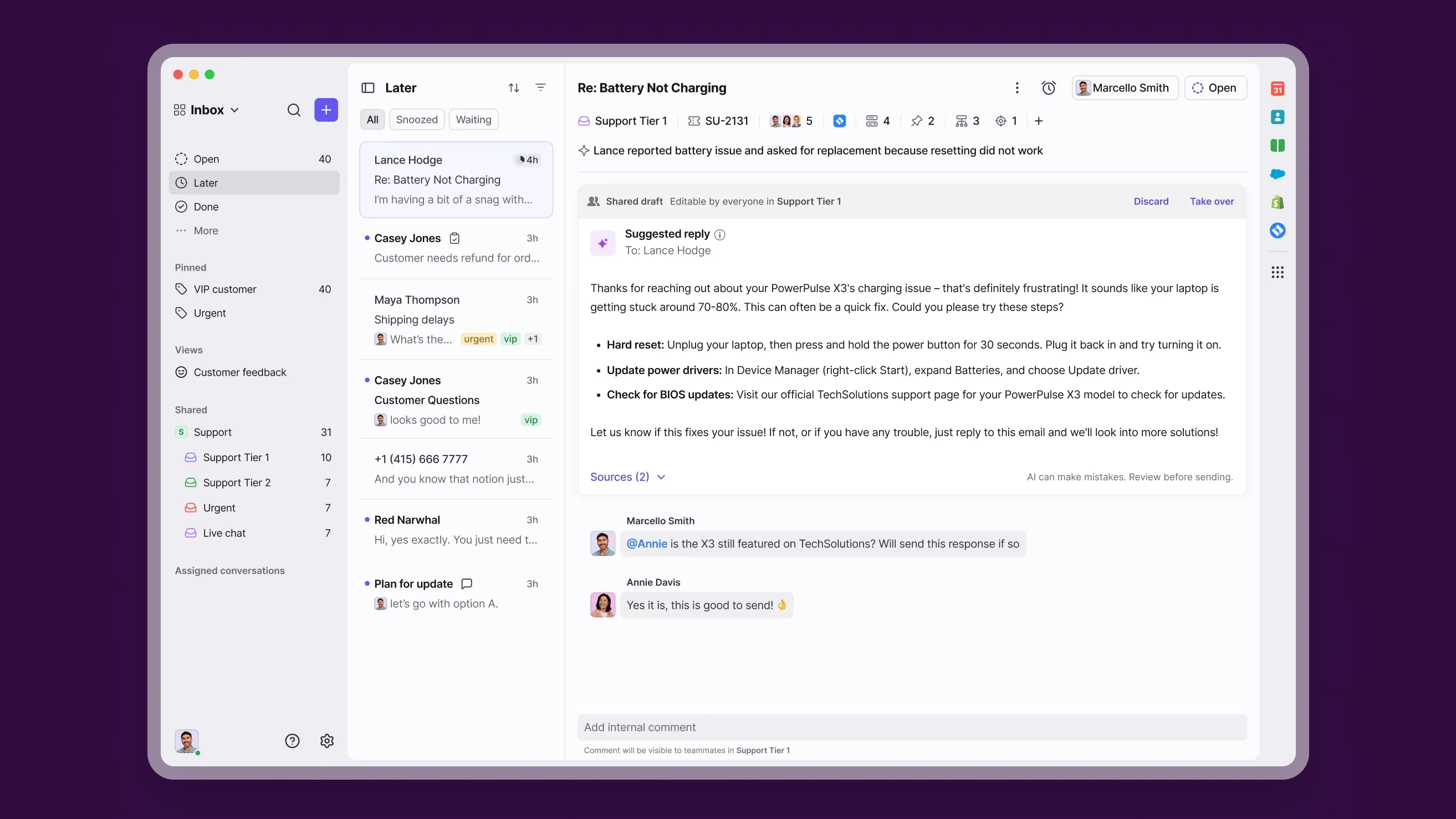
Front is a customer communication platform and shared inbox designed to help teams manage all messages - emails, chats, SMS, and social media - in one collaborative workspace. It helps teams manage incoming messages efficiently, improving team collaboration and reducing the learning curve across different departments.
Think of it like Gmail or Outlook built for teams - but with advanced automation, analytics, and AI layered on top to help teams manage conversations and route messages more efficiently.
In short, Front centralizes how your entire team communicates with customers and each other - enhancing productivity and providing valuable insights into team performance. But as you'll see next, the real question is how much it costs to get all of that up and running. 🤔
Front Pricing 2025

Front offers Starter, Professional, and Enterprise subscriptions. Prices below are in USD and were checked in October 2026. Annual rates are shown as monthly equivalents, so a $25 annual rate represents $300 per seat over a year.
| Plan | Per seat/month, billed annually | Per seat/month, billed monthly | Seat limit | Main inclusions |
|---|---|---|---|---|
| Starter | $25 | $35 | Up to 10 | 1 channel type, 10 automation rules, basic analytics, public knowledge base |
| Professional | $65 | $85 | Up to 50 | Omnichannel support, advanced analytics, 5 workspaces, SSO/SCIM |
| Enterprise | $105 | Annual only | Custom | Unlimited rules, macros, and workspaces, custom permissions, Copilot, Smart QA, Smart CSAT |
Autopilot, paid channel usage, and other optional services are separate from these subscription prices. Start with the lowest plan that covers your actual channels and workflows, then add only the extras you intend to use.
Starter ($25/seat/month billed annually)
Starter is the entry plan for teams that need a shared inbox and basic ticketing across 1 channel type. It's a practical starting point if email handles your support needs and you don't need advanced reporting.
Key details:
- Up to 10 seats per organization
- 1 supported channel type
- Up to 10 automation rules
- Basic analytics
- Public knowledge base
- Copilot and Autopilot available at additional cost
The 10-seat cap is a firm planning consideration. If you expect to need 11 users, compare the Professional cost before committing to Starter.
For 5 seats, the base subscription is $125/month equivalent, or $1,500 annually. Adding Copilot at $20 per seat/month brings the combined equivalent to $225/month.
Professional ($65/seat/month billed annually)
Professional adds omnichannel support and more control over how work moves between teams. It makes sense when you need multiple communication channels, additional workspaces, or more detailed reporting.
Key details:
- Up to 50 seats per organization
- Omnichannel support
- Up to 20 automation rules and macros
- Advanced analytics
- Up to 5 workspaces
- SSO and SCIM
Custom roles and permissions belong to Enterprise. Copilot is a paid add-on on Professional, and Autopilot usage is billed separately.
A 10-seat Professional subscription costs $650/month equivalent, or $7,800 annually. With Copilot for all 10 seats, the equivalent becomes $850/month, before Autopilot or other usage charges.
Enterprise ($105/seat/month billed annually)
Enterprise adds more administrative control and removes the published rule, macro, and workspace limits. It also includes Copilot, Smart QA, and Smart CSAT.
Key details:
- Custom seat arrangements
- Unlimited rules, macros, and workspaces
- Custom roles and permissions
- Multilingual knowledge base
- Copilot, Smart QA, and Smart CSAT included
- Annual billing only
Autopilot is still an extra charge. Native WhatsApp usage and other paid services can also add to the bill, so Enterprise isn't an all-inclusive price.
At 50 seats, the base subscription is $5,250/month equivalent, or $63,000 annually. That annual contract exceeds the threshold for required paid onboarding.
Switch from Front and get the fastest modern AI-powered support platform
Front add-ons
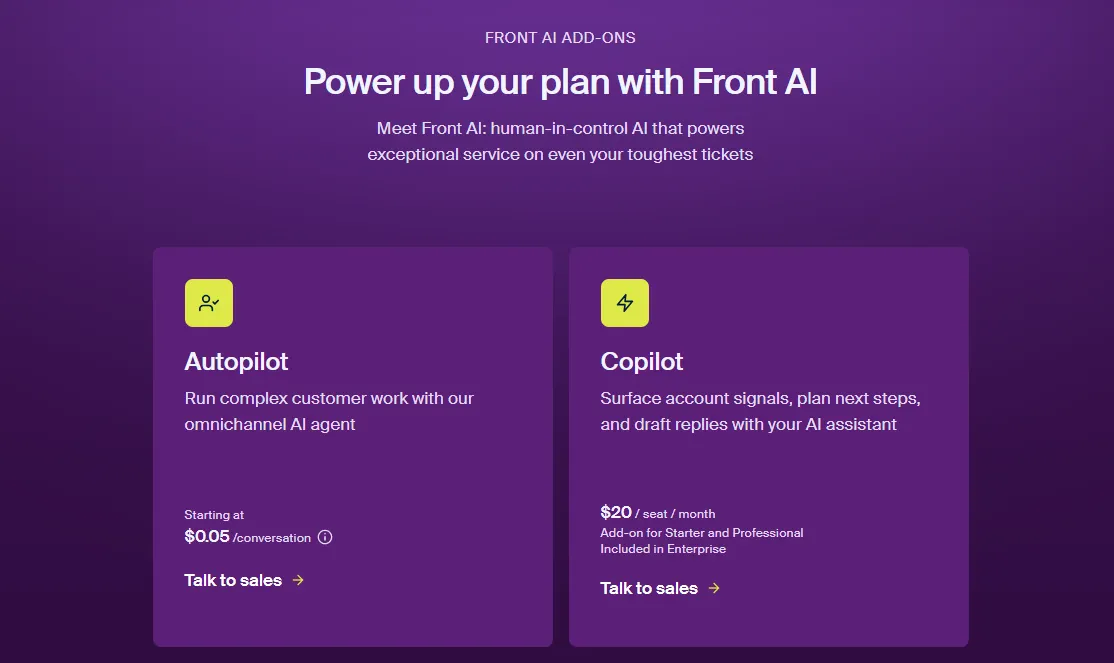
Front's add-ons use different billing units, so check both the price and what triggers each charge.
That distinction matters when estimating costs. Buying more agent seats and automating more conversations affect different parts of the bill.
Autopilot ($0.05-$0.89 per conversation)
Autopilot is Front's AI agent for handling customer conversations and tasks. Its current pricing has 3 outcomes:
| Outcome | Price per conversation |
|---|---|
| Triage | $0.05 |
| Handoff | $0.39 |
| Resolution | $0.89 |
Front charges only the highest outcome achieved in a conversation, rather than adding all 3 charges together. For example, a conversation that reaches a resolution costs $0.89.
A resolution also has conditions. Front's definition requires no human replies and no teammate follow-up within the applicable window, which varies by channel.
If Autopilot resolves 1,000 conversations, that is $890. If it only triages 1,000 conversations, that is $50. Your estimate should use the expected mix of outcomes, rather than treating every incoming ticket as a paid resolution.
Available on: All plans
Included in: None
Copilot ($20/seat/month)
Copilot helps agents work through conversations using customer context and knowledge. It can assist with answers and drafting while keeping the agent involved.
The add-on costs $20 per seat/month on Starter and Professional. Enterprise includes it in the subscription.
Copilot and Autopilot have different jobs. Copilot helps an agent respond, while Autopilot handles automated work that can generate separate outcome charges.
Available on: All plans
Included in: Enterprise
Smart QA and Smart CSAT
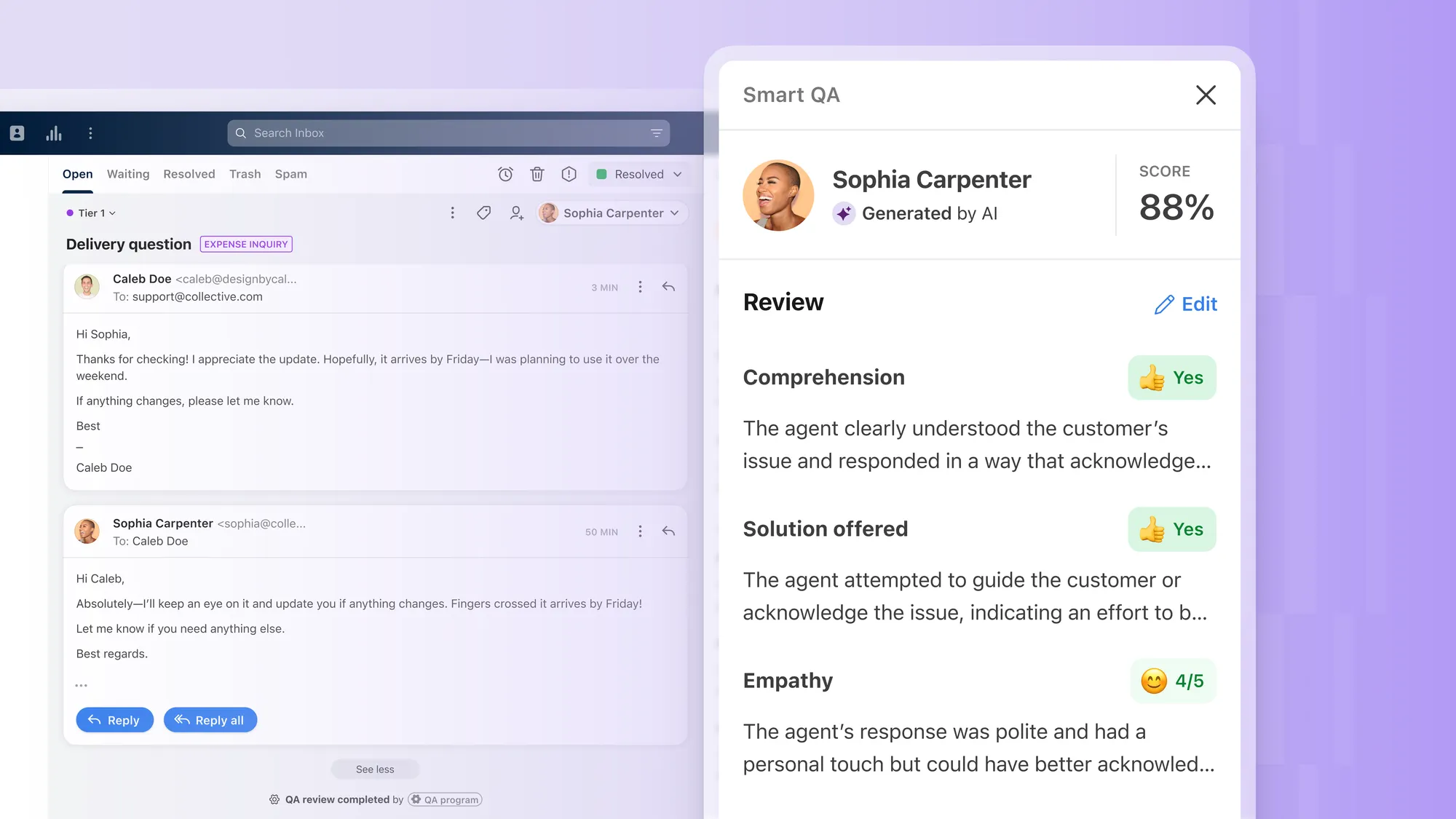
Smart QA reviews support conversations for quality and coaching opportunities. Smart CSAT estimates customer satisfaction from conversations, including when a customer hasn't submitted feedback directly.
Current public documentation lists both as included with Enterprise at no additional cost. It does not publish the previous standalone lower-tier prices or QA + CSAT bundle price.
If you're on a different plan or a legacy contract, confirm availability and pricing with Front before including either feature in your budget.
Workforce Management ($20/seat/month)
Workforce Management helps organize shifts, teammate availability, and support coverage. It costs $20 per selected seat/month, with charges added according to your billing cycle.
You can buy it for only the teammates who need scheduled shifts. Admins or managers who create schedules don't need a Workforce Management license unless they also need to be assigned a shift.
Available on: Starter, Professional, and Enterprise
Included in: None
Native WhatsApp channel
Front's native WhatsApp connection is available on Professional and Enterprise. You'll pay Meta's messaging fees plus a 20% administration fee from Front.
For example, $100 in applicable Meta fees becomes $120 after Front's administration fee. This sits alongside the Front subscription, so budget for messaging volume separately.
API rate limit increase
If your integrations need more API capacity, Front charges $200/month for each additional 100 requests per minute.
Check your expected integration traffic before purchasing this. The extra charge is for a higher request-rate allowance, rather than a fee for each API call.
Available on: All plans
Explore Featurebase for AI-powered support, feedback, and product updates
Real-world cost examples
These examples use annual subscription rates expressed as monthly equivalents. They exclude taxes, optional services, and usage not explicitly shown.
The calculations are illustrative budgets. Your final bill depends on the plan and add-ons in your contract.
1. Email support team (3 seats)
A team chooses Starter and adds Copilot for all 3 users. It stays within Starter's single-channel-type limit and doesn't purchase Autopilot.
Monthly equivalent: 3 × ($25 + $20) = $135
Annual equivalent: $135 × 12 = $1,620
The base subscription alone would be $75/month equivalent. Copilot adds $60, so the team can assess whether the agent assistance justifies that extra spend.
2. SaaS support team (7 seats)
A team needs multiple channels, so it chooses Professional. It adds Copilot for 7 users and budgets for 300 Autopilot resolutions per month.
Subscription and Copilot: 7 × ($65 + $20) = $595/month equivalent
Autopilot: 300 × $0.89 = $267/month
Combined budget: $595 + $267 = $862/month equivalent
That assumes the only billable Autopilot outcomes are those 300 resolutions. Additional conversations that reach triage or handoff outcomes would add their own charges.
3. Support team needing Enterprise features (15 seats)
A team chooses Enterprise for its permissions, automation limits, and included Copilot, Smart QA, and Smart CSAT.
Base subscription: 15 × $105 = $1,575/month equivalent
Annual subscription: $1,575 × 12 = $18,900
The base contract is below $25,000, so this example does not automatically trigger required paid onboarding. Autopilot, channel charges, and any services purchased would still increase the total.
Other things to keep in mind
The plan you need next year can matter as much as the plan you qualify for today. I would check these details before agreeing to a contract.
Seat limits can trigger a larger upgrade
Adding a user at a plan boundary can change the subscription rate for the whole team.
- 10 to 11 seats: 10 Starter seats cost $250/month equivalent. Moving to 11 Professional seats costs $715/month equivalent.
- 50 to 51 seats: 50 Professional seats cost $3,250/month equivalent. At the published Enterprise rate, 51 seats cost $5,355/month equivalent.
These comparisons use annual list rates before add-ons or negotiated terms. They show why a hiring forecast belongs in your pricing calculation.
Monthly billing changes the commitment and price
Starter and Professional offer monthly billing. Enterprise is annual-only.
For 10 Professional seats, monthly billing costs $850/month, while the annual subscription is $7,800 for the year, equivalent to $650/month. Compare both the total commitment and your expected seat count, rather than relying on a general discount percentage.
Paid onboarding applies above the contract threshold
Front requires a separately purchased onboarding package for annual contracts over $25,000. Ask for the service scope and price in writing when evaluating a quote near that threshold.
Don't assume an Enterprise label automatically means an onboarding fee applies. Conversely, don't leave onboarding out of a qualifying contract's first-year budget.
Promotional discounts need confirmation
Use the published rates as your baseline. If Front offers your organization a startup, nonprofit, education, or negotiated discount, confirm the eligibility, duration, renewal price, and excluded add-ons in the quote.
A discounted first year can still lead to a higher renewal bill. Comparing both years gives you a more useful view of the commitment.
What if Front is too expensive for me?
Start by listing the channels, automations, and reporting you actually need. Then compare equivalent configurations across tools. A lower starting price alone won't tell you which option costs less for your workflow.
These alternatives are worth evaluating for different needs:
- Featurebase: For software teams whose customer demand is growing faster than the team and that want support, feedback, and customer communication in one place.
- Zendesk: For teams evaluating a broad customer service suite with ticketing, voice, messaging, and reporting.
- Help Scout: For teams looking for a shared support inbox with workflows and AI assistance.
- Kayako: For teams evaluating a helpdesk with customer history, a shared inbox, and AI support.
- Hiver: For teams that prefer support inside Gmail, or want to compare Hiver's separate omnichannel platform.
- Freshdesk: For teams comparing ticketing, support automation, and AI tools within the Freshworks product family.
- Crisp: For teams that want a shared inbox, website chat, knowledge base, and AI workflows.
- Missive: For teams whose main requirement is collaboration around email and shared inboxes.
- Tidio: For businesses, including ecommerce stores, comparing live chat, AI assistance, and messaging.
You can dive deeper into all of the best alternatives from our Top Front alternatives blog.
So, is Front worth it?
Front can be worth the cost when your team needs collaborative customer conversations, multiple channels, and detailed workflow controls. The right comparison is the full subscription plus the AI outcomes and services you expect to use.
Featurebase is a Front alternative for software teams that want to automate support and connect customer conversations with feedback, roadmaps, and product updates.
It comes with a Free plan, so you can explore the basic inbox before choosing a paid configuration. 👇
Automate your support with the fastest AI-enhanced Inbox today
FAQs
Front doesn't offer a permanent free plan, but it has a 14-day Professional trial with no credit card required. The trial has limits, including 15 teammates and 5,000 messages, and some capabilities are restricted. Check any separate AI trial terms before assuming paid AI usage is included.
No. A Front organization uses the same subscription plan for its seats, so you can't mix Starter and Professional licenses within it. This matters when only some teammates need a feature available on a higher tier.
Starter and Professional each have a minimum of 1 seat. Front asks Enterprise buyers to contact sales about seat requirements, so confirm the minimum in your quote.
No. The restriction is on the channel type, rather than a single email address. Starter allows up to 10 connected channels per license, within its single-channel-type restriction.
New licenses are prorated from the date they're added until the next subscription billing date. Front consolidates these additional charges monthly, so adding seats can generate an invoice between annual renewals.
Front's billing FAQ says you can cancel at any time, but payments are nonrefundable and you're responsible for the full subscription term you selected. Review the terms in your order before treating cancellation as an immediate end to payment obligations.


