Hiver Pricing 2026: Is It Worth It?
If you’re considering Hiver for customer support, getting a grip on the real pricing can be tricky. Today, I reveal exactly what’s included in each plan, how the AI add-on works, and more.


On this page
Psst... Looking for a more powerful & modern alternative to Hiver? Check out Featurebase
If you’ve looked into Hiver lately, you’ve probably noticed the pricing looks simple at first - until it’s not. Between seat minimums, AI add-ons, and other tricks, the real cost can catch teams off guard.
So, before you lock in that annual contract, here’s a clear breakdown of Hiver’s 2025 pricing - what each plan actually includes, how the AI add-on works, and when it might make more sense to look elsewhere. 👇
Key takeaways
- Hiver offers four plans, including a Free tier
- Paid plans start at $25/seat/month (annual), ranging to $75/seat/month
- All plans have 2-seat minimums and can only be upgraded in blocks (2, 5, 10, 15, etc.)
- The AI add-on costs $20/seat/month, unlocking AI summarizations, composer, Ask AI, etc.
- The real cost for a 10-person team ranges from $5,400/year (Growth) to $11,400/year
- There are many powerful, more transparent alternatives like Featurebase, which includes AI and automation out of the box
| Plan | Key features | Best for | Starting price with AI add-on (5 seats) |
|---|---|---|---|
| Free ($0/seat/mo) | Basic shared inbox, email collaboration, limited ticketing, mobile app | Testing or early-stage teams | N/A |
| Growth ($25/seat/mo) | Multi-channel support, basic automation, reporting, integrations, knowledge base | Small teams handling customer support | $2,700/yr |
| Pro ($45/seat/mo) | Advanced automation, analytics, customer portal, Salesforce & Jira integrations | Growing SaaS or support teams | $4,500/yr |
| Elite ($75/seat/mo) | Enterprise automation, skill-based routing, HIPAA compliance, Okta SSO, CSM, training | Large or regulated organizations | $6,300/yr |
What is Hiver?
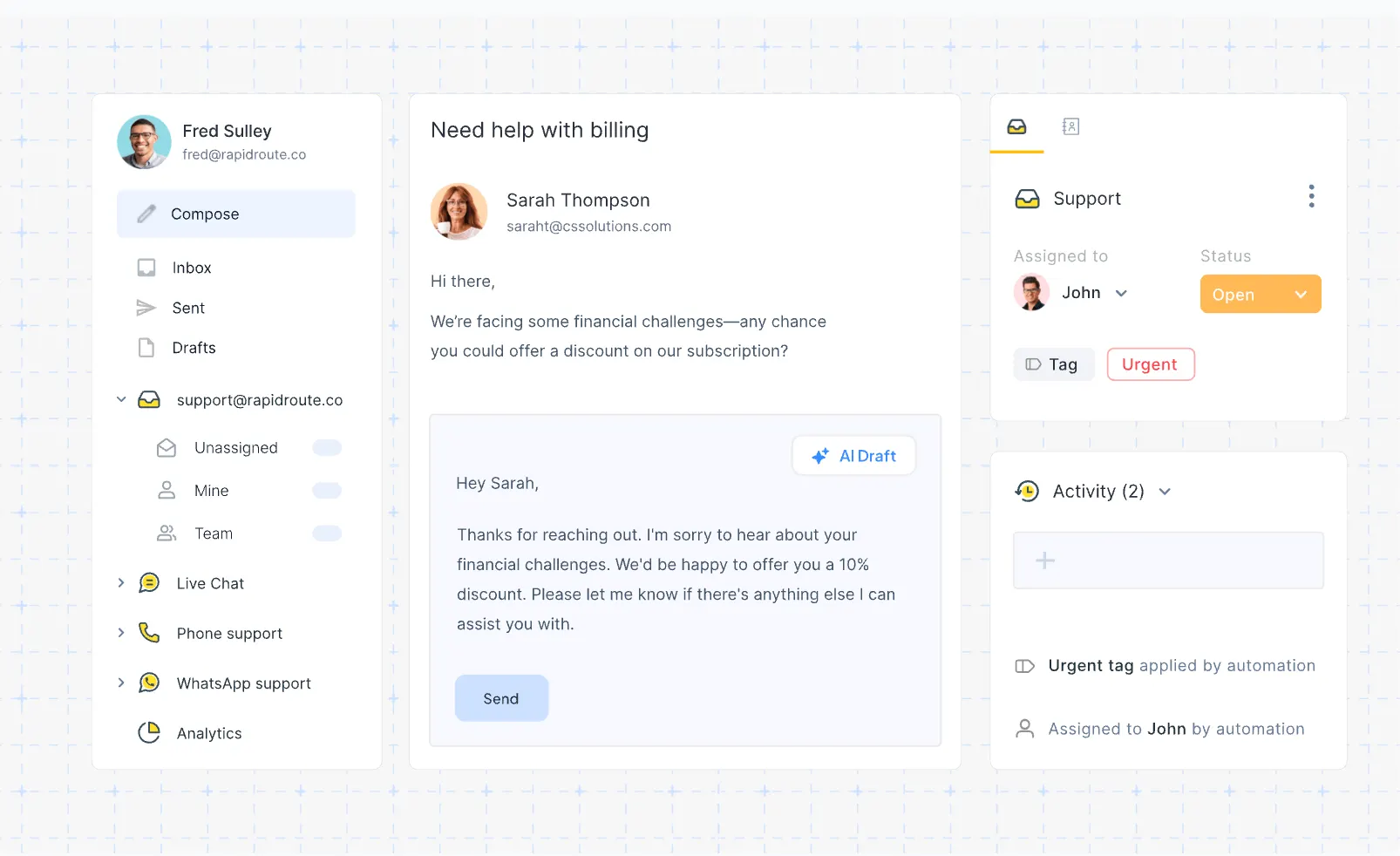
Hiver is an email-based customer service platform that turns shared inboxes like support@ or sales@ into collaborative workspaces. Instead of switching between multiple desk software tools, your team can handle customer emails, assign tasks, leave internal notes, and automate workflows - all directly inside your inbox.
It’s built for teams that already rely on Outlook or Google Workspace and want to improve visibility, accountability, and speed without adopting a full-blown help desk system like Zendesk.
Hiver’s core features:
- Shared inboxes: Manage support@ or info@ directly from Gmail and Outlook with full team visibility and reduced duplicate responses.
- Internal collaboration: Use @mentions, shared drafts, and private notes for smoother team collaboration.
- Automations: Auto-assign emails, tag conversations, and set up SLAs to stay on top of response times while minimizing manual effort.
- Multi-channel support: Handle email, live chat, WhatsApp, and voice - all in one place for consistent customer support.
- AI features: Access AI summarization, tagging, and sentiment detection (available on higher Hiver plans).
- Integrations: Connect Hiver with tools like Slack, Asana, Jira, Salesforce, and Zapier to improve efficiency across your stack.
In short, Hiver blends help desk and email management software into a single inbox software platform - ideal for teams who don’t want to switch systems. But as we’ll see next, its pricing can climb fast once you start adding users, automation, and AI.
Hiver pricing 2026
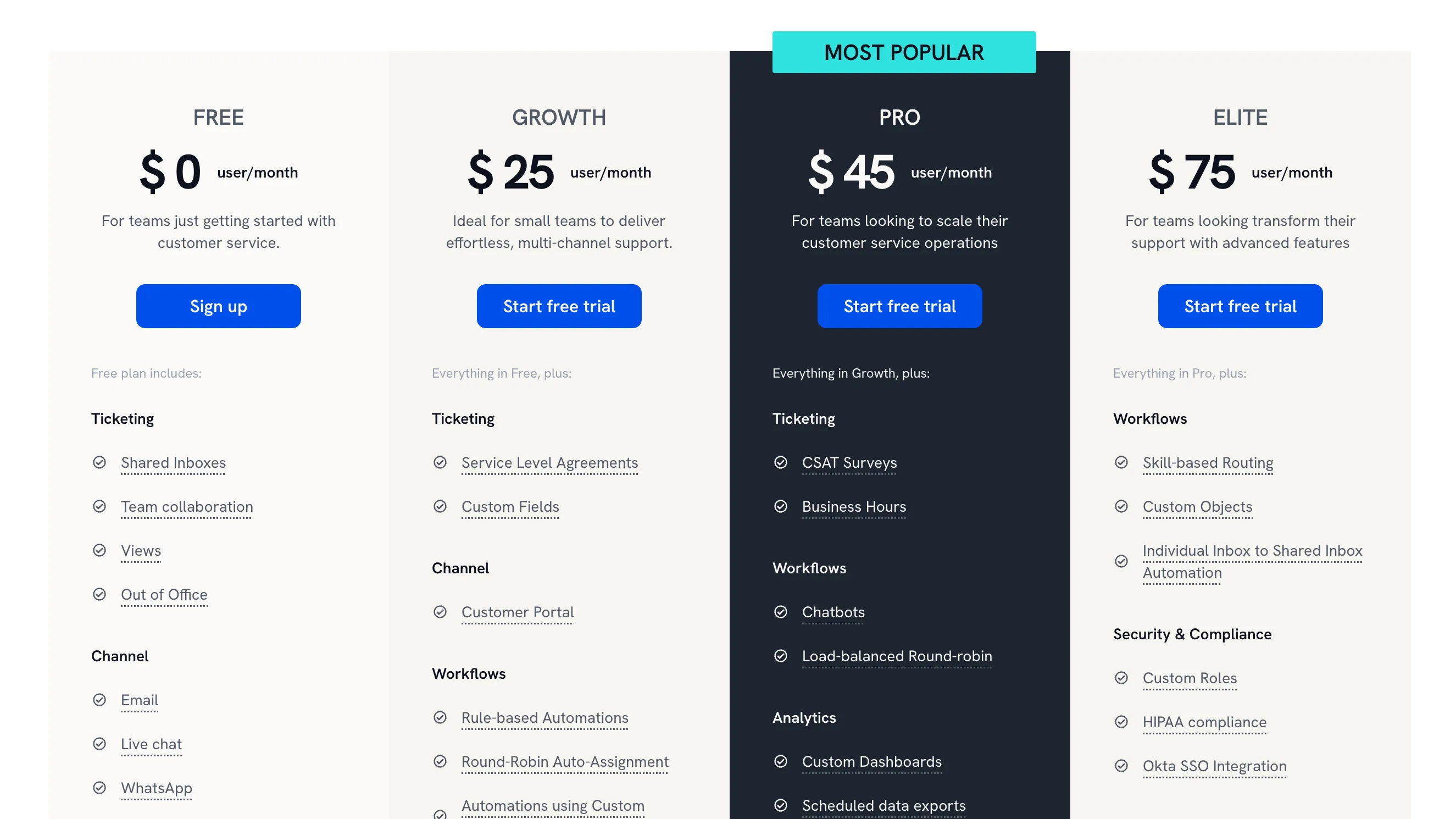
Hiver’s pricing is seat-based and split across four tiers: Free, Growth, Pro, and Elite. Each plan has a 2-seat minimum.
While the entry pricing looks affordable, you’ll quickly notice that AI, advanced analytics, and automations are mostly limited to the higher tiers.
Let’s break down what each plan includes. 👇
Free plan ($0/seat/mo)
Hiver’s free version is designed for teams just getting started with customer service. It offers basic shared inboxes, simple collaboration, and limited ticketing - enough to test the product and manage small email volumes.
Includes:
- Basic shared inbox and ticketing
- Email collaboration tools
- Basic help desk setup inside Gmail
- Mobile app access
- No automation, analytics, or AI
Best for: Very small teams or startups testing inbox management without upfront costs.
Growth plan ($25/seat/mo)
The Growth plan is built for small teams that want to offer multi-channel support while keeping things lightweight. It adds automations, analytics, and integrations while staying affordable.
Includes:
- Shared inbox and ticketing
- Email, chat, and voice channels
- Basic automation and reporting
- Integrations with popular desk software like Slack, Asana, and Zapier
- Access to knowledge base tools
Best for: Small teams delivering efficient customer support across multiple channels.
Pro plan ($45/seat/mo)
The Pro plan is where Hiver starts feeling like a complete help desk platform. It’s designed for growing teams that need scalability, stronger automation, and better insights into customer satisfaction.
Includes:
- Shared inbox and full ticketing system
- Advanced workflow automation
- Custom analytics and reports
- Knowledge base and customer portal
- Integrations with Salesforce and Jira
Best for: Mid-sized teams scaling customer support operations and automating routine tasks without losing visibility.
Elite plan ($75/seat/mo)
The Elite plan is Hiver’s top tier, built for larger organizations that want enterprise-level customization and compliance. It combines advanced automation, analytics, and skill-based auto assignment for complex support environments.
Includes:
- Unlimited shared inboxes and channels
- Skill-based routing and automation
- HIPAA compliance and Okta SSO
- Dedicated Success Manager
- 24/7 priority support and team training
Best for: Enterprises or regulated industries that need advanced workflows, compliance, and personalized onboarding.
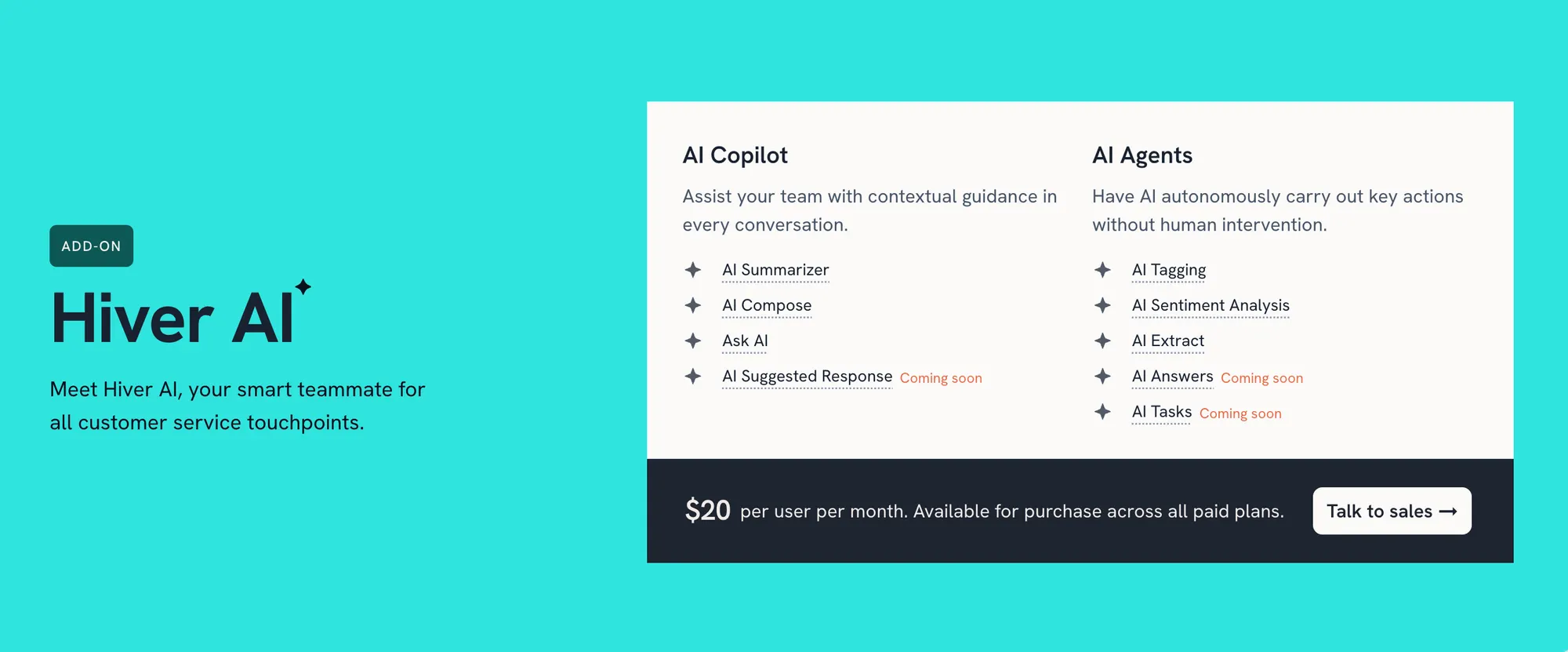
Hiver AI add-on ($20/seat/mo)
Here’s where Hiver pricing gets a bit tricky.
While the base plans include some AI, the real power comes from the Hiver AI Add-on, which unlocks automation and advanced collaboration tools to handle repetitive tasks and follow-ups.
It includes:
- AI Compose: Generate full replies from scratch using context and tone prompts.
- AI Summarizer: Quickly condense long email threads.
- AI Tagging: Automatically label and categorize emails by topic or urgency.
- AI Sentiment Analysis: Detect positive or negative tone in conversations.
- AI Suggested Responses: Get reply suggestions based on historical messages.
- AI Thank You Detector: Detect and close “thank you” follow-ups automatically.
- Ask AI: Query your inbox or KB for quick insights.
- AI Extract: Pull structured data from email content for CRM updates.
In short, the Hiver AI Add-on gives access to their complete suite of automation and language tools that help support teams reply faster, categorize emails automatically, and analyze tone or intent in real time.
Switch from Hiver and get the fastest AI-powered support platform
Other things to keep in mind
While Hiver’s pricing looks clean on paper, a few important details can easily be missed. Here’s what to watch out for 👇
- Minimum seat requirement
All paid plans require at least 2 seats, so even solo operators can’t pay for a single user. - Rigid seat scaling
You can’t freely add users one by one. Seats scale in fixed blocks (2, 5, 10, 15, etc.), so smaller teams may end up paying for unused seats. - Discounts
Hiver offers up to 20% off when billed annually versus monthly. Eligible NGOs can get custom discounted pricing through Hiver’s nonprofit program - but you’ll need to schedule a demo to apply. - Basic AI on Pro plan
Even on Pro, the built-in AI tools are limited to simple summarization and template suggestions. To access full automation capabilities, you’ll need the paid AI add-on. - AI add-on isn’t self-serve
The $20/user/month AI package can only be purchased through Sales or a Customer Success Manager - not from your account dashboard. That means setup delays and less transparent pricing.
Who is Hiver shared inbox for?
Hiver fits best for email-based teams that want lightweight support tools without switching platforms:
- Startups & small teams:
Great starting point with the Free or Lite plan. Easy setup and basic collaboration, but limited automation or analytics. - Growing SaaS & support teams:
The Growth and Pro tiers add CSAT surveys, analytics, and integrations, but pricing climbs fast once you add AI or more seats. - Large or regulated organizations:
The Elite plan offers HIPAA, Okta, and a dedicated CSM, making it ideal for enterprises that need compliance and control.
In short: Hiver is perfect for Gmail-heavy teams that want collaboration inside their inbox - but it gets expensive once you scale or need full AI capabilities.
What if Hiver is too expensive for me?
If Hiver’s pricing or limits don’t fit your team, here are some of the best alternatives worth considering instead:
- ✨ Featurebase – Best modern Hiver alternative with AI-powered inbox, automations, and built-in knowledge base
- Front – Best for teams needing shared multichannel inboxes with automation and analytics
- Drag – Best simple Gmail-based alternative that turns your inbox into a shared Kanban workspace
- Help Scout – Best lightweight help desk software for startups wanting chat and docs
- BoldDesk – Best mid-range option with advanced ticketing, automation, and lower costs
- Zendesk – Best enterprise solution for large teams needing full omnichannel support
- Gmelius – Best Gmail extension for small teams managing tasks and email collaboration
- Intercom – Best for conversational support with AI chatbots and proactive messaging
- Freshdesk – Best affordable omnichannel platform with strong automations and analytics
- Crisp – Best for small businesses handling chat, email, and WhatsApp in one place
You can dive deeper into the top Hiver alternatives and competitors here.
So, is Hiver worth it?
Hiver is a solid choice if your team lives in Gmail and wants to manage customer support without switching tools. But once you factor in seat minimums, rigid scaling, and the extra add-ons, the total cost climbs fast.
Featurebase (👋 that's us) is a modern Hiver alternative with an AI-powered support inbox, Email sync, and automations. You get all the same features, plus feedback tracking and product updates, in a much more affordable package. It's loved by thousands of companies like Lovable, Polymarket, and Raycast.
What's best is that it comes with a Free plan, and the onboarding is super simple, so there's no downside to trying it out! 👇
Automate your support with the fastest AI-enhanced Inbox today


