Blog Customer ServiceBest Help Desk Management Software in 2026: Features, Use Cases, and How to Choose
Best Help Desk Management Software in 2026: Features, Use Cases, and How to Choose
Looking for the best help desk management software in 2026? We compared the top options to see which tools are best for SaaS teams, IT teams, and growing businesses, so you can find the right fit for your workflow, budget, and support needs.



✨ Automate your support with the fastest AI-enhanced Inbox today →
Choosing help desk management software is not just about finding a place to manage tickets. The right tool can improve customer satisfaction, reduce manual effort, and help your team respond faster with better context.
But the market is crowded, and not every platform is built for the same kind of support team. Some are better for modern SaaS support, some are better for IT teams, and others are stronger for companies that want simpler ticket management at a lower cost.
In this guide, we break down the best help desk management software in 2026, what each tool does well, and how to choose the right one for your workflow.
Short answer:
- If you want the best help desk management software for modern SaaS teams, choose Featurebase✨.
- If you want advanced workflows and a category-leading help desk system, choose Zendesk.
- If you want a flexible desk software platform for growing teams, choose Freshdesk.
- If you want a budget-friendly desk solution, choose Zoho Desk.
- If you want stronger workflows for IT teams and internal requests, choose Jira Service Management.
See the full list below for a closer look at the best help desk software options in 2026.👇
TL;DR - Comparison table of the best help desk management software in 2026
| Platform | Best for | Key strength | Pricing |
|---|---|---|---|
| ✨Featurebase | Product-led SaaS teams | Modern support inbox, knowledge base, feedback, and AI workflows in one platform | Free plan available; paid plans start at $29/seat/month billed yearly + $0.29 per AI resolution |
| Zendesk | Advanced support teams | Strong automation, routing, and reporting | Starts at $19/month; Zendesk Suite starts at $55/agent/month billed annually |
| Freshdesk | Growing support teams | Flexible ticketing, automation, and multichannel support | Free plan for 1–2 agents for 6 months; paid plans start at $19/agent/month billed annually |
| Zoho Desk | Budget-conscious businesses | Balanced help desk features, automation, and apps | Free plan available; first paid tier starts at ₹800/user/month billed annually |
| Jira Service Management | IT teams and internal service desks | Strong workflows for internal requests, asset management fit, and approvals | Free plan for up to 3 agents; paid plans start at $20/agent/month |
| HelpDesk.com | Dedicated help desk workflows | Classic help desk system with strong ticket management | Free 14-day trial; Team starts at $29/user/month billed annually |
| HubSpot Help Desk | CRM-connected support teams | Help desk and customer support inside the HubSpot ecosystem | Free help desk software available; paid pricing depends on HubSpot plan |
| Hesk | Simpler help desk needs | Lightweight desk software with traditional ticket management | Hesk Cloud starts at $29.99/month or $299/year; Pro starts at $49.99/month or $499/year |
| SolarWinds Service Desk | IT operations teams | Structured service desk functionality with stronger IT workflow support | Starts at $39/technician/month billed annually |
What is help desk management software?
Help desk management software helps businesses create, track, manage, and respond to support tickets from customers, employees, and users.
At a basic level, a help desk system turns incoming requests into organized tickets so a team can assign, prioritize, and resolve them efficiently. But modern help desk software usually includes much more than that.
The best desk software can help a business:
- manage tickets across email, chat, forms, and self-service channels
- track support requests in one place
- assign tickets to the right agents or teams
- reduce manual effort with automation
- connect a knowledge base to live support workflows
- improve ticket resolution with better reporting and context
- support IT teams with asset management, approvals, and change management processes when needed
In other words, help desk management software is not just a tool for answering messages. It is a desk system for organizing support operations, improving efficiency, and helping businesses support customers at scale.
Why businesses use help desk software
Businesses use help desk software because disconnected inboxes, spreadsheets, and chat threads make it hard to manage support efficiently.
Without a proper help desk, support staff often struggle with:
- lost or duplicated requests
- unclear ticket assignment
- poor visibility into ticket volume
- inconsistent follow-up
- too much manual effort
- weak reporting on team performance
- slower ticket resolution
- lower customer satisfaction
A strong desk solution solves those problems by giving the whole help desk team one shared system to manage requests, track open tickets, connect customer context, and keep everyone on the same page.
That has a direct impact on customer support quality. When agents can see incoming requests clearly, connect knowledge base articles to common questions, and respond with more context, the team can work more efficiently and create a better support experience.
Common use cases for help desk management software
The best helpdesk software can support many different teams and workflows. Here are the most common use cases.
1. Customer support for SaaS and online businesses
This is the most common use case.
Support teams use help desk software to manage tickets from email, website forms, chat, and in-app messaging. They use automation, custom fields, and reporting to route support requests, reduce repetitive tasks, and help customers faster.
2. Internal help desk support for IT teams
IT teams often need an internal help desk system for employee requests, hardware issues, software access, server problems, and change management workflows.
In these cases, security, asset management, approvals, and structured processes matter more than marketing-oriented chat tools.
3. Shared inbox and cross-functional support
Some businesses use desk software across support, operations, onboarding, and success teams. This helps each person involved in the process stay aligned and manage requests from one place.
4. Self-service and knowledge base management
A knowledge base can reduce ticket volume by helping users solve problems without contacting support.
The best help desk tools connect knowledge base articles, self-service flows, and bot functionality so customers can find answers faster and agents can reuse proven documentation.
5. High-volume support operations
Businesses with a large number of support tickets need stronger automation, reporting, and workflow controls to manage requests efficiently.
This is where help desk features like ticket assignment rules, categorization, AI features, summaries, and SLA workflows make a big difference.
How we evaluated these help desk software tools
We focused on one question:
Which help desk management software tools actually help teams manage requests, reduce manual effort, and improve customer satisfaction?
To answer that, we looked at:
- core help desk features and overall functionality
- ease of ticket management and ticket assignment
- knowledge base and self-service capabilities
- automation and AI features
- reporting and visibility into support operations
- flexibility for different business needs
- ability to integrate and connect with existing tools
- security and data security controls
- fit for customer support teams and IT teams
- pricing, free options, and overall cost
Our goal was not to list every desk software platform on the market. It was to highlight the solutions that give teams the best mix of features, flexibility, and efficiency for real help desk management.
The 9 best help desk management software tools for 2026
1. Featurebase✨

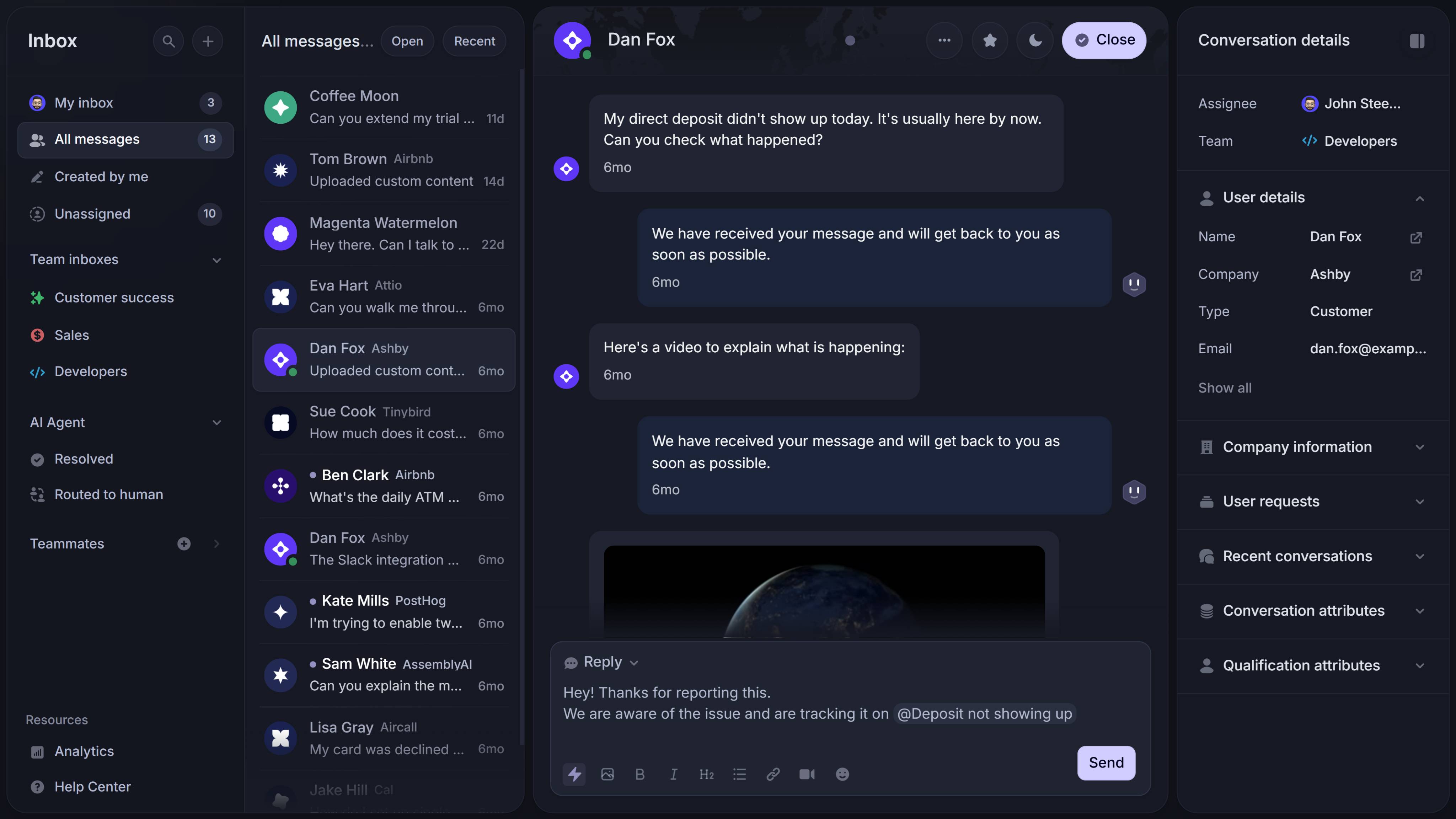
Featurebase is our top pick for the best help desk management software for modern SaaS teams.
It earns that spot because it does more than help teams manage tickets. It brings support, knowledge base, live chat, and product feedback into one workflow, which is especially useful for SaaS businesses that want to reduce tool sprawl and give agents more context while they support customers.
Key features
- Modern support inbox for managing support tickets and conversations
- Built-in knowledge base with self-service and AI search
- Live chat and messaging across customer touchpoints
- Automation and ticket assignment workflows
- Feedback and roadmap tools connected to support insights
- Reporting and customer context in one platform
Best for: Product-led SaaS teams that want support, knowledge base, and feedback in one platform.
Why it stands out: Featurebase is a stronger fit than a traditional desk system when your team wants support to connect directly with product feedback, help center content, and customer communication. That makes it especially valuable for teams trying to create a seamless support experience, reduce manual effort, and keep everyone on the same page.
Pricing: Featurebase has a free plan, and its official pricing page lists paid plans starting at $29/seat/month billed yearly for Growth, plus $0.29 per AI resolution.

Resolve 70% of customer requests with AI
Automatically resolve customer issues & cut down support loads for your team
2. Zendesk

Zendesk is one of the most established names in help desk software, and it remains a strong choice for teams that need advanced workflows at scale.
It is particularly strong when support volume is high, workflows are more complex, and the business needs stronger routing, reporting, and admin control than lighter tools usually provide.
Key features
- Omnichannel support across email, chat, and web
- Advanced ticket management and routing
- Workflow automation and AI features
- Knowledge base and self-service tools
- Custom fields and enterprise admin controls
- Strong reporting and analytics
Best for: Teams that need advanced automation, routing, reporting, and scale.
Why it stands out: Zendesk is one of the most complete help desk systems in the category. It performs well across the criteria that matter most for larger support teams: ticket management, automation, reporting, flexibility, and security. For buyers who need depth, it is one of the safest picks on this list.
Pricing: Zendesk’s official pricing pages list Support plans starting at $19 per agent/month billed annually, while Zendesk Suite starts at $55 per agent/month billed annually.
3. Freshdesk
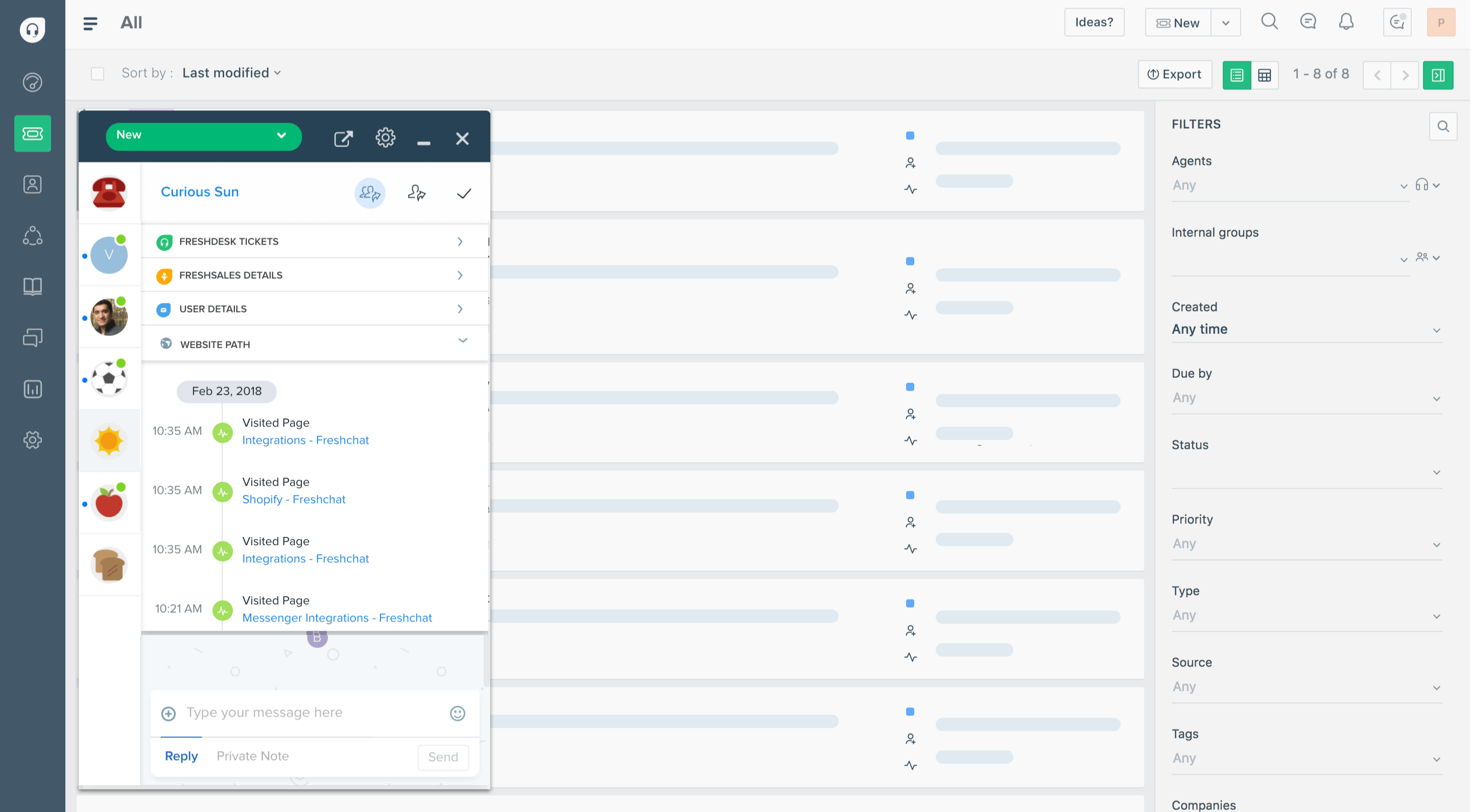
Freshdesk is a strong all-around help desk software option for growing teams.
Its biggest advantage is balance. It gives teams solid ticketing, automation, self-service, and multichannel support without feeling too heavy or too enterprise-focused.
Key features
- Ticketing and support request management
- Automation for repetitive tasks and routing
- AI features for summaries and suggestions
- Knowledge base and self-service portal
- Shared inbox and multichannel support
- Reporting and customer support analytics
Best for: Growing teams that want strong desk features and automation.
Why it stands out: Freshdesk is one of the better options for businesses that want real help desk functionality without overcomplicating setup or day-to-day use. It is especially useful when a team needs to improve ticket resolution, track ticket volume, and add automation while staying flexible on cost.
Pricing: Freshdesk’s official pricing page lists a free plan for 1–2 agents for 6 months, with paid plans starting at $19 per agent/month billed annually.
4. Zoho Desk
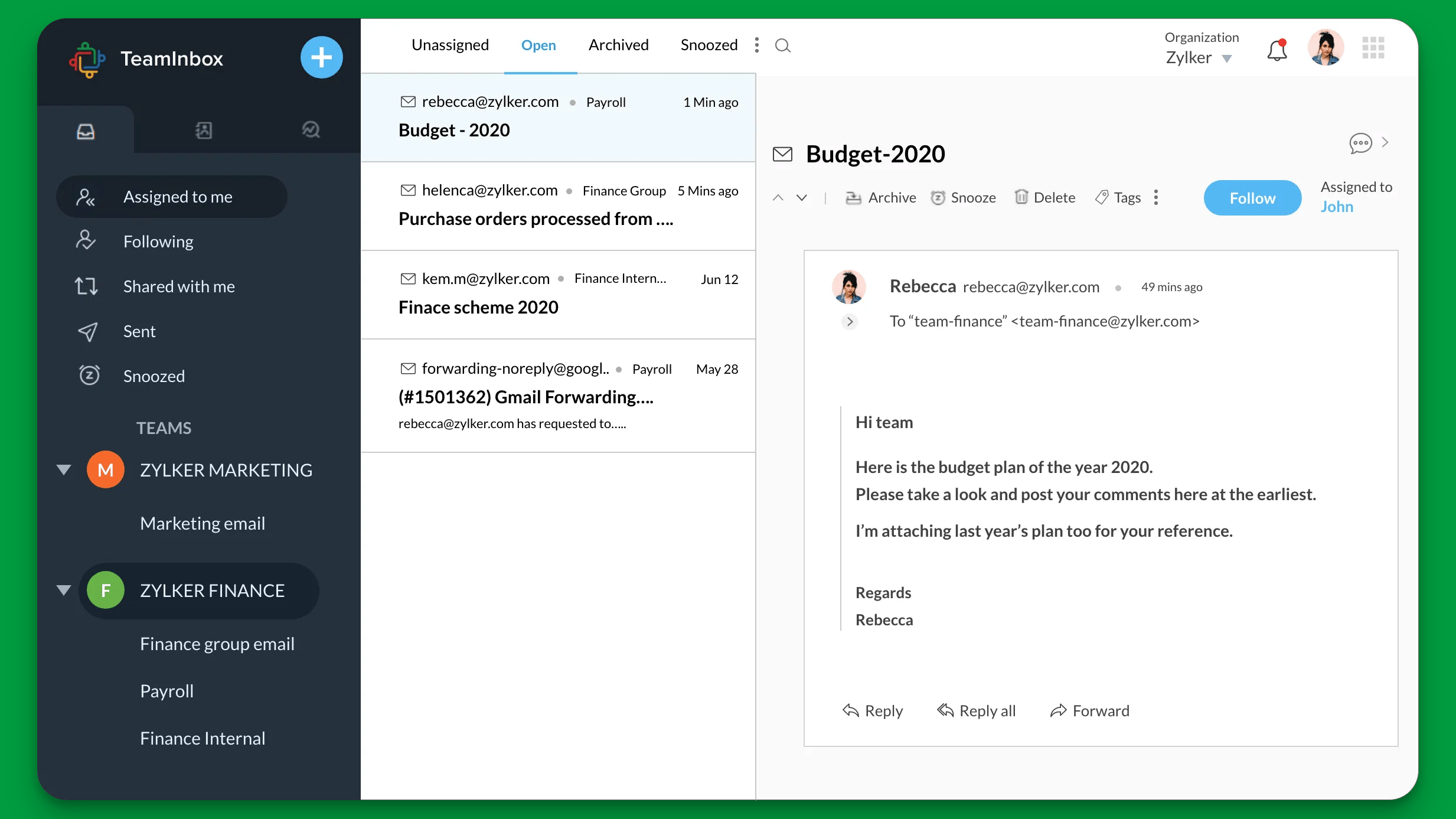
Zoho Desk is a practical choice for businesses that want a balanced mix of affordability, functionality, and flexibility.
It covers the core help desk features most teams need, including ticket management, workflow automation, reporting, and knowledge base support, without pushing them into a higher-cost enterprise setup.
Key features
- Multichannel help desk and ticket tracking
- Knowledge base and self-service features
- Workflow automation and ticket assignment
- Reporting and performance insights
- Custom fields and app integrations
- AI features in selected plans
Best for: Budget-conscious businesses.
Why it stands out: Zoho Desk adds value because it gives teams a lot of practical functionality for the price. If your business wants a usable desk solution that can manage requests efficiently, connect with other tools, and support growth without a big upfront cost, it is one of the strongest fits.
Pricing: Zoho Desk offers a free plan for 3 users, and on Zoho’s currently surfaced official pricing page, the first paid tier shown is Express at $7/user/month billed annually.
5. Jira Service Management
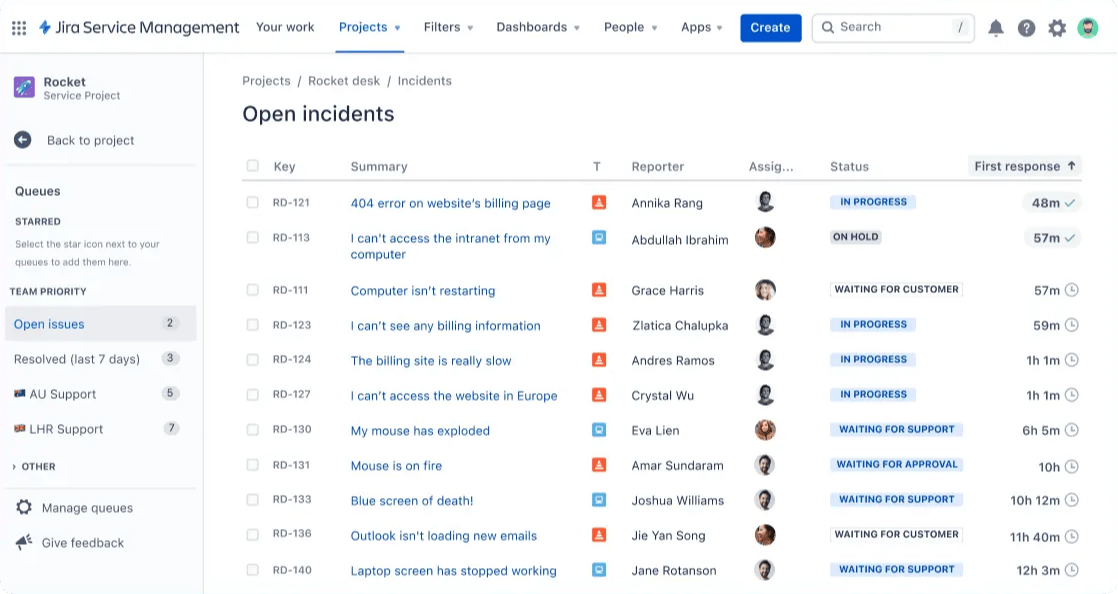
Jira Service Management is one of the best help desk software options for IT teams and internal service operations.
While many tools on this list are stronger for customer support, Jira is especially useful for internal requests, software access, approvals, structured processes, and environments where change management matters.
Key features
- Service desk workflows for internal requests
- Request management for IT teams and operations
- Automation for repetitive tasks and approvals
- Knowledge base integrations
- Security and admin controls
- Strong fit for technical teams and existing workflows
Best for: IT teams and internal service desks.
Why it stands out: Jira Service Management earns its place because this keyword has overlap with service desk and internal support intent. It is one of the strongest options when teams need structure, visibility, and tighter operational workflows rather than just a customer-facing help desk.
Pricing: Atlassian’s official pricing page lists Jira Service Management under the Service Collection with a free plan for 3 agents, Standard at $20 per agent/month, and Premium at $51.42 per agent/month.
6. HelpDesk.com
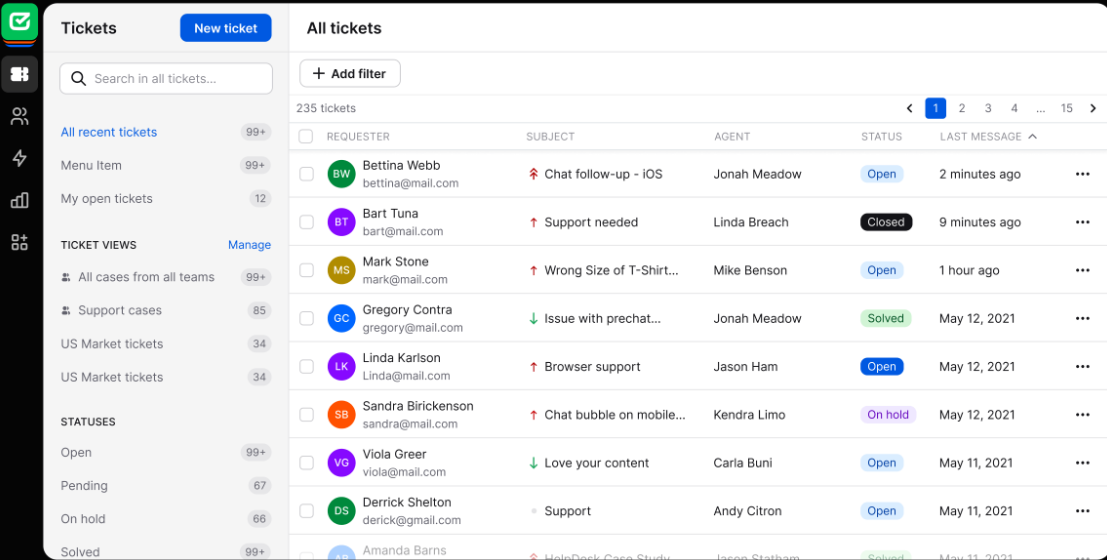
HelpDesk.com is a dedicated help desk solution built around classic ticket management.
That focus is exactly why it belongs in this list. Some platforms here are broader service or CRM ecosystems, but HelpDesk.com stays close to the core category need: helping teams create, assign, track, and resolve support tickets efficiently.
Key features
- Dedicated help desk and ticket management workflows
- Shared inbox for incoming requests
- Ticket assignment and team collaboration
- Automation for repetitive support tasks
- Knowledge base and self-service support
- Reporting for support performance
Best for: Teams that want dedicated help desk workflows.
Why it stands out: A solid fit for teams that want straightforward ticket management and collaboration without the complexity of a bigger CRM or ITSM suite.
Pricing: HelpDesk.com offers a free 14-day trial, after which its official pricing page lists the Team plan at $29 per user/month billed annually and the Business plan at $50 per user/month billed annually.
7. HubSpot Help Desk
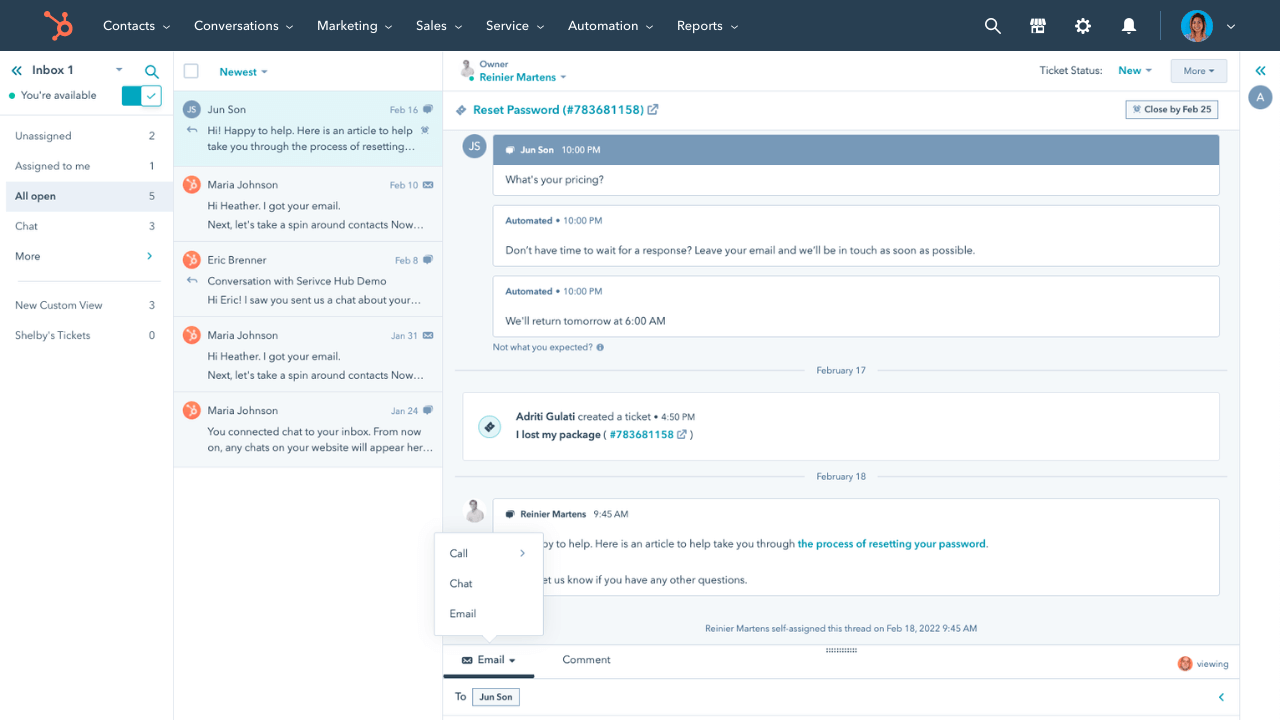
HubSpot Help Desk is a strong option for businesses that want support tightly connected to customer data, lifecycle context, and broader business workflows.
Its relevance comes from integration. For companies already using HubSpot, it can help support teams work with more customer context, rather than treating support as a completely separate operation.
Key features
- Help desk and support ticket management inside HubSpot
- Shared inbox and customer context
- Automation and workflows
- Knowledge base support and self-service
- Reporting connected to customer data
- Ability to connect support with sales and service processes
Best for: CRM-connected support teams.
Why it stands out: HubSpot Help Desk adds value when support is closely tied to sales, onboarding, retention, or service operations. It is a better fit than a standalone desk tool if the business wants support requests, contact history, and customer relationships in one ecosystem.
Pricing: HubSpot’s official site offers free help desk software, and its current official Starter Customer Platform offer, which includes customer service tools, is promoted at $9/month or $15/month per seat depending on plan.
8. Hesk
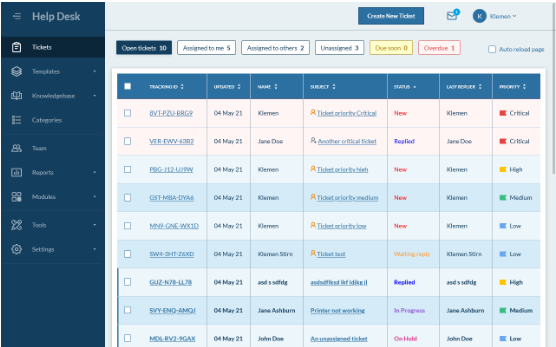
Hesk is a lightweight helpdesk software option for businesses that want a simpler and more traditional help desk setup.
Its value is straightforwardness. Not every team needs advanced AI features or a broad service suite. Some just need a reliable desk system for managing support requests, assigning tickets, and keeping workflows organized.
Key features
- Traditional help desk and ticket tracking
- Simple interface for managing requests
- Knowledge base functionality
- Email-based ticket workflows
- Self-hosted option for teams with specific control needs
- Lower-cost entry point than many larger platforms
Best for: Simpler help desk needs.
Why it stands out: Hesk is a strong fit for teams that care about simplicity, control, and a lower barrier to entry. It is especially relevant for readers who want practical help desk functionality without paying for extra features they may never use.
Pricing: Hesk is free to download, install, and use, and its official site lists an optional self-hosted Website License at $49.99 one-time to remove branding and add email support. While Hesk Cloud starts at $29.99/month or $299/year, while Hesk Cloud Pro starts at $49.99/month or $499/year.
9. SolarWinds Service Desk
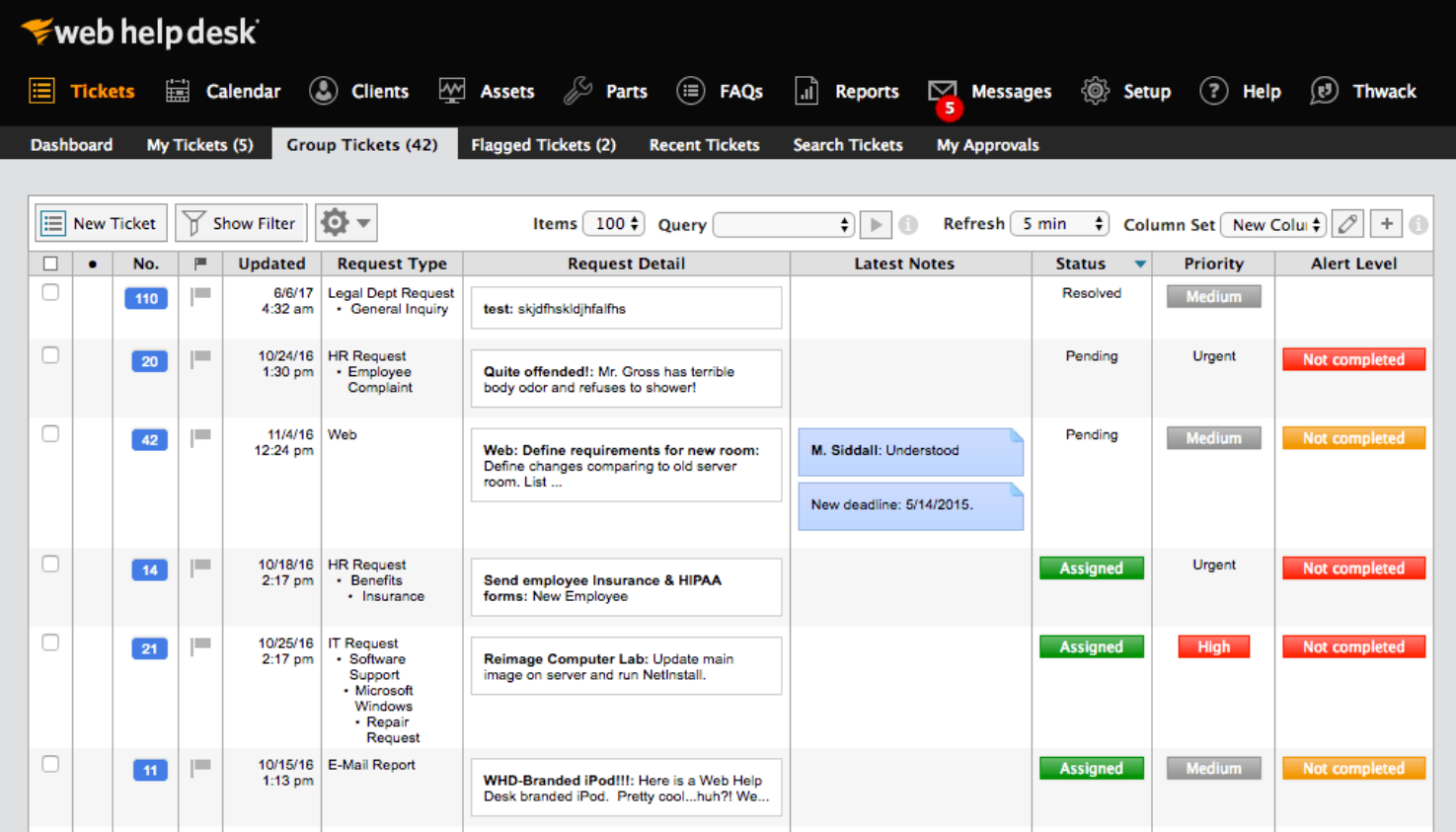
SolarWinds Service Desk is a strong fit for IT operations teams that need more structure, visibility, and control over internal workflows.
It leans more toward service desk functionality than a lightweight customer support desk, which makes it useful when internal requests, assets, and approvals matter.
Key features
- Service desk workflows for IT operations
- Incident and request management
- Asset management support
- Automation and approval workflows
- Reporting and operational visibility
- Stronger fit for structured IT services
Best for: IT operations teams.
Why it stands out: SolarWinds Service Desk rounds out this list well because many buyers in this category also care about internal support, service requests, and operational discipline. It is a better fit than general customer support tools for IT service management with stronger process control.
Pricing: SolarWinds Service Desk starts at $39 per technician/month and supports unlimited users, according to SolarWinds’ official pricing page.
Key help desk features to look for
Not every help desk management software tool offers the same depth. If you are comparing solutions, these are the features that matter most.
1. Ticket management and ticket assignment
A help desk should make it easy to create, track, manage, and resolve tickets. Look for features that help your team assign requests quickly, monitor open tickets, and reduce delays.
2. Automation that reduces manual effort
The best desk software automates repetitive tasks like routing, tagging, follow-ups, and escalations. That saves time and helps support staff focus on more complex work.
Start by mapping your help desk software requirements, then weigh the features below against them.
3. Knowledge base and self-service
A connected knowledge base helps customers solve common problems without contacting your team. It also gives agents faster access to knowledge base articles during live support.
4. AI features and bot support
AI features can improve efficiency by summarizing tickets, suggesting replies, categorizing requests, and helping a bot answer basic questions. The best tools use AI to support agents, not just replace them.
5. Reporting and visibility
Good reporting helps teams track ticket volume, team performance, customer satisfaction, and operational bottlenecks. Without reporting, it is hard to improve.
6. Custom fields and flexibility
Custom fields, workflows, and flexible configuration options help a business adapt the help desk system to its own process.
7. Security and data security
Security matters, especially when support requests include sensitive customer data, internal operations, or technical access issues.
8. Asset management and change management support
These features matter most for IT teams and internal service desks. If you need to connect tickets with hardware, software, or internal approval workflows, make sure your platform supports that.
How to choose the right help desk management software
The best help desk software depends on your workflow, team size, ticket volume, and the type of support you provide.
Here is a simple way to choose.
- Choose Featurebase if you want one platform for customer support, knowledge base management, feedback, chat, and AI-enhanced workflows.
- Choose Zendesk if you need advanced routing, complex workflows, stronger reporting, and more enterprise-grade desk features.
- Choose Freshdesk if you want a flexible help desk tool for a growing team with good automation and multichannel support.
- Choose Zoho Desk if you want a balanced combination of affordability, functionality, and flexibility.
- Choose Jira Service Management if your IT teams need internal workflows, asset management, approvals, and change management support.
- Choose HelpDesk.com if you want a dedicated help desk system that manages support tickets cleanly and efficiently.
- Choose HubSpot Help Desk if you want support connected directly to CRM data and broader customer processes.
- Choose Hesk if you want simpler helpdesk software with traditional ticket management and more control over setup.
- Choose SolarWinds Service Desk if you need a stronger service desk for IT operations, assets, and internal support processes.
Conclusion
The right help desk management software should help your team handle support tickets faster, reduce manual work, and improve customer satisfaction without making your workflow more complicated.
Featurebase is a modern support platform built for SaaS teams. It combines a fast support inbox, live chat, a beautiful knowledge base, and AI-powered workflows in one place, so your team can manage support more efficiently and give customers better self-service.
It comes with affordable pricing, including a Free plan, while paid plans start at $29/seat/month billed yearly plus $0.29 per AI resolution. The onboarding is quick and doesn’t require a credit card, so there’s no real downside to trying it. 👇
✨ Automate your support with the fastest AI-enhanced Inbox today →

FAQ about help desk management software
What is the difference between help desk software and help desk management software?
In practice, they usually mean the same thing. “Help desk management software” is simply a broader way to describe a software that helps teams manage tickets, requests, reporting, workflows, and support operations.
What is the best helpdesk software for small businesses?
That depends on your budget and workflow. Zoho Desk, Freshdesk, Hesk, and Featurebase are all strong options for smaller teams, depending on whether you prioritize cost, simplicity, or all-in-one functionality.
Can help desk software improve customer satisfaction?
Yes. A strong help desk system improves response times, ticket resolution, consistency, and self service, all of which can improve customer satisfaction.
Do IT teams need different help desk features?
Usually, yes. IT teams often need more than standard customer support tools. Features like asset management, change management, approvals, and stronger security controls matter more in internal support environments.
Is free help desk software enough?
Free plans can be useful for small teams, early-stage businesses, or testing a new process. But growing businesses often need more advanced automation, reporting, integrations, and security.