Chatbot API: What It Is, How It Works, and How to Choose
A chatbot API connects your app to a conversational engine. Here's what a chatbot API is, how it works, and how to choose between building and buying one.


On this page
- What is a chatbot API?
- How a chatbot API works
- Build with an LLM API or buy a platform?
- What to look for in a chatbot API
- What will the chatbot API look like in 2026
- A managed option worth knowing: Featurebase
- How to choose the right chatbot API
- Conclusion
- Chatbot API: What It Is, How It Works, and How to Choose
- Key takeaways
- What is a chatbot API?
- How a chatbot API works
- Build with an LLM API or buy a platform?
- What to look for in a chatbot API
- The chatbot API landscape in 2026
- A managed option worth knowing: Featurebase
- How to choose the right chatbot API
- Conclusion
Automate your support with the fastest AI-enhanced Inbox today
You've decided your product needs an AI chatbot. Now you're stuck at a fork: build one on top of a raw API, or buy a platform that already works?
A chatbot API sits underneath both choices, and picking the wrong path means weeks of rework or a runaway bill in your first month of traffic.
This guide breaks down what a chatbot API actually is, how the request-and-response loop works, and how to choose the right one for your team. 👇
Key takeaways
- A chatbot API is the interface that lets your app send a user message to a conversational engine and get a structured reply back.
- Every chatbot API runs the same loop: authenticate, send the message, the engine processes it, you get a response, and optional webhooks fire for async events.
- You have 2 paths: build on a raw LLM API for full control, or buy a managed platform for speed.
- The features that matter most are NLP and intent handling, context memory, integrations, multichannel reach, security, and analytics.
- If you want a working AI support agent without building and maintaining your own stack, Featurebase✨ gives you the Fibi AI Agent, an omnichannel inbox, and an AI help center out of the box.
What is a chatbot API?
A chatbot API (application programming interface) is a programmatic bridge between your app and a conversational engine. You send a user message and some context over HTTPS, the engine routes it through a language model or rule system, and a structured reply comes back.
That single loop is how a chatbot gets embedded into a website, mobile app, CRM, or messaging platform without anyone rewriting the conversational logic from scratch.
The demand behind these tools is real. The conversational AI market was worth $11.58 billion in 2024 and is projected to reach $41.39 billion by 2030, growing at a 23.7% CAGR, according to Grand View Research.
Vendors layer extra features on top of the core loop: authentication, rate limiting, file uploads, voice, tool calls, and webhooks. Those differences decide which API fits your stack, not whether it works at all.
How a chatbot API works
Every chatbot API follows the same 5-step shape, whether you're calling a managed platform or a raw model.
- Authentication: you identify your app with an API key, an OAuth token, or a signed request.
- Request: you send the user message, the conversation history, and usually a system prompt or context.
- Processing: the provider routes the message through its model or rule engine to work out intent.
- Response: you get back a structured reply, which can be text, suggested actions, or tool and function calls.
- Webhooks: optional events like a new message, a handoff request, or a CSAT score get pushed to a URL you specify.
Most modern APIs also stream responses, so the answer appears word by word, and support tool use, so the bot can pull data from your systems, place an order, or book a meeting mid-conversation.
For support teams, this loop is what turns a bot from a deflection toy into something that actually resolves tickets. The bot can read order history, create a ticket, and hand off to a human with full context already loaded, which is the backbone of modern conversational customer service.
Build with an LLM API or buy a platform?
There are 2 ways to get a working chatbot, and the right one depends on how much custom logic you need and how much engineering time you can spare.
Building with a raw LLM API (like OpenAI, Anthropic, or Cohere) gives you total control over behavior, data, and UI. It also means you own every layer above the model: the chat widget, the inbox, the human handoff, the analytics, and the maintenance when the provider ships a breaking change.
Buying a managed platform flips that trade. You give up some flexibility, but the widget, channels, routing, and reporting are already built, and you can be live in an afternoon.
| Scenario | Build on an LLM API | Buy a platform |
|---|---|---|
| Need a working widget this week | No | Yes |
| Limited engineering capacity | No | Yes |
| Custom workflows and data lookups | Yes | Some platforms |
| CRM, analytics, and inbox built in | Build it yourself | Yes |
| Predictable monthly cost | No (token-based) | Yes (subscription) |
A good rule of thumb: if you can describe the bot's job in a few sentences and you'd rather not own the UI, buy a platform. If the bot has to reason over your own data or behave in ways a template can't capture, build with an LLM API.
This is exactly where a managed customer service chatbot software earns its keep. With a platform like Featurebase, the Fibi AI Agent, the inbox, and the escalation rules already exist, so you skip the months of assembly a raw API would demand.
What to look for in a chatbot API
Not every chatbot API is built the same. These are the 6 things that separate a smooth integration from a painful one.
- NLP and intent handling: the engine should understand slang, typos, and follow-up questions, not just exact keyword matches.
- Context memory: the bot needs to remember what was said 2 messages ago so multi-turn conversations don't fall apart.
- Integrations: CRM lookups, ticket creation, calendars, and workflow triggers are what let a bot act instead of just talk.
- Multichannel reach: one API that serves your web widget, mobile app, Slack, and WhatsApp beats stitching together 4 separate ones.
- Security and rate limiting: HTTPS, token or OAuth auth, input validation against prompt injection, and limits that survive traffic spikes.
- Analytics: transcripts, deflection stats, and a clear view of where conversations break so you can actually improve the bot.
The bar keeps rising, too. Gartner predicts that agentic AI will autonomously resolve 80% of common customer service issues without human intervention by 2029, so picking an API that can take real actions, not just answer questions, matters more every year.
A bonus worth weighing: the API should be easy enough for a non-developer to own day to day, but deep enough for your engineers to extend when you hit an edge case.
What will the chatbot API look like in 2026
Chatbot APIs roughly split into 3 camps, and knowing which camp you're shopping in saves a lot of time.
- Raw LLM APIs: OpenAI, Anthropic, and Cohere give you direct model access. Maximum flexibility, longest time to value, and token-based pricing you have to budget for carefully.
- Enterprise NLU and flow platforms: Google Dialogflow CX, IBM watsonx Assistant, and Rasa target complex flows, voice, and compliance-heavy industries with deployment options like on-prem.
- Managed support platforms: tools like Featurebase and Voiceflow expose a chatbot through an API but ship the surrounding product, so support and product teams can launch without standing up their own stack.
The pull toward AI-first service is only accelerating. Gartner predicts 30% of Fortune 500 companies will offer service through a single AI-enabled channel by 2028.
For most product-led teams, the question isn't "which model is smartest" but "how fast can I get a reliable bot in front of customers." That usually points away from raw APIs and toward customer service automation software that already handles the boring parts.
A managed option worth knowing: Featurebase
If the build-vs-buy call lands on "buy," it's worth knowing what the managed side of the market actually looks like. Featurebase is one example of a support platform that exposes an AI chatbot without making you assemble the surrounding stack.
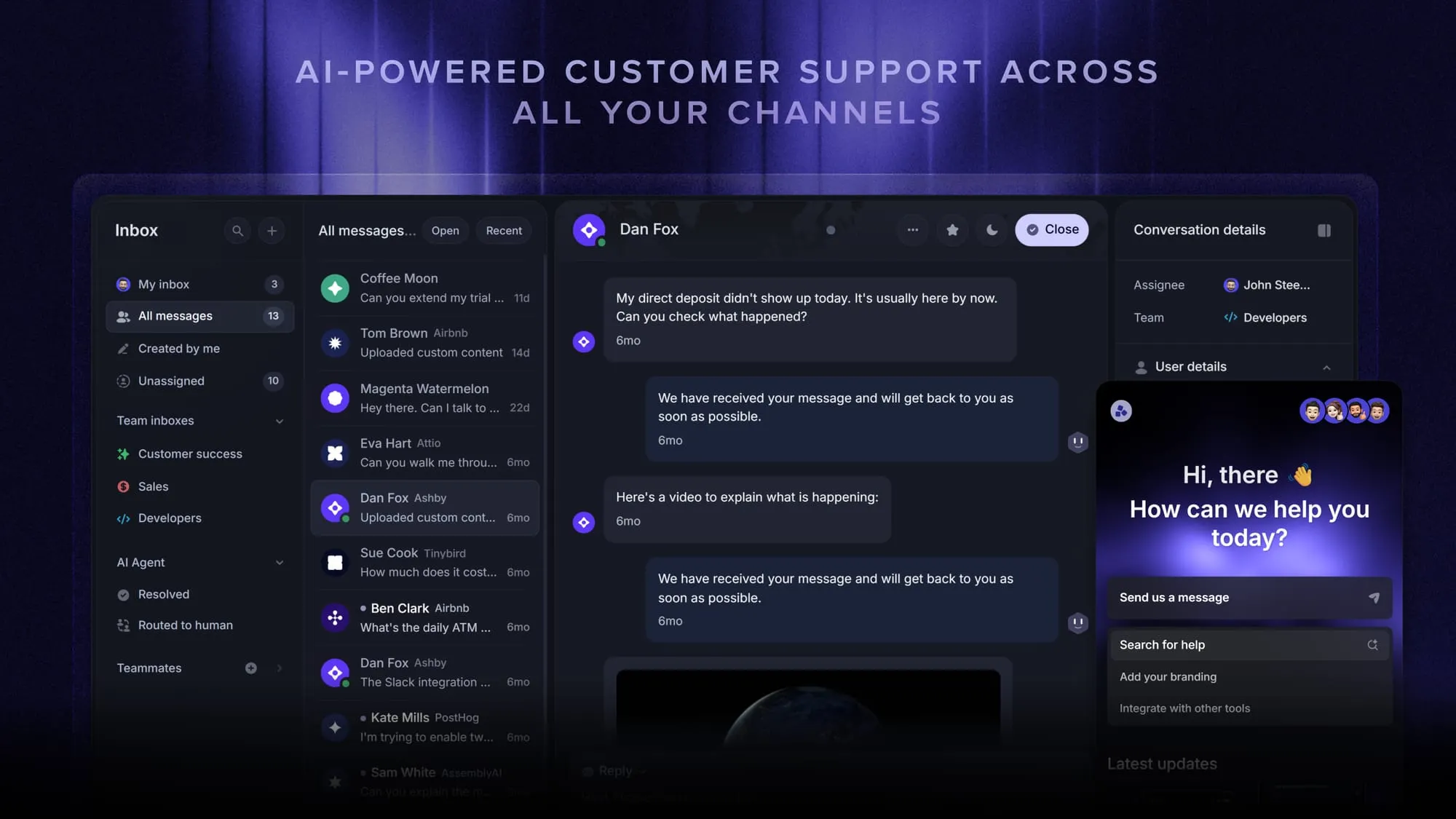
The relevant piece for this decision is the Fibi AI Agent, which resolves customer issues on its own across live chat, email, and Slack, and can run actions like trial extensions or refunds rather than just answering questions. It pulls from an AI-powered help center for self-serve answers and hands off to a human with full context when a conversation needs one.
The point isn't that this is the only choice. It's that a platform like this covers the layers a raw API leaves to you, the inbox, the channels, the escalation logic, so a small team can get a working bot live without an engineering project. There's a free plan if you want to see whether that trade fits before committing.
How to choose the right chatbot API
A few questions narrow the field fast. The first two matter more than the rest.
- Who will build and maintain the bot? If a support or marketing lead owns it, choose a managed platform. If an engineering team owns it, a raw LLM API gives you room to customize.
- What's your channel mix? Web-only fits most platforms, WhatsApp-heavy traffic narrows the list, and voice or phone points to a specialized provider.
- How custom is the workflow? Off-the-shelf support fits a platform, while custom data lookups and domain reasoning need an LLM API.
- What are your compliance needs? Verify GDPR, HIPAA, and SOC 2 coverage, and prefer self-hosted or on-prem options if data residency is strict.
- What's the cost shape? A predictable monthly bill means a subscription, while pay-as-you-go means tokens, so set caps and budgets in your first week.
Answer those honestly and the shortlist usually writes itself. Teams without spare engineering time land on a managed platform, and teams with a specific, custom need land on a raw API.
Conclusion
A chatbot API is simply how your app talks to a conversational engine: send a message, get a reply, and build on that loop however you need. The real decision is whether to assemble everything yourself on a raw API or buy a platform that already works.
Featurebase is a modern AI customer support platform that gives you a working AI chatbot without the build. You get the Fibi AI Agent to resolve issues on autopilot, an omnichannel inbox for live chat, email, and Slack, and an AI-powered help center for instant self-serve answers, all in one place.
It comes with a Free plan and unlimited conversations, and the onboarding takes minutes, so there's no downside to trying it. 👇
Automate your support with the fastest AI-enhanced Inbox today
FAQs
ChatGPT is the consumer chat product. The OpenAI API is the separate developer interface to the same underlying models, which is what you use to build your own chatbot. If you want conversational AI inside your own app, you call the API, not ChatGPT.
Several providers offer a free tier, though each has a catch. Raw LLM providers like OpenAI, Cohere, and Google Gemini give trial credits or limited free calls that aren't meant for production. Managed platforms often include a free plan with real usage limits, and open-source frameworks like Rasa are free if you can self-host and run your own infrastructure.
Pricing comes in 3 shapes. Raw LLM APIs charge per token, so cost scales with traffic and can spike without caps. Managed platforms usually charge a flat monthly subscription per seat. Some support tools add a per-resolution fee on top, like the model behind Intercom Fin's pricing, so check whether you're paying per seat, per message, or per outcome.
Any language that can make an HTTPS request works, including Python, JavaScript and Node, Go, Ruby, Java, PHP, and .NET. Python and Node tend to have the deepest SDK coverage across providers, so they're the fastest to start with if you have a choice.
Yes. Modern LLM-backed chatbots handle dozens of languages by default, with no separate setup per language. Rule-based platforms are different, since they usually need translated flows built for each language you want to support.
Use a managed platform instead of a raw API. With Featurebase, the Fibi AI Agent resolves customer issues on autopilot across live chat, email, and Slack, so you get a working AI chatbot connected to your help center without writing or maintaining your own integration.
Chatbot API: What It Is, How It Works, and How to Choose
You've decided your product needs an AI chatbot. Now you're stuck at a fork: build one on top of a raw API, or buy a platform that already works?
A chatbot API sits underneath both choices, and picking the wrong path means weeks of rework or a runaway bill in your first month of traffic.
This guide breaks down what a chatbot API actually is, how the request-and-response loop works, and how to choose the right one for your team. 👇
Key takeaways
- A chatbot API is the interface that lets your app send a user message to a conversational engine and get a structured reply back.
- Every chatbot API runs the same loop: authenticate, send the message, the engine processes it, you get a response, and optional webhooks fire for async events.
- You have 2 paths: build on a raw LLM API for full control, or buy a managed platform for speed.
- The features that matter most are NLP and intent handling, context memory, integrations, multichannel reach, security, and analytics.
- ✨ If you want a working AI support agent without building and maintaining your own stack, Featurebase gives you the Fibi AI Agent, an omnichannel inbox, and an AI help center out of the box.
What is a chatbot API?
A chatbot API (application programming interface) is a programmatic bridge between your app and a conversational engine. You send a user message and some context over HTTPS, the engine routes it through a language model or rule system, and a structured reply comes back.
That single loop is how a chatbot gets embedded into a website, mobile app, CRM, or messaging platform without anyone rewriting the conversational logic from scratch.
The demand behind these tools is real. The conversational AI market was worth $11.58 billion in 2024 and is projected to reach $41.39 billion by 2030, growing at a 23.7% CAGR, according to Grand View Research.
Vendors layer extra features on top of the core loop: authentication, rate limiting, file uploads, voice, tool calls, and webhooks. Those differences decide which API fits your stack, not whether it works at all.
How a chatbot API works
Every chatbot API follows the same 5-step shape, whether you're calling a managed platform or a raw model.
- Authentication: you identify your app with an API key, an OAuth token, or a signed request.
- Request: you send the user message, the conversation history, and usually a system prompt or context.
- Processing: the provider routes the message through its model or rule engine to work out intent.
- Response: you get back a structured reply, which can be text, suggested actions, or tool and function calls.
- Webhooks: optional events like a new message, a handoff request, or a CSAT score get pushed to a URL you specify.
Most modern APIs also stream responses, so the answer appears word by word, and support tool use, so the bot can pull data from your systems, place an order, or book a meeting mid-conversation.
For support teams, this loop is what turns a bot from a deflection toy into something that actually resolves tickets. The bot can read order history, create a ticket, and hand off to a human with full context already loaded, which is the backbone of modern conversational customer service.
[illustration here]
Build with an LLM API or buy a platform?
There are 2 ways to get a working chatbot, and the right one depends on how much custom logic you need and how much engineering time you can spare.
Building with a raw LLM API (like OpenAI, Anthropic, or Cohere) gives you total control over behavior, data, and UI. It also means you own every layer above the model: the chat widget, the inbox, the human handoff, the analytics, and the maintenance when the provider ships a breaking change.
Buying a managed platform flips that trade. You give up some flexibility, but the widget, channels, routing, and reporting are already built, and you can be live in an afternoon.
| Scenario | Build on an LLM API | Buy a platform |
|---|---|---|
| Need a working widget this week | No | Yes |
| Limited engineering capacity | No | Yes |
| Custom workflows and data lookups | Yes | Some platforms |
| CRM, analytics, and inbox built in | Build it yourself | Yes |
| Predictable monthly cost | No (token-based) | Yes (subscription) |
A good rule of thumb: if you can describe the bot's job in a few sentences and you'd rather not own the UI, buy a platform. If the bot has to reason over your own data or behave in ways a template can't capture, build with an LLM API.
This is exactly where a managed customer service chatbot software earns its keep. With a platform like Featurebase, the Fibi AI Agent, the inbox, and the escalation rules already exist, so you skip the months of assembly a raw API would demand.
What to look for in a chatbot API
Not every chatbot API is built the same. These are the 6 things that separate a smooth integration from a painful one.
- NLP and intent handling: the engine should understand slang, typos, and follow-up questions, not just exact keyword matches.
- Context memory: the bot needs to remember what was said 2 messages ago so multi-turn conversations don't fall apart.
- Integrations: CRM lookups, ticket creation, calendars, and workflow triggers are what let a bot act instead of just talk.
- Multichannel reach: one API that serves your web widget, mobile app, Slack, and WhatsApp beats stitching together 4 separate ones.
- Security and rate limiting: HTTPS, token or OAuth auth, input validation against prompt injection, and limits that survive traffic spikes.
- Analytics: transcripts, deflection stats, and a clear view of where conversations break so you can actually improve the bot.
The bar keeps rising, too. Gartner predicts that agentic AI will autonomously resolve 80% of common customer service issues without human intervention by 2029, so picking an API that can take real actions, not just answer questions, matters more every year.
A bonus worth weighing: the API should be easy enough for a non-developer to own day to day, but deep enough for your engineers to extend when you hit an edge case.
The chatbot API landscape in 2026
Chatbot APIs roughly split into 3 camps, and knowing which camp you're shopping in saves a lot of time.
- Raw LLM APIs: OpenAI, Anthropic, and Cohere give you direct model access. Maximum flexibility, longest time to value, and token-based pricing you have to budget for carefully.
- Enterprise NLU and flow platforms: Google Dialogflow CX, IBM watsonx Assistant, and Rasa target complex flows, voice, and compliance-heavy industries with deployment options like on-prem.
- Managed support platforms: tools like Featurebase and Voiceflow expose a chatbot through an API but ship the surrounding product, so support and product teams can launch without standing up their own stack.
The pull toward AI-first service is only accelerating. Gartner predicts 30% of Fortune 500 companies will offer service through a single AI-enabled channel by 2028.
For most product-led teams, the question isn't "which model is smartest" but "how fast can I get a reliable bot in front of customers." That usually points away from raw APIs and toward customer service automation software that already handles the boring parts.
[illustration here]
A managed option worth knowing: Featurebase
If the build-vs-buy call lands on "buy," it's worth knowing what the managed side of the market actually looks like. Featurebase is one example of a support platform that exposes an AI chatbot without making you assemble the surrounding stack.
The relevant piece for this decision is the Fibi AI Agent, which resolves customer issues on its own across live chat, email, and Slack, and can run actions like trial extensions or refunds rather than just answering questions. It pulls from an AI-powered help center for self-serve answers and hands off to a human with full context when a conversation needs one.
The point isn't that this is the only choice. It's that a platform like this covers the layers a raw API leaves to you, the inbox, the channels, the escalation logic, so a small team can get a working bot live without an engineering project. There's a free plan if you want to see whether that trade fits before committing.
How to choose the right chatbot API
A few questions narrow the field fast. The first two matter more than the rest.
- Who will build and maintain the bot? If a support or marketing lead owns it, choose a managed platform. If an engineering team owns it, a raw LLM API gives you room to customize.
- What's your channel mix? Web-only fits most platforms, WhatsApp-heavy traffic narrows the list, and voice or phone points to a specialized provider.
- How custom is the workflow? Off-the-shelf support fits a platform, while custom data lookups and domain reasoning need an LLM API.
- What are your compliance needs? Verify GDPR, HIPAA, and SOC 2 coverage, and prefer self-hosted or on-prem options if data residency is strict.
- What's the cost shape? A predictable monthly bill means a subscription, while pay-as-you-go means tokens, so set caps and budgets in your first week.
Answer those honestly and the shortlist usually writes itself. Teams without spare engineering time land on a managed platform, and teams with a specific, custom need land on a raw API.
Conclusion
A chatbot API is simply how your app talks to a conversational engine: send a message, get a reply, and build on that loop however you need. The real decision is whether to assemble everything yourself on a raw API or buy a platform that already works.
Featurebase is a modern AI customer support platform that gives you a working AI chatbot without the build. You get the Fibi AI Agent to resolve issues on autopilot, an omnichannel inbox for live chat, email, and Slack, and an AI-powered help center for instant self-serve answers, all in one place.
It comes with a Free plan and unlimited conversations, and the onboarding takes minutes, so there's no downside to trying it. 👇
Automate your support with the fastest AI-enhanced Inbox today
[illustration here]
Frequently asked questions
ChatGPT is the consumer chat product. The OpenAI API is the separate developer interface to the same underlying models, which is what you use to build your own chatbot. If you want conversational AI inside your own app, you call the API, not ChatGPT.
Several providers offer a free tier, though each has a catch. Raw LLM providers like OpenAI, Cohere, and Google Gemini give trial credits or limited free calls that aren't meant for production. Managed platforms often include a free plan with real usage limits, and open-source frameworks like Rasa are free if you can self-host and run your own infrastructure.
Pricing comes in 3 shapes. Raw LLM APIs charge per token, so cost scales with traffic and can spike without caps. Managed platforms usually charge a flat monthly subscription per seat. Some support tools add a per-resolution fee on top, like the model behind Intercom Fin's pricing, so check whether you're paying per seat, per message, or per outcome.
Any language that can make an HTTPS request works, including Python, JavaScript and Node, Go, Ruby, Java, PHP, and .NET. Python and Node tend to have the deepest SDK coverage across providers, so they're the fastest to start with if you have a choice.
Yes. Modern LLM-backed chatbots handle dozens of languages by default, with no separate setup per language. Rule-based platforms are different, since they usually need translated flows built for each language you want to support.
Use a managed platform instead of a raw API. With Featurebase, the Fibi AI Agent resolves customer issues on autopilot across live chat, email, and Slack, so you get a working AI chatbot connected to your help center without writing or maintaining your own integration.