Blog Customer ServiceBest Customer Service Chatbot Software in 2026
Best Customer Service Chatbot Software in 2026
The best customer service chatbot software in 2026, ranked by what the AI actually costs, who each tool fits, and where the hidden fees hide.



,✨ Automate your support with the fastest AI-enhanced Inbox today →
Every chatbot vendor promises to deflect your tickets. Almost none of them are upfront about the bill.
Most tools now charge twice: a per-seat platform fee and a per-resolution AI meter that only shows up once your bot starts working. A "cheap" $19 seat can quietly turn into thousands a month once the AI kicks in.
Below, I rank the 9 best customer service chatbot software tools for 2026 - what each one is best for, the real 2026 pricing, and the trade-off nobody puts on their landing page. 👇
Key takeaways:
| Tool | Best for | Starting price | AI pricing model | Free plan |
|---|---|---|---|---|
| Featurebase✨ | Modern AI support for product-led SaaS | $29/seat/mo | $0.29 per AI resolution | Yes, unlimited conversations |
| Intercom | Polished AI agent for digital-first teams | $29/seat/mo | $0.99 per resolution | No (14-day trial) |
| Zendesk | Large teams with complex workflows | $55/agent/mo | ~$1 to $2 per resolution | No (14-day trial) |
| Tidio | Small ecommerce and SMB sites | $29/mo | Lyro from $39/mo extra | Yes, 50 convos |
| Freshchat | Freshworks-stack support teams | $19/agent/mo | Freddy sessions extra | Yes, up to 10 agents |
| Gorgias | Shopify ecommerce brands | $10/mo | ~$0.90 per resolution | No (trial) |
| HubSpot | Teams already on HubSpot CRM | $9/seat/mo | Breeze credits (Enterprise) | Yes, 2 users |
| Ada | High-volume enterprise automation | Custom | Custom (contact sales) | No |
| Chatbase | AI support agents for customer support, ecommerce, and multichannel workflows | $32/mo billed annually | Message credits | Yes, 50 credits/month |
What is customer service chatbot software?
Customer service chatbot software is a tool that automates support conversations across your website, app, and messaging channels, answering customer questions and resolving routine issues without a human agent.
There are two kinds, and the difference matters for everything that follows:
- Rule-based chatbots follow scripted, keyword-triggered flows. They are predictable and cheap, but they break the moment a customer phrases something off-script.
- AI agents use large language models to understand intent, pull answers from your knowledge base, and take real actions like issuing a refund or extending a trial. They handle nuance, but they usually cost money per resolution. A well-designed AI Agent Architecture ensures these agents can effectively reason, maintain context, and execute actions reliably at scale.
The market has decisively moved toward the second kind. Gartner predicts that by 2029, agentic AI will autonomously resolve 80% of common customer service issues without human intervention, driving a 30% reduction in operational costs.
That shift is exactly why pricing got complicated. The seat fee buys you the platform. The AI meter is where the real spend lives.
What to look for in customer service chatbot software
Before comparing logos, get clear on what actually separates a tool you'll keep from one you'll rip out in 3 months:
- AI pricing model: This is the big one. Per-resolution fees range from $0.29 to over $2 across this list. On high volume, that gap decides your bill, not the seat price.
- Knowledge sources: A bot is only as good as what it can read. Check whether it ingests your help center, past tickets, PDFs, and tools like Notion or Confluence, or just a single help center.
- Human handoff: When the bot is stuck, the customer should reach a person with full context, not a dead end. Clean escalation is the difference between deflection and frustration.
- Channels: Web chat is table stakes. Confirm email, Slack, WhatsApp, and social are covered if your customers live there.
- Free plan or trial: You won't know if a bot resolves your tickets until it reads your content. A real free tier lets you test before you commit.
It also helps to use a platform where the AI takes action, not just answers. With Featurebase, the Fibi AI Agent resolves customer issues on autopilot and runs custom actions like trial extensions and refunds, so routine requests close themselves instead of landing in your support inbox.
The 9 best customer service chatbot software tools in 2026
Here's the full breakdown. Featurebase leads, then the 8 competitors worth shortlisting, each with real pricing and the honest trade-off.
1. Featurebase✨

Featurebase is a modern AI customer support platform for product-led SaaS. It combines AI-powered support, help center, and feedback management into a single platform for startups that want all their customer-facing tools in one place. Featurebase is loved by thousands of support teams from companies like Lovable, Raycast, and n8n. 💫
Top features:
- Omnichannel inbox – Manage live chat, email, and Slack conversations from one AI-powered view
- Fibi AI Agent - Resolve customer issues on autopilot & run custom actions like trial extensions and refunds
- Help center with AI search – Provide instant, multilingual self-serve answers
- Workflows & automations – Auto-assign tickets, route conversations, collect customer data, and more
- AI Copilot – Help your agents answer customers faster with AI Copilot that uses your internal knowledge
- Multi-brand support – Manage multiple Help Centers and Live chats from a single workspace
- Automatic AI translations – Automatically translate all messages and help articles to your customers native language
- Service Level Agreements – Track SLAs to make sure your team responds to customers on time, every time
- Mobile app – Respond to customers, receive notifications, and unblock users on the go
- Feedback & roadmap tools – Collect feature requests and close the loop with updates
- Product updates – Publish release notes with a changelog page, in-app widget, and emails
- Integrations – Connects with Slack, Linear, Jira, HubSpot, and more
Pricing: Free plan available with unlimited conversations. Paid plans start at $29/seat/month with $0.29 per AI resolution.
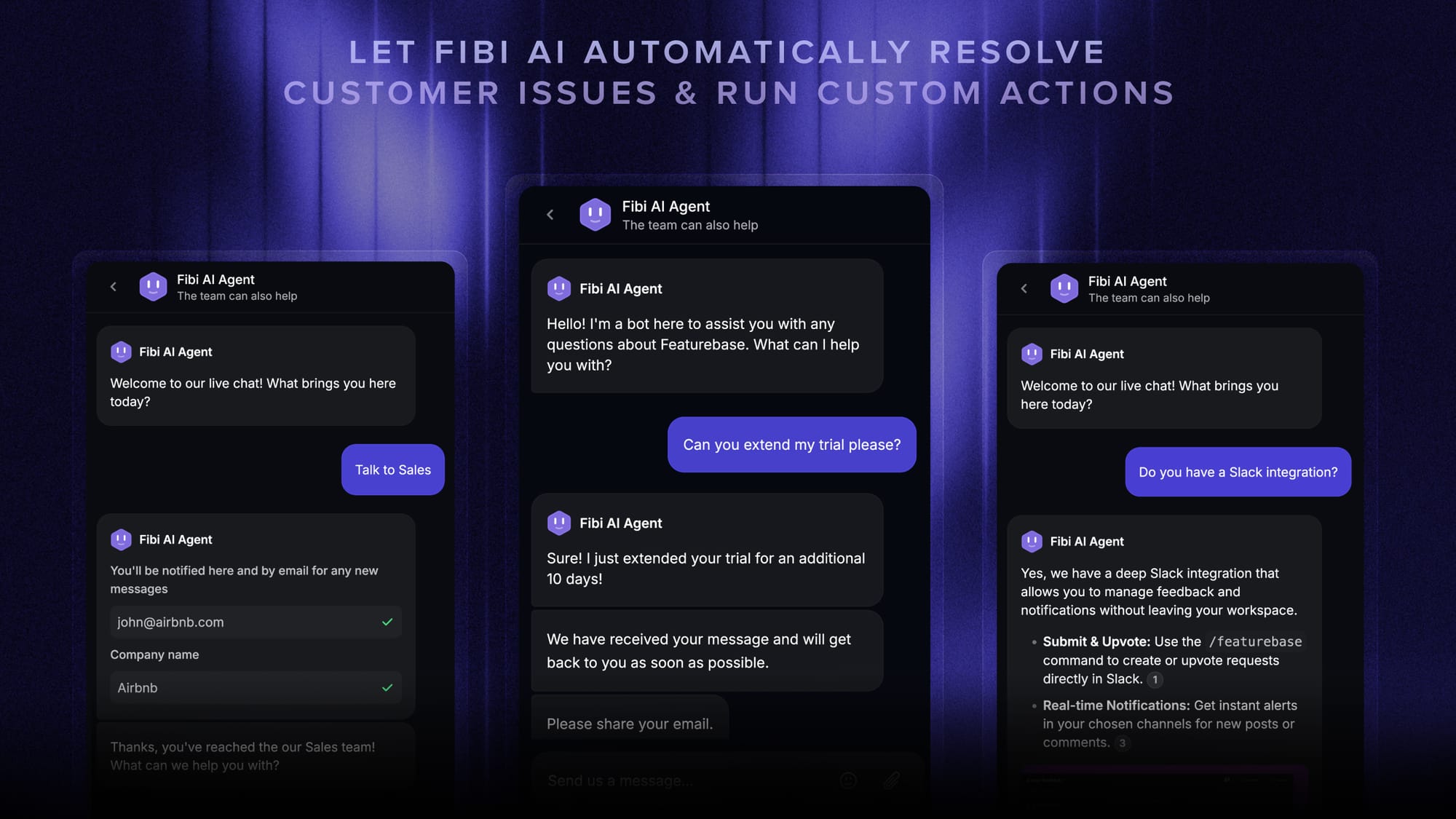
Featurebase covers all the basic support features that legacy platforms do, but with a much more modern approach. It comes with AI automations, a mobile app, and multiple channels (email, live chat, Slack, etc.). And at $0.29 per AI resolution, the AI meter is the cheapest on this list, which adds up fast once your bot is doing real volume.
✨ Automate your support with the fastest AI-enhanced Inbox today →
2. Intercom
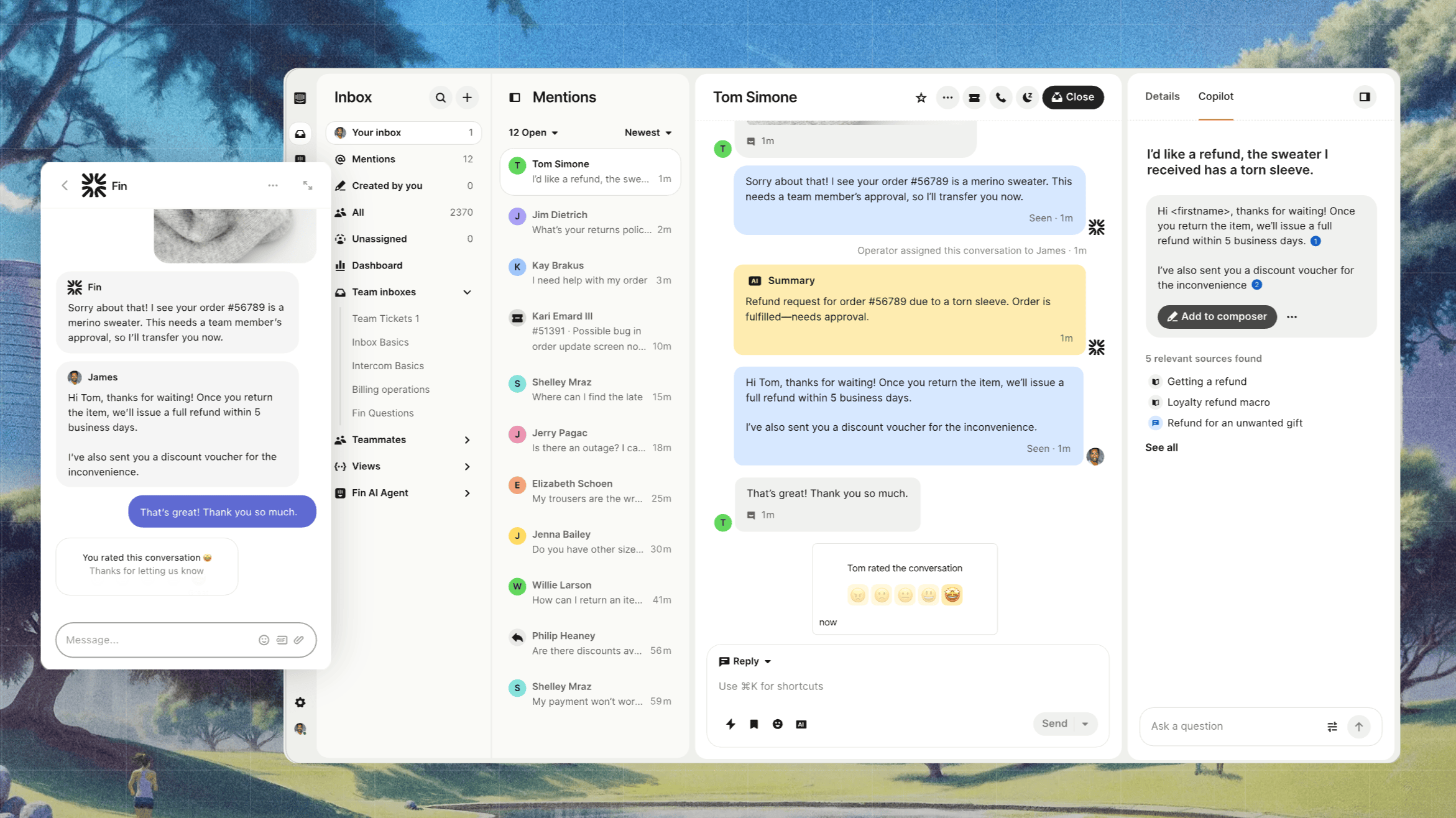
Intercom is one of the best-known support platforms, and its AI agent, Fin, is one of the most polished on the market. It's built on top of a full helpdesk and is a strong fit for digital-first SaaS teams that want a refined out-of-the-box experience.
Best for: Fast-growing SaaS teams that want a premium, low-setup AI agent.
Key features:
- Fin AI Agent that answers from your knowledge base and follows multi-step procedures
- Omnichannel support across chat, email, WhatsApp, and social
- AI Copilot to draft replies for human agents
- Deep workflow and automation tooling
Pricing: Intercom pricing starts at $29 per seat/month (billed annually), and Fin is billed separately at $0.99 per resolution with a 50-resolution monthly minimum.
The catch is cost predictability. Because a "resolution" is defined by Intercom and the better Fin performs the more you pay, monthly bills swing hard, and teams routinely report spending 2 to 3x what they expected. Reviewers on G2 also note Fin can stumble on complex or multilingual queries and that advanced setup gets steep fast.
3. Zendesk

Zendesk is the incumbent enterprise helpdesk. Its AI agents are trained on a massive volume of support interactions and slot into a deeply configurable platform, which is why large teams with established processes keep choosing it.
Best for: Large support orgs with complex, customized workflows.
Key features:
- AI agents that resolve common tickets from help center content
- Highly configurable agent workspace, views, and routing
- Omnichannel support across every major channel
- Deep reporting and enterprise integrations
Pricing: Zendesk pricing starts at $55 per agent/month (Suite Team, billed annually), with AI agent resolutions charged on top at roughly $1 to $2 each, plus a $50/agent Copilot add-on.
Zendesk is powerful but pricey, and the sticker price is rarely the price you pay. G2 reviewers flag a steep learning curve, AI charges that apply whether the response helped or not, and capabilities locked behind higher tiers. It's overkill (and over budget) for most small-to-mid teams.
4. Tidio
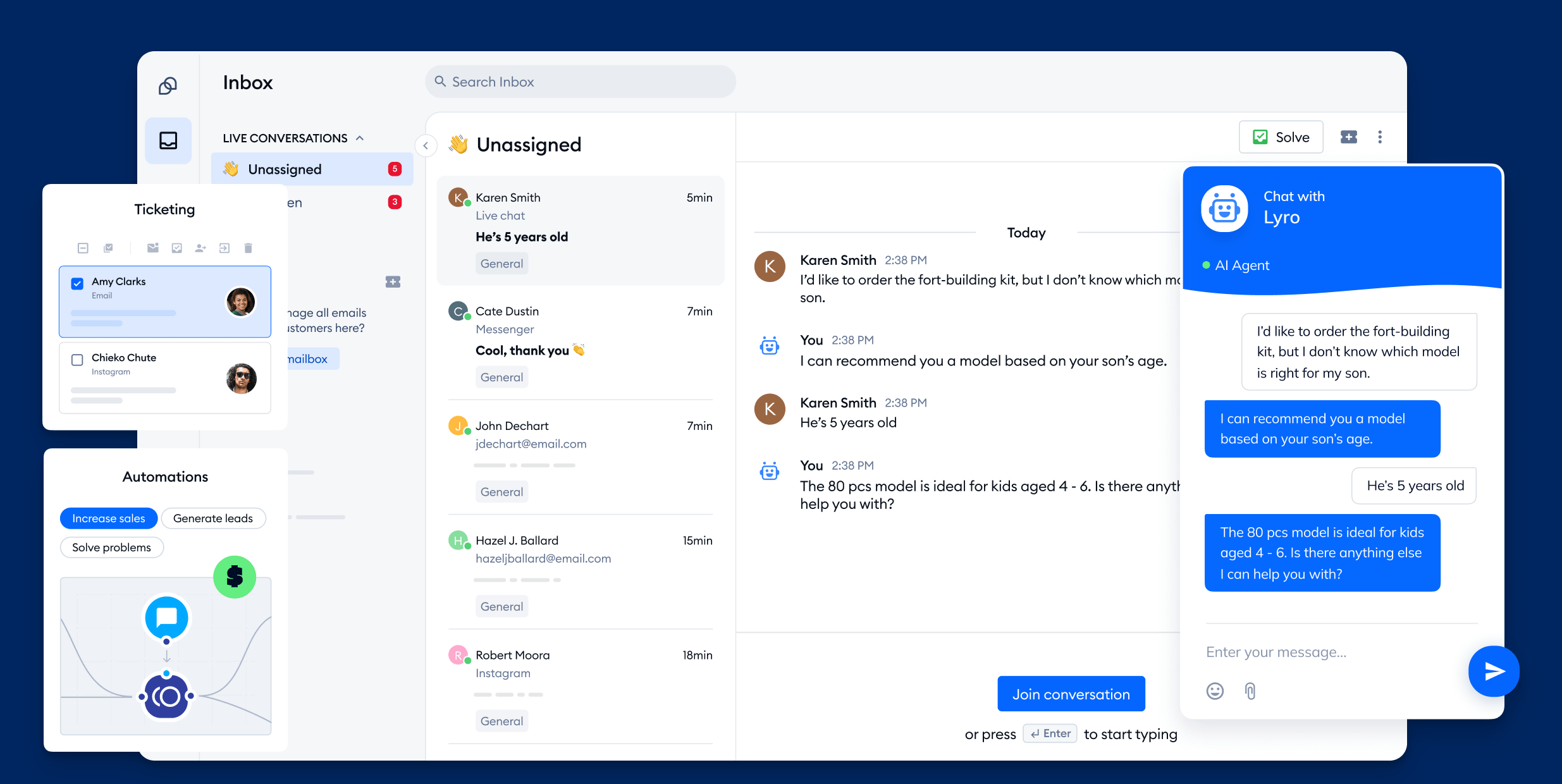
Tidio is a lightweight customer experience platform aimed at small businesses and ecommerce sites. Its AI agent, Lyro, is easy to launch (many users are live within half an hour) and handles a solid share of routine questions.
Best for: Small ecommerce stores and SMBs wanting an affordable starting point.
Key features:
- Lyro AI agent that answers from your knowledge base
- Visual flow builder with prebuilt templates
- Live chat, plus desktop and mobile apps
- Visitor tracking and basic sentiment analysis
Pricing: Tidio pricing includes a free plan (50 lifetime conversations), with paid plans from $29/month, and Lyro AI billed separately from $39/month.
Two things trip teams up. First, Lyro and the rule-based Flows don't hand off to each other cleanly, so an off-script question can hit a dead end. Second, the plan stack jumps from $59/month straight to $749/month with nothing in between, and G2 reviewers note analytics stay basic as you scale.
5. Freshchat
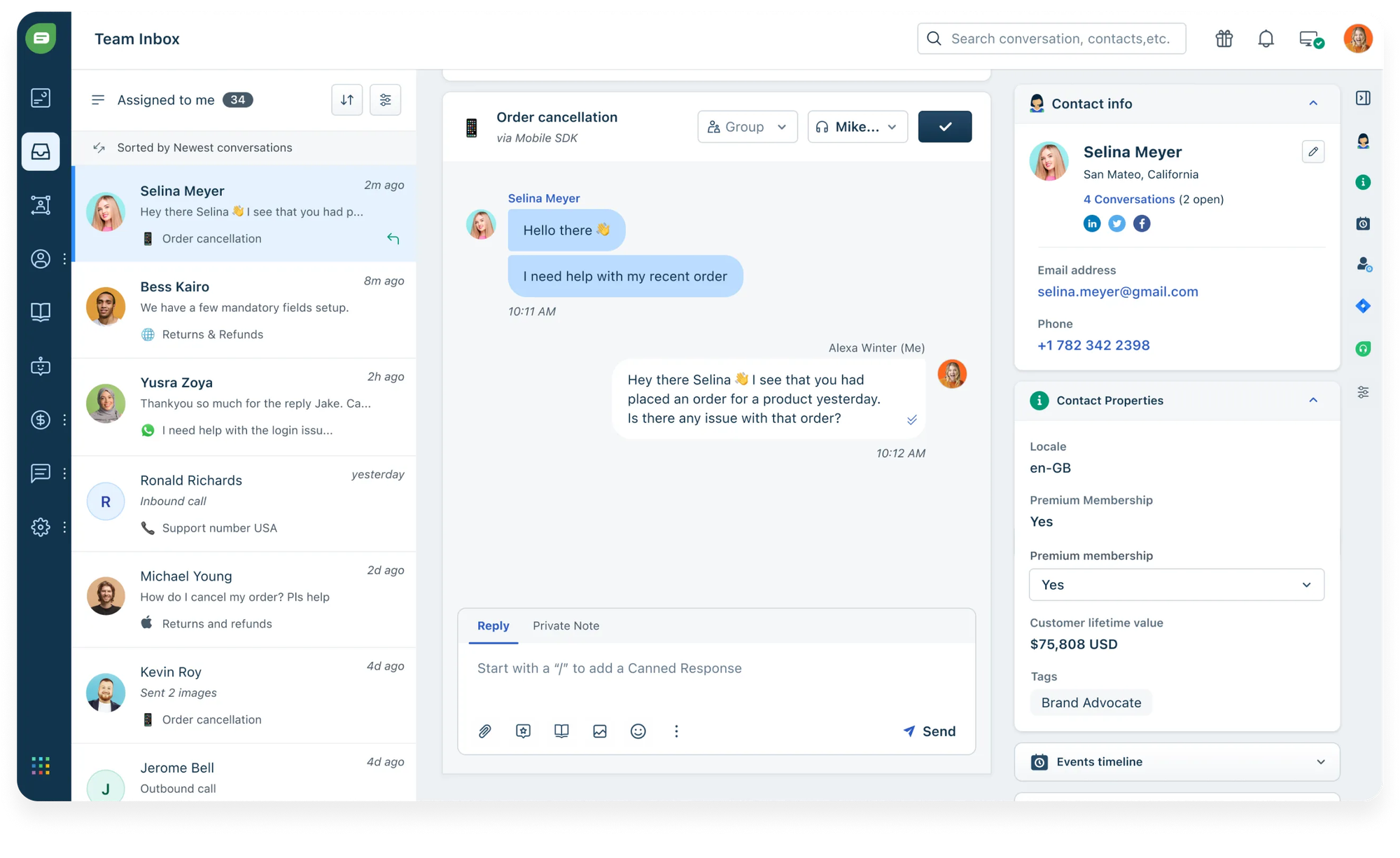
Freshchat is the messaging product in the Freshworks suite, with AI delivered through Freddy. It's a natural pick if you already run Freshdesk or another Freshworks tool and want chat and CRM data in one place.
Best for: Teams already invested in the Freshworks ecosystem.
Key features:
- Freddy AI for reply suggestions and routine automation
- Omnichannel chat across web, email, WhatsApp, and social
- Unified inbox with customer context
- IntelliAssign routing and visual flow builder
Pricing: Freshchat pricing includes a free plan for up to 10 agents, with paid plans from $19 per agent/month (billed annually). Freddy AI sessions are billed on top.
The recurring complaint is that Freddy is fairly basic out of the box. G2 reviewers say it needs manual training to perform, can misread complex or long queries, and that the strongest automation sits behind higher tiers, with AI session costs that surprise teams as bot usage climbs.
6. Gorgias
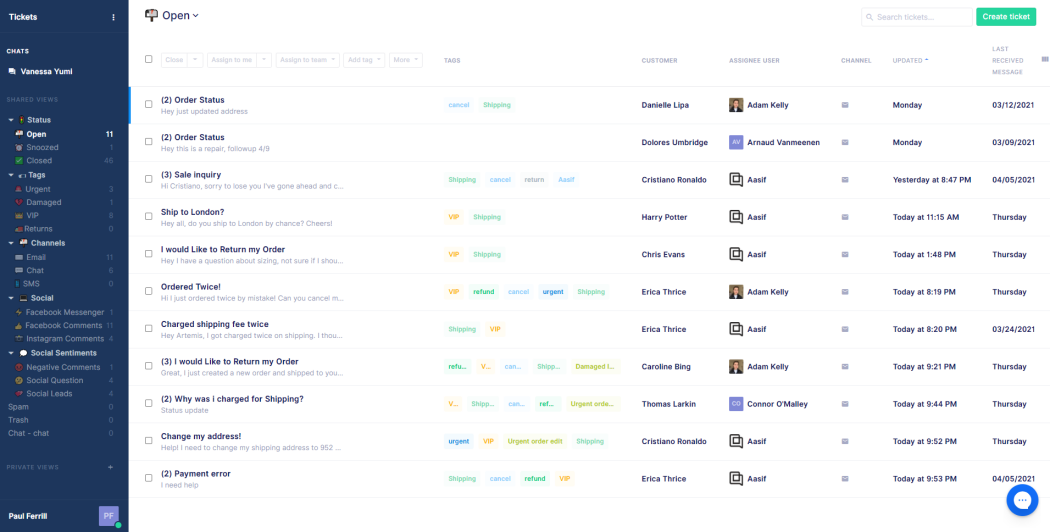
Gorgias is a helpdesk built specifically for ecommerce. Its tight Shopify integration lets agents (and its AI Agent) refund orders, edit them, and check shipping right inside the helpdesk, which is why high-volume Shopify brands love it.
Best for: Established Shopify ecommerce brands doing real ticket volume.
Key features:
- AI Agent that resolves ecommerce queries end to end
- Native Shopify actions (refunds, order edits, tracking)
- Centralized email, chat, social, and SMS
- Automation and macros for repetitive tickets
Pricing: Gorgias pricing starts at $10/month (Starter, 50 tickets), scaling to $60, $360, and $900/month tiers, with the AI Agent charged around $0.90 per resolved conversation on top.
Watch two things. The AI Agent only works on Shopify, so BigCommerce, Magento, and WooCommerce stores lose it. And billing is ticket-based, meaning your busiest, highest-revenue months are also your most expensive, with G2 reviewers flagging double-billing (a ticket fee plus an AI fee) and a steep learning curve.
7. HubSpot Service Hub
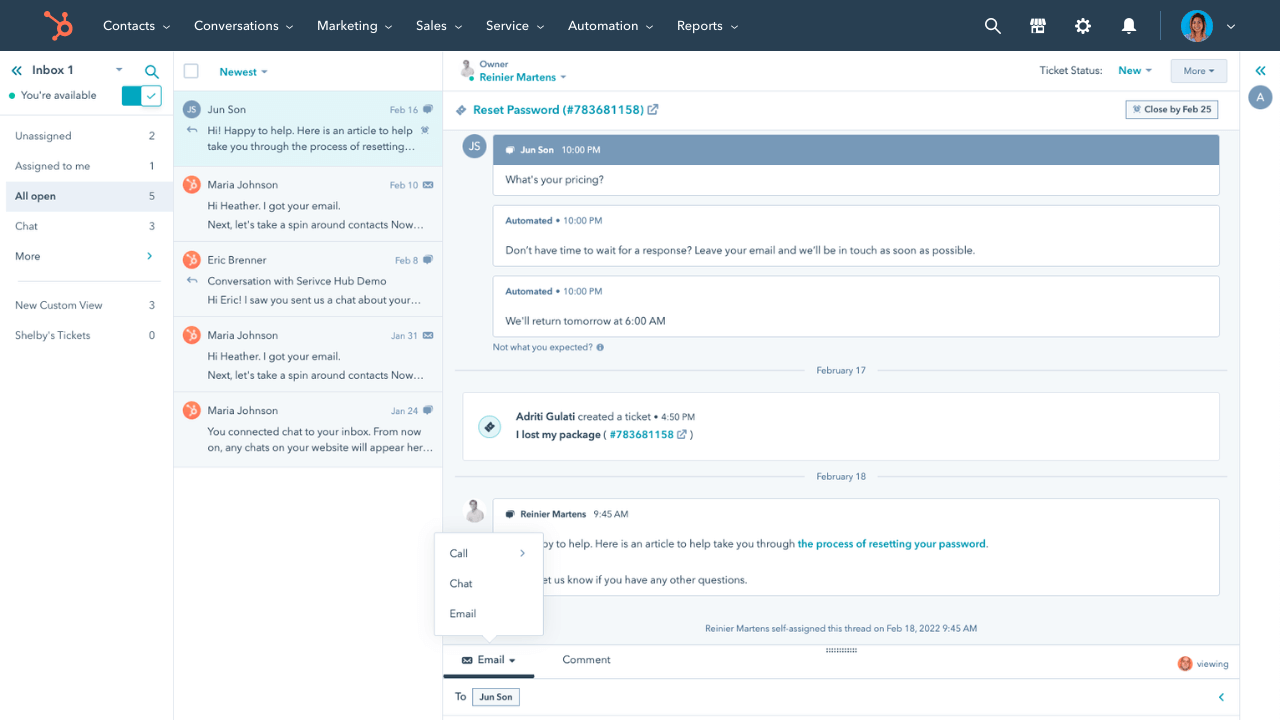
HubSpot Service Hub extends HubSpot's CRM into support, and its newer Breeze AI agents resolve tickets autonomously. If your sales and marketing already live in HubSpot, the chatbot syncs cleanly into the same contact records.
Best for: Teams already standardized on HubSpot CRM.
Key features:
- Breeze AI customer agent for autonomous ticket resolution
- Drag-and-drop chatbot builder with templates
- Native CRM sync that auto-enriches contacts
- Shared inbox and ticketing
Pricing: HubSpot pricing includes a free plan (2 users) and Starter from $9/seat/month, but the capable Breeze AI agent effectively requires the Enterprise tier at $150/seat/month plus AI credits.
The free and Starter bots are rule-based with no real AI, so anything genuinely smart sits behind a steep Enterprise cliff plus credit costs that reviewers say run out fast. G2 users also note that multi-step branching logic gets convoluted and non-English language support is weak.
8. Ada
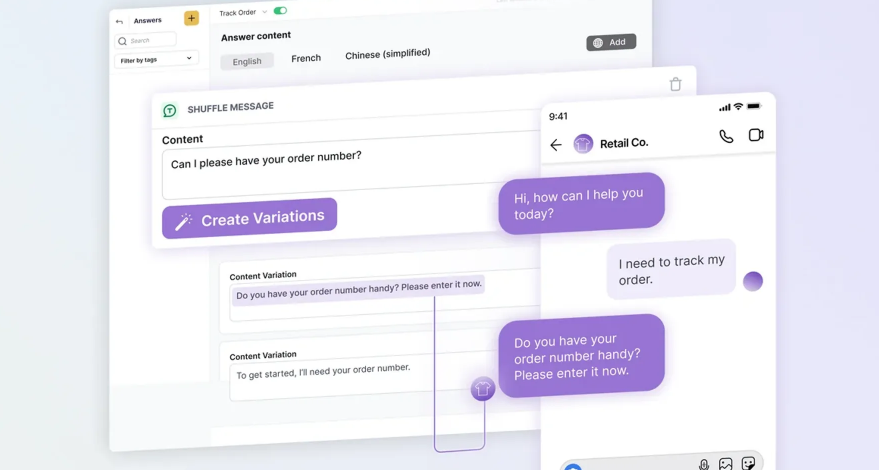
Ada is an enterprise-grade automation platform built to deflect huge conversation volumes across dozens of languages. It automates a high share of inquiries (reviewers cite 70 to 83%) and is built for global brands with serious scale.
Best for: Large enterprises automating high-volume, multilingual support.
Key features:
- High-automation resolution engine
- Strong multilingual support out of the box
- Clean no-code conversation builder
- Enterprise integrations with Zendesk, Salesforce, and more
Pricing: Ada pricing is custom and quote-only, and Ada itself points to companies with at least 300,000 annual support conversations as the right fit.
That scale requirement is the catch: it prices Ada out of reach for most small and mid-size teams. G2 reviewers flag the lack of public pricing as a real friction point, note Ada can't natively ingest tickets, PDFs, or wikis, and Trustpilot end-user reviews mention context loss and difficulty reaching a human.
9. Chatbase
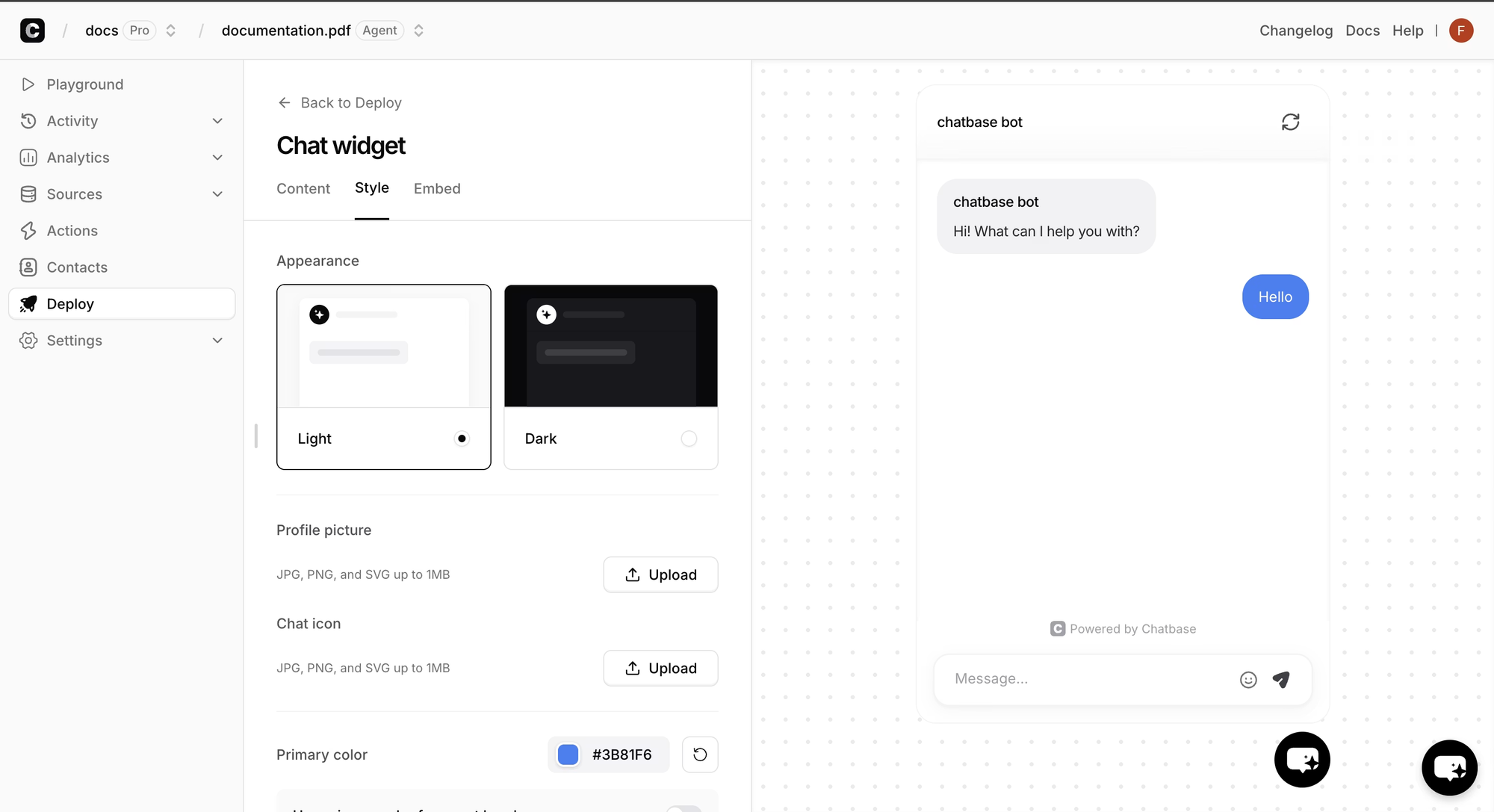
Chatbase is an AI customer support platform for teams that want to build AI support agents across website chat, email, WhatsApp, Slack, Messenger, Shopify workflows, and voice. It is built for support teams that need more than a quick website bot, with agents that can answer questions, connect to business data, take actions through integrations, and hand off complex conversations to humans.
Best for: Teams that want AI support agents with helpdesk handoff, ecommerce workflows, and multichannel support without replacing their existing support stack.
Key features:
- AI support agents trained on websites, help docs, files, and support content
- Website chat, email, WhatsApp, Slack, Messenger, Shopify workflows, and voice support
- Built-in Helpdesk for tickets, assignments, and human oversight
- Smart escalation through live chat or helpdesk tickets
- Shopify support for product questions, order status, carts, and billing updates
Pricing: Chatbase has a free plan with 50 message credits/month. Paid plans start at $32/month billed annually, with usage based on message credits.
Chatbase is stronger than a simple website chatbot trained on documents. It fits teams that want AI support agents and customer support chatbot functionality in one platform, especially when they need ecommerce workflows, helpdesk handoff, and multichannel customer conversations. Teams that need a full product feedback suite may still prefer Featurebase, but the current Chatbase product is broader than the page’s existing description.
How to choose the right customer service chatbot software
The right pick comes down to matching the tool to your volume, stack, and budget reality:
- Run the AI-cost math first: Multiply your expected monthly resolutions by the per-resolution fee. A $0.99 or $2 meter at scale dwarfs any seat-price difference, so a lower AI rate often wins the total bill.
- Match the tool to your stack: On Shopify, Gorgias fits. Deep in HubSpot, Service Hub fits. If you want support, help center, and feedback in one modern platform without legacy bloat, Featurebase fits.
- Test on your own content: Pick tools with a real free plan so the bot reads your knowledge base before you pay. Resolution rates that look great in a demo can sag on your actual tickets.
- Plan for the handoff: No bot resolves everything. The tool that escalates cleanly to a human with full context will beat the one with a slightly higher demo deflection rate.

Get the best CX chatbot software
Automatically resolve 70% of customer requests & cut down manual support loads
Conclusion
The best customer service chatbot software in 2026 isn't the one with the flashiest AI demo, it's the one that resolves your tickets without a bill that balloons the moment it starts working. For most teams, that means weighing the AI-resolution meter as carefully as the seat price.
Featurebase is a modern AI customer support platform that brings your omnichannel inbox, AI agent, help center, and feedback tools into one place. The Fibi AI Agent resolves issues on autopilot and runs real actions like refunds and trial extensions, all at the lowest AI-resolution cost on this list.
It comes with a Free plan with unlimited conversations, and the onboarding is fast, so there's no downside to trying it. 👇
✨ Automate your support with the fastest AI-enhanced Inbox today →

FAQs
What's the difference between a rule-based chatbot and an AI customer service chatbot?
A rule-based chatbot follows fixed, scripted flows triggered by keywords, so it only handles questions it was explicitly programmed for. An AI customer service chatbot uses natural language processing and large language models to understand intent, pull answers from your knowledge base, and even take actions. Rule-based bots are cheaper and more predictable, while AI agents handle nuance and resolve far more on their own.
How much does customer service chatbot software cost?
Most tools combine a per-seat platform fee (anywhere from $0 on free plans to $150/seat/month for enterprise tiers) with a separate per-resolution AI fee, typically $0.29 to over $2 per resolved conversation. The AI meter is usually the bigger cost at volume, so compare it closely. Featurebase is among the most affordable here, with a free plan, paid plans from $29/seat/month, and the lowest AI rate at $0.29 per resolution.
Can a customer service chatbot handle complex queries?
Modern AI agents handle a large share of routine and moderately complex questions by reasoning over your knowledge base and customer data. They still struggle with highly nuanced, emotional, or multi-system issues, which is why clean escalation to a human agent matters. The best setups use the bot for volume and route the hard cases to people with full conversation context.
Will customer service chatbots replace human agents?
No. Chatbots are best at deflecting repetitive, high-volume questions, which frees human agents to focus on complex and sensitive issues that need judgment and empathy. The most effective support teams run a hybrid model where AI handles the routine work and people handle the rest. The goal is augmenting your team, not removing it.
How do you measure the ROI of a customer service chatbot?
Track resolution rate (the share of conversations the bot closes without a human), cost per resolution, and agent hours saved. Pair those with customer satisfaction (CSAT) so you confirm faster service isn't costing you quality. The clearest ROI signal is deflected tickets multiplied by your average handling cost, minus what the bot's AI fees actually run you.
Can a customer service chatbot connect to my CRM and helpdesk?
Yes. Most quality chatbot platforms integrate with CRMs, helpdesks, and tools like Slack, Linear, Jira, and HubSpot so the bot can pull customer context and act on real data. Integration depth varies a lot, so confirm the specific connections you need are supported. Deeper CRM access lets the bot personalize answers and take actions like updating records or processing returns.