Best Design Feedback Tools for Teams in 2026
The 9 best design feedback tools in 2026, compared by price, features, and what each one is actually best for.


On this page
Start collecting & managing feedback with Featurebase for free
Design feedback has a way of scattering itself across email threads, Slack messages, and screenshots with red arrows drawn on top. Nobody knows which comment is current, half the notes get lost, and "make the logo bigger" turns into three more revision rounds.
A good design feedback tool fixes that by putting comments in context, right on the website, mockup, or file they refer to. Below are the 9 best options in 2026, grouped by what each one actually does best. 👇
Key takeaways:
| Tool | Best for | Starting price | Free plan | G2 rating |
|---|---|---|---|---|
| BugHerd | Visual feedback on live websites for agencies | $42/mo | No (7-day trial) | 4.8 |
| Markup.io | Feedback on websites, PDFs, images & video | $79/mo | No (14-day trial) | 4.5 |
| Filestage | Structured review & approval workflows | $199/mo | Yes | 4.6 |
| Marker.io | Turning website feedback into dev-ready tasks | $39/mo | No (15-day trial) | 4.7 |
| Ruttl | Live editing + comments on websites and apps | $18/user/mo | Yes | 4.7 |
| Figma | Collaborative comments on design files | $20/seat/mo | Yes | 4.7 |
| Pastel | Simple client feedback on live sites | $29/mo | Yes | 4.6 |
| Userback | Visual user feedback & bug reporting in-app | $29/mo | Yes | 4.7 |
| Miro | Whiteboard-style design reviews | $8/member/mo | Yes | 4.8 |
What is a design feedback tool?
A design feedback tool lets people leave comments directly on a design instead of describing changes in a separate email or document. Reviewers click on the exact spot they mean, whether that's a live website, a Figma file, a PDF, or an image, and their note stays pinned there for everyone to see.
Most tools then collect those comments into one place so nothing gets lost. The better ones turn each comment into a trackable task, capture technical details automatically, and let clients leave feedback without creating an account. The result is fewer revision rounds and a lot less "which version were we talking about again?"
What to look for in a design feedback tool
The right tool depends on what you're reviewing and who's reviewing it. These are the features that matter most:
- In-context visual feedback: The whole point is pinning comments to the exact element, not describing it. Look for click-to-comment on live pages, files, or prototypes, so feedback is impossible to misread.
- No-login client access: Every extra sign-up step loses a reviewer. Tools that work through a simple shared link get faster, more complete feedback from non-technical clients.
- Task management and versioning: Comments are only useful if they get actioned. A built-in board (or a two-way sync with Jira, Trello, or Linear) keeps feedback moving, and version history stops old notes from resurfacing.
- Automatic context capture: For website and bug feedback, the tool should grab the browser, screen size, and console details on its own so your team isn't chasing "it looks broken on my end" reports.
Keep in mind that these tools solve one specific job: reviewing a design that already exists. The feature requests and bug reports that keep arriving after a design ships are a different problem, and we cover a tool built for that further down.
The 9 best design feedback tools in 2026
1. BugHerd
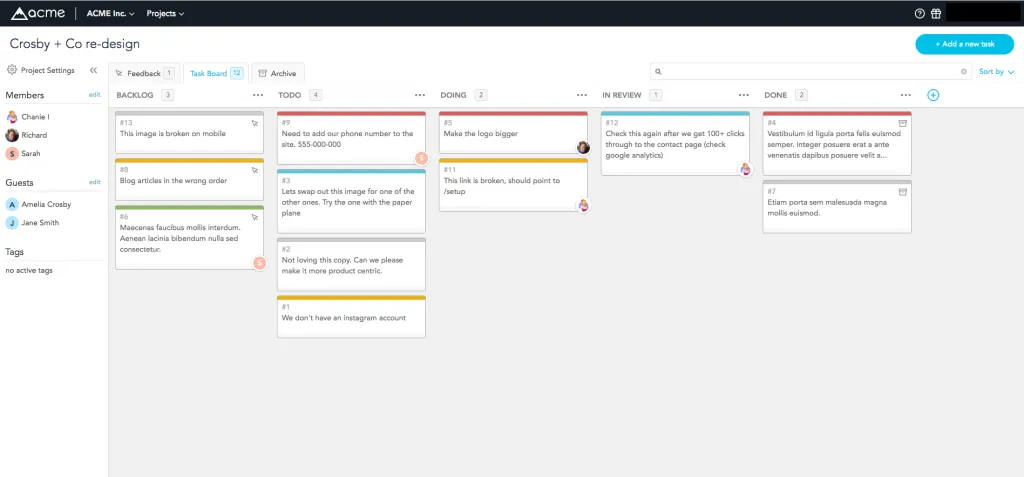
BugHerd is one of the best-known tools for collecting visual feedback on live websites. Clients click anywhere on a page to leave a pinned comment, and BugHerd automatically captures a screenshot plus the browser, OS, and screen-size details behind it.
Each pin becomes a card on a built-in kanban board, which is why agencies and web teams like it for managing client feedback through to delivery. It also handles feedback on Figma designs, PDFs, and images.
Pricing: No free plan, but there's a 7-day free trial. Paid plans start at $42/mo (billed annually) for the Standard plan with 5 members.
Reviewers consistently praise how easy it is for non-technical clients, since a pin instantly creates a trackable task. The common gripes are a dated-feeling interface, some gaps in screenshot editing, and pricing that climbs quickly as you add members.
2. Markup.io
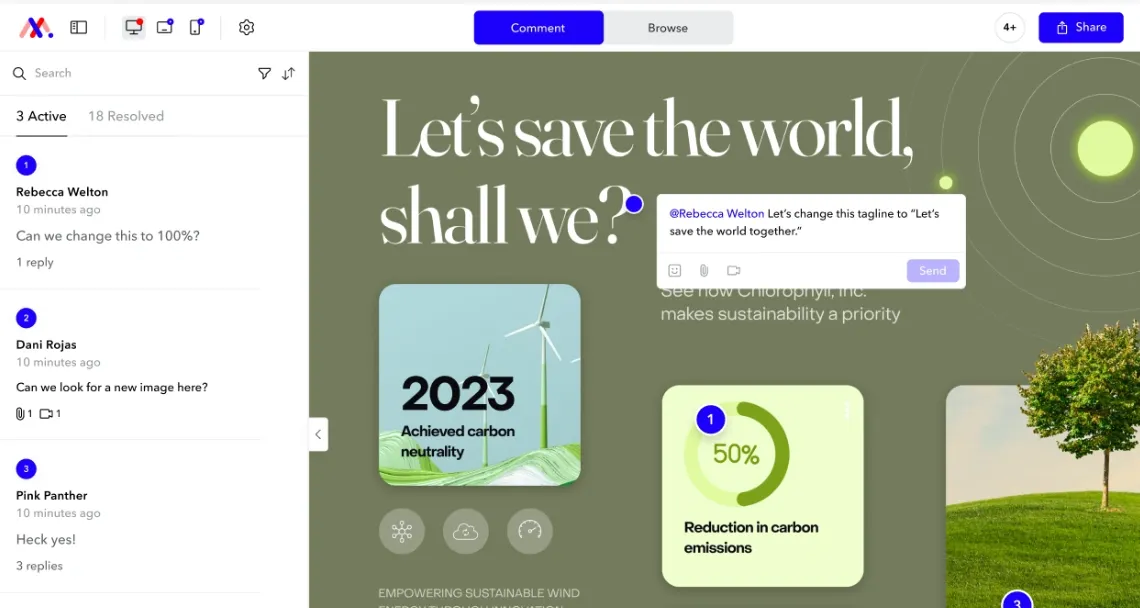
Markup.io keeps things simple: upload a website URL, PDF, image, or video, then click anywhere to leave a comment. It supports over 30 file types and recently added video markup, so mixed-media projects can live in one place.
Its standout selling point is unlimited users on every plan, which suits agencies passing links around to lots of stakeholders.
Pricing: No free plan anymore. The Pro plan is $79/mo for unlimited users, with a 14-day free trial.
Users like how easy it is for clients to jump in and comment regardless of technical skill. The main complaints center on the removal of its old free tier and the price increases that came with it, plus folder and file limits on the paid plan.
3. Filestage
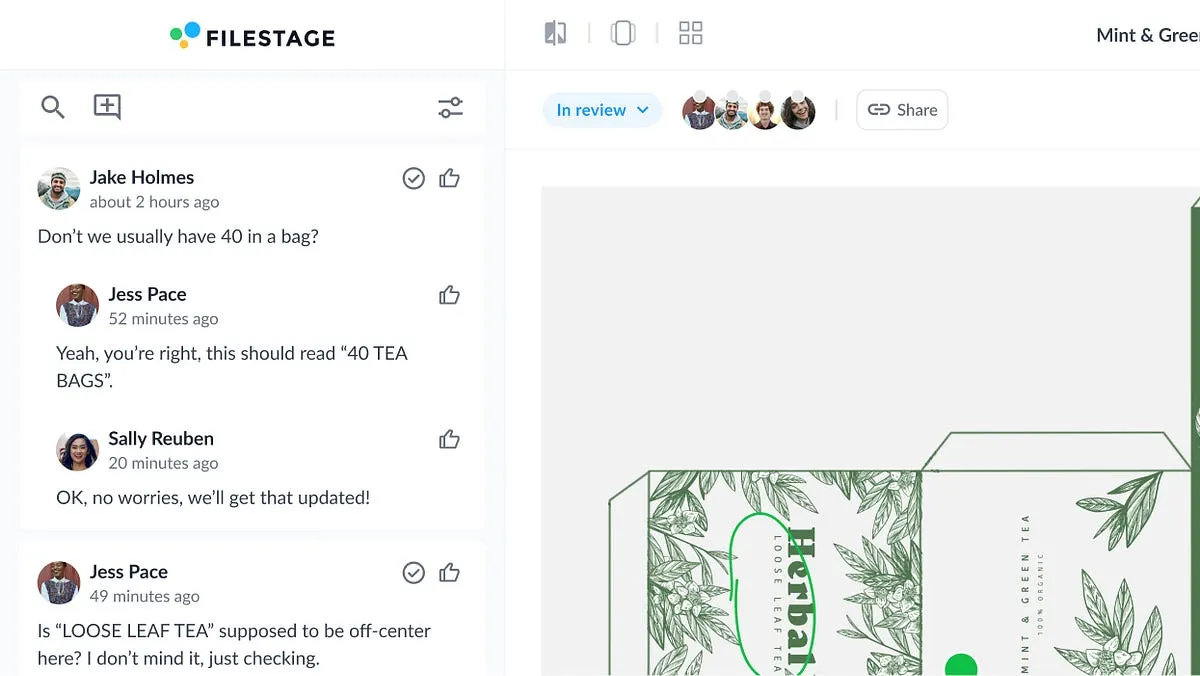
Filestage is built for structured review and approval, not just casual commenting. Files move through defined review steps with due dates and reviewer groups, and reviewers can annotate documents, images, video, and audio without creating an account.
That makes it a strong fit for marketing and creative teams that need formal sign-off across several rounds and stakeholders.
Pricing: There's a free plan (5 new files per month). Paid plans start at $199/mo.
Reviewers highlight the clean interface and fast, helpful support. The recurring downsides are the lack of a mobile app, tighter data limits on video-heavy work, and some image compression on large files.
4. Marker.io
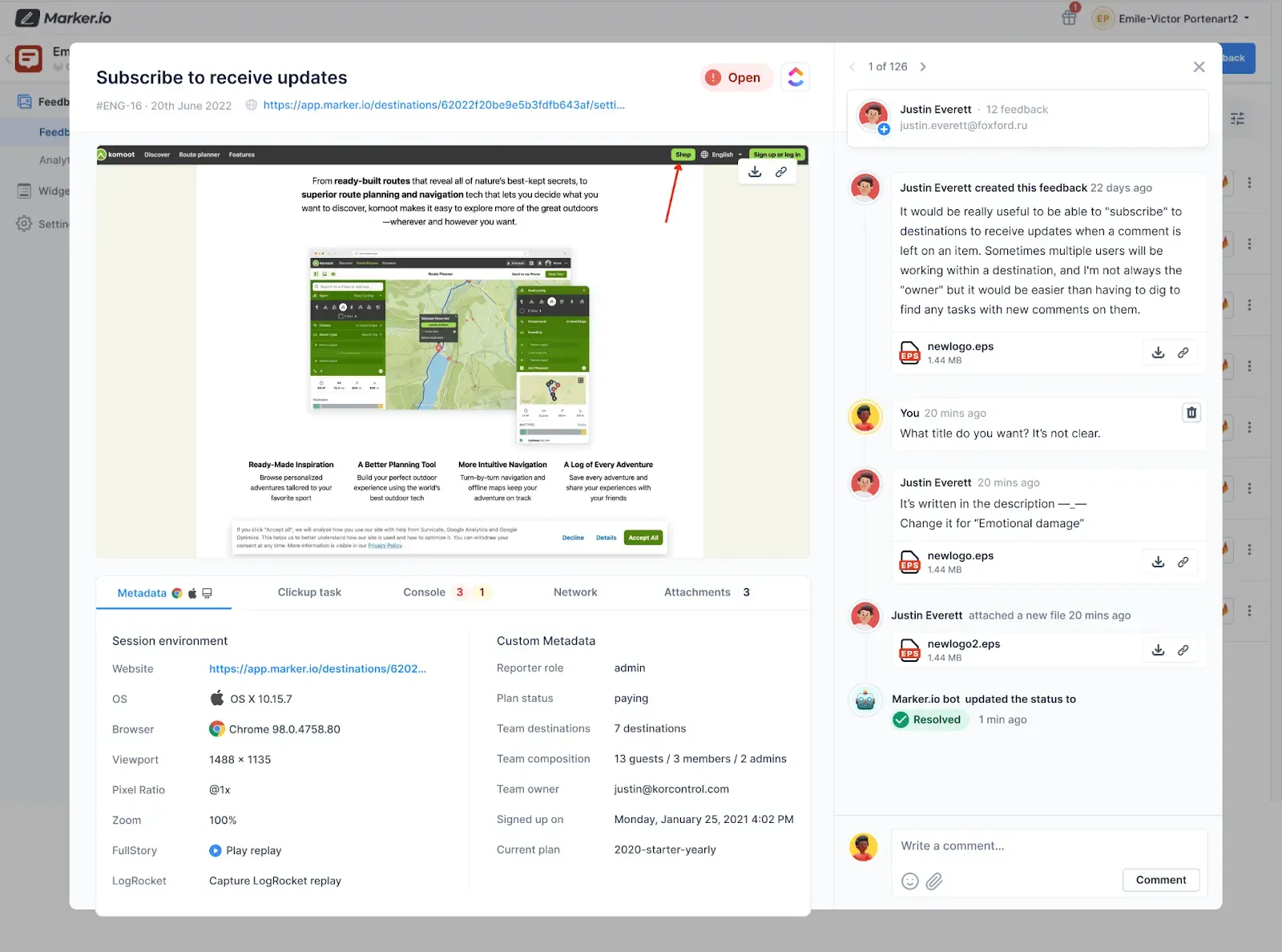
Marker.io focuses on turning website feedback into developer-ready tasks. When someone reports an issue through the widget, it captures a screenshot, annotations, and technical metadata like console logs and network requests, then syncs it straight into Jira, Trello, ClickUp, GitHub, and more.
Feedback submitters (Marker calls them reporters) are free and unlimited and don't need an account, which keeps client feedback frictionless.
Pricing: No free plan, but a 15-day free trial. The Starter plan is $39/mo (billed annually) for 3 users, and there's a dedicated $129/mo agency plan.
Developers love how much time the console and network capture saves when reproducing bugs, and the integrations get strong marks. The trade-offs are a weaker mobile experience, no built-in task board of its own, and the need to embed a script on your site.
5. Ruttl
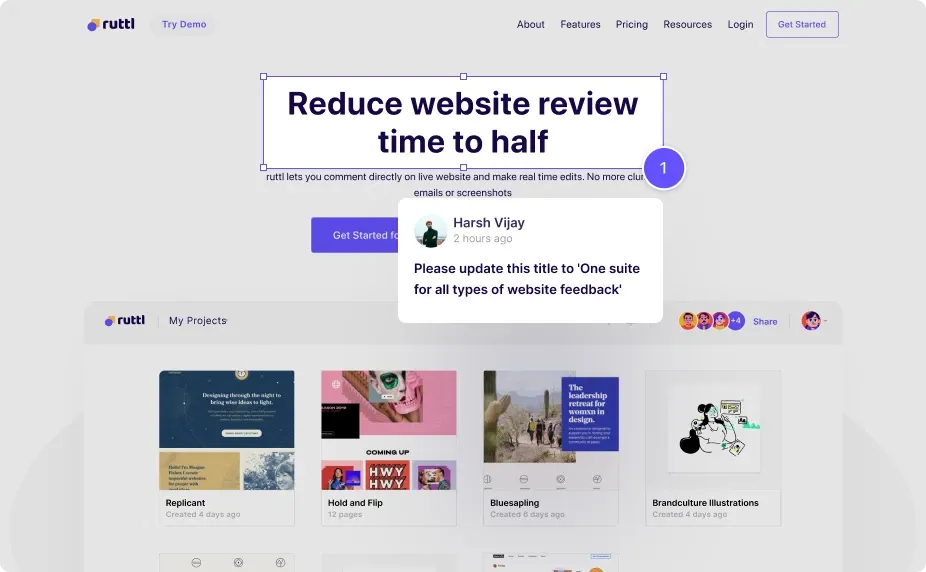
Ruttl lets you comment on live websites and apps, and it goes a step further by letting you make real edits, like tweaking text or swapping images, right on the page before handing changes to developers. It also covers mobile apps, images, and PDFs.
It's a favorite among freelancers and small agencies who want visual client feedback without a steep setup.
Pricing: Free plan available (1 project, 5 pages, up to 5 users). The Pro plan is $18/user/mo, with custom Business pricing above that.
People find it genuinely easy for non-technical clients, and the live-edit feature stands out. The complaints worth knowing: some pages fail to load inside its proxy view, support can be slow to respond, and integration options are fairly limited.
6. Figma
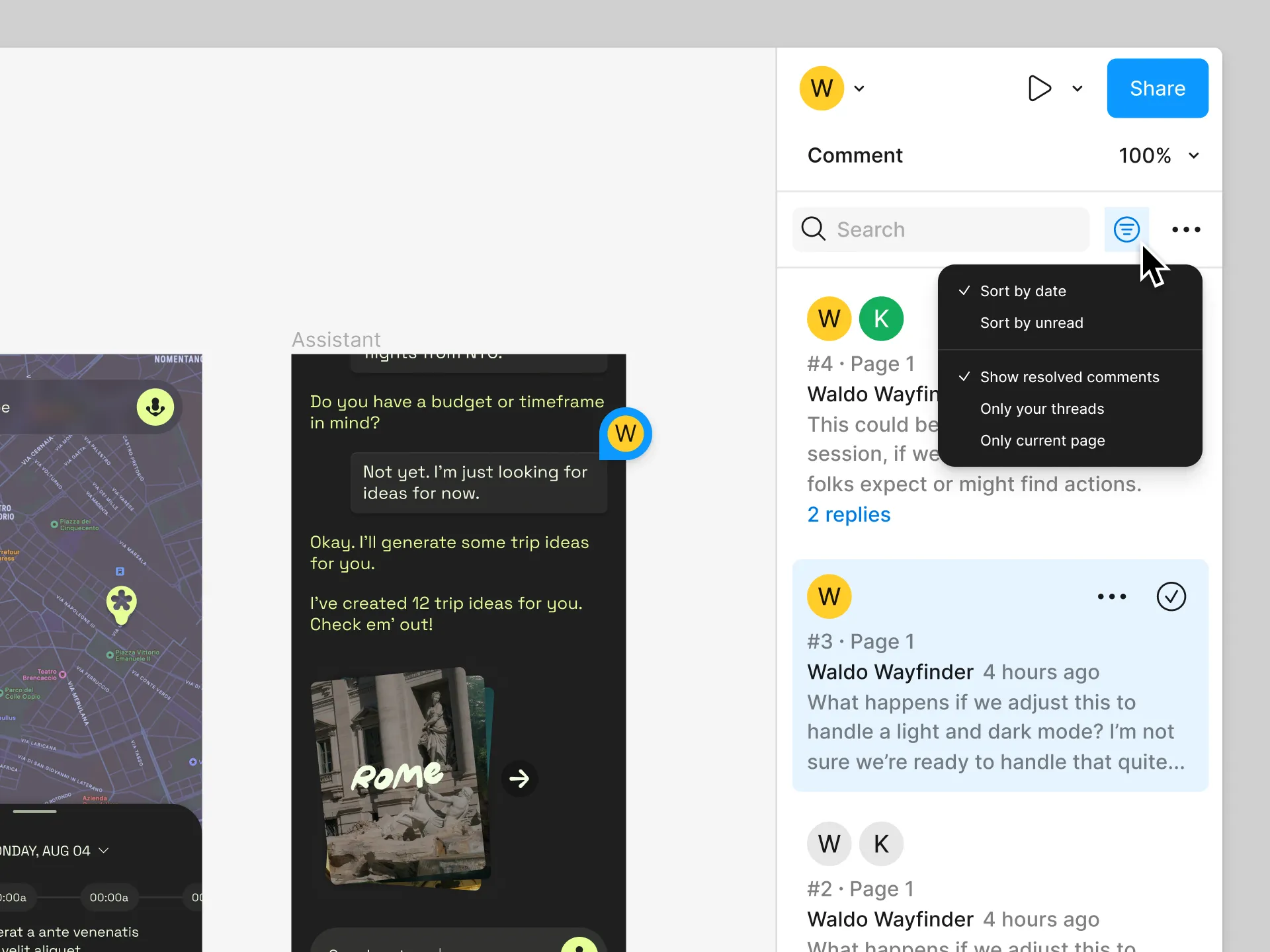
Figma is the industry standard for UI/UX design, and its commenting is where a lot of design feedback naturally happens. Reviewers drop comments directly on frames and prototypes in real time, so designers and stakeholders can discuss changes without leaving the file.
If your team already designs in Figma, keeping feedback there avoids exporting screenshots into another tool entirely.
Pricing: Free Starter plan available. A full Professional seat is $20/mo, with a cheaper Dev-mode seat at $12/mo.
The real-time collaboration and familiarity are the big wins. The catch is that Figma feedback lives on design files, not live websites, and it can feel like overkill for clients or stakeholders who don't otherwise work in it.
7. Pastel
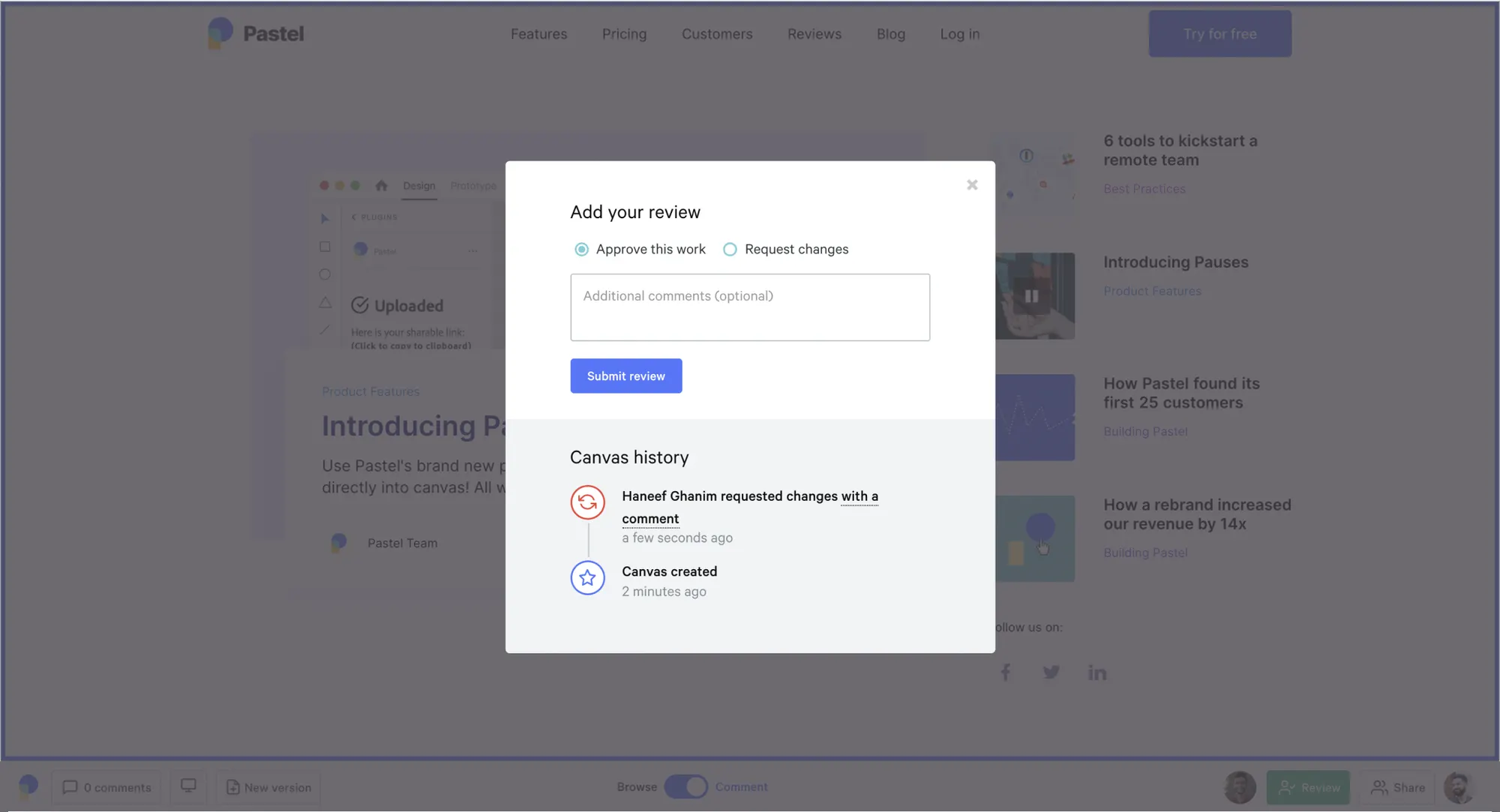
Pastel is a lightweight tool for collecting client feedback on live websites. Reviewers leave comments directly on the page, review across desktop, tablet, and mobile, and the whole thing is designed to be picked up in minutes with no sales call.
Its minimal, well-designed interface is the draw for freelancers and small studios who want something clean and fast.
Pricing: Free Forever plan available. The Solo plan is $29/mo ($24/mo billed annually), with a Studio plan at $99/mo.
Reviewers repeatedly call out how quickly non-technical clients pick it up and how responsive the team is. The downsides are a fairly limited feature set and no data export, so your feedback stays inside the platform.
8. Userback
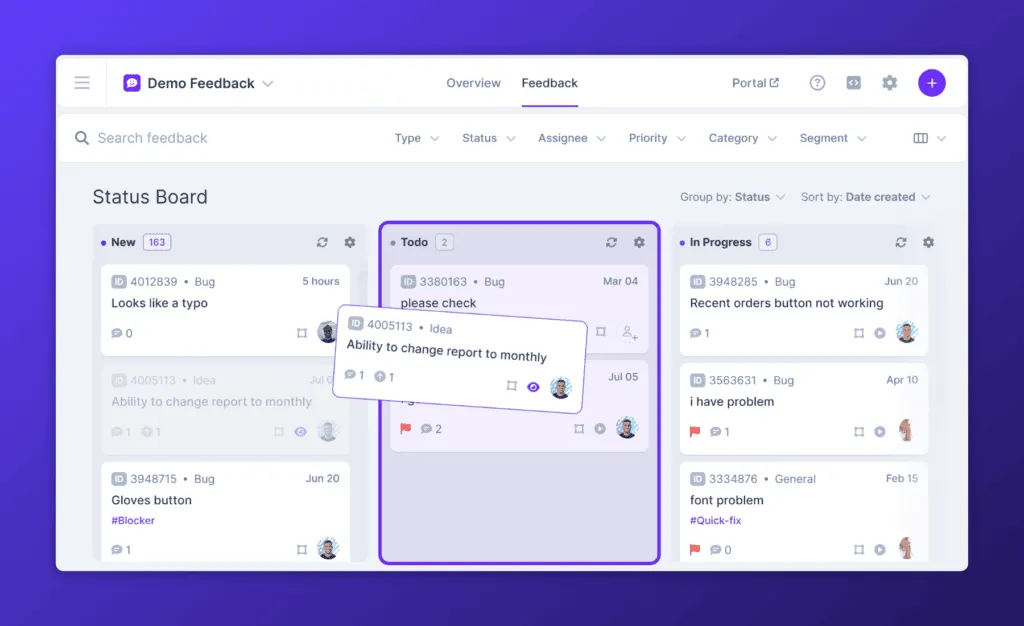
Userback sits between visual design feedback and product feedback. It captures annotated screenshots, screen recordings, and session replays from inside your app or website, and it can double as a feature portal where users vote on requests.
That makes it a good pick for SaaS teams who want both bug reports and ongoing product feedback from real users.
Pricing: Free Forever plan (2 seats, 2 projects). The Team plan is $29/mo (billed annually), with Business at $79/mo.
Users highlight the quick, no-code setup and strong support. The limitations are lighter analytics and customization, and it's aimed more at small and mid-sized teams than large enterprises.
9. Miro
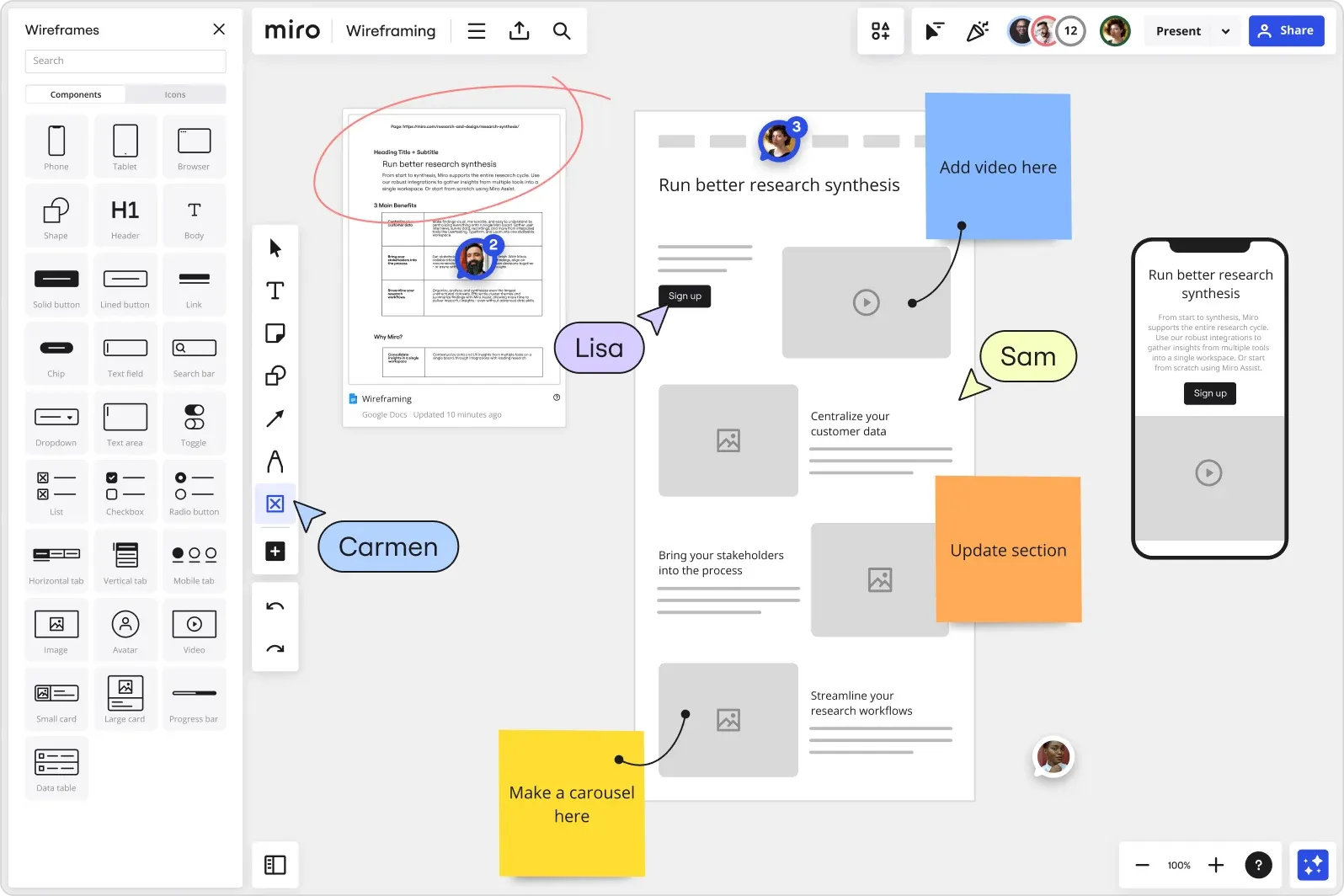
Miro is a collaborative whiteboard, and design reviews are one of its many uses. Teams pull mockups, wireframes, and screenshots onto an infinite canvas and leave sticky-note and comment feedback around them, which works well for early-stage concepts and group critique.
It's best for brainstorming and design discussion rather than pixel-precise sign-off.
Pricing: Free plan available. The Starter plan is $8/member/mo (billed annually), and Business is $20/member/mo.
The open canvas and real-time collaboration are what people love. The trade-off is that Miro isn't built for reviewing live websites or running formal approval workflows, and busy boards can get cluttered fast.
How to choose the right design feedback tool
Start with what you're actually reviewing:
- Live website or web app: Look at BugHerd, Ruttl, Pastel, or Marker.io, which pin comments directly onto real pages.
- Design files and prototypes: Figma handles this natively, and Miro is great for looser, collaborative critique.
- Mixed creative assets needing sign-off: Filestage and Markup.io are built for multi-format review and formal approval rounds.
- Ongoing product feedback after launch: Userback captures feedback from users continuously, and Featurebase (covered next) centralizes and prioritizes feature requests over time.
Then check two things that quietly make or break adoption: whether clients can leave feedback without an account, and whether comments sync to the tools your team already lives in. Get those right and feedback stops leaking out of email and into something everyone can actually act on.
Collecting product feedback with Featurebase
The tools above all review a design that already exists. But design feedback doesn't stop at launch, that's when the feature requests, bug reports, and "can you add..." messages really start rolling in. Handling that ongoing stream is a different job, and it's the one Featurebase is built for. 👇
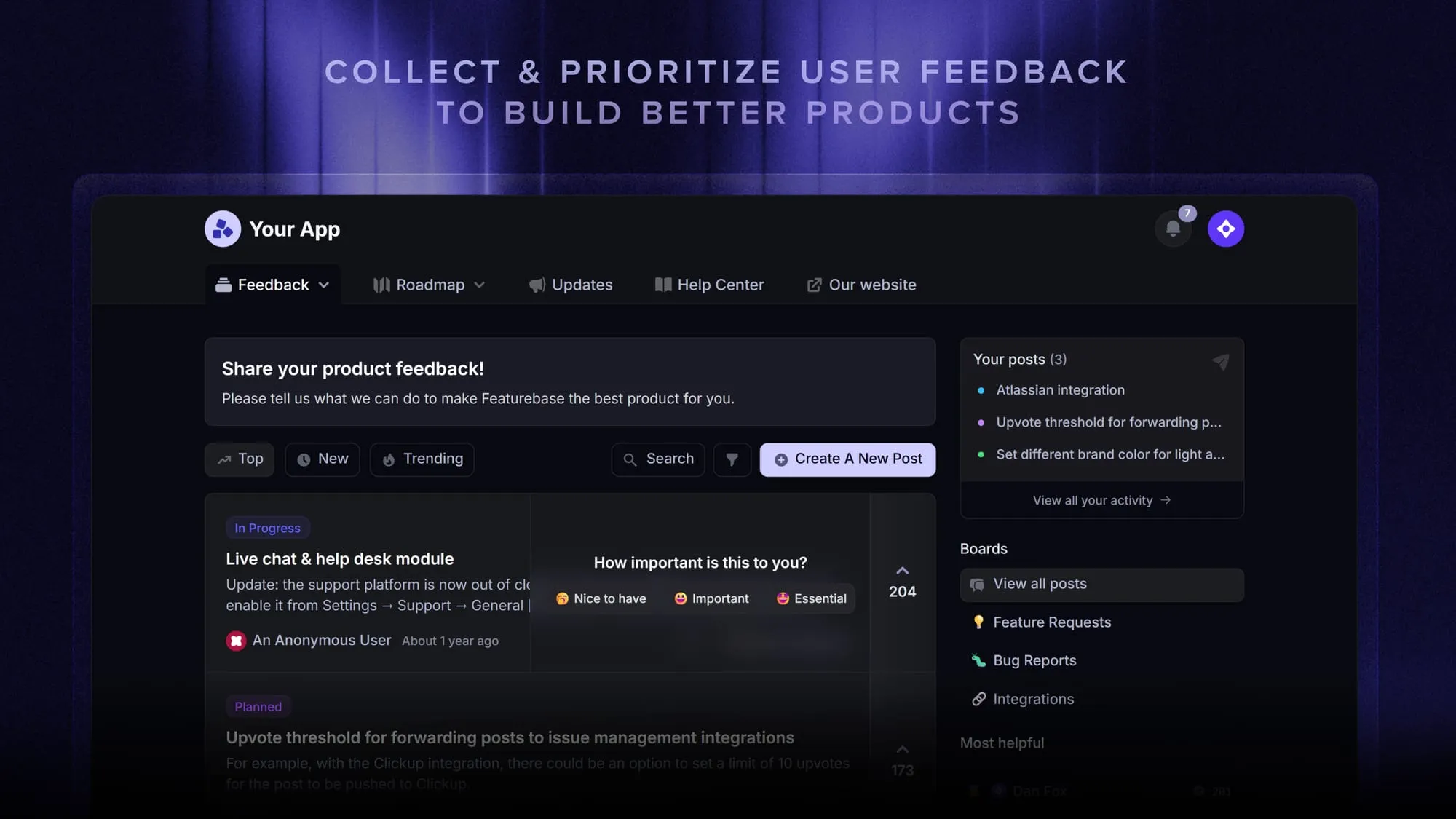
Featurebase is a modern feedback & support platform that helps product teams collect feedback, prioritize features, build roadmaps, and announce product updates, all in one place. It's loved by thousands of product teams from companies like Lovable, Raycast, and n8n. 💫
Top features:
- Feedback forum – Public feedback forum where users can submit ideas and vote on features, so you know what customers want
- In-app widgets – Embed feedback, changelog, and help center widgets directly in your product to collect ideas and bug reports with screenshots
- Prioritize by revenue – Link feedback with customer revenue, company size, and more to understand the real impact of ideas
- AI feedback categorization – Automatically group large volumes of feedback into product areas, projects, or themes
- Automated email updates – Automatically notify users when their requested features are implemented
- Roadmaps – Create internal & public product roadmaps to keep users informed and build engagement
- Surveys (NPS, CSAT, etc.) – Create targeted surveys to ask users anything and measure satisfaction
- Integrations – Connects with Slack, Linear, Jira, HubSpot, and more
Pricing: Free plan available with unlimited feedback collection. Paid plans start at $29/seat/mo.
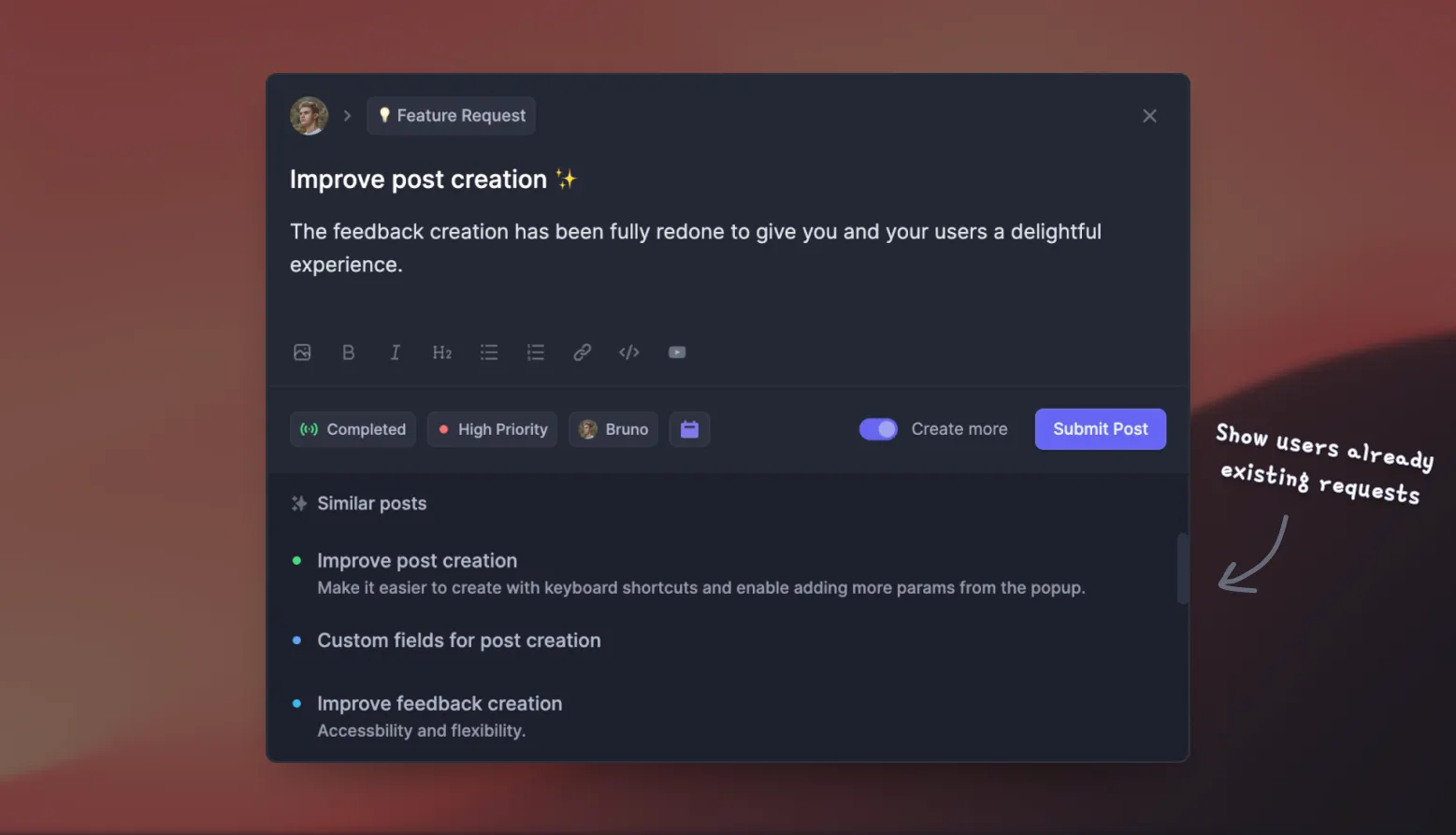
If you're pairing a visual review tool from this list with a way to manage everything users ask for afterward, Featurebase covers the second half, so nothing gets lost between "the design is done" and "what should we build next?"
Conclusion
The best design feedback tool is the one that matches your workflow. Agencies reviewing live sites will land on BugHerd or Ruttl, creative teams needing approvals will prefer Filestage, and designers working in files will keep feedback in Figma or Miro.
And once a design is live, Featurebase gives you one place to collect and prioritize the feature requests and bug reports that follow, with a public feedback forum, in-app widgets, surveys, and integrations that tie every request back to the customers asking for it.
It comes with a Free plan and unlimited feedback collection, and the onboarding is quick with no credit card required, so there's no downside to trying it. 👇
Start collecting & managing feedback with Featurebase for free
FAQs
Yes, several. Ruttl, Pastel, Figma, Miro, and Userback all offer free plans, and Featurebase has a free plan with unlimited feedback collection. Free tiers usually cap projects, files, or seats, so they work well for solo creators and small teams testing a workflow before committing.
Most paid plans run between roughly $18 and $80 per month for small teams, with pricing based either on a flat monthly rate or per seat. Approval-focused and enterprise tools like Filestage sit higher, often $199/mo and up. Several tools also offer free plans, so you can start at $0 and upgrade as your team grows.
In most cases, yes. Tools like BugHerd, Marker.io, Markup.io, Pastel, and Filestage let clients comment through a shared link or widget without signing up. This is one of the most important features to check, since every extra login step tends to slow down or reduce the feedback you get.
A design feedback tool captures comments in context, pinned to the exact spot on a design, website, or file. Project management software like Asana or Trello tracks tasks and deadlines but has no idea which pixel a comment refers to. Many feedback tools bridge the gap by syncing each comment into your project management tool as a task.
Use a tool built for on-page annotation, such as BugHerd, Ruttl, Marker.io, or Pastel. You add a small snippet of code or a browser extension, then reviewers click directly on the live page to leave pinned comments. The tool captures a screenshot and technical details automatically, so your team can act on the feedback without back-and-forth.
A design feedback tool is about collecting and organizing comments, often on live sites and in flexible ways. An online proofing tool like Filestage or Markup.io adds a formal layer on top: defined review stages, approvals, and sign-off, so a file can't move forward until the right people have approved it. If you need an audit trail of who approved what, proofing is the better fit.


