Help Scout Pricing 2026: Is It Worth It?
Considering Help Scout for customer support? It looks simple on the surface, but the paid add-ons and AI costs can make it far more expensive as you scale. In this post, I break down their pricing and help you decide if it’s still the right fit or if better alternatives exist.


On this page
Psst... Looking for a more powerful & affordable alternative to Help Scout? Check out Featurebase
Help Scout is often seen as a “safe” choice for customer support. It’s clean, reliable, and very email-first. For many teams, especially smaller ones, that sounds ideal. But once you actually look at Help Scout’s pricing, things are not quite as simple as they first appear.
In this guide, I’ll break down Help Scout’s pricing in 2026, explain what you really get on each plan, highlight the hidden costs that affect your company’s budget, and help you decide whether Help Scout is the right choice or if there are better alternatives worth considering. 👇
Key takeaways
- Help Scout uses per-seat pricing and comes with three paid tiers
- The Free plan is very limited, capped at 5 users, 1 shared inbox, and 1 Docs site
- AI Answers costs $0.75 per resolution, though it comes with a 3-month free trial
- Extra Inboxes and Help Centers come at an additional cost that can add up quickly
- Paid plans can be tried with a free 15-day trial with no credit card required
- There are many more modern & powerful alternatives, like Featurebase, which provides modern AI-powered support for fast-growing teams
What is Help Scout?
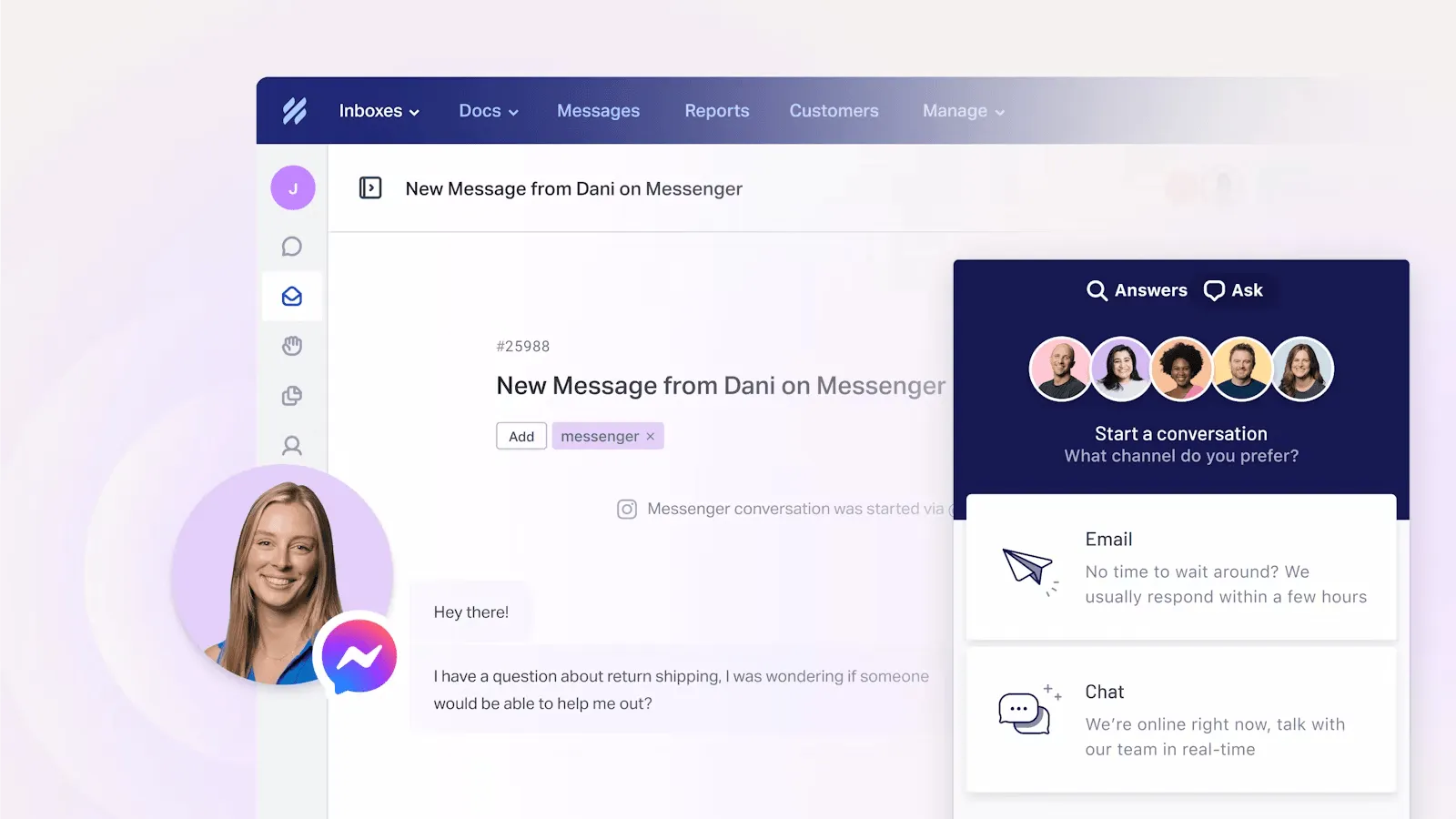
Help Scout is a customer support platform built around email-first support and shared inbox workflows. Instead of complex ticket queues, conversations feel like normal email threads, which makes it popular with smaller teams and companies that value a more personal customer experience.
The platform combines a shared inbox, live chat support, a built-in knowledge base, and the Beacon help widget into one system. Customers can search help articles, start a chat, or send an email from the same interface, while your team manages everything from one place.
It's commonly used by SaaS companies and growing teams that rely heavily on email support as their primary form of communication.
Help Scout pricing 2026
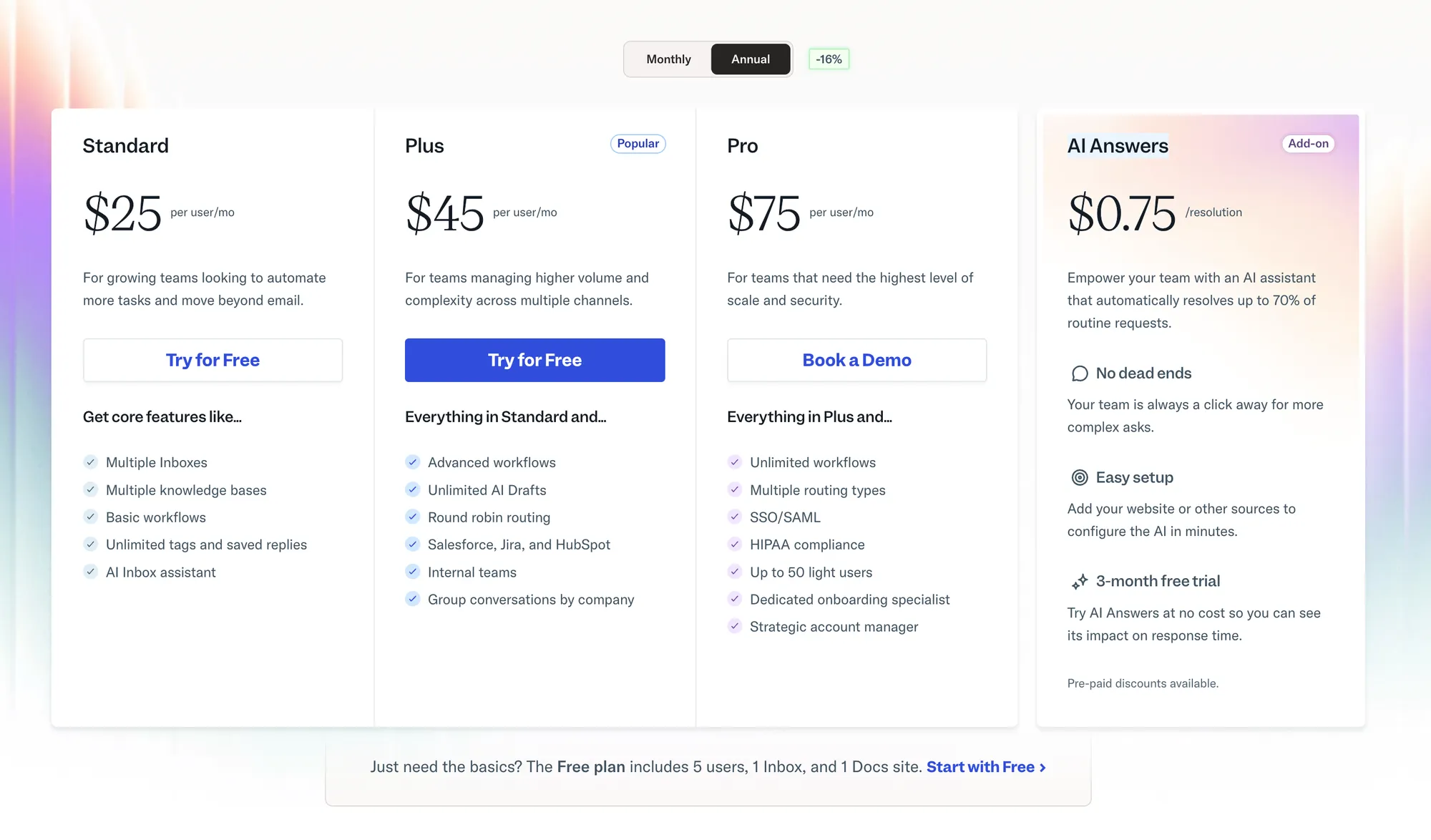
Help Scout uses a per-user pricing model, with a Free plan and three paid plans. On top of that, some features are billed based on usage, which is where Scout’s pricing can become less predictable as your support volume grows.
All paid plans include unlimited emails and core customer support features. However, limits on inboxes, Docs sites, workflows, and reporting vary by plan. AI features and Messages are billed separately based on usage.
Let’s break down each plan. 👇
Free plan ($0)
Best for very small teams testing the platform.
- Up to 5 users
- 1 shared inbox
- 1 Docs site
- 100 contacts per month
- Beacon help widget
- Basic reporting with 30-day history
The Free plan is fine for small companies or early-stage projects, but the limits are strict. One inbox and one Docs site means you will hit a wall fast once customer support volume increases.
Standard plan ($25/seat/mo)
The Standard plan is the entry point for most small teams that need real workflows.
- Up to 25 users
- 2 shared inboxes (Additional inboxes cost $10 per month each)
- 2 Docs sites (Additional doc sites cost $20 per month each)
- Unlimited contacts
- Basic workflows
- Unlimited tags and saved replies
- AI inbox assistant
- API access
- 2-year reporting history
This plan covers the standard features most support teams need, but inbox and docs limits are still tight. Many companies end up paying extra here through add-ons.
Plus plan ($45/seat/mo)
This is where Help Scout starts to unlock more advanced features for growing teams.
- Up to 50 users
- 5 shared inboxes (extra inboxes cost $10 per month each)
- 3 Docs sites (extra docs sites cost $20 per month each)
- Advanced workflows
- Unlimited AI drafts and AI summaries
- Round robin routing
- Salesforce, Jira, and HubSpot integrations
For many companies, the Plus plan is the real pricing sweet spot. That said, AI Answers and Messages are still usage-based, so your monthly billing can scale with customer conversations.
Pro plan ($75/seat/mo)
Built for larger teams with compliance and security needs.
- Minimum 10 users
- Unlimited users
- 10 shared inboxes included
- 5 Docs sites included
- Unlimited workflows
- Multiple routing types
- SSO and SAML
- Up to 50 light users
The Pro plan bundles many enterprise features, but the minimum user requirement makes it expensive fast. It is usually only a fit for larger support teams with strict security or compliance requirements.
AI Answers pricing ($0.75 per resolution)
Help Scout’s chatbot-style automation is called AI Answers, and it is priced separately from the core plans. It uses a per-resolution billing model, which means you pay based on how many conversations the AI fully resolves.
- Price: $0.75 per AI resolved conversation
- Billing: Charged monthly in arrears as a separate line item
- Available on all plans, including the Free plan
Only one resolution per conversation is billed, even if the AI replies multiple times. If the customer clicks “I still need help” or continues the conversation, you are not charged.
Help Scout also lets you set a monthly spending cap. Once the cap is reached, AI Answers is automatically disabled for the rest of the month. This prevents surprise bills, but it can also stop automation during high-volume periods.
New accounts get 3 months of unlimited AI Answers usage, which helps test before committing.
Here’s how Help Scout's AI pricing scales in practice with some real-world examples:
| AI resolutions per month | Help Scout ($0.75) | Featurebase ($0.29) |
|---|---|---|
| 100 resolutions | $75 | $29 |
| 500 resolutions | $375 | $145 |
| 1,000 resolutions | $750 | $290 |
| 2,000 resolutions | $1,500 | $580 |
Looking for a more affordable AI support tool? Check out Featurebase for just $0.29 per resolution
Other things to keep in mind
Before deciding whether Help Scout’s pricing is the right fit, there are a few important details that are easy to overlook.
Does Help Scout offer a free AI Answers trial?
Yes. New Help Scout accounts get three months of unlimited AI Answers resolutions. The trial starts immediately when the account is created, not when AI Answers is first enabled.
How does Help Scout billing work?
Help Scout’s core plans are billed per user per month in advance. AI Answers and Messages usage is billed separately in arrears and appears as line items on the next invoice. Extra inboxes and Docs sites are billed monthly as add-ons. Users added and removed within 24 hours are not billed.
Does Help Scout offer discounts?
Yes. Help Scout offers discounts for nonprofits through the Help Scout for Good program, as well as a startup plan for qualifying early-stage companies. Annual billing includes a discount, but the exact percentage is not publicly listed.
What happens when I hit plan limits?
When you reach inbox, Docs site, workflow, or user limits, you’ll need to upgrade your plan or purchase add-ons. Features like HIPAA compliance, SSO, and onboarding assistance may also require moving to the Pro plan or paying extra.
Does Help Scout offer a free trial?
Yes. Help Scout offers a 15-day free trial for the Standard and Plus plans without requiring a credit card. To trial the Pro plan, you need to contact sales and request a demo.
Best Help Scout alternatives
If Help Scout’s pricing feels too complex or expensive as you scale, here are some solid alternatives worth considering.
- ✨ Featurebase – Best modern support & feedback platform for fast-growing SaaS
- Zendesk – Enterprise-grade ticketing with help centre and AI tools
- Freshdesk – Multichannel ticketing with built-in help desk tools
- Front – A shared inbox platform for team customer conversations
- Zoho Desk – Budget-friendly omnichannel desk with knowledge base tools
- Kayako – Timeline-based multichannel support with guest collaboration
- Intercom – Messaging-first support with embedded help content
- Missive – Team inbox and chat collaboration across email and messaging
- Hiver – Gmail-native shared support inbox with automation and SLAs
- Customerly – Unified live chat, help desk, and customer success platform
- Tidio – Live chat and chatbot widget for small business customer engagement
Each of these tools approaches customer support differently. You can dive deeper in our blog about the Top Help Scout alternatives.
So, is Help Scout worth it?
Help Scout is a solid customer support platform for teams that value clean workflows, email-first communication, and a simple shared inbox experience. That said, Help Scout’s pricing is no longer as simple as it first appears. Once you factor in the high usage-based AI Answers and inbox add-ons, the monthly total can grow quickly.
Featurebase (👋 that's us) is a modern Help Scout alternative with an AI-powered support inbox, automations, Slack integration, and a help center. You get all the same features, plus roadmaps, feedback management, and product updates, in a much more affordable package. It's loved by thousands of companies like Lovable, Polymarket, and Raycast.
What's best is that it comes with a Free plan, and the paid plans start at just $29/seat/mo + $0.29 per AI resolution, which is significantly more affordable than Kayako, so there's no downside to trying it out! 👇
Automate your support with the fastest AI-enhanced Inbox today