Blog ComparisonsFreshdesk Pricing 2026: Is It Worth It?
Freshdesk Pricing 2026: Is It Worth It?
Freshdesk pricing is split across 4 modules with add-ons that stack up fast. Here's the full 2026 breakdown of every plan, AI cost, and what you'll really pay.



✨ Psst... Looking for a more modern & powerful alternative to Freshdesk? Check out Featurebase →
Figuring out how much Freshdesk will cost for your business requires setting aside a few business days. Freshdesk pricing plans are spread across four different modules, and depending on your needs, you can get one, two, or all of them.
Today, we'll help you make sense of Freshdesk pricing plans and help you choose the right one for your support operations. 👇
Key takeaways
- Freshdesk is split into 4 separate products: Freshdesk (ticketing), Omni, Freshchat, and Freshcaller, each with its own pricing.
- Core ticketing plans range from $19-$89/agent/mo (as of July 2026), but many useful features require add-ons such as Freddy AI Copilot, AI Agent sessions, and more.
- Freddy AI Agent sessions cost $49 per 100 sessions once your included allowance runs out, and they expire each billing cycle with no rollover, which can quietly raise monthly costs.
- Most real-world support setups require AI, additional channels, or routing features found only on the more expensive Pro or Enterprise plans.
- There are many more modern alternatives, including Featurebase, which provides modern AI-powered support for fast-growing teams.
| Product | Pricing (per agent/mo) | Key features | Starting monthly cost for 10 agents |
|---|---|---|---|
| Freshdesk (Ticketing) | $15–$79/agent/mo | Email ticketing, customer portal, workflows, SLAs, multilingual support | $150/mo |
| Freshdesk Omni | $29–$109/agent/mo | Omnichannel inbox, SMS, social messaging, routing, multilingual tools | $290/mo |
| Freshchat | $19–$79/agent/mo | Live chat, messaging channels, automation, multilingual support | $190/mo |
| Freshcaller | $15–$69/agent/mo | Cloud phone system, IVR, call queues, routing, recordings, supervisor tools | $150/mo |
Note: Freshdesk prices each module separately. Real-world costs are significantly higher if you need multiple products from this list or any add-ons.
Freshdesk pricing 2025 overview
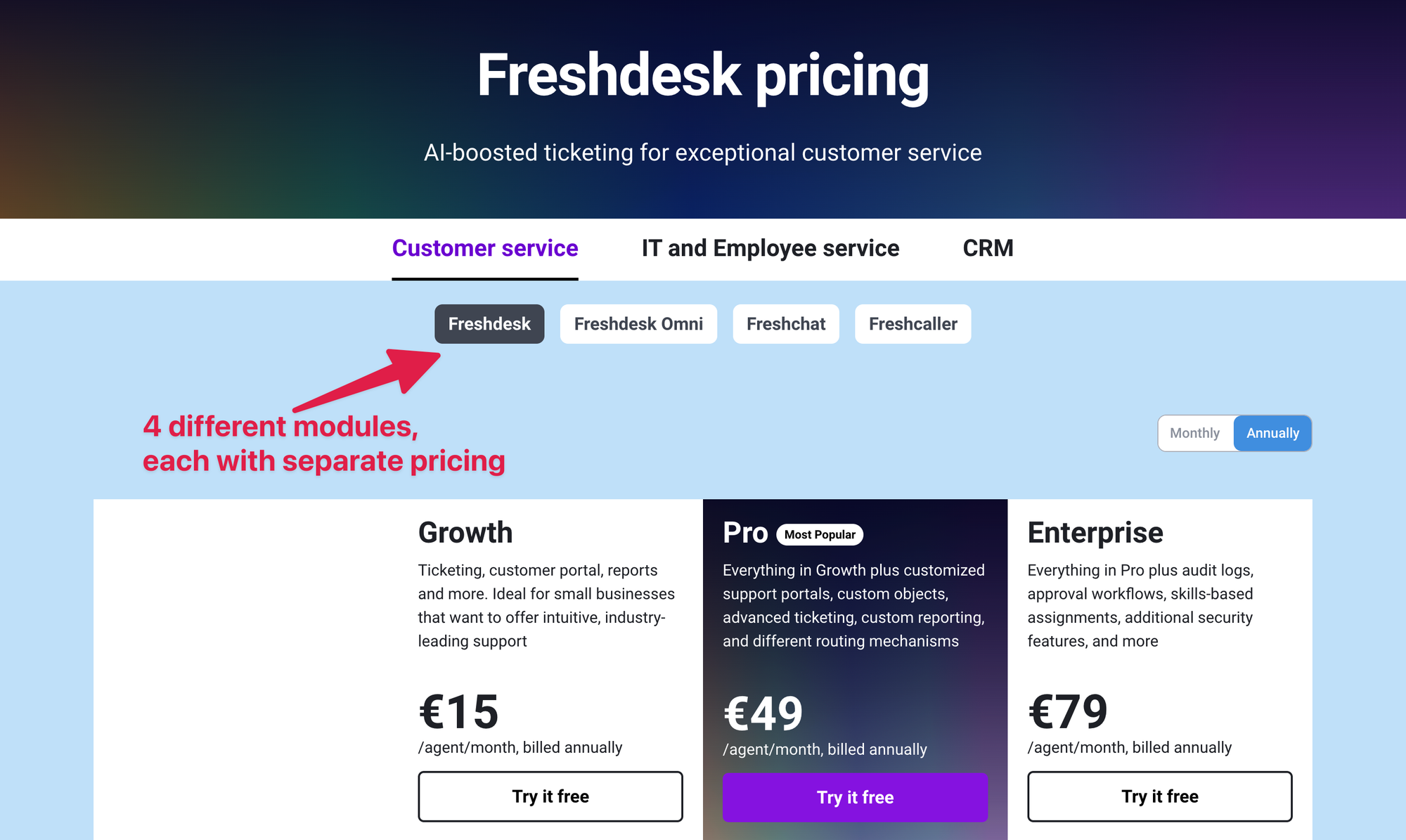
Instead of putting everything in one tool, Freshdesk splits up its product into four parts:
- Freshdesk
- Freshdesk Omni
- Freshchat
- Freshcaller
All of them have separate pricing, and you can mix and match them. The problem is… most teams don't know which ones they actually need. So let's clear things up. 👇
Freshdesk for ticketing pricing plans
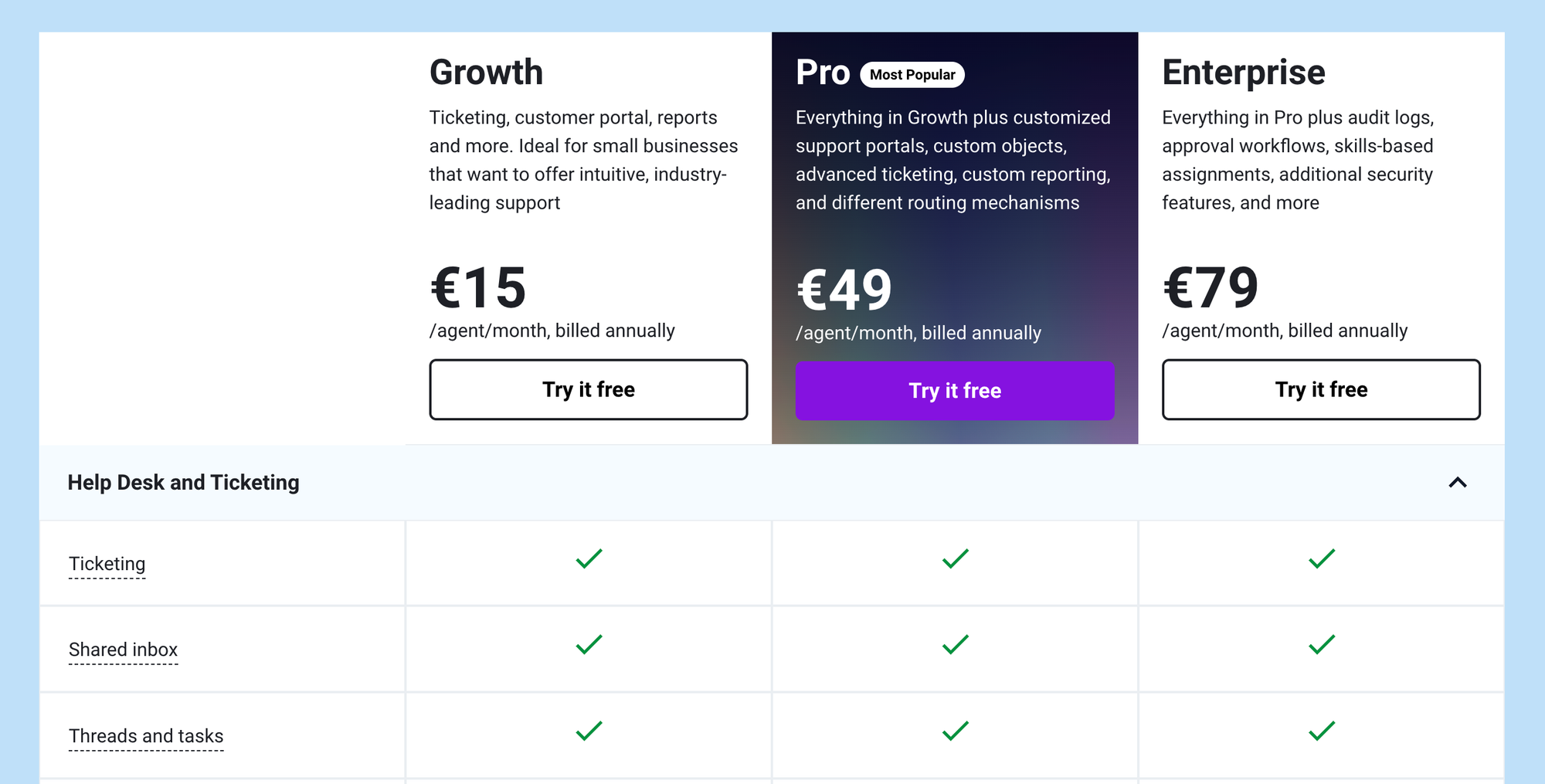
If you only need a traditional ticketing system, Freshdesk's core product is the one you'll be looking at. It covers email support, customer portals, workflows, multilingual help desks, automations, and reporting features.
There's a Free Program ($0 for 1-2 agents, available for 6 months) if you want to test the basics, and you can try any paid plan through a 14-day free trial. Here's what each paid plan actually gives you and who it's best for. 👇
Growth plan ($19/agent/month)
Best for small teams that need a basic ticketing system with simple workflows and reporting. You get:
- Ticketing system, shared inbox, customer portal, and a basic knowledge base
- Threads and tasks for internal collaboration
- Basic automation including event and time-based triggers
- Basic ticket routing
- Standard help desk reporting and dashboards
- Multilingual help desk
- Up to 5,000 collaborators (view-only contributors)
This plan works well for simple setups, but you'll quickly hit limits around routing, SLAs, analytics, multilingual conversations, and AI features.
Pro plan ($55/agent/month)
Best for growing teams that need more advanced routing, multilingual support, and stronger analytics. You get everything in Growth, plus:
- Custom support portals
- Custom objects for modeling things like subscriptions or product versions
- Advanced ticketing and routing including multiple SLA policies, round-robin, and load-balanced assignment
- Business hours across multiple time zones
- Multilingual conversations and a multilingual knowledge base
- Custom dashboards and advanced reporting
- Up to 5,000 collaborators
- First 500 Freddy AI Agent sessions included
This plan covers most mid-sized support needs, but lacks enterprise-level security, a sandbox environment, and skill-based routing, and it still requires purchasing Freddy AI Copilot separately.
Enterprise plan ($89/agent/month)
Best for larger teams that need advanced automation, better security, and complete control over global support operations. You get everything in Pro, plus:
- Audit logs, IP whitelisting, data center selection, and advanced enterprise security
- Skill-based ticket assignment
- Approval workflows
- Sandbox environment for testing workflows before going live
- Custom object analysis and advanced automation
- Tools suited for large-scale, multi-region support setups
This plan has the most depth, but key AI capabilities like Freddy AI Copilot still cost extra, and AI sessions expire monthly, which increases overall cost as usage grows.
Freshdesk Omni pricing plans
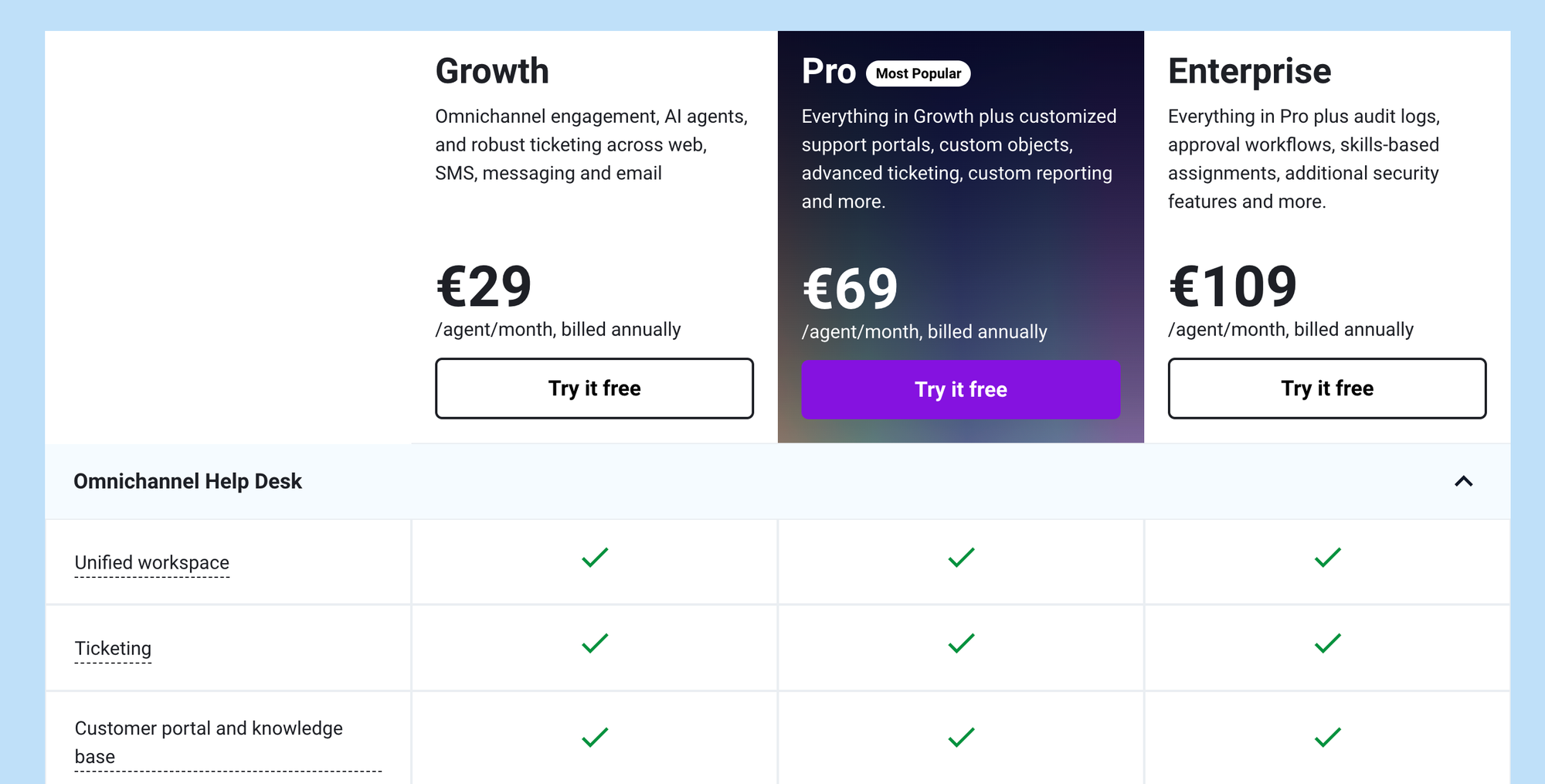
If you need to manage customer conversations across your website, SMS, email, and messaging apps, Freshdesk Omni is the upgrade you'll end up looking at.
It brings all your channels into one inbox, but it's also priced separately from the main Freshdesk ticketing product, so costs stack up fast as your team grows. Freshdesk Omni has three plans:
Freshdesk Omni Growth ($29/agent/month)
Best for small teams that want to manage support across multiple channels without adding complex routing or automation. You get:
- Omnichannel help desk with unified conversations across web, email, SMS, and messaging apps
- Ticketing system with customer portal and knowledge base
- Team inbox, threads, and tasks for internal collaboration
- Standard analytics and real-time dashboards
- Basic administration and security controls
- Freddy AI Agent available as an add-on (first 500 sessions not included)
This plan is fine for basic multichannel support, but lacks multilingual features, advanced routing, custom dashboards, and built-in AI capabilities.
Freshdesk Omni Pro ($79/agent/month)
Best for growing teams that need multilingual support, deeper routing options, and more customization. You get:
- Everything in Growth
- Multilingual conversations and multilingual knowledge base
- Bring-Your-Own-Channel and Bring-Your-Own-Telephony support
- Custom portals and custom objects
- Advanced ticketing and routing including Intelliassign, round-robin, and load-balanced assignment
- Custom real-time dashboards and agent availability dashboards
- Freddy AI Copilot available as an add-on
This plan adds flexibility and smarter routing, but still lacks enterprise-grade security, approval workflows, skill-based assignment, and requires paying extra for Copilot.
Freshdesk Omni Enterprise ($119/agent/month)
Best for larger teams that need strong security, advanced automation, and full control over global omnichannel operations. You get:
- Everything in Pro
- Skill-based ticket assignment
- Approval workflows and advanced routing rules
- Audit logs, domain and IP whitelisting, and stronger security controls
- Agent shift scheduling and out-of-office management
- Flexible multi-level knowledge base hierarchy
This plan unlocks enterprise automation and security, but key AI tools are still sold as add-ons and overall cost climbs quickly as usage and channels scale.
✨ Get Featurebase to automate your support with the fastest AI-enhanced Inbox today →
Freshchat pricing plans
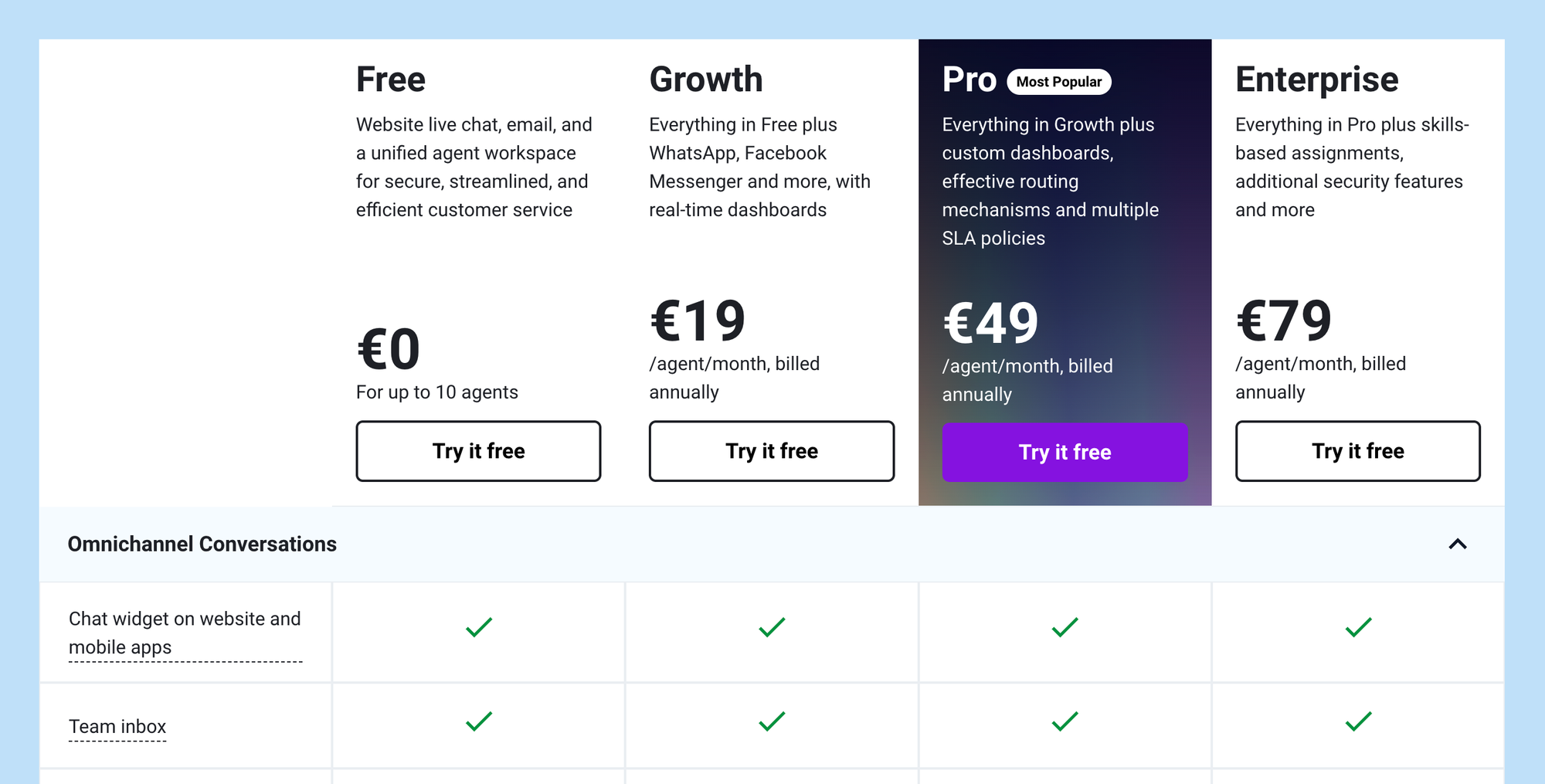
Freshchat adds live chat to your website so you can provide better customer support across another channel. You can cover multiple time zones, even when your team is offline, thanks to Freddy AI.
Freshchat Free plan
Best for small teams that need a simple live chat widget without advanced automation or routing. You get:
- Shared conversational inbox for website chat and the mobile SDK
- Basic support chat features like conversation threads, labels, and simple views
- Basic bot builder with limited bot sessions
- Basic integrations with common platforms
- Support for up to ten agents
This plan works for very lightweight chat support, but lacks automation, routing rules, analytics, and key messaging channels like WhatsApp or SMS.
Freshchat Growth ($19/agent/month)
Best for teams that want multiple messaging channels and starter-level automation. You get everything in Free, plus:
- Additional channels such as WhatsApp, SMS, and Instagram
- Assignment rules and canned responses
- Priority inbox and user segmentation
- Basic automation through simple triggers
- Entry-level dashboards for conversation insights
This plan is a good starting point, but it misses advanced automation, multilingual tools, skill-based routing, and deeper analytics.
Freshchat Pro ($49/agent/month)
Best for scaling teams that need multilingual chat, stronger automation, and better reporting. You get everything in Growth, plus:
- Automatic chat translation for multiple languages
- Advanced automation including auto resolution, improved routing, and skill-based assignment
- Performance analytics and agent availability dashboards
- Roles and permissions for larger teams
- Conversation APIs for deeper product or CRM integrations
This plan covers most mature live chat setups, but lacks enterprise-grade security, SSO, domain controls, and the highest workload limits.
Freshchat Enterprise ($79/agent/month)
Best for large teams that need advanced routing, stronger authentication, and higher limits. You get everything in Pro, plus:
- Full skill-based routing and advanced workflow rules
- Authentication options like JWT or SSO for secure sessions
- Allowed domain controls and enterprise-grade security
- Higher limits for contacts, campaigns, and automation workloads
This plan offers the most control and scale, but costs rise quickly as usage increases, and AI features still require separate add-ons.
Freshcaller pricing plans
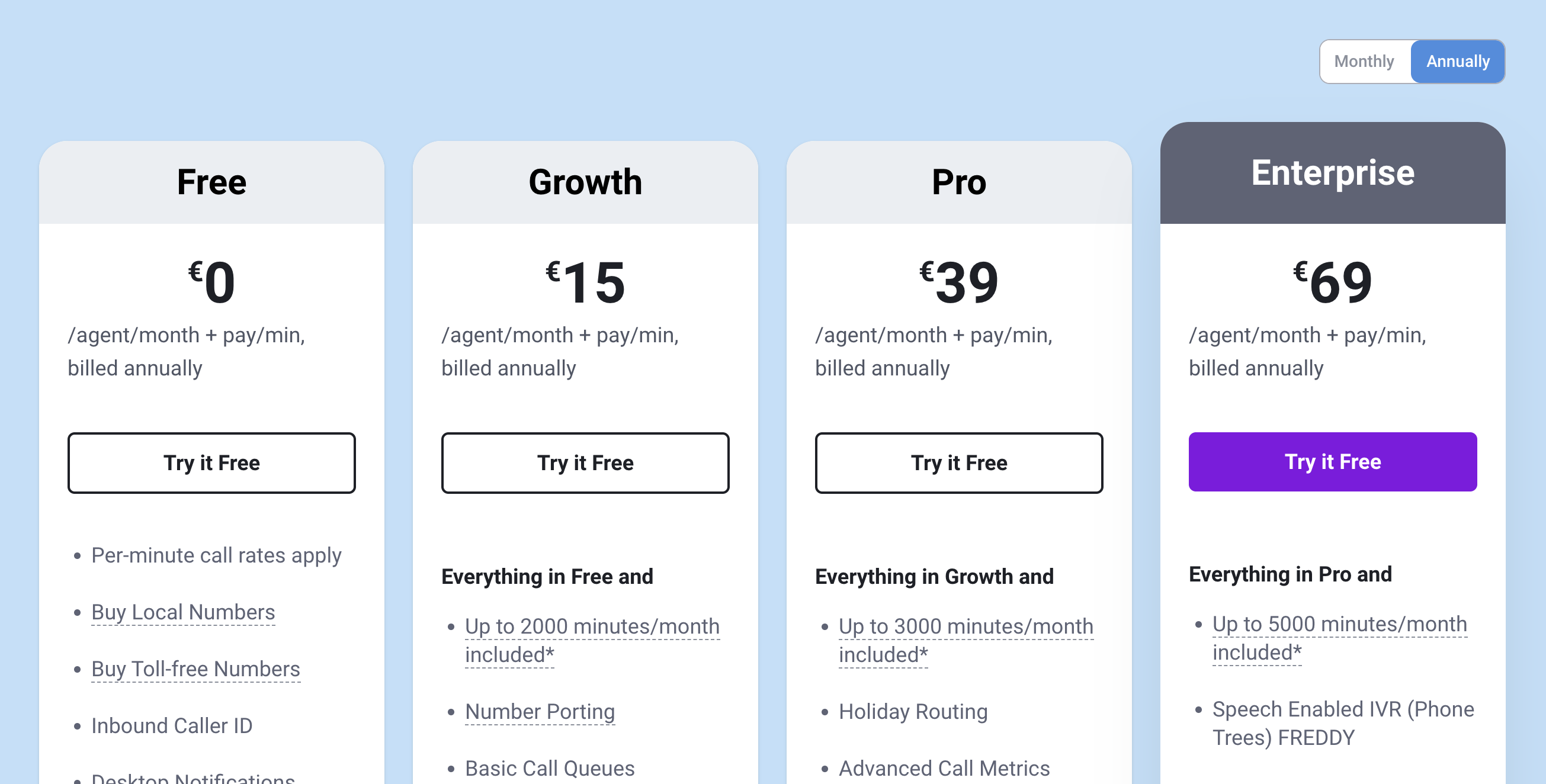
Freshcaller lets your team handle inbound and outbound phone support, purchase local or toll-free numbers, and set up call routing workflows. Each plan includes different calling features, and all of them require purchasing call minutes separately.
Freshcaller Free plan
Best for very small teams that only need basic call handling with a pay-as-you-go setup. You get:
- Pay-as-you-go billing where you only pay for call minutes
- Ability to buy local or toll-free numbers
- Basic call handling including caller ID, call notes, notifications, and custom greetings
- Simple call metrics and call forwarding
- Mobile apps for iOS and Android
This plan is fine for basic phone support, but lacks call queues, recordings, transfers, analytics, and included minutes.
Freshcaller Growth ($15/agent/month)
Best for teams that want standard call center features with included minutes each month. You get everything in Free, plus:
- Monthly allowance of inbound call minutes for your account
- Number porting for bringing existing phone numbers
- Call queues, voicemail, and warm or cold transfers
- Call recording, wait queues, and queue transfers
- Pre-built reports for call performance
This plan adds structure to your phone support, but lacks advanced analytics, holiday routing, IVR menus, and deeper supervisor tools.
Freshcaller Pro ($39/agent/month)
Best for growing call centers that need stronger analytics, IVR, and supervisor controls. You get everything in Growth, plus:
- Larger pool of included inbound minutes
- Holiday routing and more advanced call metrics
- Call monitoring and call barging for supervisors
- IVR menus so callers can navigate to the right team
- Agent availability reports and deeper analytics
- Support for bring-your-own-carrier and SIP connections
- Custom reports and agent extensions
This plan supports most mid-sized call centers, but still lacks speech-enabled capability, voice bots, and the highest automation limits.
Freshcaller Enterprise ($69/agent/month)
Best for large phone support teams that need advanced automation, voice AI, and the highest included minute limits. You get everything in Pro, plus:
- Maximum amount of included inbound minutes
- Speech-enabled IVR and voice bot capabilities
- Service level monitoring and abandoned call tracking
- Advanced automation for high-volume call environments
- More controls for large teams and complex routing setups
This plan offers the most scalability, but costs increase quickly with higher call volumes and usage of voice bot or automation features.
What Freshdesk actually costs for a real team
The per-agent price you see on the pricing page is rarely the price you pay. Once you add agents, AI, and the right module for your channels, the monthly bill looks very different. Here's how it plays out in practice (all figures as of July 2026, annual billing).
A small team on core ticketing. Five agents on the Growth plan is the simplest case:
Total cost: 5 agents × $19 = $95/month
A growing team that wants AI. Freddy AI Copilot is a separate add-on at $29/agent/month, so an AI-assisted mid-sized team adds up fast:
15 agents on Pro × $55 = $825/month Freddy AI Copilot for 10 of those agents × $29 = $290/month Total: $1,115/month - before any extra Freddy AI Agent sessions.
The Omni trap. Many buyers compare the $19 ticketing price, then realize their real workflow (live chat, SMS, social) belongs in Omni, which starts higher:
10 agents on Freshdesk Growth (ticketing) = $190/month 10 agents on Freshdesk Omni Growth = $290/month
That extra $100/month is fine if Omni matches your channel mix, but it's a surprise if you budgeted around the headline ticketing price.
AI sessions on top. Freddy AI Agent includes the first 500 sessions on Pro and Enterprise (once per account), then bills $49 per 100 sessions. A team resolving 2,000 AI sessions in a month would owe:
(2,000 − 500 included) ÷ 100 × $49 = $735/month in AI Agent sessions alone.
Because sessions expire at the end of each billing cycle with no rollover, the meter effectively resets every month. If you want to see how Freshdesk's AI stacks up before committing, it's worth modeling your real session volume first.
What if Freshdesk is too expensive for me?
If Freshdesk's pricing, AI session packs, and add-ons start to push your budget too far, you are definitely not alone. Many teams eventually look for simpler tools with clearer pricing. Here are the best alternatives to consider:
- ✨ Featurebase - Best modern support & feedback platform for fast-growing SaaS
- Zoho Desk - Budget-friendly omnichannel desk with a knowledge base
- Intercom - Messaging-first support with contextual help and automation
- Zendesk - Omnichannel desk with enterprise-ready knowledge base tools
- ProProfs - Simple ticketing with built-in knowledge base and chat
- Tidio - Chat-first support with embedded FAQ and chatbot features
- Help Scout - Email-based help desk with conversational live chat and docs
- Kustomer - Robust customer support software with customer timeline
- Hubspot Service Hub - CRM-native help desk with knowledge base
- Crisp - Messaging-first platform for growing teams
You can read a more in-depth review of the best Freshdesk competitors in our comparison, or see how it stacks up head-to-head in our Freshdesk vs Zendesk breakdown.
So, is Freshdesk worth it?
Freshdesk pricing is very complicated if you want more than the basic ticketing features. There are also hidden costs (such as AI working on a limited number of tickets), and some of the best features are reserved for higher-tier plans. Not only do you have to choose a module that works best for your business, but you also have to choose one of the Freshdesk plans in each one to make sure it meets your needs. If you want a deeper look at the product itself, our full Freshdesk review goes beyond the price tag.
Featurebase is a modern AI customer support platform for product-led SaaS. It combines AI-powered support, a help center, and feedback management in one place, so you get all the essentials of a legacy help desk, plus a mobile app and product updates, in a much more affordable package. It's loved by thousands of support teams from companies like Lovable, Polymarket, and Raycast. 💫
Top features:
- Omnichannel inbox – Manage live chat, email, and Slack conversations from one AI-powered view
- Fibi AI Agent – Resolve customer issues on autopilot & run custom actions like trial extensions and refunds
- Help center with AI search – Provide instant, multilingual self-serve answers
- Workflows & automations – Auto-assign tickets, route conversations, collect customer data, and more
- AI Copilot – Help your agents answer customers faster with AI Copilot that uses your internal knowledge
- Multi-brand support – Manage multiple Help Centers and live chats from a single workspace
- Automatic AI translations – Automatically translate all messages and help articles to your customers' native language
- Service Level Agreements – Track SLAs to make sure your team responds to customers on time, every time
- Mobile app – Respond to customers, receive notifications, and unblock users on the go
- Feedback & roadmap tools – Collect feature requests and close the loop with updates
- Product updates – Publish release notes with a changelog page, in-app widget, and emails
- Integrations – Connects with Slack, Linear, Jira, HubSpot, and more
Unlike Freshdesk's four separately-priced modules, Featurebase comes with a Free plan, with paid plans starting at $29/seat/month and $0.29 per AI resolution, so there's no downside to trying it out. 👇
✨ Automate your support with the fastest AI-enhanced Inbox today →
FAQs
How much does Freshdesk really cost per agent?
Core Freshdesk ticketing runs from $19/agent/month (Growth) to $89/agent/month (Enterprise) on annual billing as of July 2026. Real costs are usually higher, because most teams add Freddy AI Copilot ($29/agent/month), buy extra AI Agent sessions, or move up to Freshdesk Omni for multichannel support. Budget for the module and add-ons you actually need, not just the headline Growth price.
Does Freshdesk have a free plan?
Yes, but it's time-limited. Freshdesk's Free Program gives 1-2 agents core helpdesk features (ticketing, a knowledge base, and pre-built reports) at $0 for 6 months, and no credit card is required. There's also a 14-day free trial of the Enterprise plan if you want to test the higher-tier features before you commit.
How much do Freddy AI Copilot and AI Agent sessions cost?
Freddy AI Copilot is a paid add-on at $29/agent/month on annual billing, and you can assign it to as many agents as you like. Freddy AI Agent is session-based: the Pro and Enterprise plans include the first 500 sessions once per account, and after that you pay $49 per 100 sessions. Sessions expire at the end of your billing cycle and don't roll over, so heavy AI usage can raise your bill well beyond the per-agent price.
Can I upgrade or downgrade my Freshdesk plan?
Yes. You can upgrade your subscription instantly at any time. Downgrades and cancellations only take effect at the end of your current term, and you manage them from the billing area of your Freshdesk account.
Does Freshdesk charge cancellation fees?
No. Freshdesk is a pay-as-you-go service with no cancellation fees, so you can cancel whenever you want. The cancellation simply takes effect at the end of your current billing term rather than immediately.
Does Freshdesk offer discounts or annual savings?
Freshdesk does not run public discounts or startup programs. The main guaranteed saving is annual billing, which is roughly 15-20% cheaper than paying monthly. Larger discounts generally require negotiating directly with sales, especially for bigger Enterprise deployments.