Blog Customer ServiceWhat Is Proactive Customer Service? Examples + Strategies
What Is Proactive Customer Service? Examples + Strategies
Proactive customer service means anticipating issues before customers reach out. Real examples, AI tactics, and a playbook for getting started.



✨ Automate your support with the fastest AI-enhanced Inbox today →
Most support teams think they're proactive. Most customers disagree. Salesforce's 2024 research found that 61% of service professionals say their organization addresses issues proactively, while only 33% of customers actually feel that way.
That gap is where churn, refund requests, and bad reviews live. This guide breaks down what proactive customer service really means, 8 examples that work, the strategy and tech that make it happen, and the pitfalls that quietly kill most proactive programs. 👇
Key takeaways:
- Proactive customer service anticipates problems and reaches out before the customer files a ticket.
- The biggest win isn't ticket deflection. It's trust. Customers who get a heads-up before something breaks rate the company higher than those whose issues are resolved fast.
- Most "proactive" programs fail for the same reason: they ship one campaign and call it done. Real proactive support is a system of triggers, not a single email.
- AI now does the heavy lifting. Predictive analytics flags churn risk, sentiment detection catches frustrated conversations early, and AI agents resolve repeat issues without a human.
- Start narrow. One trigger (e.g. shipping delays), one template, one channel. Expand from there.
- Featurebase✨ gives small support teams an AI agent, multilingual help center, and changelog in one place. The building blocks of proactive support without stitching 5 tools together.
What is proactive customer service?
Proactive customer service is the practice of identifying and resolving customer issues before customers contact support. Instead of waiting for tickets, you anticipate problems using product data, customer signals, and known failure modes, then reach out with a fix, a workaround, or relevant information.
A reactive support team handles tickets after they arrive. A proactive support team prevents the ticket from being filed in the first place, or beats the customer to the message when something goes wrong.
Think of it as the difference between a waiter who shows up after you've flagged them down versus one who tops up your water as soon as the glass is low. The proactive waiter doesn't work harder. They work earlier. That mindset shift is the foundation of any strong customer service philosophy.
Proactive vs. reactive customer service
Both proactive and reactive support are necessary. Reactive support handles tickets after they arrive: a one-off bug, a billing question, a complex edge case. Proactive support handles the predictable: shipping delays, scheduled maintenance, repeat questions, renewals, onboarding stumbles.
The mistake is treating them as an either-or choice. Strong support teams run both, and use the proactive layer to reduce ticket volume so reactive support has the bandwidth to do its job well.
| Aspect | Reactive customer service | Proactive customer service |
|---|---|---|
| Trigger | Customer contacts you | You detect a signal or schedule |
| Customer mindset | Already frustrated | Neutral or curious |
| Goal | Resolve a known issue | Prevent or anticipate one |
| Typical channel | Email, chat, phone | In-app message, email, SMS, status page |
| Effort per outcome | High (one-to-one) | Low (one-to-many) |
| Measured by | First response time, CSAT, AHT | Deflection rate, churn reduction, NPS lift |
Why proactive customer service matters now
Customer expectations have shifted faster than most support orgs have. Salesforce's 2024 service research, a survey of 5,500+ service professionals across 30 countries, found that 61% of service teams say they handle issues proactively, but only 33% of customers agree (as of July 2026, it's still the figure Salesforce cites). That perception gap is the proactive opportunity.
Three shifts have made proactive support both cheaper and more valuable in the last few years:
- AI handles signal detection at scale: predictive models can flag churn risk, frustrated sentiment, and product friction from raw conversation data in real time. What used to need a dedicated analyst now runs in the background.
- Customers reward the heads-up: a heads-up about a delay, an outage, or an upcoming charge consistently outperforms a fast apology after the fact. The cheapest CSAT win in support is telling the customer something is wrong before they find out for themselves.
- Reactive support is expensive: every prevented ticket is one your agents don't need to handle. Assume a mid-range SaaS cost of, say, $5-$15 per ticket, and a single proactive campaign that deflects 1,000 tickets a quarter pays for itself many times over.
Benefits of proactive customer service
Reaching out before the customer does changes the economics of support. The payoff shows up in four places most teams care about:
- Lower ticket volume: every issue you prevent or pre-empt is a ticket your agents never touch, which frees reactive support to spend real time on the hard cases instead of drowning in repeat questions.
- Higher retention and loyalty: a heads-up before something breaks signals that you're paying attention. Customers who feel anticipated stick around longer, and retention is far cheaper than winning back a churned account.
- Stronger satisfaction scores: catching a problem early and owning it turns a would-be complaint into a trust moment, which is why proactive outreach tends to lift CSAT rather than just deflect contacts.
- A genuine competitive advantage: most companies still operate in reactive mode, so consistently getting ahead of issues is a differentiator customers notice and remember, especially in crowded markets.
The through-line is trust. Proactive support isn't only about doing less reactive work. It's about showing customers you understand their experience well enough to act on it first.
8 proactive customer service examples
The examples below are grouped by trigger type: the signal that tells your system it's time to reach out. Most teams already have the data. They just don't act on it.
1. Shipping or delivery delay notifications
When an order misses its expected ship date by more than 24 hours, send an email or SMS with the new ETA, an apology, and a small credit. The customer learns about the delay from you, not from a tracking page that's gone stale. This is the highest-ROI proactive play in ecommerce.
2. Service outage and incident comms
The moment monitoring flags a degraded service or full outage, post to a status page, send a banner inside the product, and email affected accounts. Don't wait until support tickets pile up. Companies with mature status-page workflows can sharply cut the flood of outage-driven tickets before it starts.
3. Onboarding nudges based on activation gaps
If a new user hasn't completed a key activation step within their first week (created their first project, invited a teammate, connected an integration), trigger a contextual in-app message and a follow-up email with the next step. Most onboarding churn happens silently. Proactive nudges surface it.
4. Renewal and billing pre-emption
Send a renewal reminder 30 days before a contract auto-renews, with the upcoming charge clearly stated. Same for credit cards about to expire. Customers hate surprise charges more than the charge itself, so pre-empting them prevents chargebacks and angry support tickets in equal measure.
5. Product update and changelog announcements
When you ship a feature customers have requested or a fix to a known bug, close the loop. An in-app changelog widget, a release-notes page, and an email to affected users turn "they finally fixed it" frustration into "they actually listened" loyalty.
6. Repeat-contact pattern detection
When a customer messages you twice about the same issue, escalate them automatically and reach out before they message a third time. Repeat contact is the strongest churn signal in support. Most teams ignore it.
7. Sentiment-triggered escalation
When live-chat or email sentiment turns sharply negative mid-conversation, route the thread to a senior agent or trigger a manager review. Catching a frustrated tone in conversation 2 prevents the angry tweet that comes after conversation 3.
8. Personalized recommendations and upsells
When a customer's usage data shows they're hitting a plan limit, are using a feature that pairs naturally with a paid add-on, or are repeatedly searching the help center for something the next tier solves, send a relevant nudge. Done well, this is service, not sales. The customer gets the right tool for the job they're already trying to do.
How to build a proactive customer service strategy
A proactive program isn't a campaign. It's a system of triggers, templates, and feedback loops. Here's the practical sequence to build one without overwhelming a small team.
- Pick one trigger and one outcome: don't try to launch 6 proactive workflows in the same quarter. Start with the single highest-volume reactive ticket type your team handles (often shipping delays, billing questions, or onboarding stumbles), and build the proactive workflow that prevents it.
- Define the signal: what event in your data tells you a customer is about to need help? It might be a status code, a usage threshold, a date range, or a behavioural pattern. If the signal isn't measurable, you can't automate against it.
- Write the message: keep it short, lead with what happened, give the customer a next step, and offer a way out (a reply path, an opt-out, a number to call). Proactive messages that read like marketing fail. Ones that read like a heads-up from a human work.
- Pick the channel: in-app messages for active users, email for inactive users, SMS for time-sensitive issues, status pages for outages. Don't default to email for everything.
- Measure two things at once: track the outcome (did tickets drop?) and the customer reaction (did CSAT hold or improve?) using the customer service metrics that fit each workflow. Proactive workflows that deflect tickets but tank CSAT are usually too pushy, irrelevant, or both.
- Iterate before you expand: run the workflow for 4-6 weeks, look at the data, fix what's broken, then build the next trigger. A team running 5 well-tuned proactive workflows outperforms one running 20 sloppy ones.
The fear most teams have is that proactive outreach will feel intrusive. The data says otherwise. A Gartner survey found that two-thirds of customers contact a brand's customer service team after receiving proactive outreach. Engagement, not avoidance, is the dominant response.
The technology that powers proactive customer service
A proactive program needs a few basic pieces working together:
- Signals: product usage, support conversations, billing events, customer feedback, or help center searches
- Workflows: rules or automations that decide what should happen next
- Channels: email, in-app messages, chat, SMS, changelogs, or status pages
- Measurement: ticket volume, CSAT, reply rates, deflection, and churn
AI makes this easier because it can spot patterns that would be hard to catch manually:
- Predictive analytics can flag accounts that look likely to churn.
- Sentiment analysis can catch frustrated conversations earlier.
- AI agents can answer common questions before they become tickets.
- Smart routing can send conversational support to the right person faster.
- AI summaries can turn long threads into useful context for future workflows.
The main thing is not having the data trapped in separate tools. That's where customer service database software comes in. If your support inbox, help center, changelog, and feedback system all live apart from each other, proactive support becomes harder to manage.
Featurebase helps by keeping more of that work in one place:
- Omnichannel inbox – Manage live chat, email, and Slack conversations from one AI-powered view.
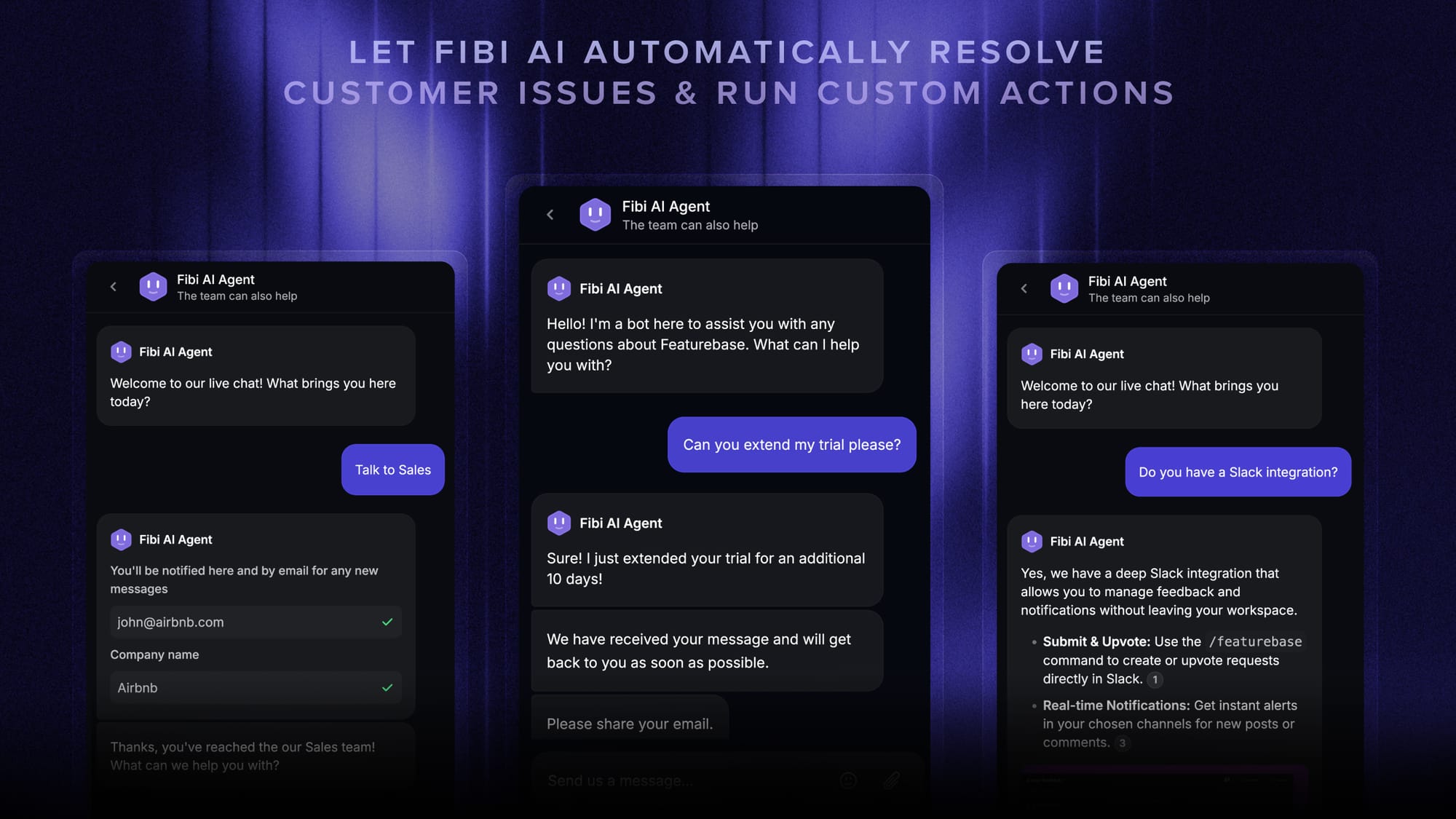
- Fibi AI Agent – Resolve common questions on autopilot and run custom actions like trial extensions and refunds.
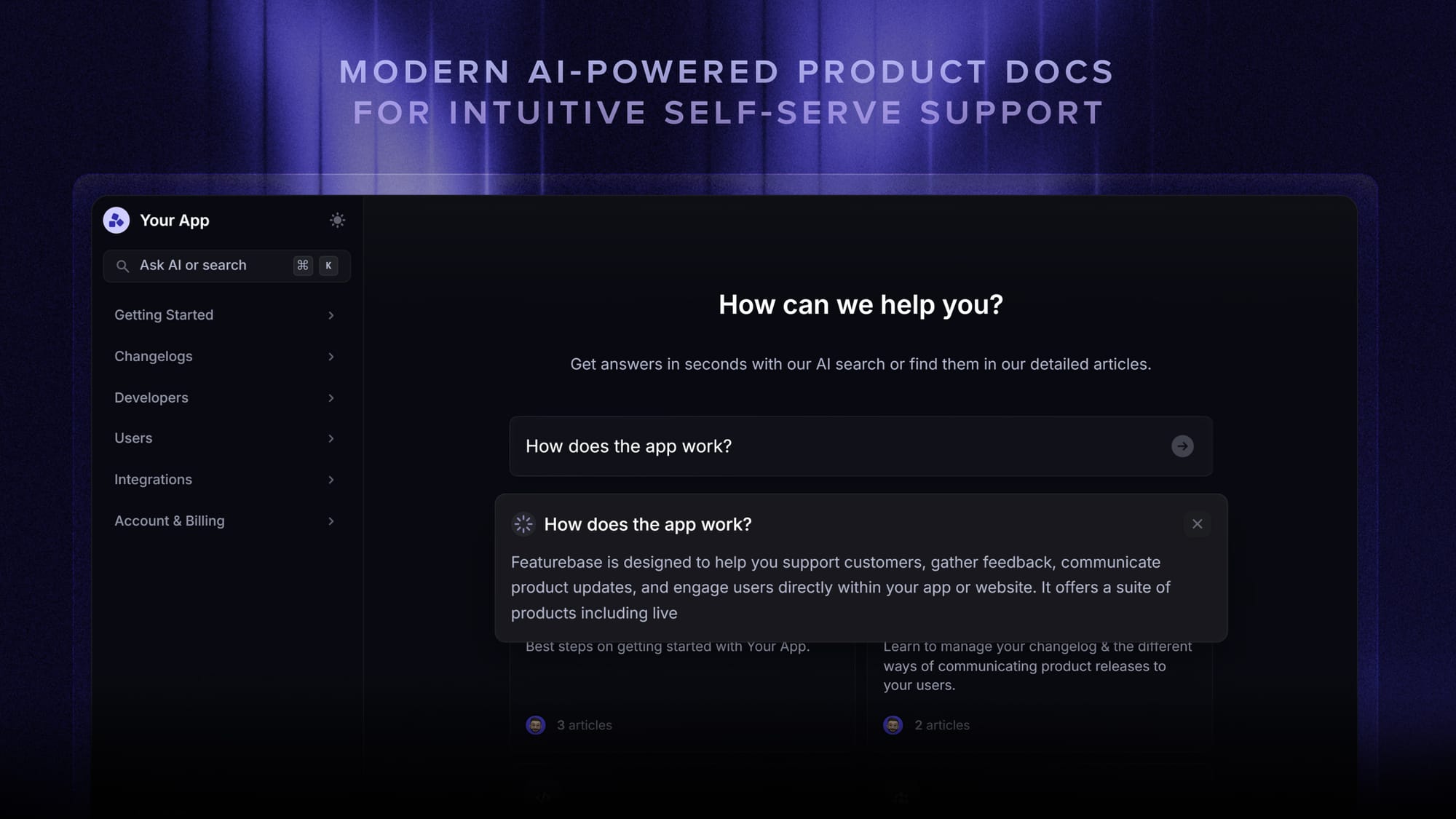
- Help center with AI search – Give customers instant, multilingual self-serve answers.
- Product updates – Announce fixes and improvements with a changelog page, in-app widget, and emails.
- Feedback & roadmap tools – Understand what customers keep asking for and close the loop.
You can still start small. Pick one recurring issue, connect the signal to a workflow, and measure whether it reduces tickets or improves the customer experience.
Common pitfalls (and how to avoid them)
Most proactive programs don't fail because the idea is wrong. They fail because of operational mistakes that compound silently.
- Treating it as a one-off campaign: a single broadcast email about an outage is a campaign, not a program. Proactive support is a system of always-on triggers. Build the workflow, not the moment.
- Sending irrelevant messages at scale: the fastest way to teach customers to ignore your proactive emails is to send 3 a week that don't apply to them. Segment by signal, cap frequency, and let users opt out.
- No feedback loop: if you don't measure CSAT and reply rate on every proactive workflow, you can't tell which ones are working. Set up the measurement before you launch the workflow.
- Owning it on a single team: proactive support touches product, engineering, marketing, and CX. A program that lives entirely inside the support team misses the signals only product and engineering can see. Cross-functional ownership from day one.
- Confusing automation with proactivity: an autoresponder isn't proactive. Sending the same message to everyone isn't proactive. Proactive means the right message, to the right customer, at the right moment, based on a signal. Without the signal piece, you're just doing volume.

Get the best customer service tool
Automatically resolve 70% of customer requests & cut down manual support loads
Get started with proactive customer service today
The teams that get proactive customer service right don't try to do everything at once. They pick one signal, build one workflow, measure honestly, and expand. The proactive gap exists because most companies skip the measurement step and assume the workflows are working.
Featurebase is a modern AI customer support platform built for product-led SaaS teams. It brings an omnichannel inbox, the Fibi AI Agent, an AI-powered help center, public changelog, and feedback collection into one place, giving you the 4 building blocks every proactive support program needs without the 5-tool stack.
It comes with a Free plan, paid plans starting at $29/seat/month with $0.29 per AI resolution, and an onboarding that takes minutes. No credit card required, so there's no downside to trying it. 👇
✨ Automate your support with the fastest AI-enhanced Inbox today →

FAQs
What is an example of proactive customer service?
A classic example: a customer's order is delayed in transit. Instead of waiting for them to ask "where's my package?", you detect the delay automatically, email them the new ETA with an apology, and offer a 10% credit on their next order. The customer learns about the problem from you, not from a tracking page that's gone stale, which turns a potential complaint into a loyalty moment.
How do you measure the success of proactive customer service?
Track 4 metrics together: ticket deflection rate (is the workflow preventing the ticket it was designed to prevent?), CSAT delta on customers who received the proactive message (did it feel helpful or pushy?), repeat-contact rate (did the underlying issue actually get resolved?), and churn rate on the affected cohort. A workflow that wins on deflection but loses on CSAT usually isn't proactive, it's intrusive.
What's the difference between proactive and preventive customer service?
Preventive customer service is one type of proactive customer service. Preventive focuses specifically on stopping known failure modes, like flagging a credit card before it expires. Proactive is the broader category and includes preventive plus anticipation (predicting needs from behaviour), education (onboarding nudges, changelogs), and timely communication (status updates, outage alerts). All preventive support is proactive, but not all proactive support is preventive.
How can AI help with proactive customer service?
AI does 4 jobs well in a proactive program: it scores accounts for churn risk using historical usage and support data, reads live conversations for sentiment and flags ones trending negative early, resolves repeat questions on autopilot via AI agents, and summarizes long conversation threads into structured records you can mine for new trigger patterns. None of this requires building from scratch in 2026, since modern support platforms ship these capabilities out of the box.
How do you scale proactive customer service for a small team?
Start with one trigger that maps to your single highest-volume reactive ticket type, write one template, pick one channel, and automate the send. Measure for 4-6 weeks, then build the next trigger on the same infrastructure. The mistake small teams make is launching 5 proactive workflows in week one and burning out their capacity to maintain any of them. Five well-tuned workflows beat 20 sloppy ones every time.
Does proactive customer service annoy customers?
Only when it's irrelevant, too frequent, or feels like marketing. A heads-up about a real issue the customer is about to experience is welcomed in most studies. The fix when it does feel intrusive: tighter segmentation (only the customers actually affected by the signal), a frequency cap (one proactive message per week is plenty for most users), and a clear opt-out path on every message. Relevance and restraint turn the message into a heads-up, not a nag.