Blog Customer ServiceEcommerce Chatbot Use Cases: 8 Ways to Boost Sales
Ecommerce Chatbot Use Cases: 8 Ways to Boost Sales
Discover 8 real ecommerce chatbot use cases, from cart recovery to product recommendations, with a shopper example for each and tips to launch one.



✨ Automate your support with the fastest AI-enhanced Inbox today →
Most online stores still treat chatbots as glorified FAQ pages. That's a costly misread.
Modern ecommerce chatbots recover abandoned carts, recommend products, qualify leads, and run round-the-clock support without adding headcount. They touch nearly every step of the shopping journey.
Below are the 8 highest-impact ecommerce chatbot use cases, each with a real shopper example, so you can spot which ones your store is leaving on the table. 👇
Key takeaways:
- Ecommerce chatbots now span the full shopping journey: product discovery, checkout, and post-purchase support.
- The highest-ROI use cases are cart recovery, personalized recommendations, and answering questions 24/7.
- AI chatbots handle unlimited conversations at once and hand off to a human agent when a query gets complex.
- Feedback collection is the most underused use case. Every chatbot conversation is a source of zero-party data.
- Featurebase✨ combines an AI support agent, help center, and feedback tools, so your chatbot resolves questions and captures insights in one place.
- The right chatbot depends on your stack, budget, and how much you need it to act rather than just answer.
What is an ecommerce chatbot?
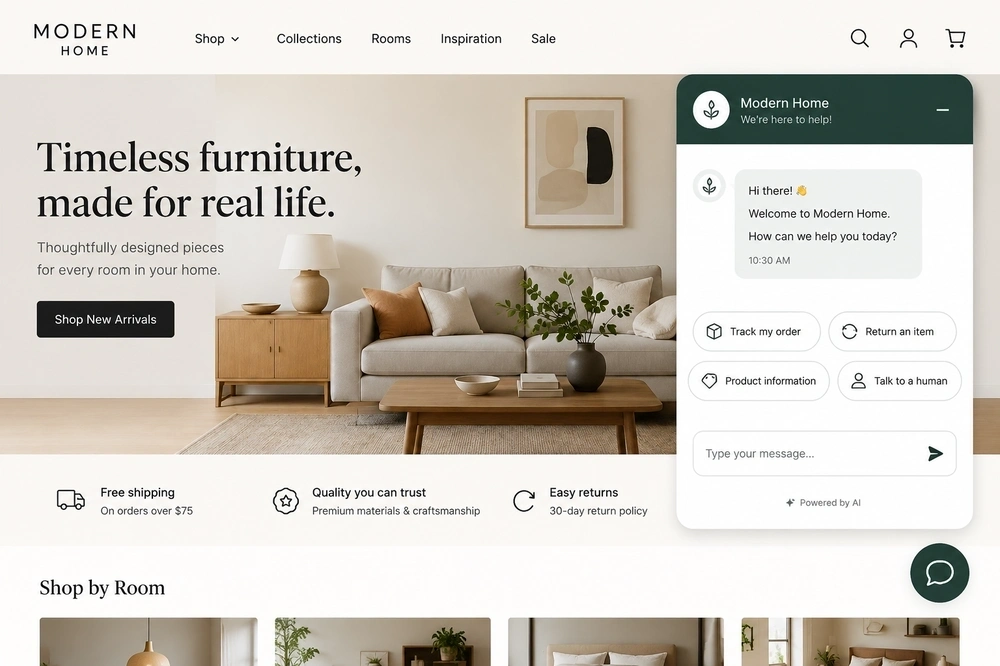
An ecommerce chatbot is a software tool that talks with shoppers in a chat window and handles common online-store tasks automatically.
It sits on your website, mobile app, or messaging channels like WhatsApp and Instagram, and answers questions, recommends products, tracks orders, and recovers carts without a human agent on standby.
Older chatbots ran on rigid decision trees and could only follow preset menus. Today's AI chatbots use natural language processing and large language models to understand what a shopper actually means, even with typos or vague wording, and respond in real time. That shift is what turned chatbots from support cost-savers into revenue drivers, and it's why retail chatbots are now standard across online stores.
8 ecommerce chatbot use cases that drive real results
Here are the 8 ways online stores get the most out of chatbots today. Each one maps to a specific moment in the customer journey, from the first question to the post-purchase follow-up.
1. Answer customer questions around the clock
The most common use case is also the most valuable: instant answers to routine questions, at any hour.
Shipping timelines, return policies, sizing, stock, order status. These questions make up the bulk of support volume, and a chatbot can resolve them in seconds without a shopper waiting for an agent. That matters because a customer with an unanswered question at 11 PM is a customer who leaves.
The automation ceiling here keeps rising. Gartner predicts that by 2029, agentic AI will autonomously resolve 80% of common customer service issues without human intervention, cutting operational costs by 30%.
Example: a shopper browsing a clothing store asks, "How long does standard shipping take to Texas?" The chatbot pulls the live delivery estimate for their location and answers instantly, so they finish checkout instead of closing the tab.
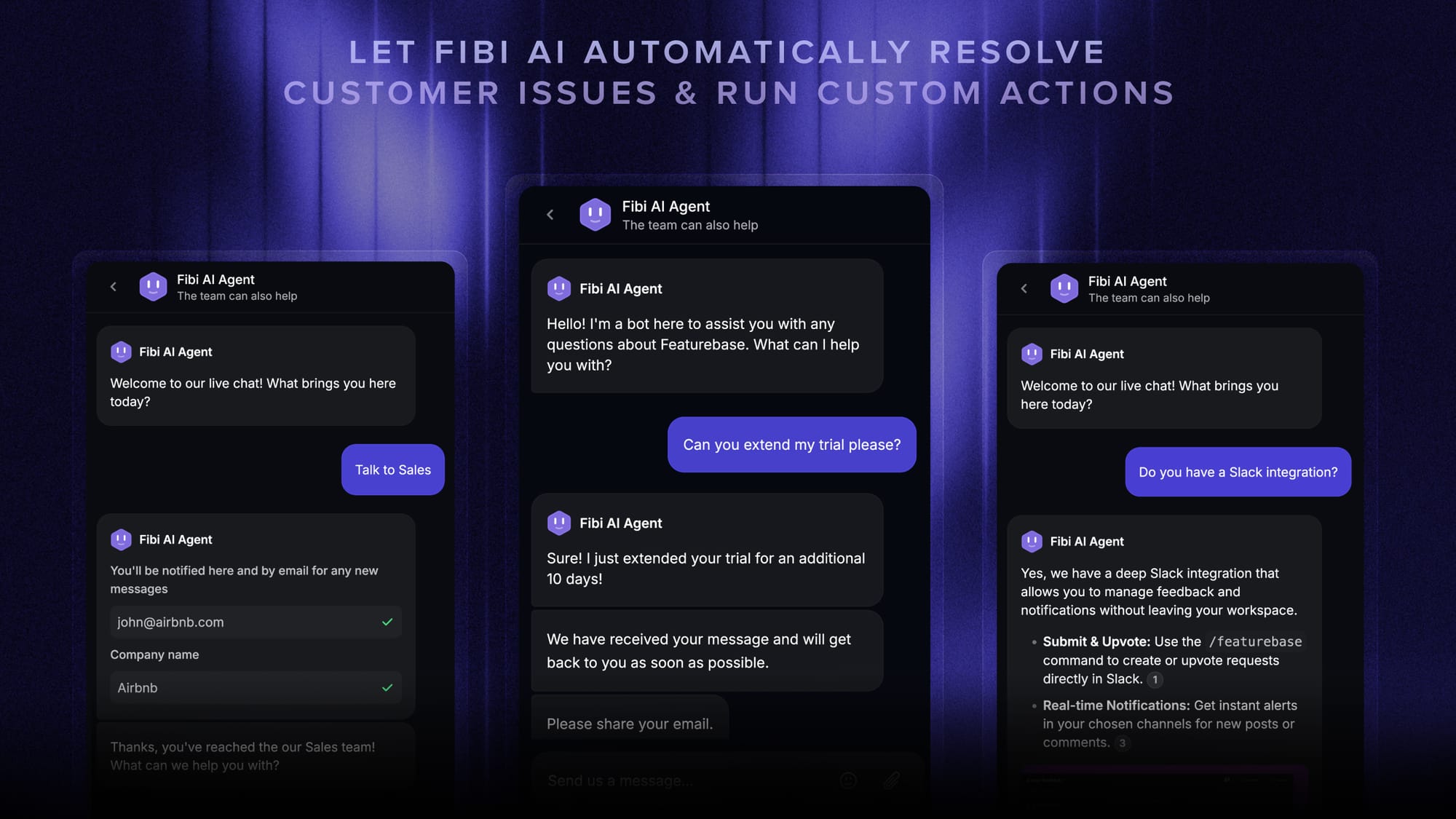
A well-built FAQ chatbot deflects the repetitive questions so your team can focus on the complex ones. With Featurebase, the Fibi AI Agent resolves these queries on autopilot, while a help center with AI search gives shoppers instant self-serve answers in their own language.
2. Guide product discovery with personalized recommendations
Chatbots act as a personal shopping assistant, steering shoppers to the right product through a short back-and-forth.
Instead of leaving customers to dig through a huge catalog, the bot asks a few clarifying questions about their needs, budget, or style, then narrows the options. This replicates the in-store experience of a helpful sales associate, and it pays off. McKinsey found that 71% of consumers expect companies to deliver personalized interactions, and 76% get frustrated when they don't.
Example: a shopper on an outdoor gear site types, "I need a tent for a rainy weekend for two people." The chatbot asks about pack weight and budget, then suggests 2 waterproof models that fit, complete with the key differences between them.
Good product-discovery flows shorten the path to purchase and lift conversion by removing the friction of endless scrolling.
3. Recover abandoned carts before they're lost
Cart abandonment is the single biggest leak in ecommerce, and chatbots are one of the few tools that can plug it in real time.
The average documented online cart abandonment rate is 70.22%, according to Baymard Institute. A chatbot can step in the moment a shopper hesitates at checkout or moves to exit, answering a last-minute question or offering a small incentive to close the sale.
It also works after the fact. A bot connected to your messaging channels can follow up with a reminder or a discount code to bring a shopper back to a cart they left behind.
Example: a customer stalls on the payment page. The chatbot pops up with, "Questions about our return policy before you check out?" and offers free shipping, easing the doubt that was about to cost the sale.
4. Handle order tracking, returns, and post-purchase support
Post-purchase is where chatbots quietly save the most support hours. Order status, delivery updates, returns, and exchanges are simple, repetitive tasks that don't need a human.
Rather than digging through email confirmations, a shopper just asks the bot. When it's connected to your order system, the chatbot can pull real-time status and even start a return or update account details in the same conversation.
Example: a customer messages "Where's my order?" and the chatbot returns the live tracking status in seconds, then offers to email them updates until it arrives.
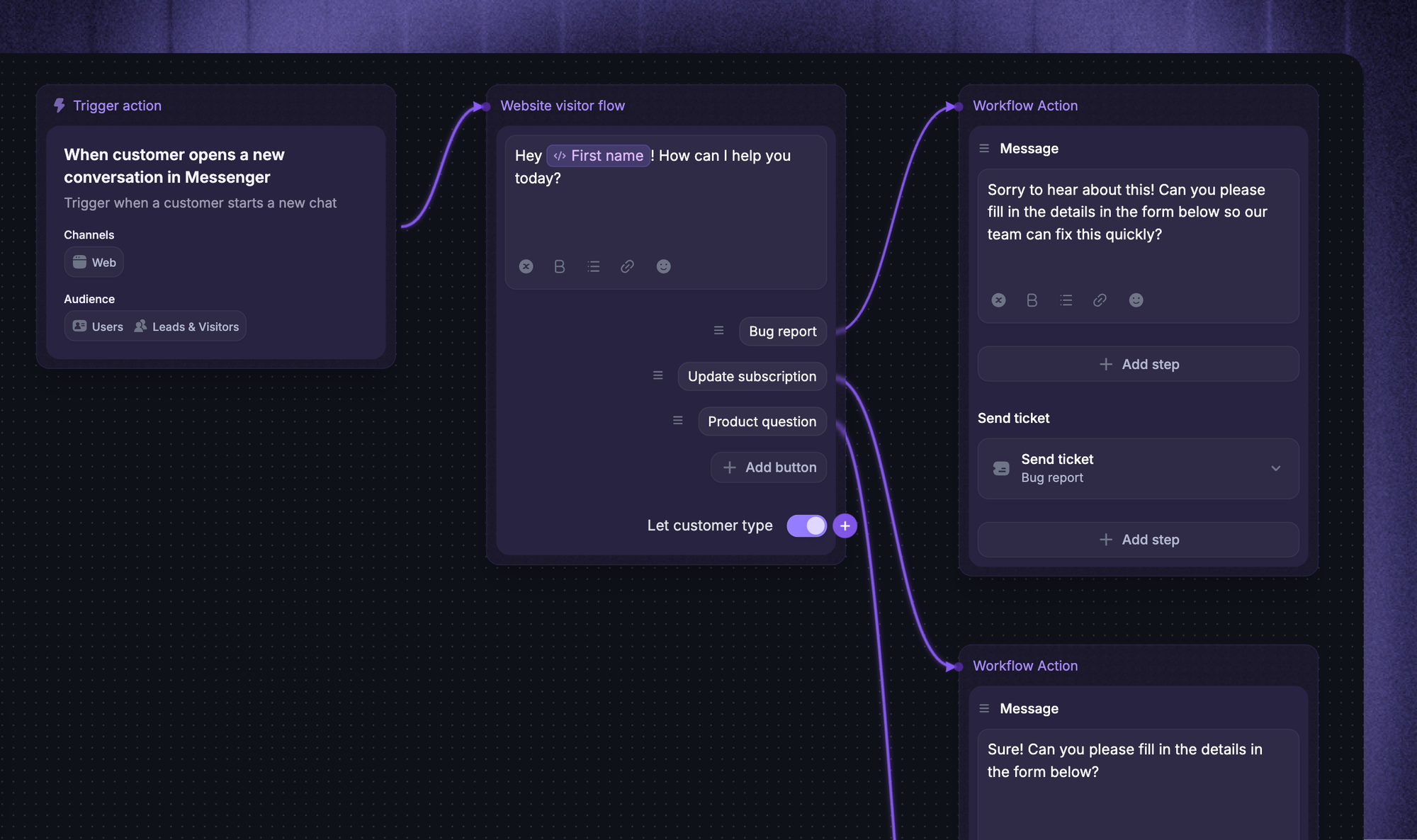
This keeps buyers informed, cuts down on "where is my order" tickets, and turns the post-purchase window into another chance to build loyalty rather than frustration.
5. Promote offers and personalized discounts
Chatbots are a direct, in-the-moment channel for promotions, and they convert better than a static banner because the timing is personal.
A bot can surface a time-sensitive offer, share a discount code, or highlight a product based on what the shopper is browsing right now. Because an AI chatbot draws on real-time behavior and customer data, the offer is relevant instead of generic.
Example: a returning shopper adds one item to their cart. The chatbot notes they're one product away from a free-shipping threshold and nudges, "Add one more item and shipping's on us."
Used well, this keeps shoppers on your site and discourages them from clicking away to compare prices elsewhere.
6. Upsell and cross-sell in the moment
Beyond the initial sale, chatbots spot natural opportunities to increase order value through relevant add-ons.
When a shopper adds a product to their cart, the bot can suggest complementary items or an upgrade, the same way a good salesperson would. Because it draws on browsing history and purchase data, the suggestions feel helpful rather than pushy.
Example: a customer buys a camera. The chatbot follows up with, "Most people pair this with a 64GB memory card and a case. Want to add them?"
The key is restraint. One well-timed, relevant suggestion lifts average order value, while a wall of upsells just annoys the buyer.
7. Capture and qualify leads
For higher-consideration or B2B ecommerce, lead generation chatbots double as an always-on lead capture and qualification engine.
A bot greets a visitor, collects details like name and email, and asks a few qualifying questions before routing the conversation to sales or booking a demo. This means your team spends time on leads that are actually a fit. Chatbots can qualify leads using a simple set of questions your sales team already asks.
Most teams anchor qualification to a framework. The classic is BANT:
- Budget - the lead has the money to buy
- Authority - the lead can make the decision
- Need - your product solves a real problem for them
- Timeline - they plan to buy soon enough to matter
Example: a visitor to a SaaS store starts a chat. The bot asks about company size and use case, then books a demo with the right rep based on the answers.
With Featurebase, you can capture that lead context directly inside the chatbot conversation and sync it to the tools your team already uses.
8. Collect customer feedback and zero-party data
The most underused use case: every chatbot conversation is a chance to learn what customers actually want.
Chatbots can run quick surveys, polls, or rating prompts during or after the shopping experience, gathering opinions that would otherwise go uncaptured. That's zero-party data, information customers share with you directly, and it's some of the most valuable insight a store can collect.
Example: after resolving a return, the chatbot asks, "How was that experience?" with a 1-to-5 rating, flagging any low scores for the team to review.
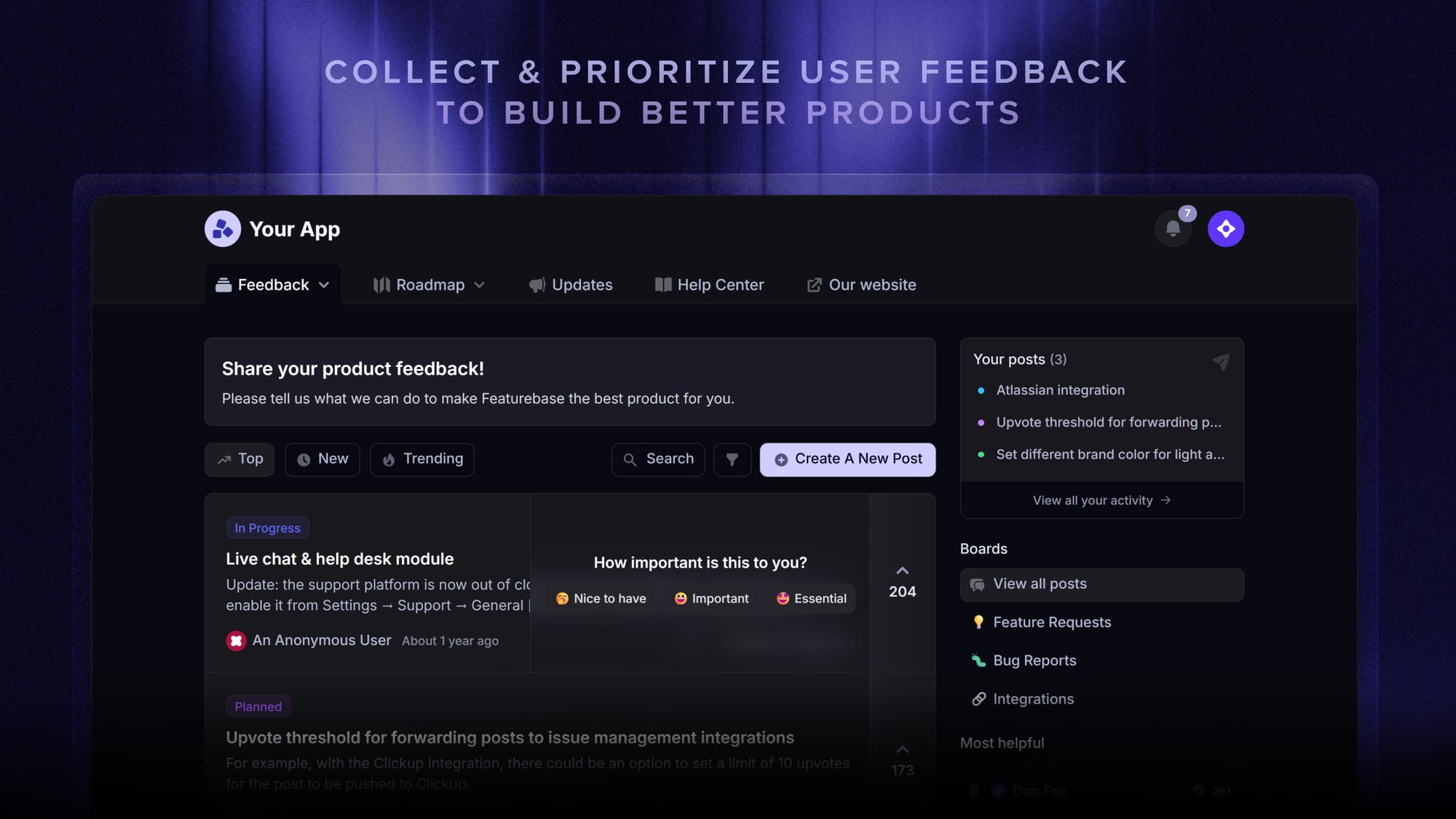
This is where Featurebase goes further than a typical bot. You can centralize feedback from every conversation and run targeted NPS and CSAT surveys off the back of chatbot interactions, turning support chats into a steady stream of product insight.
Rule-based vs AI chatbots: Which fits your store?
Not every chatbot is built the same, and the type you choose shapes which use cases you can actually pull off.
- Rule-based chatbots follow preset decision trees and menu buttons. They're reliable for order tracking, store policies, and simple FAQs, but they can't handle open-ended questions.
- AI chatbots use natural language processing to interpret intent and respond dynamically. They handle nuanced questions, personalize recommendations, and improve over time.
- Hybrid chatbots combine both, automating routine queries with buttons while using AI for the fuzzy stuff, then handing off to a human when needed.
For most stores, a modern AI or hybrid bot is the better fit because the high-value use cases above (recommendations, lead qualification, feedback) all depend on understanding natural language. It's also worth weighing where chatbots and live chat each fit, since the two work best together rather than as either-or.
Best practices for launching an ecommerce chatbot
A chatbot only delivers on these use cases if it's set up well. A few principles separate the bots that drive revenue from the ones that frustrate shoppers.
- Start with one clear goal: pick a primary objective like cart recovery or ticket deflection before you build. A focused bot beats a bloated one.
- Train it on your own content: point it at your product catalog, help articles, and policies so answers are accurate. A bot is only as good as the data behind it.
- Design a clean handoff: make sure the bot escalates to a human agent with full context when a query goes beyond its scope. Nothing sours a shopper faster than a dead end.
- Match your brand voice: the chatbot is an extension of your store, so its tone should sound like you, not a generic robot.
- Measure and iterate: track resolution rate, conversion impact, and satisfaction, then refine the flows that underperform.
Getting these right is the difference between a bot that customers trust and one they try to click past. Comparing your options against solid customer service chatbot software is a good place to start.

Get the best ecommerce chatbot
Automatically resolve 70% of customer requests & cut down manual support loads
Where Featurebase fits
A few of these use cases, mainly answering questions, deflecting FAQs, and collecting feedback, come down to how well your support layer understands customers and connects to your other tools. Featurebase is one option worth a look on that side of the picture.

Featurebase is an AI-powered customer support platform built mainly for product-led SaaS and online teams. It brings support, a help center, and feedback collection into one place, so the questions your chatbot answers and the insights it gathers don't scatter across separate tools.
What it does:
- Fibi AI Agent - Resolves routine questions on autopilot and can run actions like refunds or trial extensions
- Omnichannel inbox - Handles live chat, email, and Slack conversations from one AI-powered view
- Help center with AI search - Serves instant, multilingual self-serve answers
- Feedback & surveys - Collects feature requests and runs NPS or CSAT surveys off the back of conversations
- Integrations - Connects with Slack, Linear, Jira, HubSpot, and more
Pricing: Free plan with unlimited conversations. Paid plans start at $29/seat/month, plus $0.49 per AI resolution.
It's a good fit for stores and SaaS teams that want modern AI support and feedback in one place. It's less of a match if you mainly need a bot for social-commerce channels like Instagram or WhatsApp DMs, where a dedicated social tool may serve you better.
Conclusion
Ecommerce chatbots have grown well past answering FAQs. Used across the journey, they recover carts, guide product discovery, qualify leads, and turn every conversation into useful customer insight, all without stretching your team.
Featurebase is a modern AI support platform that helps you automate customer questions with an AI agent, deflect tickets with an AI-powered help center, and collect feedback and survey responses in one place. So your chatbot doesn't just answer shoppers, it feeds real product insight back to your team.
It comes with a Free plan and quick onboarding that doesn't require a credit card, so there's no downside to trying it. 👇
✨ Automate your support with the fastest AI-enhanced Inbox today →
FAQs
What's the difference between an ecommerce chatbot and an AI agent?
A chatbot mainly responds. It answers questions and provides information from a knowledge base. An AI agent goes further and acts autonomously, completing multi-step tasks like processing a refund or updating an order without human input. In practice the line is blurring, as modern AI chatbots increasingly take actions rather than just reply.
How do you add a chatbot to your ecommerce store?
Most ecommerce platforms like Shopify, WooCommerce, and BigCommerce support chatbot apps that install in a few clicks. Start by defining what you want the bot to do, then train it on your product catalog, help articles, and policies so its answers are accurate. From there you embed it on your site and connect it to your order and support systems.
Do ecommerce chatbots actually increase sales?
Yes, mainly by recovering sales that would otherwise be lost. Chatbots reduce cart abandonment through real-time nudges, guide shoppers to the right products, and stay available 24/7 so a question at midnight doesn't cost you the sale. The impact is largest when the bot is well-trained and hands off cleanly to a human when needed.
How much does an ecommerce chatbot cost?
Pricing ranges widely. Many tools offer a free plan for basic use, while paid plans typically run from around $15 to $100+ per month for small and mid-sized stores. Enterprise platforms with advanced AI can cost far more, and some charge per AI resolution or conversation rather than a flat seat fee, so the real cost depends on your volume.
Are chatbots or live chat better for ecommerce?
They work best together rather than as an either-or choice. A chatbot handles high-volume, routine questions instantly and around the clock, which frees your live agents to focus on complex or high-value conversations. The ideal setup lets the bot resolve what it can, then hand off to a human with full context when a query needs a personal touch.
What is the best AI chatbot for ecommerce support?
The best choice depends on your platform, budget, and how much you need the bot to act rather than just answer. Support-heavy stores usually want strong AI resolution, clean human handoff, and tight integrations with their existing tools. Featurebase is a solid option here, pairing an AI support agent and help center with feedback tools, and you can compare it against other AI chatbots to find the right fit.