How to Collect & Track Intercom Feature Requests
Looking for a better way to stay on top of all the feature requests in your Intercom's live chat? You're in the right place! In this post, we'll go over the best ways you can collect and prioritize all of the feedback you get from Intercom.


On this page
Your Intercom inbox is full of product gold. Between support chats and Messenger conversations, customers are constantly telling you what to build next.
The problem? Those feature requests get buried in closed conversations, and the insight rarely reaches your product team.
This guide covers how to collect, organize, and act on the feature requests coming through Intercom (now Fin), from native tagging to a dedicated feedback tool. 👇
Key takeaways:
- Intercom is built for conversations, not tracking: Native tagging and Tracker tickets work at low volume, but they make it hard to spot trends or rank requests.
- A dedicated feedback tool centralizes everything: Route requests from Intercom's live chat and Messenger into voting boards so nothing slips through the cracks.
- Prioritize by revenue, not just vote count: Tie each request to customer MRR and plan so you build what matters to your highest-value accounts.
- Close the loop automatically: Notify every requester by email the moment their feature ships.
- Featurebase✨ turns Intercom feedback into an organized backlog: Capture requests from live chat, let users vote, prioritize by revenue, and keep everyone updated.
What Intercom becoming Fin means for your feature requests
In May 2026, Intercom rebranded its company to Fin, putting its AI customer agent at the center of the business. The Intercom product name lives on (the team recently launched Intercom 2), so your live chat and Messenger workflows still work exactly as before.
In June 2026, Salesforce signed a definitive agreement to acquire Fin for around $3.6 billion, its largest deal yet for an AI customer service platform. As of July 2026 the acquisition is still pending and expected to close during Salesforce's 2027 fiscal year.
Whatever the brand says, the takeaway for product teams is the same: feature requests still land in your conversations, and you still need a way to capture and act on them. If the changes have you weighing your options, we cover the best Intercom and Fin alternatives separately.
How to collect feature requests in Intercom
Intercom is a powerful tool for talking to customers, but it was never built to be a feature request tracker. Still, there are a few native ways to keep tabs on requests before you bring in a dedicated tool.
- Tag conversations: Add tags like
Feature requestorBugso you can search and filter conversations later. It is low friction for support reps, but hard to spot trends or rank requests without exporting everything to a spreadsheet. - Use Tracker tickets: Link related conversations to a single Tracker ticket to group everyone asking for the same thing. It is useful for visibility, but still manual and not built for prioritization.
- Collect through the Messenger: Point users to a flow when they want to suggest something. It captures the request, but it lands back in the inbox with everything else.
These options work when request volume is low. Once feedback starts pouring in from live chat, email, and Slack all at once, though, tagging and exporting becomes its own full-time job. That is the point where most teams reach for a dedicated feedback tool that plugs directly into Intercom.
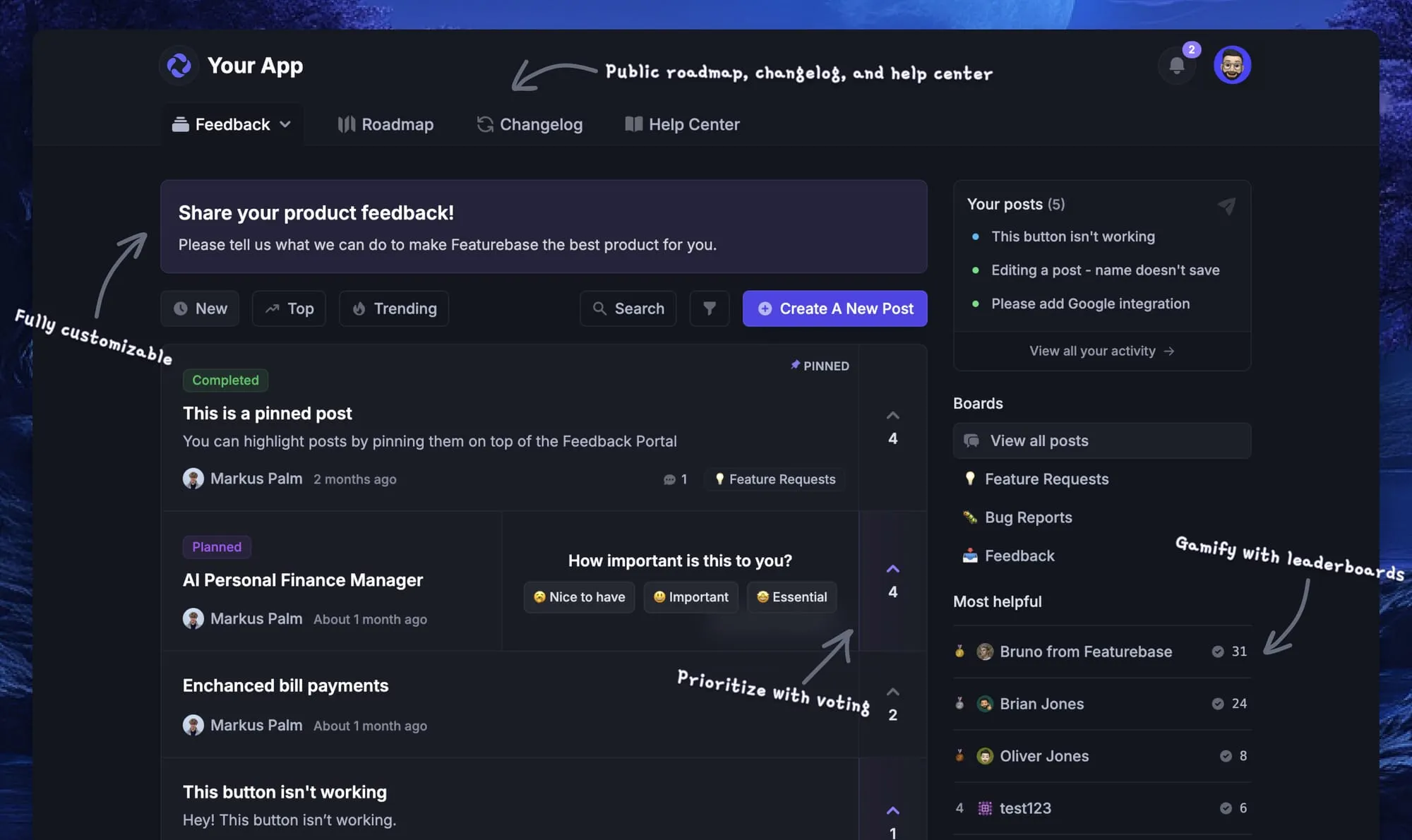
How Featurebase’s Intercom integration helps manage feature requests & bugs
Let's go over the three key ways to collect feedback through live chat and manage it in one place. After this, you will understand the power of tracking Intercom feature requests with Featurebase.
1. Users can submit feature requests via Intercom Widget
If you're already using Intercom, you don’t need a separate feedback widget. With our Intercom Integration, your users can submit feedback to voting boards straight from Intercom's own interface.
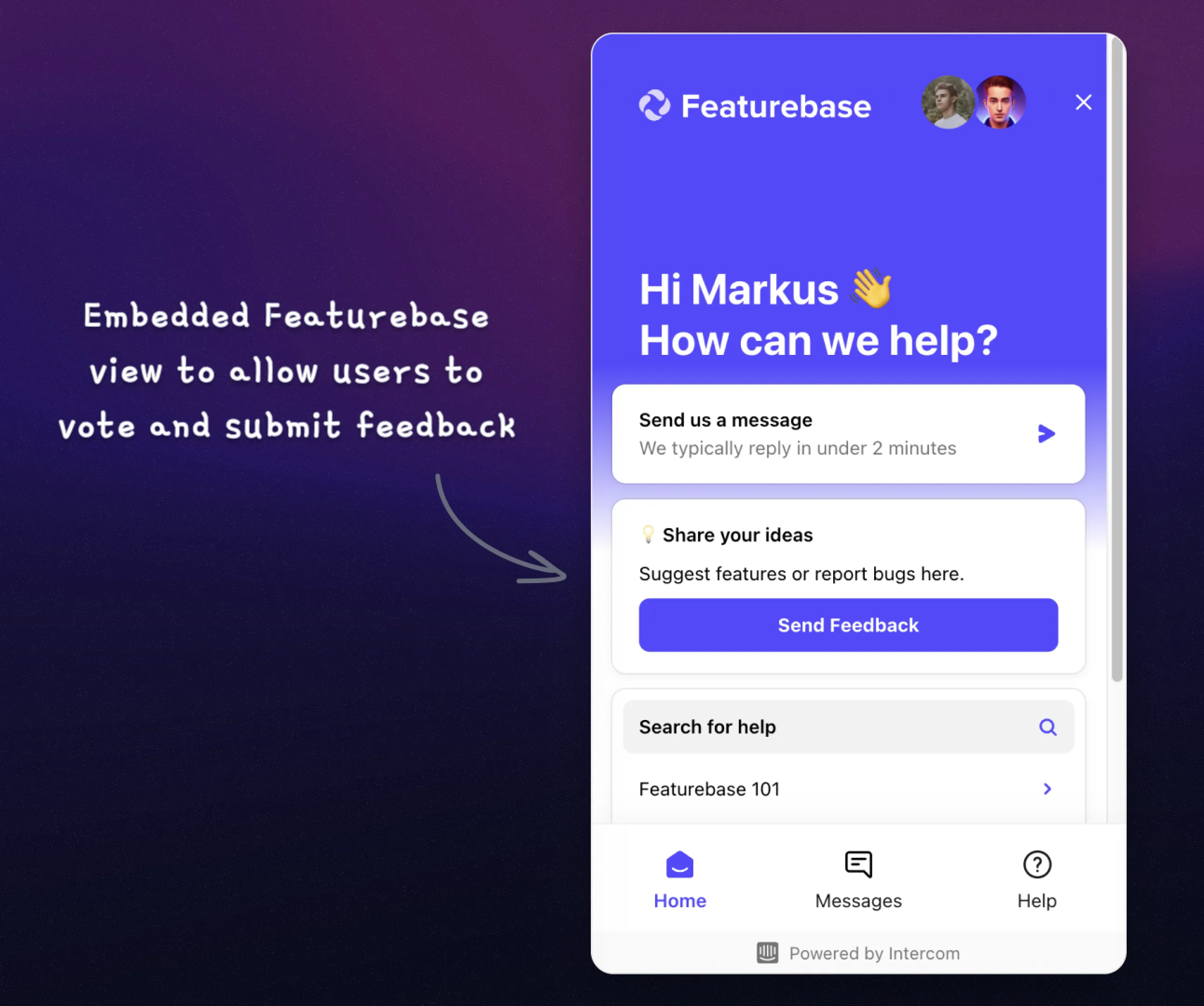
Aside from submitting requests, they can upvote features and view the latest updates, all in one interface.
2. Create new requests and subscribe users to existing ones for updates
You can subscribe users who request features to specific posts in Featurebase. This feature is especially powerful for keeping your customers in the loop.
To do this, search for the relevant request in the Featurebase view and click the vote button. This action adds the user as an upvoter for that post and informs them of any progress or updates.
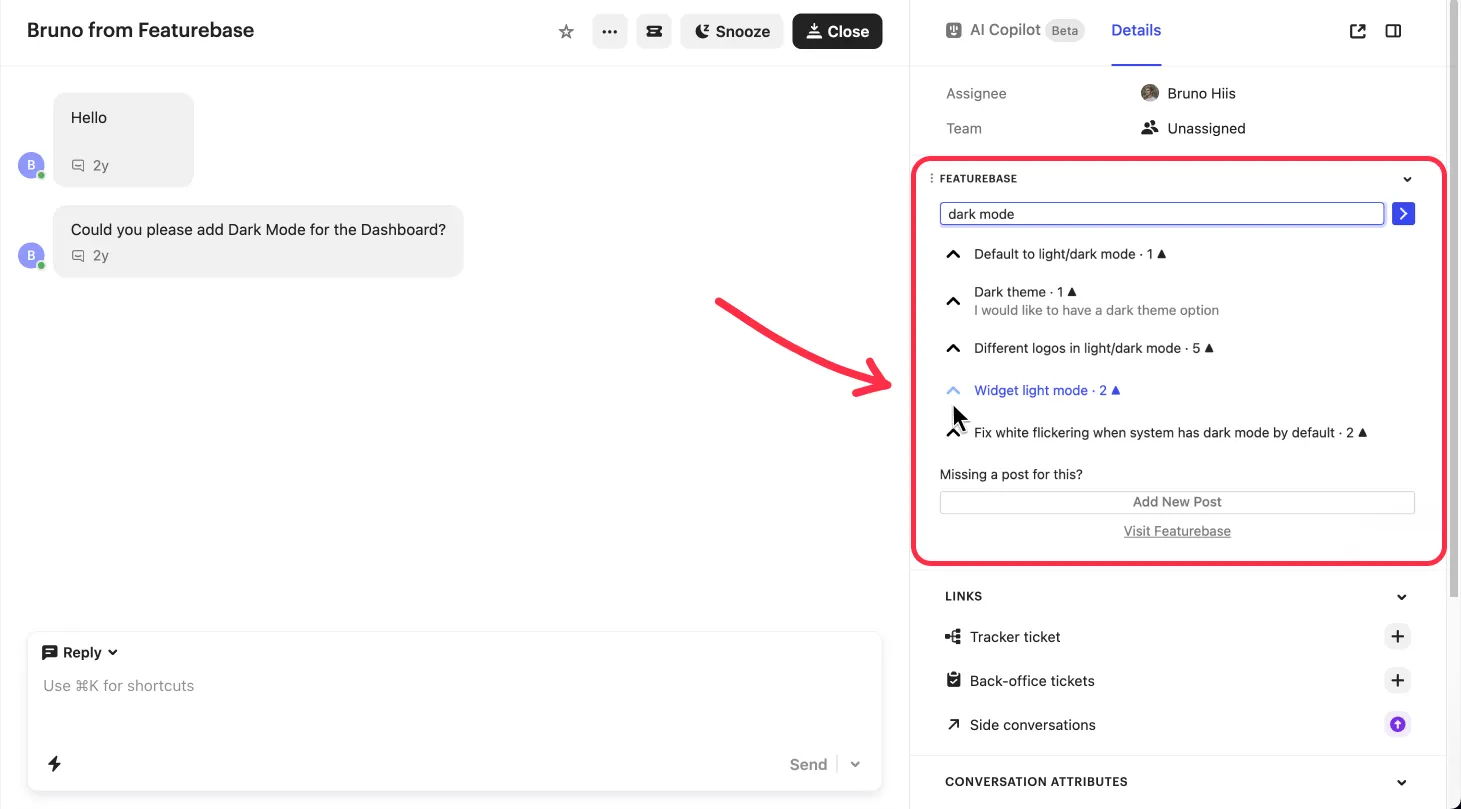
If the requested feature doesn’t already have a post, you can create a new one directly from the Intercom messenger. In this way, you can maintain a seamless feedback loop.
3. Prompt your customers for feedback and ideas
You can send prompts to users via Intercom Messenger to encourage feedback from them. This proactive approach helps gather valuable insights and suggestions from users.
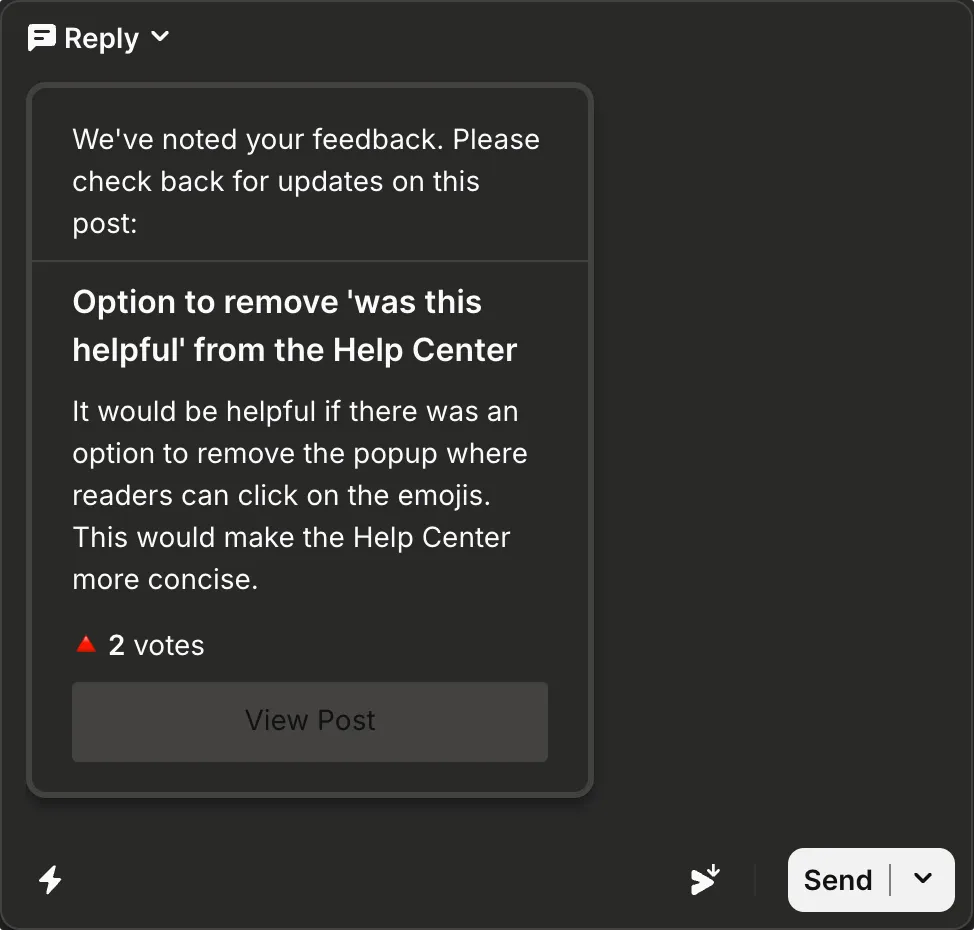
Engaging customers through prompts can increase the volume and quality of feedback you collect. As a result, you get access to a richer pool of data for product development.
By the way, here's the setup guide for the Featurebase ↔ Intercom integration.
Why do you need a feature request tracking system?
The Intercom integration is just one of the key benefits of a good feature request tracking system. Once you collect and organize all the feedback from your customer support chats, you can further process it for deeper insight.
Let’s take a quick look at five crucial ways in which a comprehensive feedback-tracking tool like Featurebase can be a game-changer for you.
1. Better organization & Prioritization
Feature tracking tools enable you to categorize and prioritize requests efficiently. You can sort feedback based on various criteria to determine its relevance. This structured approach ensures that you develop the most critical and beneficial features first.
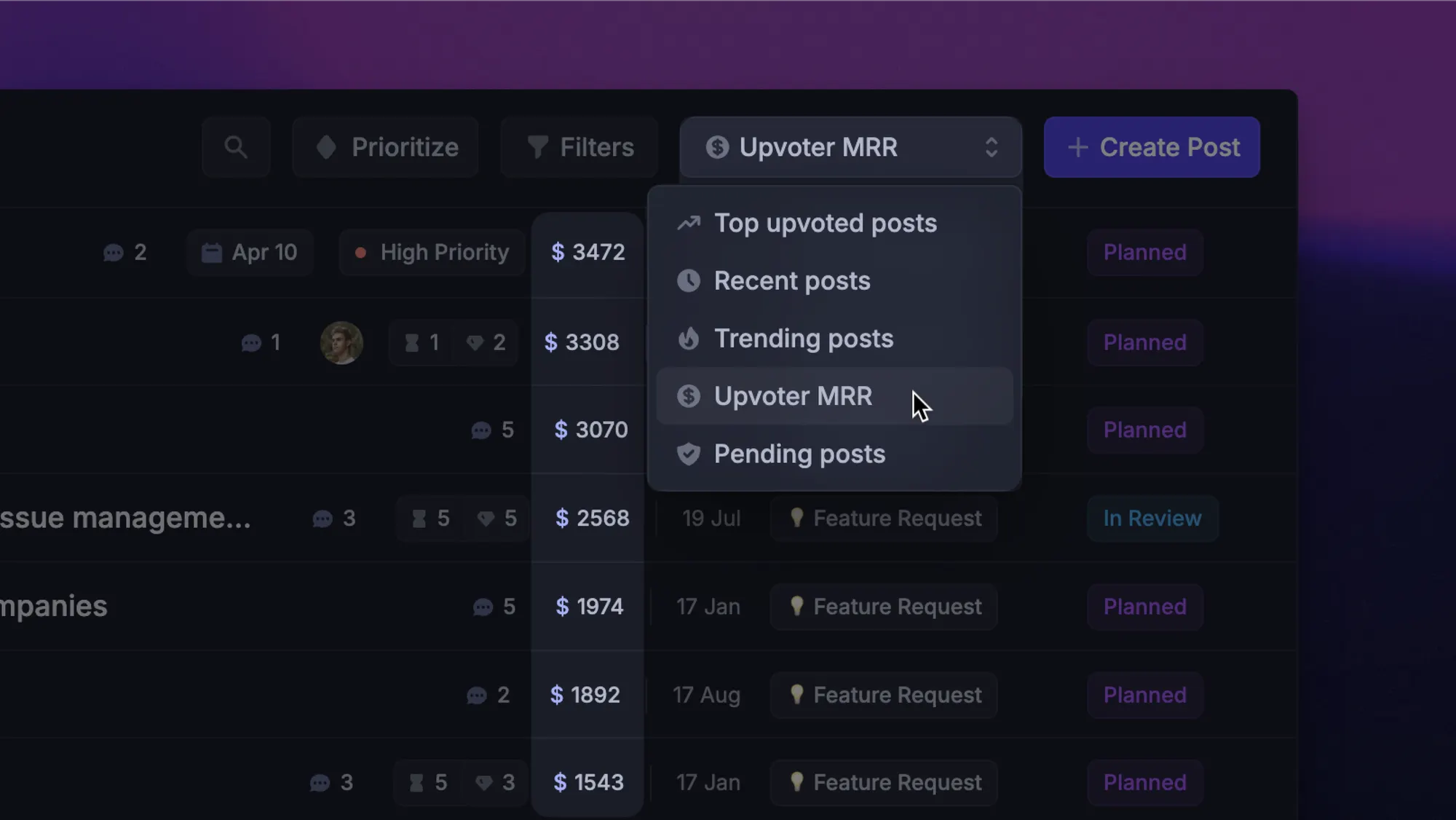
A feedback management tool like Featurebase makes this kind of prioritization easy.
It allows you to segment feedback by metrics like popularity and customer revenue. As a startup, you want to focus on the most popular requests coming from your most high-value customers.
2. It helps close the feedback loop
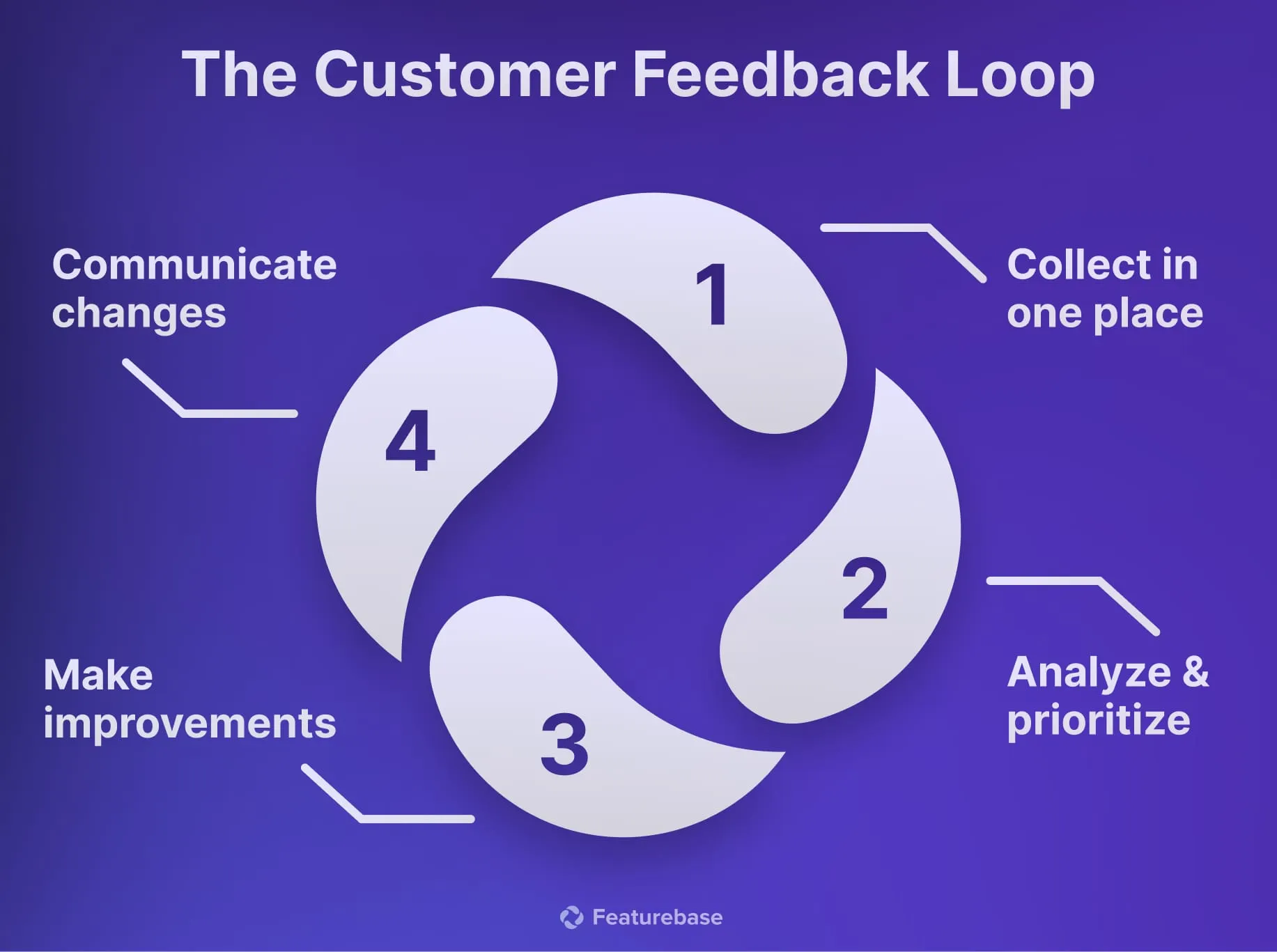
Closing the feedback loop is vital for maintaining customer satisfaction. A feature request tracking system lets you keep users informed about the status of their suggestions. It arms you with the right changelog tools to keep your customers in the loop about any changes you make.
With Featurebase, for instance, you can create custom changelogs to update your users. You can also send different updates to different users and let them react or leave comments.

3. It simplifies feedback collection
A feature request tool streamlines the process of gathering feedback from various channels.
Instead of sifting through emails and support tickets, you can centralize all feedback in one place. This organization saves time and ensures you don’t overlook any valuable suggestions.
For example, tools like Featurebase allow users to submit feature requests directly through a public portal. This customizable central hub automatically organizes feedback for you.
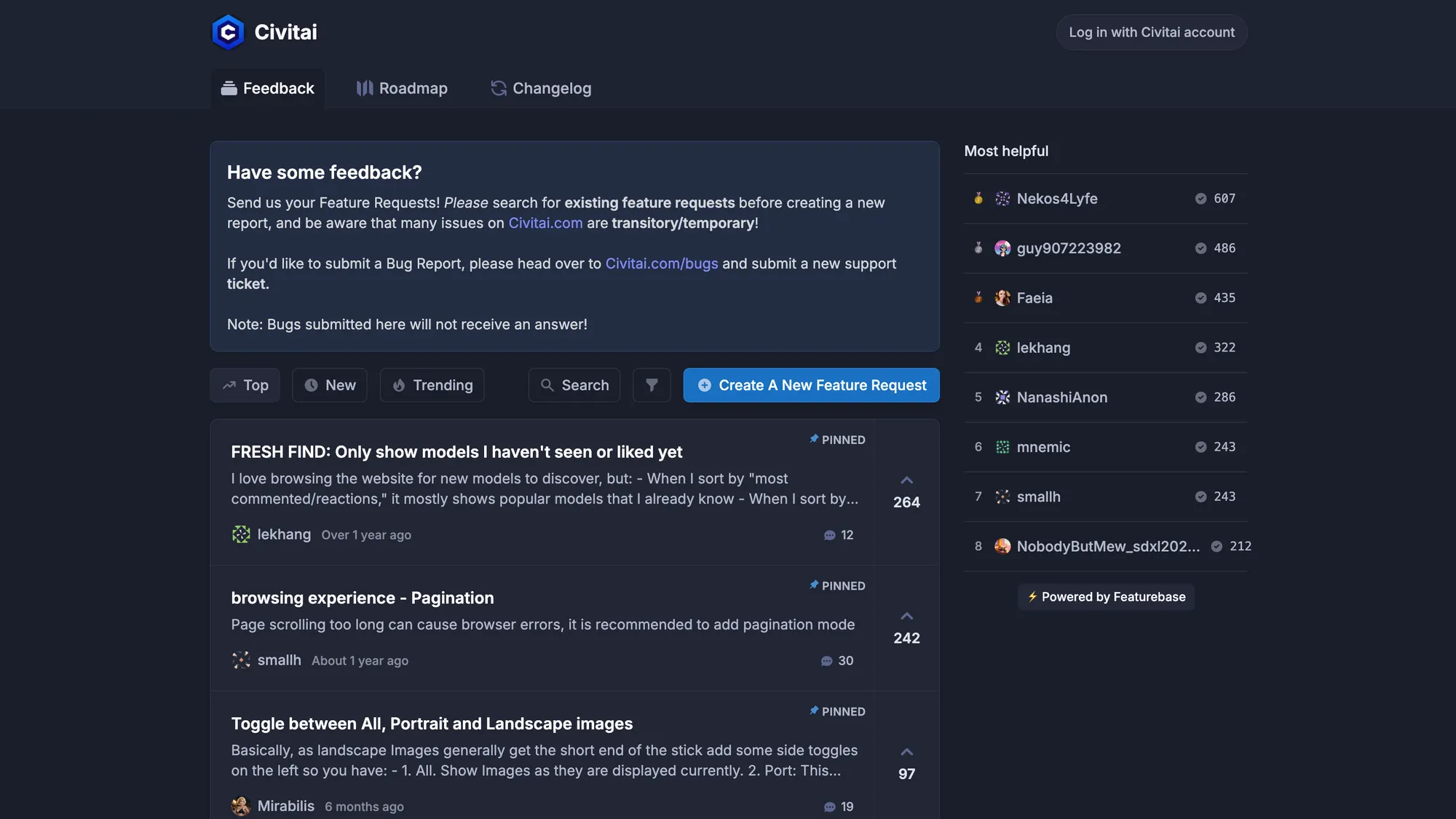
With upvotes, helpful filters, and a leaderboard, you can easily organize and segment user feedback.
4. It connects you with your customers
Using a tracking system helps you stay connected with your customers.
When your users see that you are taking their feedback seriously, they feel valued and heard. This transparency builds trust and strengthens customer relationships.
For instance, by allowing users to vote on feature requests, you can show that you prioritize their needs. This practice encourages a sense of community and engagement.
5. Fits perfectly in your existing stack
The best feedback-tracking systems help you make the most of the tools around you.
In addition to the Intercom integration, we offer Jira, Clickup, Linear, etc., to ensure that Featurebase perfectly fits in your stack.
A good example of how Featurebase is often used with these integrations:
- Get feedback through Intercom (live chat or widget)
- It’s pushed to Featurebase’s voting boards
- Users vote and comment on these ideas (you can see the total voters' revenue of a request)
- If you decide to implement a feature request, you can push it to Jira, Linear, or Clickup for your development team
- Once they ship the feature and change the status to “completed”, all of the upvoted users will get an email notification about it via Featurebase.
Therefore, Featurebase integrates seamlessly with your existing tools to enrich feedback with your customers’ opinions and data. As a result, you can collect, prioritize, and act on feedback efficiently, leading to better product development.
Conclusion
Intercom (now Fin) is great for connecting with customers around the clock, and those conversations are one of your richest sources of feature requests. The catch is that a live chat inbox was never meant to organize and prioritize that feedback.
That is where Featurebase comes in. Its Intercom integration pulls feature requests and bug reports from your chats into one place, lets you prioritize them by customer revenue, and automatically keeps every requester in the loop by email once their idea ships. 💫
There is a Free plan with unlimited feedback collection and fast onboarding, so there is no downside to trying it. 👇
Start collecting & managing feedback with Featurebase for free
FAQs
You can tag conversations, use Tracker tickets to group related requests, or export tagged conversations to a spreadsheet for analysis. For anything beyond low volume, most teams connect a dedicated feedback tool like Featurebase that routes requests from Intercom's live chat into organized voting boards, so they can prioritize and act on them.
Not a dedicated one. Intercom offers tagging and Tracker tickets to keep track of requests inside conversations, but it has no voting boards, prioritization, or roadmap features. Teams that want to organize and rank requests usually pair Intercom with a purpose-built feedback platform.
The company rebranded to Fin in May 2026 to put its AI customer agent front and center, but the Intercom product name still exists after the launch of Intercom 2. In June 2026, Salesforce agreed to acquire Fin. For collecting feature requests, the workflow is unchanged.
Sort requests by how many customers asked for them and by the revenue behind those customers, not just raw vote counts. Tools that sync Intercom's user and company attributes let you weight requests by plan or MRR, so you can focus on what matters to your highest-value accounts.
Keep a record of who requested each feature, then follow up when it ships. A feedback tool automates this by emailing every user who voted for a request once its status changes to completed, so you never have to hunt down email addresses in Intercom.


