Blog Customer Service24/7 Customer Support: Benefits, Costs, and How to Start
24/7 Customer Support: Benefits, Costs, and How to Start
Learn how to offer 24/7 customer support with AI, self-service, and human coverage. Compare operating models, calculate costs, and plan reliable handoffs.



✨ Automate your support with the fastest AI-enhanced Inbox today →
A customer can't change their subscription at midnight. Another can't log in on Sunday. Both need help, but that doesn't mean you need a full support team online all weekend.
This guide compares staffed shifts, outsourcing, and AI customer support software. You'll learn what each approach can handle, what it costs, and where human handoffs matter, so you can choose the right setup for your team. 👇
Key takeaways
- 24/7 customer support means help is available at any hour, including weekends and holidays. That help might come from AI, self-service resources, or people.
- The right coverage model depends on the work: Repeated setup questions suit automation. Complex account problems may need a staffed team.
- Human handoffs need a real owner: An urgent issue can't wait in an unattended queue, even if AI replies immediately.
- Fast replies don't tell the whole story: Resolution time, reopened conversations, customer satisfaction, and total cost show whether the service works.
- Featurebase✨ suits SaaS teams that want AI support and human conversations alongside customer feedback and product updates.
What is 24/7 customer support?
24/7 customer support means customers can get assistance 24 hours a day, 7 days a week, including nights, weekends, and holidays. You'll also see it called 24/7 customer service or round-the-clock support.
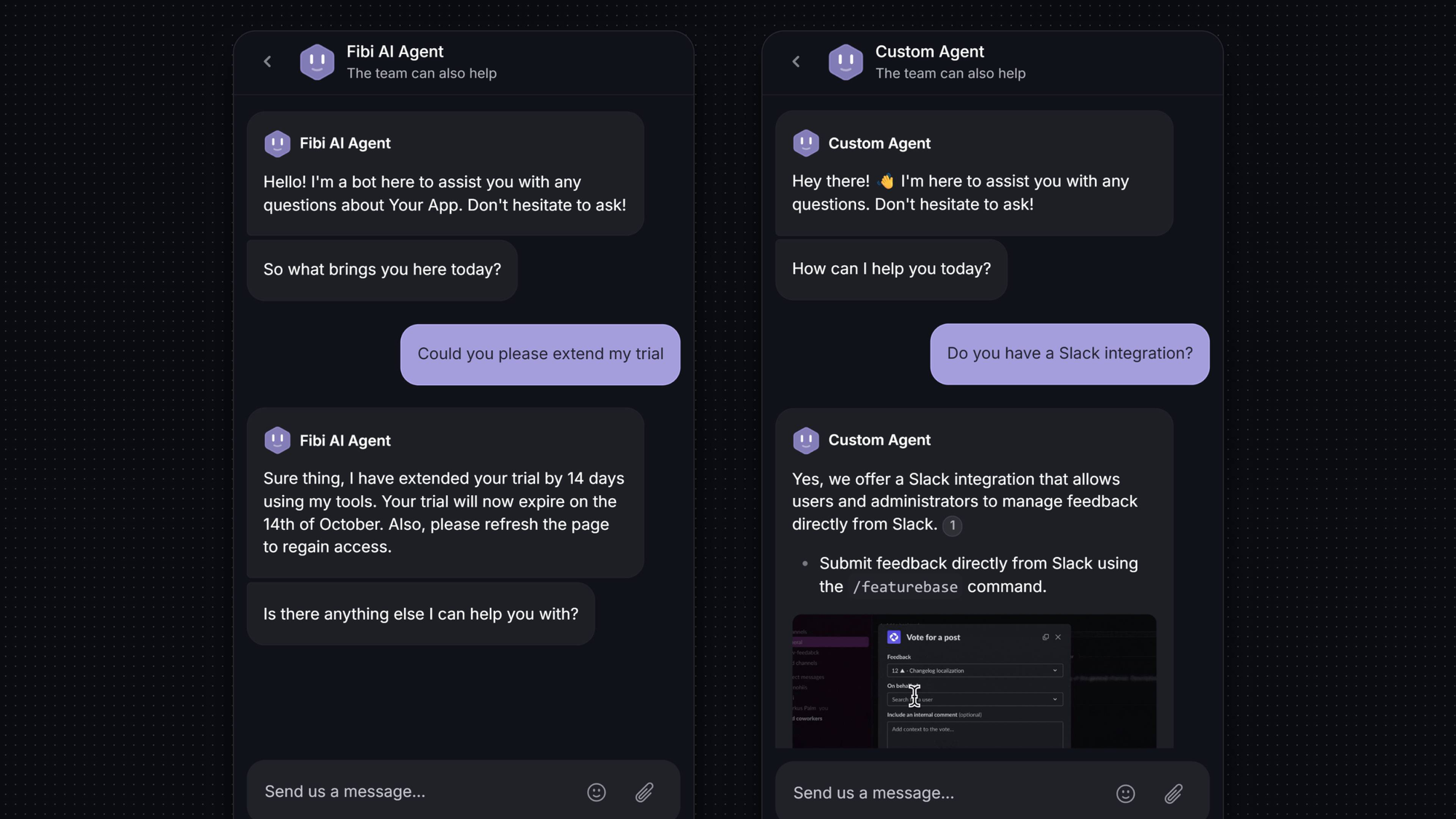
An AI agent might explain how to change a subscription at midnight. A disputed charge could need a billing specialist, while a service outage needs an on-call responder.
Your support promise should distinguish between:
- Availability: Customers can access a help center or start a conversation whenever they need help.
- Response: They receive a useful answer immediately, or know when someone will reply.
- Resolution: The issue gets fixed, whether that's through instructions, an approved action, or specialist help.
An inbox accepting emails all night doesn't mean a person is available all night. Make that clear before customers send a message.
Benefits of 24/7 customer support
Your Friday evening might be a customer's busiest working hour. Even customers in your time zone may be setting up an account or finishing a project after your team has logged off.
In Salesforce's 2025 survey of 6,500 service professionals, 82% believe customer expectations have increased. After-hours support can meet some of those expectations by removing everyday delays:
- Fewer interruptions: A customer who finds the right permissions instructions can invite a teammate and carry on working.
- Help across time zones: Someone using your product overseas doesn't have to rearrange their day around your office hours.
- Less morning backlog: Answering routine subscription questions overnight leaves fewer conversations for the next shift.
- More consistent onboarding: A new user can finish setup while they're exploring the product, instead of waiting until Monday.
I'd start with self-service if after-hours demand is low. A staffed night shift makes more sense when customers regularly need help that documentation or AI can't provide. Urgent incidents still need their own escalation route, however few you receive.
4 ways to provide 24/7 customer support
The biggest difference between these models is what they can resolve without waiting for your daytime team. You can also combine them, such as using AI for routine questions and an outsourced team for overnight conversations.
1. Staff rotating shifts
An internal team works staggered schedules to cover the full day. You control its training, product knowledge, and authority to act, including who can approve a refund or investigate an account problem.
This is a strong fit when overnight requests regularly need detailed troubleshooting. The staffing budget needs to cover breaks, holidays, training, and unexpected absences as well as scheduled shifts.
A good shift handover lets the next agent pick up a refund dispute knowing what's been promised and what still needs approval. Without that context, customers end up explaining the same problem twice.
2. Use a follow-the-sun team
With follow-the-sun support, a team finishing its day hands open conversations to colleagues starting theirs in another time zone. This reduces the need for overnight shifts in one location.
This works best when teams share customer records and policies. A customer shouldn't get a different answer about refund eligibility just because their conversation moved to another region. Some overlap between shifts gives agents time to explain complicated cases.
Time zone coverage doesn't automatically cover weekends or local holidays. Three regional teams working Monday to Friday can still leave a weekend gap.
3. Outsource overnight coverage
Customer support outsourcing lets an external provider cover nights, a particular channel, a language gap, or busy periods. It's useful when you need coverage beyond what your internal team can staff.
The provider's authority matters as much as its opening hours. An agent who can explain your refund policy but can't approve a refund may leave most of the work for your team the next morning.
Outsourcing also leaves you with training and quality reviews. If you change a subscription plan, the provider needs the new rules before customers start asking about them. Otherwise, you're paying for coverage that creates follow-up work.
4. Combine AI with human escalation
AI agents can answer questions from your knowledge base and carry out approved actions when connected to the right systems. For example, explaining how to change a subscription is different from actually changing it. The second needs a configured integration and clear permissions.
I'd choose this model when repeated questions make up much of the overnight queue. Self-service support covers customers who prefer to find an answer themselves, while AI can help people describe and work through their problem.
People still handle billing exceptions, unusual technical problems, and requests that need judgment. If those cases can wait until morning, say so. If they can't, you'll need someone available to take over.
| Coverage model | Best suited to | Main operational cost |
|---|---|---|
| Rotating internal shifts | Regular demand for specialist help | Staffing and managing overnight schedules |
| Follow-the-sun teams | Customers and support teams spread across regions | Handoffs, overlap, and consistent training |
| Outsourced coverage | Defined coverage gaps or overflow | Provider fees, onboarding, and quality reviews |
| AI with human escalation | Repeatable questions and documented workflows | Software, knowledge maintenance, and unresolved cases |
How to implement 24/7 customer support
Start with requests you can handle reliably and a handoff plan for everything else. Here's how to build that first rollout.
1. Measure your after-hours demand
Group existing requests by arrival time, customer time zone, channel, and issue type, including messages sent while the team is offline.
The mix matters more than the total. Fifty questions about downloading invoices suggest a documentation or automation opportunity. A few reports that an entire team can't log in need an urgent response, even if the overall volume is low.
2. Define your coverage and response commitments
Customers need to know which channels are covered, whether their plan includes them, and when a person will respond. A live chat window can create an expectation of immediate help that an email form doesn't.
Service level agreements (SLAs) should distinguish the first reply from a progress update or completed resolution. A one-hour response commitment also means something different if the clock stops outside business hours.
For a team with AI coverage and daytime agents, a plain-language promise might read: "AI assistance is available anytime. Our team replies Monday to Friday, 9 a.m. to 6 p.m. UTC. Critical incidents follow your support agreement."
3. Prepare your knowledge base
Start with the questions your agents answer repeatedly: how to reset access, change a subscription, invite a teammate, or troubleshoot an integration.
A useful knowledge base article explains the steps and their limits. A refund article, for example, should explain eligibility and how to request help when a case falls outside the standard policy.
Use the words customers use and give someone ownership of updates. An article about an old billing screen can confuse both customers and the AI agent relying on it.
4. Set escalation rules and ownership
Good escalation management gives the next person the problem, its impact, and what's already been tried, with clear responsibility for the next action.
In Qualtrics' 2026 Consumer Experience Trends report, based on a 2025 survey, half of consumers worried that AI would prevent them from reaching a human. A clear handoff route helps address that concern.
Here's an example for a software product with an on-call responder:
| Request | After-hours action | Owner |
|---|---|---|
| How do I invite a teammate? | Provide the relevant instructions and check whether they helped | AI or self-service |
| My invoice needs a correction | Collect the invoice reference and explain when a specialist will respond | Billing queue |
| Nobody on our team can access the product | Check for a known incident and trigger the agreed urgent escalation | On-call responder |
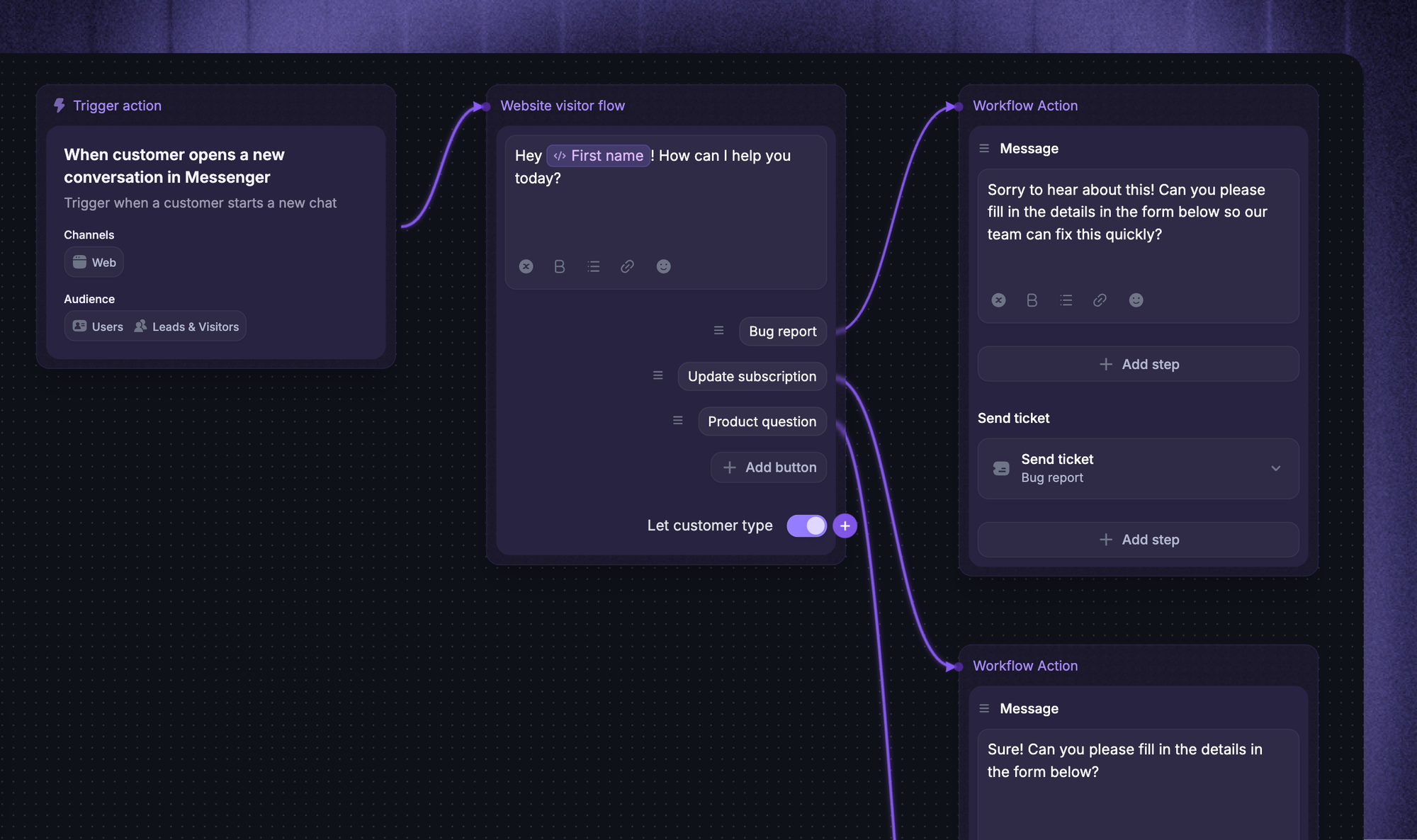
In Featurebase, Fibi AI Agent can collect context before handing a conversation to a teammate through Workflows. Office hours communicate when the team will be back if nobody is available. That sets an expectation, but you'll still need an on-call arrangement for urgent cases.
5. Test overnight, weekend, and failure scenarios
Before launch, follow a few conversations from the customer's first message to the final answer. Include a routine subscription question, a vague "it's broken," a direct request for a human, and an urgent access problem.
The most revealing cases are often failures. If a refund integration is unavailable, does the request reach billing with the right context? If an on-call responder misses an alert, does someone else take over?
Each failure needs a fallback and someone responsible for following through.
6. Launch a pilot and improve it
Start with one channel or a group of common requests. Compare the results with a similar period before the pilot, allowing for differences in volume and complexity.
Repeated questions about changing a subscription might point to a missing article, a confusing billing screen, or an action your AI can't yet complete. Reviewing unresolved conversations helps you find the right fix.
Expand once answers and handoffs are reliable. A growing morning queue is a reason to fix the current setup before widening it.

Start supporting customers around the clock →
Automatically resolve customer issues & cut down support loads for your team
How much does 24/7 customer support cost?
Human coverage is a major cost decision, but the software subscription isn't the whole bill either. Your budget needs to cover:
- People: Salaries or contracted hours, benefits, overnight premiums, training, and supervision.
- Software: Support seats, AI usage, phone or messaging charges, and required add-ons.
- Operations: Knowledge maintenance, quality reviews, integrations, and incident response.
Suppose you need 1 human agent available at all times. That's 24 × 7 = 168 hours of coverage each week.
Assume each employee works 40 paid hours per week and 30% of that time is unavailable for queue work because of breaks, leave, training, and other duties. That leaves 40 × 0.70 = 28 coverage hours per employee.
Illustrative staffing requirement: 168 ÷ 28 = 6 full-time equivalents for 1 continuously covered position.
The 30% allowance is an example assumption. Replace it with your own data. This calculation also excludes any extra capacity needed for simultaneous requests, demand spikes, and handover overlap.
With AI, you're paying for seats, billable usage, and the human work that remains. What a provider counts as a resolution matters, particularly if a customer returns later with the same problem.
A lower quote isn't necessarily better value. A service that takes a refund request and forwards it to your team does less than one authorized to complete the refund. Compare the cost of delivering the same outcome.
How to measure after-hours support quality
Report on business hours and after hours separately, comparing similar issue types and channels. Otherwise, quick daytime replies can hide a long overnight wait.
These customer service metrics tell you more together than any single score:
- First response time: Separate automated acknowledgments from useful replies, and measure how long customers wait for a human after requesting one.
- Resolution time: Measure elapsed time until the problem is solved, including time spent waiting for another team.
- Escalations and backlog: Track unaccepted handoffs, unresolved requests, and the age of the oldest case.
- Reopened conversations: Investigate cases that appeared resolved but needed more help.
- Customer satisfaction: Compare CSAT across coverage periods and include the response count alongside the score.
- Cost per resolved request: Include software, staffing, and follow-up work in the calculation.
A customer who stops replying may have solved their problem, given up, or gone to bed. Silence alone doesn't prove success. Conversation reviews and later contact about the same issue help distinguish those outcomes.
Featurebase's Fibi AI Agent reporting separates assumed resolutions from customer-confirmed resolutions. It also shows handoff reasons and customer satisfaction, so you can look beyond the number of automated answers.
Provide after-hours support with Featurebase
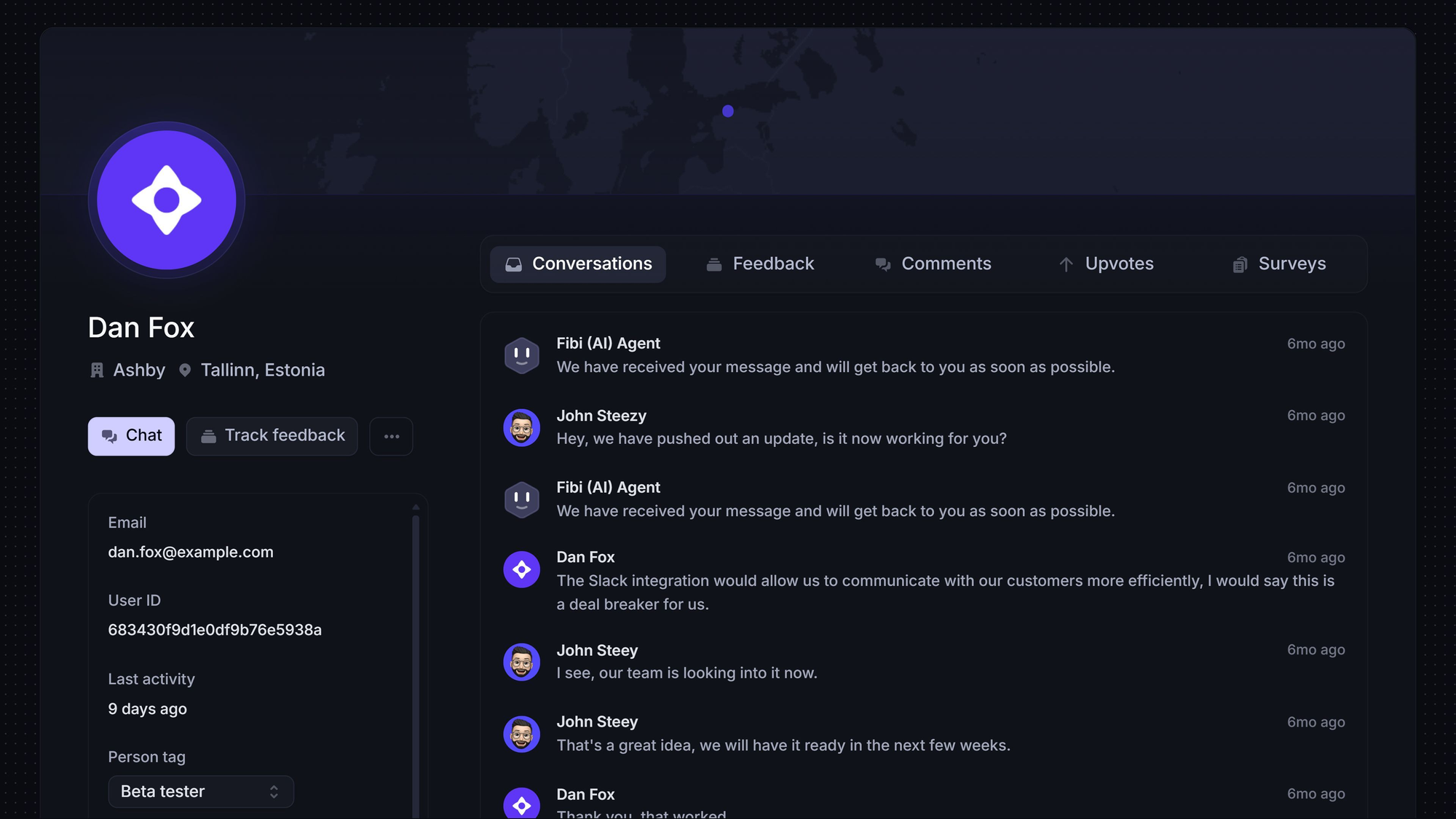
I'd choose Featurebase over a standalone helpdesk for a SaaS team that needs both customer support and a way to manage product feedback. It puts AI support and human conversations alongside feedback, roadmaps, and product updates.
That matters when a support question turns into a feature request. A customer might ask how to restrict a teammate's permissions, only to discover the control they need doesn't exist yet. Your team can help with a workaround and record the missing capability as feedback. When the feature ships, you can publish a changelog update in the same platform.
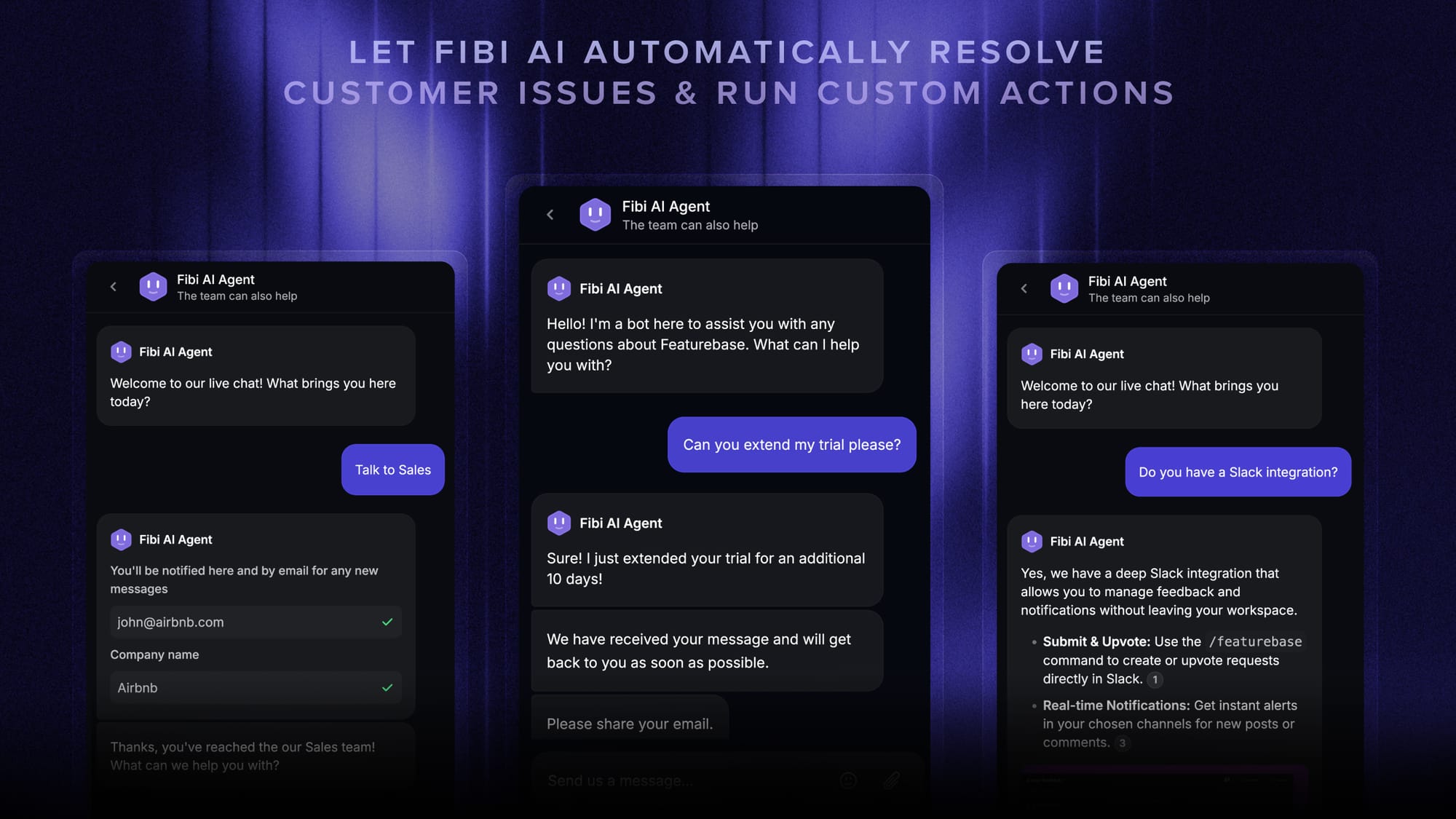
Fibi AI Agent can use help content, customer requests, roadmaps, and changelogs to answer questions. So customers can get help with how the product works today and answers about planned or released features.
For after-hours requests, Fibi can answer routine questions and use configured custom actions for tasks such as trial extensions or refunds. Those actions need the appropriate connections and rules. Cases that need a person can move to your team with context, while customers see when human help is available.
Pricing: A Free plan includes 1 seat and unlimited conversations. Paid plans start at $29/seat/month, billed annually, plus $0.49 per AI resolution. Fibi requires a paid plan.
Workflows, Slack support, and SLAs start on Professional at $59/seat/month, billed annually. Multi-brand support requires Enterprise. If workflow-based routing is part of your after-hours plan, budget for Professional rather than the entry price.
Featurebase fits software teams that want AI to handle routine questions while their own people take the difficult cases. It isn't designed for phone-led support operations.
Always available. Even when your team isn’t.
Automatically resolve customer issues & cut down support loads for your team
Conclusion
The right 24/7 customer support setup depends on what customers need after hours. Routine setup and subscription questions are a good starting point for AI and self-service. Complex account problems and urgent incidents need people with the authority to act.
Featurebase is a strong choice for SaaS teams that want those support conversations to inform product decisions. Keeping support, feedback, roadmaps, and updates together helps your team manage the immediate question and what customers want improved next.
You can explore the platform on the Free plan. Fibi AI Agent requires a paid plan, with AI resolution charges on top of the seat price. 👇
✨ Explore Featurebase for AI support and product feedback →

FAQs
Is 24/7 customer support included in every plan?
No. Coverage can depend on the plan, region, channel, and issue type. A plan with AI assistance around the clock may still limit human replies to business hours, while urgent escalation could be a separate service.
How is 24/7 support different from 24/5 support?
24/7 support operates every day of the week, while 24/5 support runs continuously across 5 specified days. The agreed time zone defines when that window starts and ends. A request sent outside it may wait until coverage resumes unless there's a separate urgent support arrangement.
Can 24/7 customer support cover multiple languages?
Yes. Multilingual customer support can combine human agents, translated resources, and AI. The important part is what happens when the conversation gets complicated. An AI answer in a customer's language doesn't necessarily mean a billing specialist can continue in that language.
What should you check before buying 24/7 phone support?
The key distinction is whether the service can solve problems or only take messages. You also need a fallback when a transfer goes unanswered, especially for urgent calls. Call time, overflow, and transfer charges all affect the final price.
How do you calculate the ROI of 24/7 customer support?
Use the same period for measurable financial benefits and incremental costs: ROI = (benefits − costs) ÷ costs × 100. Freeing an agent's time for other work isn't automatically a cash saving. Additional revenue or retained business belongs in the calculation only when you can reasonably attribute it to the change in support coverage.