Customer Experience Automation: A Practical Guide
Customer experience automation uses AI and data to make every step of the customer journey faster and more personal. Here's how it works, with real examples.


On this page
Automate your support with the fastest AI-enhanced Inbox today
Your support volume keeps climbing, but your headcount doesn't. And customers now expect instant, personal answers at any hour of the day.
Handling all of that by hand doesn't scale. You either burn out your team or make customers wait.
Customer experience automation (CXA) is how growing teams close that gap: using AI and data to handle routine interactions automatically, so your people focus on the ones that actually need them. Here's how it works, where it helps, and how to get it right. 👇
Key takeaways
- Customer experience automation (CXA) uses AI, data, and workflow automation to streamline and personalize interactions across the entire customer journey.
- It runs on 4 components: orchestration, segmentation, personalization, and automation.
- CXA is not the same as CRM (which manages relationships) or marketing automation (which drives the funnel), though they work together.
- The main payoffs are 24/7 availability, lower costs, faster and more consistent service, and personalization at scale.
- Common use cases include AI agents, self-service knowledge bases, automated ticket routing, proactive emails, and automated QA.
- Featurebase✨ brings AI-powered support, a help center, and feedback tools together so you can automate your customer experience without stitching 5 tools together.
What is customer experience automation?
Customer experience automation (CXA) is the use of AI, data, and workflow automation to handle repetitive customer interactions and personalize the customer journey at scale. Instead of a person manually answering every question, routing every ticket, and sending every follow-up, software does the routine work and hands the complex cases to your team.
The goal isn't to remove humans. It's to free them from the repetitive work so they can spend time where judgment and empathy actually matter.
CXA spans the whole journey, from a first-time visitor asking a pre-sales question to a long-time customer who needs a refund. It uses customer data to decide the next best action, whether that's answering instantly, routing to the right agent, or triggering a proactive message.
And this matters more every year. Gartner predicts that by 2029, agentic AI will autonomously resolve 80% of common customer service issues without human intervention, leading to a 30% reduction in operational costs. The teams building that muscle now are the ones who won't be scrambling later.
The 4 components of customer experience automation
Most CXA setups are built on the same 4 building blocks. Get these right and the automation feels seamless instead of robotic:
- Orchestration: Mapping the customer journey and using data to spot where automation actually helps, so you automate the right moments instead of everything.
- Segmentation: Grouping customers by shared traits like plan, behavior, or lifecycle stage, so each group gets relevant content at the right time.
- Personalization: Tailoring messages and interactions to the individual, so customers feel recognized rather than blasted with generic replies.
- Automation: Deploying the actual automated actions, like sending a message, routing a request, or updating a record, based on those data insights.
Skip orchestration and you automate the wrong things. Skip personalization and the automation feels cold. All 4 work together.
CX automation vs. CRM vs. marketing automation
These 3 get mixed up constantly because they all touch the customer and share data. But they do different jobs:
- Customer experience automation automates and personalizes interactions across the entire customer journey, with a strong focus on service and support.
- Customer relationship management (CRM) stores and organizes customer data and interaction history in one place, so your team always has context. It's the system of record, not the automation engine.
- Marketing automation focuses on moving people through the marketing funnel with campaigns, nurture emails, and lead scoring.
The simplest way to keep them straight: CRM holds the data, marketing automation works the funnel, and CXA uses that data to automate the experience across the whole lifecycle. In practice they overlap and feed each other, and your CXA tool often pulls context straight from your CRM.
The benefits of customer experience automation
Done well, CXA pays off in a few clear ways:
- 24/7 availability: AI agents and self-service handle questions outside business hours and across time zones. That matters when 74% of consumers now expect customer service to be available around the clock.
- Lower operational costs: Automating routine tasks lets you handle more volume without linearly adding headcount, which cuts your cost per contact.
- Faster, more consistent service: Automated routing and instant answers shrink wait times, and every customer gets the same quality of response no matter who (or what) handles it.
- Personalization at scale: With customer data feeding every interaction, you can tailor recommendations and messages for thousands of customers at once.
- Happier, more focused agents: When automation absorbs the repetitive tickets, your team spends time on the complex, interesting problems instead of resetting passwords all day.
The through-line is leverage: the same team serves more customers, better.
6 examples of customer experience automation
CXA shows up all over the customer journey. Here are 6 of the most common use cases:
- AI agents and chatbots: AI agents resolve common requests end-to-end, answering questions, processing refunds, and updating orders, then hand off to a human with full context when they can't. This is the backbone of most CXA setups. Tools like Featurebase's Fibi AI Agent resolve customer issues on autopilot and can run custom actions like trial extensions and refunds.
- Self-service knowledge bases: An AI-powered help center lets customers find answers on their own, instantly, without opening a ticket. Featurebase's help center with AI search surfaces instant, multilingual answers right in the search bar.
- Automated ticket routing: Instead of a person triaging every incoming request, automation reads the ticket and sends it to the right agent or team based on topic, priority, or customer tier.
- Proactive emails and messages: Automated messages triggered by customer behavior, like an abandoned cart, an upcoming renewal, or a drop in usage, reach customers at the right moment without anyone hitting send.
- Automated quality assurance: AI can review 100% of support conversations against set criteria and flag the ones that miss the mark, instead of a manager spot-checking a handful.
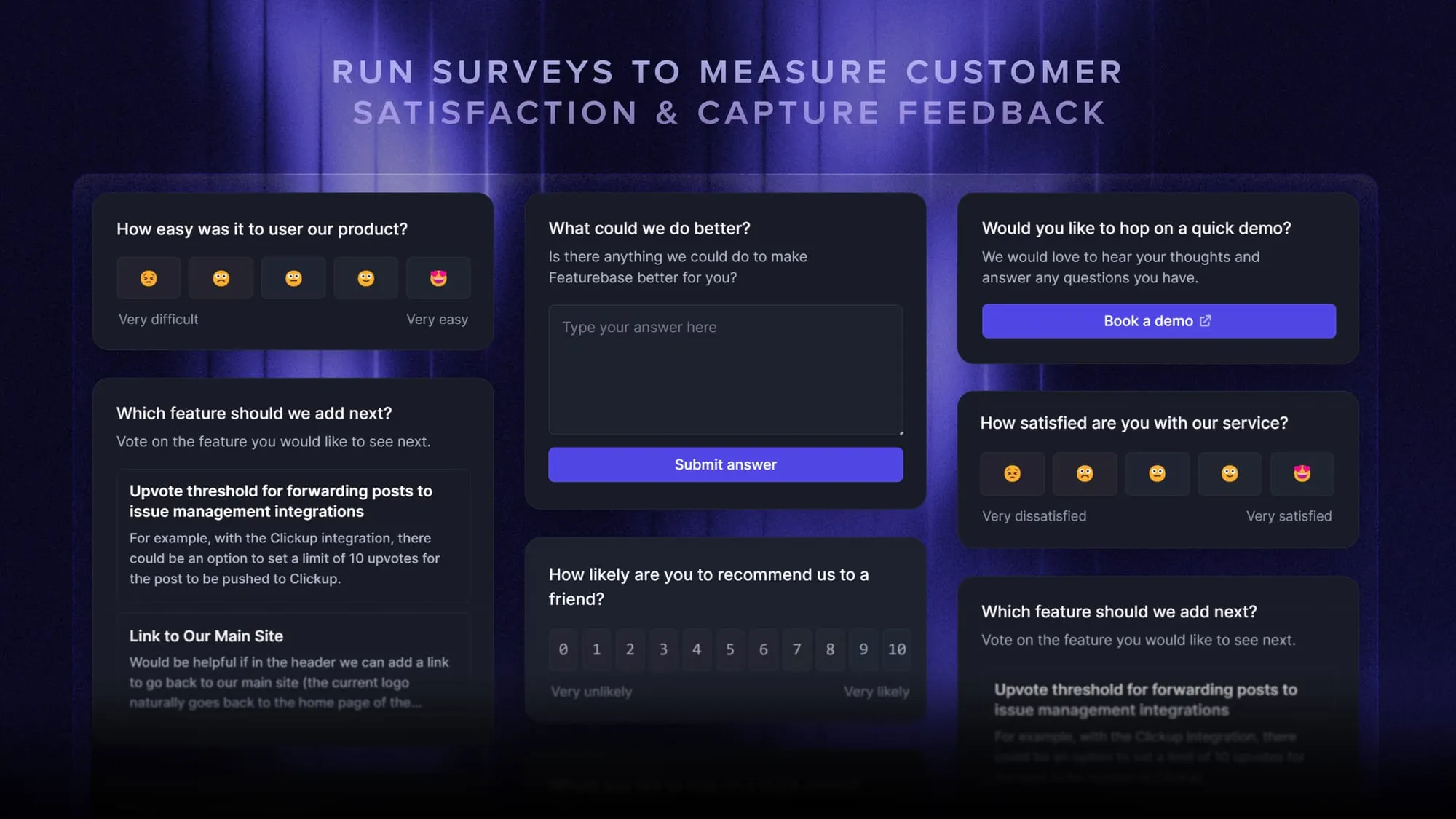
- Surveys and feedback collection: Automatically triggering a CSAT or NPS survey after a resolved ticket captures how customers feel while it's fresh, then feeds that insight back into your process.
How to get customer experience automation right
Automation isn't a magic switch. Bolted on carelessly, it frustrates customers more than it helps. A few principles keep it useful:
- Start with high-volume, low-complexity requests: Password resets, order status, and refund questions are ideal for automation. Save the complex, emotional, or high-stakes issues for a human.
- Make the handoff seamless: When automation can't resolve something, it should pass full context to an agent so the customer never repeats themselves. This matters because only 14% of customer service issues are fully resolved in self-service, so your escalation path has to be smooth.
- Keep a human in the loop: The best CXA blends automation with empathy. Let software handle the routine and route the rest to people who can actually help.
- Measure and iterate: Track deflection rate, resolution time, and CSAT so you can see what's working and fix what isn't.
Get these right and automation feels like great service. Get them wrong and it feels like a wall between you and your customers.
Automating your customer experience with Featurebase
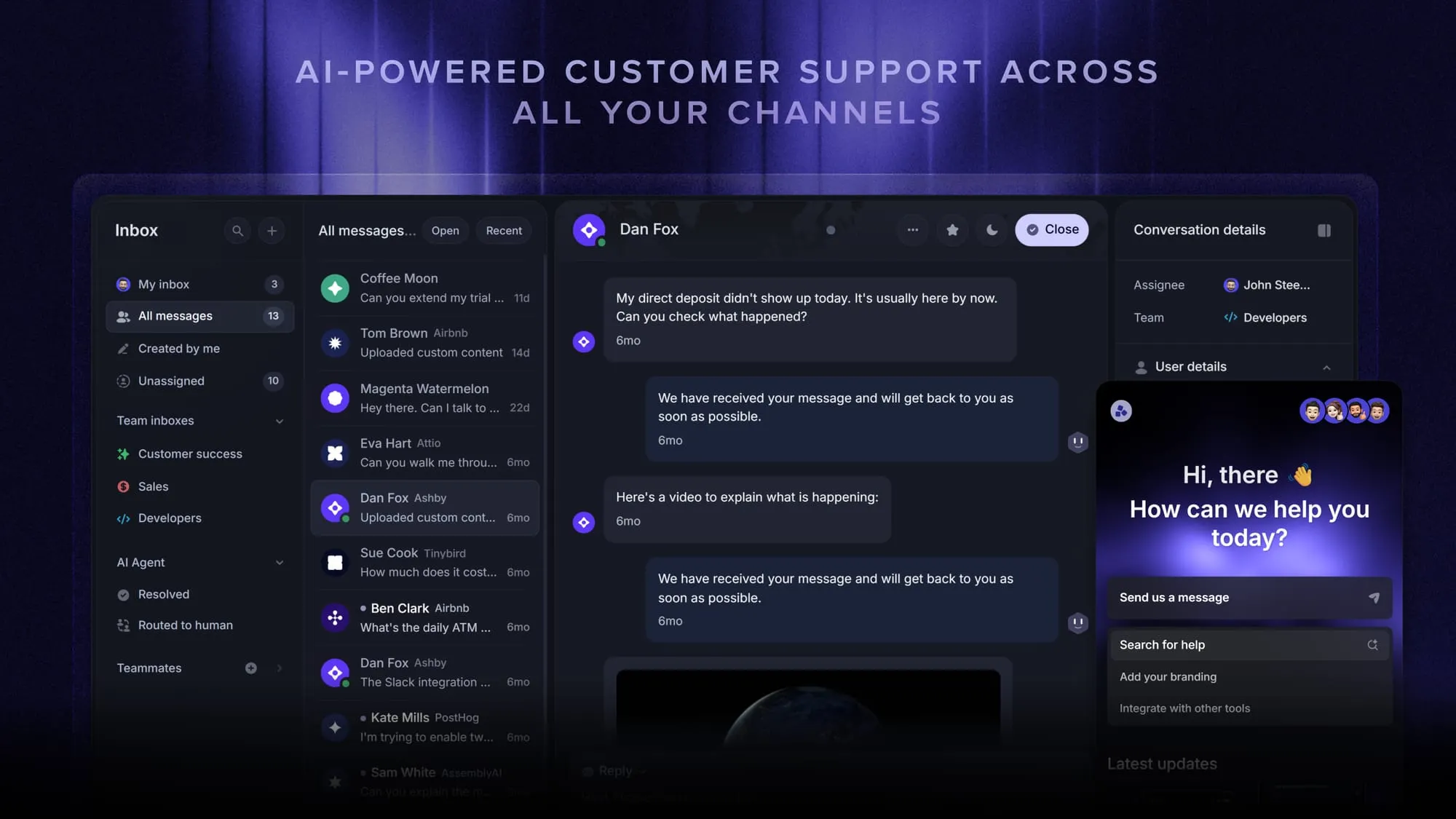
If you want to put the ideas above into practice without stitching together separate tools, Featurebase is one platform worth a look. It brings AI-powered support, a help center, and feedback collection into one place, which covers a good chunk of the CXA use cases we walked through.
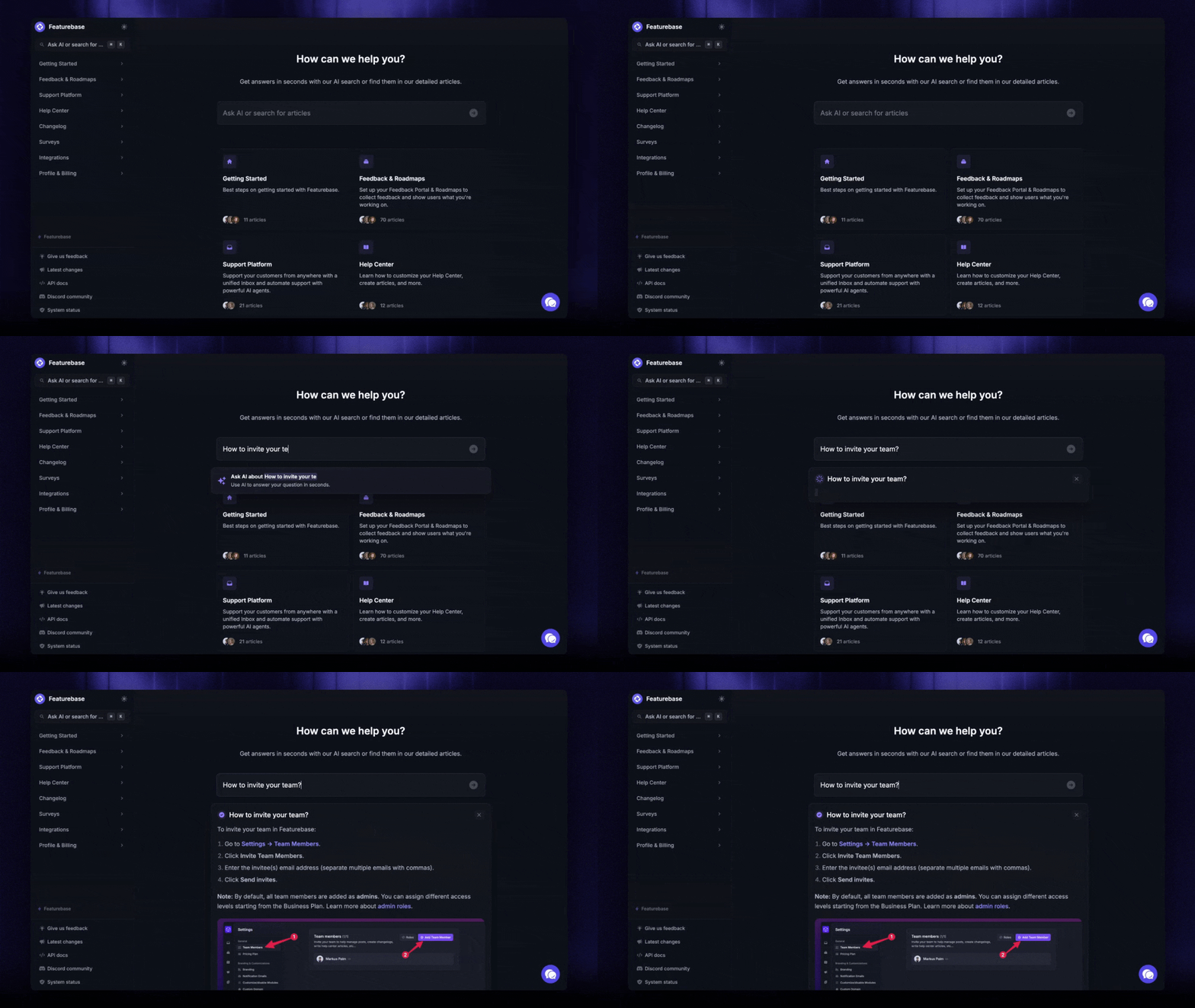
On the automation side, the Fibi AI Agent resolves common issues on its own and can run actions like trial extensions or refunds, while the AI help center handles self-service with instant, multilingual answers. Workflows take care of routing and repetitive tasks, and a shared inbox keeps live chat, email, and Slack conversations in one view.
It has a free plan, and paid plans start at $29/seat/month with $0.49 per AI resolution, so a small team can start automating without a big upfront commitment.
Conclusion
Customer experience automation isn't about replacing your team. It's about using AI and data to handle the repetitive work so your people can focus on the interactions that build real relationships. Get the components, the use cases, and the guardrails right, and you serve more customers, faster, without burning anyone out.
Featurebase is a modern AI-powered support platform that helps you automate your customer experience with an omnichannel inbox, the Fibi AI Agent, and an AI-powered help center, plus feedback and roadmap tools to close the loop with your users.
It comes with a Free plan and fast onboarding that doesn't require a credit card, so there's no downside to trying it. 👇
Automate your support with the fastest AI-enhanced Inbox today
FAQs
Customer experience automation uses AI and workflow automation to handle and personalize customer interactions across the journey. A CRM stores and organizes customer data and interaction history so your team has context. CXA is the automation engine, while the CRM is the system of record, and the two usually feed each other.
CX automation covers the whole customer lifecycle, with a strong focus on service and support. Marketing automation is narrower, built to move prospects through the marketing funnel with campaigns, nurture sequences, and lead scoring. Both automate customer touchpoints, but CXA is about the experience after someone becomes a customer as much as before.
Prioritize omnichannel coverage (chat, email, voice, social), real depth of AI rather than a basic chatbot, and native integrations with your existing CRM and support tools. Strong self-service deflection and built-in analytics matter too. Platforms that consolidate these into one system tend to deliver faster ROI than stitching together point solutions.
It removes repetitive work from the queue by deflecting common questions before they reach an agent. During live conversations, AI can surface relevant answers in real-time, and automated QA reviews interactions so managers can coach based on data. The result is shorter handle times and agents focused on the issues that actually need judgment.
No. While enterprises were early adopters, modern tools have made CXA accessible to small teams too. Featurebase, for example, offers a free plan and fast onboarding, so a small support team can start automating with AI agents and a self-service help center without a big budget or a long setup.
Track a mix of efficiency and satisfaction metrics: deflection rate (how many issues automation resolves without an agent), average resolution time, cost per contact, and CSAT or NPS. Watching these together tells you whether automation is cutting effort without hurting the customer experience.