Blog Customer Service13 Best Cloud-Based Customer Service Software in 2026
13 Best Cloud-Based Customer Service Software in 2026
Web-based support is the future. These are the best cloud-based help desk software options to help you improve customer satisfaction.



✨ Automate your support with the fastest AI-enhanced Inbox today →
Ever had to call support that kept you waiting for hours on end on an IVR, with no one picking up? In 2026, you no longer have to pick up the phone to resolve a problem, no matter how big it may be.
Cloud-based help desk software allows customers to contact a business online via a website, email, social media, or wherever it is convenient for them.
The problem is that modern cloud-based ticketing systems are so numerous and packed with features that it can feel like choosing between five different sorts of chocolate ice cream.
Not anymore.
Today, we show you the best help desk software options built for working in the cloud, along with reasons why you should consider them, plus up-to-date pricing.
Short answer:
- If you want the best customer service software for AI support, ticketing, self-service, and feedback in one place, Featurebase✨ is our top recommendation.
- If you want an affordable cloud help desk that is easy to set up and comes with strong automation, Freshdesk is one of the best choices.
- If you need a more advanced cloud ticketing system for larger teams, complex workflows, and enterprise scale, Zendesk is a strong option.
- If you want a budget-friendly platform with solid ticketing, automation, and data security, Zoho Desk is worth considering.
- If you run an ecommerce brand and want to manage support requests alongside orders and revenue, Gorgias is one of the best fits.
- If you need deep customization across a large cloud-based support operation, Salesforce Service Cloud is a good choice.
- If you want a free and simple cloud ticketing system for internal IT support, Spiceworks Cloud Help Desk is worth a look.
- If you want to handle support directly from Gmail without switching tools, Hiver is a strong option for small businesses.
See the full list below for the best cloud-based help desk software options for different teams, workflows, and budgets. 👇
Key takeaways:
| Tool | Best for | Starting price |
|---|---|---|
| Featurebase✨ | Product-led SaaS teams that want AI support, ticketing, help center, and feedback in one place | Free, paid from $29/seat/mo |
| Freshdesk | Growing teams that want an affordable cloud help desk with strong automation and omnichannel support | From $15/agent/mo |
| Zendesk | Large teams that need advanced ticket management, customization, and enterprise scale | From $19/agent/mo |
| Zoho Desk | Cost-conscious teams that want solid help desk ticketing software with built-in automation and data security | From $14/agent/mo |
| Gorgias | Ecommerce brands that want to manage support requests directly alongside orders and revenue | From $10/mo |
| Salesforce Service Cloud | Enterprises that need deep customization and a seamless support experience across complex systems | From $25/user/mo |
| Spiceworks Cloud Help Desk | Internal IT teams that want a free, simple cloud ticketing system | Free |
| Hesk | Small teams that want a lightweight help desk with optional cloud or self-hosted setup | Free / from $49/mo |
| Kayako | Teams that want a web-based help desk solution with a unified customer conversation view | From $15/agent/mo |
| HappyFox | Teams that want a user-friendly interface with strong automation and workflow customization | From $24/agent/mo |
| Hiver | Small businesses that want to manage support directly inside Gmail and keep users informed | From $19/user/mo |
| Tidio | Teams that prioritize live chat and chatbot automation for customer support | From $29/mo |
| Front | Teams that want a collaborative shared inbox with flexible workflows instead of a traditional help desk | From $19/user/mo |
The benefits of using a cloud-based ticketing system (vs. on-premise solutions)
Using a cloud-based helpdesk makes a lot of sense for your business and your customers.
First, you can get started almost instantly. There is no hardware to install or infrastructure to manage. You sign up, configure your inbox, and your team can begin handling tickets right away. This keeps upfront costs low and avoids long implementation cycles.
Second, your team can work from anywhere. Since everything runs in the browser, agents are not tied to a specific office or device. Whether someone is remote, traveling, or working across time zones, they can access the same system without extra setup.
Another major benefit is automatic updates and maintenance. The provider handles security patches, bug fixes, and new features in the background. Your team always uses the latest version without relying on internal IT resources.
Cloud tools also make it easy to scale as your business grows. Adding new agents or upgrading plans takes minutes, not weeks. This is especially helpful when ticket volume increases or you need to expand your support team quickly.
On top of that, most platforms offer built-in integrations with CRMs, chat tools, and other apps, so your customer data stays connected across systems.
see our full help desk software comparison.
The best cloud-based help desk software for customer support teams in 2026
Want to improve your support processes, resolve customer issues quickly and increase customer satisfaction? Here are some of the best cloud-based ticketing systems to help you do just that in 2026.
1. Featurebase ✨

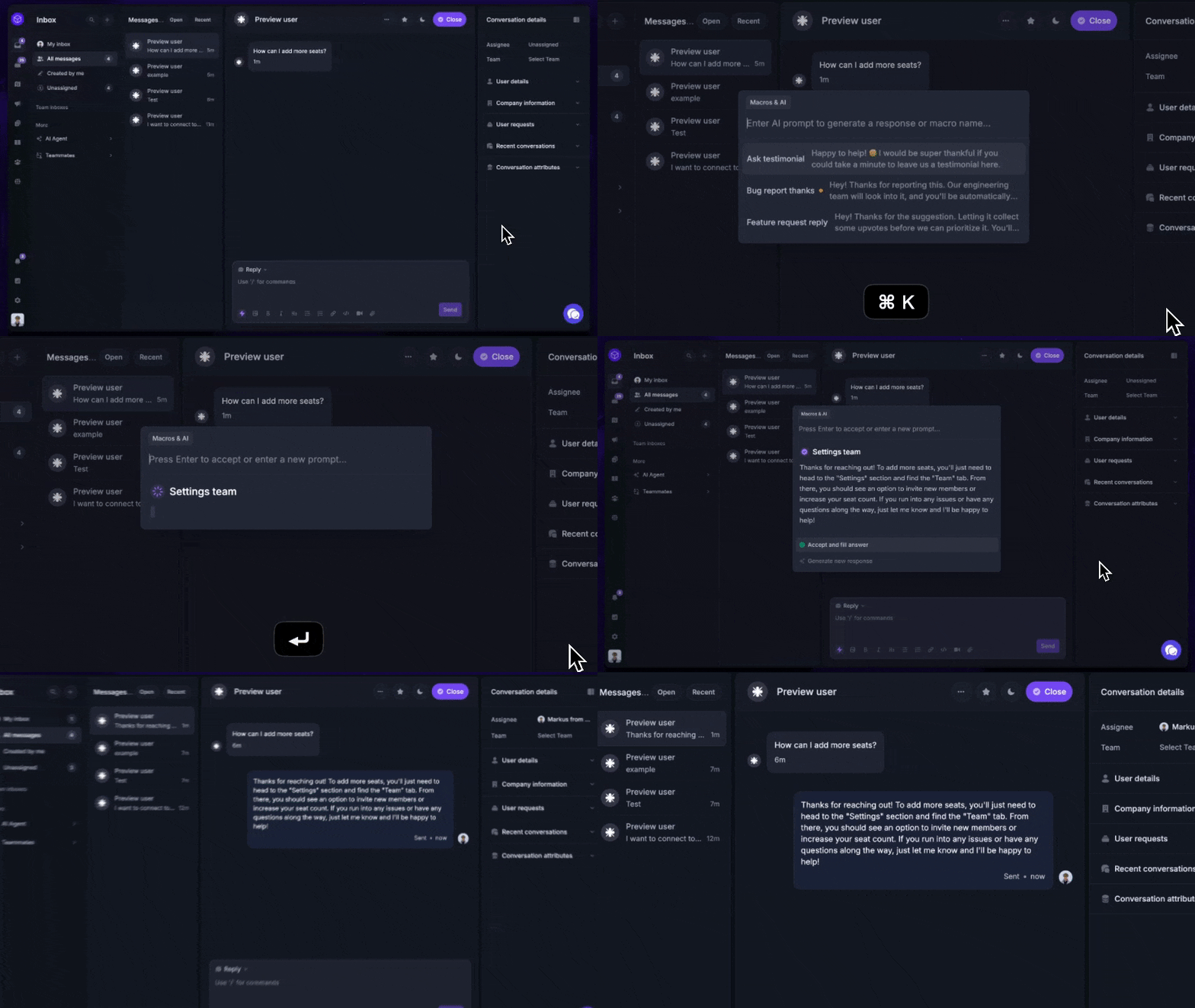
Featurebase is a modern AI customer support platform for product-led SaaS. It combines AI-powered support, help center, and feedback management into a single platform for startups that want all their customer-facing tools in one place. Featurebase is loved by thousands of support teams from companies like Lovable, Raycast, and n8n. 💫
Top features:
- Omnichannel inbox – Manage live chat, email, and Slack conversations from one AI-powered view
- Fibi AI Agent - Resolve customer issues on autopilot & run custom actions like trial extensions and refunds
- Help center with AI search – Provide instant, multilingual self-serve answers
- Workflows & automations – Auto-assign tickets, route conversations, collect customer data, and more
- AI Copilot – Help your agents answer customers faster with AI Copilot that uses your internal knowledge
- Multi-brand support – Manage multiple Help Centers and Live chats from a single workspace
- Automatic AI translations – Automatically translate all messages and help articles to your customers native language
- Service Level Agreements – Track SLAs to make sure your team responds to customers on time, every time
- Mobile app – Respond to customers, receive notifications, and unblock users on the go
- Feedback & roadmap tools – Collect feature requests and close the loop with updates
- Product updates – Publish release notes with a changelog page, in-app widget, and emails
- Integrations – Connects with Slack, Linear, Jira, HubSpot, and more
Pricing: Free plan available with unlimited conversations. Paid plans start at $29/seat/month with $0.29 per AI resolution.
Featurebase covers all the basic support features that legacy platforms do, but with a much more modern approach. It comes with AI automations, a mobile app, and multiple channels (email, live chat, Slack, etc.).
✨ Automate your support with the fastest AI-enhanced Inbox today →
2. Freshdesk
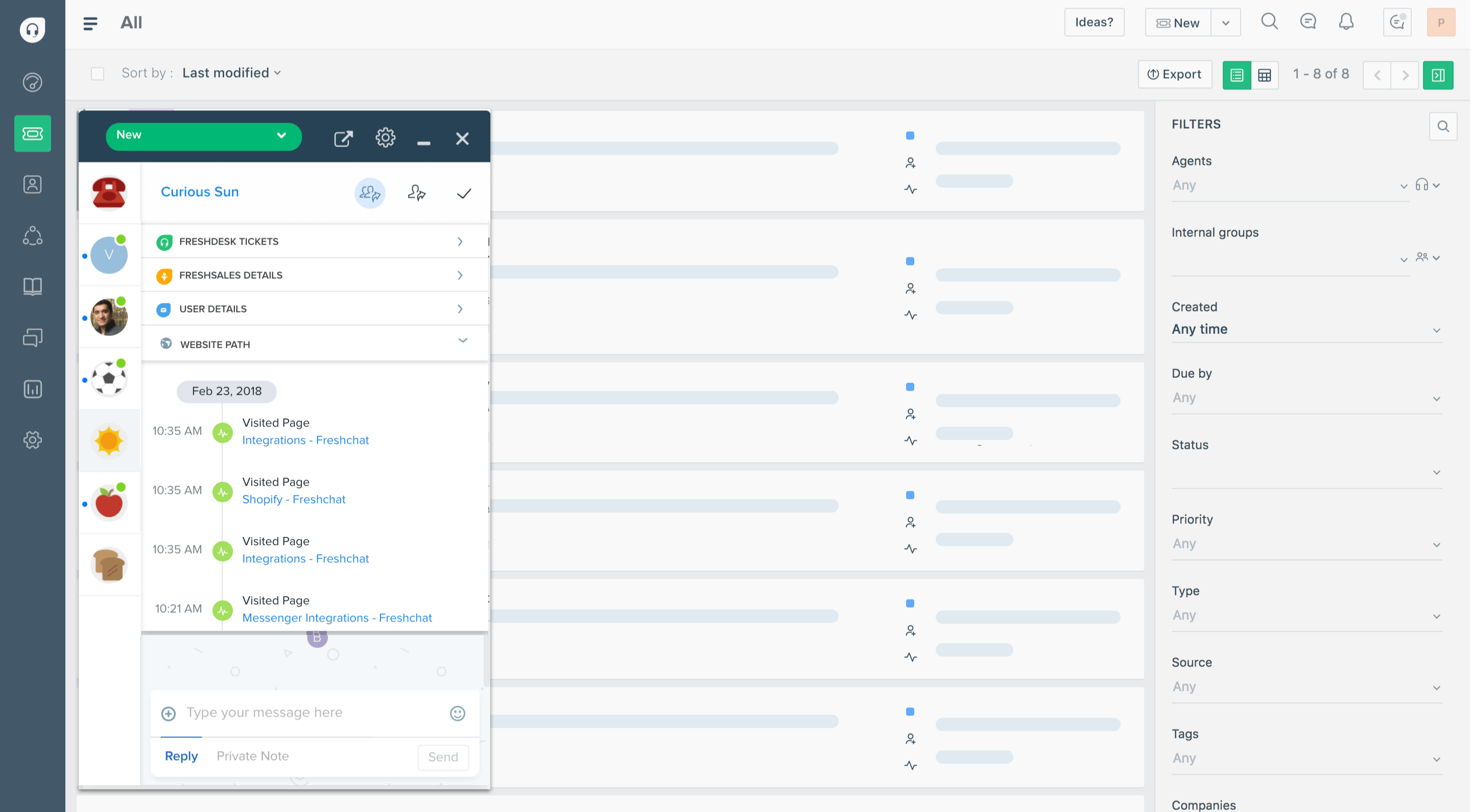
Freshdesk is a cloud-based help desk platform built for support teams that want to manage customer conversations across multiple channels without relying on on-premises systems. It is widely used by growing companies that need flexibility, remote access, and fast setup without heavy IT involvement.
Top features
- Cloud ticketing system: Manage support tickets from anywhere with a fully hosted solution
- Omnichannel support: Handle email, chat, phone, and social media from one dashboard
- Automation workflows: Set rules and triggers in the cloud to route and resolve tickets faster
- Self-service portal: Create a hosted knowledge base that customers can access anytime
- Real-time reporting: Track team performance and customer satisfaction through cloud dashboards
Freshdesk pricing starts at $15/agent/month, and a free plan is available.
Freshdesk can get expensive as you scale, especially if you need advanced reporting and automation features. Some teams also run into limitations with customization on lower plans, and performance can slow down when handling larger ticket volumes.
3. Zendesk

Zendesk is a cloud helpdesk software platform built for teams that need a structured way to handle customer inquiries at scale. It is widely used by support teams and IT team environments that require advanced ticket management, automation, and reporting in a fully hosted system.
Top features
- Cloud ticket management system: Centralize and manage customer inquiries from anywhere
- Omnichannel support: Handle email, chat, phone, and social channels in one place
- Advanced automation: Route and prioritize tickets using rules and triggers in the cloud
- Self-service knowledge base: Create hosted help centers for customers and internal use
- Analytics and reporting: Track performance and support metrics with detailed dashboards
Zendesk pricing starts at $19/agent/month, and a free trial is available.
Zendesk can feel complex to set up and manage, especially for smaller teams. Costs also add up quickly as you unlock more advanced features, and customization often requires time and technical effort to get right.
4. Zoho Desk
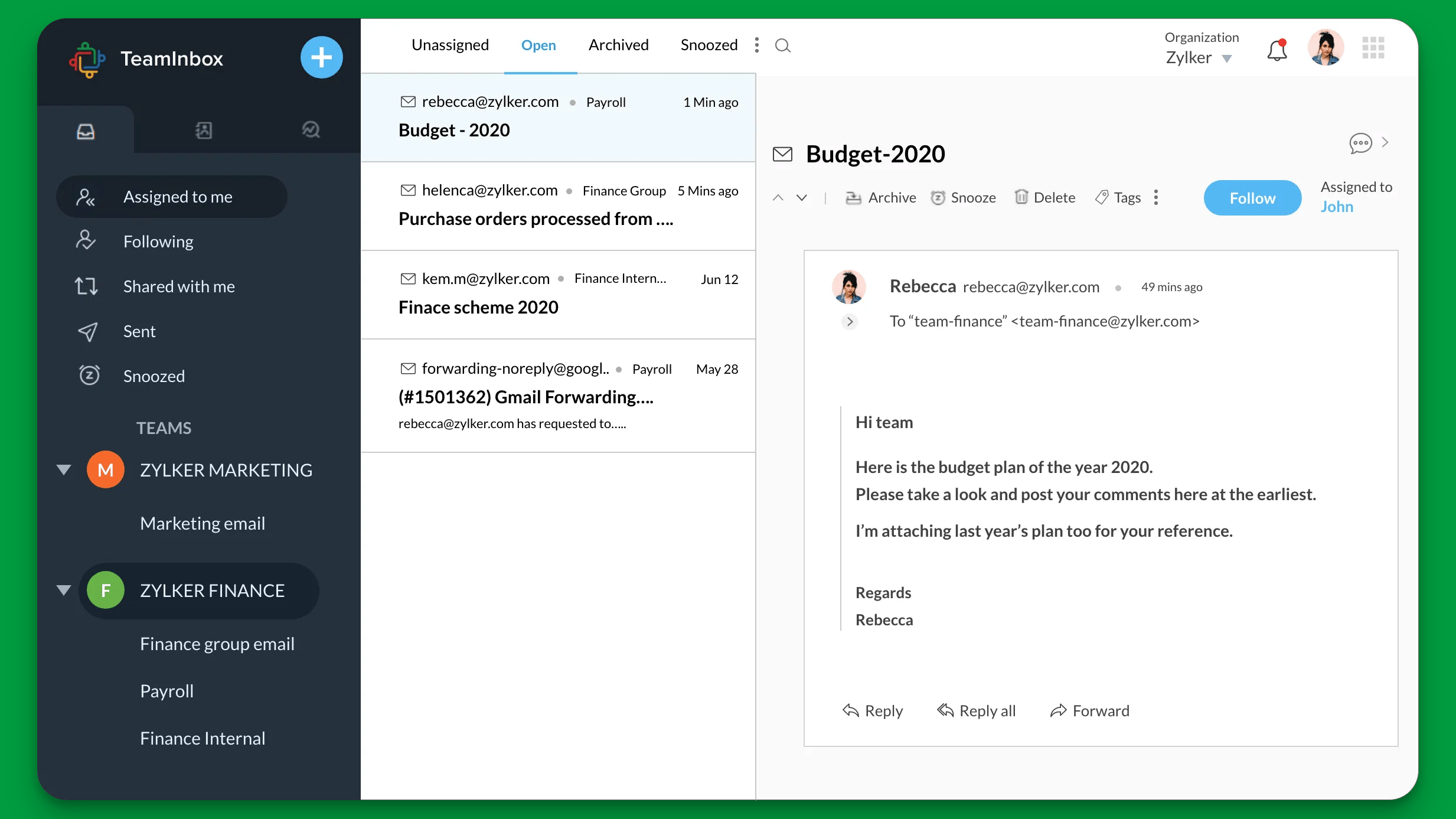
Zoho Desk is a cloud-based help desk ticketing software built for teams that want a flexible and affordable way to manage customer queries. It is part of the broader Zoho ecosystem, which makes it a strong option for companies already using Zoho tools and looking for tight integration and data security.
Top features
- Cloud ticketing system: Manage customer queries from anywhere in a fully hosted environment
- Automated workflows: Set rules to assign, prioritize, and resolve tickets automatically
- Omnichannel support: Handle email, chat, phone, and social channels in one place
- Self-service portals: Create knowledge bases for customers and internal teams
- Built-in data security controls: Manage access, roles, and data protection within the platform
Zoho Desk pricing starts at $14/agent/month, and a free plan is available.
Zoho Desk can feel cluttered due to the number of features packed into the interface. Some users also report a learning curve when setting up automated workflows, and deeper customization often requires time to configure properly.
5. Gorgias
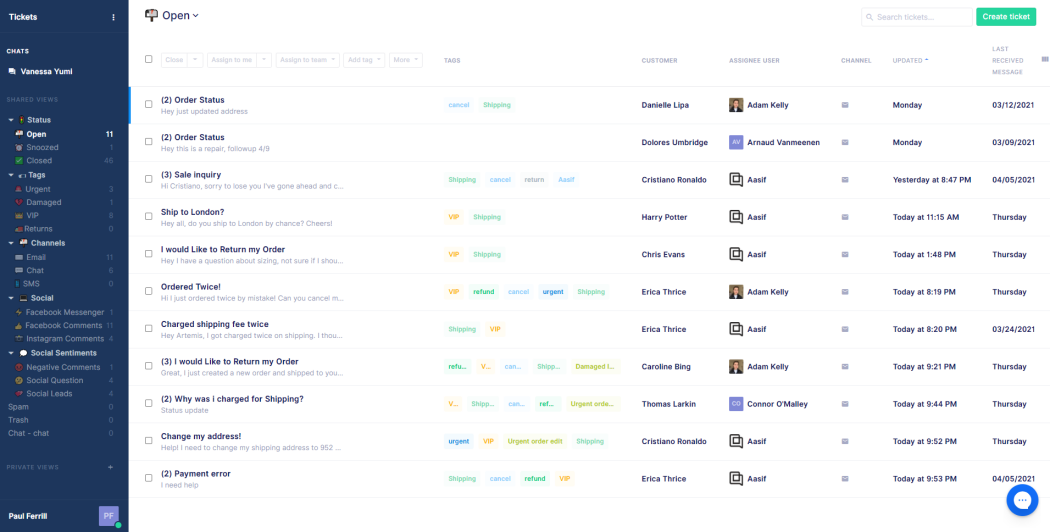
Gorgias is a cloud-based help desk software built primarily for ecommerce brands that need a fast way to manage support requests across sales and support channels. It combines a help desk ticketing system with deep store integrations, which makes it especially useful for teams handling high volumes of customer inquiries.
Top features
- Cloud ticketing system: Manage support requests from email, chat, and social in one place
- Ecommerce integrations: Connect with platforms like Shopify and Magento to view orders inside tickets
- Automation workflows: Automate responses and ticket routing based on customer data
- Macros and templates: Reply faster with reusable responses for common issues
- Revenue tracking: Track how support interactions impact sales and refunds
Pricing: starts at $10/month for 50 tickets and scales based on usage.
Gorgias pricing can become expensive as your support volume grows, since costs are tied to ticket usage. It is also heavily focused on ecommerce, which makes it less suitable for non-retail support teams.
6. Salesforce Service Cloud
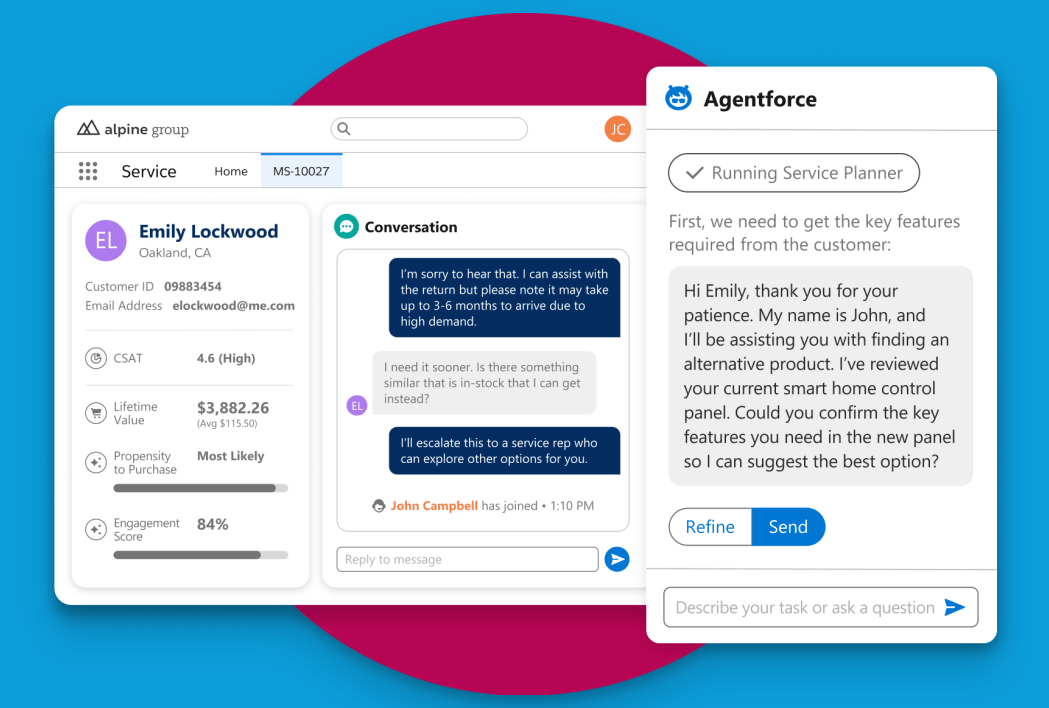
Salesforce Service Cloud is an enterprise cloud help desk platform built for large teams that need advanced case management and deep customization. It is commonly used by organizations that want to deliver a seamless support experience across multiple channels while acting as a central service provider for customer support operations.
Top features
- Cloud case management: Handle support requests and cases from anywhere in a fully hosted system
- Omnichannel routing: Direct tickets from email, chat, phone, and social channels to the right agents
- Advanced automation: Use workflows and rules to manage and resolve cases efficiently
- Knowledge base and self-service: Provide customers with access to help articles and support resources
- Deep reporting and analytics: Track performance, agent activity, and customer satisfaction in real time
Pricing: starts at $25/user/month, and a free trial is available.
Salesforce Service Cloud can be complex to implement and manage, often requiring dedicated resources or consultants. Costs also rise quickly as you add features, which can make it less practical for smaller teams.
7. Spiceworks Cloud Help Desk
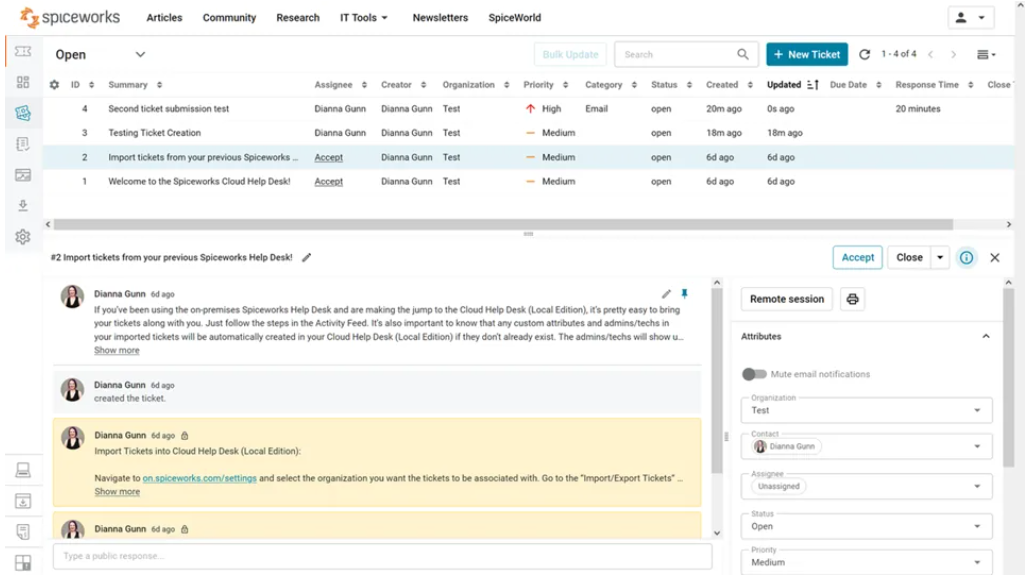
Spiceworks Cloud Help Desk is a free cloud-based support platform built mainly for internal IT teams that need a simple way to manage tickets and track issues. It is commonly used by smaller organizations looking for a lightweight help desk ticketing system without upfront costs.
Top features
- Cloud ticketing system: Manage support requests from anywhere with a hosted solution
- IT-focused workflows: Track issues, devices, and internal requests in one place
- Basic automation: Set simple rules to assign and manage tickets
- Reporting tools: Monitor ticket volume and team performance through dashboards
- Multi-user access: Allow your IT team to collaborate on support tickets in real time
Pricing: completely free to use.
Spiceworks Cloud Help Desk is limited in customization and advanced features compared to paid tools. The interface can feel outdated, and it may not scale well for teams handling more complex support operations.
8. Hesk
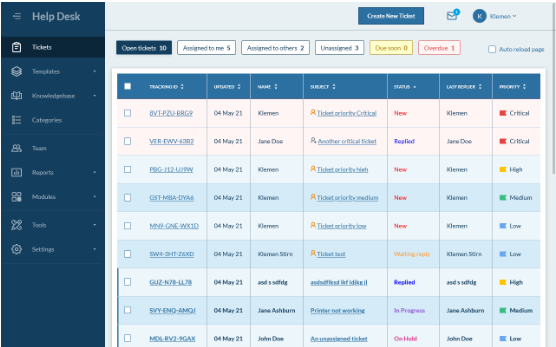
Hesk is a lightweight help desk ticketing system that can be used as a cloud-based solution or self-hosted, depending on your setup. It is often chosen by smaller teams that want a simple way to manage support requests without dealing with complex systems.
Top features
- Cloud ticketing system: Manage support tickets from a hosted environment or deploy it on your own server
- Email to ticket conversion: Turn incoming emails into organized support requests
- Knowledge base support: Create a simple help center for common questions
- Basic automation: Assign and manage tickets with simple rules
- Custom fields and categories: Organize tickets based on your workflow
Pricing: free for self-hosted version, cloud hosting starts at around $49/month.
Hesk lacks many advanced features found in modern cloud platforms, especially around automation and reporting. The interface is also quite basic, which can limit usability for larger or more demanding support teams.
9. Kayako
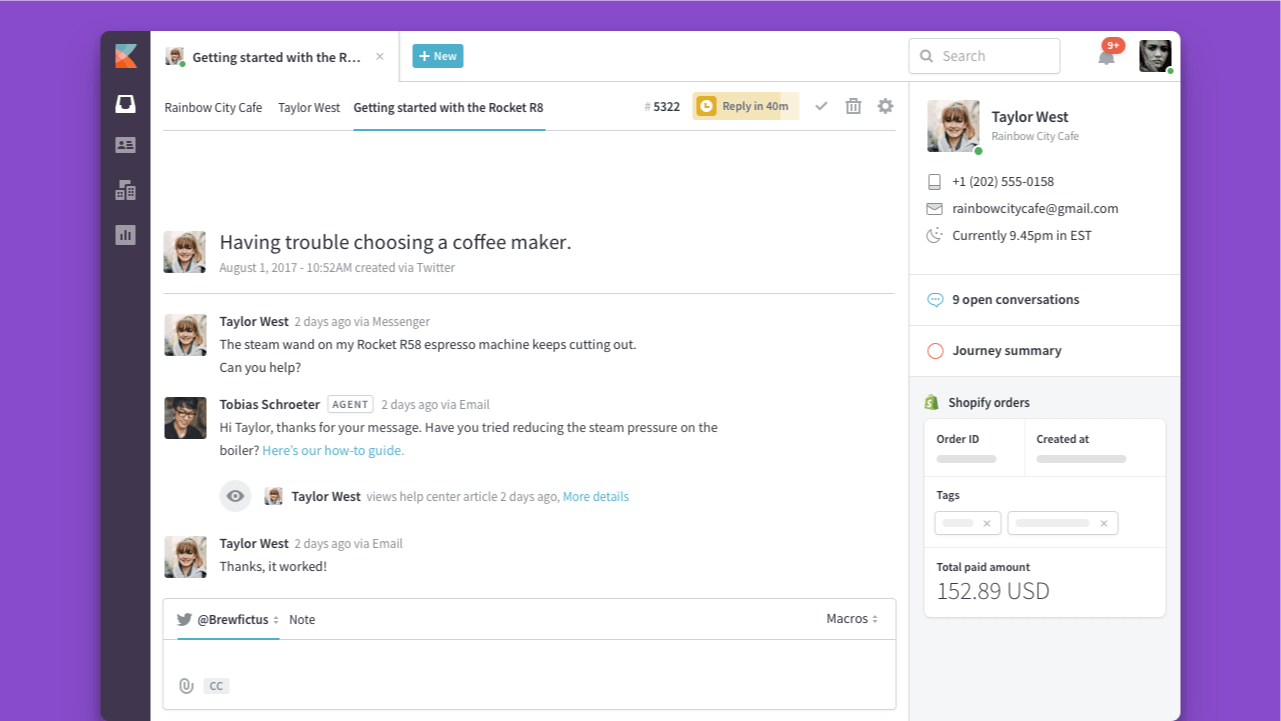
Kayako is a web-based help desk solution built for teams that want a unified view of customer conversations across channels. It focuses on delivering reliable support by combining email, chat, and social interactions into a single timeline, while offering seamless integration with other business tools.
Top features
- Unified conversation view: See the full customer journey across all channels in one place
- Cloud ticketing system: Manage support requests from anywhere in a hosted environment
- Live chat and messaging: Support customers in real time alongside email tickets
- Collaboration tools: Work together across teams with shared conversations and notes
- Seamless integration options: Connect with tools like Slack and Salesforce
Kayako pricing starts at $15/agent/month, and a free trial is available.
Kayako can feel limited compared to newer platforms, especially when it comes to automation and reporting. Some users also mention performance issues and slower updates, which can affect teams that rely on more advanced workflows.
10. HappyFox
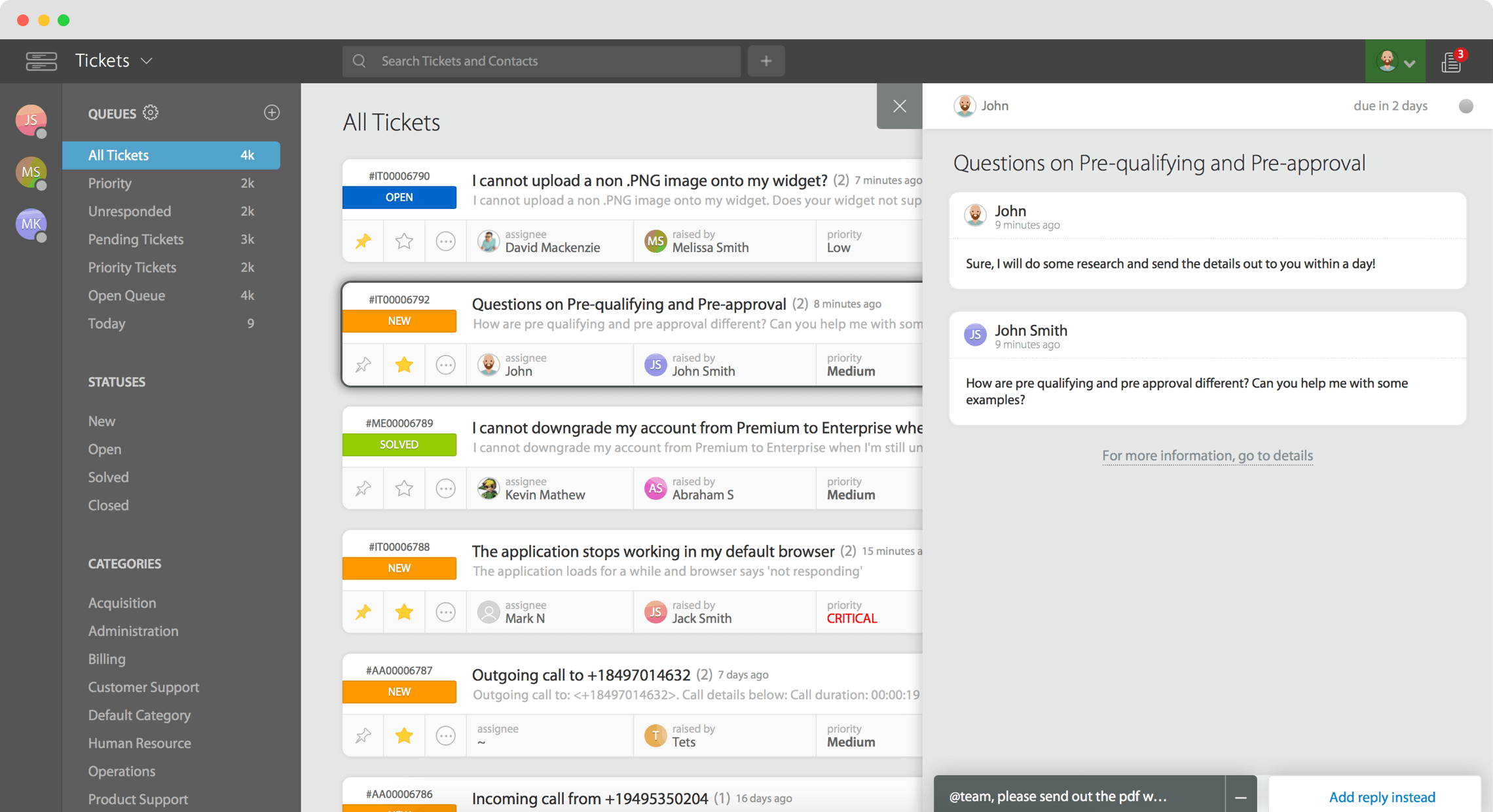
HappyFox is a cloud-based ticketing system built by HappyFox for teams that want a structured way to manage support across multiple channels. It is known for its user-friendly interface and flexible setup, which makes it suitable for both small teams and larger support operations.
Top features
- Cloud ticketing system: Manage support tickets from anywhere with a hosted solution
- Omnichannel support: Handle email, chat, phone, and social channels in one place
- Automation workflows: Route and prioritize tickets using customizable rules
- Knowledge base tools: Create self-service portals for customers
- Advanced reporting: Track performance and team metrics through detailed dashboards
Pricing: starts at $24/agent/month and a free trial is available.
HappyFox pricing can be on the higher side compared to similar tools, especially for smaller teams. Some advanced features are only available on higher-tier plans, and setup can take time if you want to customize workflows in detail.
11. Hiver
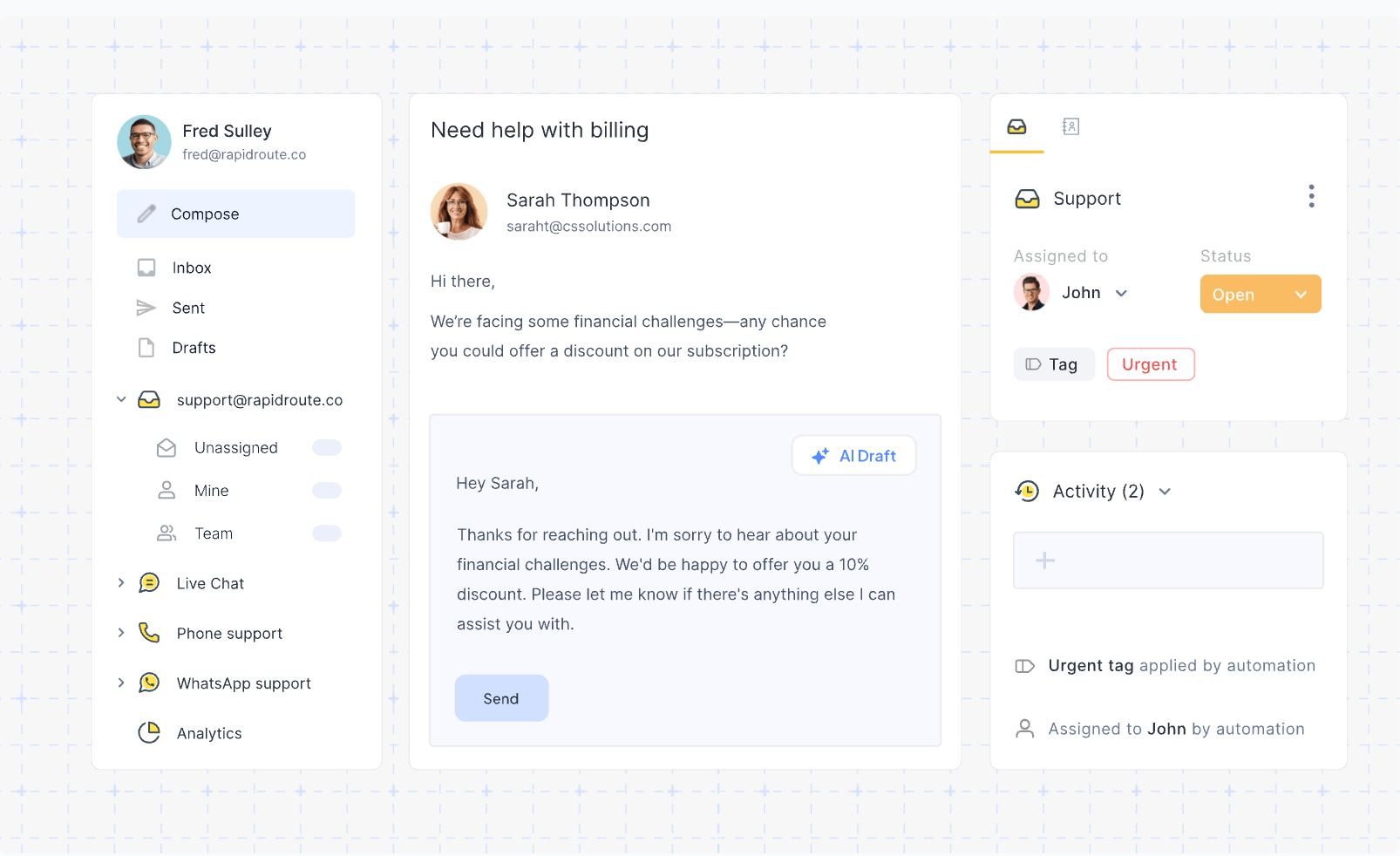
Hiver is a cloud-based help desk tool that works directly inside Gmail, making it a popular choice for small businesses that want to manage support without leaving their inbox. It focuses on core key functions like shared inboxes, collaboration, and visibility, helping teams keep users informed while handling support requests.
Top features
- Shared inbox in Gmail: Manage support emails collaboratively without switching tools
- Email to ticket management: Turn conversations into trackable support requests
- Internal notes and tagging: Collaborate with teammates directly inside email threads
- Automation rules: Assign and manage tickets automatically
- Basic reporting: Track response times and team performance
Hiver pricing starts at $19/user/month, and a free trial is available.
Hiver is limited compared to full help desk platforms, especially when it comes to advanced automation and multi-channel support. It also relies heavily on Gmail, which can be restrictive for teams using other tools or needing more complex workflows.
12. Tidio
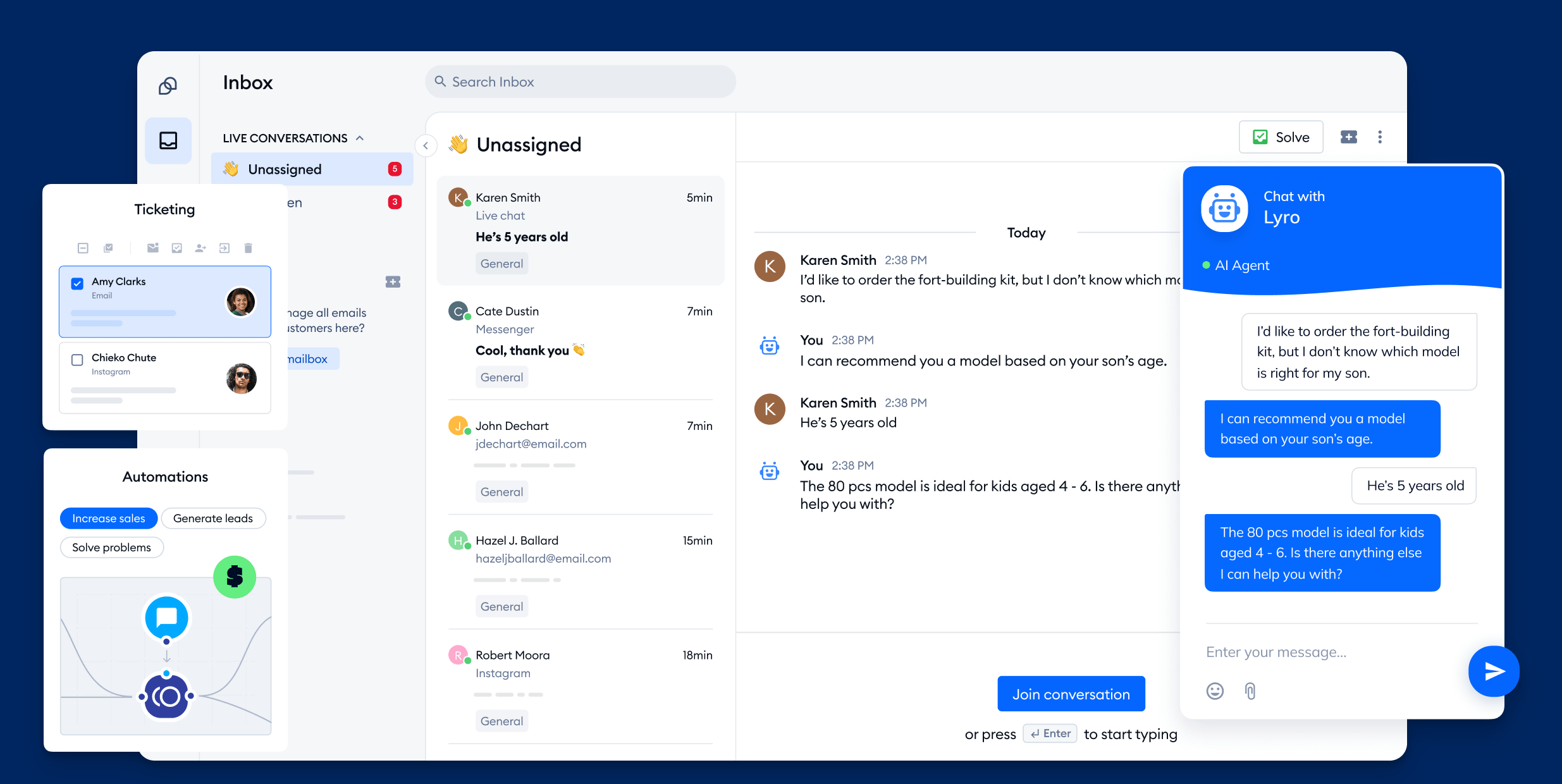
Tidio is a cloud-based help desk and live chat platform built for teams that want to handle customer conversations in real time. It is especially popular with small businesses and ecommerce brands that need a simple way to manage support requests across chat, email, and messaging channels.
Top features
- Cloud inbox for support: Manage customer conversations from chat, email, and messaging apps in one place
- Live chat and chatbot automation: Respond instantly and automate replies to common questions
- Multichannel support: Handle communication from websites, email, and social platforms
- Visitor tracking: See user activity on your site to respond with context
- Easy setup and deployment: Launch quickly without technical setup
Tidio pricing starts at $29/month and a free plan is available.
Tidio can feel limited for teams that need advanced ticket management or deep reporting. It is more focused on chat and automation, which may not fully replace a more structured help desk system for larger teams.
13. Front
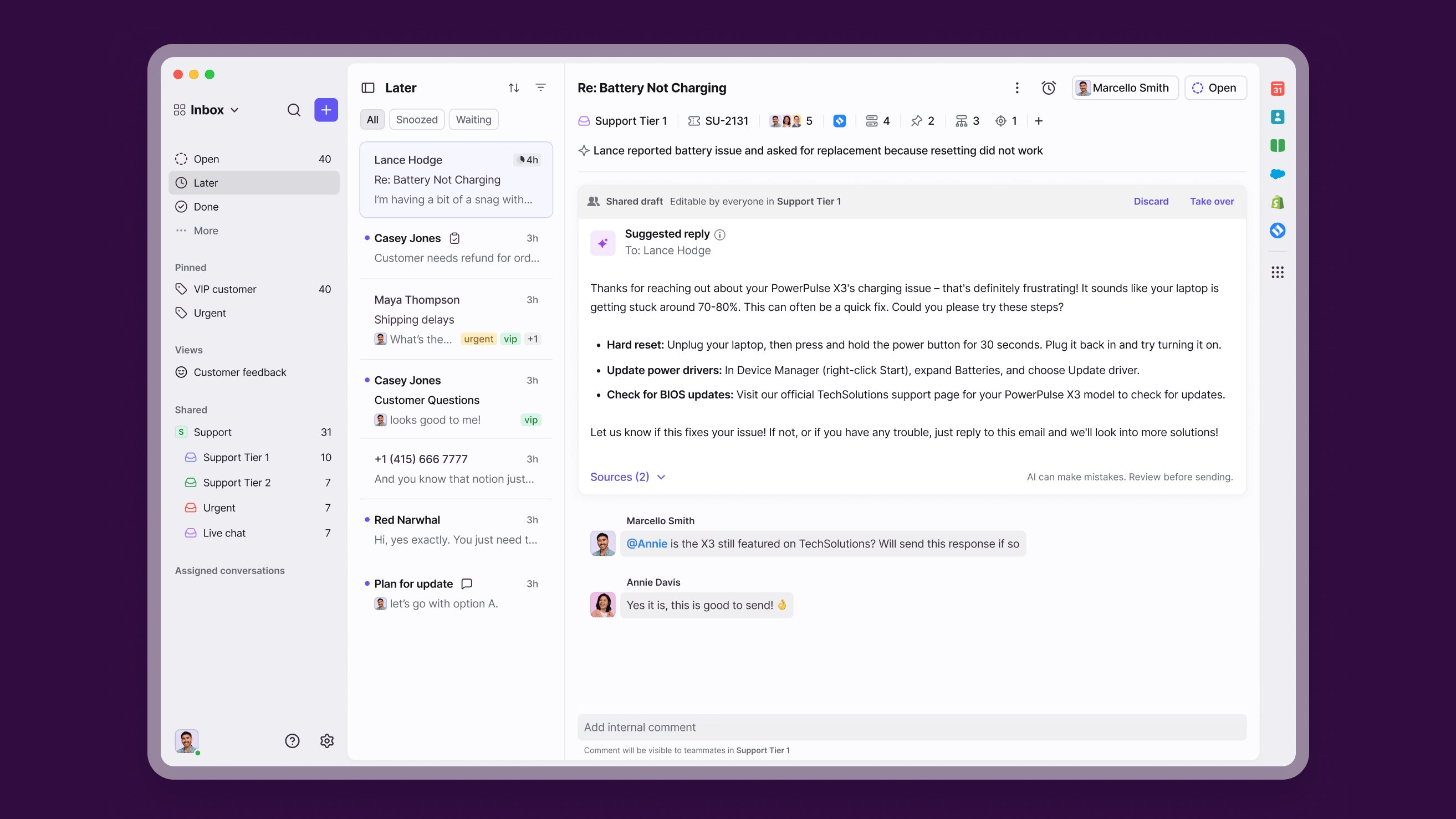
Front is a cloud-based help desk and shared inbox platform built for teams that want to manage customer communication collaboratively. It is often used by support, sales, and operations teams that need visibility into conversations while keeping workflows flexible.
Top features
- Shared inbox system: Manage email, chat, and messaging conversations in one place
- Collaboration tools: Add internal comments and assign conversations to teammates
- Automation rules: Route and prioritize messages automatically
- Multichannel support: Handle communication across email, SMS, and apps
- Analytics and reporting: Track response times and team performance
Front pricing starts at $19/user/month, and a free trial is available.
Front can get expensive as your team grows, especially if you need more advanced features. It also lacks some of the deeper ticket management capabilities found in more traditional help desk platforms.
Get the cloud-based help desk that works for your business and your customers
Cloud help desks solved the biggest problem of the old systems: no setup, no servers, no waiting weeks to get started. But they also created a new one. Too many tools are doing overlapping things, and teams end up duct-taping chat, tickets, help centers, and feedback together.
That works… until it doesn't.
If you are running multiple tools just to handle support, you are probably already feeling the friction. Conversations get lost, context disappears, and your product team is disconnected from what users are actually asking for.
That is exactly the gap newer platforms are trying to close.
Featurebase takes a different approach. Instead of being just another ticketing tool, it connects support, feedback, and product updates in one place. You are not just replying to tickets, you are seeing patterns, prioritizing what matters, and closing the loop with users. 💫
Featurebase comes with a Free plan, with paid plans starting at $29/seat/month. The onboarding is super fast, so there's no downside to trying it. 👇
✨ Automate your support with the fastest AI-enhanced Inbox today →