Chatbot Containment Rate: Formula and Ways to Improve It
*Learn how to calculate chatbot containment rate, interpret benchmarks, spot misleading results, and improve automated support without frustrating customers.*


On this page
Your chatbot can finish a conversation without an agent ever joining, while the customer leaves with the same problem and opens a new ticket the next morning.
In this guide, I'll show you how to calculate chatbot containment rate, check what the number actually includes, and improve it by fixing the issues that send customers back for help. 👇
Key takeaways
- Chatbot containment rate: The share of bot conversations that end without a human handoff. Check your platform's definition, since some also require evidence of resolution.
- The basic formula: Completed conversations without human handoff ÷ total eligible chatbot conversations × 100.
- Containment needs context: Abandonment, repeat contacts, and customer satisfaction help explain whether customers received useful support.
- Improvement priorities: Better knowledge, connected actions, and clearer conversations can reduce avoidable escalations. Customers should still have an easy route to a person.
- ✨ Featurebase: Fibi AI Agent, a help center, and an omnichannel inbox let AI and your team handle support together.
What is chatbot containment rate?
Chatbot containment rate is the percentage of chatbot conversations that finish without being transferred to a human agent. It's used to assess how much support stays within an automated channel.
For example, a customer asks how to invite a teammate. The chatbot explains the process, the customer confirms it worked, and the conversation ends. That's a successful instance of chatbot self-service.
But a customer who gets stuck and leaves may also count as contained under a simple no-handoff definition. The metric alone cannot distinguish those experiences.
You'll also see the term AI containment rate used for AI agents. Whatever the label, check whether the platform counts every conversation without a transfer or only conversations that meet its resolution criteria.
A higher rate can mean fewer conversations for your team to handle. Whether that customer support automation saves work depends on how many of those customers need help again.
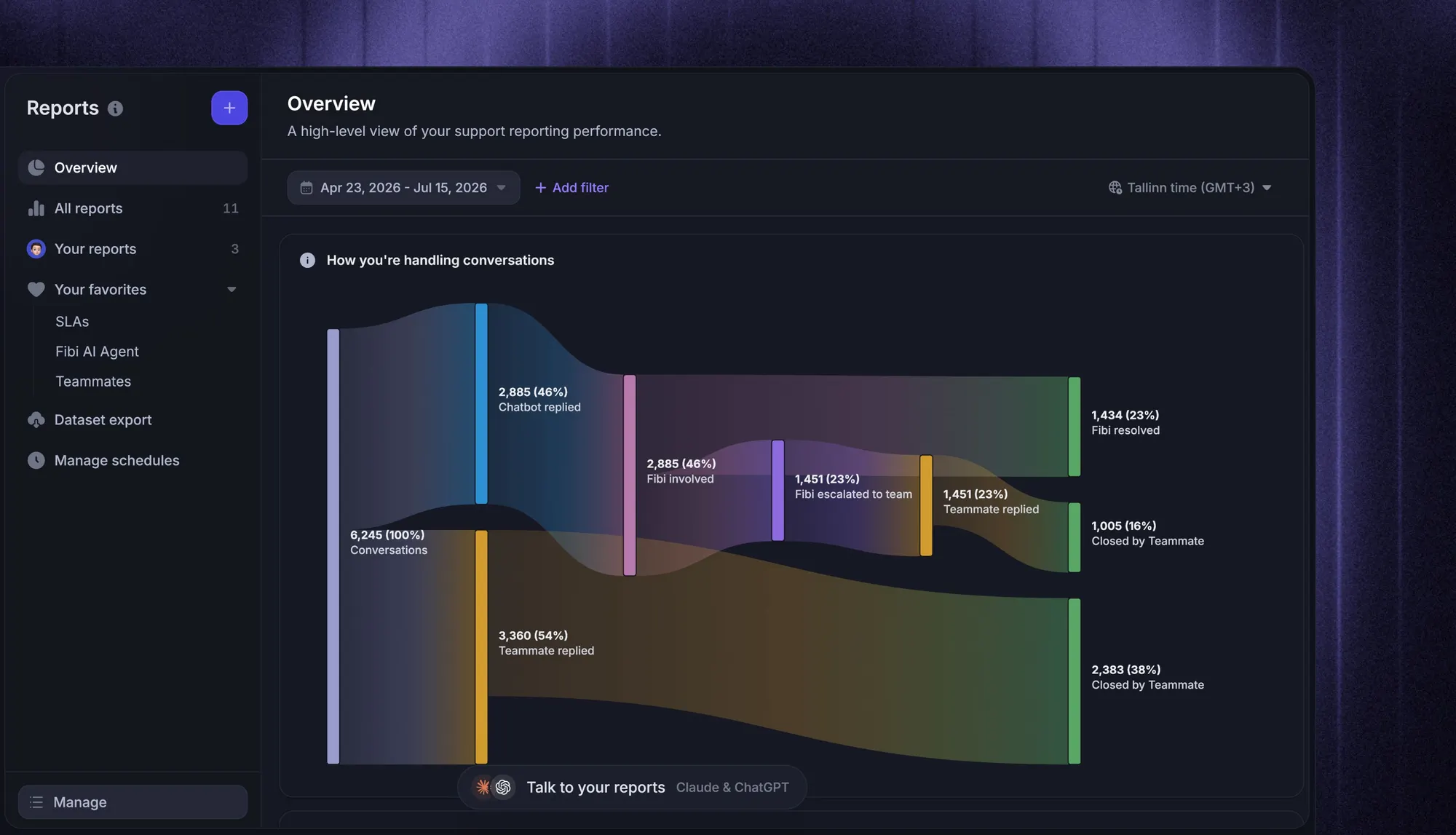
How to calculate chatbot containment rate
Start with a consistent reporting definition. Otherwise, a change in your dashboard might reflect a counting change rather than better chatbot performance.
Define which conversations count
Use real support conversations where a customer sends a message and the bot participates. Exclude internal tests, spam, and people who open the chat widget without asking anything.
Document these rules before calculating:
- Reporting period: Which conversation start dates belong in the report?
- Session boundary: When does an inactive conversation end, and when does a returning customer start another?
- Human involvement: Does a handoff request count as escalation, or only an actual transfer? Pick a rule and apply it consistently.
- Pending conversations: Which sessions are still active when you run the report?
For a weekly report, allow a consistent follow-up period before finalizing the results. Keep pending conversations visible, and don't classify them as contained just because nobody has joined yet.
Apply the formula
The chatbot containment rate formula is:
Containment rate = (completed conversations without human handoff ÷ total eligible chatbot conversations) × 100
Let's use an illustrative example. These numbers are invented to explain the calculation, not an industry benchmark.
A chatbot receives 1,200 eligible conversations, all of which have ended by the reporting cutoff. Of those, 300 reach a human agent and 900 end without a handoff.
Containment rate = (900 ÷ 1,200) × 100 = 75%
You can also calculate this as (1 − escalated conversations ÷ total conversations) × 100 when every conversation falls into exactly 1 of those 2 outcomes. That shortcut stops working if pending sessions or separately excluded abandonments create additional outcomes.
Check how each conversation ended
Now review the same example in more detail:
| Outcome | Conversations | Share of all conversations |
|---|---|---|
| Customer confirmed the bot solved the issue | 600 | 50% |
| Bot supplied an answer, but resolution was assumed | 200 | 16.7% |
| Customer abandoned an unfinished task without a handoff | 100 | 8.3% |
| Conversation reached a human agent | 300 | 25% |
| Total | 1,200 | 100% |
The no-handoff containment rate remains 75%. The customer-confirmed chatbot resolution rate is 50% of the same cohort. A platform combining confirmed and assumed resolutions would report 66.7%, using these example rules.
The assumed group may include successful conversations. It simply has weaker evidence than the customer-confirmed group. Likewise, silence after a useful answer is different from leaving halfway through a failed task.
Check whether customers later contact support about the same issue, including through email or another channel. Record those repeat contacts against the original outcome, and avoid counting the same failed conversation twice when adjusting your results.
Which metrics should you track alongside containment?
Your chatbot analytics should connect automation performance with the experience customers receive. A small set of customer service metrics makes that easier to assess.
| Metric | What to measure | What it helps explain |
|---|---|---|
| Resolution rate | Conversations meeting your documented resolution criteria ÷ eligible bot conversations | Whether the customer's issue was addressed |
| Escalation rate | Conversations requiring human involvement ÷ eligible bot conversations | Where automation needs help |
| Abandonment rate | Conversations left unfinished ÷ eligible bot conversations | Where customers give up or get interrupted |
| Repeat-contact rate | Initially contained conversations followed by contact about the same issue ÷ initially contained conversations | Whether answers hold up after the chat ends |
| Customer satisfaction score (CSAT) | Positive ratings ÷ submitted ratings | How responding customers felt about the experience |
| Task completion rate | Successfully completed actions ÷ attempted actions | Whether the bot actually finished the requested work |
Treat these as reporting definitions for your own analysis, and check how your software calculates each metric. Keep the customer group and reporting window comparable.
Also check the CSAT response rate. A positive score from the few customers who answered a survey tells you less about everyone who stayed silent.
Featurebase's Fibi reporting separates assumed and customer-confirmed resolutions, while its overall Fibi resolution rate includes both. That distinction lets your team inspect what sits behind the combined figure.
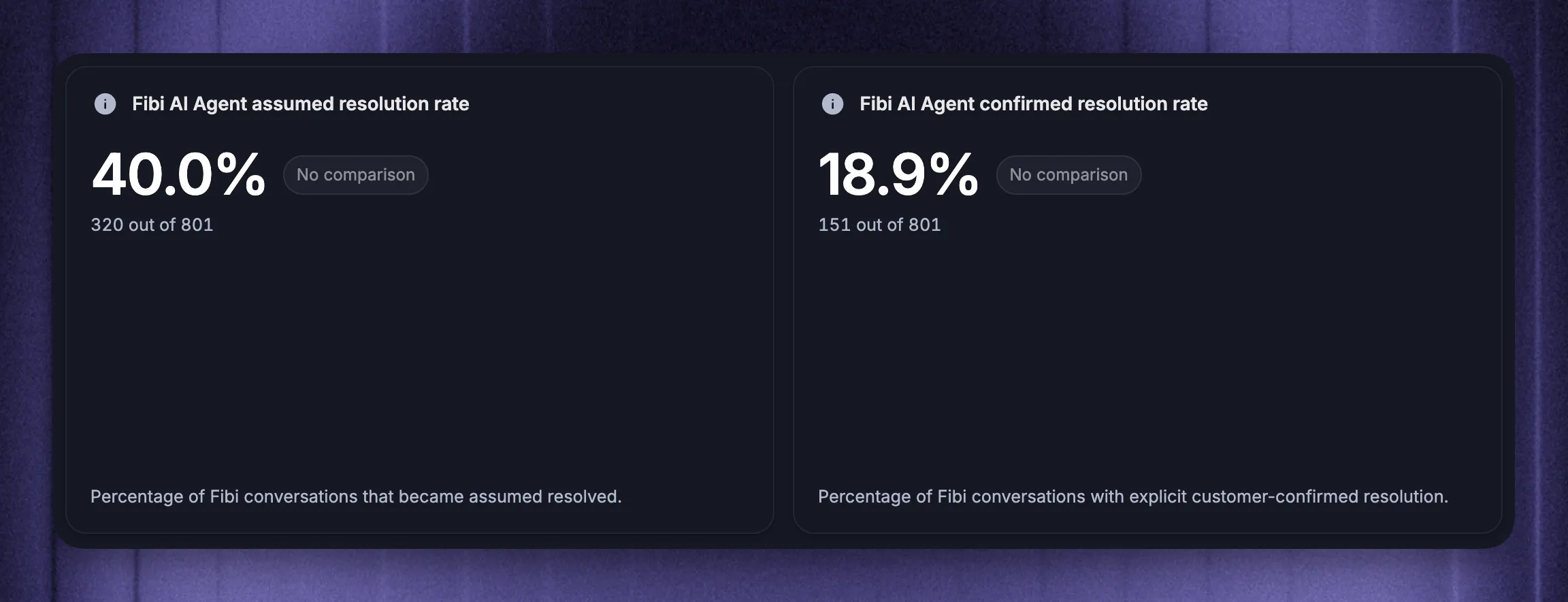
Read chatbot metrics together. If containment improves while repeat contacts increase, review the conversations before treating the change as a success.
6 ways to improve chatbot containment rate
Start with the conversations your chatbot could reasonably resolve. Fixing the reasons those conversations fail gives you a clearer improvement plan than raising a company-wide target.
1. Fix the issues behind frequent handoffs
Group conversations by what the customer wanted, such as accessing an account, finding an invoice, or understanding a feature. Consistent ticket tagging helps you compare those groups over time.
Then read examples from the busiest groups with weak results. Separate the causes:
- Missing knowledge: The bot cannot find the answer.
- Misunderstood request: It answers a different question.
- Missing capability: It knows what should happen but cannot complete the action.
- Appropriate escalation: The request needs judgment, authority, or investigation from your team.
Assign an owner and a specific fix to each recurring problem. For instance, invoice requests might need an account lookup, while repeated confusion about permissions might need a clearer help article.
Report results by intent as well as overall. A surge in easy questions can raise the headline rate while difficult support issues remain unchanged.
2. Improve the knowledge your chatbot uses
Review the source material behind unsuccessful answers. An outdated article, conflicting policy, or missing exception can produce an answer that sounds complete but sends the customer in the wrong direction.
Useful knowledge base best practices include giving each article a clear purpose, explaining relevant plan restrictions, and keeping instructions current.
Write for the questions customers actually ask. An article titled around an internal feature name may overlook the everyday problem that brings someone to support.
After changing a source, rerun the failed question with different wording. Check that the bot finds the right content and applies the right conditions. Adding more documents only helps when it improves the answer customers receive.
3. Connect the actions customers need
Some requests need an action before they can be resolved. Explaining where invoices normally appear won't help a customer who needs an invoice retrieved from their account.
Use chatbot API integrations to connect useful account data and supported actions. Start with a specific task that frequently reaches your team, then define what successful completion looks like.
Check permissions, required customer information, and what happens when the connected system fails. The bot should only report success after the action succeeds.
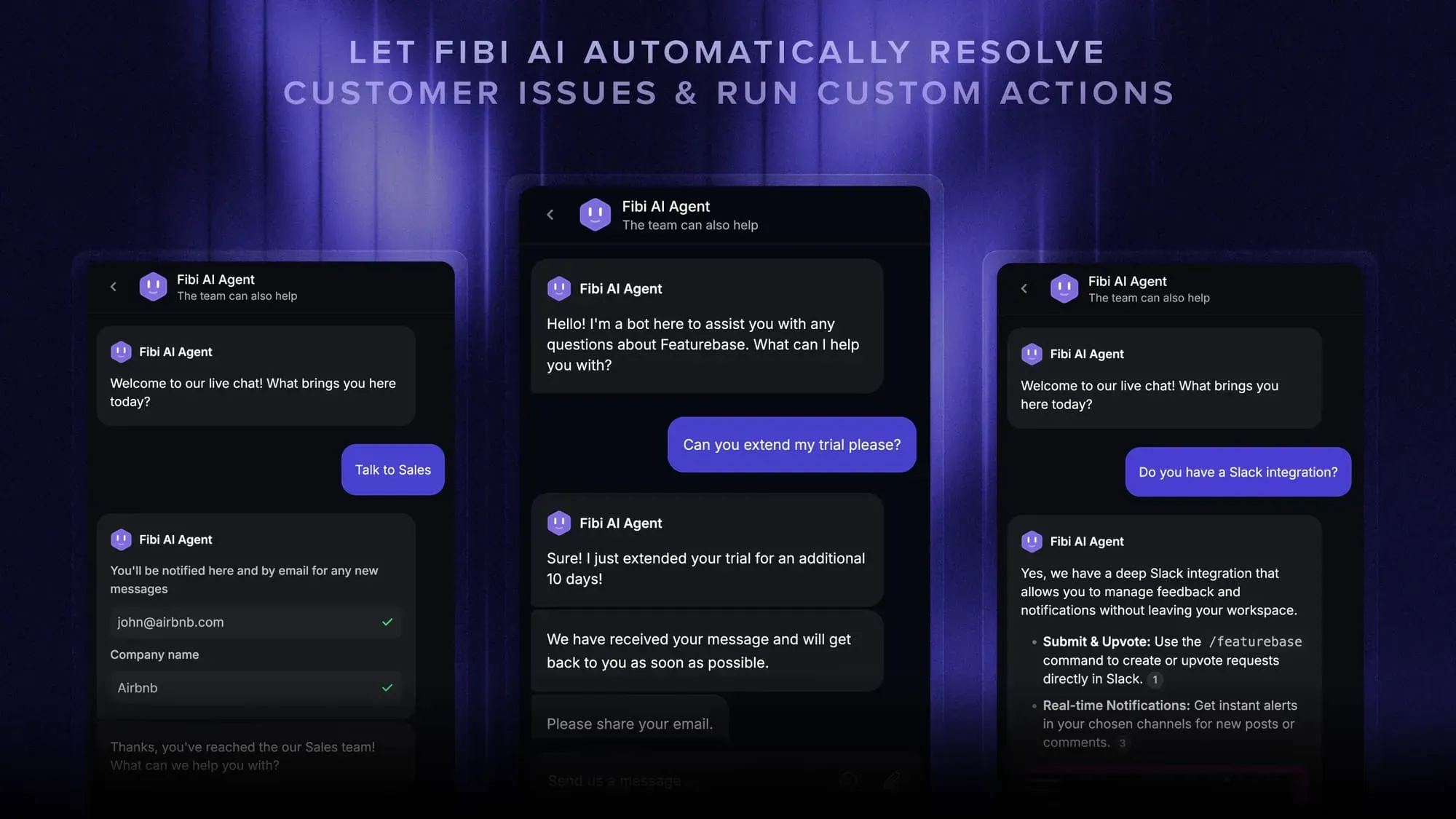
For example, Fibi AI Agent supports Custom Fibi Actions that can retrieve invoices or extend trials through connected APIs. These actions are available on Professional and Enterprise plans and require your team to connect the relevant systems.
This gives the customer a way to complete the request within the conversation, reducing handoffs caused by missing functionality.
4. Handle unclear questions and follow-ups
A customer saying “I can't add someone” might mean inviting a teammate, changing permissions, or reaching a seat limit. Sending the first matching article can lead the conversation in the wrong direction.
Improve intent recognition by testing those real phrases and the follow-up messages that clarify them. Ask a focused question when information is missing, such as whether the customer sees an error or cannot find the invitation option.
Your chatbot scripts and AI instructions should preserve information already provided. Customers shouldn't have to repeat their plan or account details at every step.
Keep clarification bounded. If the bot repeats the same question, misunderstands a correction, or cannot make progress, offer a handoff. Another loop is unlikely to make the experience better.
5. Make human handoff easy
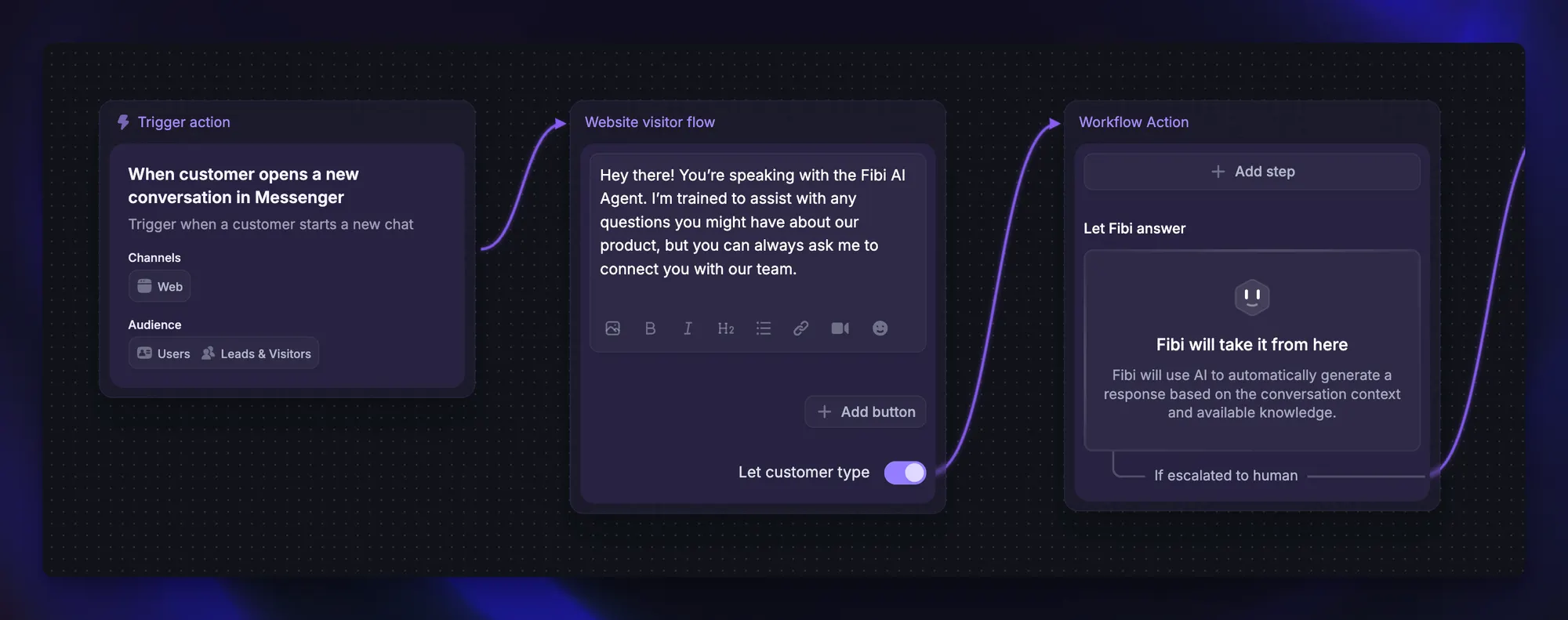
Customers should be able to request a person, and the bot should recognize requests that fall outside its authority or knowledge.
In a 2026 Gartner survey of 3,566 B2B and B2C customers, 87% said access to a human was essential when companies used GenAI for service.
A useful ticket escalation process passes along the customer's goal, relevant account context, and what the bot already tried. If nobody is available immediately, explain how the team will follow up.
Track handoff quality separately from whether a handoff happened. A necessary transfer that reaches the right person with full context is a successful part of the support journey.
Making escalation accessible may lower the reported containment rate initially. Use the accompanying resolution, repeat-contact, and satisfaction results to judge whether customers are better served.
6. Test changes against real conversations
Build a reusable set of anonymized conversations from production. Include successful exchanges, failed answers, interrupted tasks, and requests that should reach a human.
For each case, define the expected outcome before running the test. A trial-extension test should confirm the correct account was updated and the customer received an accurate response.
Your chatbot testing should cover follow-up questions, corrections, missing information, and failed integrations. Rerun the same cases after changes to knowledge, instructions, or connected actions so you can catch regressions.
Then review live results with a comparable traffic mix. Check language, channel, and intent before attributing a change to your update.
Keep a simple change log alongside the report: what changed, when it changed, and which customer problem it was intended to fix. That makes the next review much easier.
Conclusion
Chatbot containment rate becomes useful when you can explain which conversations it counts and what happened to those customers afterward. Use it to find fixable problems, then check whether your changes improve resolution and satisfaction.
Featurebase is a modern AI customer support platform for product-led SaaS. It combines AI-powered support, a help center, and feedback management in one place, with Fibi answering customer questions and your team handling the conversations that need human help.
Featurebase has a Free plan, so there's no downside to trying the core platform. Fibi is available on paid plans, with AI resolutions billed separately. 👇
Automate your support with the fastest AI-enhanced Inbox today
FAQs
A useful target depends on your request types, the bot's responsibilities, and how containment is counted. Before adopting chatbot containment rate benchmarks, check their sample, channels, and treatment of abandonment. Set targets for comparable intent groups against your own baseline, with resolution and satisfaction requirements alongside them.
Containment focuses on conversations inside an automated channel. Deflection rate often measures support demand handled through self-service before it reaches a human, including help-center visits. Vendors sometimes use chatbot deflection rate for a narrower measure, so compare the actual numerator and denominator before comparing results.
Choose a window that captures normal follow-up for the issue you're measuring. Account-access problems may return quickly, while billing questions may take several days to resurface. Use historical contact patterns to select the window, document it, and keep it consistent across comparisons.
Estimate the value of human work actually avoided, then subtract automation, maintenance, and follow-up costs. Divide that net benefit by the automation investment and multiply by 100. Include the full AI chatbot pricing model, and distinguish time freed up for other work from cash savings that reduce your budget.
You can measure how often test conversations finish without a handoff and whether they meet their success criteria. Report that as a test result, since simulated users and selected scenarios may differ from live traffic. Use a limited production pilot to establish your operational baseline.
The broad calculation applies to both, but session boundaries differ. Voice calls end with a hang-up or transfer, while chat sessions can pause and resume across a timeout. Document those rules and distinguish unfinished departures from successful endings before comparing channels.