Ticket Queue Management for Customer Support Teams
Improve customer support with practical ticket queue management: clear ownership, balanced workloads, backlog reviews, and early checks for SLA risks.


On this page
Your customer support team can be replying all day while older tickets sit untouched, complex cases wait on engineering, and an SLA deadline slips past.
Good ticket queue management makes that unfinished work visible. In this guide, I'll show you how to organize support queues, share the workload, and build a review routine that keeps customers from waiting without an update. 👇
Key takeaways
- Give queues accountable owners: Someone should monitor unassigned work, stalled tickets, and coverage gaps during every support shift.
- Track the next action: Separate tickets your team can work on from those waiting on customers or another team.
- Review age and deadlines together: A ticket can meet its first-response target and still leave a customer waiting for days.
- Balance effort and capacity: Open ticket counts need context about complexity, availability, and other responsibilities.
- Improve the process every week: Use backlog reviews to resolve blockers and prevent recurring requests.
- ✨ Featurebase brings customer conversations together with shared Inbox views, SLAs, and workload tools, with availability depending on your plan.
What is ticket queue management in customer support?
Ticket queue management is the ongoing process of organizing and monitoring unresolved customer support requests so the right work receives attention on time. It covers ownership, workload, waiting states, follow-ups, and backlog health throughout the ticket lifecycle.
A support ticket queue is a working list of requests that share a purpose, such as billing questions or cases waiting for a reply. Your ticketing system might represent it as a team inbox, an assignment queue, or a filtered view.
These related activities answer different questions:
- Ticket triage: What does the customer need, and what requires attention?
- Ticket routing: Which team or agent should handle the request?
- Ticket prioritization: How does its urgency compare with other requests?
- Queue management: Is the work moving, and what needs intervention now?
For example, a correctly assigned integration issue can still sit untouched while its owner handles new chats. Support ticket queue management catches that delay and gives the next action a deadline.

How to manage customer support queues
Start with a shared rule: every unresolved request needs an accountable owner, a next action, and a time to check it again. These 7 practices turn that rule into a daily operating routine.
1. Give every support queue an owner and backup
Name a person responsible for watching each queue during staffed hours. This can be a rotating duty rather than a permanent management role.
The queue owner checks for gaps across the work. Individual ticket owners remain responsible for investigating their cases and updating customers. While a request is unassigned, the queue owner is accountable for getting it picked up.
Write a short operating agreement that covers:
- Scope: Which customer requests belong in the queue.
- Coverage: Who monitors it now and who takes over during breaks or absence.
- Intervention: When the owner should arrange backup or involve a support lead.
- Handoff: How the next shift learns about unresolved risks.
Give the owner enough authority to act on what they find. If they must ask permission every time an overloaded teammate needs help, the review becomes another place where work waits.
At shift changes, hand over the exceptions that need action. A total ticket count alone says little about which customers need attention next.
2. Separate actionable support work from waiting tickets
An inbox containing every unresolved ticket can hide the work your team needs to do now. Organize it around the next action:
- Needs support action: A teammate must reply, investigate, or make a decision.
- Waiting on the customer: You have asked for information or confirmation needed to continue.
- Waiting on another team: Engineering, billing, or another specialist owns a dependency.
- Follow-up due: A promised update or scheduled check has reached its due time.
These can be views over the same records. You don't need a separate team inbox for every waiting reason.
Before moving a ticket into a waiting state, record what is missing and when someone will check again. If support has promised an update before the dependency is resolved, that update is still work the team owes the customer.
Featurebase's custom Inbox views let teammates share filtered lists based on details such as ownership, waiting time, and SLA due dates. A view changes which conversations you see without changing their assignment, so teams can monitor exceptions while keeping the existing owner.
Keep a complete unresolved-work view alongside the focused lists. Otherwise, a filter change can make a difficult case disappear from everyday attention even though the customer still needs help.
3. Set a regular support queue review cadence
Review queues often enough to catch problems before your support commitments expire. A team promising replies within minutes needs closer monitoring than one handling asynchronous requests over several business hours.
Use this as a starting routine, then adjust it to your ticket volume and coverage:
| Review point | What to check | What should happen next |
|---|---|---|
| Start of each shift | Overnight requests, unassigned work, overdue updates, absent owners | Confirm coverage and assign immediate actions |
| During the shift | Approaching SLA deadlines, newly urgent issues, capacity changes | Bring in help or adjust the work before a breach |
| Before handing over | Unfinished investigations, customer promises, pending dependencies | Give the next shift a named owner and clear next step |
| Weekly backlog review | Older tickets, recurring blockers, repeated request types | Unblock cases and assign improvements to the process |
Scheduled reviews support continuous monitoring of urgent requests. A critical issue should enter your ticket escalation process immediately, even if the next queue sweep is later.
Keep each review focused. Instead of asking everyone for a status update, inspect tickets with missing owners, overdue actions, or increasing waits. Finish with a decision for each exception and record who will carry it out.
If the same exception survives several reviews unchanged, escalate the blocker or reconsider the action. Repeatedly reading the ticket doesn't move it forward.
4. Balance support workloads by effort and availability
An equal number of tickets does not necessarily mean an equal workload. A teammate investigating an intermittent API failure may have less capacity than someone handling several straightforward account questions.
For effective workload balancing, review agent workload using:
- Active effort: Which cases need investigation or sustained attention now.
- Availability: Who is actually working, including breaks, meetings, and shift endings.
- Relevant skills: Who can make progress without a lengthy transfer or retraining.
- Other duties: Time reserved for incident coordination, documentation, or coaching.
Administrative work matters too. Salesforce's 2025 State of Service report found that service representatives spent 46% of their time with customers, with administrative tasks and internal responsibilities taking part of the remainder. Use your own team's workload data when setting capacity limits.
When someone is overloaded, move suitable new work first. Reassign an active investigation when the benefit outweighs the time needed to transfer context, and confirm that the receiving teammate can take it.
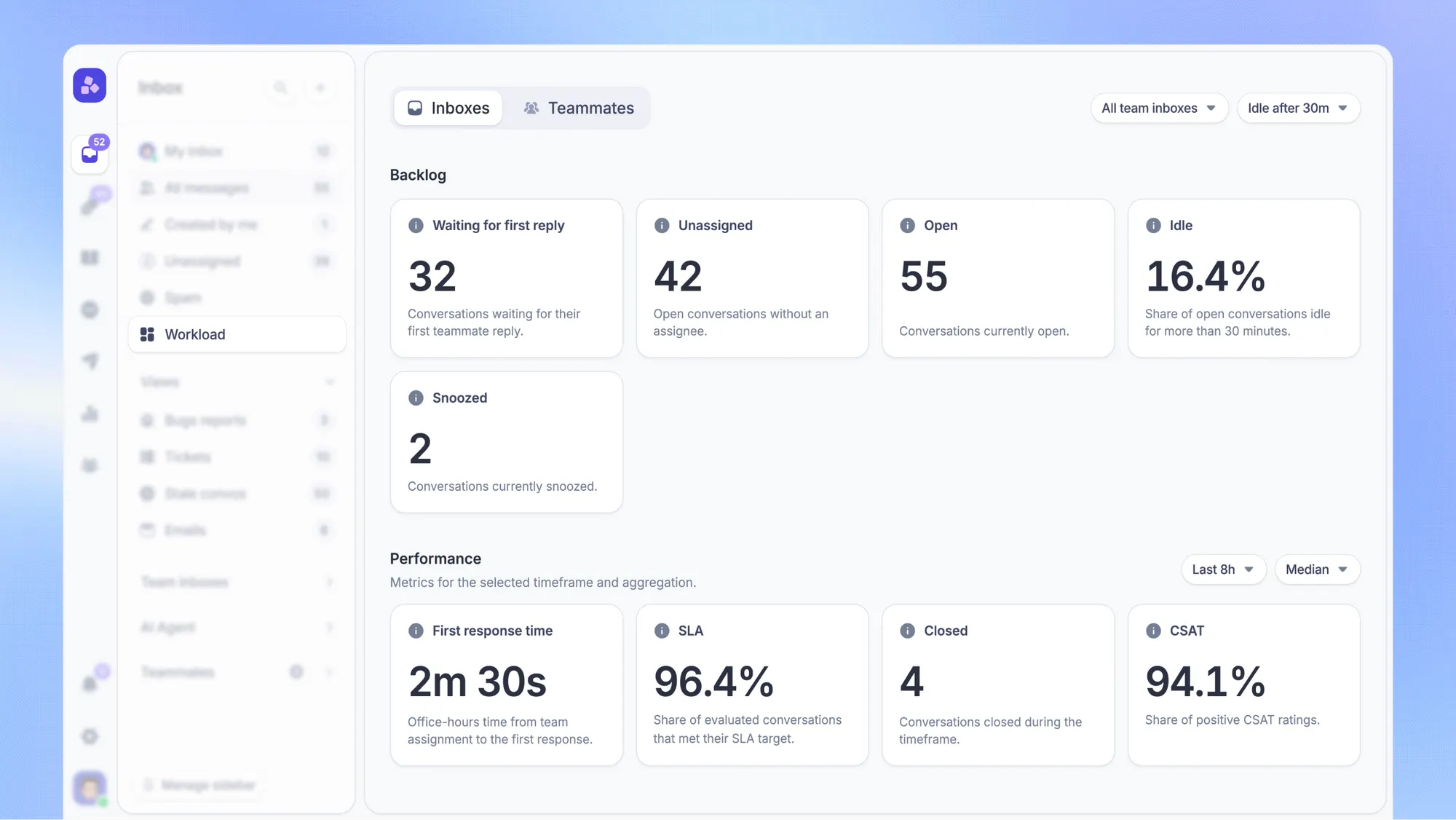
Featurebase's Workload management includes a dashboard for waiting conversations, teammate availability, and capacity. Its Enterprise plan adds Balanced assignment and advanced workload controls, helping distribute conversations within limits. Support leads still need to account for case complexity when reviewing the distribution.
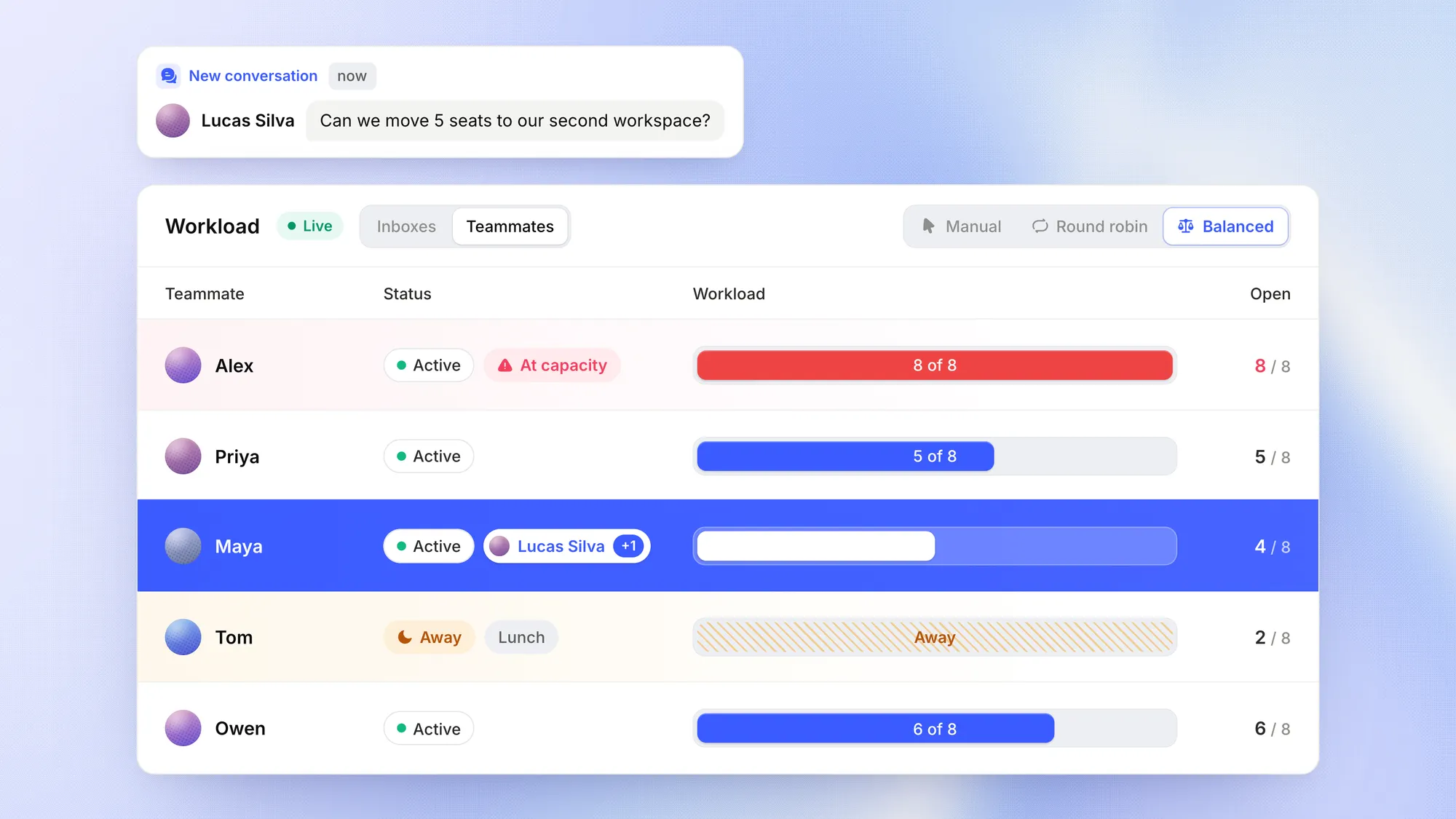
Leave room for unexpected work. Assigning every available minute in advance makes each urgent request a disruption to an already full schedule.
5. Surface aging support tickets and SLA risks
Check both the oldest unresolved work and the tickets approaching a service level agreement (SLA) deadline. Sorting only by priority can leave routine requests waiting indefinitely.
Keep these measures separate:
- Ticket age: Time since the request was created.
- Customer waiting time: Time the customer has been waiting for the next support response.
- SLA time remaining: Time left under the applicable response or resolution commitment.
A long-running investigation may be progressing with regular updates. A newer ticket may already be close to breaching its response target. The queue should make both situations easy to find.
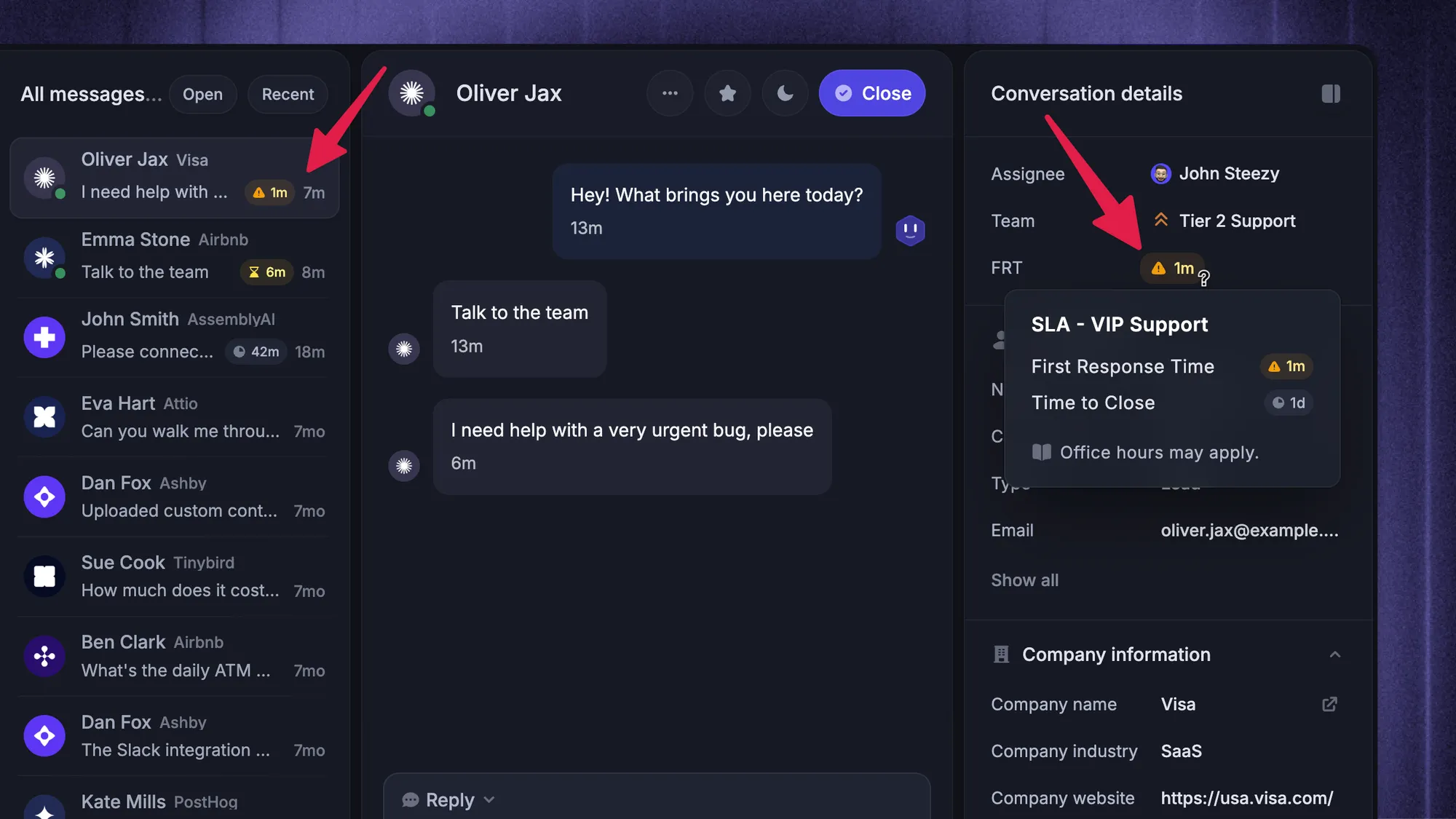
Set an action for each risk. An approaching deadline might require backup. An old ticket might need a blocker removed, a promised update sent, or a decision from another team.
Remember that SLA compliance depends on your policy. Business hours, holidays, and waiting states can affect the clock. Moving a ticket to pending does not automatically pause every target, and sending an acknowledgment does not resolve the underlying issue.
Build an aging view for requests outside formal SLAs too. Customers without a contractual deadline still need a service standard and a reliable follow-up.
Finally, check time since meaningful progress. Internal comments can make a ticket look recently active while the customer continues waiting for an answer.
6. Keep customer updates moving through support handoffs
When support needs engineering or another specialist, keep responsibility for customer communication explicit. Asking for help should leave the customer with someone who will follow up.
A useful handoff includes:
- Customer impact: What the customer cannot do and any relevant deadline.
- Work completed: What has already been checked, with the evidence attached.
- Required action: The specific question or task the receiving team must address.
- Next update: Who will communicate with the customer and when.
Confirm that the receiving team has accepted the work. A mention in an internal note is easy to miss, especially when several teams share the ticket.
Keep the customer-facing owner responsible for the next update until someone explicitly takes over. If there is no fix yet, that update can explain what is being investigated and when the customer will hear again.
Put dependency follow-ups into the queue review routine. This gives the support lead a way to spot stalled collaboration before the customer has to chase for news.
7. Review the customer support backlog every week
Daily queue reviews protect today's commitments. A weekly backlog review examines why work remains unresolved and how to reduce recurring support tickets.
Define what your team means by ticket backlog first. You might count all unresolved requests or only those older than an agreed threshold. Keep that definition consistent when comparing weeks.
Start with the oldest actionable tickets, repeated transfers, and cases waiting on the same dependency. Give each one a clear outcome:
- Continue: Confirm the next action and the time reserved to do it.
- Unblock: Assign responsibility for obtaining missing information or a decision.
- Escalate: Involve someone who can resolve a stalled dependency or capacity issue.
- Close appropriately: Confirm resolution or apply an agreed closure policy with clear customer communication.
Then look for patterns across tickets. Repeated setup questions may need a clearer knowledge base article, while a recurring error may need a product fix.
Choose a specific improvement, give it an owner, and check its progress at the next review. Self-service content and automation are useful when they address a recurring cause you can identify.
Avoid closing unanswered tickets just to shrink the backlog. Review reopened cases and customer feedback alongside closure counts to check whether the work was actually finished.
3 customer support queue management examples
The following examples show how queue reviews turn visible problems into actions. The timings are illustrative, so adapt them to your own support commitments.
An older billing question keeps getting skipped
A customer asks for an invoice correction. The request is assigned and acknowledged, but newer chats keep taking attention. By the next day's review, nobody has checked the invoice.
The queue owner spots the age and missing next action. They reserve time with a billing teammate and give the customer a specific update time. The case stays visible until the correction is confirmed.
What changes: Routine work gets protected time instead of depending on a quiet moment that may never arrive.
An integration issue is waiting on engineering
Support reproduces a failed webhook and sends the logs to engineering. The ticket is marked as waiting internally, but the customer was promised an update that afternoon.
The dependency stays with engineering while the support owner keeps the communication task. A follow-up view surfaces the promised update, even if the investigation is still underway. If engineering hasn't accepted the issue, the queue owner follows up on that handoff.
What changes: A waiting state preserves the reason for the delay while customer updates continue.
A login incident fills the support queue
Several customers report that they cannot sign in. Incoming ticket volume rises, and the usual support team cannot cover both the incident and routine requests comfortably.
The support lead links affected tickets to the incident, gives agents a consistent update, and brings available backup onto suitable work. Another teammate watches unrelated requests and approaching deadlines. Incident tickets remain tracked until each customer's support work is complete.
What changes: The team coordinates the surge while keeping existing customer commitments visible.
8 metrics for customer support queue health
A useful queue dashboard helps you decide where to act. Review these customer support metrics by team or request type so an overall average doesn't hide a struggling queue.
| Metric | What to measure | What to investigate |
|---|---|---|
| Unassigned tickets | Requests without an individual owner, including how long they have waited | Missing coverage, unclear ownership, or failed assignment |
| Oldest customer wait | Longest current wait for a support reply | A missed message, absent owner, or stalled handoff |
| Backlog age | Unresolved tickets grouped by age and waiting reason | Older work that needs protected time or a dependency removed |
| Incoming versus resolved volume | New and reopened work compared with completed work over the same period | A sustained gap between demand and capacity |
| SLA risk and breaches | Targets approaching their deadlines and the share missed | Recurring coverage gaps or action taken too late |
| Response times | First response time and subsequent reply times, including the slowest portion of replies | Customers waiting longer after the initial acknowledgment |
| Active workload per available agent | Cases requiring action, reviewed alongside complexity and available time | Uneven effort or more active work than the team can handle |
| Reopen rate | Resolved tickets that return for further work | Premature closure, incomplete answers, or recurring issues |
Write down the definitions before comparing results. Specify business or elapsed time, whether waiting tickets are included, and which tickets or SLA targets form the denominator for a rate.
Use medians and slower-response percentiles alongside averages where your reporting supports them. A healthy average can coexist with a group of customers waiting far longer than everyone else.
Check resolution time and customer satisfaction alongside queue speed. Faster replies are useful when they help customers reach a satisfactory outcome.
Count unique tickets when combining views. The same request might appear in an agent's inbox, an aging view, and an SLA-risk view. Adding those totals would exaggerate the amount of work.
For each recurring problem, connect the metric to an action and an owner. If incoming work keeps outpacing completions, investigate the demand or capacity gap. Reordering the same queue every morning won't remove that gap.
Conclusion
Good ticket queue management makes unfinished customer support work easy to act on. Start with accountable owners, clear waiting states, and a review routine. Then use workload and aging data to catch delays before customers have to chase.
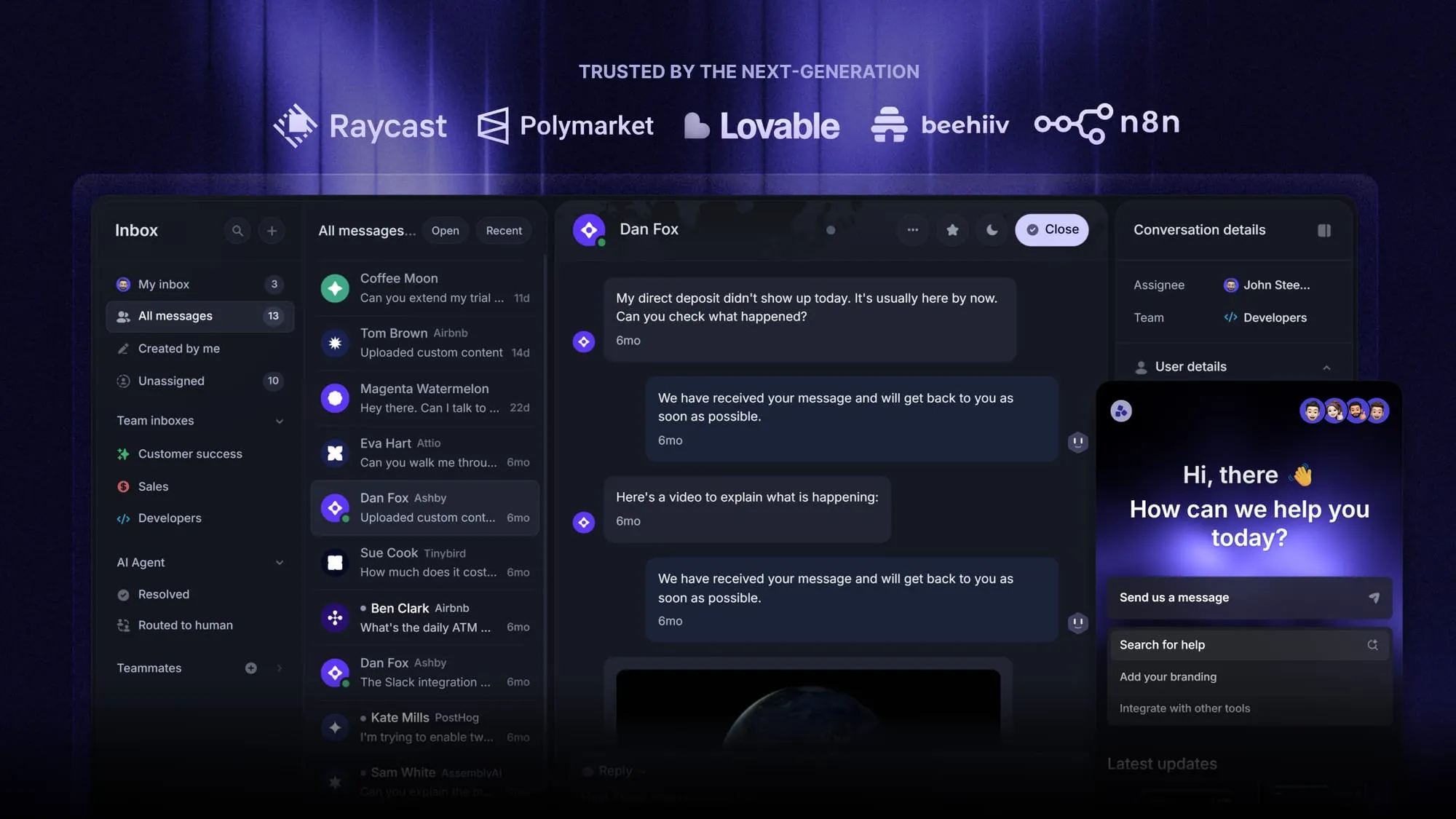
Featurebase is a modern AI customer support platform that combines support conversations, a help center, and feedback management in one place. Shared Inbox views, SLAs, and workload tools help your team keep track of what needs attention.
The Free plan includes 1 seat and unlimited conversations. Workflows and SLAs are available from Professional, while advanced workload controls require Enterprise. Check the plan comparison and explore paid features with a 10-day free trial, without a credit card. 👇
Automate your customer support with Featurebase's AI-powered Inbox
FAQs
A shared support queue gives several teammates visibility into a common set of requests. An agent inbox shows the work assigned to an individual. The same ticket can appear in both, allowing the team to coordinate while keeping individual responsibility clear.
Create separate queues when requests need different responsible teams, coverage schedules, or service commitments. Use tags and filtered views for distinctions that only change what someone needs to see. Before adding a queue, confirm who will monitor it and what decision the separation will make easier.
A shared email inbox can support basic coordination if ownership and follow-up are recorded consistently. An email ticketing system adds structured ownership and tracking to incoming messages. If you also support customers through chat or other channels, look for a helpdesk ticketing system that brings that work together. Compare the visibility your team needs with the manual work required to maintain it.
The human should receive the customer's request, relevant context, and a record of what the AI already tried. The unresolved conversation needs to become visible to the responsible team, with an owner and an applicable response target. Tell the customer that a person is taking over and set a realistic expectation for the reply.
Track a feature request in the product backlog when it needs a product decision rather than further support investigation. Keep any immediate support task, such as explaining a workaround or answering a follow-up, accountable in the support system. Link the records so the request can be tracked without implying that the feature has been promised or delivered.