Thematic Alternatives: 8 Tools for CX and Product Teams
Compare 8 Thematic alternatives for CX intelligence and product feedback. See pricing, trade-offs, and when keeping Thematic makes sense for your team.


On this page
Searching for Thematic alternatives can mean you need deeper customer insights, clearer pricing, or a better way to turn feedback into product decisions.
This guide separates CX intelligence tools from platforms for requests, prioritization, roadmaps, updates, and support. You'll see which tools fit each job, what they cost, and when keeping Thematic makes sense. 👇
Key takeaways
Thematic adds customer intelligence to an existing CX stack. Start with the category that matches the work you need to improve.
Product feedback workflows
| Tool | Best for | Starting cost | Main trade-off |
|---|---|---|---|
| Featurebase | Requests, roadmaps, updates, and support together | Free plan. Paid from $29/seat/month, billed annually. | Evaluate specialist CX analysis needs separately |
| Canny | Feedback boards, voting, and changelogs | Free plan. Pro from $79/month, billed annually. | Costs scale with tracked users |
| Productboard | Feedback connected to product planning | Contact sales. | Requires consistent planning processes |
CX intelligence
| Tool | Best for | Starting cost | Main trade-off |
|---|---|---|---|
| Chattermill | Multi-source feedback and CX metric analysis | Request pricing. | Allow time for taxonomy and reporting validation |
| Enterpret | Feedback connected to accounts and revenue | Request pricing. | Needs reliable customer and business context |
| SentiSum | Support conversation analysis and contact drivers | Custom annual pricing. | Volume bands and extra agents affect cost |
| Qualtrics XM | Broader CX programs and conversation analytics | Custom pricing. | Confirm product scope and implementation needs |
| Medallia | Experience management across channels and teams | Custom annual pricing. | Broader scope than a product request portal |
Pricing checked November 9, 2026. The comparison uses current vendor product information, with review feedback informing the trade-offs to investigate during evaluation.
What Thematic adds to your existing CX stack
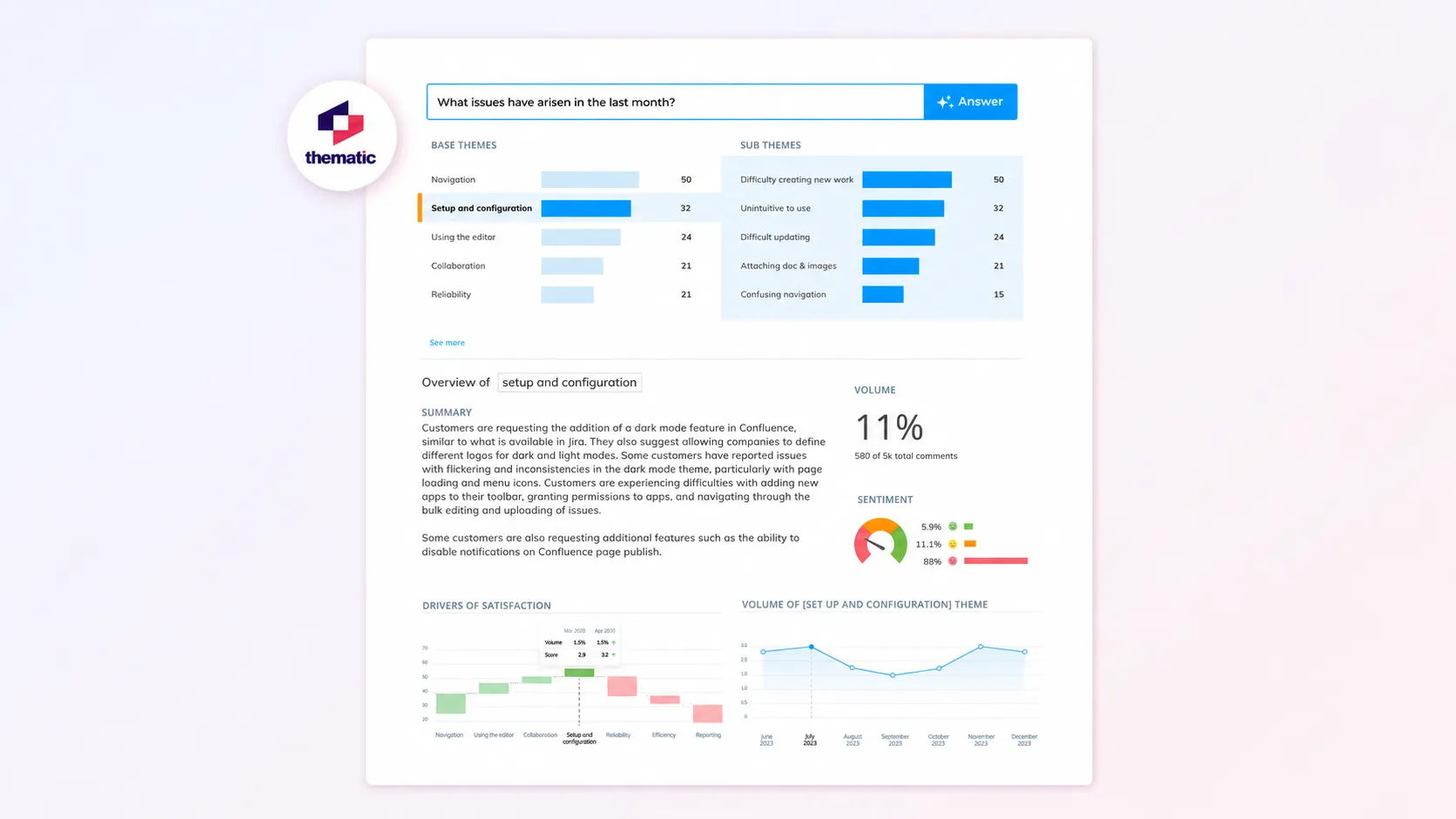
Thematic is a customer intelligence platform that analyzes feedback your business already collects. It brings together sources such as surveys, support tickets, calls, reviews, and social feedback to identify themes and explain changes in customer sentiment.
Think of the workflow in 3 parts:
- Collection: Your survey platform, helpdesk, call recorder, and other channels capture what customers say.
- Intelligence: Thematic groups that feedback into themes, connects findings to supporting comments, and helps you investigate patterns.
- Action: Your teams decide what to change and carry out the work in their operational tools.
Thematic sits primarily in the intelligence layer. It explicitly positions itself alongside existing survey platforms, so adopting it doesn't mean replacing every tool that supplies feedback.
Its customer feedback analysis capabilities include theme and sentiment analysis, trend exploration, and analysis of factors associated with NPS, CSAT, and CES scores. Its Theme Editor lets teams refine themes, while Thematic Answers supports natural-language questions about the feedback.
Those features matter when someone asks, "Why did satisfaction fall after the onboarding change?" You need to inspect the underlying comments, compare segments, and understand which problems became more common.
A request-management workflow answers another question: "Which onboarding improvements should we build, who asked for them, and how will we tell those customers when they're ready?" A team can need both capabilities at the same time.
Thematic's Foundation plan costs $25,000/year, including 25,000 comments annually and up to 3 datasets. Enterprise pricing is custom. The right comparison therefore includes your feedback volume and analysis requirements, rather than just a monthly price beside a request-management tool.
When keeping Thematic makes sense
Keep Thematic when it already helps your team make decisions from feedback across channels. Changing tools should solve an identifiable problem, such as missing source coverage, an analysis limitation, or pricing that no longer fits.
Retaining it is particularly sensible in these situations:
- Your collection stack works: You already have reliable survey, support, and review systems. You need a shared analytical view across them.
- You need to explain CX changes: Your team investigates score movements and recurring themes across customer segments, rather than simply counting feature votes.
- People need to inspect the evidence: Analysts and stakeholders want to trace a theme back to the comments behind it and refine how feedback is grouped.
- You have an established reporting process: Teams already understand the taxonomy, dashboards, and reporting cadence. Switching would require rebuilding that shared understanding.
For example, a business might use Thematic to investigate why implementation feedback has become more negative. Product managers could then track the specific improvements elsewhere, while the CX team continues monitoring the wider pattern.
G2 feedback includes praise for Thematic's fast summaries and flexible themes, alongside comments about setup effort and interpreting impact scores. Treat those as evaluation questions: can your team explain a finding to leadership, and can someone maintain the analysis as your product changes?
Your voice of the customer program also needs people responsible for acting on findings. If the bottleneck is unowned requests or missing customer updates, adding a clearer product workflow may be enough.
Featurebase can serve that workflow while you retain a specialist intelligence tool. Establish how findings become requests and who owns the handoff. A manual process can work, but include that work in the decision rather than assuming the platforms automatically sync.
Before replacing Thematic, write down one decision your current setup cannot support. That gives your shortlist a concrete test and helps prevent a migration that produces similar reports with different branding.
Thematic alternatives for product feedback workflows
These tools fit when the main gap is collecting and managing product feedback, deciding what to build, and keeping customers informed. Their request and planning workflows should be evaluated separately from specialist text analytics software.
1. Featurebase
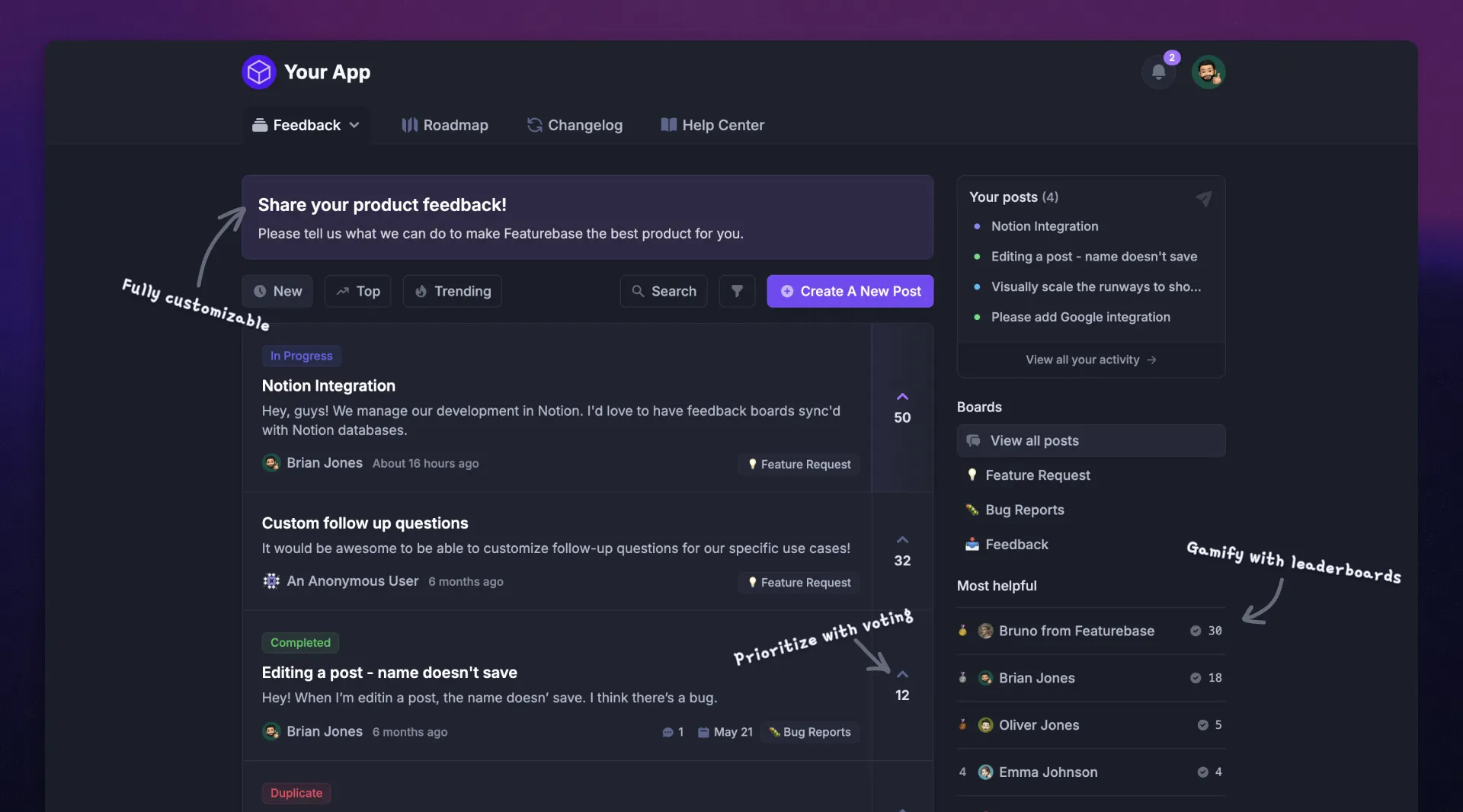
Featurebase is a feedback and support platform for teams that want customer requests, prioritization, roadmaps, product updates, and support conversations connected in one place. It fits when feedback reaches your team, but turning it into tracked work and useful customer updates still involves too much chasing.
A customer can raise an idea through a feedback portal, an in-app widget, or a support conversation. Your team can connect the evidence to a Request, see who wants it, and keep the discussion attached as the request moves forward.
Top features:
- Feedback forum – Let customers submit ideas, vote on requests, and discuss what they need.
- In-app widgets – Collect feedback and surface customer-facing content inside your product.
- Prioritize by revenue – Connect requests with customer and company data to understand the accounts behind them.
- AI feedback categorization – Group feedback into relevant product areas or themes on supported plans.
- Automated email updates – Notify requesters as their requested features move forward or ship.
- Roadmaps – Share internal and public views of planned, active, and completed work.
- Product updates – Publish release notes through a changelog page, in-app widgets, and emails.
- Surveys – Collect targeted feedback and measure satisfaction with surveys such as NPS and CSAT.
- Automatic AI translations – Make feedback and comments accessible across languages on supported plans.
- Integrations – Connect feedback with tools such as Slack, Linear, Jira, and HubSpot.
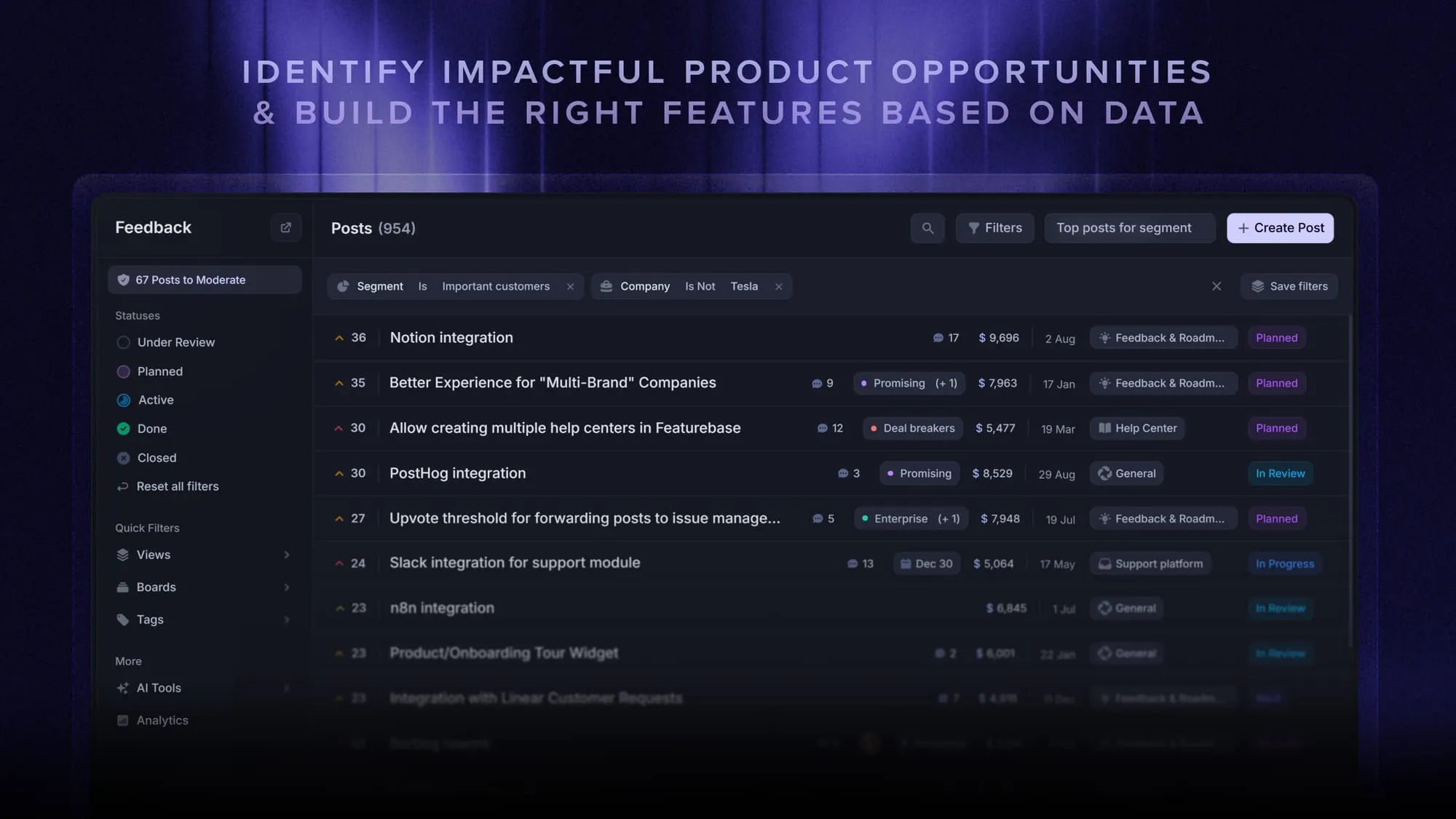
For prioritization, teams can review customer revenue alongside their own value and effort estimates. These are different signals: revenue describes the accounts requesting something, while value and effort reflect the team's assessment of the work.
Support is part of the same platform. The shared inbox handles customer conversations, and those conversations can connect to requests. That helps a teammate see the original problem and follow up when the relevant change is ready.
When it fits: You need feature request management and a clear path from customer input to a decision, roadmap status, and release announcement. It is also useful when product and support teams need shared context.
If your primary requirement is explaining cross-channel NPS movements through a specialist CX analysis model, evaluate that requirement separately. Featurebase's appeal here is the connected customer workflow.
Pricing: Free plan. Paid from $29/seat/month, billed annually. The Free plan includes unlimited posts and comments, 1 feedback board, and 1 roadmap. Growth includes revenue prioritization and the in-app feedback widget.
Professional is $59/seat/month billed annually and includes AI feedback analysis and feedback from call recorders. Enterprise is $99/seat/month billed annually and includes AI feedback categorization. Feature availability varies by plan, and Fibi AI support resolutions cost $0.49 each when used.
Start collecting & managing feedback with Featurebase for free
2. Canny
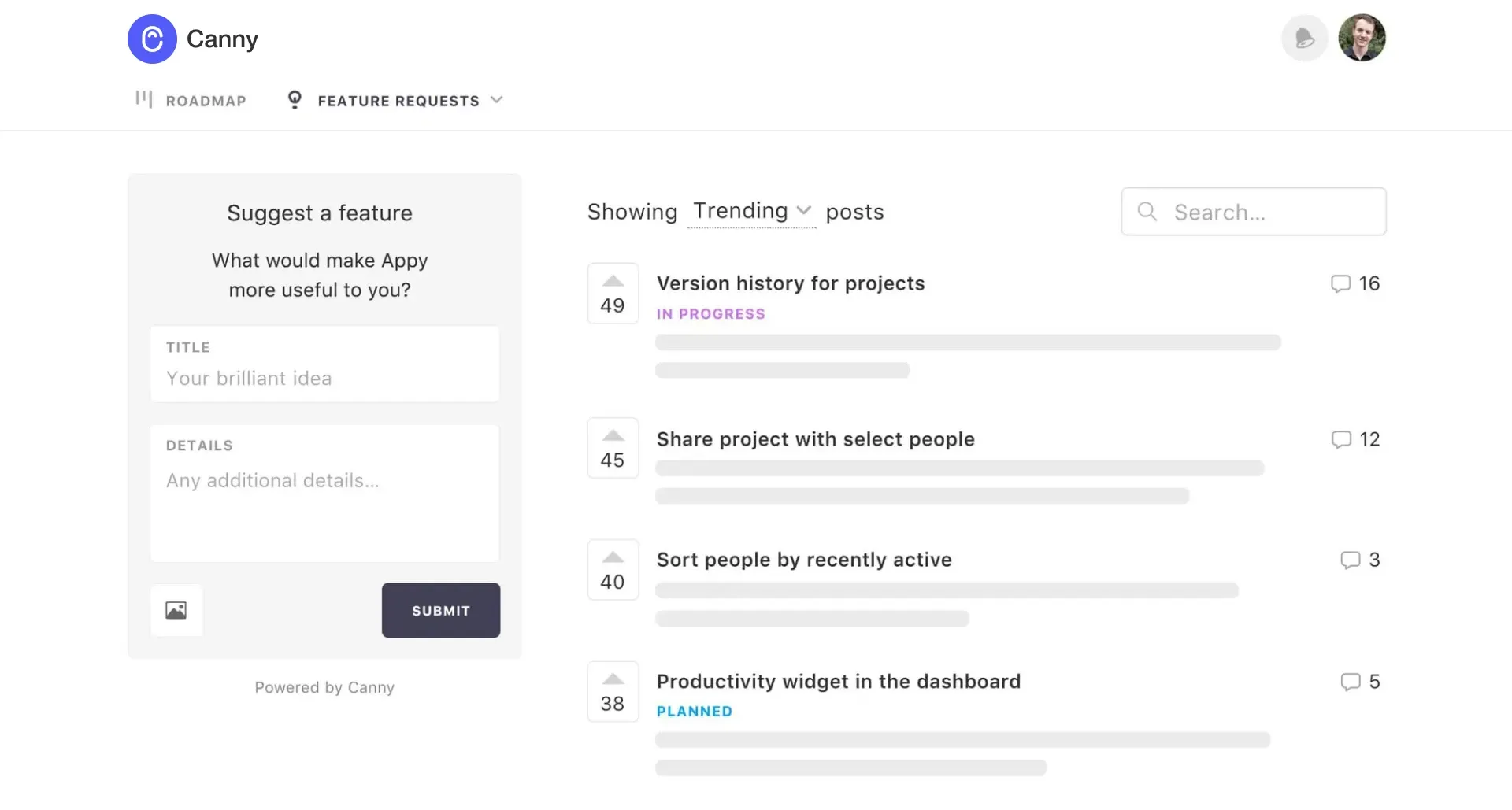
Canny is product feedback software built around capturing requests, organizing customer input, and sharing progress. It suits teams that want a dedicated feedback workflow alongside the support and development tools they already use.
Its central record is a feedback post. Customers can submit ideas and vote, while teammates can bring feedback from connected sources into the same system. Canny Autopilot adds automated capture and organization, so its scope extends beyond customers manually posting to a board.
Top features:
- Feedback boards with voting and comments
- Automated feedback capture and duplicate management
- Roadmaps for sharing planned and active work
- Changelogs for announcing shipped improvements
- Connections to support and development tools
When it fits: Your main problem is scattered feature requests, and you want a clear place to collect them. A public roadmap then gives customers a way to follow progress without opening another support ticket.
G2 feedback often highlights the simplicity of posting and voting. Reviews also raise questions about filtering, customization, and how AI merges requests. During a trial, inspect whether merged items preserve meaningful differences between customer needs.
Canny pricing deserves particular attention. A tracked user is someone associated with feedback, including submissions, votes, and comments. Budget against the people represented in your feedback, rather than the number of employees managing it.
Pricing: Free plan. Pro from $79/month, billed annually. The Free plan covers up to 25 tracked users, while the advertised Pro starting tier includes 100. Business pricing is custom, and costs rise with tracked-user requirements.
3. Productboard
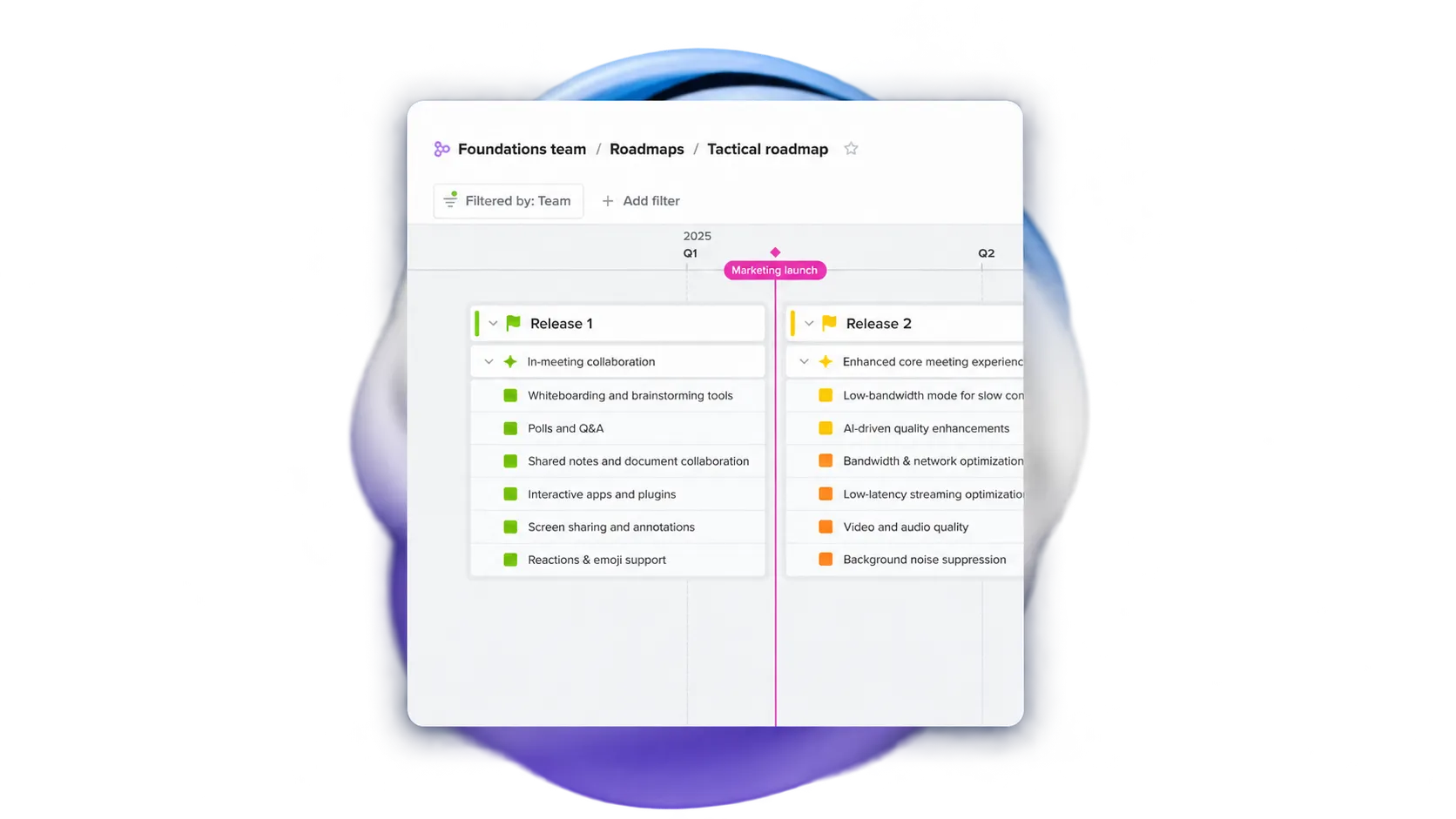
Productboard connects customer feedback to product planning. It is worth considering when the decision extends beyond organizing requests into coordinating priorities and roadmaps across a product organization.
Its appeal is the relationship between what customers say and the features a team plans to build. Product managers can organize insights, assess opportunities, and communicate a roadmap with the reasoning attached.
Top features:
- Feedback collection and insight organization
- Feature prioritization and customer segmentation
- Configurable product roadmaps
- Customer portals for gathering input
- Integrations with development tools and business systems
When it fits: You want customer feedback management to feed a structured planning process, with product managers maintaining priorities and sharing different views with stakeholders.
For example, a team planning improvements across several product areas needs to decide which requests belong together and which outcomes each investment supports. Productboard is a more relevant candidate for that process than choosing an analytics tool solely for sentiment reporting.
The trade-off is process ownership. G2 reviewers value the connection between insights and roadmaps, but also describe a learning curve and the need for consistent ways of organizing information.
Agree on your feature prioritization approach before evaluating the platform. Otherwise, it is easy to reproduce an inconsistent backlog inside a more configurable tool. Ask a product manager to take a real insight through prioritization and roadmap communication during the evaluation.
Pricing: Contact sales. Productboard's current pricing page presents Business and Enterprise plans without public starting amounts. Ask which feedback, AI, integration, and planning capabilities are included in the proposal you receive. Our Productboard pricing guide covers the buying considerations in more detail.
Thematic alternatives for CX intelligence
These Thematic competitors are relevant when you need customer feedback analytics across sources. Chattermill, Enterpret, and SentiSum offer different analytical focuses, while Qualtrics and Medallia can support broader experience-management programs.
Compare them against the decisions your analysts need to make. A useful customer intelligence platform should help your team investigate a problem, inspect the evidence, and give the responsible team enough context to act.
4. Chattermill
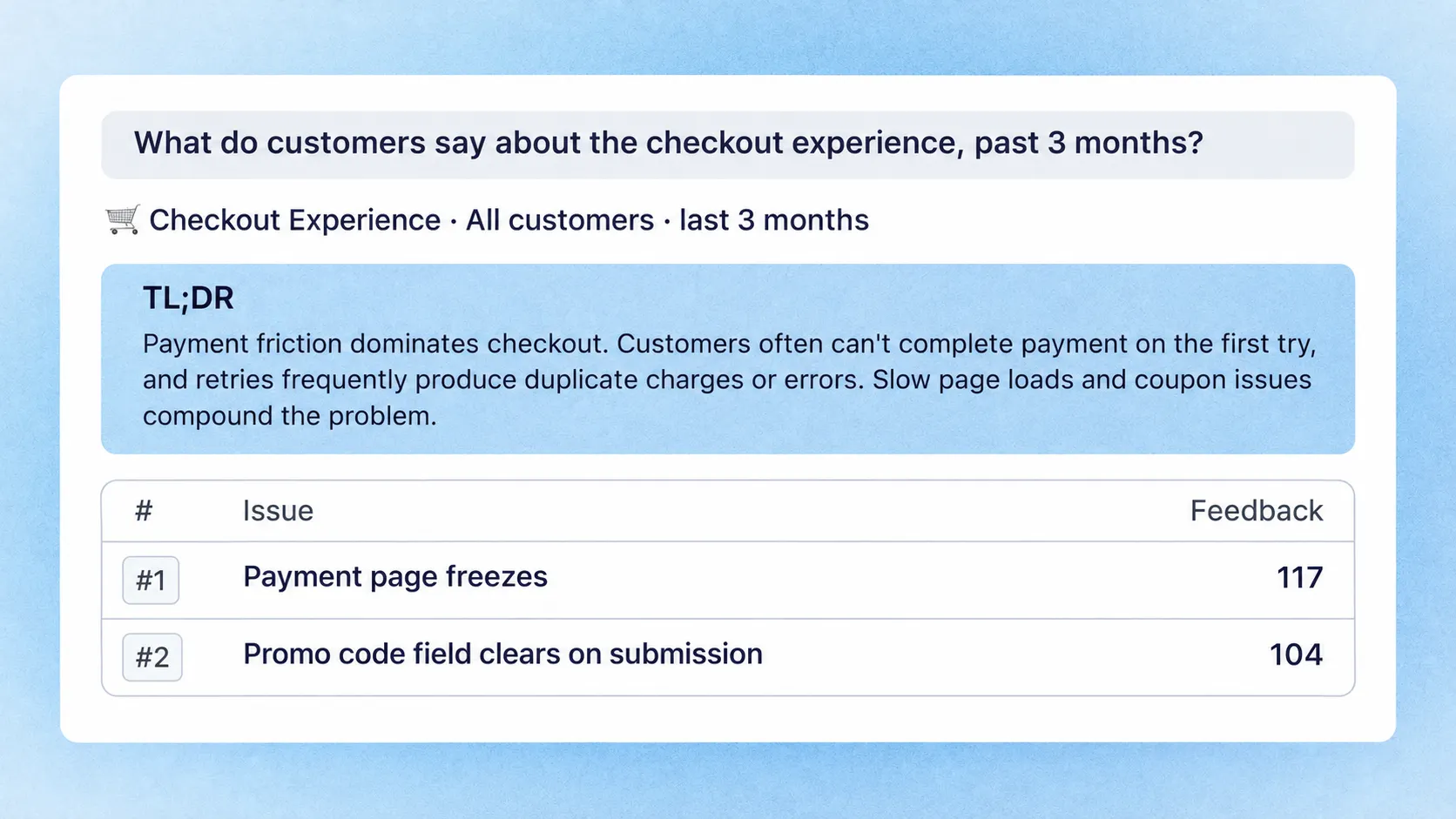
Chattermill brings feedback from surveys, reviews, tickets, and calls into a shared analytical view. It is a relevant Thematic alternative for CX teams that want to understand recurring issues, investigate metric changes, and distribute findings across the business.
Its platform combines theme and sentiment analysis with reporting, alerts, and Lyra Agent for exploring customer feedback through questions. Findings can be traced to the customer comments behind them, which helps teams examine an explanation before acting on it.
Top features:
- Feedback consolidation across customer channels
- Theme and sentiment analysis
- Analysis of factors associated with CX metrics
- Reports, dashboards, and anomaly alerts
- AI-assisted questions backed by customer evidence
When it fits: Your CX team needs to compare what customers report across channels and investigate which issues deserve attention. Chattermill is particularly relevant when different teams need a consistent view of the same feedback.
Imagine a support queue shows more billing complaints, while survey satisfaction has also fallen. Your evaluation should establish whether analysts can isolate the relevant comments, compare affected segments, and explain the pattern without manually rebuilding the analysis.
G2 feedback highlights unified feedback and useful insights, with some cautions about discovering advanced features and navigating analysis. Include the people who will use the dashboards in the demo and let them investigate a real question.
Pricing: Request pricing. No public starting amount was available on the official pricing route checked for this comparison. Scope the quote around your sources, volume, required analysis, and ongoing support. See our Chattermill pricing guide for a closer look at the factors to discuss with sales.
If Chattermill makes your shortlist, compare Chattermill alternatives to see how other tools approach CX analysis, product feedback, and support.
5. Enterpret
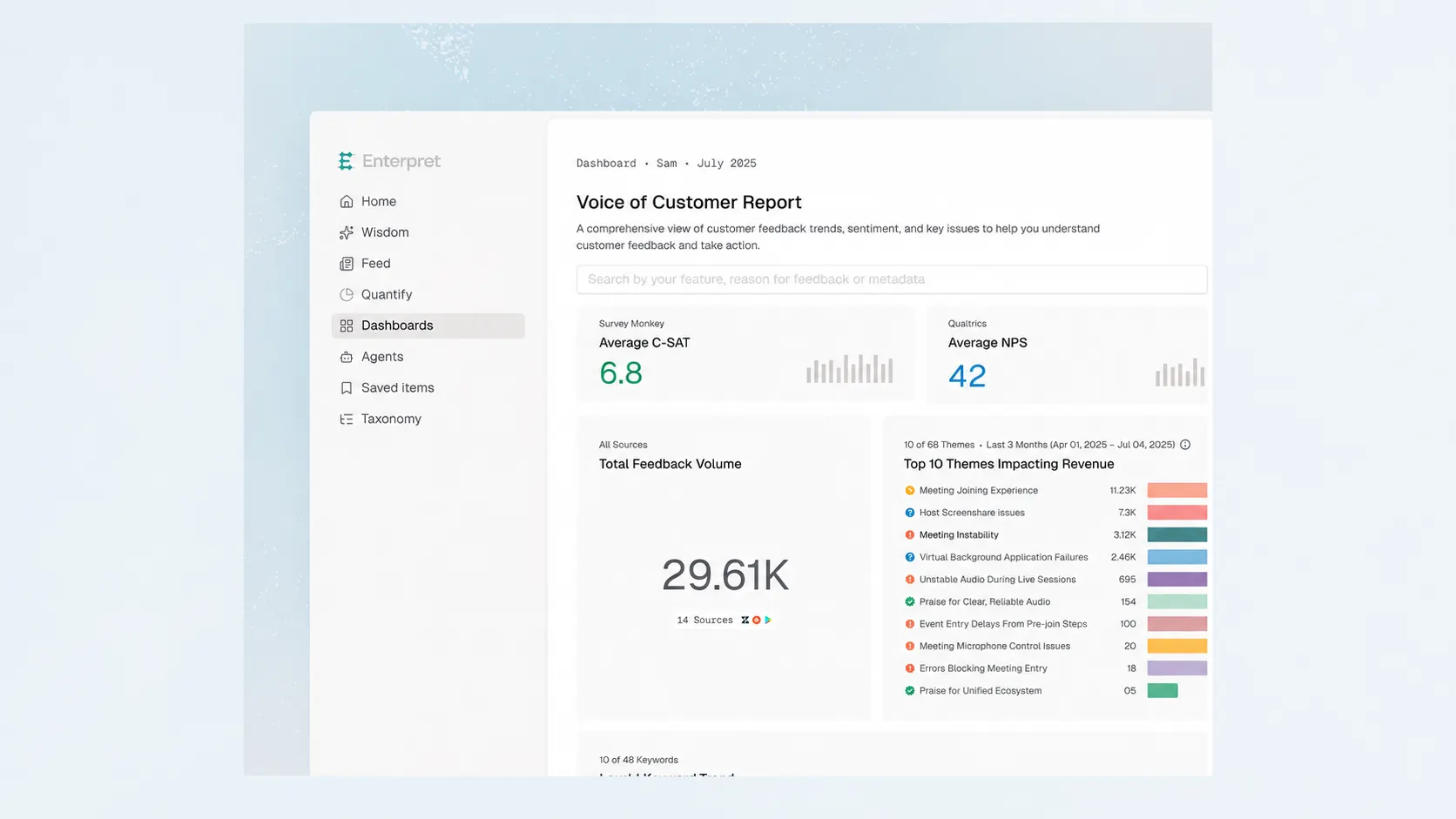
Enterpret is a customer feedback analysis platform with a strong focus on connecting feedback to business context. Its Customer Context Graph links signals to entities such as users, accounts, features, and revenue.
That makes it relevant when a product or VoC team needs to ask which customer groups are experiencing a problem and how those accounts relate to the business. The platform also provides an adaptive taxonomy, dashboards, and AI-assisted exploration.
Top features:
- Feedback ingestion from multiple sources
- Adaptive classification of customer feedback
- Connections between feedback, users, and accounts
- Analysis using revenue and other customer attributes
- Dashboards, AI-assisted insights, and workflow integrations
When it fits: You need to connect customer evidence with account context before making a product decision. For example, the team may want to understand whether a recurring integration problem affects trial users, established customers, or accounts approaching renewal.
The value depends partly on the data you connect. Linking a complaint to an account's revenue helps describe exposure, but it does not prove that fixing the complaint will retain that revenue. Keep that distinction clear in prioritization discussions.
G2 reviewers praise centralized feedback and support, while some describe effort spent tuning the taxonomy and limitations around auditing or exporting analysis. Ask to inspect how classifications change and how your team can validate a finding outside the dashboard.
Pricing: Request pricing. No public starting amount was available on the official pages checked. Confirm the scope of integrations, data enrichment, and AI capabilities in the proposal.
6. SentiSum
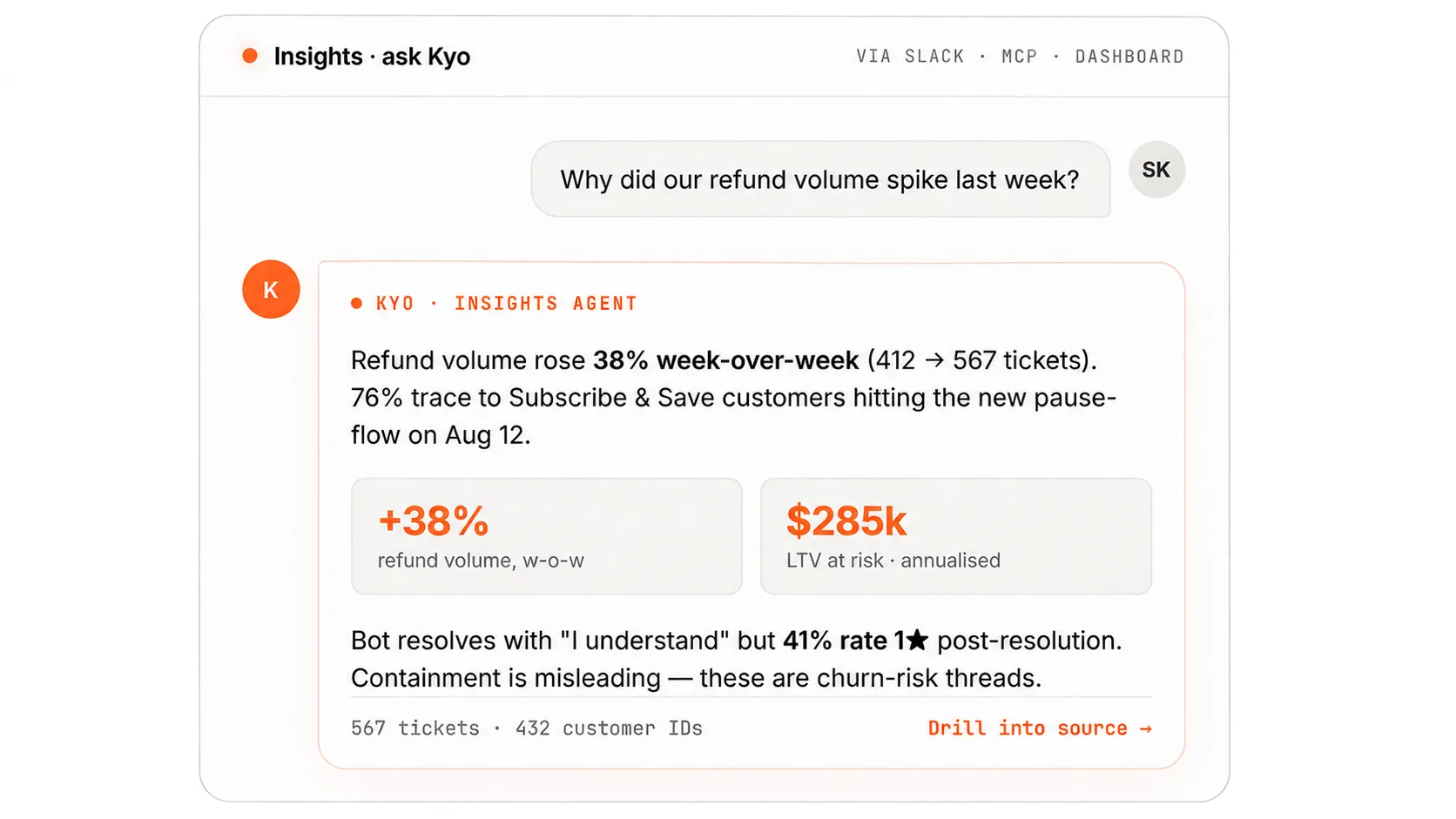
SentiSum focuses on understanding customer conversations, making it a relevant choice when support tickets are your richest source of feedback. Its analysis helps teams investigate contact drivers and recurring issues in the conversations they already handle.
Its current offering centers on an Insights Agent, with Kyo for asking questions and Early Warning for spotting emerging issues. The emphasis is on helping support and CX teams understand what is happening across their conversation data.
Top features:
- Analysis of customer conversations and contact reasons
- A taxonomy tuned to the business
- Conversational exploration through Kyo
- Early warnings about emerging issues
- Integrations and ongoing customer-success support
When it fits: You want to understand why customers contact support and which problems keep returning. A useful evaluation might start with an increase in account-access tickets and ask whether the analysis separates password problems from verification or permission issues.
SentiSum's G2 review pool is relatively limited, and some available comments are older. They praise reduced manual analysis and useful drill-down, while raising questions about mixed-sentiment interpretation. Use those observations to design a test on your current conversations, rather than treating them as a verdict on today's model.
This is a support-intelligence buying decision. If you also want to replace the inbox where agents respond, evaluate that requirement separately from conversation analysis.
Pricing: Custom annual pricing. The current model uses volume bands and includes unlimited users. Additional agents can carry separate charges, so request a proposal for the specific capabilities you intend to use.
7. Qualtrics XM

Qualtrics is worth considering when the project includes a broader customer experience program. Its CX offering spans feedback collection and analysis, while XM Discover provides capabilities for analyzing conversations and other unstructured feedback.
XM Discover can work with sources including cases, chat, voice transcriptions, emails, surveys, and reviews. It provides tools for importing data, configuring topic and sentiment analysis, and sharing dashboards with different audiences.
Top features:
- CX feedback collection and measurement
- Conversation and text analytics through XM Discover
- Configurable topic models and sentiment settings
- Dashboards, custom metrics, and alerts
- Permissions for different analytical and reporting roles
When it fits: You need voice of customer software as part of a wider experience-management program, with teams responsible for measurement, analysis, and operational follow-through.
This can be relevant when customer feedback spans a contact center, digital journeys, and survey programs. Evaluate the particular products needed for those sources. A familiar Qualtrics survey account does not establish that XM Discover is included.
G2 feedback on Qualtrics Customer Experience praises reporting and consolidated insights, while also describing configuration complexity and a learning curve. Those are program-level considerations. They should not be used to assume that every Qualtrics analysis product has the same capabilities or limitations.
Give both analysts and report consumers a task during evaluation. Someone who builds a dashboard and someone who only needs to investigate a change may need different access and training.
Pricing: Custom pricing. Qualtrics describes interaction-based pricing for its CX offerings. Confirm the products, interaction definitions, and contract entitlements you need. Its free survey account is not equivalent to free access to XM Discover.
8. Medallia
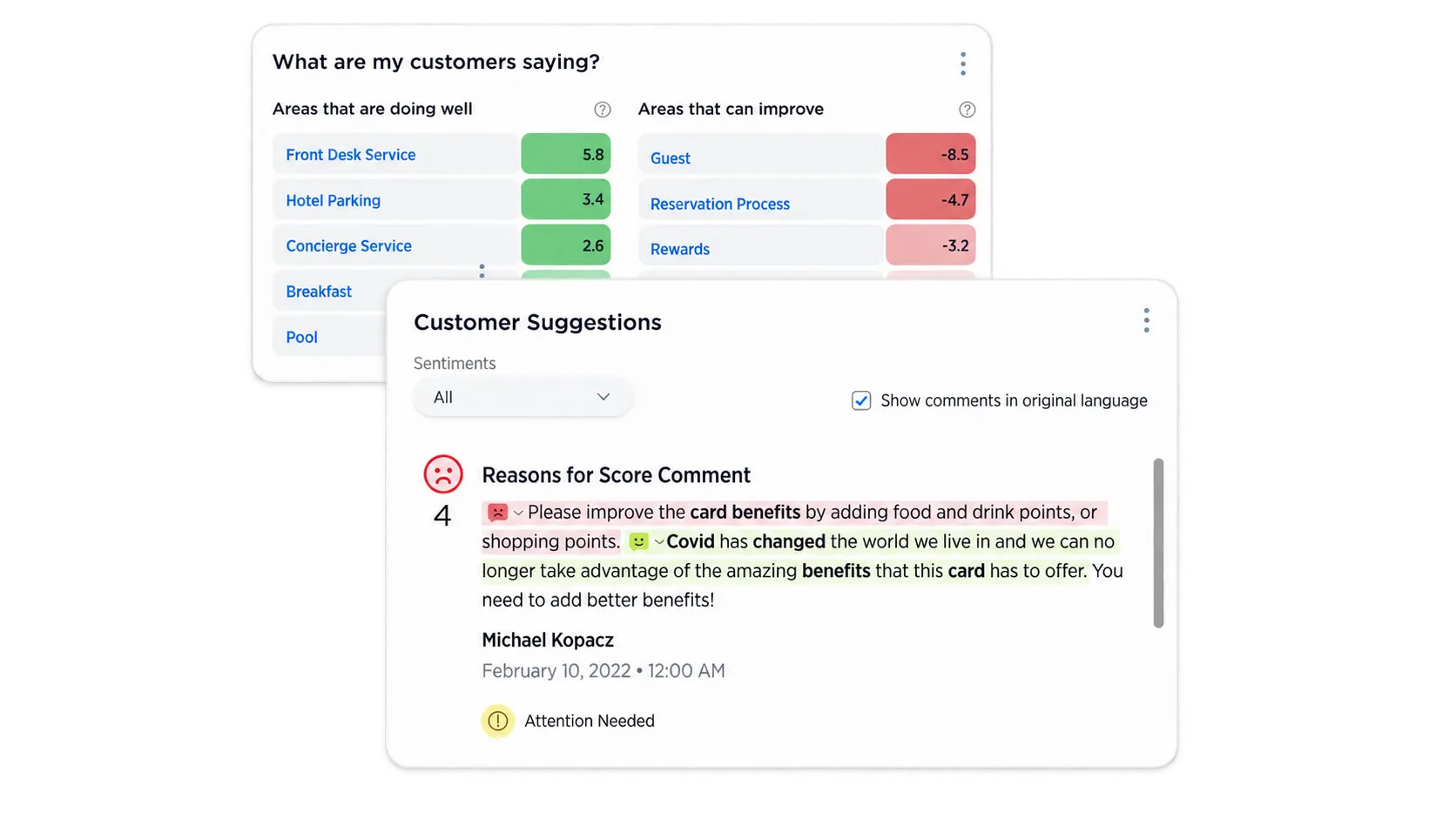
Medallia is an experience-management platform for bringing customer signals together and routing findings into operational action. It is relevant when the scope includes multiple channels, teams, or locations with different responsibilities for responding.
Its offering includes signal collection, text and speech analytics, reporting, alerts, and closed-loop workflows. That makes the comparison broader than choosing a tool to classify survey comments or maintain a product backlog.
Top features:
- Collection of survey, speech, digital, and other experience signals
- Text, speech, and survey analytics
- Role-based reporting
- Automated alerts and case management
- Workflows for responding to customer feedback
When it fits: Your organization needs a shared experience-management program that turns feedback into work for the teams responsible for resolving issues. For example, a recurring service problem might need both central analysis and follow-up by the affected operational team.
G2 feedback highlights centralized insights and service, with cautions around implementation effort and reporting customization. Define who owns the program and who maintains its reporting before comparing the platform with a narrower intelligence layer.
Also distinguish operational case follow-up from product release communication. Both can close a feedback loop, but they serve different purposes. Ask vendors to demonstrate the particular action your team needs to take after an issue is detected.
Pricing: Custom annual pricing. Medallia uses Experience Data Records, which represent data associated with a discrete customer or employee interaction, with pricing in annual tiers. Get a scoped quote based on the experience data your program will process.
How to choose the right approach
Choose around the decision or customer workflow that needs to improve. A long feature checklist is less useful than a realistic example that each shortlisted tool must handle.
Start with these criteria:
- Source coverage: Identify the feedback channels you actually use and the metadata each connection preserves. A ticket without its account or product context may be much less useful.
- Analytical depth: Decide whether you need theme discovery, sentiment trends, score-driver analysis, or account-level context. These are different requirements, even when vendors group them under AI.
- Evidence and control: Check whether people can inspect the comments behind a conclusion and challenge or refine classifications. A readable summary is only part of the job.
- Ownership and follow-up: Decide who receives an insight, who chooses the next action, and how the customer hears back. This is where a request workflow may become the priority.
- Total cost: Include data preparation, implementation, subscriptions, usage, and ongoing ownership. Compare the cost of the complete workflow you need.
For a concrete example, imagine customers repeatedly ask to export a dashboard. A CX analysis tool might reveal that reporting limitations are becoming a more common theme and show which segments mention them.
The product team still needs to understand the request, assess its value, estimate the effort, and decide what to build. Featurebase lets the team keep the requesters and supporting evidence together while comparing customer revenue and value/effort scores.
Once the decision is made, someone needs to communicate it. A roadmap can show progress, and release notes can explain what shipped. That communication is part of the customer feedback loop, not an automatic consequence of identifying a theme.
When evaluating feedback analytics software, choose a dataset that reflects your actual workload. Include feedback from the channels and customer segments that influence decisions, including long conversations and ambiguous comments.
For workflow tools, follow a real request from intake to a customer update. Check whether teammates can find the original evidence and whether the person responsible for follow-up has enough context.
The result may be a replacement, an additional workflow tool, or a decision to keep your current setup. Each is reasonable when it solves the problem you identified.
Conclusion
The best Thematic alternatives depend on the work you need done. Chattermill, Enterpret, and SentiSum are relevant for different customer intelligence needs. Qualtrics and Medallia suit evaluations that extend into broader CX programs.
Keep Thematic when its analysis remains useful and your existing collection stack works. If the missing piece is organizing requests and keeping customers informed, compare product feedback workflows separately.
Featurebase brings requests, prioritization, roadmaps, updates, and support together so your team can act on customer feedback and show people what changed. It fits when product and support need shared context from the first conversation through the release.
You can start with the Free plan and evaluate the workflow using your own customer requests. 👇
Start collecting and managing feedback with Featurebase for free
Frequently asked questions
Choose the tool that performs best on a decision your current setup struggles to support. Give finalists the same feedback sample and ask each to produce an explanation your team can verify. For a product workflow, use the same real request and compare how easily teammates can move it through a decision and customer follow-up.
Start with a reliable way to match feedback authors to customer accounts, plus revenue and relevant account attributes. Keep those records current and define how feedback from multiple users at one company is counted. Revenue associated with a request shows the value of the accounts represented, not guaranteed revenue gained by building it.
Setup typically involves connecting sources, mapping fields, reviewing classifications, and deciding who maintains the analysis. Imported historical feedback may also need cleaning or consistent identifiers. Ask for a plan based on your data and responsibilities instead of relying on a generic onboarding timeline.
Product feedback tools can collect requests directly and provide prioritization insights, while broader CX platforms can combine survey collection with analytical capabilities. Thematic focuses on analyzing feedback from an existing stack. Confirm what the proposed plan collects itself, what it imports, and whether its analysis covers the channels you need.
Ask human reviewers to label a representative sample, then compare the platform's themes and sentiment against that reference. Include mixed sentiments, ambiguous wording, and the languages your customers use. Check whether important issues are missed, unrelated comments are grouped together, and summaries accurately reflect their supporting evidence.


